Month: May 2014

  • The Future of the Office Space

    I tend to read a lot of posts about the future of the office — be it about office design, or working from home. I read these posts because not only will it eventually effect me, it likely will effect my business (being in real estate) much faster.

    When you read these articles the facts you tend to understand after a while come down to:

    • We all ignore that ‘open office’ designs are not the most productive environments because: they look pretty, they are trendy, and most importantly they cost less.
    • Remote working, some people have it, some don’t, but everyone seems to want it.
    • Did I mention open office designs? Those are really big.
    • And then there are the posts about standing at your desk, which I love to do — though I am sitting as I type this.

    There seems to be the consensus that open office layouts are here to stay, and that eventually at some point, working remotely will be the norm.

    Ok, I guess.

    But I have a little different vision of the ‘future’ office, and it’s certainly not working from home. While it is very nice to work from home, in general, working from home is a pretty bad idea. Forget all the ‘distractions’ ((I worked from home quite a bit for a few years, it was not ideal.)) that most people will point to and instead focus on just one aspect: space.

    How much space do you have in your home to create an office? Ok, so you have enough for you, but what about your spouse, or your kids when they start working (but are still in school), is there room for all of you to have home offices? I think not.

    Are we suddenly going to start remodeling our homes, and designing them, to accommodate the fact that we work from home? Are dining rooms, living rooms, eat-in kitchens, and garages all going to become ‘offices’? How long, if we will all work from home one day, until our home is nothing but and office?

    Is the future really one where my commute is a hallway, and I never leave the house, let alone stand up? Where the work never ends because it is just two steps away and everyone, including your boss and clients, knows that? Is it one where we just work all the time because we feel pressured into it, or where we constantly fight all the distractions at home as we try to do some work that we are loathe to do?

    I think not — at least I hope not.


    The question that has been nagging at me is this: what happens to the millions of square feet of existing office space if, indeed, there are no corporate offices anymore?

    That space won’t simply vanish — trust me, I manage far too much vacant space and no matter how hard you try it doesn’t go away.

    I try to look at this problem of remote working and current office space from the perspective of what I would do to fill the space. Open office space layouts has proven that companies love saving money, even if it is at the expense of less productivity. ((As contentious a statement as it is to say that open plans are less productive, but just put your headphones back on and enjoy that collaborative open office while rocking out and trying your best to ignore the people around you.)) It comes down to what’s cheaper for corporations: offices, or no offices?

    To that end I think corporations will actually be keen on having people work from home, rather than having to pay for an office — and the admin staff that is required of you having an office. ((Janitors, office managers, maintenance.))

    So if I were running a property with a bunch of vacant office space, I’d start leasing out the individual offices in the space to people who “work from home”. That thought got me a little excited about how the future of office work could really play out.

    Maybe corporations don’t have offices anymore, but maybe individuals do have offices. Sometimes that is a desk in the corner of a room full of desks, sometimes that’s an office in a building full of offices. But I see it working like so:

    • I have my own office, setup the way I want it.
    • That office is paid for by whomever I work for as part of my salary.
    • If I leave the company, I simply go to another company, and that company doesn’t have to pay for a new workspace, as I already have it. I can move jobs without having to move offices.
    • Or, I can move offices, cities, countries at will, and never have to change my job.

    Offices become “Ben’s office”, instead of “X Company’s office”. That could be cool, and it makes far more sense than everyone working from home. Each employee having their own dedicated office space would allow for:

    • Personalization
    • The correct environment for that employee. Be it ‘open’, or private — or somewhere in-between.
    • Cheaper costs, as a company now has 100% flexibility with lease rates (they aren’t locked into a 10 year lease for a 1,000 people even if they just laid off half the people). Instead their employees assume the risk of a lease, or work from home.
    • Employees get to choose their location, and move whenever they might want to.
    • Employees get to choose the people they spend their day with. Don’t like the other people in your office? Get a new office. Don’t like your city? Get a new city.

    There are more, but you get the idea.

    To me this is a powerful idea. The idea that we reverse roles to a degree. We don’t have to live with our future office being in our homes — because there is going to be abundant space available for us to rent out. Want a nicer office? Pay for it.

    I still have doubt about how much remote work will play into the future of business, but there is no doubt that it already is a substantial amount of people. Therefore, I can only assume that number is going to increase with every technological jump we make.

    The biggest hurdle now is simply paper. If we can find a way to reduce paper transaction between business (checks and invoices) then we can expedite this change in workspace.

    This should be exciting.
  • The Best on The Brooks Review

    I’ve created a new page which I vow to update at least monthly. It contains items that I think are the best in their particular category. The stuff that I feel I have really tested and made a decision on.

    I’ll be adding more items over the next week, and then updating it regularly. Drop me a note of there is a category you’d like to see added.

  • Quote of the Day: Maciej Cegłowski

    “Imagine if we didn’t have to worry about privacy, if we had strong guarantees that our inventions wouldn’t immediately be used against us.”
  • Find Me Via Passbook

    Justin Williams:

    While there, I’ll be running around with an iBeacon in my backpack that you can use to locate me at parties, sessions, or any other event you may be at.

    Nerd. ((What a great idea too!))

  • After Google Bought Nest, It Removed One of the Company’s Biggest Competitors From Search Results – Kind Of

    James Robinson has a post of questionable truth up about Google removing search results for Vivint (a Nest competitor) from Google search. Now, Matt Cutts clears up that this was part of a SPAM thing and says it has nothing to do with the Nest acquisition.

    This though will always be a problem. When search results are as important to finding good information as they have become, then there will always be questions around integrity for companies that run anything other than just a pure search engine. This is one of the reasons I like sites that are member supported, and why I like DuckDuckGo so very much.

    Who knows what the truth here is, but that in itself is the real problem. We, as users, should never have to question if the search results are being refactored to better support the companies other products. With Google ((And probably Bing too if we look hard enough.)) there has been a lot of smoke (and some clear instances) of the company gaming search results to better support their products. ((See: Google Plus))

    That simply shouldn’t be the case, search accuracy is far too important.

  • Quote of the Day: Roger Sterling

    “I’ll tell you what brilliance in advertising is: 99 cents. Somebody thought of that.”
  • The Split Screen iPad

    For a while now rumors have been swirling that Apple is gearing up to introduce multi-tasking on the iPad — the kind where two apps run side-by-side. The thing about it, the solution seems rather unApple to me.

    Perhaps you disagree, but how in the world do you run two apps side by side in portrait mode? What, you disable portrait mode? Unlikely.

    There’s little elegance about it, and far too much complexity. Perhaps they have something amazing I am not thinking of ((Not a big reach there.)) , but I am more inclined to believe that if Apple want’s to improve what ‘business’ users call ‘multi-tasking’ that they would approach it in a different way.

    More specifically, I think Apple would approach it in a similar manner with how apps can access the Photo Library, Twitter compose, Facebook compose, or new Email compose screens. I’d imagine something like being able install a blogging app, and having that register with Safari. Then, via the Share sheet, I can call that app from within Safari to create a new blog post as if I was emailing the page to someone.

    That seems more elegant, and honestly, more useful than two apps running along side each other. In fact adding such a system seems like it would really work well as it wouldn’t be just an iPad feature — the iPhone could use that system just as elegantly.

  • PDF Expert 5.1

    Not to be outdone, Readdle updated PDF Expert — which is hands down the best PDF app on iOS — to version 5.1 and added:

    The iPhone version is finally as powerful as the iPad one. Now you can create freehand drawings and figures, manage pages and merge PDFs, select annotation groups and edit them, share files via SMB, and mark your files with colors and stars. All that powerful functionality is wrapped into gorgeous flat design.

    They also note they sped up the app, which is crazy because it was already faster than anything else.

  • Editorial 1.1: Another Step Forward for iOS Automation

    Speaking of Editorial, Viticci has an epic review of the latest update (which is bigger than the version number would suggest). I haven’t read through this post yet, I am saving it for when I can really read it in-depth.

  • Editorial Workflow Backup

    With the release of Editorial 1.1, we get an iPhone version. I use Editorial for posting links and quotes to this site when on iOS, so this update is very welcome. However I was stumped on how to move my workflows to the iPhone. Turns out there is a workflow for doing that (but you need Dropbox, so I had to sign up for a free account again). Works well.

    Also there is a workflow that does the same thing for Snippets.

    Thanks to Chase McCoy.

  • Truecrypt is Dead

    I store a lot of stuff in Truecrypt volumes so this is particularly troubling. Cory Doctorow:

    The response to the Truecrypt news is mostly frank bafflement. The software is licensed under an obscure “open source” license that makes it unclear whether third parties can support the now (apparently) orphaned codebase.

    No one really knows how secure the software was, but a security audit had recently been funded and was getting set to start. Then, boom, the software developers kill the software and claim: “Using TrueCrypt is not secure as it may contain unfixed security issues.”

    Ominous to say the least.

    For now I guess I will use OS X encrypted images. Man, what a bummer.

  • Update to: Reuters’ Bullshit Commuting Post

    I added a great comment from a reader, so be sure to check out the updated bit at the end of the post. (Update made on May 28, 2014 at 1544 PT.)

  • Should Microsoft buy something to respond?

    Emily Parkhurst:

    So, what should Microsoft buy to help it along? Spotify? Pandora? I suspect RealNetworks could be acquired on the cheap.

    Uhhh, I, umm, hmmm…

    I know RealNetworks is still around, you see their logo in Seattle on their headquarters, but I actually don’t know what they do anymore.

    (Looks it up.)

    Ok, I’m back, it looks like they have four main products:

    1. GameHouse.com, which by all accounts looks like a service offering shitty games for PCs, Macs, and ‘mobile’. And I mean shitty games. They are promoting free versions of Sudoku and Mahjong…
    2. Helix, which is simply a device for encoding media for streaming. Getting closer to Beats — what with it being a physical good and one that touches ‘streaming’.
    3. RealPlayer Cloud. Now we are talking, they bill this as “like Dropbox for your videos” — not even a “but better” in there. Which then leads me to wondering what is wrong with using Dropbox for your videos… A ‘review’ on the iOS App Store from ‘Maka Bee’ rates the app at 5 stars, saying: “Regular app!” So, yeah… you can’t make that shit up.
    4. Lastly they list “Mobile Entertainment”, which lists Mobile Music as a service! Now we are talking: “Some of the world’s largest mobile operators work with us to deliver music to their subscribers.” Oh, so just a backbone then?

    Buying Spotify, Pandora, or RDIO, I guess would make sense as a competitive move, but RealNetworks? That’s just silly talk.

    No matter what, Microsoft would be idiotic to buy any company to ‘compete’, instead they should focus on trying to compete with the crap they already are trying to ‘compete’ with: Surface, Skype, Windows, Office, or anything else…

  • Apple Confirms Its $3 Billion Deal for Beats Electronics

    Brian X Chen:

    The Beats brand will remain separate from Apple’s, and Apple will offer both Beats’s streaming music service and premium headphones.

    That’s the only thing I was wondering about. From the sound of the article Beats will remain it’s own brand, but very much will be a part of Apple instead of “independent from”. Also interesting is that Iovine and Dr. Dre don’t get a seat near Cook in the ranking, as they both report to Cue.

    There will likely be even more words spilled about this, but I think this was one of those “it’s only a matter of time” situations. The Apple brand is, and likely always will be, one thing in consumer minds. To that end the only way for Apple to keep growing is to have sub brands.

  • Quote of the Day: Derek Lowe

    “But no matter what, there’s one area that never does seem to turn into a big, open, collaborative share-space: wherever the higher-level executives work. Funny how that happens.”
  • Reuters’ Bullshit Commuting Post

    I saw a post titled: “Your commute is costing you more than you realize” on Reuters and saved it away to read this morning. I was keen to read as I drive a bit for my job, and previously commuted about 90 minutes a day (round trip) to get to work. I just wanted to see what they found out.

    Here’s their opening shocker:

    Specifically, the four years when Phillips was driving 2.5 hours each way to her job and back, every single workday.
    […]
    The total tab, she figures: $43,000. And that is just in gasoline – not oil changes or repairs, not the value of her time.

    WOAH!

    Oh, wait, that’s $43,000 over four years, not just like one year. Though it only accounts for fuel. But let’s also remember that is a 2.5 hour commute, when the article lets us know that on average an American commutes just 25.5 minutes. ((Though they don’t say if that is round trip or not, seems like it is only one leg of the commute.))

    So really that $43,000 number is better stated as $895.83 per month — as humans are inherently bad when numbers and time spans get too long. Now, that’s still a pretty large number, but Reuters isn’t done shocking you yet — because they have an even bigger number to throw at you:

    “So if you have a 20-mile commute to work, multiply it out: 40 miles each workday times 50 cents a mile. And there are 2,500 of those workdays in every decade, so that ‘not too bad’ commute is burning at least $50,000 every ten years.”

    $50,000! That’s bigger than $43,000. Oh, over ten years, so like $416.67 per month then. You know: half of the other number? Yeah… ((In case you are wondering the $0.50 per mile figure is something the government sets the bar at for employee reimbursement for travel in a personal vehicle. You can also use that figure as a tax deduction if you track miles — consult your tax person about that though.))

    So what we have in this article is a bunch of useless bullshit, and I’ll tell you why: it’s useless because Reuters offers no baseline of what they average cost of commuting is and without that baseline you cannot know what the numbers they show you really mean.

    Is $416.67 per month a lot of money for commuting? I don’t know because I don’t know what the average cost of commuting is, so that I may compare the figure with the average. Instead let me do some math that Reuters should have done:

    • $416.67 per month is actually better expressed as $19.23 per day (assuming 52 work weeks a year, and five work days per week from that original $50,000 per ten year figure).

    Ok, so it costs about $20 a day for that 40 mile (total daily) commute. Is that a lot?

    I honestly don’t know, but I am inclined to say it’s probably only a little higher than average. If I assume that the average American must take powered transportation of some ilk to work, then we can assume they are at least going to pay about $4 per day in bus fares. ((Maybe less, maybe more in your city. Best I recall it’s $2 base in Seattle.))

    But that’s on the bus, and we know Americans love cars. So let’s talk about Tacoma, WA — considerably cheaper than Seattle — and assume you drive for 25.5 minutes to work, park, and then drive back home 25.5 minutes.

    I plotted a 25 minute drive from the lovely University Place, to downtown Tacoma. That drive is 9 miles one way, or 18 round trip. Using that $0.50 figure that comes out to $9 per day. But wait, then you have to pay for parking, so you’ll buy a parking pass. In Tacoma you can get one for $40/mo, but let’s say you get one for $30/mo. That means your daily cost is now $10.38 per day for parking and vehicle expenses.

    Now we have a really good baseline to go off of, and we can now compare the data like so:

    • The average American spends between $11 per day on their commute to work. (If they drive.)
    • A 20 mile (each way) commute to work will cost you almost $20 per day on average if you drive.
    • A stupidly absurd 2.5 hour commute (each way) to work will cost you an mind numbing $42 per day.

    None of this accounts for your time wasted commuting, so be sure the commute is worth the salary and do the math.

    UPDATE: Reader Luke writes in with a poignant comment on this:

    For those that can’t or don’t want to telecommute, I do think there’s value in looking at monthly cost rather than daily cost because rent/mortgage is generally considered monthly. Taking your $11/day number, that’s $238/mo. That means that if I currently have an average commute but can find somewhere within walking distance of my work, I can spend an extra $200/mo on my house and still come out ahead.

    That’s a really great way of looking at this. I struggled with day/month views of the numbers as I think the month view is equally as hard to look at as the day breakdown. But equating it to rent/mortgage is a fantastic way to look at it.

  • Unlocking the Mystery of How Your Brain Keeps Time

    Amy Kraft:

    Some researchers speculate that during novel situations, time feels slower because the brain pays more attention. To assess this, in 2004, Dartmouth College neuroscientist Peter Tse performed a computer-based experiment in which a repetitive image flashed on the screen followed by a unique one. All of the images were shown for the same duration of time, but participants mistakenly believed that the unique image appeared on the screen for longer. Neuroscientists refer to this as the “oddball effect,” which occurs when the brain pays less attention to the mundane and more attention to novel stimuli.

    Interesting, although it does nothing to explain why my kids always wake up before 7am no matter what time they go to bed. ((I don’t need to sleep past 7am, but I’d sure appreciate the option of sleeping in.))

  • Dispatch 2.0 on The Sweet Setup

    Robert McGinley Myers writing for The Sweet Setup, about the Dispatch 2.0 update:

    There are a number of other smaller new features added to the app, and my favorite is that if you take action on an email, such as sending it to Evernote, you get a little check mark next to it to let you know that an action has been taken.

    He’s got a better rundown than Beautiful Pixels. Really fantastic update.

  • Dispatch 2.0

    So happy about this update. This is hands down the best email client out there — Mac or iOS. I'm linking to the Beautiful Pixels write up because they have updated screenshots and the official site doesn't (at time of writing) If you don't have it, go buy it.

  • Creating New OmniFocus Tasks with a Linked Email Message

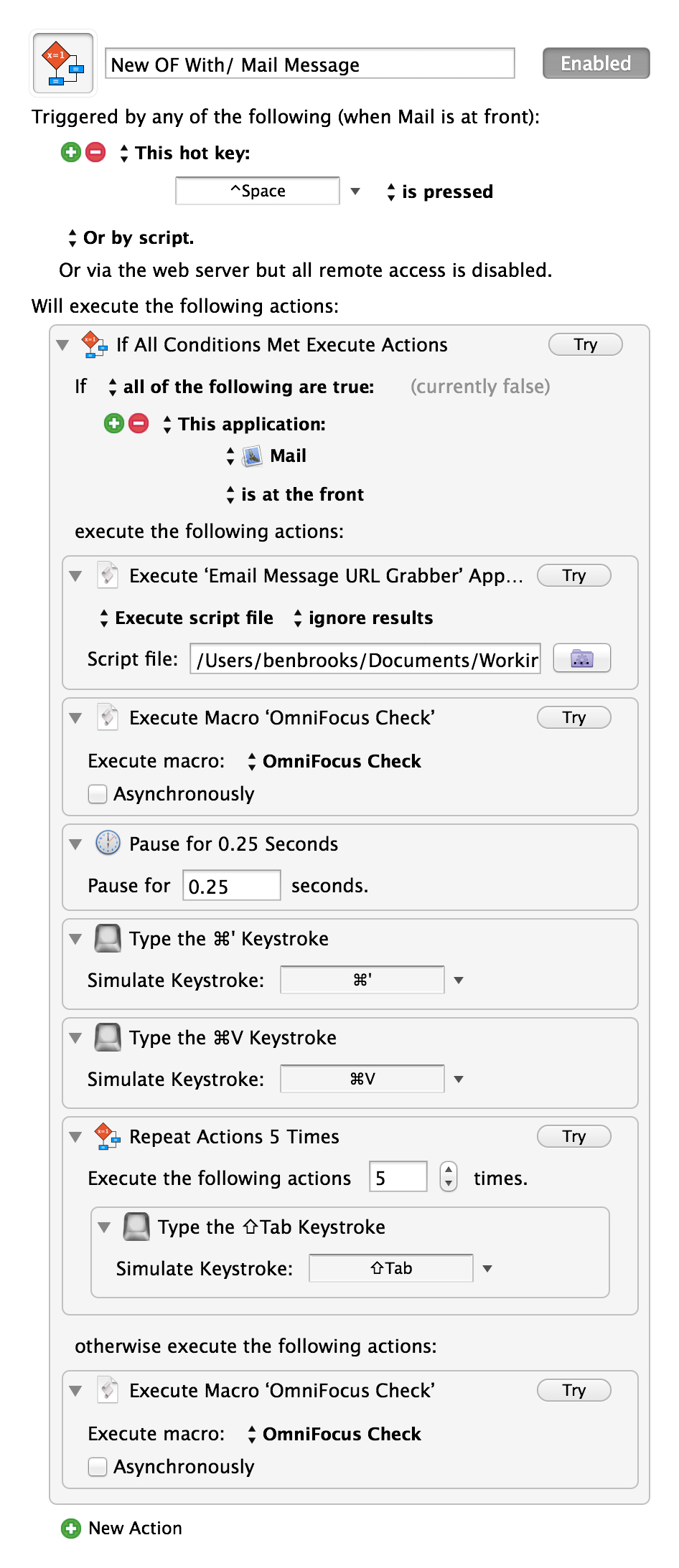
    The other day I posted a link to Matt Henderson where he created a system of adding mail message links in OmniFocus — it was neat — but used the OmniSync Server, so I didn’t want to use it. Today, Matt posted a follow-up creating a system whereby the entire process happens on your Mac.

    Be sure to take a look as he really has a clever system. I went ahead and did two tweaks to his macro:

    1. I moved his script to get the message URL into a script file as I couldn’t get it to work without that (and I prefer this flow anyways, for later editing of the script).
    2. I added in using Shawn Blanc’s excellent OopsieFocus script to make sure OmniFocus is running.

    The result is this:

    The ‘OmniFocus Check’ is simply a macro I have that runs Shawn’s above mentioned script. I’ve tested it, and it is fantastic — though I am not sure I want to keep it my normal shortcut, but for now I will. Thanks Matt.