“Today we’re installing technologies of ubiquitous surveillance, and the temptation to use them will be overwhelming.”
Author: Ben Brooks
-
Shawn Today, Episode 400
A few weeks ago I let Shawn know that he *really* should have me as a guest — then I realized I invited myself and momentarily felt bad. Turns out he wanted me on episode #400 — 400! — and so I joined him and turned his lovely 7-minute podcast into a 43-minute podcast. It was a lot of fun, you should check it out and be sure to become a member of Shawn’s site — I just found out he has done 400 shows without a single sponsor.
-
Switching From Gmail to FastMail
[Max Masnick has a nice write up for people looking to switch from Gmail to FastMail][1]. Most importantly Masnick talks about why FastMail is actually better than Gmail (and no, not for reasons like “not Google” that you’ve come to expect from me).
I’ve never used FastMail, but I’ve heard nothing but good things about it. Personally I am using a Mac mini from [Macminicolo.net][2] with the stock OS X Server app supplying the email — I could not be happier with that setup. I also just got *another* Mac mini for my day-job to move that email. Where was that email? Embarrassingly that email was still with Google Apps — and I had been dreading moving the gigs of emails we had there — but we did it last night and man is it great. We used an IMAP syncing service on the Mac to move the email and presto — ask [Rusty Ross to help you][3] (that’s what I did).
[1]: http://www.maxmasnick.com/2013/07/19/fastmail/
[2]: http://macminicolo.net
[3]: https://twitter.com/ConsultantRR -
‘Samsung Galaxy S 4 Active’
[James Trew on a couple of the features on this new phone][1]:
> With IP67 water and dust protection — it’ll survive three feet of water for up to 30 minutes {…}
I think this is genuinely the first Samsung phone that has some features that really interest me. I have seen the commercials of this phone a lot — I’ve seen it getting rinsed under water when stuff is splashed on it and so forth — if it works as advertised, it’s nothing short of awesome.
I’d love to see this in the iPhone and certainly expect that these kinds of “life-proofing” features are bound to come. My iPhone 5 looks like crap — it’s beat up from my toddler stealing it and then sliding it on tile floors (I cringe writing that).
So be it.
Speaking of life-proofing, there’s a case manufacturer called [LifeProof][2] that makes cases for iPhones that are waterproof, among other things. I bought one of these cases for an employee that works outside and man is it nice, it’s small for what it does and offers some really great protection (and warranty). [The case is on Amazon for $79][3] and though certain aspects of it are bulky, it’s much thinner than others I have seen.
**UPDATE:** [Always too good to be true](http://www.reddit.com/r/Android/comments/1j8xsk/a_warning_to_all_galaxy_s4_active_users_upvote/).
[1]: http://www.engadget.com/2013/06/05/samsung-galaxy-s-4-active-goes-official/
[2]: http://www.lifeproof.com/en/
[3]: http://www.amazon.com/exec/obidos/ASIN/B00AIH0IAC/ref=nosim&tag=brooksreview-20 -
‘The Fourth Agenda’
[Shawn Blanc has a nice overview of the latest version of Agenda][1]. Agenda is a solid calendar offering and there are some very welcomed additions to version 4. (What’s not welcomed by me is that new icon.)
The best feature though, is one that Shawn seems to have left out, is swiping from the right edge. Doing this brings up a quick date picker that is really well done and unlike anything I have seen before.
I’m sticking with the iOS 7 default calendar app right now, I like it quite a bit, but I’m glad to see continued development of other calendar apps. Still, [none are perfect][2], but the (hopefully coming to iOS) ability to add travel times is what I am really wanting.
[1]: http://shawnblanc.net/2013/07/the-fourth-agenda/
[2]: https://brooksreview.net/2013/05/calendar-app/ -
Quote of the Day: Matthew M. Aid
“Since 9/11, the NCS has also developed a variety of so-called “black boxes” which can quickly crack computer passwords, bypass commercially-available computer security software systems, and clone cellular telephones — all without leaving a trace.” -
‘Obama Wins Back the Right to Indefinitely Detain Under NDAA’
[RT.com, a site that apparently hates bylines, writes][1]:
> Congress granted the president the authority to arrest and hold individuals accused of terrorism without due process under the NDAA, but Mr. Obama said in an accompanying signing statement that he will not abuse these privileges to keep American citizens imprisoned indefinitely.
I cannot be the only one that had a hard time stopping their eyes from rolling when they read this.
[1]: http://rt.com/usa/obama-ndaa-appeal-suit-229/?utm_medium=App.net&utm_source=PourOver
-
‘Police Documents on License Plate Scanners Reveal Mass Tracking’
[Catherine Crump][1]:
> Automatic license plate readers are the most widespread location tracking technology you’ve probably never heard of. Mounted on patrol cars or stationary objects like bridges, they snap photos of every passing car, recording their plate numbers, times, and locations. At first the captured plate data was used just to check against lists of cars law enforcement hoped to locate for various reasons (to act on arrest warrants, find stolen cars, etc.). But increasingly, all of this data is being fed into massive databases that contain the location information of many millions of innocent Americans stretching back for months or even years.
I’ve long known about these readers, but I had no clue they were saving the data and amassing a database. I like these readers because they are actually a very effective tool.
The scenario that has always been described to me is either during an amber alert and a fugitive situation: cars equipped with this tool can effectively drive around large swathes of areas quickly and be alerted if the license plate they are looking for is driven by. So think about there being an amber alert, one cop car could vet and entire mall parking lot in minutes. That’s pretty great.
However, if license plate data is being stored? That’s shady.
> The primary law enforcement use of these systems is to take pictures of plates to make it possible to check them against “hot lists” of cars of interest to law enforcement. This can be done virtually instantaneously. While plates that generate a “hit” may need to be stored for investigative purposes, *there is no need to store plates for months or years* to achieve this purpose.
Agreed.
[1]: http://www.aclu.org/blog/technology-and-liberty-national-security/police-documents-license-plate-scanners-reveal-mass?utm_medium=App.net&utm_source=PourOver
-
Three Hops
[Philip Bump on new NSA spying information](http://m.theatlanticwire.com/politics/2013/07/nsa-admits-it-analyzes-more-peoples-data-previously-revealed/67287/):
> But Inglis’ statement was new. Analysts look “two or three hops” from terror suspects when evaluating terror activity, Inglis revealed. Previously, the limit of how surveillance was extended had been described as two hops.
That’s a lot of people. I saw a post a while back about this (I can’t find it now, send it to me if you can) of just how many people this ends up being — it’s a massive amount of people. This isn’t just twice the people.
I love that the NSA keeps getting caught in their own lies. “Well we don’t spy, I mean we do, well it’s only on terrorists, well and those that come into contact with people we have a gut feeling are terrorists, oh and those that come into contact with those that come into contact with… ok it’s everyone.”
-
Google + Passwords = Plaintext
[Micah Lee on an Google security flaw he found](https://micahflee.com/2013/07/use-android-youre-probably-giving-google-all-your-wifi-passwords/):
> Go to your home screen, press the Menu button, select “Settings”, under “Personal” select “Backup and reset”. Is the “Back up my data” checkbox checked? If so, all of the wifi passwords that your phone remembers are being synced to your Google account.
… and those passwords are in plaintext. I haven’t changed my WiFi password in years, my passwords are changing today.
-
‘Cloud.typography vs. Typekit’
[Chris Bowler on web typography][1]:
> Overall, Typekit is a slightly easier to use service. Both offer great fonts, decent pricing, and are technically sound. The primary reason a designer would use Cloud.typography is when he/she absolutely needs to use a H&FJ font in a design. Otherwise, the options lean toward Typekit.
Chris’ overview is very accurate. His conclusion that Typekit is better for 90% of the people is correct. But I take issue with the above statement, that one would only use H&FJ if they *need* to — that *needs* to be replaced with “if they want to”.
Then again I’m definitely biased.
[1]: http://chrisbowler.com/journal/cloud-vs-typekit?utm_medium=App.net&utm_source=PourOver
-
‘The NSA Wants America’s Most Powerful Corporations to Be Dependent on It’
[Conor Friedersdorf on the NSA offering to be Norton Anti-Virus for Big “bailout” Finance][1]:
> Americans shouldn’t trust any of these repositories of power. Government and corporations are both capable of terrible things. To have them colluding with one another in secret, inexorably arranging things so that there’s disincentive for disagreement among them, is terrifying. The people can fight Big Government. The people can fight Big Finance. The people can fight Big Tech. Could the people fight them if they’re all working together with secret law on their side?
A terrifying thought — at least to me — the idea that those three become so dependent on each other that they collectively squash any entity trying to speak up for what is right.
[1]: http://www.theatlantic.com/politics/archive/2013/07/the-nsa-wants-americas-most-powerful-corporations-dependent-on-it/277822/
-
Quote of the Day: Seth Godin
“Trust is precious and easily wasted, and guessing is a lousy foundation for future progress.” -
Amazon Item of the Week: Lubricant
I promise you, this is not *another* post [about a 55-gallon drum of sex-lube found on Amazon](https://brooksreview.net/2012/06/personal/) — though that still makes me smile. No, I want to talk to you about WD-40 and why you should buy something different. Don’t get me wrong, I like WD-40 just fine, but I have found a much better lubricant.
[CorrosionX](http://www.corrosionx.com/corrosionx.html)
I’ve actually been using it for years as my local locksmith got me hooked on it. It’s a fantastic lubricant, and I use it just about everywhere. Squeaky doors, stuck bolts, garden tools, knives (high-carbon knives I keep in my go-bag will rust so I keep a thin layer of CorrosionX on them so that they don’t, you know, *rust*). I don’t know much about the science all over the CorrosionX website, but I can tell you I won’t buy WD-40 over this stuff.
Amazon, stupidly, doesn’t have the [aresol version](http://www.amazon.com/exec/obidos/ASIN/B0070WYVLA/ref=nosim&tag=brooksreview-20) for sale on Prime, but they do have nice [three pack of a pump sprayer version](http://www.amazon.com/exec/obidos/ASIN/B008R1HX0E/ref=nosim&tag=brooksreview-20) — which I didn’t know existed. (I will note, I have found it cheaper in stores locally than those Amazon prices. Plus, a three pack? Who the hell needs that much?)
-
Transporter
[When Pat posted about Transporter](https://brooksreview.net/2013/05/transporter/) and mentioned I hadn’t written about it, I was shocked. I’ve actually had a Transporter for some time, so I was sure I must have written about it. [Transporter](http://www.filetransporter.com) is a very interesting, unusual hard drive and because of that I’m having a tough time figuring out how to approach talking about it.
The way Transporter works is pretty simple: you connect the device to your network and put a HD inside of it. (Mine is connected via ethernet and has a 3TB drive inside.) You use a web interface to create shared folders, rather than just sharing the entire drive. Each folder can be shared to other people, or synced with another Transporter — or it can just be network storage for you.
That’s the basics. From there you can install a menubar app on your Mac that will sync your files in a somewhat Dropbox-like manner. It’s actually a bit more complicated than Dropbox, because each folder you have access to has two options, which I will call *local* and *remote*. If you set the folder to local, it works much like Dropbox: the files are stored locally on your machine *and* on the Transporter — changes are synced in the background. Using the Remote option means the files are stored on the Transporter instead of your machine, but you can access them *if* you have a network connection.
This is great, since my retina MacBook Pro has a 256GB drive and the Transporter has a 3TB drive. However you’ll notice I said it’s not exactly like Dropbox. There are three notable differences:
1. It’s slower than Dropbox. With Dropbox you expect small files to show up almost instantly, however, with the Transporter you need to give it a good while (sometimes hours).
2. For some reason the Connected Desktop folder, in which all your Transporter folders live, is either symlinked or aliased somewhere else. These folders act more like connected folders than native folders. 99% of the time this isn’t an issue, however, don’t try to set this folder as your Screen Shot folder, or nothing will work.
3. You can sync one folder to multiple Transporters. This is different than just sharing a folder. Here’s how Connected Desktop describes it:> You can perform an initial sync between two Transporters on a fast, local network and then easily relocate one to a secure offsite location. Should something happen to your local network, you’ll never miss a beat. Our software will automatically continue to access files from any shared Transporter until your local network is restored.
That’s a pretty neat feature as it offers a private and redundant data storage solution for “normal” people. So while there is no mirrored RAID, you can have data redundancy in the form of multiple Transporters. Better still, you don’t have to take one to a datacenter, you could just take it to your Mom’s house.
That, in a nutshell, is the Transporter. On paper it’s a very cool device, but the big question is: does it work?
The short answer is yes: Transporter is better than a file server, webDAV or FTP, but not as dead simple as Dropbox. After switching completely from Dropbox to the Transporter (only syncing files for apps via my Dropbox account) I’ve never lost anything or been frustrated by using it.
My biggest issues with Transporter so far are:
1. It’s slow to sync back to the actual transporter.
2. The iOS app is painful to use.
3. The menu bar app is hideous (I hid it with bartender).The first two are the biggest issues I have. While the sync speed is typically not a problem, the poor iOS app is a true shortcoming.
There are some other really good things about the Transporter, like the fact it has 3TB of storage that’s easy and cheap to upgrade. It’s stable, too; I’ve never had to reset it.
And it’s far more private: here’s what Connected Data says about the encryption and security of the file transfers:
> We’ve implemented transport layer connections using industry-standard AES 256-bit encryption for communication among Transporter devices and their clients, which is the same technology that banks use. Unique private keys reside on the individual Transporter units, such that even Connected Data does not have access to them. Our Transporter Desktop apps and Transporter Downloader apps all use this encryption for items in transit. For communication with Connected Data web services, we use Secure Sockets Layer (SSL).
That’s important given that Dropbox is joining PRISM and the NSA gobbles network traffic. The only thing left is the physical security: I’ve toyed with putting it in a safe. Then again, I may be a bit crazy, because I asked macminicolo.net if they’d host a Transporter for me (they will).
## The Sum
I like it. But it’s not for everyone. The initial cost is higher than a Dropbox account, but the recurring costs are lower for any real volume of data. More importantly for most people it’s harder to use than Dropbox and I’ve yet to see a single app work with it (I don’t even know if that’s possible given the encryption). My verdict? I’m using it, I don’t have to think about it and I’m rarely ever annoyed by it. For most products that wouldn’t be a ringing endorsement, but for file syncing? I don’t know how much more I could ask for.
#### Buy It
You can buy from these links through Amazon, and I’ll get mad rich (or something), here’s the [empty Transporter](http://www.amazon.com/exec/obidos/ASIN/B00BFNJ2NW/ref=nosim&tag=brooksreview-20), [1TB version](http://www.amazon.com/exec/obidos/ASIN/B00BFNJ2OG/ref=nosim&tag=brooksreview-20), and [2TB version](http://www.amazon.com/exec/obidos/ASIN/B00BFNJ2O6/ref=nosim&tag=brooksreview-20).
-
‘Cancer of Compromise’
[Matt Gemmell on *not* making tough design decisions][1]:
> The result is products that are riddled with cancer of the compromise. Yet our industry lionises the accompanying spec-sheets. Look at all these failures of imagination and commitment and *judiciousness*!
Well put piece, and the best explanation of why spec sheets don’t matter that I have seen.
[1]: http://mattgemmell.com/2013/07/15/constraints/
-
‘Changing the Creepy Guy Narrative’
[Chris Brecheen writing about a BART experience][1]:
> The thing was, I had already heard this story, many many times. I knew how it would play out. I knew all the tropes. I probably could have quoted the lines before they said them. I wanted a new narrative. Time to mix it up.
A fantastic story, so do read it. The absolute hardest thing (for me at least) is when you see a wrong happening, a wrong that you could try to stop, to make the decision *to* try and stop it. It’s so much easier to walk away — I think we all know that — but I have massive respect for those that do step forward to try and right the wrong.
*Anyways*, good story.
[1]: http://chrisbrecheen.blogspot.co.uk/2013/07/changing-creepy-guy-narrative.html
-
‘Your iOS Device isn’t as Encrypted as You Think’
[Jonathan Zdziarski][1]:
> The real question is, who do you want your data to be secured from? Your typical snot-nosed TSA agent certainly isn’t going to have a device capable of scraping data off of your phone, however both hackers and government might. If you jailbreak your device, it’s possible that a much larger pool of people will as well.
I never assumed iOS was *that* secure, but not storing Keychain passwords in encrypted files is worrying to me.(*Note*: I have no clue why I had that in there as it is clearly not consistent with this article, sorry. -Ben) I think the above just about sums up all computer security though. The more you hack, the larger the potential to open up *more* security holes. However, the pool of people that can exploit and get a hold of your data, is small, but growing. They have to have good reason to want *your* data.(via reader Philip)[1]: http://www.zdziarski.com/blog/?p=2149
-
Keyboard Maestro Macro: Based on my Wifi, Do This
With the ability to now trigger macros based on WiFi, I’ve come up with a doozey of a macro that I have been using as a sort of “geofenced” WiFi trigger for certain settings on my Mac.
I like my computer to look and act a certain way at work, differently at home, and differently everywhere else. ((A few people have mentioned [Control Plane][1] to me, but in looking at it I prefer to stay with Keyboard Maestro.)) In the past I had a ton of Keyboard Maestro macros that I would invoke quickly to setup my computer — but no more (well *mostly* no more).
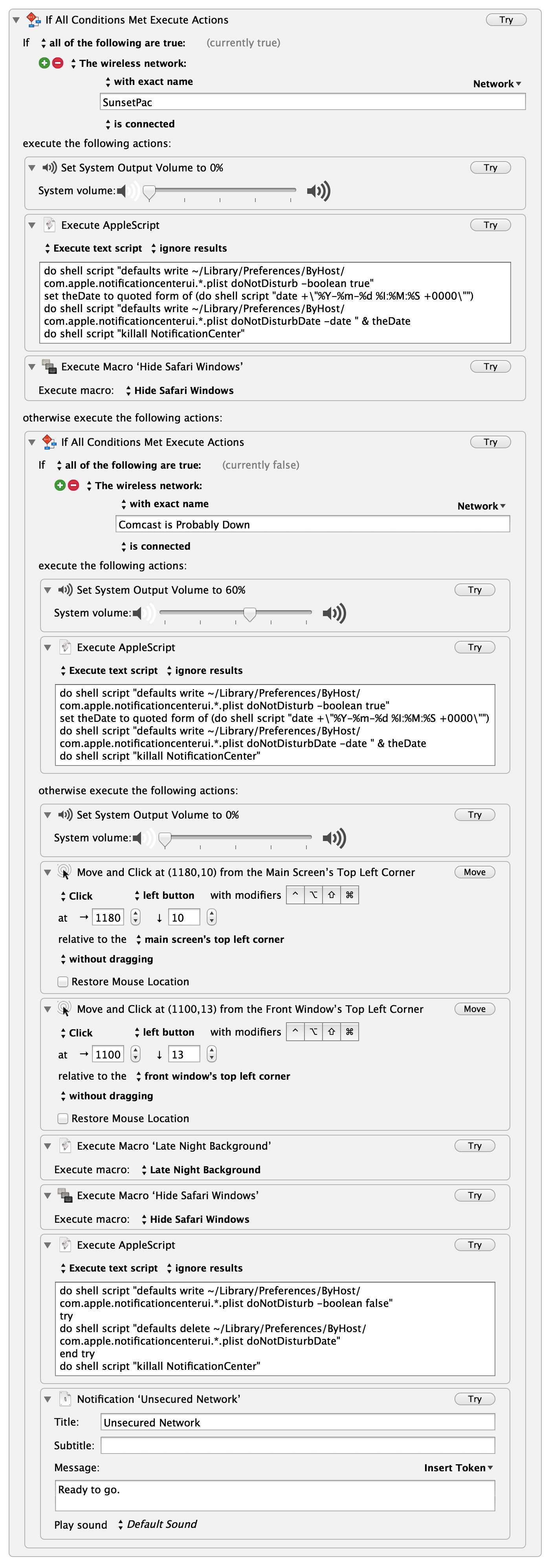
My WiFi actions macro. (full-size here, open that in a new tab.) Instead I now have my computer tweak a few settings based on the WiFi network I am connected to. To the right you can see the macro, but I think I should walk you through this in case you aren’t familiar with some of the tools I am using.
First the macro is being triggered by connection to *any* WiFi network, that is what the `.` denotes. The reason for this is simple: I want to do something specific if I connect to any other network than the ones I specify. This works well for me because I only have two “trusted” networks (my home network and office network).
What follows for the actions is a large if/then statement inside the macro. The first condition checks to see if the WiFi network is my office network. If it is, then the macro sets the volume of my computer to `0%` and executes an AppleScript that turns *on* notification center. Lastly the macro hides all Safari windows — *WHO KNOWS* what I was looking at last.
The next test is to see if I am on my home network (aptly named “Comcast is Probably Down” — a name that never ceases to make me grin). If I am home, then I turn my volume to `60%`, turn *on* notification center and leave it at that.
The last is the `else` statement, meaning if my computer connects to any WiFi network that is not one of the two above, here’s what needs to be done. My assumption is that I have either connected to a coffee shop network, or am in another office for some reason (or another person’s house) either way, I want certain things to happen. ((I should note that I *could* set it up to act if I tether, but I have not done that because it would almost be identical to the else action.)) First, volume to `0%` again, because why wouldn’t you be polite? Next some mouse clicks, which are currently the only way I know how to automate turning on my VPN — which is what those mouse clicks do. From there I set my wallpaper to a specific background, which is all black for good measure. I hide Safari windows — I already touched on why. Then I turn *off* notification center. Lastly, I send a notification to let me know I am on such a sketchy network as to need all these precautions, but that the macro ran to protect me anyways.
You can add as many intermediate WiFi network checks as you want, and you can add tons of actions to each one. Previously, I did some of this with time triggers, but those weren’t fool-proof and this method has yet to fail me — I love it.
## Further Playing
I’ve also toyed with the idea of having KM take all the open tabs in Safari, grab the URLs, send them to Instapaper (or bookmark them) and then close Safari. That’d be something I would do if I was more presentation oriented, but I can’t remember the last time I presented something.
## Sum
My ultimate goal is to just be able to close the lid on my laptop, and open the lid, without having to worry who is sneaking a peek, or what I was doing last.
[1]: http://www.controlplaneapp.com
-
Johnnie Walker “Game Changer” on Vimeo
[Joseph Kahn has a new ad for Johnnie Walker Blue Label — it stars Bruce Lee, how][1]:
> EVERY shot of his head and every detail in there is completely cgi.
As an ad for whiskey, I don’t get it. But take away the fact that it is for Johnnie Walker, and I like the video — man is that some good CGI.
[1]: http://vimeo.com/69868746