Category: Articles

  • Review: Worthwhile for iPad

    Shortly after I posted about [Tweed](https://brooksreview.net/2011/05/tweed/), I was contacted by the developer of [Worthwhile](http://itunes.apple.com/us/app/worthwhile/id439998021?mt=8), an app in a similar vein of Tweed — but one that the developer of the product felt I might actually like.

    I was put on the developer beta list and took a look at Worthwhile and I think it *is* worthwhile for you to check out. ((Couldn’t resist that.))

    ### Aesthetics

    Let me start right away by saying that it is not nearly as visually stunning as Tweed. The app is very utilitarian feeling and likely won’t see anyone downloading it because it looks visually interesting. Like most good apps though, Worthwhile doesn’t need those visualizations to make the app useful for you.

    ### What It Does

    Worthwhile turns your Twitter feeds, or your Twitter lists, into a large list of shared links. Tapping on a link will show the linked page to the right and provide you options to send the link to Instapaper. This is all very similar to Tweed, however unlike Tweed you can hit a button on the list itself, for each tweet, that will send that link straight to Instapaper — no need to open the whole page.

    This is something that I really like and that makes the app really great for reading through links on Twitter lists. (I don’t actually have any Twitter lists that I made, but I ‘followed’ the ones that [Shawn Blanc made](http://shawnblanc.net/2011/05/managing-twitter-via-lists/) — why do the work when he did it for me.)

    When you first launch the app you sign in to Twitter and Instapaper. After which your feed starts to populate. You will notice that there is a button to hide the item, or to read it later along with the URL under the tweeted text. Luckily you can turn off some of this clutter in the settings preference. I turned off the hide button and the URL preview to maximize space for the tweet text itself.

    Tapping read later will immediately send it to Instapaper and hide the tweet from the list. A very nice touch. You only see Tweets with links that were made in the last 24 hours, however by enabling ‘weekend mode’ the time span is extended on Mondays to include all of the links from the past weekend. This is a great example of a feature that was made because people actually used the app before they launched it — I love that little touch.

    ### Usefulness

    As I mentioned above the reason I was sent this app to try out is because the developer thought that I may actually find the app useful. With Tweed I never got into the app — it always seemed more cumbersome that using Twitter on my Mac or iPhone (I rarely, if ever, use Twitter on my iPad). I was pretty skeptical about Worthwhile when I saw it — but the ability to add links with one tap intrigued me enough to make we want to try out the app.

    For my main timeline I think Worthwhile is useless — it’s just as easy to use Twitter on my iPhone to add things from my main feed to Instapaper — with the added benefit of seeing *all* tweets.

    Where Worthwhile really excels for me is in the use of lists.

    I never look at Twitter lists and never make them, but some of the lists that I follow, made by other users, are really great for using with this app. This allows me to comb through tweets that I would otherwise not see and potentially grab some interesting reads from them.

    For that alone I have found myself popping Worthwhile open once a day to comb through some Twitter lists.

    ### Read Later

    Worthwhile is in the App Store now for $3.99. Typically I don’t care about price once it is below $5 on the iPad and Worthwhile is no exception — a good buy. It’s not the prettiest, but it is highly useful and quick.

    Worthwhile will truly turn your Twitter feeds into an RSS like tool that is not curated by you, but curated by people that you choose to curate it for you — this is an interesting concept. I rather like that idea.

  • Like a Headless Chicken

    I have never had the privilege(?) to see a a chicken after its head was cut off, nor do I ever want to. What I used to picture growing up was a bloody, but oddly comical scene, of a headless chicken aimlessly running around Ozzy Osbourne. Now after witnessing the transgressions of the Twitter crew over the past few months, well I just picture it as a very, very, sad thing.

    Twitter is acting like the proverbial headless chicken.

    I have been a passive Twitter user for a very long time, more recently becoming a much more active user. Twitter has become one of the last social networks that I even bother with using, let alone actually liking. Up and until about a month ago I was pretty happy with the state of being at Twitter ((Aside from my worries that they may soon run out of people willing to give them money.)) — things were moving swimmingly.

    Then Twitter got its head cut off.

    Instead of getting the warm and fuzzies when I read about what Twitter is doing next (like I do with say Square), I get the voice in my head that says: “crap what now?”

    It feels like Twitter is aimlessly running with two general goals right now:

    1. Make money!
    2. Get more users!

    Both are valid, but I always used to see Twitter as having these goals:

    1. Be awesome!
    2. Don’t be jackasses! (e.g. Microsoft and Google of late)

    The difference is huge. The latter was a company that was building a service that they used, loved, and wanted to continue loving. The former is building a business at the user’s expense for the sake of VCs.

    That’s not to say that Twitter can’t build a business — they should — and it’s not to say that the two are mutually exclusive — they aren’t. Instead of integrating the goals, or simply adding them on, Twitter has decided that these goals *are* mutually exclusive and that sucks.

    It is very clear that Twitter dropped their old mentality with the approach they are taking towards third party developers — they are treating them with blatant disrespect and using a cloak of vagueness to hide it (albeit poorly).

    ### Respect ###

    The first blow came with the not-so-subtle, shall we say, “encouragement” that developers should no longer make full-featured Twitter clients. OK, we get it you don’t want people partying on your lawn anymore.

    Then came the outright crippling of the usability of all these apps under the cloak of “security” with the forced change from xAuth to OAuth for DMs.

    Now we get the TweetDeck acquisition that lands another sucker punch to third party developers.

    TweetDeck has a pretty large user base, all while being a pretty crappy Adobe Air app ((Don’t bother emailing me anything positive about Adobe’s Air platform — it sucks and you know it.)) that Twitter is more than talented enough to replicate. Yet instead of going out and making their own version of TweetDeck, they rewarded that developer with a large cash payout (oddly enough more than I bet the poor VCs get back from Twitter in the end).

    Essentially this tells other developers that they now have two options:

    1. Continue developing in a hostile environment with ever changing rules, for a company that doesn’t want you developing for it.
    2. Get your user base big enough that Twitter will pay for you to stop developing your app.

    Of course Twitter has said they will keep TweetDeck around — I for one am not holding my breath on that one. ((I give it two years tops. Yes, I may eat these words.))

    The respectful thing to do would have been to say that they are ceasing to allow full API access in six months time — no exceptions, unless of course they buy you. That would at least show your community the respect it deserves and allow them the time to plan for transitions to the future. Instead Twitter have decided to leave developers wondering: “what’s next?”

    It’s the equivalent to being invited somewhere and saying: “maybe I’ll stop by, maybe.” Answering so is just disrespectful to the host that is trying to plan things. While rejecting third party apps outright would be an outrage for developers and users, it would at least be honest.

    ### Million Directions, No Course ###

    The craziest thing is that even though Twitter is very clearly focused on growth and money — they seem to be going a million different ways with it.

    Add the quickbar with promoted trends in a highly popular client, remove it and apologize. Add cumbersome rules for other developers. Spend tons of money to buy an Adobe Air app.

    Look at these three things and tell me what the strategy is? It looked like with the first one Twitter was going to try and monetize the service with paid ads and the like. Then they decided to put that to bed and start being cranky to the developer community, seemingly to push use back to their free (and ad free) apps. Then they blow a wad of cash on another app that is free and lacks ads.

    So what Twitter now has done:

    1. Annoyed users
    2. Pissed off developers
    3. Bought a free Adobe Air app

    What they are still lacking: money.

    They went from looking for more ways to inject advertising (the revenue model of choice for Twitter) to looking for ways to force users on to their platforms, that lack a revenue model.

    ### User Base Argument ###

    It’s easy to say that they are clearly working on building the user base to make a larger play for money. The problem though is that, as I have talked about, their current strategy of using promoted items is not an ideal option. So it looks like they are building a massive user base and raising costs for the end game of a boost in advertising rates.

    Then of course you better hope there are actually advertisers out there willing to pay those rates so that everything stays in the black. Which of course when you serve very few ads in very discrete locations — well to survive doing that you need to have very high prices. Very high ad prices mean that there are very few companies that can afford to pay you.

    Google makes money off of a volume play, not of a tightly focused play. There *is* a difference.

    I don’t know how often I say this, but I will say it again: lots of users don’t equal money.

    ### Competing Network Argument ###

    Many have stated that if Twitter didn’t buy TweetDeck that it would have joined up with UberMedia to create a rival network. Thus the acquisition was a defensive move.

    Let’s put that to bed right now: you don’t worry about a new competing network that has yet to be built and doesn’t have any current users. That’s like driving down the road constantly worrying that every other car is actively trying to run into you.

    Thus Twitter just paid $40 million to get users that they *already* had and that aren’t *likely* going anywhere…

    ### End User ###

    In the end though it is the users of Twitter that are getting dicked around with the most. They will see cumbersome logins now just to use the apps that they prefer using (thanks to OAuth). They will likely see a reduced choice set of Twitter app offerings (thanks to Twitters strong discouragement). They will begin to see less discrete advertising (thanks to the need for money).

    The walls are closing in, Twitter only wants you to use official Twitter products with their service so they can control every aspect of the service. They have every right to do so, but they should be very cautious of the fact that Twitter, since its inception, has very much *not* been a walled garden. Twitter has very much always been a place where you could participate no matter what your preferred tool was.

    Such a massive change is never met with open arms.

    ### ? ###

    I can’t decide if Twitter is the chicken aimlessly running around Ozzy, or if they have just lost their soul — maybe both.

  • Site Navigation

    A couple of weeks ago [Shawn Blanc posted](http://shawnblanc.net/2011/05/previous-entries/) about his thinking for changing how a reader navigates his site. The biggest of the changes was the removal of blog pagination — the little link at the bottom of the main page that takes you to the next page, which is laid out identically to the first.

    Pagination is the way a lot of sites work.

    When Shawn made the switch, I had already been working on a similar switch for this site, testing it on a local build I have. The main reason I wanted to switch is because I always found the navigation on this site to be hideous — I hated the way the buttons looked. I wanted to switch to some nicer looking buttons and as these things do, it started spiraling into a much larger navigation rethink.

    Shortly after Shawn changed his navigation I changed it on this site as well as part of the larger rethink I was working on. Why? Well as [Shawn puts it](http://shawnblanc.net/2011/05/previous-entries/):

    >The goal is to offer the best choice for the reader, based on what I, as the publisher of my site, consider to be the most valuable.

    Link blogging is only a part of what I do and if a new reader stumbles along the way I want to encourage them to read my articles, not my quips on link I posts. So I removed pagination on the home page, opting for the link that you see now, which takes you to the Archives page.

    I made the change and only announced it on my personal Twitter page, wanting to see what kind of feedback I received. I have yet to receive any significant complaints via email and only a few on Twitter (most of which has been fixed as a result).

    ### The Result ###

    My results are much [similar to Shawn’s](http://shawnblanc.net/2011/05/previous-entries-update/), no real difference but maybe a bit more reads on articles. I am keeping my site the way it is, so for those that have not noticed, here is how the navigation works.

    #### Main Page ####

    At the bottom of the main page is a button that simply says: “older”. This button takes you to the Archives and no where else.

    #### Archives ####

    I have decided rather forcefully that if you want to navigate the site you need to start at the Archive page. From this page there are four categories that you can peruse:

    1. Recommended Reading — where you will find links to content all sorts of people wrote (including me) that I love. This is like my Macy’s moment where I show you other great sites and take the “if you love it, set it free” approach. The response on this section so far has shown me that people love this section.
    2. The Linked List — I realize that some people still want to browse my links, this is the only place that you can do that. Clicking here shows you only linked posts, but these posts are paginated so that you can continue to move through them.
    3. Quote of the Day — Same options as the linked list, you get to browse through all the quotes that I post in a paginated manner.
    4. The Articles — This redesign was launched a while back and offers you the article titles in a chronological order, which you can view by month.

    #### Single Post Pages ####

    I also made a few small tweaks to the single post pages — the pages that Shawn correctly stated as the ones that new readers are most likely to come to your site on.

    ##### Linked Pages #####

    For pages that are the permalinks for the linked list items there is a simple link at the bottom of the post to view “All Posts”, this sends you straight back to the archives and the process starts again.

    ##### Article Pages #####

    Since I assume most new readers come to the site to read an article, I offer two forms of navigation at the bottom of the article posts:

    1. Page by page navigation between articles, allowing you to step between each post.
    2. All Posts, where once again you are kicked back to the archives page.

    ##### Quote Pages #####

    Quotes work the same way article pages do, only you move between quotes only.

    ### Theft ###

    Like Shawn I have put a lot of thought into how navigation works. Personally I rarely use site navigation, opting for search boxes instead (conveniently located at the bottom of every page). However nothing I am doing here is new, it has all been done on other sites that I love to read and I have taken what I like best from each site. Don’t email me saying that you have seen this elsewhere — you have and I know that.

    ### Goal ###

    In the end my goal is to help you, the reader, read more. If you see something I didn’t think of, a glaring omission, or just have thoughts on this layout — feel free to get in touch.

  • An Open Letter to Executives

    To all executives in a position to ever correspond with the media: stop making jackass comments.

    Let me show you the type of comments that I mean:

    [Steve Ballmer](http://www.usatoday.com/money/companies/management/2007-04-29-ballmer-ceo-forum-usat_N.htm):

    >There’s no chance that the iPhone is going to get any significant market share. No chance.

    [Eric Cador](http://www.telegraph.co.uk/technology/news/8528810/HP-Touchpad-will-be-better-than-number-one-tablet.html):

    >In the PC world, with fewer ways of differentiating HP’s products from our competitors, we became number one; in the tablet world we’re going to become better than number one. We call it number one plus.

    [Tony Hayward](http://politicalhumor.about.com/od/stupidquotes/a/gulf-oil-spill-quotes.htm) while CEO of BP:

    >I think the environmental impact of this disaster is likely to have been very, very modest.

    Don’t make comments like this because you can too easily be proven dead wrong.

    ### Quantifiable Marketing Propaganda (QMP)###

    I would define marketing propaganda as:

    >Biased and arbitrary phrases used to describe an upcoming product or service, chiefly invoked by those who stand to benefit from the success of said product or service.

    When you add quantifiable in front of that idea you change the definition from a subjective saying, “something is amazing” to something that can be measured — with data. This is the reason the above statements are so bad. Ballmer was proven wrong. Cador will likely be proven wrong too. And well, Hayward…

    If you are going to make a ridiculous statement follow Steve Jobs’ lead and call stuff ‘magical’ — magic is rather hard to quantify with data.

    #### Customers ####

    The other problem with QMP statements is that they are often statements that your customers don’t give a crap about. What HP tablet customer wants to buy a tablet more because it is selling well? More likely they want to buy the device because it is a good price, or has good features, or does thing X that they want. ((There is a market effect when you have the leading product that consumers feel pressure to buy what their peers have. However to get to that point you have to succeed in the other areas to gain the critical early adopters. So yes, market share does work to sell devices, but only after you cross into the majority and are trying to gain more customers.))

    #### Whiners ####

    Lastly QMP statements come off as:

    – Whiny
    – Jealous
    – Spiteful

    That’s the last impression you want people to have of your executive staff. Just don’t do it.

    ### Self-deprecation ###

    Too often I see every other company that is not Apple release a new product by saying that it is better than the other guy (whether directly or indirectly stated). Again, that’s doing it wrong. Take a cue from Apple here and try saying things like:

    – Fastest Mac yet
    – Best iPhone ever
    – The blank just got better

    Those poke fun at your own products and by their very nature are likely true. Don’t force people to fact check your claim against your competitors products because doing so could end very badly.

    ### Steve Jobs ###

    By this point you maybe thinking that Steve Jobs breaks these rules all the time — you’d be incorrect. He rarely uses quantifiable statements, typically he uses very subjective statements — which by their very nature are hard to prove wrong **or** right.

    Statements like:

    – It’s magical
    – It’ amazing
    – We think you will really like it

    These are all bold statements, but they are all subjective and not quantifiable. You can’t determine if something isn’t amazing to someone, or quantify the amount of magic something contains. The last of the three is pretty self explanatory…

    ### Conclusion ###

    Stop making statements that can be proven wrong with facts, you will all look smarter for it.

    Sincerely,

    Ben Brooks

  • Mobile WordPress Blogging

    Today Shawn Blanc [posted an article](http://shawnblanc.net/2011/05/a-ode-to-software/) that dives into the software he uses on a day to day basis, near the end he laments:

    >I find a lot of link-worthy content away from my laptop. Either when I’m reading on my iPad or surfing the Web on my iPhone. What I need is an app that takes the current Mobile Safari URL, title, and any highlighted text and then populates a post editing window with those items. From there, if I could adjust the title and the slug and hit publish, I’d be happy.

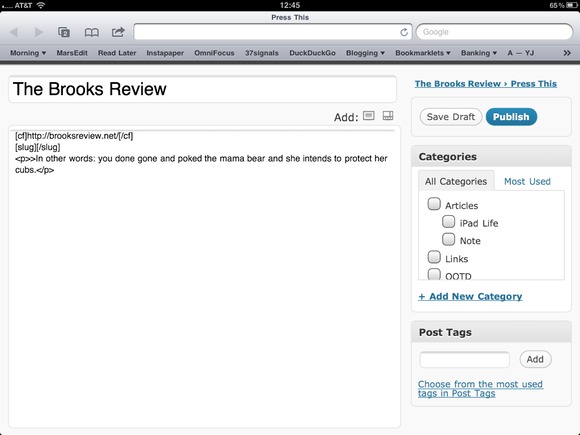
    Amen to that, it has long been my biggest frustration. Shawn also talks about hacks to the Press This bookmarklet to get that to work and that was also the same solution that I came up with. I mixed in [CF Setter](http://hypertext.net/projects/cfsetter) and [Slugger+](http://hypertext.net/projects/sluggerplus) plugins from Justin Blanton to create a Press This that generates this:

    Safari on Mac:

    [](https://f3a98a5aca88d28ed629-2f664c0697d743fb9a738111ab4002bd.ssl.cf1.rackcdn.com/ss-mac-press-this.jpg)

    Mobile Safari:

    [](https://f3a98a5aca88d28ed629-2f664c0697d743fb9a738111ab4002bd.ssl.cf1.rackcdn.com/ss-ipad-press-this.jpg)

    As you can see I am pre-populating the linked-to field, the Title and the blockquote text. I am also adding in the slug fields so that I can fill that in. Now in Safari on the Mac this plugin works really well, on mobile Safari I am not quite there. For whatever reason, mobile Safari is still adding the paragraph tags to the blockquote, so those need to be deleted. ((Please contact me if you know how to do this.))

    This though is far, far better than any other solution out there that I have found.

    #### Installation ####

    All you need to do is grab the code from GitHub and replace the file in your WP-Admin folder: the `press-this.php` file (make sure the rename the original so that you have a backup).

    That’s it.

    [Check it out on GitHub.](https://github.com/benbrooks/PressThisMobile)

  • Quick Takes on Five Apps #13

    In this installment I am sticking to nothing but Mac apps — well almost. Check out past [installments here](https://brooksreview.net/tag/quick/).

    ### [BaseApp](http://www.getbaseapp.com/) (Mac) ###

    BaseApp is a great menubar utility for Basecamp users. The app will alert you to any updates on your Basecamp site and show you what happened and in which project. It also serves as a great way to launch into your Basecamp account. The best part: the app is now free in the Mac App Store.

    ### [Google Music Beta](http://music.google.com) (Web?) ###

    I finally got my invite to Google Music Beta. It is a pretty interesting cloud music offering as there is already music available for you to play (you select some genres you like that Google adds in music). Parts of the app is Flash and it says that it does not support iOS at this time. I had no troubles playing it on my iPhone, aside from the fact that the experience was less than optimal.

    This is still a pretty new service and likely will get better, but so long as I must download an uploader that uses my bandwidth in the background — well I am not to interested in wasting time uploading anything to it. I don’t quite know what to say about Google Music, so let me express it another way:

    ##### Do I like it? #####

    No.

    ##### So I hate it? #####

    No.

    ##### Will I use it? #####

    Not at this time, maybe as it improves by ditching Flash and giving me a better way to upload music — by not making me upload it.

    My biggest complaint is that it doesn’t do OTA sync — no joke. If I pause a song that is in the “cloud”, why in the world can’t I pick up where I left off on any other device, or when I come back to the site?

    ### [SizeUp](http://irradiatedsoftware.com/sizeup/) (Mac) ###

    This is a pretty handy Mac app that serves to move and do all sorts of crazy things to your window sizes and positions. A lot of people use this app to arrange Safari windows to take half of their screen so they can reference a webpage while writing. I’m not a fan — it’s overly complicated and not nearly as intuitive as something like [Divvy](http://mizage.com/divvy/).

    The one thing that keeps this program on my Mac: the SnapBack window hotkey. All too often a window gets resized that I don’t want to be resized and I can essentially undo that change with this hotkey — that alone will keep this on my Mac.

    ### [Weather HD](http://itunes.apple.com/us/app/id411543336?mt=12) (Mac) ###

    Interesting to see how the Mac App Store is bringing a lot of apps over to the Mac that I wouldn’t expect to be all that useful on the Mac (think Angry Birds, which is far better on iOS). Weather HD is now on the Mac App Store and it well set you back $3.99. What I don’t get is that it doesn’t really do anything special.

    I have never seen the appeal of Weather HD and I think that a 283 MB app that runs in window or fullscreen mode is probably not something many people will want on their Mac. There are better things you can spend $3.99 on.

    ### [Kindle for Mac](http://itunes.apple.com/us/app/kindle/id405399194?ls=1&mt=12) ###

    This has been around for quite sometime, but I just noticed that it was in the Mac App Store so I figured I would mention it again here. As far as Kindle apps go this one is firmly in last place (Kindle device, Kindle iPad, Kindle iPhone, Kindle Android, Kindle Mac/PC). It has never been my desire, nor comfortable to read a book on my Mac’s screen. Though it is nice to see that they have solved a lot of problems with the app that I ran into when they first released it.

    Bottom line: you get everything you would expect out of the Kindle reading experience, which is all you can ask for in a free app.

    *If you liked this installment be sure to check out the other [installments](https://brooksreview.net/tag/quick/).*

  • Apple’s Cloud Music Service

    [MG Siegler](http://techcrunch.com/2011/05/18/apple-cloud-music/):
    >Think about it. With these agreements, Apple is likely going to be able to do the one thing that is absolutely crucial for cloud music to take off: offer library syncing without uploading. In other words, Apple now likely be able to do what Lala (the company Apple bought in late 2009 and subsequently shut down) was able to do: scan your hard drive for songs and let you play those songs from their servers without having to upload them yourself.

    The cloud music stuff (as Shawn and I talked about [here](http://thebbpodcast.com/2011/05/episode-11-never-punch-someone-in-the-forehead/)) is going to be very interesting for the next 8 months — as we see how it all plays out. I think Siegler is right about the way the service will work, but I doubt that it will allow you to do this with non-iTunes purchased content.

    The problem with allowing users to stream everything in their current library (regardless of where it was purchased) is that some of that music may have not been obtained legally. Now Apple likely does not care about that — Apple just wants their users happy — don’t think for one moment this was not a huge sticking point for the music labels during negotiations with Apple.

    The labels do not want you to be able to do this with things Apple can’t verify that you purchased. Doing so would be giving up on the anti-piracy tirade they have been on for most of this century. ((It’s nice that we are at the beginning of a new century — allowing me to make such bold sounding statements.))

    I don’t know what the service will look like, but I doubt that it will work like most of the optimistic audiophiles hope that it will. I doubt that you will be able to play everything in your library using Apple’s cloud service.

    I just don’t see how Apple would have gotten around that in negotiations, unless…

    #### Upgrade ####

    As I talked about in the last B&B podcast episode, I am guessing you will have to pay a one-time cloud upgrade fee on a song by song basis. Perhaps $0.30 a song, maybe less. Once you do that, those songs are available in the cloud. ((This did this before when they started the ‘plus’ music files.))

    This could be where Apple circumvented the labels. If Apple said we want all the music in the users library to be streamable (so long as we have a deal in place with the label for that music) and further told the labels that in doing so they would charge an upgrade fee that the labels get a percentage of (allowing the labels to double dip [charge twice for the same thing] — which we know they love) I could see the labels going for it.

    I could *further* see the labels being muscled into allowing Apple to charge users to “upgrade” the music in their library that they *didn’t* buy from iTunes. Thus, pirated or not, all your music would be in Apple’s cloud for a price. I am guessing they would be OK with this because it is a faster way to get money from pirates than court cases are.

    This isn’t ideal for the users, Apple, or the labels — it’s a compromise. I hope I am wrong and all the dreamers are right, it would be cheaper for me if I am wrong. I just don’t see the labels bending that much without getting their palms greased first.

  • Just Works

    ‘It just works.’ It’s a common phrase that Apple and its loyalists use — we all have a general understanding of what it means, but how do you achieve it?

    I asked [Marco Arment](http://www.marco.org/) how a developer writes a piece of software that a user would describe as “just working”, to which he responded:

    >Take every support email you get, and try to avoid getting the same ones in the future.

    I think he is talking about much more than just squashing bugs — he’s also talking about listening to things that annoy the crap out of users and fixing those issues.

    ### What it Means to Me ###

    For me ‘just works’ comes down to three factors:

    1. Understanding how customers use your product. This is likely helped by the ‘support emails’ Marco mentioned.
    2. Using your own product often.
    3. Not adding stuff, for adding stuff’s sake. (Feature bloat.)

    Those three factors are key to a product that gives users a great, frictionless, experience — the experience that is often described as ‘just working’.

    #### Creation ####

    The fastest way to achieve this is by creating something *you* need.

    Some of the best products (software or otherwise) are the result of a person scratching their own itch. This is why a brand new smartphone that lacks 3rd party apps and simple things, such as copy and paste, can survive *and* succeed. It’s not about features, specs, or bullet points – it’s all about experience.

    When the iPhone launched in 2007 it was pretty bared bones, but it succeeded in the market because it was evident that the people who designed and made the phone, designed and made the phone for themselves to use.

    Or as I like to think of most inventions: *I highly doubt the riding lawn mower was invented by a man with a small lawn.*

    [Here’s Marco again on why he created Instapaper](http://www.randsinrepose.com/archives/2011/01/25/interview_marco_arment.html):

    >In the fall of 2007, I had just switched to the iPhone, and I had a long train commute every day. I never knew what to read on the train, but I’d find stuff all day at work that I didn’t have time to read, so I made Instapaper as a simple, one-click link-saving service for myself to time-shift links from the work day to my train commute.

    That’s why Instapaper is one of those services/apps that ‘just works’ — Marco needed the service to be drop dead simple and highly useable — not for customers — for himself since he was the initial customer, thus he eliminated all of his own support complaints first.

    #### Omni ####

    One company that seems to exemplify this more than any other is the OmniGroup — specifically in their iPad apps. Both OmniFocus and OmniOutliner are *better* on the iPad than they are on the Mac, and those are two excellent Mac apps to begin with. The feeling that I always get with an OmniGroup iPad app is that they not only tested the app, but that they *tested* the app. Read: they actually use the product.

    #### Friction ####

    When I asked [Sean Sperte](http://seansperte.com/), one third of [Sky Balloon](http://skyballoonstudio.com/), how they achieve such “just works” status — he responded:

    >Most of what we do is take cues from Apple’s default apps. We strive to remove as much process friction from the user’s end goal.
    >And we start by defining what the user’s end goal is — not their technical end goal, but their *real* end goal …

    The difference is subtle when expressed, but huge in practice. It means that they made the app that you wanted and not that app that they thought *you* wanted — they made the app work the way you wanted too, not the way others apps say it should work.

    I give a lot of apps hard times on this site for little problems and some oversights ((Also about icons.)) , but I can usually tell within the first minute of using a new app whether it is an app made by people who actually made the app for themselves or for others — it shows, take note.

    Apps that people make to sell, look like apps made to make money. (Often ad laden, standard everything, little documentation and no support.)

    Friction, as Sperte calls it, is something that I see in products that aren’t being used by the people who developed them — friction is caused by competing on features and not experience. Friction happens when you don’t use your own product anymore. ((iCal anyone?))

    #### User Perspective ####

    I asked [Justin Blanton](http://hypertext.net/) what “it just works” means to him:

    >Consistency. The software/hardware (re)acts as I expect it to, and no differently. Every time. And if it breaks, it breaks in a consistent and predictable manner, from which I can recover. Once I’ve done all the thinking on the front and back ends, and set things up just right, I expect to not have to *think* again—’it just works’ is muscle memory’s enabler.

    [Shawn Blanc](http://shawnblanc.net/) responded to the same question saying:

    >For an app to “just work” for me I suppose it boils down to a combination of two things: there is a low learning curve and there is long-lasting utility. Put another way, the app slides right in to my area of need.

    Consistent, frictionless, seamless apps. That’s what make the user not notice the UI, the icon, the price, the lack of features. Why? Because they just work.

    ### Things that Just Work ###

    All of this started when I was writing up my review of OmniOutliner for the iPad — I kept wanting to just say: “it just works the way you think it would and it’s really great.” That of course would be helpful to no one, so I had to sit back and think about why I felt this way about the app.

    I started to think about all the things that I report as “just working” and I think these four guys hit the nail on the head. Before the iPhone switching phones was a bear, you had to hope the sync would work with your Mac, then hope that the new phone would in some way recognize that data. Maybe you had to buy a MissingSync utility, or install some crazy hacked together after thought software from the vendor. Maybe the new phone really only worked with Exchange — though you didn’t know *that* before you bought it.

    When I bought the iPhone it just worked. It fit into my workflow and life seamlessly as Shawn talks about above. There was no friction — yes it lacked some features I would liked to have, but the stuff it did have were so good it was like I had been using the phone all my life.

    I haven’t used outlines since college, but when I popped open OmniOutliner for the first time I knew how to work everything. The app just fit in my workflow all of a sudden with very little thought and very little problems.

    It just worked.

    ### Things that Just Don’t Work ###

    We hate printers so very much because they just *never* work. Playing off of what Justin said printers fail often and always fail in different ways. ((PC Load Letter)) Printers don’t work as expected and if you are on Windows you have to figure out which software to install before you actually plug in the printer — otherwise you face the wrath of scary warning stickers.

    In the same genre fax machines rarely, if ever, just work because they rely on too many other services to work. Even if everything goes through there is still no guarantee that the guy on the other end has a decent enough machine to be able to read 11pt type. They were never built to be great, just adequate — yet they truly don’t work.

    If you have ever added on to a home, or lived in a home that was added on to, you likely know exactly where the addition is. These additions always feel like additions. ((With exception to the 1% cases that are actually done very well, but those are fringe outliers and are usually much more involved than a standard addition. If you don’t know which happened in your home, or any home, as yourself if you could have lived in the home while the addition was being done. If the answer is yes, then it will always feel like an addition. If you can’t tell? You are the 1%.)) Adding on becomes a problem because you are building on top of something else, instead of integrating a new part. You are adding layers, not integrating features.

    Integration versus layering: integration makes a good product, layering makes an average product.

    Layering never gives you the ‘it just works’ feeling.

    ### Ive ###

    One last quote, this time from [Jonathan Ive](http://www.youtube.com/watch?v=t0fe800C2CU&feature=youtube_gdata):

    >A lot of what we seem to be doing is getting design out of the way. And I think when forms develop with that sort of reason, and they’re not just arbitrary shapes, it feels almost inevitable. It feels almost undesigned. It feels almost like, ‘well, of course it’s that way. Why would it be any other way?’

    In other words: it just works.

    ### Who Cares ###

    This entire philosophy is of crucial importance right now because for the first time we are hitting a sweet spot in consumerism. We have the means to build, sell and buy very high quality goods. More to the point I am starting to hear people exclaim: “I like it because it just works.” Yet when you ask them what they mean you are met with a blank stare.

    The better question is why is it right for person X. To which people can usually come up with some great reasons: “they won’t have to worry about common problem X.” Just works mentality is permeating its way through to the general consumer, and if you want to be successful you are going to have to figure out how to make your product/service ‘just work’.

  • On Dropbox Security

    Dropbox (everyone’s favorite utility) has been taking a lot of heat lately from users, privacy nuts, and now the FTC over its encryption and data security practices. The two points that people seem to have trouble with are the following, from the FAQ Dropbox [posted](http://blog.dropbox.com/?p=735):

    >Like most major online services, we have a small number of employees who must be able to access user data when legally required to do so. But that’s the exception, not the rule. We have strict policy and technical access controls that prohibit employee access except in these rare circumstances. In addition, we employ a number of physical and electronic security measures to protect user information from unauthorized access.

    The above is likely due, in part, to this (from the same FAQ):

    >That said, like all U.S. companies, we must follow U.S. law. That means that the government sometimes requests us (as it does similar companies like Apple, Google, Skype, and Twitter) to turn over user information in response to requests for which the law requires that we comply.

    Basically Dropbox can look at any file you have stored on it’s service if it wants to and will turn over those contents (unencrypted) if compelled by court order. For law abiding citizens this is of no concern, for nefarious folk this is probably a deal breaker. The real question I have, I stated earlier when commenting on the [matter](https://brooksreview.net/2011/04/dropbox-security-2/):

    >Is this like setting off a nuke — where two people need to turn two different keys to make it happen? If not, why not? That’s what I want to know.

    Basically of the employees that can access my data — what security protocols must they go through to access it.

    It seems though this issue runs a bit deeper than I originally thought as Mathew J. Schwartz for Information Week [reports](http://www.informationweek.com/news/storage/security/229500683):

    >In particular, Dropbox–unlike some of its competitors, such as Spideroak and Tarsnap–uses file deduplication when files are first uploaded. As a result, when a user uploads a file, the Dropbox site first studies the file to see if it’s been uploaded by a different user. If so, Dropbox just links to the previously uploaded file.

    I knew about the file deduplication methods that Dropbox is using, but never thought about how that could be a bad thing from a privacy standpoint, Schwartz adds:

    >For starters, deduplication can make it easy for outsiders to know what’s already on Dropbox’s servers, since the website studies a file to see if it’s seen it before. “While this doesn’t tell you which other users have uploaded this file, presumably Dropbox can figure it out. I doubt they’d do it if asked by a random user, but when presented with a court order, they could be forced to,” he [Christopher Soghoian] said. “What this means, is that from the comfort of their desks, law enforcement agencies or copyright trolls can upload contraband files to Dropbox, watch the amount of bandwidth consumed, and then obtain a court order if the amount of data transferred is smaller than the size of the file.”

    Again, not a problem unless you are breaking the law by storing illegal songs, videos, and the like on Dropbox.

    Another thought this entire debate has set off is that Dropbox, I believe, uses Amazon’s S3 storage — what access does Amazon have to the data if compelled by law?

    ### Server Side ###

    I am going to get out of my knowledge base for a little bit, but when all these issues came to a head a while back I had an interesting email conversation with someone that has intimate knowledge of these systems. The gist of the conversation is that Dropbox does server-side decryption and encryption — that’s why the key is stored with them and that is how they have access. Competitors like Spideroak, for instance, do client side encryption and decryption.

    Client side means that they don’t have access to unencrypted data — it means that even if they turned over your data, the government agency would have to work to decrypt it because the don’t hold the key — you do. Dropbox (to the best of what I understand) doesn’t use this method because it would significantly slow down the user computer — as that is the computer that would be encrypting and decrypting data on the fly.

    To add more complications, mobile apps — such as Dropbox on your iPhone — would have quite a bit of trouble (if it is even feasible/possible) to do this on the device. Meaning that with services like Spideroak the mobile devices sends the encrypted password back to Spideroak to decrypt the data first, thus breaking the security chain.

    It’s a tough nut for these companies to crack because the heavier and more secure the system the slower it is — the slower the utility, the less utility it actually has to users.

    ### Solutions ###

    Back when this all came out I mentioned that I will begin storing sensitive data in Dropbox inside of encrypted DMG files. This works and keeps your data secure, but again causes a massive inconvenience when you need to get that data because you need to open the file and enter a password.

    Patrick Rhone recently [commented](http://minimalmac.com/post/5534765499/dropbox-lied-to-users-about-data-security-complaint-to):

    >If you want your data to be 100% secure, here’s the solution:
    >Don’t have data.

    He’s absolutely right. The point is really this: don’t assume the data you store in the cloud is ever only accessible to you, thus don’t store sensitive data in the cloud. In other words: don’t be the villain telling the hero all your plans right before the hero escapes.

  • Review: OmniOutliner for iPad

    I have always found outlining a post harder than just writing one with no outline. However, I knew when the OmniGroup announced that they were bringing OmniOutliner to the iPad that I would snatch it up right away because I love using that app as a note taking tool in meetings — on the Mac it lends itself well to that task.

    As I had already decided to buy the app I immediately bought it and installed it when it launched, here’s my impressions of [OmniOutliner for iPad](http://www.omnigroup.com/products/omnioutliner-ipad) after using it to actually outline a few of my posts and spending considerable time with the app.

    ### Omni Uses the App ###

    One thing that is immediately evident is that this is an app made by people who actually use the app on the device. Thought was put into the controls in the app, how you enter data, style it, and organize it. You don’t have to wonder how you move items around, or make children and parent items — you just do what you think you should be able to do and more likely than not you will be right.

    It’s things like that which make using this app so fantastic.

    ### Color Schemes ###

    OmniOutliner on the Mac has always support colors, but rarely are they used because it just isn’t *that* easy to do so. Enter the iPad app and the OmniGroup has pre-made seven different color themes and styles that you can duplicate and use. My favorite of course is the Solarized light theme — it’s like they read my mind on this one.

    The neatest thing is that these color themes carry over to your Mac. If I set the colors on the iPad and open the same file on my Mac it will look the same, what a great touch that you would expect to have in an app of this caliber.

    ### Outlining ###

    As I said in the intro I don’t normally outline things, but the iPad also makes it a pain to edit text and to write long form (without a bluetooth keyboard at least). This is the void that OmniOutliner has filled for me since I downloading it. Allowing me to quickly structure and “write” a post with great ease. Opening the file on my Mac, or more likely set the iPad next to my Mac screen, and I can take off writing.

    I also get the added benefit of actually being able to see the flow of a post before I write it — which hopefully produces better quality content.

    As a straight outlining tool OmniOutliner is one of the most robust you can get on your iPad and again the actions work just as you expect them. You can arrange items by dragging them and also delete with a swipe.

    ### Other Uses ###

    The great thing about OmniOutliner has always been the flexibility that the app provides — even so far back as the kGTD system days. That doesn’t stop here either, there are great preset templates for things like logs (I created whiskey log to track the whiskey I have tried) and of course for note taking and basic spreadsheet layouts.

    The pre-installed spreadsheet looks basic at first until you realize that it is actually auto calculating a few cells — this is not a Numbers replacement, but it is a very nice and quick spreadsheet tool. With a few added TextMate bundles and copious use of the notes fields you could actually write an entire post in the app — though that seems bit ridiculous if you ask me.

    ### Miscellaneous Good Things ###

    It’s incredible how fast and light this app feels. It launches quickly and opens documents with very little delay. The app gives you access to the full range of fonts available on the iPad — a nice departure from the typical forced Helvetica apps that flood the writing app categories.

    One last point before moving on: the icon is not blue or purple — it’s orange. I am not sure if they are trying to create a brushed metal look, but either way I like the app icon quite a bit. Having said that, if you put it next to the iPod icon you are asking for trouble.

    ### $20 ###

    You can’t talk about an OmniGroup app without mentioning the price. They sell OmniFocus at $40 on the iPad and OmniOutliner keeps the high priced tradition with a price of $20. Is the price high? Yes, in comparison to other iPad apps. Is the price too high for what you get? No.

    Think of it this way, the Mac app will run you $39.99 for the non-Pro version — the iPad version is half the price with no reduction in features — it’s worth $40.

    ### File Management ###

    One of the most important aspects of a tool like OmniOutliner is how well it will play with your Mac. That means if I have an outline on my Mac, how easy is it to get it open on my iPad — and vice versa. Sadly this is the biggest speed bump for OmniOutliner. The obvious choice would be for the app to work with Dropbox — thus allowing you to quickly and painlessly work between your device, sadly the OmniGroup did not implement this in it’s first version. ((I really hope this is coming though.))

    Instead here are your options for importing a new file to OmniOutliner on your iPad:

    1. Copy from iDisk — to which I ask who has the time to save a file to idisk?
    2. Copy from WebDAV

    Let’s talk about the second option for a moment, as you perhaps don’t know what to do with it. Except Omni’s likely customer base is one that knows what this means and has a webDAV server setup. But if you don’t, you still have an options. What you may not know is that with the help of [DropDAV](http://dropdav.com/) you can create a webDAV server for free (for free Dropbox accounts) out of your existing [Dropbox](http://db.tt/nQKF6kW) account — which works just fine for importing to OmniOutliner.

    Once you hook the two together things work pretty decently with your Dropbox account. ((Be sure to add a trailing slash on the DropDAV url when you enter it: https://dav.dropdav.com/ and that should fix any constant re-login issues you may find.))

    Export gives you two options as well:

    1. Email — gee thanks.
    2. WebDAV

    Again here number two is really not that useful until you hook up Dropbox and DropDAV — then it becomes all sorts of powerful. The biggest issue that still remains is version control. Importing and exporting means that you aren’t doing a modification sync so you will likely get tripped up with an old version somewhere, at some point. I’d like to see native Dropbox integration here so that I don’t have to worry about which version is the most recent.

    #### Document Selector ####

    One last thing: OmniOutliner uses the same document selector carousel that apps like Pages and Numbers uses. You see a smaller thumbnail of the document with name and options — scrolling laterally to see other documents. As has been noted about Pages and Numbers this only works with a small grouping of documents. Once you reach, say, 20 documents the entire system becomes very cumbersome to use.

    I think a quick solution would be to implement some type of search mechanism for the file picker, but even then we need some improvements here. The Apple carousel view really isn’t made to handle a bunch of files quickly.

    ### Brown ###

    The top and bottom toolbars use a textured brown coloring — which I don’t quite get since it isn’t strong enough to where it feels like skeuomorphism, it just feels off. I can forgive little things like this, but it causes two problems:

    1. It reminds me of iCal, which is ugly.
    2. When you have a dark background it is too light and draws my eye. On a light document it is too dark and draws my eye. These two bars just feel heavy and *there* — instead of being out of the way.

    The brown color seems like an odd choice when put next to the sleek silver gradient of the column header bar, this isn’t enough to say that it is a bad design, or ugly — but it is a bold choice that I don’t care for.

    ### TextExpander ###

    One huge missing element is TextExpander support. I asked OmniGroup CEO Ken Case about this on Twitter, to which he [replied](https://twitter.com/kcase/status/68726098128683008):

    >Not sure yet how easy TextExpander will be to integrate: it works with standard UIKit text fields, but ours are custom.

    [and](https://twitter.com/kcase/status/68726224977002496):

    >(We had to build our own custom text fields to support rich styles, inline attachments, etc.)

    It sounds like they are looking into adding the support, but are rightfully concerned with how well it will work with their non-standard UI. That’s a major bummer and one that I hope they find a work around for — once you get used to TextExpander it becomes very annoying when an app doesn’t support it.

    ### Better than Good ###

    Even with the flaws I pointed out this is still a very good app for two reasons:

    1. It is far better than the Mac version (I am seeing a trend with OmniGroup offerings here).
    2. It makes my iPad better.

    Even if they only met criteria number two you would be hard pressed to call the app anything but very good. The biggest hurdle the app still has to deal with is a syncing/Dropbox solution, if and when they get that handled this will be a must have app.

  • Translation of FCC Commissioner Meredith Attwell Baker

    FCC Commissioner Meredith Attwell Baker — you know the person who helped approve the Comcast/NBCUniversal deal and is now going to work for them — just released a [press statement on the matter](http://transition.fcc.gov/Daily_Releases/Daily_Business/2011/db0513/DOC-306569A1.pdf). Let’s take a look shall we:

    >I’m proud of my nearly eight years of government service, and especially my service as an FCC Commissioner under Chairman Genachowski’s leadership. Until late this spring, my plan was to seek renomination for a second term as Commissioner. That was true all through the winter during consideration of the Comcast/NBCUniversal transaction and in the months after it was completed.

    “Plans can change.”

    >Not once in my entire tenure as a Commissioner had anyone at Comcast or NBCUniversal approached me about potential employment. When this opportunity became available in mid- April, I made a personal decision that I wanted to give it serious consideration.

    “I talked to a couple of head hunters and heard rumblings, but I am not foolish enough to talk directly with these companies about a job. In April I decided I had to do what was best for me, not what I was nominated to do.”

    >Therefore, I immediately sought counsel from the General Counsel of the FCC, and recused myself on April 18th from any matters involving Comcast or NBCUniversal. I have not only complied with the legal and ethical laws, but I also have gone further. I have not participated or voted any item, not just those related to Comcast or NBCUniversal, since entering discussions about an offer of potential employment. Because of this, I plan to depart the Commission as soon as I am able to ensure an orderly wind-down of my office.

    “I had to find where the line was drawn in the laws, so I talked to law people. Also I haven’t done my current job one bit since I accepted the job at my buddies company — two weeks notice baby! Oh, and I want to leave real quick like.”

    >I will of course comply with all government ethics and Obama pledge restrictions going forward. I am excited to embark on the next phase of my career and am grateful for having had the opportunity to work with great public servants at the FCC.

    “Thanks to Obama and the FCC for getting me this fat pay day and all the connections to make me a good lobbyist. Peace out.”

  • Quick Takes on Five Apps #12

    This is the twelfth [installment](https://brooksreview.net/tag/quick/) of the Quick Takes series, where I look at five (or so) apps and tell you my thoughts on them.

    ### [Shine](http://appthat.com/shine/) (iPhone) ###

    Ryan Gomba was kind enough to send me over a promo code for Shine the other day, it’s a $0.99 weather app for the iPhone. Be sure to check out Justin Blanton’s write up on the app [right here](http://hypertext.net/2011/05/shine-weather-app). He makes some great points about the app.

    The icon isn’t that great and that’s probably being kind. The visual styling of the rest of the app is top notch down to the ‘can’t update’ detail that overlays a red tag with a refresh icon in it to let you know your data is out of date — it’s a nice touch for something that most apps see as an afterthought. The temp is huge and easy to see, you can quickly flick through to see weather forecasts by day or broken down to every few hours. Like Justin I would love to see a feels like temp reading, but the badge icons are something I tend to ignore (or turn off) so no desire for that here.

    One thing that a lot of weather apps are missing for a Seattleite is the text forecast. You can show us the weather icon forecast all you want, but in Seattle that will be clouds or rain , so it can’t say things like:

    – PM Showers
    – Showers
    – Rain
    – Partly Cloudy
    – Mostly Cloudy
    – Wind/ Rain
    – Sprinkles
    – Rain AM only

    There’s a lot going on with Seattle weather and I would love to be able to see that without having to scroll through the hour view and look at the percent chance of precipitation.

    ### [Verbs](http://verbsapp.com/) (iPhone) ###

    Verbs is a $2.99 iPhone app that allows you to IM with people over MobileMe/AIM/Gtalk — I particularly like the Droplr integration in that app (it’s one of my favorite services). This is a great looking app and I really love the icon — fits perfectly with the app.

    You can cycle through conversations with a card like interface that is a clone of how the iPhone Safari tabs work. I have two major annoyances with this app:

    1. The app constantly gives me notifications that it has lost connection. I don’t want IM on my phone so that I can initiate conversations, I want it so others can shoot me a message — which only works if I am connected and online. I just don’t trust this app to keep me online all the time, part of this is the limited multi-tasking that iOS offers.
    2. Though the overall design is great, the conversation view is what bugs me the most. The text does not wrap in the entry field, which is annoying and silly, the send button is next to the delete key meaning that I send messages when I am trying to delete things. This interface needs a slight update.

    Overall I am pretty happy with the app and think that it works great for those occasional times I want to IM on my iPhone.

    ### [Vocabology](http://itunes.apple.com/us/app/vocabology/id383809431?mt=8) (iPhone) ###

    This little free app pulls the word of the day from multiple different sites. Forget about whether you get anything out of word of the day types things, it’s still fun to see from time to time. The interface is very sparse and you can pick and choose what sources you want to see. Clicking through to the definition shows the iAd that is placed on the second screen — you only see it if you want to know what the word means and I think that was a great way to implement ads.

    My favorite part: the Urban Dictionary word of the day (which I didn’t know existed), today’s word: Bed Gravity. Clever.

    ### [8mm Vintage Camera](http://itunes.apple.com/us/app/8mm-vintage-camera/id406541444?mt=8) (iPhone) ###

    I have been avoiding this app since I saw it, $1.99 price and the icon made me walk away. The screen shots I have seen about it though really intrigue me — I mean who doesn’t want messed up color, out of focus and shaky looking video from their HD quality iPhone camera? I mean *I* do.

    This app feels like Instagram for videos without all the sharing and social aspects. That’s not a bad thing — Instagram is great and one of my favorite new things out there — but the filters can be a little over the top and that is what 8mm is all about: over the top gimmicky video. That doesn’t mean that you couldn’t make a very cool video with it, but most people won’t.

    ### [Splinter Cell Conviction HD](http://itunes.apple.com/us/app/splinter-cell-conviction-hd/id371111757?mt=8) (iPad) ###

    The game is $0.99 at the time of writing and it is a continuation of the Splinter Cell game series. The graphics are good, but not great — this isn’t Infinity Blade. Splinter Cell suffers from the same problem that every other shoot ’em up game on the iPad does: accuracy. It is very hard to be accurate when your finger is often larger than the bad guys head.

    I haven’t played through the game yet, but the few levels I have played have been entertaining to the point where I had to make a conscious effort to put down the iPad and write this short blurb up. Well worth a buck, probably two or three. One thing I will say is that this game really sucks down the iPad battery life.

    ### [Prompt](http://itunes.apple.com/us/app/prompt/id421507115?mt=8) 1.1 Update (iOS Universal) ###

    I wanted to touch on this app again because the 1.1 update adds two really great improvements:

    1. Nicknames for connections.
    2. The ability to automatically execute a command upon connection.

    The second thing means that I can setup my SSH connection to the TBR server to automatically execute an Apache restart — the most common problem I encounter on the site. This is a great update to an already excellent app and it’s little touches like this that keep making it better and better.

    *If you liked this installment be sure to check out the other [installments](https://brooksreview.net/tag/quick/).*

  • The Ballmer Days Are Over

    Disclaimer: I own Microsoft stock. Yes, this is *not* pro-Microsoft but I feel the need to be very open about this.

    He’s employee number 30 and has been with Microsoft since mid-1980. In 2000, after nearly 20 years of service, Microsoft promoted Steve Ballmer to Chief Executive Officer. In the ten plus years that Ballmer has been at the helm of Microsoft he has done this to the company:

    [](https://f3a98a5aca88d28ed629-2f664c0697d743fb9a738111ab4002bd.ssl.cf1.rackcdn.com/ms-ss.jpg)
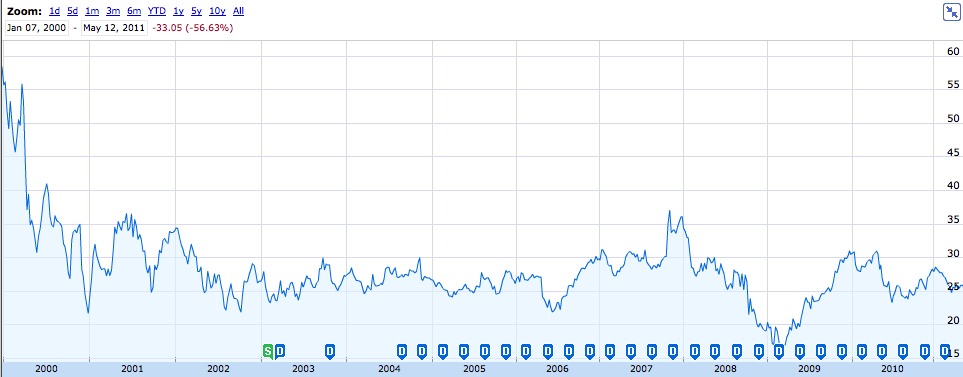
    As you can see that’s not looking very pretty, but that data alone doesn’t tell the entire story. To be fair we have to look at what the stock market in general has done too. Here’s the same plot with the NASDAQ data along with MSFT’s (note I chose NASDAQ because the index best reflects the business of Microsoft):

    [](https://f3a98a5aca88d28ed629-2f664c0697d743fb9a738111ab4002bd.ssl.cf1.rackcdn.com/ms-nd-ss.jpg)
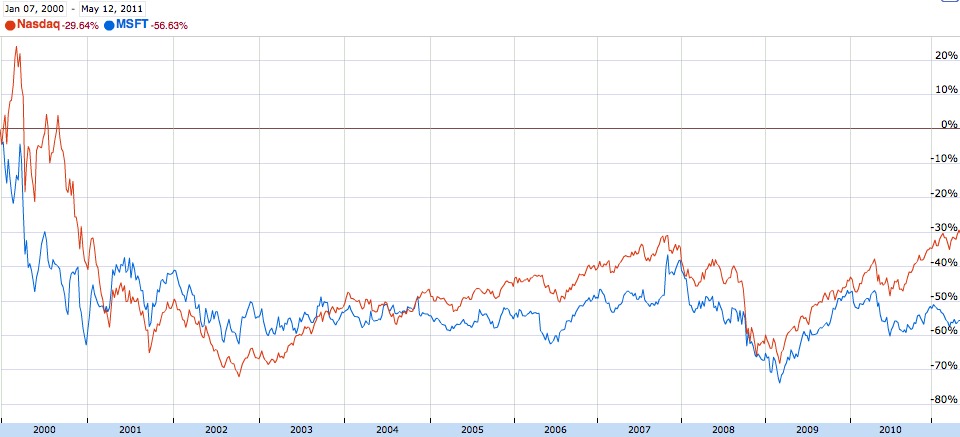
    It’s pretty obvious from the chart that Microsoft has been moving right along with the NASDAQ, or it has been moving the NASDAQ right along with it — however you want to look at it.

    From these two charts it seems rather obvious that Microsoft is on a downward trend, but is that accurate? Let’s look at the same chart, but remove NASDAQ and add in Apple and Google:

    [](https://f3a98a5aca88d28ed629-2f664c0697d743fb9a738111ab4002bd.ssl.cf1.rackcdn.com/ms-gg-aa-ss.jpg)
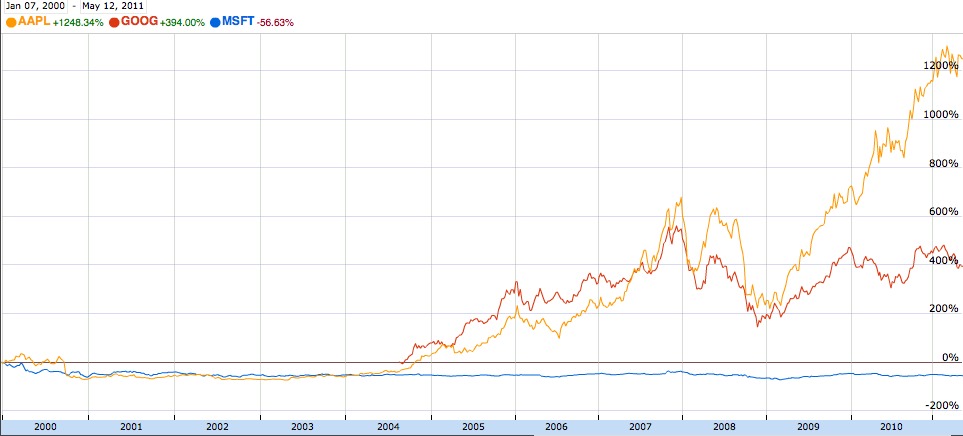
    Once you do that it seems pretty obvious that Microsoft has been slowly declining, while Google and Apple have been taking off like a rocket since 2004.

    While these charts are anything but proof of bad management — in business school the first thing they teach you about CEO’s is: it is the CEO’s job to *increase* the shareholder value of the company. Since taking the position Ballmer has decreased shareholder value, as reflected by stock price, by -56.63%. That. Is. Not. Good.

    ### Countdown ###

    I think it is appropriate at this time to start the countdown of how long Ballmer has left until he “steps down”. ((Because high profile CEOs rarely get fired, typically they choose to resign instead.)) This Skype deal should be the final nail in the coffin for the Ballmer era at Microsoft, yet I fear that employee number 30 may get a reprieve. Let’s take a stroll down Ballmer memory lane:

    #### $8.5 BILLION ####

    Ballmer’s acquisition of Skype for $8.5 billion dollars is not only a gross overpay, but a complete waste of money for Microsoft. Ballmer has yet to lay out a [clear reason why Microsoft wanted Skype](http://gigaom.com/2011/05/09/why-microsoft-is-buying-skype-for-8-billion/). He has only stated the obvious: integration in Microsoft products — which could have been done in a partnership instead of an acquisition. In fact, the acquisition by most accounts sounded more like a move by Ballmer to buy something that others ((Read: Google, Facebook.)) may have wanted to own — just for the sake of others not owning it.

    Beyond that is the fact that Microsoft has 89,000 employees — are you telling me that the company that put a computer in every home couldn’t create a Skype clone?

    Not only could Skype have been made in-house, Skype *should* have been made in-house by Microsoft.

    Even if it would have cost $1 billion dollars Microsoft would have been better off creating Skype in-house. Does anybody really think Apple spent anything close to $1 billion dollars building FaceTime?

    This entire acquisition feels like a desperate move, made by a desperate man. As a shareholder I hope that the regulators stop the acquisition, but I highly doubt that will happen.

    #### The iPhone ####

    Ballmer is now famous for [saying](http://www.usatoday.com/money/companies/management/2007-04-29-ballmer-ceo-forum-usat_N.htm):

    >There’s no chance that the iPhone is going to get any significant market share. No chance. It’s a $500 subsidized item. They may make a lot of money. But if you actually take a look at the 1.3 billion phones that get sold, I’d prefer to have our software in 60% or 70% or 80% of them, than I would to have 2% or 3%, which is what Apple might get.

    We can get into talking tough and all that, but Ballmer — as the face of Microsoft — should have never made such a short sighted comment about any product released by a serious competitor like Apple. What is less quoted is the comments he made immediately following the above:

    >In the case of music, Apple got out early. They were the first to really recognize that you couldn’t just think about the device and all the pieces separately. Bravo. Credit that to Steve (Jobs) and Apple. They did a nice job.

    >But it’s not like we’re at the end of the line of innovation that’s going to come in the way people listen to music, watch videos, etc. I’ll bet our ads will be less edgy. But my 85-year-old uncle probably will never own an iPod, and I hope we’ll get him to own a Zune.

    What is so shocking about this is that Ballmer recognizes that first to market is important — yet it took until 2010 to launch Windows Phone 7, [three years after the iPhone](http://en.wikipedia.org/wiki/Windows_Phone_7).

    Where is the “innovation” that Ballmer mentions in the music space — the Zune is effectively dead now and I bet his Uncle *does* have an iPod at this point. ((I’m going to go with a shuffle that a family member bought for him to listen to Otis Redding on. Because who doesn’t like “Sitting on the dock of the bay”.))

    This is the epitome of short sighted behavior by Ballmer and should have made the board and shareholders incredibly un-easy at the time and especially now. Instead it bolstered his support as a man who was going to squash the evil Apple bug.

    Short sighted behavior like this can and should be forgiven if the person later recognizes his errors and immediately moves to correct it, yet again though it took three years to get a serious iPhone competitor out of Microsoft. They never created a music/video player that gained traction after the Zune faded into Wikipedia archives. That cannot and should not be forgiven.

    #### Windows Phone 7 ####

    As I mentioned above Windows Phone 7 was seriously late to the party. Three years late means that most consumers Microsoft was targeting were on at least their second iPhone before Microsoft started to slowly ship Windows Phone 7. Add to that the basic lack of now common place smart phone features and you begin to see that Microsoft shipped a product that was competitive with the software *from three years ago*.

    Windows Phone 7 may stand to be a long term success for Microsoft, but I doubt it. It is a product that in every way shows why Ballmer should not be in charge any longer. It was late and short sighted about the current market needs. In 2006 Windows Phone 7 would have blown away every technophile, this one included, in 2010 it is interesting and underwhelming.

    I can assure you there are no crowds forming to get one.

    It is the Zune all over again — a solid offering made far too late to make a substantial difference.

    #### Windows Mobile ####

    Windows Mobile 6.5 was a powerhouse of a product. Pre-2007 most U.S. buyers of smart phones chose between BlackBerry and Windows Mobile 6.5 5. ((6.5 came out later, likely it was 5 at this time.)) Both were small screened devices with a hardware keyboard — with exception to the few HTC devices with stylus based touch screens. Palm was struggling at the time and Windows Mobile was the dominant player in consumer minds, BlackBerry was the beast in boardrooms.

    In the U.S. it was a two platform market for the most part — the iPhone changed that. BlackBerry immediately started to make clones with the Storm [launching in 2008](http://en.wikipedia.org/wiki/Blackberry_storm). Microsoft could have started shipping compelling devices — instead they squandered what little market they had until it was an insignificant market share. So much for that 60% Ballmer wanted.

    #### Copycats ####

    In 2005 Apple held its World Wide Developer Conference with [banners hanging that read](http://www.flickr.com/photos/emeidi/43356340/): “Redmond, start your photocopiers.” Microsoft used to have a knack for taking any technology that was upcoming, copying it and launching it under their moniker(s) and squashing that small company. Apple made a joke about it, but Ballmer should have taken it as a directive. Instead it wasn’t until a year later when Microsoft released the heavily troubled and much criticized Windows Vista.

    Copying your competition is not necessarily a poor business move — Microsoft itself has proven time and time again that you can be very successful by doing so. Ballmer has continued this tradition, but with a glaring difference: tardiness. Where Microsoft used to be fast to copy and shut down these companies — before traction was gained — they have now been slow — and comically bad — at copying others. What happened?

    Hell, Microsoft used to innovate too, but even that seems to have disappeared (unless you count the Office Ribbon interface).

    #### Danger, Danger ####

    In 2008 [Microsoft paid $500 million for Danger](http://www.microsoft.com/presspass/press/2008/feb08/02-11acquisition.mspx). This was Ballmer’s response to the iPhone: an acquisition that went (almost) no where. I could say more, but Michal Lev-Ram of Fortune does a [better job](http://tech.fortune.cnn.com/2011/03/01/t-mobile-says-farewell-to-microsoft-danger/):

    >Microsoft says most of the team working on Danger has already been absorbed in to the Windows Phone 7 group (Microsoft’s home-brewed mobile operating system). But the Redmond-based software giant had much bigger plans for Danger back in 2008, when it announced it was buying the small Palo Alto, Calif. company. The plan was to tap into the Sidekick-maker’s “deep understanding of consumers” and its “young and enthusiastic, internet-savvy and socially inclined” customer base (according to a company release from 2008). Obviously, that never quite happened.

    #### The Infamous iPhone Funeral ####

    About a month before the launch of Windows Phone 7, Microsoft held an [iPhone funeral procession](http://blogs.seattleweekly.com/dailyweekly/2010/09/microsoft_throws_windows_7_par.php) in Redmond. This is not something a confident business does, this is something an arrogant business does — regardless of what company does something like this it is both childish and stupid. Not to mention that the people in the parade look like evil servants, complete with a Darth Vader on a motorcycle.

    It’s silly — and it was done in good fun to boost employee morale. None of that matters though because a good CEO would have never let that happen and that fact that Ballmer let it happen says a lot about him as CEO: arrogant to a fault.

    ### Next Steps ###

    The above are all recaps of the things that Ballmer has had a hand in over the last ten years that should be enough to give the board a reason to remove him. The scariest thought isn’t Ballmer remaining in power — it’s who his successor may be. My guess is that it is another long time employee (calling #40), but that would be a worse decision than letting Ballmer blow money on hookers and Skype.

    There are two things Microsoft needs to do now before it is really time to fret.

    #### New CEO ####

    Microsoft should be searching for a new CEO *right now*. The Skype acquisition damage can still be mitigated if the proper people are put in place to immediately leverage the Skype brand. A new CEO should be:

    1. Passionate about technology: don’t you get the feeling that Ballmer doesn’t really care about the products that Microsoft makes, in the same way that Steve Jobs cares about how employee shuttle buses look and how and where color is applied? Any new CEO should love technology and that will begin to show at Microsoft like it did when Gates was still at the helm if the right person is hired. Ballmer seems to care more about being the biggest thing on the market instead of the products his company creates.
    2. Forward thinking: Ballmer has shown his short sightedness time and time again, let’s get an executive with some vision. It is time that Microsoft starts creating new markets instead of trying to understand markets that their competitors are creating.
    3. An outsider: this is going to be the hardest thing for Microsoft to realize, but they need to get some fresh eyes on the problem. At the very least it should be someone who has not spent more than the last five years with the company. Microsoft needs a fresh outside perspective. An insider will just keep following the GPS coordinates that have been set forth by Ballmer.

    #### Talent ####

    The second thing Microsoft needs to focus on is acquiring talent and not product names. They should be making acquisitions that bring in top notch talent. Microsoft used to be the top pick for young budding tech stars, today that is hardly the case. ((With no disrespect to the many talented people that are currently working at Microsoft, or desire to work there. I know many Microsoft employees that are exceptional, they are just not being allowed to shine.))

    If Microsoft wants a chance and long term survivorship they need to make themselves appealing to young stars. You can’t appeal to this young crop of talent unless you offer compelling products. More and more job selection for the elite talent is less about money and more about job satisfaction. Microsoft’s best bet here is to start acquiring fresh young companies **and** keeping the talent that comes with it.

    ### The End? ###

    Microsoft isn’t dead yet, nor will it be soon. It is however in the early stages of death and Ballmer isn’t going to the hospital — he’s running to go party some more.

    Microsoft needs a swift kick in the ass.

    UPDATE: [Let’s not forget about the failed Kin](http://techcrunch.com/2010/06/30/microsoft-puts-down-the-kin/).
  • The New Yorker iPad App

    John Biggs has a really [nice write up on](http://www.crunchgear.com/2011/05/12/it-is-finished-the-new-yorker-ipad-app-is-the-beginning-of-the-end-of-print/) why he is leaving his [New Yorker](http://www.newyorker.com/) paper subscription in the dust for the iPad only version. Since as long as I can remember my house was always filled with magazines. My parents both got a ton of subscriptions and I would always get to peruse through my dad’s car magazines when he was done. As I got older and my parents divorced and I started to get my own magazine subscriptions — mostly car magazines — but I loved reading all that information.

    Those magazines subscriptions had Newsweek and Businessweek added to them late on — among others. The one thing I hated about magazines was that they take up far too much room if you want to hang on to them for archives and reference. In 2004 I started using Zinio — an online magazine distributer — who for the same price as the print subscription would give you magazines in a DRM protected, Adobe laden, PDF that you could use their (not so stellar) viewer to read.

    To this day I still use Zinio and while it has gotten better over the years the DRM has always been a problem for the service. To my knowledge all those archives of Zinio magazines I saved are unreadable at this point because they switched to a new viewer that uses Adobe Air — lovely. Their iPad app is ok, but really it is just an extension of the often crappy Adobe Air app that they have for the Mac. I have been pretty reluctant to wanting to switch full on to iPad only subscriptions because the pricing simply was not competitive — $4.99 an issue is just too much if you want to buy every issue.

    Luckily Apple introduced subscription pricing and like all of you I have been watching closely to see how publishers are reacting to it. Our first taste was a sour one that The Daily offered. One app that I have really taken too is Bloomberg’s Businessweek+ app that allows you to subscribe to the weekly periodical for a seemingly low price of $2.99 a month, or $36 bucks a year. It’s not the best pricing, but it’s not the worst either.

    The content of Businessweek has always been hit or miss for me, but it is typically news that I don’t seek out and that I like to know (even if I get to it much later than I could on the web). The fact is that I find the content valuable, you may not. What intrigues me about Businessweek is the app itself, which you can see my thoughts on [here](https://brooksreview.net/2011/04/businessweek-2/) (I like it).

    Outside of Businessweek and the few Zinio magazines that I still subscribe too I haven’t been too enamored with iPad magazine apps. Then the New Yorker wrote something that I really wanted to read — really wanted to read. The end result of which is that I am now a yearly subscriber to The New Yorker in e-format only and I am quite pleased with it.

    The New Yorker really raises the price at $59.99 a year — something most iPad users are going to need to think about. I have never had a subscription to The New Yorker, but I have read articles from it on occasion. As far as the content is concerned: it is top notch and that is almost not debatable.

    The app itself is what intrigues me the most.

    The app seems to take the idea of adding eye candy and throw it out the window. This is not an app designed for Apple freaks, or iPad users — this is an app that has been very intentionally designed for readers.

    *I love that.*

    The font is crisp, clear and readable. You don’t get fancy carousels that don’t work, or multimedia enriched everything — you get quality writing displayed in a quality reading manner. The navigation is straight forward and an expanded view shows you where you are in everything, lest you get lost. Everything in the app is smooth like butter, everything just works. Sure the text isn’t zoomable, or selectable, or shareable — but it is highly readable and in the end that’s what I bought it to do.

    It’s safe to say that I have tried a lot of magazine apps and that, of all of them, I hope more publishers model their apps after what The New Yorker has done — they have won me over.

  • “Screwed” vs An Evolving Market

    [iFlow Reader Staff](https://www.iflowreader.com/Closing.aspx):
    >We put our faith in Apple and they screwed us. This happened even though we went to great lengths to clear our plans with Apple because we did not want to make this substantial investment of time and money blindly. Apple’s response to our detailed inquiries was to tell us that our plans did not infringe their rules in any way, which was true at the time, but there is one little catch. Apple can change the rules at any time and they did. Sadly they must have known full well that they were going to do this.   Apple’s iBooks was already in development when we talked to them and they certainly must have known that their future plans would doom us to failure no matter how good our product was. We never really had a chance.

    First things first: Apple didn’t “screw” iFlow, and they certainly didn’t *screw* iFlow. If anything screwed iFlow it was the very thing that drew them to iOS to begin with: the platform success and an evolving business model.

    Every good business person knows that in order to be successful in the long term you need to have a flexible business. You need to be able to respond to changing laws and changing environments. So iFlow, Apple didn’t screw you — you screwed yourselves. Linking your success to being able to sell one app in one market screwed you and it can and will happen to others.

    To say that Apple screwed iFlow is to also say that Apple directly came after iFlow and said “time to end these guys”. Instead Apple changed a rule that effects everyone in the app store, especially Amazon — not just iFlow. It’s also not fair to say that you cleared it with Apple and that Apple knew they were going to screw you — they likely didn’t know that, at least not the people you talked with. With 50,000 plus employees do you (iFlow) really (naively) believe that all of Apple’s employees were privy to the development of iBooks?

    It sucks that iFlow can’t figure out an alternative, but it’s not Apple’s job to help iFlow run their business. The people they should really be pissed at is the publishers not allowing a flexible pricing model for changing distribution methods — but that probably wouldn’t get them on the Hacker News front page.

  • Follow Me, Follow You on Twitter

    Do I follow you? Do you follow me? What if I follow you and you don’t reciprocate? What if you follow me and *I* don’t reciprocate? Does it matter? If your favorite Twitterer start following you tomorrow, how would that change you? Will you change the way you tweet — the contents of your tweets?

    If you follow me and I don’t follow people that you expect me to follow, does that change your opinion of who I am? If you follow me and I unfollow someone for a stupid reason — will that change your perception of me?

    That’s a lot of questions, but they have all been bouncing around my head since 5/4/11 — the day I unfollowed quite a few people — that I consider friends — when I was fed up of hearing lame Star Wars jokes. I received a lot of commentary from people about why I should keep following and how it isn’t “cool” that I am unfollowing people for this reason.

    Many suggested that I get a Twitter app to filter the tweets.

    I do have a filter in Twitter for Mac and it is called following/unfollowing. I don’t want to hear only what I want to hear from people I follow — I want to hear everything they say, whether I like it or not, if that starts to become annoying then I find myself asking the tough question:

    >Why am I still following this person?

    While writing this post I stopped and did the tedious task of pruning my list of people that I follow, I went from 276 to 199 (probably even less by the time you read this). If I unfollowed you, I am sorry, but it shouldn’t matter to you. This has nothing to do with whether I like you, or deem you “worthy” — it has everything to do with what interests me. I like people that tweet certain things, you just may not fit that group.

    Who follows you, how many people follow, and who people you follow are following shouldn’t matter — because no matter what, when you click follow you see that persons tweets — regardless of what opinion they have of you. ((Of course this does not account for protected feeds.)) If I unfollow you, don’t fret because you can still follow me. The reverse is also true.

    Twitter is **not** Facebook. We are not friends because we both pushed a button confirming so — we just are interested in what other people say. Think of Twitter more like RSS feed subscriptions and less like a network of friends and you won’t get so worked up over all this follower nonsense.

  • Interesting Things Microsoft Can Do With Skype

    Following the acquisition, here are some interesting things that Microsoft could do to take Skype to the next level:

    1. Integrate Skype in Outlook. Not so that you can Skype a contact from within Outlook, that’s too obvious. Wouldn’t it be neat if you had a 50MB attachment to send and Outlook just sent that over the Skype protocol for you?
    2. Finally rid of the world of MSN messenger.
    3. Sell a Windows Phone 7, uh, phone with only 3G data and no talk time on it — leveraging only Skype as the calling means.
    4. Start licensing the technology to be used in other apps and other services, thus increasing the user base. (Facebook)
    5. Start charging for it (MS knows how to charge for things).
    6. Turn it into a serious business tool to compete with WebEX.
    7. Build in the ability to remotely control another users computer for troubleshooting (like LogMeIn does).

    Of course we also run the risk that:

    1. Skype gets five more words added to its name.
    2. And a number for good measure
    3. Microsoft is complacent and does absolutely nothing with it.

    I think Microsoft overpaid for Skype, but I don’t think Skype is necessarily screwed because it is owned by Microsoft.

  • The Myth of Profits

    Last night I made the [quip](https://brooksreview.net/2011/05/skype-price/):

    >It’s the same problem that Facebook and Twitter face — massive user base with no idea how to profit from it.

    I was pinged later with this comment from [Moncef Belyamani](http://chezmoncef.com/post/5354480516/skype-is-not-equal-to-facebook):

    >Such a bold statement, yet so wrong. It took me less than a minute to find this key paragraph in a New York Times [DealBook](http://dealbook.nytimes.com/2011/01/06/goldman-unit-passed-on-earlier-facebook-investment/) article from January […]

    The link that he provides states:

    >Last year, Facebook recorded revenue of approximately $2 billion, with roughly $400 million in profit, according to people briefed on the company’s results. That is up from $220 million in earnings on $770 million in sales in 2009.

    At first glance it would appear that my initial statements about Facebook are way off base. Here’s the key passage in the above quote from the New York Times: “according to people briefed on the company’s results.”

    In other words no one outside of private investors has seen Facebook’s financial statements, they have not been independently audited, which means they are far less reliable than what these companies once reported:

    – Lehman
    – AIG
    – Worldcom
    – Enron
    – Madoff
    – Arthur Anderson

    I think you get where I am going here.

    I am not saying that Facebook is cooking its books in any way, but I am saying that right now not only do we have no way of verifying that they aren’t, but our “information” is also being sourced from people who stand to gain from a higher perceived value of Facebook.

    This “information” is likely coming from a private shareholder of the company. They are the only ones to gain from leaking this data — if others value Facebook higher because of this then the secondary markets that trade these private shares will only increase the value of a Facebook share, thus making that investor richer.

    Perhaps though you still think everything I have stated is bunk. Take this into consideration then: if Facebook is profitable then why does it still need to raise capital through private investing? In the same NYT article they talk about the $450 million that Facebook raised in additional capital. Are we to believe that they can’t continue along their current path with the mythical profits that are being made right now? That they actually need to double what they make to sustain growth? Or is it that they really are not profitable? Or is it one and the same?

    You could also believe that the company needs that extra cash to expand and grow faster than they could without — if that’s the belief do we really think that they *only* need $450 million? Wouldn’t they be better suited for a public IPO where they stand to be infused with billions? Of course a public IPO would mean full auditing and disclosure of their financial statements and release to the public. Which in turn would mean potential investors would get a true picture of their value.

    I tend to believe the following about all private companies:

    – Information reported by interested parties is unreliable.
    – Companies that are still raising money are not profitable.

    You may disagree, but the fact remains that [hearsay](http://en.wikipedia.org/wiki/Hearsay) is not permitted in court for a reason.

    [Updated: 5.10.11 at 6:37 AM]

    On [Twitter](https://twitter.com/theorangeview/status/67945499273072640) I was pointed to [this article](http://www.reuters.com/article/2011/01/06/us-facebook-goldman-idUSTRE70359V20110106), which states:

    >The financial statements were not audited and offered little detail about how Facebook generates it revenue, said the source, who did not want to be identified because he had signed a non-disclosure agreement.

    Now Goldman Sachs has every reason to report accurate numbers, but it still stands to reason that any profit currently being made is:

    1. Not enough, thus the additional capital.
    2. Without a full operational breakdown it is hard to say what the net income they are reporting reflects — there are too many ways to report things that can substantially change the outcome.

    It is of course possible that Facebook is making money, without proof though I am inclined not to believe that — and you shouldn’t buy into it either.

  • You Can’t Replace Email if You Require Email

    Google Wave was an idea with the lofty goal of trying to replace email, that didn’t work out so well for them. Facebook wants to replace email, and Twitter seems to have the same ambition too (though probably wanting to replace text messages and IM over email). The problem with every service that has been a serious contender of replacing email is these services rely on email to function.

    You can’t replace pants with shorts when your definition of shorts is: everyone buy pants and cut the legs off — pants will still be a viable business (the consumer is just altering the usage). Same too with Twitter, Facebook, et al, they are still relying on email for certain parts of their service (like adding new users or sending notifications) while wanting to replace email at the same time.

    Take a look at the Twitter sign up:

    Here is Facebook’s:

    Neither service would let me signup unless I provided an email address. Two massively important communication tools — for millions of people — will not let you sign up without providing an email address, what year is this?

    If these two companies were in charge when email services were a hot commodity, you would have had to provide a mailing address when trying to sign up for an email account.

    So here’s a pro-tip to all current thinkers out there: if you want to build a service to replace email, **don’t** require the user to provide an email address when they signup.

    There are many practical reasons for requiring an email address to sign up for a new service:

    – Password recovery ((This is easiest when done over email, but can be done with a series of ‘challenge questions’.))
    – Verification
    – Spam control
    – Helping other users find each other.

    There are more reasons, but those four are at the core — the first being of huge importance.

    Remember that when email first came about, it was not tied to anything for users — we had no way of looking someone’s email up (we still don’t). We built our email databases the old fashioned way: by exchanging business cards.

    That’s not entirely practical anymore — however it’s not out of the question to assume that your user is not willing to slowly build their network. Provide robust search and have faith in the fact that users will want to broadcast their “handle” to the people they want to correspond with instead of relying on email.

    Also, please make something that replaces email and fixes all of its problems. ((An impossible dream, I know.))

  • Via

    In the past six months there has been a lot of talk about ‘via’ links — the links that link-blog posts use to give credit to other people and websites for turning them on to particular links. It is a courteous practice to list a via link to another site and I tend to do it when I remember where I found the link, or if there is good reason to do so.

    I have seen a few people now not doing via attributions and also saying that they find the pratice rather pointless. I couldn’t care less about whether someone cites me in a via link, and I doubt that I make any substantial traffic difference to sites that I provide via links to.

    Or do I?

    I have been reading *In The Plex* which is a sort of biography on Google itself — in the book they make reference to just how important linking is on the web. This got me thinking about how we conduct ourselves when link blogging.

    We all know how PageRank works, the more links people are sending to a particular page, the higher the PageRank — the higher the PageRank the higher you appear on Google search results. PageRank is derived, by links between sites. ((This is a very simplified explanation, but accurate enough for our purposes.))

    Additionally sites like Alexa.com, that try to “rank” websites, will use “sites linking in” as a metric for success. Ergo, by linking to the source site with a tiny and easy ‘via’ attribution you are essentially helping to support that site — indirectly.

    Again, I don’t care if people provide attribution to me in form of via links — but I do know that I want to help out other sites that have helped to provide me with content. That’s why I use via links and have since the beginning.

    In short, don’t use via attributions to be nice — use them to help show other people sites that you find relevant on the web. Use via as a way of sharing hidden gems with all of us, while also supporting those hidden gems.