Things updated substantially (always posted at the bottom):
– [The Rectilinear Top Load Backpack](https://brooksreview.net/2012/12/gr1/)
Top Posts
Things updated substantially (always posted at the bottom): – [The Rectilinear Top Load Backpack](https://brooksreview.net/2012/12/gr1/)
Things updated substantially (always posted at the bottom):
– [The Rectilinear Top Load Backpack](https://brooksreview.net/2012/12/gr1/)
When I turned twenty-five, five years ago, my wife can attest to the minor life crisis I suffered leading up to the event. I felt old, I wasn’t where I wanted to be, and *everything* mattered. Today I am thirty. ((December 28, 2012)) I am closer to where I want to be, have managed to…
When I turned twenty-five, five years ago, my wife can attest to the minor life crisis I suffered leading up to the event. I felt old, I wasn’t where I wanted to be, and *everything* mattered.
Today I am thirty. ((December 28, 2012))
I am closer to where I want to be, have managed to keep my emotions about turning thirty to a minimum, and realize that only a few things in life matter.
And so, as bloggers do, here are thirty things that I *think* I know:
1. The government is not infallible, and often egregious in the decisions they make, take note and speak up when they are wrong.
2. Some asshole will always drive slow in the fast lane. Said asshole will justify it with the rationale that there is no such thing as a fast lane. You can refute with the tried and true passing lane logic: “Technically it is the passing lane, and by definition then you *must* be passing someone to be in it. Therefore you *must* be traveling faster than those in the right lane(s) to be in the left lane.” At the end of the day, this won’t work. Neither will riding their ass, honking, or using *Top Gun’s* “international greeting”. However, all of these things *will* make you feel better.
3. Ignore people that constantly ask for your opinion, only to then refute your opinion. They don’t care to actually listen to your opinion, so you shouldn’t care to waste your breath.
4. People will never stop blaming their incompetence on the day of the week. “It’s Monday so I am just dragging today.” “No one works on Friday, that includes me.” It is best to avoid these people, they are the ones going no where fast and have yet to realize the day of the week doesn’t matter much any more.
5. Early morning meetings have the potential to screw over the rest of your day. Avoid early morning meetings at all costs — always get a couple of hours of work in before your first meeting.
6. No one wants to work on Friday (see number 4), so it’s a great time to catch up. Also a great time to schedule a meeting, late in the afternoon, to ensure that it will be a short meeting, or a cancelled meeting. (Additionally, choosing to work over “bank holidays” is another great way to get a lot done.)
7. The Electoral College is bullshit.
8. Well tailored clothes make you look 50% better — no matter how cheap the clothes that are well tailored were when you purchased them.
9. Facebook is changing our culture in a way that I hate.
10. A lot of paranoid people are crazy, however most people are simply not paranoid enough — which is also crazy.
11. If you simply nod and say “I understand” when you first meet people, you will learn far more about them than they learn about you (they will just assume that you agree with them). Don’t fall into the trap of assuming people agree with you based on the fact that they did not refute you — that’s a suckers game.
12. You should never be surprised when an idiot does something idiotic. We know this, but it is also important to just realize that idiots will be idiots and that is just how it is. Anger about this fact will get you no where.
13. Likewise, someone who is constantly doing idiotic things is likely also an idiot — you just may not be willing to label them as such.
14. Telling someone that you were right is far less satisfying then letting them learn you are right on their own.
15. It’s only a secret if you don’t tell anyone, and it doesn’t matter how many times people tell you this, because it’s one of those things you just have to learn the hard way.
16. Features, specs, and checklists are irrelevant. The best thing you can get is specific to you and so you should take any review not written by you with a grain of salt.
17. Whenever you check out at a store and the little credit card reader asks if you want to donate to XYZ charity — just donate a dollar. It takes no extra time, you probably won’t notice the missing dollar, and you will be doing something good while you buy your Cheetos.
18. Coke drinkers always tell themselves that Coke is better than Pepsi in the same way that Android users convince themselves that Android is better than iOS.
19. Saying things like the above, number 18, will fill your inbox every time.
20. Don’t give a shit about what people think of your honest opinion. If you think Android is better than iOS, Windows better than Mac, and Nikon better than Canon — so be it. You’d be wrong, but at least you’re standing for what you believe in, and that’s more important.
21. Life is a lot easier if you set two standard drinks: one non-alcoholic and another alcoholic. Keep both simple, the more complex your order, the bigger an asshole you look like. (Doubly so with coffee orders.) Make sure both are common enough that even a dive bar will have them. (I went with Pepsi/Coke and Makers Mark on the rocks.)
22. Respect matters to people (well most people) more than money or gifts. If you want to retain an employee/tenant/anyone just treat them with respect — whatever respect means for the relationship you have with them — it will go further than any gift or money will (mostly).
23. Expect the worse of the weather and be prepared. If forecasters say no snow, but it’s going to be low 30s and raining — expect snow. Forecasters use models, you should use common sense.
24. You have no right to complain for something that was free, so pay for your stuff and you won’t look like a fool when you complain about it.
25. Own your weaknesses. I know I’m not good at sports or grammar and a ton of other things. It is because I know this that I am willing to seek help and take advice on these matters. I was only able to do that when I admitted that I sucked at these things.
26. The little things matter.
27. Except when they don’t.
28. When you feel like shit, smile. Smiling goes a long way and if you can get someone else to smile because you smiled, your fake smile might become a real one. And, if even just for a moment, you might feel better.
29. There’s nothing better in life than making a baby giggle.
30. Lists like this are often full of bad advice.
*(This post is a part of a series on Keyboard Maestro, [see more here](https://brooksreview.net/tag/KM-SERIES/).)* As part of my job I compile a monthly PDF report which I send out to the owners of properties I manage. I do this for quite a few properties every month. When I started I used a bunch of TextExpander…
*(This post is a part of a series on Keyboard Maestro, [see more here](https://brooksreview.net/tag/KM-SERIES/).)*
As part of my job I compile a monthly PDF report which I send out to the owners of properties I manage. I do this for quite a few properties every month.
When I started I used a bunch of TextExpander shortcuts to build the email, but this soon became too cumbersome. Not one to rest, I eventually built a Keyboard Maestro macro based off of Automator to send these files. Using Automator allowed me to pre-fill all the info in the email, with custom dates and `To` fields, but Automator has a significant downside.
Anyone who triggers Automator via Keyboard Maestro knows that Automator is a really slow tool to use. I would be waiting for my computer to think and work before I could do anything else and this drove me nuts.
I immediately started to work with AppleScript to try and replace Automator — I figured out how to do everything except automatically attach the selected file from Finder. The more I searched, the less I came up with a solution. Until [Eelco Lempsink](http://tupil.com) got in touch, responding to my plea for help on App.net, Lempsink sent over an awesome AppleScript that builds a new email with the selected Finder item attached.
So with Lempsink’s permission, [here’s the AppleScript he built](https://f3a98a5aca88d28ed629-2f664c0697d743fb9a738111ab4002bd.ssl.cf1.rackcdn.com/mail-attach-fixed-again.zip):
tell application "Finder"
 -- Make a list to gather the names of the selected files
 set fileAliases to {}
 -- Get the selection of the frontmost Finder window
 set fileSelection to the selection
 -- Iterate of the selection
 repeat with fileItem in fileSelection
 copy the fileItem as alias to the end of fileAliases
 end repeat
 -- Check if the selection is not empty
 if the number of items of fileAliases is 0 then
 -- Audible feedback, so the script always does something.
 beep
 else
 -- Now talk to mail to create the message
 tell application "Mail"
 set newMessage to make new outgoing message at beginning with properties {visible:true}
 -- Attach all the selected files
 repeat with fileAlias in fileAliases
 make new attachment with properties {file name:fileAlias} at after the last paragraph of newMessage
 end repeat
 -- Put Mail in the foreground
 activate
 end tell
 end if
 end tell
When executed this AppleScript grabs the selected Finder item(s) and attaches them to the email. For my purposes I needed to add a bit more to it so that I didn’t have to touch a single thing in the email before I sent it.
[Here’s my modifications](https://f3a98a5aca88d28ed629-2f664c0697d743fb9a738111ab4002bd.ssl.cf1.rackcdn.com/Maill-attach-Ben-Mod.zip):
-- Variables
 set theSubject to "PROPERTY NAME Owner's Report"
 set theContent to "Let me know if you have any questions. -Ben"
 set recipientAddress to {}
 tell application "Contacts"
 if group "CONTACT GROUP" exists then
 set recipientAddress to "CONTACT GROUP"
 end if
 end tell
 tell application "Finder"
 -- Make a list to gather the names of the selected files
 set fileAliases to {}
 -- Get the selection of the frontmost Finder window
 set fileSelection to the selection
 -- Iterate of the selection
 repeat with fileItem in fileSelection
 copy the fileItem as alias to the end of fileAliases
 end repeat
 -- Check if the selection is not empty
 if the number of items of fileAliases is 0 then
 -- Audible feedback, so the script always does something.
 beep
 else
 -- Now talk to mail to create the message
 tell application "Mail"
 set newMessage to make new outgoing message at beginning with properties {subject:theSubject, content:theContent, visible:true}
 -- Set a recipient
 tell newMessage
 make new to recipient at end with properties {address:recipientAddress}
 make new bcc recipient at end of bcc recipients with properties {address:"HIGHRISE BCC ADDRESS"}
 end tell
 -- Attach all the selected files
 repeat with fileAlias in fileAliases
 make new attachment with properties {file name:fileAlias} at after the last paragraph of newMessage
 end repeat
 -- Put Mail in the foreground
 activate
 end tell
 end if
 end tell
I’ve added a few things:
– A variable block, so that I can define items one time. Here I define the report subject, the content, and the contacts to send the email to. I added this because I had to create one Applescript for each property I manage. I decided to use a contact group instead of individual contact emails in the script because it allows for easier information change down the line: I just update the Contacts application.
– The other changes are just adding in the spots for the variables.
– Additionally I added in a BCC field where I stick my [Highrise](http://highrisehq.com) BCC address for logging my email correspondence.
That’s the AppleScript, and it rocks.
## Keyboard Maestro
I, of course, trigger this with Keyboard Maestro. You could use FastScripts, but I use Keyboard Maestro so that I can add one more thing: today’s date. I know you can get this in AppleScript, but for the life of me I can’t figure out how to format the date the way I want it. ((I truly suck at Applescript.))
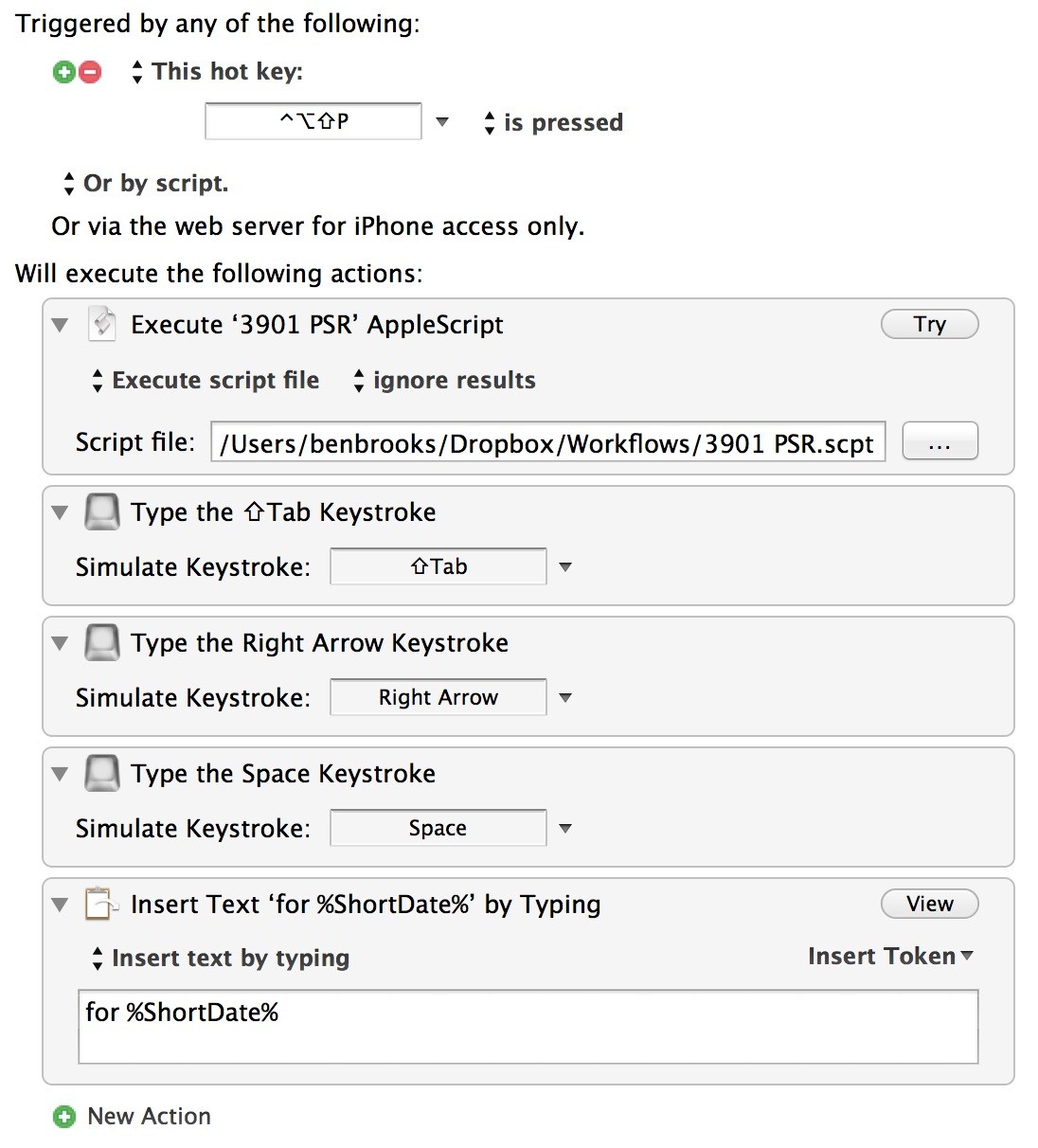
Depending on what fields you have Mail showing in the compose window you may need to edit the tabbing and arrows on the macro — essentially I just use keyboard shortcuts to navigate to the subject line and append today’s date.
The entire macro only takes a few seconds to run and that makes it much faster than Automator.
I stack every property under one hot key trigger so I can just click the one I want to use. This is saving me a ton of work each month.
“But when you write for TrollWriteSMASH, edited by the artist formerly known as Fake Steve Jobs and currently known as mud, just one survey that supports your bitter, anti-Apple hypothesis will do.” — The Macalope
This bag is made for war, but it turns out it is also a very good bag.
Ah, the GORUCK GR1. Right before I purchased the Tom Bihn Smart Alec, I stopped and considered a purchase of the GORUCK GR1 — coveted by many. It’s a fantastic backpack that is made in the USA by a company that thinks all of their products need to stand up in war — and no I’m not joking.
My buddies took early versions of our rucks to combat and to cities the world over, and critiqued every last detail. Green Berets became judge and jury of quality.
Things updated substantially (always posted at the bottom): – [TSA’s Christmas Non-Miracle](https://brooksreview.net/2012/12/tsa-christmas/), updated December 17, 2012. – [The Dropbox v. iCloud debate](https://brooksreview.net/2012/12/linchpin/), updated December 18, 2012. – [Instagram promises revisions](https://brooksreview.net/2012/12/insta-ad-2/), updated December 18, 2012.
Things updated substantially (always posted at the bottom):
– [TSA’s Christmas Non-Miracle](https://brooksreview.net/2012/12/tsa-christmas/), updated December 17, 2012.
– [The Dropbox v. iCloud debate](https://brooksreview.net/2012/12/linchpin/), updated December 18, 2012.
– [Instagram promises revisions](https://brooksreview.net/2012/12/insta-ad-2/), updated December 18, 2012.
*(This post is a part of a series on Keyboard Maestro, [see more here](https://brooksreview.net/tag/KM-SERIES/).)* I really hate websites that capitalize every letter of an authors name in their byline because it makes it hard to link to that post — mostly because I like to copy and paste names so that I make sure I…
*(This post is a part of a series on Keyboard Maestro, [see more here](https://brooksreview.net/tag/KM-SERIES/).)*
I really hate websites that capitalize every letter of an authors name in their byline because it makes it hard to link to that post — mostly because I like to copy and paste names so that I make sure I don’t make a typo.
Luckily with names, for the most part, a simple Title Case will fix the problem. This is an action that can be done very simply in Keyboard Maestro.
The result of this macro is to take the highlighted text and convert it from all caps to Title Case, so that I can post a link citing the author without worrying about misspelling a name.
## The Macro
I start by triggering the macro with a hot key, specifically the hot key: `Control + OPT + Shift + CMD + T`. (Easy to remember as every modifier except `FN` is pressed, then `T` for Title Case.)
The macro assumes that you have the editable text selected, so you will need to have already copied and pasted your text where you want it. (I made it this way so that I could use it universally, as many leases I work on also suffer this problem.)
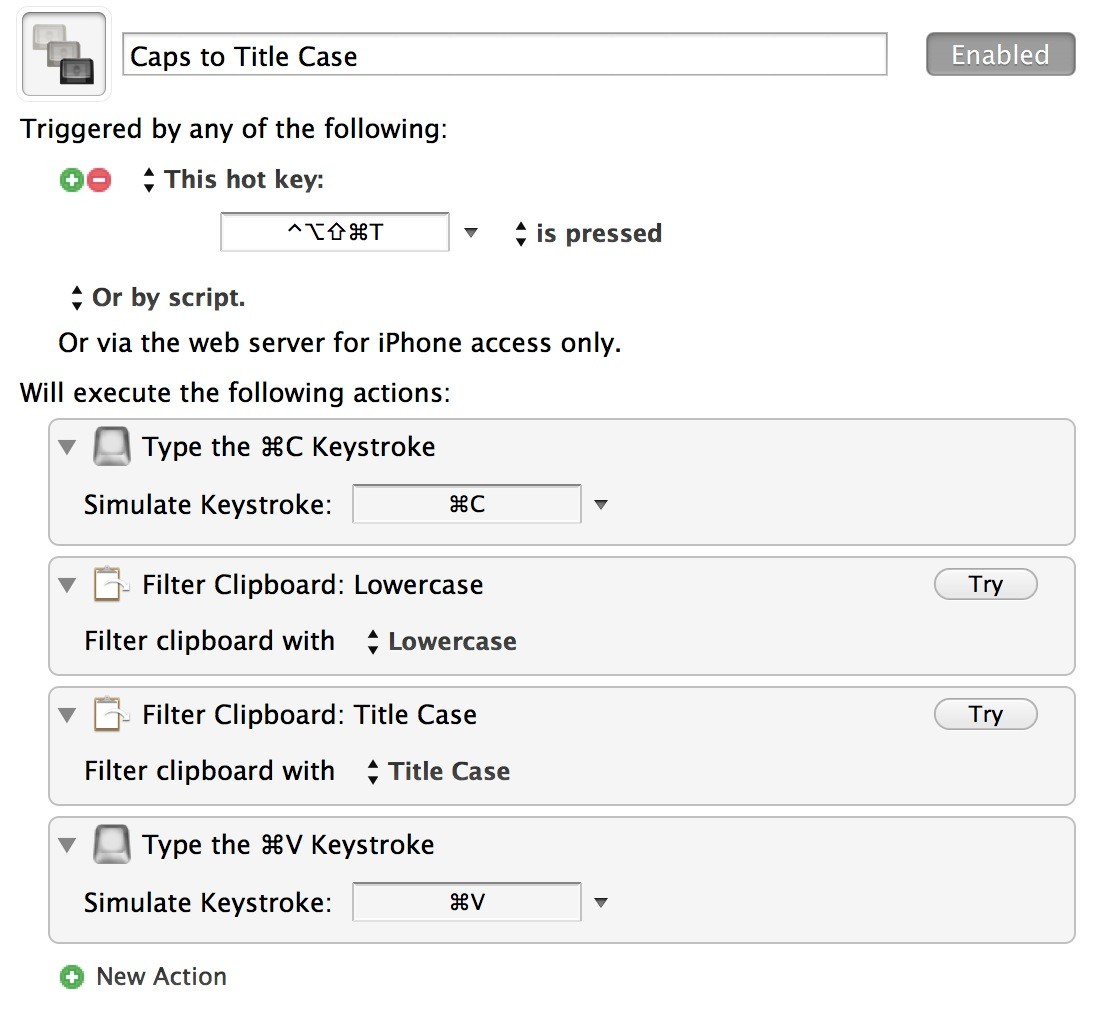
Next Keyboard Maestro performs four actions:
1. The selected text is copied to the clipboard using the action: `Type the CMD+C keystroke `.
2. Next Keyboard Maestro filters the clipboard to all lowercase (this is done because the Title case action won’t change the case of all capitalized words). To get this action, just add the `Filter Clipboard` action and select lowercase.
3. Add the same action again, but this time filter to Title Case.
4. Like the copy action above, we change it to paste by sending the keystroke `CMD+V`.
All done.
If everything works your all caps text should now be properly cased. This also works for titles of blog posts, as it will remove your poor casing and re-case the words as they should be (just be sure to edit for proper names and such).
## Bonus
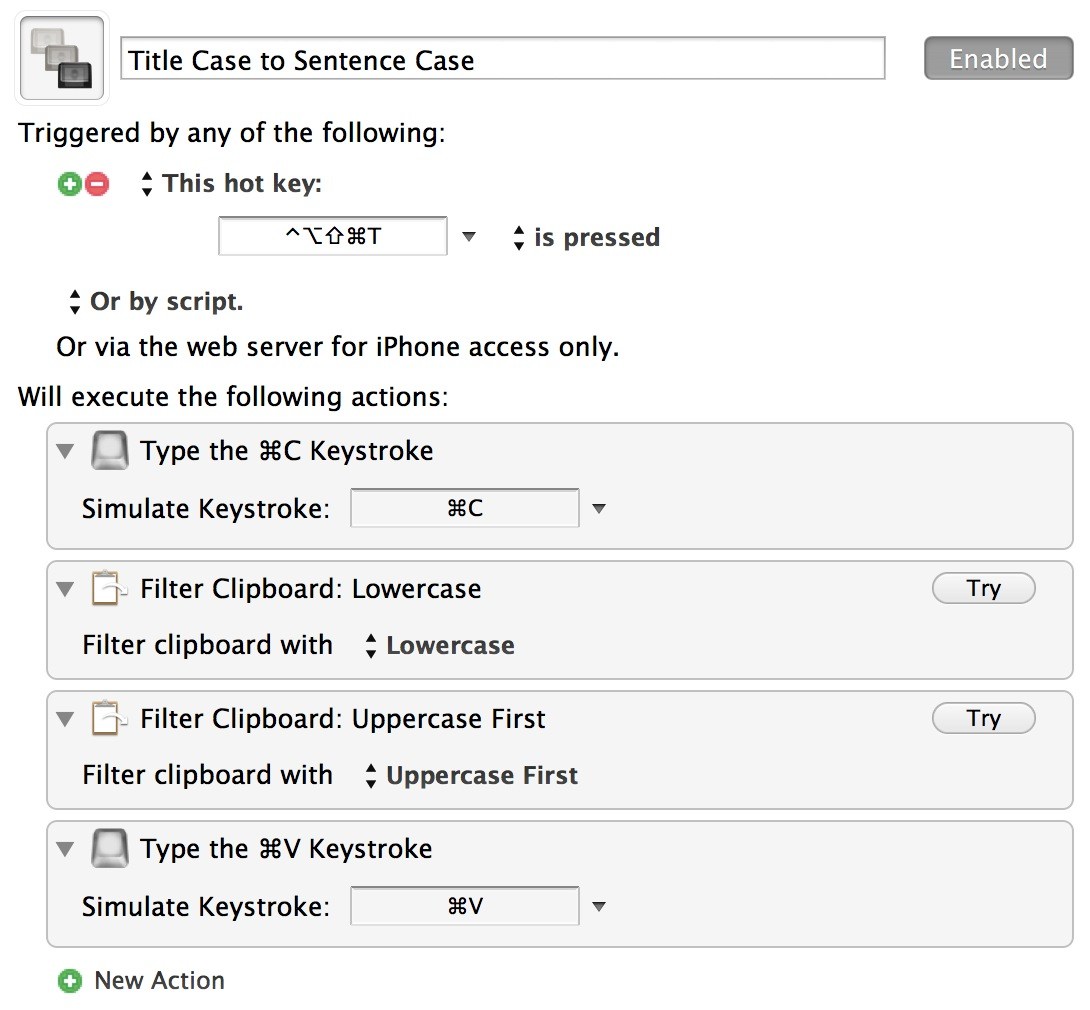
I mentioned that I often use this in leases at my day job, another thing that comes up is people liking to type in all caps for emphasis. I find it ridiculous, and impossible to read, so I have another macro to re-case those stupid sentences to Sentence Case.
The steps are the exact same, just choose `Sentence Case` instead of `Title Case` in the third step.
[Dave Pell has a great post about the technology overload that many of us feel](http://tweetagewasteland.com/2012/12/technologys-placebo-effect/): >The idea that we need a technological solution for too much technology is, at best, the Internet era’s great placebo effect. We feel like we’re getting a little better, but that’s just part of the same addiction. We’ll always be…
[Dave Pell has a great post about the technology overload that many of us feel](http://tweetagewasteland.com/2012/12/technologys-placebo-effect/):
>The idea that we need a technological solution for too much technology is, at best, the Internet era’s great placebo effect. We feel like we’re getting a little better, but that’s just part of the same addiction. We’ll always be just one more piece of technology away from the solution.
The solution, as we all know, is just to turn our devices off. It’s good advice that is hard to follow. This seems like the perfect thing to keep in mind as (here in the U.S.) we head into the holiday season where work slows, people aren’t in a hurry to have you respond to emails, or calls.
It’s easier to ignore your iPhone when Grandma chastises you every time you check your iPhone. ((Not *my* Grandma, mind you, she flipping loves her iPad and my terrible Vimeo videos of my daughter.))
[Riccardo Mori has a great post talking about App.net and the differences between App.net and Twitter. Mori has this really great statement](http://morrick.me/archives/6056): >So, when someone starts interacting with you out of the blue, you don’t tend to think *Who the hell are you?* (as it may happen on Twitter). Instead, you feel like you just…
[Riccardo Mori has a great post talking about App.net and the differences between App.net and Twitter. Mori has this really great statement](http://morrick.me/archives/6056):
>So, when someone starts interacting with you out of the blue, you don’t tend to think *Who the hell are you?* (as it may happen on Twitter). Instead, you feel like you just moved out of the big city, to a smaller town, and you’re surrounded by friendly neighbours who have come here for the same reasons: to escape the urban alienation, so to speak.
I like the analogy between big city and small town. It fits for me because while people are still strangers, strangers in a small town are more aligned with your beliefs and your life than the typical stranger in a big city.
Mori’s post is a great look at why App.net is not the same as Twitter.
“We need a media that races to be right.” — Dave Pell
[Thomas Brand has some thoughts on Dropbox and iCloud, culminating in this great point](http://eggfreckles.net/notes/linchpin/): >People use Dropbox on their iOS devices because they want to share information between Apps. And they use Dropbox on their Macs and PCs because they want to share information between people and computers. Why not make iCloud better at both,…
[Thomas Brand has some thoughts on Dropbox and iCloud, culminating in this great point](http://eggfreckles.net/notes/linchpin/):
>People use Dropbox on their iOS devices because they want to share information between Apps. And they use Dropbox on their Macs and PCs because they want to share information between people and computers. Why not make iCloud better at both, and lift the superimposed limitations on sharing information between apps that gives Dropbox a linchpin in iOS?
It’s a really good sounding idea, but I think it would break the simplicity of iCloud if done improperly. There is one way I think that could add such a feature without over complicating things: allow iCloud apps to all have “Send to…” buttons in them.
If I am working in Numbers and have another app, on either my Mac or iOS, that has registered to be able to open the file type I am working on a user can open a share sheet that shows apps and sends a copy of the file to that app’s iCloud bucket. This would be simple, non-destructive, and easy to explain to all users.
Of course this opens the can of worms that is the “Open with…” dialog currently on Macs, where all too often the sheer amount of apps listed is overwhelming. That is one aspect I don’t know how to overcome, because a preference to limit shown apps would defeat the entire purpose of ‘ease of use’.
“Intentions are dandy, but real men get to work.” — Shawn Blanc
[Jenna Wortham and Nick Bilton reporting on the ToS changes at Instagram](http://bits.blogs.nytimes.com/2012/12/17/what-instagrams-new-terms-of-service-mean-for-you/): >This means that photographs uploaded to Instagram could end up in an advertisement on the service or on Facebook. In addition, someone who doesn’t use Instagram could end up in an advertisement if they have their photograph snapped and shared on the service…
[Jenna Wortham and Nick Bilton reporting on the ToS changes at Instagram](http://bits.blogs.nytimes.com/2012/12/17/what-instagrams-new-terms-of-service-mean-for-you/):
>This means that photographs uploaded to Instagram could end up in an advertisement on the service or on Facebook. In addition, someone who doesn’t use Instagram could end up in an advertisement if they have their photograph snapped and shared on the service by a friend.
That’s the same sketchy crap that Facebook pulls (and no wonder since Instagram is owned by Facebook). You may be perfectly fine with your privacy being invaded — perhaps not even seeing it as an invasion — but will you be fine if a picture of your kid holding a Coke can becomes the next Coke ad plastered all over Instagram and Facebook?
The problem with this rule is that you, and those you photograph, become implied endorsers and spokespeople for these “brands” ((I am now only capable of saying the word “brands” with the [Marco Arment](http://www.marco.org) emphasis.)) and that’s bullshit.
If you want an alternative [Flickr looks to be the place to go right now](http://shawnblanc.net/2012/12/the-new-flickr/). Their new mobile app is solid and people have been joining, or re-finding, Flickr in droves lately. Best of all, you can pay a measly `$29` for a year long Pro account that will remove the need for Flickr to create bullshit terms of service.
If you want a more stuck up version, [500px is fantastic](https://brooksreview.net/2012/04/500px-2/).
**Updated (December 18, 2012):** [Instagram has responded to the negative reactions with a statement that talks down to users a lot](http://blogs.wsj.com/digits/2012/12/18/instagram-no-we-arent-going-to-sell-your-photos/). However this is one great clear part in the response:
>The language we proposed also raised question about whether your photos can be part of an advertisement. We do not have plans for anything like this and because of that we’re going to remove the language that raised the question.
Good. Now if only the rest of the statement had less bullshit I could actually make heads or tails of what they really are saying — which to me sounds like: “calm down, dude.”
One bit I did chuckle at:
>From the start, Instagram was created to become a business.
Ways I read that:
– We always wanted Instagram to be a business, never knew how.
– Yippee! We are *becoming* a business.
– Our business was to get a lot of users and sell for a crap-ton of money. We succeeded.
Anyways — good on Instagram for pledging to remove that sections, now we just need to make sure they don’t forget.
[John Gruber is on a bit of an “Dropbox is an essential feature” kick](http://daringfireball.net/linked/2012/12/17/dropbox-linchpin): >The scary part though, is that one recurrent theme I see in nearly every single “how I write on the iPad” story is Dropbox. It’s the linchpin in the workflow. [And in a follow-up post](http://daringfireball.net/linked/2012/12/17/apple-dropbox): >Jobs may well have been right…
[John Gruber is on a bit of an “Dropbox is an essential feature” kick](http://daringfireball.net/linked/2012/12/17/dropbox-linchpin):
>The scary part though, is that one recurrent theme I see in nearly every single “how I write on the iPad” story is Dropbox. It’s the linchpin in the workflow.
[And in a follow-up post](http://daringfireball.net/linked/2012/12/17/apple-dropbox):
>Jobs may well have been right that Dropbox is a feature, not a product, but it’s a hell of a good feature, and one that iCloud does not provide.
As you can probably guess, I *slightly* disagree with this mindset. I think that a year ago Gruber would have been dead on, but I think iCloud is actually changing the importance of Dropbox for many users.
Right now it’s hard to write on an iPad and not use Dropbox, but it’s been getting easier every day. I actually don’t store a single draft or even archive in Dropbox any longer. Everything is in the iA Writer iCloud storage — where the hell that lives I have no clue, but it also doesn’t matter either.
Dropbox is a power user tool/service/feature — a damned good one — just not something the average user is going to leverage in the way that others do. iCloud is a consumer level feature. It’s good enough for power users if they are willing to relinquish control and trust Apple, but mostly it’s a drop-dead simple solution for *everyone*.
It may be simple to show someone how to use Dropbox, but it’s even *easier* to show someone how to use iCloud. That’s the killer feature of iCloud: integration.
(The argument in my mind is that Dropbox requires you save to a folder, and recall from a folder. Whether all files just live in the master Dropbox folder, or subfolders, is irrelevant — the user still has to think about a non-default folder. Doubly hard on iOS when the user must pick *which* of their Dropbox folders to use with the app. Compare that to iCloud where you can just tell someone: save it to iCloud. Both iOS apps and Mac OS X just show iCloud as iCloud [and it is quite cumbersome to actually create folders within iCloud].)
When it comes down to it, iCloud and Dropbox perform the same actions, just interfacing with the user in a very different way. iCloud hides the file system and ties documents to applications, whereas Dropbox is *just* a syncing file system not tied to any app. The difference is subtle, but important.
In that light I truly believe that Dropbox is the past and not the future of cloud based file storage. Managing files is just not something that a user should need to do any longer. ((I suspect too that iCloud is more of the model Microsoft *will* take with SkyDrive, with the added feature being that it will work like Dropbox on non-Windows systems.))
With that said, iCloud scales very poorly. This is the core problem with iCloud right now — just try and find one Writer file amongst hundreds, or thousands even — you’ll likely end with your heading banging on the desk.
Here’s the thing though: iCloud’s problem is a UX/UI issue (i.e., easily fixed). Dropbox could easily shift into iCloud, but that’s not the service that they sell and they won’t get that kind of OS level integration from Apple or Microsoft — both have competing services — and therefore a technically easy shift becomes nearly impossible because of the competitive landscape.
It should be interesting to see how this unfolds in the next few years.
**Updates (December 18, 2012)**: [Chris Gonzales adds his thoughts on this matter and makes a fantastic point](http://unretrofied.com/blog/2012/12/17/on-dropbox-and-icloud):
>iA Writer, an example used by Ben as a fully self-contained solution, could go out of business someday. What happens to that data? Does Apple allow you to export it for use in other apps?
I do wonder what, if anything, will happen to my data if one of these apps does go under.
A while back I bought a shredder — like 4 years ago — to start shredding anything that has my name on it. ((This level of paranoia should surprise no reader.)) For the first few times I used that shredder everything was great. Then it jammed one day and I spent two hours picking everything…
A while back I bought a shredder — like 4 years ago — to start shredding anything that has my name on it. ((This level of paranoia should surprise no reader.)) For the first few times I used that shredder everything was great. Then it jammed one day and I spent two hours picking everything out of it. From that point forward that shredder was the worst thing I had in my home office — the amount of hatred I had for that shredder rivals a `PC Load Letter` error.
So I asked for recommendations for something new, and no one had any for a shredder. I purchased a new one for home and it’s meh — it still works — it’s just not very good.
Then I needed a shredder for my office, to shred important things, I think.
What I purchased is a Fellowes 79Ci — which believe it or not is a simple name when it comes to shredders — and I have now run about 1,000 pages through it. I can confidently say that this is a *good* shredder.
– It’s quiet.
– It has yet to jam.
– Has a large capacity.
– Auto-reverses before it jams.
Best of all it ships via Prime and [is only `$178` and change](http://www.amazon.com/exec/obidos/ASIN/B000WB397I/ref=nosim&tag=brooksreview-20) — recommended.
[A very interesting interview with Daniel Danker, “the BBC’s head of iPlayer, apps and all that stuff,” questioning why their Android client lags behind the iOS client](http://www.bbc.co.uk/news/technology-20754182): >It will never be as easy to develop for Android as Apple because of the variety of devices, but we’re not upset about that – it’s where the…
[A very interesting interview with Daniel Danker, “the BBC’s head of iPlayer, apps and all that stuff,” questioning why their Android client lags behind the iOS client](http://www.bbc.co.uk/news/technology-20754182):
>It will never be as easy to develop for Android as Apple because of the variety of devices, but we’re not upset about that – it’s where the audience is. Apple may punch above its weight in users accessing video and so on, but much of the Android audience are just the kind of people we want to reach, people who’ve never used their phones before in this way.
The last phrase is fascinating: “people who’ve never used their phones before in this way.”
You can read this two ways: new smartphone users are coming to Android first, and thus they aren’t used to using their phones to stream video; OR Android users simply aren’t used to streaming video. I think the broad evidence supports the latter, which is also my interpretation, given how much *more* data the smaller iOS user base uses than the Android user base.
There’s a ton of other fascinating problems the BBC has run into:
– The BBC spends more time and energy on Android, yet the iOS app is leaps and bounds better right now.
– The top request is from people using a Samsung Galaxy S2 — which Danker notes can’t handle “advanced video”.
– This is a great comparison between iOS and Android development: “Background audio, for example. When you leave the app you want the Today programme to keep on running. That worked out of the box on Apple, but not on Android, and we’re just getting there now.”
Reading through this interview it doesn’t read like a slam on Android, but a post highlighting some of the very real issues that Apple bloggers have been noting about Android for a while now, mainly: fragmentation, and the vast array of devices make it hard to develop for *every* Android device.
[Jonathan Poritsky on the massacre in Conneticut](http://www.candlerblog.com/2012/12/14/we-have-a-problem/): >The most important thing for us to do today, as a nation, is to recognize that we have a problem, that there have been a string of senseless murders that have made 2012 a depressingly bloody year. And recognizing that we can and must do something to prevent…
[Jonathan Poritsky on the massacre in Conneticut](http://www.candlerblog.com/2012/12/14/we-have-a-problem/):
>The most important thing for us to do today, as a nation, is to recognize that we have a problem, that there have been a string of senseless murders that have made 2012 a depressingly bloody year. And recognizing that we can and must do something to prevent them.
>That’s not being political. That’s being an adult.
Agreed. See also Jason Kottke’s great coverage:
– [Roger Ebert on the media’s coverage of school shootings](http://kottke.org/12/12/roger-ebert-on-the-medias-coverage-of-school-shootings)
– [Kids and guns in the USA](http://kottke.org/12/12/kids-and-guns-in-the-usa)
– [How to talk to kids about school massacres](http://kottke.org/12/12/how-to-talk-to-kids-about-school-massacres)
– [The NRA is winning the war on guns](http://kottke.org/12/12/the-nra-is-winning-the-war-on-guns)
– [Facts about guns and mass shootings in the US](http://kottke.org/12/12/facts-about-guns-and-mass-shootings-in-the-us)
– [It’s a Smith and Wesson Christmas](http://kottke.org/12/12/its-a-smith-and-wesson-christmas)
– [How do we prevent school massacres?](http://kottke.org/12/12/how-do-we-prevent-school-massacres)
– [The United States of Guns](http://kottke.org/12/12/the-united-states-of-guns)
– [The right day to talk about guns](http://kottke.org/12/12/the-right-day-to-talk-about-guns)
– [Mr. Rogers on helping kids deal with tragic news events](http://kottke.org/12/12/mr-rogers-on-helping-kids-deal-with-tragic-news-events)
– [Japan is a land without guns (and shooting deaths)](http://kottke.org/12/12/japan-is-a-land-without-guns-and-shooting-deaths)
– [Six facts about guns and gun control](http://kottke.org/12/12/six-facts-about-guns-and-gun-control)
– [Studies: more guns, more homicide](http://kottke.org/12/12/studies-more-guns-more-homcide)
And that’s just what Kottke has published as of this writing.
What’s clear is that, as a country, we have a problem. Whether you believe the problem is gun control, or mental healthcare is irrelevant to the problem at hand.
The simple fact is that today, we as a nation, failed to protect our children — that’s on all of us.
I just [posted a quote](https://brooksreview.net/2012/12/qotd-dash/) [by Anil Dash from his fantastic post about the way things were on the web](http://dashes.com/anil/2012/12/the-web-we-lost.html), but I love [this bit from Jason Kottke commenting on Dash’s post](http://kottke.org/12/12/the-web-we-lost): >The thing that really irritates me and deeply disappoints me about Twitter specifically is that the people who started that company and those…
I just [posted a quote](https://brooksreview.net/2012/12/qotd-dash/) [by Anil Dash from his fantastic post about the way things were on the web](http://dashes.com/anil/2012/12/the-web-we-lost.html), but I love [this bit from Jason Kottke commenting on Dash’s post](http://kottke.org/12/12/the-web-we-lost):
>The thing that really irritates me and deeply disappoints me about Twitter specifically is that the people who started that company and those who now run it know this. They know exactly what Anil is talking about. They railed against big companies trying to control the web back in the day. And they don’t care anymore? Are they just out for themselves and the money?
I have used the piss out of the web since the day I got an AOL account, but I was never deeply *involved* in the web when I started. However I would guess that VC funding of small startups that become massive investments was much more rare back then. There were certainly big things going on, but not as many small things trying to be big as there are today.
If you remember that, you can understand where and why the web is the way it is today.
Let’s forget about Facebook and Twitter for a moment and pick on [Marco Arment](http://www.marco.org) instead. Imagine if [Instapaper](http://www.instapaper.com) had launched with VC backing? Well, actually, just look at [Pocket](http://getpocket.com).
Pocket is the free equivalent to Instapaper and is even quite nice, but how does Pocket survive long term — where are they going to make money? Ads? Charge for an app when the user base is already huge? I’m not sure, but whatever they try isn’t likely to succeed because turning a free product into a paid one is very hard and putting ads on a service known for stripping out ads isn’t likely to work.
Now let’s look at Arment’s [The Magazine](http://the-magazine.org) — imagine if he had taken VC backing to launch that. We’d have a magazine with similar content and design (because everything starts out great), but the magazine would be free, not a paid subscription. Why charge for something at the risk of not getting maximum users, the VC’s would argue.
I’ll tell you why: it’s easier to lower the price later, than it is to raise the price.
And that, my friends, is the problem that faces the majority of the free services you use now: they sold out a stable business in their chase for maximum users.
Users, remember, aren’t worth anything if either they aren’t paying you, or advertisers aren’t paying you to show crap to them.
“We get bullshit turf battles like Tumblr not being able to find your Twitter friends or Facebook not letting Instagram photos show up on Twitter because of giant companies pursuing their agendas instead of collaborating in a way that would serve users.” — Anil Dash
[Dionne Anglin reporting for a FOX affiliate in Dallas, TX on a seventh grade girl with brittle bone disease who was detained by the TSA](http://www.myfoxdfw.com/story/20341065/tsa-claims-sick-girl-tests-positive-for-bomb-residue): >”I said, ‘What do you mean? What did you test her for?’ ‘Oh she tested positive for explosive residue.’ Okay… at that point you would think they would test her…
[Dionne Anglin reporting for a FOX affiliate in Dallas, TX on a seventh grade girl with brittle bone disease who was detained by the TSA](http://www.myfoxdfw.com/story/20341065/tsa-claims-sick-girl-tests-positive-for-bomb-residue):
>”I said, ‘What do you mean? What did you test her for?’ ‘Oh she tested positive for explosive residue.’ Okay… at that point you would think they would test her wheelchair, but they did nothing. Everything just seemed to spiral out,” Daniels said.
That’s just special isn’t it? TSA, though, loves us:
>TSA’s mission is to safely, efficiently and respectfully screen nearly two million passengers each day at airports nationwide. We are sensitive to the concerns of passengers who were not satisfied with their screening experience and we invite those individuals to provide feedback to TSA through a variety of channels.
Bullshit. Every word of that statement is bullshit. And if that statement is truly the TSA’s mission, then they have flat out failed. Let’s look at the claims:
– Safely screen: Except the health risks of the porno-scanners has yet to be certified by medical professionals because the TSA is refusing to allow that testing to happen. So, no, TSA your screening isn’t safe until you prove it is.
– Efficiently: Yeah fucking right.
– Respectfully: If being respectful now means groping children and detaining ill children then, yeah, way to go.
– Sensitive to concerns: They are, they prove that by issuing generic press releases when they fuck up, without ever apologizing — and further doing their “job” as robotically and illogically as possible.
– We invite complaints: “We will ignore complaints, we are never wrong — we are the Borg.”
Merry Christmas TSA, I hope you all get shit-canned in January.
**Updated (December 17, 2012):** [The TSA has issued an “apology” for this incident](http://dfw.cbslocal.com/2012/12/17/tsa-apologizes-to-11-year-old-girl-detained-at-airport/):
>We regret that the experience of this young lady was not a positive one as we always strive to screen passengers with dignity and respect while ensuring the safety of all travelers. Everything TSA does is designed to protect against another terrorist attack. In all likelihood, this traveler would have presented no risk, yet we could take no chances. She alarmed for explosive residue and TSA took the necessary steps to resolve the alarm.
You may be prone to thinking: CHRISTMAS MIRACLE! You, sir, would be wrong. This is what [we call a non-apology apology](https://en.wikipedia.org/wiki/Non-apology_apology).
Allow me to translate:
> *We feel bad that this young lady had a bad experience because we certainly try hard. In fact, everything we do is to stop terrorism — including detaining a very ill young lady. We just can’t take a fucking chance when it comes to terrorism — common sense be damned. Listen, the alarm went off, and when it goes off the book says we detain — pretty simple. No, you can’t see our “book” because you may be a terrorist.*
Note that no where in the actual TSA statement, or my translation, is the word: “sorry” present. The TSA could have gained much respect had they issued the following, very logical, statement:
>We are very sorry to have learned about the troubling experience that Shelbi Walser had trying to pass through a screening check point at DFW Airport. While our agents were following TSA policy in response to a, likely, false alarm — we believe that we could have handled the situation better. We are reviewing our policies at this time.
The difference is saying sorry, owning the mistake, personalizing the situation so that we know that a robot didn’t write this, and explaining why this happened. This isn’t hard people.