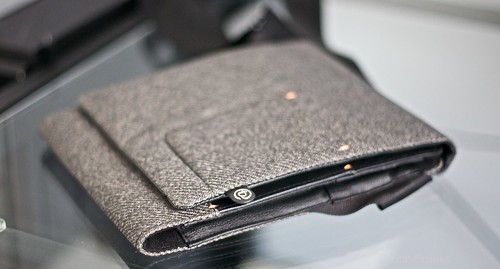
Just got my new iPad bag dropped off today – Booq Boa Push. Very small, very nice looking – review to come.
Top Posts
Just got my new iPad bag dropped off today – Booq Boa Push. Very small, very nice looking – review to come.
Just got my new iPad bag dropped off today – Booq Boa Push. Very small, very nice looking – review to come.
This could be tricky for Google to get out the Oracle lawsuit without paying up something. Also be sure to check out this link with some more information about the lawsuit – apparently Oracle knew about the potential to sue and was a marketing factor in the sale of Sun.
This could be tricky for Google to get out the Oracle lawsuit without paying up something. Also be sure to check out this link with some more information about the lawsuit – apparently Oracle knew about the potential to sue and was a marketing factor in the sale of Sun.
Thought I would post a quick shot of my home office where I have been working for the past couple of days. I love this setup and usually only work from home on Fridays, however my car has been in the shop since yesterday. I took some time to de-clutter it a bit and here…
Thought I would post a quick shot of my home office where I have been working for the past couple of days. I love this setup and usually only work from home on Fridays, however my car has been in the shop since yesterday. I took some time to de-clutter it a bit and here is what it looks like now.

A couple of notes about the setup:
The drawer on the left with the Apple sticker on it houses a USB hub (that is the USB cord you see plugged into the Macbook Pro) and four hard drives (backup and media drives). The MBP stand is from Raindesign and the iPad stand is from Griffin. The cord you see sticking up just above the black cabinet on the left is a charger for my bluetooth headset and Verizon MiFi. Under the desk is a large (huge) batter backup, a shredder and an always full garbage can.
Justin Blanton: I think another reason I’m enjoying the Magic Trackpad is because it doesn’t require my hand to move very far to get to it. I’m a keyboard guy — if it can be done with a keyboard instead of a mouse, I use a keyboard. Always. Having the trackpad so close to the…
Justin Blanton:
I think another reason I’m enjoying the Magic Trackpad is because it doesn’t require my hand to move very far to get to it. I’m a keyboard guy — if it can be done with a keyboard instead of a mouse, I use a keyboard. Always. Having the trackpad so close to the keyboard in my case, just a few inches to the right of it; much closer than my mouse makes it feel more like an extension of the keyboard, and less like a separate device.
Just got back from the Apple store where I tried to pick one up for myself – none in stock. I hope to get one next week, from toting around with it in the store I can see how appealing it is.
Last night my wife and I were too tired to cook and didn’t want to spend time in a restaurant – so we walked over to the Taco Time that is a few hundred feet away. What follows is from a discussion I was having with my wife (whom I am sure was bored) about…
Last night my wife and I were too tired to cook and didn’t want to spend time in a restaurant – so we walked over to the Taco Time that is a few hundred feet away. What follows is from a discussion I was having with my wife (whom I am sure was bored) about this Google hubbub.
After explain the situation to her and toying with the idea of going Google-less in my life I came up with a few predictions about the future of Google.
(Note that for the past year now I have had a strong feeling that Google would not be around in 5 years – that is they would be around in the sense that AOL is still around now).
That about covers it.
I wish they would have had this when I was a kid. The iPad is not light, but have you seen how heavy kids’ backpacks are these days?
I wish they would have had this when I was a kid. The iPad is not light, but have you seen how heavy kids’ backpacks are these days?
MG Siegler: And I have to agree. Further, Google’s response to the backlash today stating the “facts” about their proposal with Verizon sort of pisses me off. and: Instead, Google’s intentions are much more transparent: greed. Greed also tends to have a negative connotation, but I’m of the Gordon Gekko mentality that “greed works.” It’s…
MG Siegler:
And I have to agree. Further, Google’s response to the backlash today stating the “facts” about their proposal with Verizon sort of pisses me off.
and:
Instead, Google’s intentions are much more transparent: greed. Greed also tends to have a negative connotation, but I’m of the Gordon Gekko mentality that “greed works.” It’s what drives this country. And as a public company, whether we want to admit it or not, it’s what drives Google.
This is what I have been saying all along Google is getting greed. I do disagree with Siegler with respects to Google being ‘evil’ – no they are not a Bond villain – but by their own definition they seem to be teetering on the edge of evility (is that a word?).
Looks great and has some truly interesting features. What concerns me is the price point and the company that is making it – this most likely is vaporware, I hope though, that I am wrong.
Looks great and has some truly interesting features. What concerns me is the price point and the company that is making it – this most likely is vaporware, I hope though, that I am wrong.
Be interesting to see what Oracle really hopes to gain from this lawsuit – seems odd to sue over the use of Java. Seems even more odd that Google didn’t get the licensing that was needed.
Be interesting to see what Oracle really hopes to gain from this lawsuit – seems odd to sue over the use of Java. Seems even more odd that Google didn’t get the licensing that was needed.
Personally I think it will come out for all (U.S.) carriers next, not just Verizon. It is market share time, best way to do that is to be everywhere.
Personally I think it will come out for all (U.S.) carriers next, not just Verizon. It is market share time, best way to do that is to be everywhere.
Google: MYTH: Google has “sold out” on network neutrality. FACT: …With that in mind, we decided to partner with a major broadband provider on the best policy solution we could devise together. We’re not saying this solution is perfect, but we believe that a proposal that locks in key enforceable protections for consumers is preferable…
Google:
MYTH: Google has “sold out” on network neutrality.
FACT: …With that in mind, we decided to partner with a major broadband provider on the best policy solution we could devise together. We’re not saying this solution is perfect, but we believe that a proposal that locks in key enforceable protections for consumers is preferable to no protection at all.
Google’s Original Stance (2007):
The nation’s spectrum airwaves are not the birthright of any one company. They are a unique and valuable public resource that belong to all Americans. The FCC’s auction rules are designed to allow U.S. consumers — for the first time — to use their handsets with any network they desire, and download and use the lawful software applications of their choice.
It’s regrettable that Verizon has decided to use the court system to try to prevent consumers from having any choice of innovative services. Once again, it is American consumers who lose from these tactics.
That looks like selling out to me.
Google:
MYTH: This proposal represents a step backwards for the open Internet.
It changes nothing, in reality. Though it certainly allows for a lot of work arounds, many of which Google is conveniently forgetting about in this blog post.
Google:
MYTH: This proposal would eliminate network neutrality over wireless.
FACT: It’s true that Google previously has advocated for certain openness safeguards to be applied in a similar fashion to what would be applied to wireline services. However, in the spirit of compromise, we have agreed to a proposal that allows this market to remain free from regulation for now, while Congress keeps a watchful eye.
So really that is not a Myth then, it does eliminate that and they are only defending it by saying the free market will correct itself. Except according to Google’s 2007 blog post (linked to above) that is not the case:
Apparently, one of the nation’s major existing wireless carriers doesn’t think consumers deserve more choices.
Earlier this week, Verizon Wireless filed a lawsuit against the FCC’s rules that would require the eventual winner of the spectrum offer open devices and applications. They called the rules “arbitrary and capricious, unsupported by substantial evidence and otherwise contrary to law.”
Google:
MYTH: Google is working with Verizon on this because of Android.
Why are they even bothering to lie about this one???
This is the most pathetic excuse for defending your actions I have ever seen. So much so that I am moving our corporate email from Google apps and I urge you to do the same. Pathetic Google.
One thing that people seem to be forgetting with this whole Google-Verizon net neutrality cluster (f) is that companies are here to make money – not to help consumers. This isn’t just a view of Google either, I have seen it in a couple of places where people state something along these lines: “Wouldn’t it…
One thing that people seem to be forgetting with this whole Google-Verizon net neutrality cluster (f) is that companies are here to make money – not to help consumers. This isn’t just a view of Google either, I have seen it in a couple of places where people state something along these lines: “Wouldn’t it be great if Steve Jobs wrote an open letter supporting net neutrality”. The clear answer is yes that would be great, the more support for net neutrality (no matter which individual) the better off we all are. What people fail to realize though, as the fact that it is not the obligation of other companies to speak up, the obligation of all companies (excluding non-profits) is to make money.
In the pursuit of money consumers are usually the ones that get hurt.
Now of course it is important to note that companies are not out to screw over consumers, doing that would doom any business. What I am saying is that companies will choose profits over consumers any day of the week. It takes a special kind of company that won’t abide by that rule – so special that none come to mind. Sometimes (often) choosing to help your customers as much as you can will benefit you financially – however there are rare cases where this does not hold true. Net Neutrality is one of them, insulin is another.
It is simple economics at work, these huge corporations realize when they have you over the barrel and you are at their mercy. If they pass anti-net neutrality legislation they will have such a case. Google I think is assuming that right now they have customers in such a position, search, email and docs are all very powerful tools that many rely on for everything. For diabetics insulin is that product – no matter how much companies charge for it people will continue to buy insulin, because without they may die.
For most companies the thought process is as such:
Customers are number one while things are running smoothly, when we feel threatened our investors start to worry and our jobs are no longer secure, thus companies will begin to do what ever they think they need to do to survive.
But is Google is feeling threatened? Think about it, Bing is doing an impressive job, Android gets very little press compared to iOS (Apple), and Apple is now entering the mobile advertising space (iAds). You better believe that Google is feeling threatened, that is not to say that they think they are on the verge of collapse, or that even I think that – they aren’t. Google though is very much in a territorial fight with Microsoft and Apple, that is why they are putting customers aside in an unapologetic search of more control and profits.
Google must have realized that right now in time they hold a unique opportunity to try going out and screwing over consumers, while at the same time not losing any customers. We need to speak up, loudly.
Awesome looking new music app for the iPad.
Awesome looking new music app for the iPad.
JetBlue is supposed to be a modern company, clearly they were just posing as this shows a serious lack of humor that is needed in today’s social world.
JetBlue is supposed to be a modern company, clearly they were just posing as this shows a serious lack of humor that is needed in today’s social world.
Flipboard the iPad app that allows you to view news and social networking in a beautiful magazine styled wrapper, launched a couple of weeks ago with a lot of fan fare. Their servers were immediately over loaded and it took the site days to get back up and running so that people could use the…
Flipboard the iPad app that allows you to view news and social networking in a beautiful magazine styled wrapper, launched a couple of weeks ago with a lot of fan fare. Their servers were immediately over loaded and it took the site days to get back up and running so that people could use the full features of the app.
I got Flipboard when it came out and waited for two days before I could get Twitter up and working on it – some people waited even longer. Last night I got an itch to clean up some of my iPad apps and get rid of the ones that I just don’t really use – turns out Flipboard was one of them.
I was surprised when I came across the Flipboard icon and needed to decide what to do with the app – after all it is a beautifully designed app and there really is nothing wrong with it. Except for the fact that I don’t use it. Flipboard doesn’t fit into my workflow at all, it is too slow to actually get updated on news, Reeder is much better. It is not all that great at conveying information – though it does an excellent job displaying information.
Flipboard then is like an awesome new gadget that you truly do not need. It is the iPod nano when you already have a shuffle and four other iPods – sure it looks and works great, but when do you use it over all the other iPods you have?
Ultimately Flipboard is staying on my iPad, not because I will use it, or because it is useful – rather it is staying because it makes a power case for people when they want to be wowed by the iPad. Flipboard is an beautiful and well thought out app, however just because it is beautiful doesn’t mean it is useful.
Fixes the PDF bug that allowed you to use Jailbreakme.com to well Jailbreak your device – update also out for the iPad. Update to these now – before some dick head gets a malicious PDF out in the wild.
Fixes the PDF bug that allowed you to use Jailbreakme.com to well Jailbreak your device – update also out for the iPad. Update to these now – before some dick head gets a malicious PDF out in the wild.
The above headline is MSNBC’s, mine would read: “Ditching the Cell Phone is a Power Move and a Dick Move”. I can certainly see the appeal of no cellphone, I think we all can. Doing so is selfish – you are essentially saying that you are more important so people need to figure out how…
The above headline is MSNBC’s, mine would read: “Ditching the Cell Phone is a Power Move and a Dick Move”. I can certainly see the appeal of no cellphone, I think we all can. Doing so is selfish – you are essentially saying that you are more important so people need to figure out how to contact you for themselves.
If you really want to be less distracted by the cellphone, turn the ringer AND vibrate off. You are welcome.
Luckily for RIM they decided to be bastards at the same time as Google, so their stories are getting lost in the clutter. This however is a huge deal for Blackberry users – we don’t fully know what RIM has conceded to yet, but it seems clear they have conceded some things. One way or…
Luckily for RIM they decided to be bastards at the same time as Google, so their stories are getting lost in the clutter. This however is a huge deal for Blackberry users – we don’t fully know what RIM has conceded to yet, but it seems clear they have conceded some things.
One way or another Saudi Arabia is getting to eavesdrop on Blackberry customers in their sovereign nation. This is nothing new, as usually they would just do this through the Telcos and that would be that. The problem though is that whatever concessions RIM made to satisfy the Saudi’s they are likely going to have to make in most other countries. How would they be able to justify not allowing it?