Month: April 2011

  • Ripping Open a Link-Bait Fool

    I have been told that people don’t think I should link to obvious link bait posts, I can see why. Instead of causing a direct link, how about I provide [this link](http://swizec.com/blog/ubuntu-better-for-app-management-than-apple/swizec/1672) to the post and we go on to dissecting this load of drivel.

    Some guy that goes by the handle “Swizec” posted an article titled: “Ubuntu’s app management better than Apple’s”. Obviously this grabbed my attention and caused me to read the post — after all it has been a while since I was last using Ubuntu and I was curious to hear about the improvements made to the OS.

    >But what I wanted to talk about today was how a bunch of opensource geeks have managed to beat the paragon of usability and App Stores and all things shiny and awesome when it comes to managing apps, installing software and so on.

    Clearly from the the article title he is meaning Apple — meaning Ubuntu has created a better App Store interface than Apple has. At this point I am incredibly excited and I want to hear more, because I don’t think the current App Store for Mac OS X is quite up to par.

    Next “Swizec” breaks down the 15 steps he identifies one needing to do before getting a new app on a Mac or Windows box — 15 steps, you have got to be kidding me. What he seems to forget is that we have Google, type in one line, read the article and download the app — that’s pretty straight forward and far less than the 15 crazy steps he takes. But, I will agree that it is not always easy to find a good app. I took way more that 15 steps to find a good seating chart app when I was planning our wedding, but I digress.

    He then lists 9 steps for the average “package manager”. Now having used linux for a while I know what a package manager is, but I would guess that 90% (probably more) of computer users don’t. So then really steps 4 and 7 must be confusing for people when they have to `apt-get` something — do you know what that means? ((Yes I know what it means.))

    >The most notable difference is that suddenly you have this authoritative source of applications where everything is available in a single place. Sure, if you have specific needs you might still have to visit a website or two, three, four, five to get the specific version of the package you need just in case the one your distro offers is too old … but all in all, the process is much nicer.

    No the most notable difference is actually the fact that only command prompt geeks know what you are talking about at this point. The most notable difference is that my mom couldn’t download an app using this method — hell our average high schooler probably couldn’t either.

    Me: “No, Mom, listen you need to go look on Google for version X of the package because the distro you have is too old.”

    My Mom: “…can you come over and do that?”

    >Recently Apple has done some improvements and became more like Linux with its variety of App Stores, the one on iOS works pretty well, the one on MacOS is … well it’s just a dash bit strange to be honest.

    Wait… what? Macs are more like Linux — no, my friend, you simply have that backwards.

    >It doesn’t feel right. It isn’t tightly integrated into the OS itself, it doesn’t really offer anything to make me want to use it.

    Now I buy that, the Mac App Store was clearly intended for 10.7, not 10.6.

    >Another big issue with the App Store that I have is that it only works for Apps. What about all the other software I need on my computer?

    Wait, now we are arguing the semantics of what an “app” is? Let me explain, it is the same as software. You’re welcome.

    He then devolves the conversation into a plethora of screenshots from Ubuntu and Mac OS X 10.6 with the apparent point being that in the App launcher folder on Ubuntu you are also recommended apps that are similar. Meaning you are shown ads in the app launcher in Ubuntu — perhaps that’s just the way I view it, but most people turn off Genius recommendations in iTunes for a reason.

    Then we get his conclusion, which states:

    >All in all, I think Ubuntu has made a great leap to making the whole experience of using third party software much much easier on the palate.

    Agreed, but that’s not what you said the whole time — your posit is that it *is* better than everything else, not that it simply made the experience easier.

    >There’s still a long way to go and a bunch of geeks are already complaining that the whole interface sucks, but they keep forgetting just how much it sucks for everybody else who isn’t using linux. We’re just spoiled.

    Keep the above in mind for later.

    >Of course there is still a long way to go and the new interface does have its issues. There’s also a big chance that cometh MacOS 10.7 everything might change. The App Store was meant for the new version after all and the fact we’re even allowed to use it already is supposed to be a grace of the Gods and so on.

    Or just Apple pushing out a new product, either way I agree that it seemed rushed out to 10.6. This statement though is a “hedging my bets” statement, whereby he is trying to make sure that everyone knows that what he started off by saying is 100% fact, is now only a vague opinion — you need to own and article like this.

    >We’ll see, I really hope they come even close to Ubuntu Natty Narwhal because my laptop is (and always will be) running a Mac OS.

    Remember that passage I asked you to keep in mind — read it again, now. So life sucks for everyone not using linux and the new App Store is better than Apple’s, but alas he will always be running Mac OS even though he knows it to be crap compared to Ubuntu. Does this confuse anyone else?

    The title sets that the writer believes that Ubuntu has created a better App Management system than Apple. He then explains in detail why he believes that to be the case. Then, in the **conclusion**, he says that linux users are now “spoiled”, yet he will always use Mac OS. It’s not like he can’t boot Ubuntu on his Mac, he can (for free), but no he is choosing what he just got done explaining to be inferior. Odd.
  • Questions for RIM’s CEOs

    Eric Jackson:
    >The features you touted last night for your new phones were better battery life, a better browser, and better graphics for gaming. Is someone going to buy a BlackBerry over an iPhone or Android phone because of your improved browser? Is that what has been holding them back? Also, for your games: I thought your PlayBook just ships with Tetris. Are there going to be any other games I can play on the new BlackBerries that use your improved graphics?

  • Push Ads in Android

    Martin Adamek:

    >What has happened? In the last update of the app I introduced new ads provided by AirPush. These ads are not visible as part of the app, instead they appear in notification bar. They will appear max once a day and are easily cancelable (as any kind of notification). This update has started the wave of negative user comments and 1-star ratings.

    and:

    >Guys you are right, this can’t be compared. TV ads are there only during the show, while push ads appear anytime, even while you do not use the app. I completely missed this point.

    Stay classy Android.

    [via DF]
  • Google’s Crowdsourced Traffic Database

    Dave Barth, Product Manager for Google Maps back in 2009:
    >It takes almost zero effort on your part — just turn on Google Maps for mobile before starting your car — and the more people that participate, the better the resulting traffic reports get for everybody.

    That is significantly more than zero effort — especially for your battery life. I imagine this is what Apple wants to make better, making it so that users don’t have to take any additional steps by providing historical analysis instead of real-time crowdsourcing of the data.

  • Associative Fallacy

    Ethan Kaplan:
    >Chasing business models in one media with business models of fundamentally different media is a recipe for disaster. I see this happening continually with newspapers and magazines and the iPad, and I see it happening with the music subscription services. It’s applying an associative fallacy to things that are disparate, and history is littered with the fatalities of these collisions.

  • Slow Time

    37signals (I believe this is excerpted from a Jason Fried interview):
    >Slow time is “Maybe it takes two or three days to have this conversation. And we do it over periods of 15 minutes here, two minutes there, four minutes there.” And that’s fine. It doesn’t need to happen all at once. Unless it’s really, incredibly, truly urgent. (Which most things aren’t. They’re made out to be that way, but they really aren’t that important.)

    Read the parenthetical again.

  • Speculating on Apple’s Traffic Database

    Apple said this in the [iPhone location database Q&A](http://www.apple.com/pr/library/2011/04/27location_qa.html):

    >Apple is now collecting anonymous traffic data to build a crowd-sourced traffic database with the goal of providing iPhone users an improved traffic service in the next couple of years.

    The above could mean a lot of different things, a lot of different stupid things such as:

    – Apple is going to try and replace Google Maps.
    – Apple is going to build turn-by-turn navigation.
    – Apple is going to build a car.
    – Apple is going to save the world.

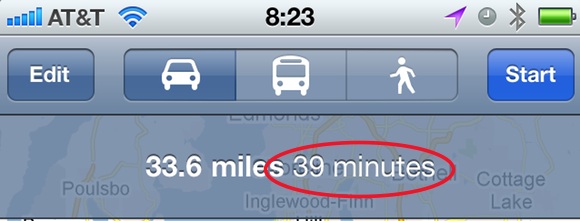
    Personally I don’t think it means any of the above things, I think Apple wants to fix this:

    Collecting a massive amount of historical traffic data doesn’t make a ton of sense for providing real-time traffic information. That information could be crowd sourced real-time, but that would require users opting-in and a lot of computational power on servers somewhere else — plus why do that when most states have sensors built into the roadways to provide the same data?

    No, I think Apple is more likely to use this historical data to improve the accuracy of the drive time to different locations. A database that massive with that much traffic information should be able to provide a good statistical analysis of how long it takes to get from point A to point B on Tuesday at 10am. Essentially it would seem that the database being built could say that on Monday’s from 6am-8am I5 through Seattle is 20 minutes slower than it is on Friday’s at the same time. Thus allowing Apple to say that with no traffic your route takes 39 minutes, but if you left right now it will take you (on average) 59 minutes — that is a powerful feature.

    Google Maps will already show you how long something can take “with traffic”, but it won’t tell you how it is determining what “with traffic” means and most of the times I find it wildly inaccurate. Now imagine a database built off of actual data and based on the current day and time that you are traveling. I imagine that would be far superior to what we currently have.

    Especially so if that database could take into account sporting events and allocate time for that traffic, but now I am dreaming.

    Apple’s statement also said “the next couple of years” — which I read to mean, iOS 6 (possibly iOS 5). I tend to lean towards iOS 5, otherwise I think Apple would not have asked itself that question in the Q&A they wrote — this was a warning shot over the bows of its competitors, and I think Apple is going to be counting faster than its competitors think.

    [Updated: 4.29.11 at 9:02 AM]

    It is, of course, not lost on me that this could mean data traffic and not road traffic. However the wording makes it sound like the latter and not the former.

  • On the White iPhone Thickness Crap

    Dr. Drang:
    >Not only is there going to be variation from one phone to another, there’ll be variation from place to place on the same phone. If someone does go out a measure a few white iPhones and finds them to be several (not just a few) thousandths of an inch thicker than black iPhones, I’ll be convinced there’s a difference.

    He also shows that his black iPhone 4 is thicker than his son’s black iPhone 4 **and** how one should photograph these things. But this makes the most sense:

    >Wait. Before I do that, let me digress and say that the best way to prove a difference in thickness is to measure the goddamn thicknesses. But perhaps this is too technical a solution for a “marketing guy.”

    Exactly.

  • Drew Houston on Usability

    Drew Houston the cofounder and CEO of Dropbox:
    >Relatively early on we brought a handful of people off the street (literally) for our first round of usability tests. Most of them had trouble even getting through the installer: for example, zero of the five people noticed that we had a tray icon (our most important UI element), and more than one person tried clicking the screenshots in the tour. This was a mortifying experience for us, causing us to add a Giant Ass Blue Bouncing Arrow pointing to the tray icon during install, and to tweak the coloring of the screenshots to distinguish them from your OS chrome. Forcing these people through some kind of folder mapping scheme would have been a colossal train wreck.

    His entire response is great and worth the read for anybody thinking about usability issues.

  • Weather.cgi

    [Dr. Drang](http://www.leancrew.com/all-this/2011/04/weather-or-not/) whipped up a neat little python script that you can place on a web server to grab weather info in mobile Safari (and Safari for that matter). I forked the project over on GitHub and styled the layout a bit. Check out the demo [here](http://b3nbrooks.com/cgi-bin/weather.cgi). ((Be sure to add it to your homescreen so you can see the great icon I whipped up for it.))

    You can’t change the location because it is hard coded, but you should be able to get it working on your web server.

    *Note: I am not saying this is better than My-Cast, but it is interesting what you can put together in a short period of time.*

  • Speaking of Weather

    WeatherSpark:
    > WeatherSpark is a new type of weather website, with interactive weather graphs that allow you to pan and zoom through the entire history of any weather station on earth.

    This is Flash only, but that aside it is a massive amount of data they give you. Not my thing, but pretty information heavy.

  • 5AM Wake Up Call

    Elle Luna:
    >It was 5:30AM, my goals were completed, and I didn’t need to leave for work for another 3 hours. 
    >This was the instant that my experiment was a success. Having 3 hours in the morning to do nothing. Planning for nothing. Making time out of my day to have just three hours to myself. That was a revolutionary idea for me. 

    It really is the best feeling when you have that time to yourself — I prefer it in the morning and wake up at 5:30a, even Twitter is quiet at that time. My Wife on the other hand prefers it in the late hours of the night, between 12a-3a.

    You don’t just have to get up early, but if you can be awake at a time when your house is quiet and you can think — that’s when you find the magic.

  • “It’s Not What Your Software Does, It’s What People Do With Your Software””

    Greg DeVore:
    >The creators of Garageband for iPad didn’t care about what their software could do. They cared about what people could do with their software.

    The end result of which is smiles. Lots of smiles. Go ahead and try not to smile when the iPad, or other software, does something that you find “magical”.

  • Quote of the Day: Marco Arment

    “But since they had never used those features, they didn’t know how much they wanted them.”

    Marco is talking about why he pulled the free version of Instapaper, but I think the above quote applies to so much in life. Like food, until you try it you have no idea how much you may like it (or hate it). ((My wife will probably get a kick out of me saying this — given that I am a very, well, picky eater.))

  • The Phones Know Too Much

    MG Siegler:
    >Let’s face it, our phones have a lot of potentially personal information about us on them beyond just location. That’s why it really sucks when we lose them or they’re stolen. And just imagine when these devices all have NFC chips in them for easy payments. That’s really going to suck. I’m sure the FUD stories will start about that in the next year or so.

    Set passcode lock. Check. Set erase data after 10 failed passcode attempts. Check. Duct tape iPhone to hip…

    As our phones know more and more about the financial parts of our lives security is going to become a bigger and bigger issue. It already is not taken serious enough by most users.

  • Answering Reader Questions About My MacBook Air

    Reader Brendon Cromwell (among many others) writes in to ask about my MacBook Air:

    >How is it holding up for you in your daily routine? What’s your feel for how long you think it will hold up under the increasing software requirements?

    >I’m going back and forth between a 128GB MacBook Air (& replacing my older iMac w/ a new one) and an 128GB SSD MacBook Pro (& keeping my older iMac).

    I am quoting Brendon because he rather succinctly asks everything that other people have been asking me about my setup, this is my attempt to answer these questions based on where I am today.

    ### Daily Routine ###

    This is a question that most people forget to ask, but my MacBook Air is the best Mac I have ever owned — hands down — no contest. I have had everything from the fabled 12″ Powerbook G4 to a pimped out Mac Pro — the MacBook Air takes the cake here. It is incredibly fast for 95% of everything that I do and the screen resolution is amazing give the small footprint of the machine. The size and weight of the machine still amazes me every time I touch it.

    I love this machine.

    I also take my MacBook Air to and from my office everyday and on travels. Just like all unibody MacBooks it is holding up very well from the wear and tear of everyday life. My cats are often found running over the lid when it is closed (and one cat weighs more than 12lbs) and they can be found sleeping on the keyboard too. (I don’t like them on my computer, but such is my life.) This machine has exceeded all my expectations, and they were [pretty lofty expectations to begin with](https://brooksreview.net/2010/10/mba-fits/).

    ### Longevity ###

    This is the area that worries me the most — I typically like to keep a machine for 2-3 years before replacing it. So what will this machine perform like in 3 years? I have no clue and honestly only SJ would be likely to know that. My general sense though is that the most of the applications that I use (Safari, Mail, TextMate) will continue to fly for years to come.

    My only concern areas are with:

    – Photo Editing
    – OS Upgrades
    – Parallels running Windows

    I get the feeling that everything is constantly being optimized for lower powered hardware and that even though my MacBook Air may not run it as fast as the next generation — it will still be more than adequate. Parallels is especially good at making their system faster and faster with each update — so much so that it is probably faster than actually using a netbook for Windows at this point.

    It is also important to note that while software wants to use every bit of juice it can get its hands on — I personally am using less and less software to get tasks done. So while more resources are needed for each app, I am using less apps.

    The last thing I need to consider is price. When I buy a laptop I buy the fastest model I can (I ignore HD and RAM if I can upgrade it easily myself). My MacBook Air was $1,799 and the equivalent MacBook Pro (top of the line 15″, because why would you buy the 13″?) would cost me just over $3,200 (adding 3rd party SSD, Apple 8GB RAM and the Hi-Res screen). So if the MacBook Pro needed to last me 3 years, the MacBook Air could last me less and I still would be paying a similar computing cost year over year. That’s not a bad deal.

    *(If you don’t follow I am saying that because the MacBook Air is cheaper I can afford to upgrade it more frequently than I could a MacBook Pro that I would want to use.)*

    ### Desktop versus Mobile Desktop Conundrum ###

    The decision that Brendon is struggling with is something that I have found myself asking a lot too. It boils down to:

    1. Do you get a MacBook Air and a desktop machine like an iMac, or;
    2. Do you get a powerful 15″ MacBook Pro, or;
    3. Do we just get the fastest, smallest machine we can afford?

    That’s a tough call and to answer that I have to call on my own experiences. Here’s the computing setups I have had since leaving college. ((That’s the best timeframe that represents what a ‘normal’ business user does.))

    – Powerbook 12″ G4 and Mac mini G4 *circa 2005*
    – Powerbook 12″ G4 and Mac Pro and Mac mini G4 (from this point forward the Mac mini is a media center only) *circa late 2006*
    – MacBook Pro 15″ and Mac Pro and Mac mini G4 *circa 2007*
    – MacBook Pro 15″ Unibody and Mac mini G4 *circa late 2008*
    – MacBook Pro 15″ w/ SSD and Mac mini G4 *circa 2010*
    – MacBook Air 13″ and Mac mini G4 *circa late 2010*

    In all my years of computing, no matter what the setup, I couldn’t be happier than I am now with just my MacBook Air. The problem with a dual computer setup is picking which machine to use. If you want a desktop for the power and a MacBook Air/Pro for portability then you will never be happy with your setup — because you will always be using the wrong computer at the wrong time.

    It’s a pain in the ass to use two computers — even with Dropbox. Getting the settings the same, the shortcuts and the like consistent is never fun and always a pain. Running just a high-end MacBook Pro is a great solution, but often overkill and a pain in the back. I always found myself leaving my MacBook Pro behind, or not using it, because it was too big or too heavy for where I was going (especially a tough call to make when going away for just a weekend).

    When I had my Powerbook it went everywhere with me, and since I got rid of it I never took another laptop as many places as I have now, again, with the MacBook Air. Here’s how you decide:

    – If you plan on taking your computer somewhere other than your desk at least once a week (hell even once a month), get a MacBook Air (as fast as you can afford).
    – If you plan on leaving your computer at your desk and only removing it once, maybe twice a year — get an iMac/Mac Pro with an SSD. Then buy a used iPad (new if you can afford it) and set it up to screen share over WAN with your desktop. This should solve most of the rare on the go problems you may encounter.
    – If you need the fastest, most portable (or not) powerhouse money can buy for highly specialized needs — then you already know what to buy.

    In my opinion, it’s just not worth getting an iMac and a MacBook Air because for most people the MacBook Air will be more than enough. There are always exceptions and fringe cases, but those users already know that they are the exception.

    Since getting my MacBook Air here’s some of what I have done on it with no problems:

    – Ran all Creative Suite (CS5) apps at once, copying and pasting between them.
    – Edited 1,200+ photos in Lightroom.
    – Recorded and edited every episode of the [B&B Podcast](http://thebbpodcast.com/).
    – Partitioned the HD to run another OS on a partition.
    – I run Parallels with Win XP Pro nearly everyday.
    – Power a 24″ LED Cinema Display
    – Converted movies for my iPad.

    The only time I notice a difference between this machine and my old MacBook Pro ((Now my Wife’s)) is when:

    – Playing back a 1080p h.264 video using the 24″ Cinema Display (in full screen), the computer drops a lot of frames doing this.
    – Saving 3.5GB AIFF audio files is slooooow.
    – …

    Regular readers know that I don’t put praise on things where it is not due — the MacBook Air is due all the praise I can heap onto it. I love this machine.

    *You can check out my original review [here](https://brooksreview.net/2010/11/mba-review/).*

  • How Apple Updates Its Location Database

    In this July 12th, 2010 letter to Edward Markey and Joe barton, Apple details how and why it collects the user data to update its location database. From reading this it seems that Apple only grabs this anonymized data under two conditions:

    1. You are requesting your location. At this point Apple grabs any updated information.
    2. You are using another app that uses location services, at which point Apple will update its data.

    Of note: you can stop all this from occurring by turning of location services.

    [h/t reader Jose Marques]
  • Apple’s Response to the iPhone Location Data

    Apple via Press Release:
    >This data is not the iPhone’s location data—it is a subset (cache) of the crowd-sourced Wi-Fi hotspot and cell tower database which is downloaded from Apple into the iPhone to assist the iPhone in rapidly and accurately calculating location. The reason the iPhone stores so much data is a bug we uncovered and plan to fix shortly (see Software Update section below). We don’t think the iPhone needs to store more than seven days of this data.

    So the location database people found was not actual locations that the person traveled to, but data that Apple pulled down from its WiFi and cell tower database location cache. Interesting, what really made me do a double take:

    >Can Apple locate me based on my geo-tagged Wi-Fi hotspot and cell tower data?
    >No. This data is sent to Apple in an anonymous and encrypted form. Apple cannot identify the source of this data.

    So Apple is not collecting data from the database file people found, but from another source which is anonymized, encrypted, and sent to Apple. I want to know more about *this*.

  • iPhone Weather App Follow-Up

    A few follow-up points on the iPhone [weather app round-up](https://brooksreview.net/2011/04/weather/) that I did.

    ### The Weather ###

    I left out that you can, in fact, create custom views in this app. The problem is still that those custom views still don’t work right for me and just adds another tab that you have to switch between. If I was only using the app to view one set of data, then yes this would be ideal — however I only want to have one, full-featured, weather app on my phone. This is a very nice looking app and it will be optimal for many people, but not for what I need and want.

    ### [Gismeteo](http://itunes.apple.com/us/app/gismeteo-lite/id419371996?mt=8) ###

    This was a reader recommendation that intrigued me. I really like the way the information is displayed, but the forecast views and advanced features are just lacking — you get the same data you would out of the standard Apple app. Not to mention the lack of U.S. centric measurements.

    ### [eWeather HD](http://itunes.apple.com/us/app/eweather-hd/id401533966?mt=8) ###

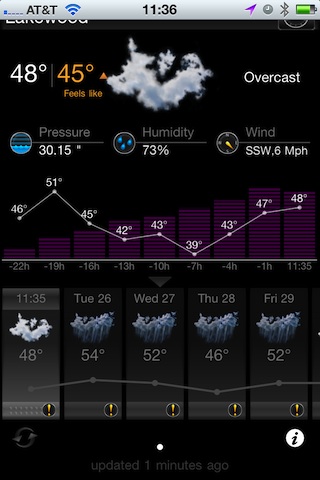
    Another app emailed into me — it looked ugly in the screenshots sent to me, but the data displayed is robust, so I decided to spend the $1.99 so you don’t have too. The first thing I noticed is that the app is indeed pretty ugly in the setup phases. Having said that the data display is pretty nice looking. It also has a bar graph to show the temperature trends, overall though I found the app to be buggy, case in point:

    [](https://f3a98a5aca88d28ed629-2f664c0697d743fb9a738111ab4002bd.ssl.cf1.rackcdn.com/eweather.jpg)

    That’s not a scrolling thing, it just started cutting off the location bar. Odd. Relaunching the app solved the problem, but what it didn’t solve is the fact that when “scrolling” through the forecasts along the bottom: there is no “home” or “now” buttons to shoot you back to current information — it is actually quite hard to get back to the current weather view. That reason alone is enough for me not to use it.

    *Let me know if I missed anything else.*

    * [Updated: 4.28.11 at 8:09 AM] *

    A lot of you have written in to mention Weather Pro — it’s a very solid offering and very popular among Europeans. I have tried it now, but it just has way too much blue in the interface for my tastes. Nice app, though I will stick with My-Cast.

  • PlayStation Network Breach

    The PlayStation Blog:
    >Although we are still investigating the details of this incident, we believe that an unauthorized person has obtained the following information that you provided: name, address (city, state, zip), country, email address, birthdate, PlayStation Network/Qriocity password and login, and handle/PSN online ID. It is also possible that your profile data, including purchase history and billing address (city, state, zip), and your PlayStation Network/Qriocity password security answers may have been obtained. If you have authorized a sub-account for your dependent, the same data with respect to your dependent may have been obtained. While there is no evidence at this time that credit card data was taken, we cannot rule out the possibility. If you have provided your credit card data through PlayStation Network or Qriocity, out of an abundance of caution we are advising you that your credit card number (excluding security code) and expiration date may have been obtained.

    But, *you know*, keep bitching about that iPhone location database that is store locally on your iPhone — we are going to sort out if someone *actually* stole your identity or not.