Month: July 2011

  • The New Home Button on the iPhone 5 (Allegedly)

    Dan Provost on the rumored iPhone 5 home button redesign:
    >The home button is special. In it’s purest form, it is not used to manipulate what is happening on the screen, but to manipulate the apps themselves (in most cases, closing them and returning to the home screen).

    His entire post is worth a read and a fantastic look at how Apple likely thinks about the home button.

  • Quote of the Day: Allison Arieff

    “When’s the last time you had a creative breakthrough in a Monday morning meeting? Creativity springs from unexpected places and sources — from a walk in the park to the rare block of uninterrupted time — so thinking more broadly about the intrinsic motivations (autonomy, learning, etc.) that facilitate good work is likely to have a far happier outcome than the “latest” innovation in cubicles.”
  • AT&T to Implement Data Throttling in Early October

    Cleve Nettles:
    >Rumored to be starting in the first week of October, we’ve heard that AT&T will start throttling the data speeds of the network’s top data hogs.

    Sure AT&T is spotty and not great as a company, but if done correctly (and it sounds as though it will be) it should help out the overall network quality.

  • Brew Review

    My thanks to the Brew Review for sponsoring the RSS feed this week. If you are a beer drinker that constantly forgets which beers he likes (let’s face it there are a lot of micro brews out there) then this is an app you need.

    It has a tons of features for the beer obsessed and yet still works great for a guy like me that just logs the name of beer and whether it was enjoyable or not. Be sure to support them and check out the app — I’ve found it very handy.

  • It Just Doesn’t Work

    Harry McCracken:
    >All of which brings me back to Apple. Heaven knows, it often ships products that don’t include all the features an average consumer might want. But even when its products don’t “just work” in a way that feels practically mystical, they do work. What does it say about the state of the tech industry that this comes as a refreshing surprise?

    This is a really good read that highlights a problem that has only been brought about due to the proliferation easy updates and acceptance of ‘beta’ labels.

    [via DF]
  • Twitter’s Adam Bain Talks Promoted Tweets in Timelines

    MG Siegler interviewing Adam Bain about Twitter’s promoted tweets in timelines:
    >When I ask about the importance of exclusivity for the deals Twitter is offering (that is, will only Twitter get to offer them?), Bain says that it’s important to note that Promoted Tweets aren’t just about deals or offers — he doesn’t want this product thought of as “Twitter Deals”. “That’s one of a bunch of categories that consumers find interesting,” he says. “More than half of our launch is about exclusive content,” he says.

    That addresses my biggest frustration with ads on websites: ad exclusivity. I hate it when I know that I *could* see that ad on another site. What a valuable thing Twitter is doing here. ((My entire commentary is called: *sarcasm*.))

  • Page Speed Service

    An interesting project from Google to try and speed up the web for the entire world — for free. There are some real concerns with allowing Google to do that, but as any nerd I was more interested in how much faster they could make TBR.

    [Here are the results](https://f3a98a5aca88d28ed629-2f664c0697d743fb9a738111ab4002bd.ssl.cf1.rackcdn.com/pagespeedservice.png). ((Don’t see myself using it any time soon.))

  • Quickly Changing Volume on a Password Protected iPhone

    So clever. Addresses one of my biggest iOS annoyances — well at the very least makes it less frustrating.

  • Broadband Performance Study Finds Huge Regional Disparities in US

    Ryan Paul:
    >Comcast had the highest average download speed at 890KBps and Verizon came in second with 788KBps. A separate comparison of mobile broadband providers found that AT&T was the fastest at 416KBps and Verizon was the slowest of the major providers at 216KBps.

    My own usage agrees with the above, with one major caveat: when it works. AT&T and Comcast are incredibly fast… when they work.

  • How I Evaluate and Decide to Purchase New iOS Apps

    My mind was wandering the other day and I began trying to figure out why some of my favorite iOS apps aren’t in the top rated sections of the App Stores.

    First a note: All of this is based off of my own perceptions and experiences — coupled with my observations of other users. There is no science here.

    As I see it there are three main ways that people come across new iOS apps:

    – Outside source (web site, friends, advertising) directing them to an app (likely recommending it).
    – Browsing the app store (top charts, categories, genius suggestions) looking for new apps.
    – Searching for a specific app, or type of app to fill some void.

    With outside sources you are coming to the app with intent to get that app (most of the time). Those that are willing to pay will likely buy that app as soon as they are sure that it is the one recommended to them by whomever sent them to the app. This is the easiest sale for an iOS app: the user who comes directly to the app.

    Browsing users are quite different. These users are likely skimming through long lists of apps looking for two things: something to pop out at them, and names/brands they recognize. With browsing users a developer only gets four ways to sell the app to a potential customer:

    – Icon
    – Name
    – Rating
    – Price

    Take one look through the top charts at the apps that you have never tried and you will get an idea for just how limiting those four factors are. These are the four ways that a developer can get a user to click on the app for more information and details.

    Searching shoppers are coming with intent to fill a need that they currently have and need filled now. They use the following to help decide which app is right for them:

    – Name
    – Icon
    – Price
    – Rating
    – Screenshots
    – Description

    One thing you will note is that I have intentionally left out reviews. Personally I don’t think they are very worthwhile and of the people that do look at them — typically those are people that are looking for a reason *not* to buy your app. ((Free apps don’t count here, why you wouldn’t just “buy” it and try it for yourself I don’t know.))

    All is not equal though with these buying decisions. For the last two types of buyers I think you can prioritize the importance of each decision criteria, but first we need to better understand the price factor.

    ### Pricing

    It doesn’t matter if your app is $0.99 or $99, if someone doesn’t want to pay for the app, they are not going to pay for the app, no matter the price.

    You cannot change this.

    If someone is willing to pay for an app you have three categories they fall in: ninety-nine-centers, willing buyers, and me.

    #### Ninety-nine-centers

    They finally realized how much ads suck, but are still only willing to pay $0.99 — because after all it is *just* an iOS app.

    #### Willing Buyers

    These are people that are pretty willing to fork over the cost of a double tall Starbucks latte to get a decent app. They are likely to be fine paying up to $2.99 for an app, with $4.99 being the upper limits of comfort and impulse buys for them.

    #### Me

    This is the group of nerds that prefers to pay and is willing to pay more than $19.99 for an excellent app. These are your ideal customers — they are anyones ideal customers.

    ### Priorities

    As I mentioned above each buyer is more likely to pay attention to the following when making a buying decision via browsing:

    – Icon
    – Name
    – Rating
    – Price

    Now that list is probably ordered incorrectly as far as what matters the most, it should read like this:

    – Icon
    – Price
    – Name
    – Rating

    The icon is what will catch the browsing users eye and cause them to stop. The price comes second because that only matters to users who don’t like to pay, from there the other items are of little consequence.

    With buyers who are searching for apps things happen a little differently:

    – Name
    – Icon
    – Price
    – Description
    – Screenshots
    – Rating

    Let’s break down the psychology of these priorities a little bit.

    ##### Name

    The name is going to tell the person if they have found what they are actually looking for via search. ‘Dropbox’ is a fine search, but will result in a lot of options to choose from because of all the Dropbox enable text editors out there.

    However names start to become irrelevant when you are searching for something not brand specific like: ‘notes’.

    ##### Icon

    This is your opportunity to make a good first impression, giving the user an idea of the level of design your app has. If I am searching for a weather app, there are going to be a ton of results and the names will be pretty meaningless. Thus I am more likely to check out the app icon that I like best first.

    This is important because if the app I try first meets all my needs I will have little reason to come back and look at the other apps.

    ##### Price

    Simple: am I willing to pay X to fill need Y? Not much you can do here, as discussed above.

    ##### Description

    Most of the time when I am searching for an app to fill a need, I am looking for a specific feature. Can I quickly see if that feature is listed in the description?

    I tend to prefer straight bullet points here, unless it is an app that I am not likely to see the value in with out the developer telling it to me. For example: Instagram, Instapaper, Dialvetica, Capture.

    ##### Screenshots

    These are actually tied with the description in priority in my book, but I put the after descriptions because I know a bunch of people that never look at them.

    These are especially important for visual apps like weather apps. People are looking to see if this is an app they want to use and if it looks straightforward.

    ##### Rating

    Smart iOS buyers know that reviewers and ratings are horse shit.

    However I know a lot of people that won’t even download an app that has less than three stars. Where this starts to matter for someone like me is when there are multiple apps that are very similar and all cost money. Ratings (not reviews) then come into play for which app I try first (and if I like the first app I try I am likely not to come back an try others).

    Again this is guess work by me, but this is how I and others that I have talked to think about iOS purchasing. That leaves one big thing: reviews.

    ### Reviews

    A smart buyer knows that reviews are not trustworthy and thus ignores them. What about the rest of the market?

    From what I have read on the web and in talking to others: the negative reviews seem to matter, but only to a small degree.

    Someone who wants to buy your app, will buy your app regardless of the reviews. The people who are on the fence about your app, or your apps pricing, are the ones that you are at risk of losing with poor reviews.

    That is: if I only am comfortable paying $0.99 for your app, but it is priced at $1.99 I will be looking for a reason *not* to buy your app. “Oh John left a terrible review, says app is worthless — yeah *not* buying that now.” As if I ever was going to buy it.

    This is also likely the same person, that if they do buy your app, puts you at risk of getting a review from them that says: “One star, over priced. Everything else is amazing though.”

    ### Lessons

    I am not a developer and though the above seems very logical it doesn’t explain the popularity of some apps:
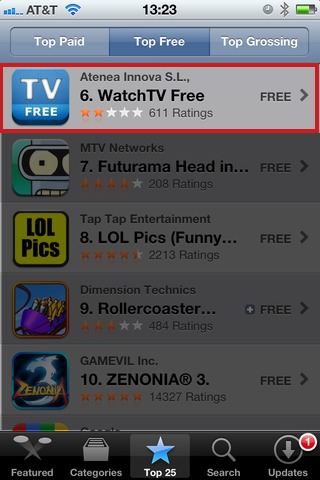
    What I have learned is that there are two categories of apps that seemingly defy all logic: free apps and games.

    As evidenced in the above screenshot a free app that many don’t think is very good is still rated #6 in the top free apps — #6. Yet, it’s free and the app title seem pretty exciting: free TV, on my iPhone? Why not. Well because it sucks. ((That’s my official review of the app.))

    Games are an entirely different beast, one that I just can’t even pretend to understand.

    ### Long and Short of It

    Make a nice icon, price it at $2.99 with a detailed description. Wait for reviews that say it is too much money, but gain smart loyal users.

    Either that or give it away free.

  • MacBook Airs and ‘Storage’ Sizes

    Sorry for linking to myself here, but since saying the MacBook Pro 13″ makes no sense I have had a deluge of emails and tweets. Two common arguments I am hearing are: RAM and storage space.

    The RAM limitation is legitimate and 4GB versus 8GB *is* a huge difference. However I stand by this (which is what I am linking to) with regards to the storage space:

    >There is certainly a large contingent of Mac users that have an overwhelming amount of data storage needs, but if you fall in that group than I doubt that even a 500GB hard drive will suffice for you.

    That’s to say that if you can’t get it done in 256GBs then you likely need more than 500GBs too.

  • Quote of the Day: John Gruber

    “It’s a corrupting revenue model.”
  • Mariners ‘Peanut Man’ Rick Kaminski

    [Sad news today](https://twitter.com/#!/king5seattle/status/96276328705302528) that ‘Peanut Man’ Rick Kaminski of the Seattle Mariners has passed away. He has been a highlight of Mariners games for years now, I am linking not to the story of his passing, but to a video highlighting his skills.

    He will be missed.

    Update:[ A note from Mariners president Chuck Armstrong](http://seattletimes.nwsource.com/html/marinersblog/2015742490_mariners_at_new_york_yankees_j_2.html#continue):

    >On behalf of everyone at the Seattle Mariners, our deepest sympathies go out to Rick Kaminski’s partner Candy, his family, his many friends, and fans. Rick was a fixture at Seattle sporting events for as long as I can remember. His speed and accuracy with a bag of peanuts was matched by his quick wit and smile. He always seemed happy to see you, even if he was meeting you for the first time. Rick loved what he did and the fans loved him for it. He will be sorely missed at Safeco Field as well as Peoria, Arizona, where he got in his ‘Spring Training’ along with everyone else.

  • The 13″ MacBook Pro’s Place

    Stephen M. Hackett commenting on the 13″ MacBook Pro’s position:
    >This machine is a great cross between power and portability. Pros need FireWire 800, Ethernet and more onboard. I know I can’t live with an Air as my primary machine at work.

    Because nothing screams pro like: [Supported resolutions: 1280 by 800 (native)](http://store.apple.com/us/browse/home/shop_mac/family/macbook_pro?mco=MTM3NjU5MzU). If you really need power and portability with FireWire 800: MacBook Air 13″ Core i7 with a new Thunderbolt display. There are also Thunderbolt adapter cables in the works to provide FireWire 800 without the extra glass. The 13″ is dead and, unfortunately, Apple just hasn’t told it that yet.

  • Ryan Cash on Online Newpapers

    >Welcome to the Internet – a place where physical pages don’t exist, and there’s no such thing as “no space left”.

    So true.

  • Mad Men on Netflix Instant Streaming

    It’s a fantastic show. Now is the time to catch up. Also, Netflix, your instant streaming selection is rather poor — Mad Men makes up for it somewhat, but we both know you can do better.

  • This Is Why Your Newspaper Is Dying

    Number 1 and number 7 drive me nuts.

  • Why Microsoft Won’t Dump Bing

    Bing is integrated everywhere in Microsoft products, so it *is* unlikely that they would fire sale Bing. Though the whole search ‘on your TV with Kinect’ component — that sounds “fun”. ((Also gotta love the 1995 era design on this site.))

  • The B&B Podcast – Episode 20: MacBook Airs

    In this episode Shawn and I mostly talk about his new MacBook Air and FileVault. We also touch on some pre-holiday Apple launches and I talk about the degrading quality of our Skype connection — even though as a listener you won’t hear it…

    Thanks to the fantastic [Fantastical](http://flexibits.com/) for sponsoring.

  • Face Detection Software and API Land in iOS 5

    Mark Gurman:
    >Apple is not specifically planning to launch an iOS 5 application that relies on their face detection technology, but plans to do something much more important. Open up facial recognition as a public developer API for iOS 5 applications.

    I bet Apple does use face detection in one of their most prominent apps on the iPhone: the camera. Not so you can tag friends, but so you get that fancy ‘focus on faces’ mode that is popular in point and shoots.