Month: June 2012

  • The Doxie Go

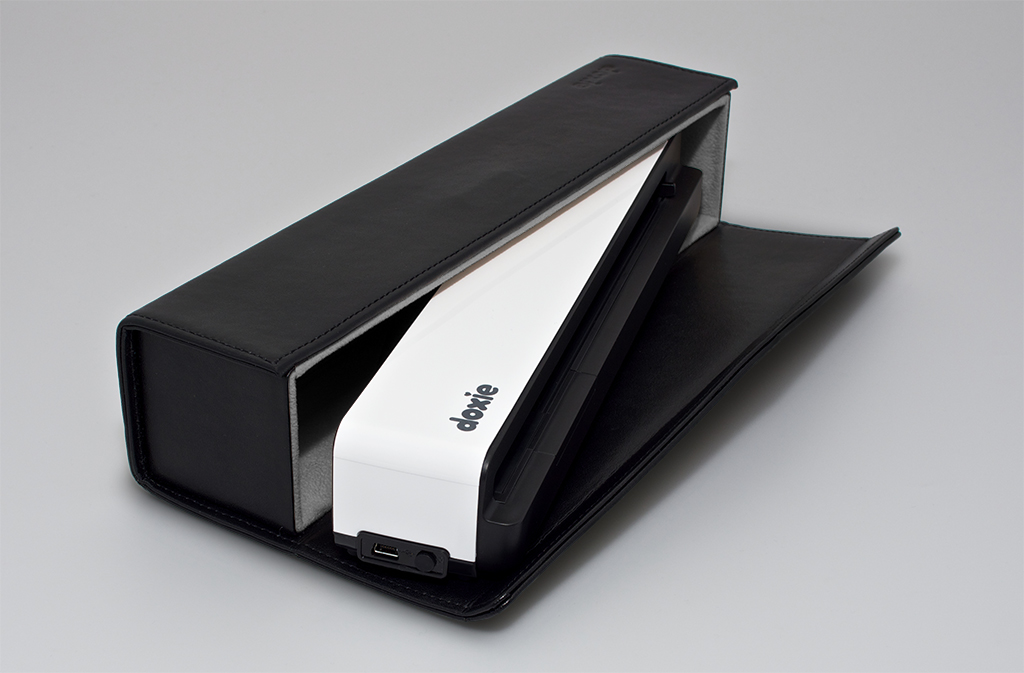
    I want to thank Apparent for sponsoring the RSS feed this week to promote the new and improved Doxie Go. I love the Doxie Go and after seeing what they announced, Doxie sent over one of the new cases for the Doxie Go for me to check out.

    Here’s what it looks like:


    It’s a pretty damned nice case if I do say so myself.

    The Doxie Go really does make the perfect little scanner to have kicking around your desk for those times when someone prints something out to hand to you.

  • Amazon Item of the Week: SanDisk ImageMate All-in-One USB 3.0 Reader/Writer

    I’m busy updating all my gear to USB 3.0 where I can — surprisingly, or not — some of the USB 3 gear isn’t great. I found this card reader though and there’s a few things I like about it:

    1. It’s by Sandisk and I’ve had this model (though non-USB 3) before and it still works great.
    2. It’s compact.
    3. It’s white and that means it comes with a white USB 3 cable, which I have yet to find sold by themselves.

    Nice buy.

  • How to Ensure Failure

    Just follow RIM’s lead:

    – Delay your next OS and next-gen devices — the only hope you have at competing and thus making money.
    – Announce massive drops in revenue and profit.
    – Lay off the 5,000 people that you will need in order to not let the next- gen device and OS slip even further into the future.

    I am beginning to wonder if RIM has just given up…

  • If You Use Two Macs and Dropbox to Sync Yojimbo…

    I’m a big fan of Yojimbo and have been using this tip to sync Yojimbo using Dropbox — except that I never had two Macs using Yojimbo before, so for me this was mostly just a backup solution. Now that I have two Macs I need to make sure that Yojimbo closes on one before I use it on another.

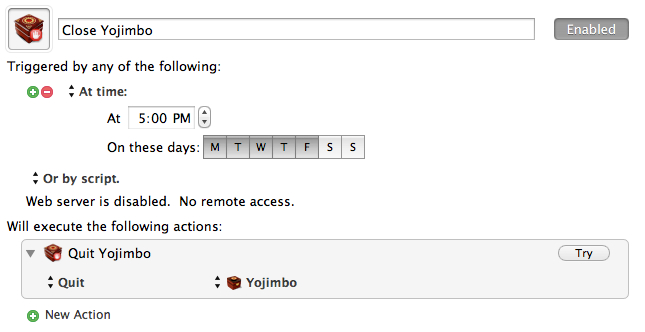
    Luckily my dual Mac setup is pretty specific: one Mac at work, one at home. Therefore I know what time I will be at either Mac. So to keep away any conflicts, and to solve my poor memory issues I invoke Keyboard Maestro to do this:

    KM closes Yojimbo for me Monday through Friday.

    On my Mac at home I set it to close Yojimbo at 8a M-F.

  • The B&B Podcast #67: Sweaty & Uncomposed

    A great show this week for you while Shawn is on vacation I had John Moltz fill in for him. John and I discuss all things Google and Microsoft — talking about tablets, phones, and corporate adoption. We both share our secret hope that this is a turning point for Microsoft.

  • ‘8 Reasons Why Mimi Would Dump Steve Ballmer’

    Keith Fitz-Gerald’s reason number 5:
    >Microsoft spent $26 billion on research over the last three years. Meanwhile, Apple spent $5.54 billion and managed to crank out products light years better than anything Microsoft has come up with. No question which group of shareholders is getting the most bang for the buck.

    Great list of reasons. I am a bit more rosy in my Microsoft outlook right now, but I still think Ballmer should have been gone more than 2 years ago.

  • ‘Google-Ocracy’

    The Macdrifter doesn’t (wholly) agree with my assessment that Google’s selling of tablets for cost is a bone headed move, saying:

    >Build a logical model of how you make decisions and sell ads to leverage that model. It’s simple and lucrative.

    Except that it is short-sighted. Because showing someone an ad doesn’t make the ad effective — what makes the ad effective is showing someone an ad for something they are preparing to buy at just that moment. That’s why ads on Google Search work really well, and the AdSense ads on the sides of crappy blogs make the site owners no money.

  • Today in TSA Failings

    It must be my lucky day, because man does the TSA want to be made fun of today. First let’s start with this gem out of JFK, [from the NY Post](http://www.nypost.com/p/news/local/queens/unplugged_tsa_airhead_triggers_jfk_kKxMANCPErCWn6KLfDbbVI):

    >The TSA’s bungling reached a new low yesterday when a JFK Airport terminal had to be evacuated and hundreds of passengers marched back through security screening all because one dimwitted agent failed to realize his metal detector had been unplugged, sources told The Post.

    Yep, TSA forgot to plug in the machine, which is pretty bad. BUT, this story gets better:

    >Amazingly, he failed to realize that alert lights never flashed once as streams of passengers filed through the dead detector, the sources said.

    >Majed was so clueless that he couldn’t even tell police how long the machine had been shut off or how it happened, the sources said.

    I guess if you mess up that bad, there’s no point in even trying to pretend that you did you job. Now, one would think, that the TSA would fire this person and apologize to the, umm, world. Nope, not the case with the TSA who stated:

    >The TSA would not confirm or deny that its detector had been unplugged, releasing a statement saying only that a metal detector suffered a “malfunction.”

    Would have been better if they had said the screener suffered the malfunction.

    Though, not to be out done, Newark wants you to know that even when their equipment is plugged in — well they [aren’t paying attention to it](http://www.nj.com/news/index.ssf/2012/06/8_newark_airport_screeners_fir.html):

    >The TSA said investigators are also looking into photographs of screening supervisors who appear to be sleeping in front of monitors used for detecting bombs and other threats in checked bags about to be loaded onto planes.

    The TSA has already fired 8 screeners for sleeping on the job in Newark, so at least the TSA has fired some screeners — which is news to me.
  • AnandTech Looks at the Nexus 7

    Looks like solid hardware when compared to the Kindle Fire, I ordered one last night to check it out. This will be the third 7″ Android tablet I have used, and I am not going to lie when I say that the addition of an Android Instapaper app is probably going to be the biggest improvement — something Google didn’t have a hand in.

  • NetSpot: WiFi Survey & Wireless Scanner

    New-to-me free little Mac utility will map the WiFi coverage in your home/office. It’s pretty neat too and easy to use: you just walk from place to place in your home, with your laptop, stopping to tap where you are on the map. From there the software scans all wireless networks available and notes the connection strength. You can then visualize that data on a network by network basis.

    Perfect for deciding if you should add in one of those hot new Airport Express stations, or if you just should move your Time Capsule out of that cabinet you keep it in. ((I really need to move it out of that cabinet…))

  • Quote of the Day: Michael Lopp

    “How long can they keep it up? I don’t know, but I do know that Apple believes the future is invented by the people who don’t give a shit about the past.”
  • ‘What Happened to the Android Update Alliance?’

    Andrew Cunningham:
    >While it looks to be a solid update to last year’s Ice Cream Sandwich, there’s a big question that always looms large over the announcement of any new Android version: these features look nice and all, but will my device ever be upgraded?

    Here I am — [practically begging Apple to stop updating old crappy hardware](https://brooksreview.net/2012/06/legacy/). Man, I’m a dick.

  • Google’s Tablet Strategy

    Ina Fried for a site with a URL has this quote from Google’s Andy Rubin on the Nexus 7 tablet:

    >“When it gets sold through the Play store, there’s no margin,” Rubin said. “It just basically gets (sold) through.”

    In other words: Google isn’t making a profit off the Nexus 7. I absolutely do not understand how shareholders continue to be OK with this mentality. Google now has several high-cost, low-reward, programs running that they are pissing away money on — let’s recap the ones I can think of:

    – Google Glass
    – Nexus 7
    – Self-driving cars
    – Space Elevator

    Most of these projects can be found on this [Wikipedia](https://en.wikipedia.org/wiki/Google_X_Lab) page. Perhaps I’ll look like a fool in ten years and Google will be rolling in cash from all these ventures, but more likely investors will be sitting back and wondering what the hell went wrong.

    The idea of selling the Nexus 7 to users at cost is just a bad idea. Google didn’t *need* to sell a tablet for $200. Google doesn’t need to compete with the Kindle Fire, because the Kindle Fire doesn’t seem to be doing, well, stellar at all.

    Apple makes a pile of cash everyday by selling a tablet at $499 ((They were making money long before the $399 version.)) , which is exactly why Google should be trying to make a profit. If they break even at $200, why not sell it for $250 — that’s still half the price of the most successful tablet in the market.

    In the end, I know why Google is selling at break even, because Google truly believes this:

    >The amount of tablet-specific apps have also been an issue, but Rubin said Google is sticking with its strategy of encouraging developers to write a single app for both phones and tablets, while taking some care to make sure the layout and button size are optimized for larger-screen devices.

    Translation: we don’t give a crap about how much users like using the product, just that they use it.

    Make no mistake, when this is the mentality you approach things with, then you very much need to sell your product at break even — or it won’t sell.

  • Google Glass and Reality

    [Andy Ihnatko on Twitter](http://twitter.com/Ihnatko/status/218051100333457410):
    >Interesting that Google is being so open about Glass dev process. Prob because they’ve no idea how to turn this neat idea into a product.

    I’d clarify that statement as such: Google has no idea how to turn this idea into something that is neat, let alone an actual product. When the iPad launched Apple knew they had something really neat on their hands. The best they could reckon, at the time, was that it was a fantastic tool for browsing the web and consuming content.

    What they didn’t think of, imagine, or conceive was some of the amazing apps that would eventually come out. Once they saw those, that’s when Apple figured out how to market the device as a mass market consumer good.

    That’s when the iPad became a hit.

    With Google Glass I am not sure we even have a neat idea to start such a fire because I have yet to see one feature that makes me want it for even a one-off scenario.

    Which brings us to [Erin Biba’s comment on Twitter](http://twitter.com/alexismadrigal/status/218051609433882625):

    >Google Glass is the Segway of wearable accessories.

    That’s another interesting comparison, because the Segway is both neat and a product. However the Segway is not a mass market product because of the limited utility and the price. The Segway works well for security guards at malls and events, but is pretty much ridiculous for everything else. Luckily the segment that Segways do work well for are also segments that can and *will* spend that money on a Segway.

    Compare that to Google Glass, where it is going to be $1,500 for a pair. So now Glass is an idea that may or may not be ‘neat’, has no fit as product (yet), and is limiting itself to a small market based on a high entry price.

    Sounds like a winner.

  • An App Keeps Spies Away From Your iPhone

    Tom Simonite:
    >A new app called Silent Circle tries to change that by encrypting calls, e-mails, and texts. It’s aimed at activists, companies, and individuals who fear they’re being spied on.

    In other words: it’s aimed at me.

    Think of this though, for all you spy lovers, this would be a way to *finally* have your own “secured line”. Thus allowing me to now say to people: “this line isn’t secure, I’ll call you back on a secure line”. Awesome.

  • (Poorly) Supporting Legacy Devices

    Everyday I use two devices from Apple: an iPhone 3GS and an original iPad. The 3GS is basically an iPod that sits in my car all day, but I use an old iPhone so that Instacast can update itself when I park in my garage. That old original iPad is in use as a dedicated baby monitor, so its pretty much on all night long.

    It’s great that Apple decided to continue to support both of these devices, at least it is great in theory, because in practice I kind of wish they hadn’t. Both devices are running iOS 5.1.1 and both are laggy and buggy. Updating apps on either is an exercise in patience and control to not throw the device against the nearest hard surface — entering the password for iTunes alone can even cause stuttering.

    Don’t even get me started with how shitty the implementation of iTunes Match is on the 3GS, because only a masochist would like it. ((Which brings me to another point. If a masochist, by definition, is someone who gets pleasure from pain/etc, then wouldn’t it stand to reason that they should never endure something painful because failing to endure pain would be *more* painful for them, thus giving them more pleasure? Ah who cares…))

    Now we learn that Apple is [offering](http://www.apple.com/ios/ios6/) iOS 6 support for the 3GS, but not the original iPad (which is newer and faster). I know why they are doing this: you can still “buy” a 3GS new — so they feel compelled to support it. Ok, but why not also support the iPad?

    My guess: because Apple knows that iOS 6 is going to run even worse on the original iPad than iOS 5 does. So really Apple is doing iPad users a favor by not supporting it.

    But what about the 3GS getting iOS 6? Why support these legacy devices, if said support is going to be pretty poor anyway? I never remember the original iPad being laggy and buggy, nor do I remember the 3GS being that way when it came out. Both seemed to work perfectly up and until the moment that iOS 5 was loaded on them (to be fair there were issues with iOS 4, but I can’t remember if that was the 3G or 3GS).

    My point is: if you are going to do something, don’t half ass it.

    As a daily user of a 3GS and an original iPad, I can say with 100% confidence that I *would be* better off not having put iOS 5 on either device, because iOS 5 optimization for either device feels and works like an after thought.

    I am scared at what iOS 6 might bring for 3GS woes and I really do think Apple should abandon devices faster (for the user’s sanity) if they aren’t going to make sure that these new updates work just as well on the legacy devices.

  • iBank for iPad

    I have tried a lot of the Mac banking apps and every time I come back to iBank. While I don’t use iBank on my iPhone — their new iPad app is really nice. It feels a bit sluggish to me right now, but looks great ((The icon: no, just no.)) and has a lot of functionality.

    As a bonus tip (again thanks to [Justin Blanton](http://hypertext.net/2012/06/omnifocus-secure-webdav)): instead of using the default ‘WiFi’ sync option I setup a WebDAV sync, but since we are talking about financial data I used the excellent [CloudSafe](http://cloudsafe.com) service. I highly recommend CloudSafe because of the security it offers and the speed the service runs at — also it is really simple to use.

  • ‘What Am I Missing Out on by Not Having an iPad?’

    Luckily, Prashant Sachdeva has that question covered.

  • Apple & Fashion

    Sheel Mohnot:
    >In 1986, Apple decided to extend its brand… into clothing. And it wasn’t a black mock turtleneck and jeans.

    And it also wasn’t good…

  • Macbook Pro Retina Review from a Photographer

    Luminous Landscape has a nice review up of the retina MacBook Pro. Two nice points in the review:

    1. An explanation of why apps need to be “retina enabled”.
    2. A comparison of drives on Thunderbolt versus USB 3.