Month: August 2013

  • ‘Text a Driver in New Jersey, and You Could See Your Day in Court’

    [Ben Brumfield and Chris Boyette][1]:

    > They {a New Jersey court} ruled that if the sender of text messages knows that the recipient is driving and texting at the same time, a court may hold the sender responsible for distraction and hold him or her liable for the accident.

    I thought that would be the stupidest part of the article, it was, but not the most concerning:

    > And [new legislation proposed by state Sen. James Holzapfel ][2]would let police thumb through cellphones if they have “reasonable grounds” to believe the driver was talking or texting when the wreck occurred.

    That’s messed up. Now, I would be fine with searching a phone’s records for texting after a court ordered it so, but a police officer doing so simply because they suspect it? Fuck. That.

    [1]: http://www.cnn.com/2013/08/29/us/new-jersey-texting-crash-sender-liable/index.html
    [2]: http://www.cnn.com/2013/06/12/tech/new-jersey-cell-phone-traffic-stop/index.html?iref=allsearch

  • Quote of the Day: Marco Arment

    “‘Fn’ key should be pronounced like you’re censoring the swear word: ‘effin’ key.’”
  • Gadget Site Reviews

    [John Gruber, in a parenthetical comment][1], in an article about the horribleness of the Q10:

    > Why weren’t the gadget site reviews of the Z10 and Q10 more scathing?

    Weren’t they? I don’t know, I didn’t read them, but let’s take a look:

    – **The Verge**: “But for the faithful, make no mistake: the Q10 is the ultimate BlackBerry. All paths in BlackBerry’s nearly three-decade history lead to this phone. Happy Bold users will, and should, upgrade in droves. Unfortunately, BlackBerry needs much more than a stop-loss product.” [That’s the last sentences][2] of the 7.3 rating that *The Verge* gave the Q10 — sounds like they like it a lot. I mean I didn’t read the rest of the post, just the summary, like every other reader…
    – **Engadget**: [Their summary][3] is so all over the board that they don’t even bother to make a conclusion on the device. Instead they offer up sentences that allow you to draw the conclusion you want to draw about the Q10. In one paragraph saying they would choose the Z10 and the next saying that the Q10 might be better for a certain niche. You’d think it would have been easier to write a definitive answer rather than stumble over this many words…
    – **Trusted Reviews**: (I don’t read this site, but the domain forced me to include them.) [In their 7.0 review][4] of the Q10 they conclude: “The BlackBerry Q10 will not challenge the Samsung Galaxy S4 or HTC One, but this is not really what it has been designed to do. For business users, the Q10 will be a welcome and giant step up from an aging BlackBerry Bold 9900. It is unlikely to turn around BlackBerry’s fortunes just yet, though.”

    All of these left me with this (if I was interested in this phone): “Seven out of ten isn’t bad, but I don’t understand why I should buy the phone. Wait, maybe I shouldn’t. Crap I don’t know.”

    And that’s the point of reviews on major sites like the ones above: they don’t want to tank a rating, and they don’t want to be too opinionated. Doing either would *hurt* their business.

    Yes, it would *hurt* their business to be honest.

    Why? Because if they piss the company off that makes the devices they review, then they may not get press invites or review units — and that may in turn seriously hurt their revenue as they are based off of ad sales. ((Though Trusted Reviews doesn’t look to have many (any?) ads on the site.))

    But are the sites wrong to give these devices 7 out of 10s? [Amazon lists][5] the international version of the Q10 with 41 user ratings which average out to 3.5 stars out of 5. Now I find that once Amazon has 200+ reviews on any item, the reviews are pretty accurate. ((That’s why I only buy things with four or more stars.)) Three and a half out of five, by the way, is the same as seven out of ten.

    Now, it’s only 41 reviews, but there are a few other versions of the Q10 that we can add in (I didn’t do the math), all those versions have 5 stars. So Amazon reviewers are seemingly liking the device more than the above reference “review” sites.

    [There’s reason to think][6] that the Q10 is shit and should have been called out on that, but that doesn’t seem to be a universal feeling. As much as I like to give *The Verge* shit, their rating seems to be tracking with the user ratings on Amazon thus far.

    That’s not to excuse their lack of opinion and objective advice, that’s still shitty reviewing, but their ridiculous point ratings seem to be acceptable in the case of the Q10 by comparison of user ratings on Amazon.

    [1]: http://daringfireball.net/linked/2013/08/30/how-did-q10-ship
    [2]: http://www.theverge.com/2013/4/29/4281730/blackberry-q10-review
    [3]: http://www.engadget.com/2013/04/23/blackberry-q10-review/
    [4]: http://www.trustedreviews.com/blackberry-q10_Mobile-Phone_review_multimedia-apps-battery-life_Page-3%23tr-review-summary
    [5]: http://www.amazon.com/Blackberry-Factory-Unlocked-International-Version/product-reviews/B00C1DIGRI/ref=dp_top_cm_cr_acr_txt?ie=UTF8&showViewpoints=1
    [6]: http://blackberryq10.tumblr.com

  • HTTP Status Codes

    This is a fantastic tool — love it. ((It helps that I just recently learned how to use the `.bash_profile`.))

  • Fast-Flashlight for iPhone

    It’s the fastest around for now, but when iOS 7 launches I can assure you that there will be no need for flashlight apps any longer (unless you like that pulsing shit).

    {via my entire inbox}
  • Doing it Horizontally

    [This post][1] from Adam Glynn-Finnegan is making the rounds. In the post he offers *another* redesigned airline boarding pass. I don’t much care about what he did, but I want to bring up a few points that have been driving me nuts (since it seems every 6-months these posts about new airline boarding passes pop up):

    1. Why are you still designing them horizontally? That’s a stupid direction because it’s not the easiest way to hold a pass and read it in a human hand — portrait is. There are more problems with this orientation too, like the fact that the line length becomes too long to easily scan with an eye, so you get lost in the wash of data, instead of honing in on the important data.
    2. Why are all these boarding passes being design for paper? That’s so dumb it hurts me to think about. ((Yes, in the linked post he asks if the concept is dead, but that was answered two years ago (at least).)) Most airlines, most airports even, allow you to pull up the pass on your phone and use it that way. Now, that means you not only need a portrait pass, but that you also should be designing for the best solution (phone use) instead of the archaic one (paper). Even at that, there’s a ton of people that come to the airport having printed out their passes on a computer using 8.5″x11″ paper — not a thermal printer at the airport, which is likely the least used these days — so at the very least you need to consider these being printed on a much larger paper size.
    3. Why are we still using the tear-off option here? Given what I said in point #2, there are very few people with perforated tickets to begin with, and even fewer instances where airline staff are tearing off and keeping parts of the tickets. There’s a reason for that barcode on the ticket.

    All of that brings me to my last and final point: security and airline staff are relying on the barcodes, not the printed information. The *only* person relying on the printed information is the passenger. For the very rare instance other people need to review the ticket, they can read smaller print.

    In other words: the entire ticket should be designed mostly for the user, with a huge barcode for easy scanning, and a ticket made to work best on a portrait-held smartphone first a foremost.

    ``

    [1]: https://medium.com/design-ux/c72084d7793e

  • ‘How Many Leakers Came Before Snowden?’

    [Bruce Schneier has an interesting thought][1]: if the NSA truly didn’t know what, or that, Snowden stole documents then…

    > Given that, why should anyone believe that Snowden is the first person to walk out the NSA’s door with multiple gigabytes of classified documents? He might be the first to release documents to the public, but it’s a reasonable assumption that the previous leakers were working for Russ{i}a, or China, or elsewhere.

    *Yikes*.

    [1]: http://www.schneier.com/blog/archives/2013/08/how_many_leaker.html

  • ‘Reviewing Documents With OmniFocus And Hazel’

    This is a fantastic little Hazel rule to add to your tool belt.

  • ‘What Happens When You Stand for 2 Years’

    [Arshad Chowdhury has a post making the rounds][1] wherein he talks about the things he has learned and gained from standing at work all day long for two years. I have not noticed either of the side effects he mentioned (both the positive and negative), but most of what he says I am in agreement with.

    I started standing occasionally [on October 10th, 2010][2] and went full-time [on January 25th, 2011][3]. What I can tell you about standing is that it has done wonders for me. It has alleviated a lot of back pain, and leg numbness that I had. My feet don’t get tired standing and truly don’t seem to ever get tired anymore.

    I can also tell you that sitting down feels really fucking great. I don’t know if any of the health benefits are true, but my guess is that a mix of standing and sitting is the best for people. Since I don’t care to stand while I drive, or while I watch TV at home, I stand while I work.

    I do advise against the setup as Chowdhury has pictured, and seems to recommend. If that’s his setup in the picture, I’d run away from that (which is easier because I am already standing). The problem with his setup is that he is looking down too much, and that will always be an issue if you use a laptop as your entire setup (meaning as your monitor, mouse, and keyboard).

    I use my laptop for the screen, but have a keyboard and trackpad separate from it. This type of arrangement allows me to raise up the laptop screen to a height more inline with [ergonomic guides][4] on the issue.

    If you are standing for health reasons, you should probably make sure you get *all* the benefits by adjusting your screen height. Even if you don’t stand, it’s a good idea to get that screen a little higher than you are probably used to.

    [1]: http://arshadchowdhury.com/1485-what-happens-when-you-stand-for-2-years/
    [2]: https://brooksreview.net/2010/10/stand-up/
    [3]: https://brooksreview.net/2011/01/stand/
    [4]: http://www.thehumansolution.com/ergonomic-office-desk-chair-keyboard-height-calculator.html

  • Secure Archiving, and Fast Searching of Email

    The oldest email I had on my Mac was dated January 1st, 2006. That was in an archive folder for my iCloud email. ((What’s great is that the email was to a buddy talking about using group iDisk and iCal for a project we were working on. Man, did Dropbox simplify things.)) Now, what’s the point of mentioning that? Well if you got a hold of my iPhone, and guessed the four-digit passcode, you essentially would have access to every email I have received since that date. All neatly stored in my archive folders, totaling well over 50,000 messages — attachments included. A good chunk of my digital life.

    You don’t need NSA computing power to read all my emails. You could get a full archive by getting into any of my iOS devices, getting into my email server, or getting into my Mac. Some of those things I can properly secure. Some (most?) are almost impossible to secure completely. I’m guessing my passcode wouldn’t be too hard to guess if you just recorded me for a few hours — you’d probably get it in fifteen minutes and I wouldn’t notice.

    That bothered me from the geeky “I wonder if I can secure that” perspective. So that’s what I set out to change.

    I searched around to see if there was a way to encrypt the mail database stored on my OS X Server providing email services — there are, but none that I understood. Even still, those methods wouldn’t secure my iOS devices, or my iCloud archive. *Damn*.

    It’s also been making me uneasy that my Mac mini is sitting there with no encryption — as encryption would make it very difficult to remotely administer a Mac, given that I have no way of physically getting to that Mac.

    The solution then seemed to present itself: get the data off of the Macs, iOS devices, and Servers. Take my email archive out of IMAP and into something that is encrypted. I then thought about how I use that archive right now: reference. Even just for reference Mail.app does a piss poor job of searching, finding, and displaying old email messages. So Mail.app actually is a pain in the ass for managing my email archive.

    I began searching for email archiving applications that I could use to achieve my goal. None of them offered encryption, more on that later, but I found three applications to try: [MailSteward](http://www.mailsteward.com), [Mail Archiver X](http://www.mothsoftware.com), and [Email Archiver](http://emailarchiverpdf.com) (which is least like the others).

    ## Email Archiver

    You can find this on the Mac App Store for $24.99. It takes a range of emails and converts them to searchable PDFs. This sounds appealing for future safety, but in practice this is very slow, and very useless for referencing archived files. I quickly gave up on this app.

    This app is better suited for archiving things project by project — if you are wont to do that.

    ## Mail Archiver X

    Strike one was the lack of retina capability, but Retinizer quickly solved that. In fact the biggest issue I have with Mail Archiver X is that the search capabilities are lacking. In Mail Archiver X you get just one search box, much like Mail.app which I have already mentioned sucks at search.

    This was ultimately the reason I steered clear of Mail Archiver X.

    ## MailSteward

    Obviously, with the other two out, I chose MailSteward. I chose it because of it’s search power, which looks like this:
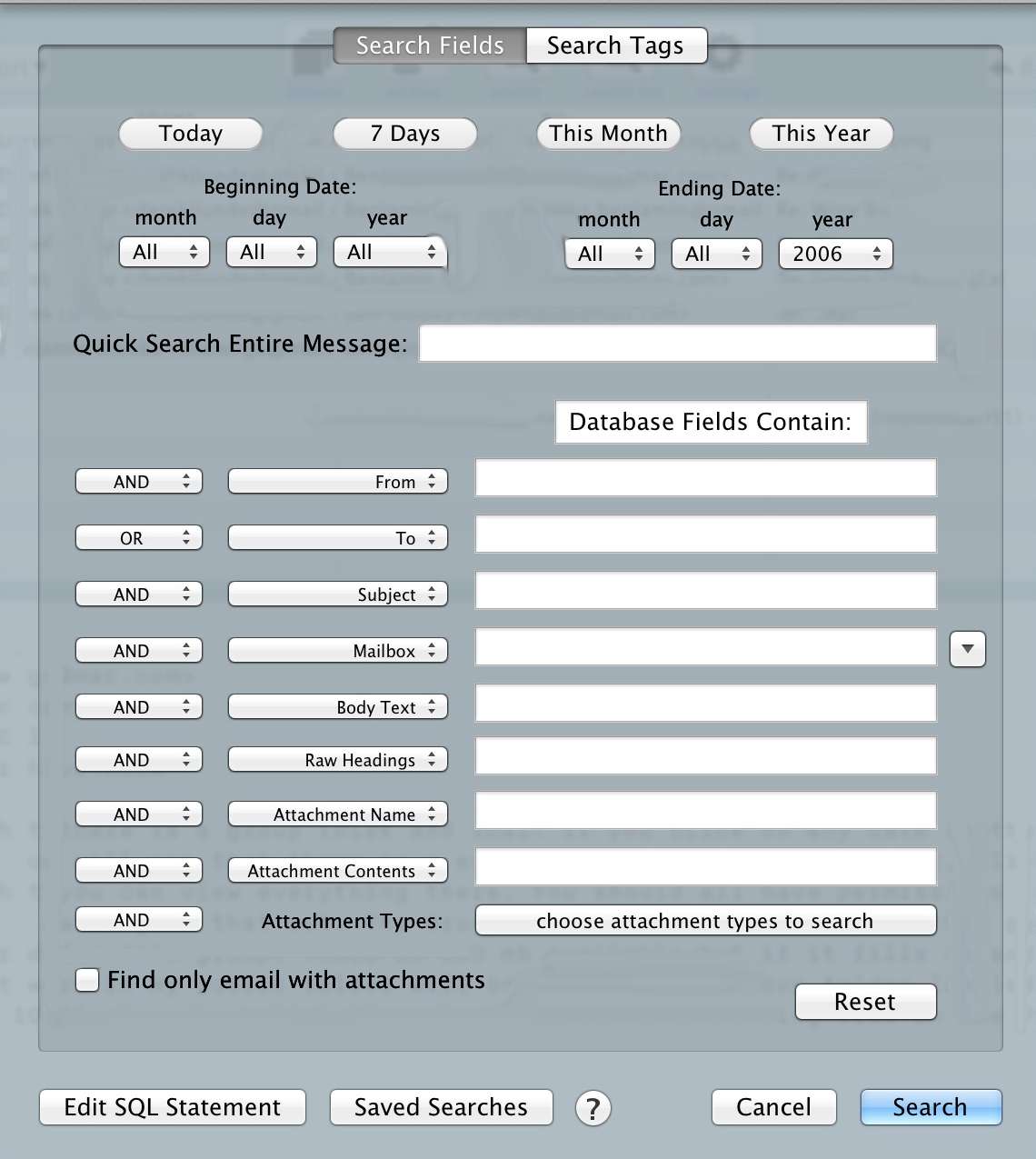
    That’s a powerful tool, especially given that my dataset is 50,000 emails — some with attachments. There’s a ton of great options in the app, including scheduled archiving and auto-tagging (which I have yet to implement). Overall I ended up with a database well over 15GBs, but a program that can search it faster and better than Mail.app could.

    So now I have a better search method stored locally on my Mac.

    ## The Result

    This solution does not solve every problem. While it offers better search of my email archive, there are still a bunch of new issues that popped up. Here’s the system I currently have in place:

    – My MacBook Pro archives email in everything except my inbox daily at 10:21pm.
    – My Mac mini also has a copy of MailSteward installed and it archives everything once a month from all inboxes to a local database.
    – I have mail rules set to delete any email over six months of age. ((These rules are pretty hit and miss. So far I had to do the initial delete manually.))

    Therefore, at most, someone could grab the last six months of my email. As I get more comfortable with this system I plan on shortening that time period to one month for personal stuff, one week for this blog, and two months for work.

    Now, you may ask, what about the database for MailSteward sitting on your Mac mini? Well, that database sits *inside* a Truecrypt volume. ((My MacBook Pro is encrypted by FileVault 2, which is good enough for that database.)) I just have to remember to mount that volume before MailSteward wants to run each month, or after restarting the machine (which I typically only do for software updates).

    All of this means I get no access to old emails from iOS, ((I *could* VNC into my Mac mini and search that way if I want.)) but it also means that I have secured my old email from people who gain physical access to my devices.

    Yes, the NSA *might* already have copies of my stuff, but that’s no reason to make it easy for someone who gets access to my devices to have a robust database on me.

    Overall, this is a far better solution for people that like to search their email archive, and it *can* be more secure if you set it up correctly. I was, however, a bit uneasy deleting all those emails and relying only on MailSteward.

  • The NSA Data Mining Conundrum

    As the weeks roll on it has become clearer that the NSA has cast a very large, very fine, net over all communications in, out, and through the US. If the NSA is to be believed then they do their very best *not* to capture American communications, but they regularly fail at avoiding such capture — instead relying on their vague “minimization” techniques to make up for the capture of American communications.

    One of the reasons this is such a hard debate to solve, is that there are a lot of moral decisions that need to be made — questions that need answers.

    The first question we need to answer is: Should the NSA and other federal agencies be allowed to use any and all technology available to catch criminals and terrorists? I believe the *only* answer to that question is an emphatic yes. The next questions are trickier:

    – Should these agencies be allowed to act without direct oversight?
    – Who oversees these agencies and their policies?
    – Should the laws governing these agencies be made in secret to protect law enforcement abilities?
    – How much should be known publicly?

    I could go on. I am, surprisingly, in favor of most of what the NSA is doing, but the current oversight seems to be totally insufficient. The program should be openly debated in Congress, approved through normal courts, and FISC should only be used for specific people that the government believes are far too high risk to hold a debate over in open court. And even in those circumstances the rulings should be made public after twelve months — no redactions.

    The one question I keep tripping over: How, and for how long, should the government retain information they gather about individuals? Additionally, when and who authorizes searches within that retained data?

    Essentially let’s say (purely theoretically and simplified) that the NSA holds a database on every email sent — ever. With the interests of the nation in mind, I cannot figure out the following:

    – How should that database of emails be stored?
    – Should the NSA be allowed to store this data indefinitely, indiscriminately, or should it be filtered and deleted, or just deleted based on dates?
    – When should this data be allowed to be searched? By court order? By suspicion? By lovers?

    There are many problems here, because quite simply the more data the better when it comes to truly preventing bad things. I acknowledge that, but we also cannot be a nation scared to speak for fear it may show up on a boolean query by an underpaid NSA worker.

    Had 9/11 been totally planned via email, then clearly there’s a lot of benefits to indefinite storage and easy searching of email data. When the first plane hits, the NSA knows exactly what to look for and maybe, just *maybe*, they know what is going on before the other planes strike. At the very least, they know the scope of the attack. That’s a great argument in favor of keeping everything, allowing easy searching, and so forth. I truly believe that FISAA, FISC, and the NSA created these tools and are using them with this mindset.

    But there’s a flip side to all of this. What if two idiots get drunk and hatch a plan that sounds a lot like terrorism. They communicate over channels monitored by the NSA and get flagged. The plans seem detailed and the “voice” of the messages seems intent on execution. Should the NSA swoop in then? Should they wait until it’s too late? If they swoop in right away, then we never know if that plot would have been carried out. Is that the society we want to live in?

    Further, if those people are only observed then many hours have been wasted watching people that never do anything while others slip by.

    Now think about this: The FBI catches a person, the *suspect* of terrorism, based on a couple of illegal items they find in their house. Normal penalty (making this up) is five years in prison. But the FBI asks the NSA to run a little search, and it turns out the guy was one of two drunk idiots sending the emails described above. Now what? He’s still only guilty of being an idiot in possession of illegal items, but because of the emails should the punishment be harsher? Why? He still only did one thing against the law…

    *Ugh.*

    I can’t answer a lot of these questions, which is exactly why I think this is a topic for public debate in Congress. I just hope the president gives us that chance. There’s no correct decision to be made, but there is a sound decision with good reasoning. That’s all I want.

  • ‘Researchers Reverse-Engineer the Dropbox Client’

    [Michael Kassner reporting][1] on the [reverse-engineering of the Dropbox client][2]:

    > The paper goes to great lengths explaining how Dhiru and Przemyslaw successfully gained access to a victim’s Dropbox account and files. The two also mentioned in the paper with each new version of Dropbox, developers were able to harden the client’s security, which in turn eliminated one or more attack vectors.

    Essentially they figured out how Dropbox auto-authenticates you into Dropbox.com when you click the link to launch the website from the app. What always worries me about these types of hacks, the same as Kassner worries, is how long they have been in the wild without anyone knowing.

    I don’t feel nearly as optimistic about Dropbox security as [Gabe does][3]. It feels to me that the better target for hackers now is services like iCloud, Dropbox, and SkyDrive instead of attacking OSes. Why bother attacking a physical machine running Windows or OS X, if you can instead target a service that stores the actual *files* for millions of physical machines?

    I feel like this is just a tip of a very large iceberg surrounding cloud file storage.

    [1]: http://www.techrepublic.com/blog/it-security/researchers-reverse-engineer-the-dropbox-client-what-it-means/?utm_medium=App.net&utm_source=PourOver
    [2]: https://www.usenix.org/system/files/conference/woot13/woot13-kholia.pdf
    [3]: http://www.macdrifter.com/2013/08/dropbox-reverse-engineered-link.html

  • ‘Obama’s Bluff’

    [George Friedman writing about the tough decision President Obama has to make regarding Syria][1]:

    > This is no longer simply about Syria. The United States has stated a condition that [commits it to an intervention][2]. If it does not act when there is a clear violation of the condition, Obama increases the chance of war with other countries like North Korea and Iran. One of the tools the United States can use to shape the behavior of countries like these without going to war is stating conditions that will cause intervention, allowing the other side to avoid crossing the line. If these countries come to believe that the United States is actually bluffing, then the possibility of miscalculation soars.

    That’s the danger of bluffing in anything — you better be 100% certain you aren’t called, or willing to take the risk you are. I think it is clear this was a bluff on Obama’s part. Right or wrong Obama has now been called. There is very little choice for the United States now — because either hard line statements from our President no longer carry weight, or we go to war (of some scale). Both options, for lack of a better word, suck.

    > The attacks could prove deadlier than the chemicals did. And finally, attacking means al Assad loses all incentive to hold back on using chemical weapons. If he is paying the price of using them, he may as well use them. The gloves will come off on both sides as al Assad seeks to use his chemical weapons before they are destroyed.

    I don’t see this ending well for anyone at this point.

    [1]: http://www.stratfor.com/weekly/obamas-bluff
    [2]: http://www.stratfor.com/geopolitical-diary/us-prepares-intervention-syria

  • ‘OmniKeyMaster: Upgrade Pricing for Mac App Store Customers’

    [OmniKeyMaster][1] is a great new tool from The Omni Group which allows Mac App Store users of Omni software to quickly and easily move to non-Mac App Store versions. This allows faster updates (because they bypass App Store approval) and upgrade pricing.

    I think this is a very smart move and a great tool. Effectively it removes a decision users have to make: now you just buy from the Mac App Store and if you want upgrade pricing later you can convert easily. More-or-less a win-win. The nice part about buying from the Mac App Store is that (hopefully) Apple has your back and won’t allow you to download anything dangerous to your system. With a tool like OmniKeyMaster you can then use the App Store to gain trust in developers *before* you move outside of the Apple-dome-of-protection.

    Now this tool is just for Omni applications, but I hope other companies take note and perhaps someone builds a service for *all* developers to use. One tool to convert any Mac App Store app you want to a non-Mac App Store app, that would be great.

    [1]: http://www.omnigroup.com/blog/entry/omnikeymaster-upgrade-pricing-for-mac-app-store-customers

  • ‘To Make Journalism Harder, Slower, Less Secure’

    This is a fantastic post on Pressthink about how journalism can and should operate in a surveillance state. It’s interesting to think about the implications of silencing the press — but more than that it is sad to think that silencing the press is considered an option by “civilized” governments.

  • ‘300 Days With the iPad Mini’

    [Dan Frommer][1]:

    > The main thing you need to know about my iPad mini right now is that it’s here next to me, and I’ve already been using it a bunch today. I also fell asleep reading it last night, and almost every night last week.

    After initially scowling at the iPad mini, I bought one from a [buddy][2]. I bought one because the iPad (3) is damned heavy to carry around and even more cumbersome to deal with if you need two hands and don’t have a bag. I use the piss out of both of my iPads, so I have a few thoughts on them that I will share (in no particular order):

    – The size and weight of the iPad mini make it better for almost every task.
    – The size of the proper iPad is much better for scribbling notes with a Cosmonaut.
    – The size of the proper iPad is superior for typing, even with a bluetooth keyboard the display feels better for writing.
    – Not having retina blows, but you get over it when you realize your arms aren’t tired after one page of reading.
    – I read with my iPad mini *every* night — I did that for only a few months with my proper iPad.
    – I abuse the crap out of my iPads, neither have broken.
    – When I head to work I always take my retina MacBook Pro, proper iPad, and then debate about taking the mini. It makes it into my bag 40% of the time.
    – The mini is *always* the device I grab if I rush out of the house and am not sure if I might need some extra computing prowess.
    – The mini is *the* device I take when we go on day-trips, and weekend getaways (where I have been given the “you better not bring stuff to work on” look).

    I’d buy a retina iPad mini over another full-size iPad, but only if the weight and size didn’t change the wrong way on the mini. More likely, I am looking to upgrade *both* iPads and my iPhone this fall.

    [1]: http://www.splatf.com/2013/08/ipad-mini-still/
    [2]: http://512pixels.net

  • ‘Square v. Portrait’

    [Khoi Vinh looking at an Instagram shot of his in the square crop, and how he would have cropped it for portrait][1]:

    > I’m not arguing that Instagram should allow portrait images. I’m just saying the world is more interesting than just squares.

    There’s a lot that is great about the square crop, but it’s also not a very useable image crop. You rarely see frames for square crops, and your displays are rectangular. In my house I can often be heard, rather rudely, barking at people: “why don’t you shoot that picture/video in an *useable* orientation.” Meaning: stop shooting video in portrait and stop taking group photos in portrait. I try to shoot 95% of all my photos in landscape, with only an odd few in portrait.

    I simply find that every time I take a good shot in portrait, there isn’t much I can do with that shot that I actually want to do with it. It’s doubly annoying for square images. They can look great, but then what the hell do I do with a square image? It looks great on my iPhone screen, but outside of that it just looks like: where did the rest of the picture go?

    [1]: http://www.subtraction.com/2013/08/26/square-v.-portrait

  • ‘U.S. Enables Chinese Hacking of Google’

    [Bruce Schneier, in **2010**, for CNN][1]:

    > In order to comply with government search warrants on user data, Google created a backdoor access system into Gmail accounts. This feature is what the Chinese hackers exploited to gain access.

    This was written before we knew about 90% of the NSA dragnet, Yet here is [Google’s statement, from CEO Larry Page, on PRISM (circa 6/2013)][2]:

    > First, we have not joined any program that would give the U.S. government—or any other government—direct access to our servers. Indeed, the U.S. government does not have direct access or a “back door” to the information stored in our data centers. We had not heard of a program called PRISM until yesterday.

    Perhaps Page needs to clarify that just the Chinese have direct access to that backdoor? ((By the way, why are you still using Gmail?))

    (via The Brief)

    [1]: http://edition.cnn.com/2010/OPINION/01/23/schneier.google.hacking/index.html
    [2]: http://googleblog.blogspot.com/2013/06/what.html

  • ‘In Surveillance Era, Clever Trick Enhances Secrecy of iPhone Text Messages’

    [Dan Goodin on the coming iOS secure texting app, TextSecure][1]:

    > Moxie Marlinspike, the pseudonymous security researcher, cryptographer, and developer of the TextSecure and RedPhone privacy apps for Android, has devised a simple trick that iPhones can use to respond to another phone’s key requests even when the app is inactive. The technique relies on “prekeys” that are generated and sent to a server when TextSecure is first registered. When a separate TextSecure user wants to send a message, he’ll no longer have to wait for the other party to respond with her key. Instead the sender will be able to download her prekey and so the ephemeral key can be generated right away.

    I read about this a few days ago, but was holding off posting to see if anyone would shoot holes in this method. I have yet to see anyone complaining about it enough to warrant suspicion, but there are a couple things I really don’t like here:

    1. “the pseudonymous security researcher” — that doesn’t make me feel all warm and fuzzy about the developer, let alone trust this person.
    2. From what I can tell your pregenerated keys sit on a remote server, are then fetched, and used to pair and encrypt the message. This is a neat trick, but my fear is that your keys could be compromised *before* you even get the message. So yes, it would be hard to *go back* and decrypt your old messages, but if the server that holds the keys is compromised then all of your new messages could be decrypted in real time (I would assume) and thus you need to trust the server your keys are on. Which brings me back to point one.

    I regularly use Silent Circle and Wickr. Wickr is an odd beast that I have talked about before and the security of it is questionable due to the same server issue. I’ll take you back to [this post][2] where Matthew Green looks through secure messaging apps.

    Green can’t even weigh in on Wickr, which is concerning. He is in awe of the code for TextSecure (I wasn’t using the pre-key method at the time of Green’s writing), and as for Silent Circle they have been independently audited at a code level and nothing sounds any alarms. TextSecure seems to actually be secure.

    I personally think the best bet is Silent Circle for these reasons:

    1. They shut down their email service preemptively instead of having any of their users privacy violated — they did so on the notion that they may be forced to turn over everything instead of waiting to be forced into it.
    2. I know who they are (not personally). Using your real names, establishing a real company, and showing your credentials goes a long way to establish trust with me.
    3. They claim the message key are stored on the device, never leave the device and are not on any servers.

    For those reasons I am sticking with Silent Circle to talk to, uh, myself with — man I wish more people took this seriously enough to get accounts on these services. Ultimately, I think TextSecure will stand a good chance because it will be free and secure-ish.

    [1]: http://arstechnica.com/security/2013/08/in-surveillance-era-clever-trick-enhances-secrecy-of-iphone-text-messages/
    [2]: http://blog.cryptographyengineering.com/2013/03/here-come-encryption-apps.html?m=1

  • ‘Why Are There So Few Women Programmers?’

    Dave Winer (no link because I refuse to link to sexist douchebags):

    > Now, I’m sure there is sexism, probably a lot of sexism. But I also think there’s something about programming that makes many women not want to do it. Here’s a theory why that might be.

    That last line? He went back and struck it, as in strike-through, but even without the last line that’s a pretty fucking sexist comment. There’s been a lot of responses. So many comments that Winer has been deleting comments on his blog (many with merit) and writing piece after piece trying to win back credibility, or something, trying to convince himself he is a good guy? I don’t know, I don’t care.

    I personally like the response from [Faruk Ateş, who says][1]:

    > If there *was* any specialization in the genders, programming would still, to this day, be utterly dominated by women, because they were the first software programmers (hell, they *invented* programming). As today’s programming environment is dominated by men, and this is a recent development as well as a complete turnaround from how it used to be, which is, being dominated by women, the entire foundation of your belief is a lie, and your belief rests on you deluding yourself over these facts.

    “Why are there so few women programmers?” Perhaps because of thinking like Winer’s.

    [1]: http://farukat.es/journal/2013/08/694-dear-dave-winer-you-cant-silence-truth