Month: September 2013

  • ‘I Am the Other’

    [Ken White][1]:

    > I am the other because I believe a free person needs no excuse whatsoever to keep communications secret from the government, whether those communications are weighty or frivolous. I am the other because I believe the mantra “what do you have to hide” is a contemptible and un-American sentiment that fundamentally misconstrues the proper relationship between citizen and state.

    Fantastic read, and I could have quoted any section of it. One particular section (that I felt was too long to quote in a “moral” sense) deals with the government potential to pass confidential information to prosecutors to help with crimes. Put this at the top of your list if you are still wondering why NSA spying is a really big deal.

    [1]: http://www.popehat.com/2013/09/06/nsa-codebreaking-i-am-the-other/

  • ‘Trials and Upgrades Are Still Dead’

    [Justin Williams responding to this year’s complaints about upgrades and free trials in the App Store(s)][1]:

    > I don’t have a solution to the problem, but I know that trials won’t transition customers who have grown up in the age of free into people willing to part with money for software. A martini may be $10 whereas your app is a mere $2.99, but people are conditioned to always pay for their liquor as food and drink has always been a pay-for product.

    Williams has some really smart points in his post and I think he is spot on about upgrade pricing.

    I don’t think free trials are needed at all. If you think people aren’t buying your software because they can’t try it, then you simply are not doing a very good job explaining your software (with screenshots, descriptions, website, screencasts, etc.). There’s a lot of software I won’t buy until someone I know has it because the information about the product is scarce — and what is available isn’t very informative.

    [1]: http://carpeaqua.com/2013/09/05/trials-and-upgrades-are-still-dead/

  • Why Break Encryption, When You Can Build a Backdoor?

    New Snowden documents are out. [James Ball, Julian Borger and Glenn Greenwald report][1]:

    > It cautions analysts that two facts must remain top secret: that NSA makes modifications to commercial encryption software and devices “to make them exploitable”, and that NSA “obtains cryptographic details of commercial cryptographic information security systems through industry relationships”.

    And:

    > A quarterly update from 2012 notes the project’s team “continue to work on understanding” the big four communication providers, named in the document as Hotmail, Google, Yahoo and Facebook, adding “work has predominantly been focused this quarter on Google due to new access opportunities being developed”.

    Lastly:

    > This GCHQ team was, according to an internal document, “responsible for identifying, recruiting and running covert agents in the global telecommunications industry.”

    Ok, so this report is coming out from The Guardian, The New York Times, and ProPublica as a joint report of sorts — and of course the government asked they not publish this article (kudos to them for publishing it anyway).

    From what I can tell, with the information being provided, GCHQ and the NSA are working with large software companies to build-in backdoors to encrypted software. This can/could/is/maybe running the gamut from VPN, HTTPS, SSL/TLS, and so on. Basically if the encryption tool is made by a large US or UK corporation there is a chance it has a backdoor built in for the spy agencies.

    Not. Good.

    On top of that, as quoted above, it appears that Google was/is the top target (not surprising given the popularity and the amount of data Google holds on users). More importantly it *sounds* like GCHQ (maybe the NSA?) is putting spies into telecomm companies to compromise those networks from within…

    [Bruce Schneier, writing about how to stay secure in light of this new information][2] (he has the original documents and has read through them), states:

    > What I took away from reading the Snowden documents was that if the NSA wants in to your computer, it’s in. Period.

    That’s Windows, Mac, Linux, iOS, or whatever. That’s incredibly unsettling.

    Essentially, if the government wants in to your communications, your data, your computer, it’s likely going to get in. What’s unsettling about backdoors is that once they are found by others, they can, and will, be used by others. That’s incredibly dangerous for all.

    Being in the U.S. this is not comfortable, but I can’t imagine being in a foreign country and seeing that most of the software you are using is U.S. made software and knowing that the NSA is specifically targeting foreign communications coming through the US.

    [1]: http://www.theguardian.com/world/2013/sep/05/nsa-gchq-encryption-codes-security
    [2]: http://www.theguardian.com/world/2013/sep/05/nsa-how-to-remain-secure-surveillance

  • ‘Why should I host in a data center?’

    What it takes to get at your device inside a data center, good to know if you are hosting your own stuff. That’s for a normal person, while a governmental agency would obviously have a different route to take.

  • ‘A Mockery of Whom?’

    [Daniel Jalkut on the new Yahoo! logo][1]:

    > This is not how any company, big or small, cherished or unknown should design a company identity. The more I read about Yahoo!’s process for this redesign, the less respect and confidence I have in them

    The only good thing I can say about the logo is: at least it isn’t blue. Then again, I have seen blue iOS app icons that I much prefer to this, for example: any blue Apple iOS icon would be better.

    [1]: http://bitsplitting.org/2013/09/05/a-mockery-of-whom/

  • Quote of the Day: Trevor Timm

    “In other words, even the author of Section 215 thinks the government has twisted and distorted its language to justify something that the law was never supposed to allow.”
  • ‘We’re unable to offer upgrade pricing for Mac App Store purchases’

    I hate that Apple plays this game, but my take is [the same as Stephen Hackett’s](http://512pixels.net/2013/09/omni-app-store/).

  • ‘7 Billion Reasons to Say No’

    I certainly don’t like the Microsoft acquisition of Nokia, but this post from [Patrick Rhone strikes me as rather short-sighted][1]:

    > The smartphone war is over. It has been for a while. And, like a lot of wars, the two winners both claim victory and are likely both, through the view of each own’s prism, right. Anyone else getting into this fight now (or trying to start the same fight) will be ignored.

    Really? [Kind sounds like this][2]:

    > “\[Apple and the iPhone is] kind of one more entrant into an already very busy space with lots of choice for consumers … But in terms of a sort of a sea-change for BlackBerry, I would think that’s overstating it.”– Jim Balsillie, 2007 \[then Co-CEO of RIM]

    The one thing to know about the cell phone industry is that it can change almost over night. Build something substantially better and the geeks will flock to it, which means eventually all users will too. The odds are heavily against Microsoft, but that doesn’t mean that the “smartphone war is over” — not by a long shot.

    [1]: http://minimalmac.com/post/60240331259/7-billion-reasons-to-say-no
    [2]: http://www.theguardian.com/technology/2012/jun/29/rim-chiefs-best-quotes

  • The HP LaserJet Pro 200 Color M251NW

    [Marco Arment was talking about printers][1] and mentioned the cheap color laser printer he has at home, the HP CP1525NW, and noted:

    > Since printer models change almost as often as GPUs, it looks like it’s been replaced in the lineup now by the [HP LaserJet Pro 200 color M251nw][2], which just rolls off the tongue. 

    I bring this up because I actually have the HP LaserJet Pro 200 color M251nw Doid Akon LL Sweet K, or some name like that. We bought it to replace a shitty Konica Minolta color laser that we had in my *office*. We use the M251nw everyday, for printing every document we send out. There’s four people in the office and my accountant uses it. ((I note my accountant because three of us don’t print much, but my accountant seems to print non-stop.))

    We’ve had this printer in service for about three months and the only issue that I have run into is that large graphics in documents print slowly. ((Slower than I would expect, that is.)) Beyond that the color is good, the quality is sharp, and it hasn’t broken. The toner still costs an arm and a leg, but it always does.

    It’s a solid printer, and I recommend it.

    [Buy here, with my affiliate link][3], or you can use Marco’s in his quote above. (It’s currently $206.95 with Prime shipping, what a steal. I’m thinking about buying another.)

    [1]: http://www.marco.org/2013/09/04/drang-epson
    [2]: http://www.amazon.com/dp/B008ABLJHE/?tag=marcoorg-20
    [3]: http://www.amazon.com/exec/obidos/ASIN/B008ABLJHE/ref=nosim&tag=brooksreview-20

  • PayPal Freezes Mailpile Campaign Funds

    [Brennan on the Mailpile blog][1]:

    > Af[t]er 4 phone calls, the last of which I spoke to a supervisor, the understanding I have come to is, unless Mailpile provides PayPal with a detailed budgetary breakdown of how we plan to use the donations from our crowd funding campaign they will not release the block on my account for 1 year until we have shipped a 1.0 version of our product.

    That’s some bullshit from PayPal. PayPal is one of the worst online banking solutions, but it is also the largest and most popular. They are holding about $45,000 of the Mailpile funds, but Mailpile is confirming they will still make the product happen — which is great.

    Now, to shame PayPal into admitting the truth here. (I tend to think it may be governmental pressure on PayPal since Mailpile is a secure email service.)

    Update: [PayPal has released the funds](http://arstechnica.com/business/2013/09/paypal-freezes-45000-of-mailpiles-crowdfunded-dollars/).

    [1]: http://www.mailpile.is/blog/2013-09-05_PayPal_Freezes_Campaign_Funds.html

  • Meet Perch on Vimeo

    > Perch is an always-on video communication app designed to bring you closer to the people you talk to everyday regardless of where you are. It connects two separate spaces together in a way that facilitates natural and spontaneous video conversation.

    My buddy Pat Dryburgh showed me this video a while ago, and I was impressed (not just with the video). The original idea of Perch was never one that I understood, but this incarnation is very cool. You should watch the video.

    Now, if only I had remote workers to Perch with. (I am thinking about setting up a Perch to my house so my daughter can talk to me whenever she needs me.)

  • A Well Constructed Opinion

    [Michael Lopp writing about his never-ending obsession with the long gone][1] Instagram `Gotham` filter:

    > In a world where we mindlessly repeat the loudest and most compelling tweets as fact, a well-constructed opinion is rare. It’s rare because a well-constructed opinion can defend itself. Through a combination of experience, facts, and, occasionally, passion, a well-constructed opinion is a refreshing signal among a sea of unstructured, unattributed noise.

    That bit is such a perfect encapsulation of what I try to do every time I review a product. It also perfectly explains what is frustrating to me about 95% of product reviews on “other” blogs.

    I often say: give your opinion. I know you guys know I am not short on opinions, but I am a very long way away from having truly well-constructed opinions. So when I say “have an opinion Verge”, what I mean is: develop a well-constructed opinion that is also reflected in your 0-10 rating scale.

    [1]: http://www.randsinrepose.com/archives/2013/09/04/rip_gotham.html

  • ‘Tor Is Less Anonymous Than You Think’

    [Meghan Neal][1]:

    > So, how bad is the security risk? The study found that even if an attacker had no control routers, 80 percent of Tor users could be de-anonymized within six months. With control of one AS, nearly 100 percent of users were likely to be uncovered, within three months. With two, it could take just one day.

    Given all of the tidbits passed along in this post, it seems to make logical sense to assume that the NSA could de-anonymize any Tor user within a day or so. This is both impressive, and immensely concerning.

    [1]: http://motherboard.vice.com/blog/tor-is-less-anonymous-than-you-think

  • Quote of the Day: Bruce Schneier

    “The more we expect technology to protect us from people in the same way it protects us from nature, the more we will sacrifice the very values of our society in futile attempts to achieve this security.”
  • How Shawn Blanc Sells His Old iPhones

    Among his other tips, this one probably works really well:

    > […] take some cool and professional-looking pictures that have super-shallow depth of field […]

    The crux of Shawn’s strategy is that he is selling a legally unlocked iPhone — good pictures or not — and there’s a market for unlocked iPhones (it seems to be a strong market too).

    But, I would guess that market will be a bit *less* strong this year. I say this because the Verizon iPhone 5s were *all* sold sim-card unlocked. That’s huge and that makes the supply of unlocked-year-old-iPhone-5s that much bigger. So my guess is that there will be slightly depressed pricing in the used market, but then again it’s a `5` and not an `s` model so that may help keep the price up.

    Needless to say, Shawn’s strategy is *not* one that I would bank on. I’d use it as more of a “I hope I can get this, but can still pay rent if I don’t” type of strategy.

  • Meet: The Hemisphere Project

    [A DEA and AT&T program to search call records of Americans (records that date back to 1987)][1]. Scott Shane and Colin Moynihan for the New York Times:

    > The government pays AT&T to place its employees in drug-fighting units around the country. Those employees sit alongside [Drug Enforcement Administration][2] agents and local detectives and supply them with the phone data from as far back as 1987.

    What’s happening is that administrative subpoenas (i.e. not from a court) are issued to AT&T directly and implanted AT&T employees search a 20+ year database of all calls passing through AT&T switches. This data is use to catch Americans and non-Americans alike who are suspected of committing crimes.

    Now the important difference to the NSA here is that AT&T is storing the data, not the government. *Another* important difference is that the data goes back to 1987 and grows by 4 billion records a day — whereas the NSA only keeps data for 5 years.

    Yet another government program to watch out for. I do wonder how communications like Skype/Facebook/Google Hangouts/FaceTime affect this type of tracking. ((Yeah, Skype is compromised, but by the NSA not DEA.)) That is, these services are essentially internet traffic so I have to wonder if the smarter criminal strategy is to move from burner phones to encrypted IP based communications…

    [1]: http://www.nytimes.com/2013/09/02/us/drug-agents-use-vast-phone-trove-eclipsing-nsas.html?pagewanted=all
    [2]: http://topics.nytimes.com/top/reference/timestopics/organizations/d/drug_enforcement_administration/index.html?inline=nyt-org

  • Microsoft’s Illusion

    *Editor’s Note: Don’t forget, I own Microsoft stock.*

    It was [announced today] that Microsoft would acquire Nokia. ((Finally.)) There’s only one point that I want to touch on in this “acquisition” and that is: Microsoft isn’t buying the brand or patents — instead Microsoft just gets to *use* the brand “Nokia” and the patents in the form of a license.

    Read into that what you will, but that is certainly a less than ideal situation for Microsoft and its shareholders. Microsoft will now be saddled with tens of thousands of additional employees with only a (roughly) ten year license to the Nokia name (the patents look to have been granted in a license that will renew in perpetuity). ((I assume this is why it was a “substantially acquire” wording that is clumsy and confusing.))

    There are red flags all over this deal, but I want to focus on what I will call ‘Microsoft’s Illusion’. Before I dive into what that means, first let’s take a quick peek at what *made* Microsoft so dominant for so very long.

    ##### The Microsoft Dominance

    I believe (contrary to others) that there exist but two important factors to the Microsoft dominance of yore:

    1. The `.doc(x)`, `.xls(x)`, and `.ppt(x)` file formats.
    2. The near universal support of application developers (called ‘programs’ back then).

    Many people argue that Microsoft’s true lock-in was the Office suite, but I believe that’s a slight misdirection. The true lock-in is the file formats *created* by Office. At one time there is no doubt that Office itself was the lock-in, but it’s the above mentioned file formats that there is no escaping.

    You can use whatever office suites you want now, but if you don’t save to those formats, then no one will know what to do with your files. I’d even argue that `.doc` is more well known in offices than `.txt`.

    Secondary to all of this is that it used to be a near universal statement that *all* software was made for Windows. Mac user? Wait three years, only to then have the developer tell you it’s not coming after all. That’s not some bitter exaggeration, it *was* the truth. Everything was made first and foremost for Windows and then maybe, *just maybe*, for Mac OS.

    Today, I think both of the above factors are changing. Yes, the Office file formats are still demanded and pervasive in the business world, but the developer focus certainly feels more split. Sometimes even feeling like Mac apps are made first, and then Windows.

    Think about it like this: most crappy electronics you buy, like bluetooth headsets, come with software for both Mac and Windows. That *never* used to be the case.

    So where you used to have lock-in with Office and with developers only creating for your platform. You now middy have lock-in with Office and are *losing* the developer support — which is important to note that I mean not just “Windows first”, but that I mean “Windows only”.

    ##### So, Microsoft’s Illusion Then

    What you will notice about the (admittedly biased) two reasons for dominance above, is that neither focus on design, or software development prowess. There is no doubt that Microsoft has done some really great software work, and continues to do so, but it’s no longer overly compelling work (as evident by the user revolt to Windows 8, the lack of Windows Phone adoption, and the general ‘meh’ reviews from geeks). Microsoft’s business was largely shored up by Office lock-in which is now waning and by developers *only* developing for Windows — which is certainly circling the drain.

    So, naturally, Microsoft goes and buys a hardware company to try and be more… Apple-y?

    The thing is, to buy Nokia and assume it will help you leap forward as a company, is to also assume that you have a strength in software. Software strength just doesn’t exist at Microsoft right now. It *could* exist there, but Microsoft would have to let go of the idea that they might irritate entrenched users by removing things like the Start menu.

    The illusion that Microsoft holds for themselves is that they are a ‘fantastic software company’ that has been beaten down by shitty hardware providers. That’s an illusion that couldn’t be further from the truth.

    Microsoft, I would argue, is a mediocre software company with fleetingly good software ideas, saddled with corporate ineptitude. To change that they will be adding tens of thousands of *hardware* employees to compete in a market saturated with high-quality hardware and high-quality software — where they already offer their software on high-quality hardware (e.g. Nokia, HP, etc).

    Microsoft is trying to fix their internal illusion, that they make some of the best software on the market, by selling hardware themselves. The better idea would have been to just double down on making the tough software decision to move their software forward. Instead they now have to try and make hardware *and* software at a high quality level.

    Good luck.

  • Goodbye Dropbox

    Let me start by saying that I really love Dropbox. When I first saw the working beta video of Dropbox it was a rare moment in technology, where I was grinning from ear to ear, eager to get my hands on it, amazed at the simplicity and speed. Since signing up I have never had a problem with Dropbox. It’s been a fantastic tool, and an even better service, which many developers have built great apps on.

    Yesterday, I did this:
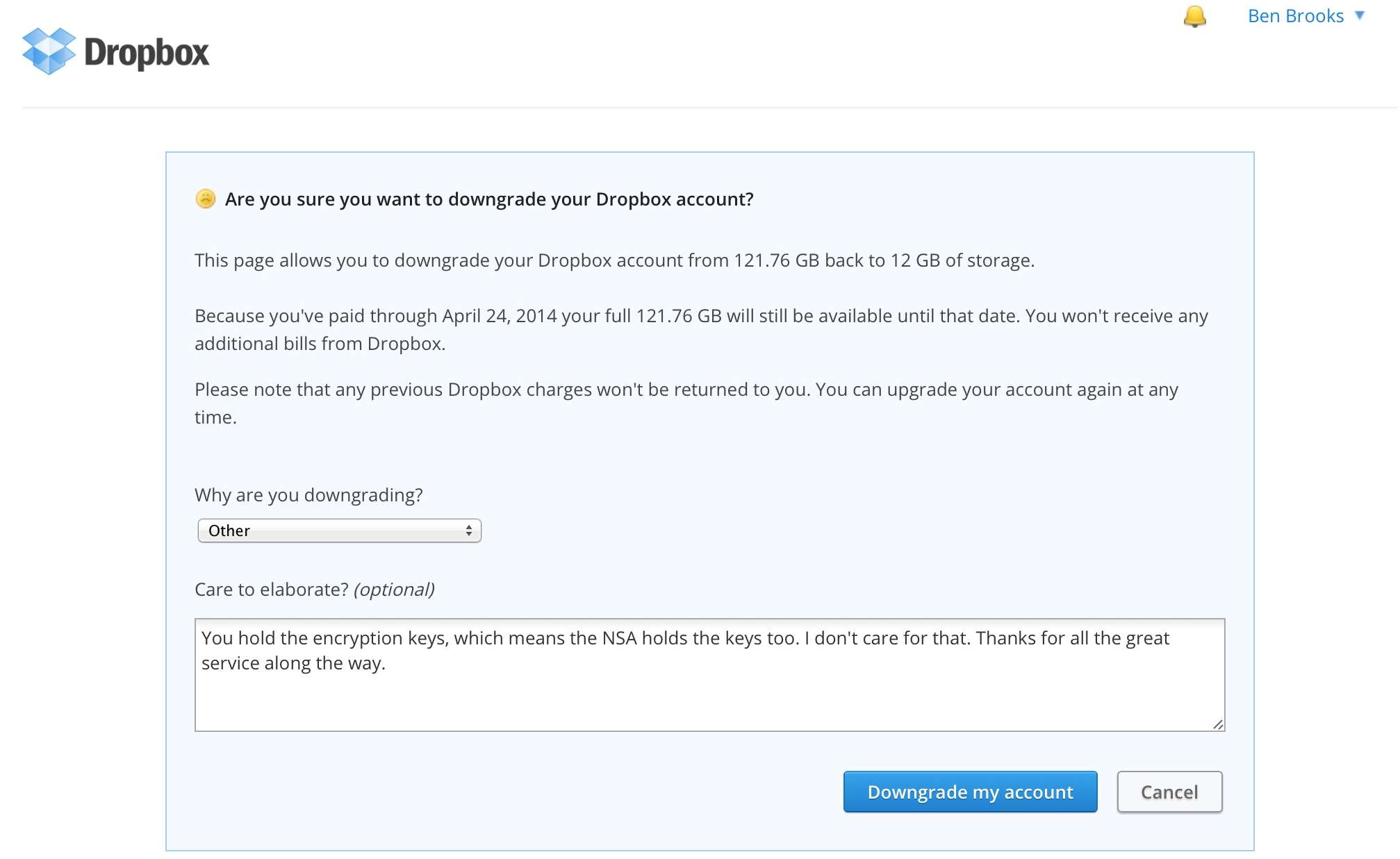
    I mean every word of that statement but I didn’t want to do it. I wanted Dropbox to revise their system and make it less susceptible to snooping by the NSA, but they haven’t. There are many, *many*, alternatives out there and I haven’t settled on just one. Instead I’m spreading out and doing the nerdy-masochistic method of using a lot of different services. I’ll still keep Dropbox around, but instead of keeping 50GBs in the folder, there’s just 12MBs now — mostly old B&B Podcast stuff, and syncing files for a few apps.

    Some of the alternatives I’m currently using are: BitTorrent Sync, ownCloud, and File Transporter. Let’s take a brief look at my experiences with each.

    ## BitTorrent Sync

    It seemed like the moment I started posting about the NSA scandal, readers began emailing me to ask about [BitTorrent Sync][1]. The first thing to know is that BitTorrent Sync is very much *not* Dropbox. Meaning there is no central server in the cloud where your files are stored. Files are synced from computer-to-computer.

    Because of BitTorrent Sync’s peer-to-peer nature, you get a bunch of options that you don’t have with Dropbox. Notably:

    – File transfers are encrypted with keys that are stored with *you*. (This is good.)
    – *Any* folder on your computer can be synced.
    – Each folder has its own encryption key and must be added individually to a new computer or device. Unlike Dropbox, you can’t login to BitTorrent Sync on another computer and see all of your synced folders.
    – Each folder can be shared with full privileges, or shared with read-only privileges.

    That’s the basics of BitTorrent Sync, which is a *far* more complex, yet more secure, offering than Dropbox. Since there’s no central server there are no size limits on storage — you can sync whatever your devices can store.

    ##### What I Use It For

    Right now I use BitTorrent Sync for two folders on my Mac to my Mac mini server: My Photos folder, which creates a nice backup for my ever changing Lightroom library and any other photos in that folder. I also sync what I call my “Working” folder, which is the folder where I keep all active documents on my Mac.

    Essentially, BitTorrent Sync provides a real-time backup of my two most essential folders. Together these folders weigh-in at between 5-15GBs (depending on when I last cleared out my Lightroom Library).

    ##### iOS

    The iOS app is fairly new to me but seems to work well. There’s a few great features like mobile-to-mobile sharing and more standard features like automatically backing up the Camera Roll.

    Since the private keys are very long, BitTorrent Sync makes connecting your iPhone a bit easier with (probably) the best use of QR codes I have ever seen. I can’t comment too much on the stability of the app, since I have only ever used it with iOS 7 Beta and can’t be sure which bugs are in iOS 7 and which are in the app.

    The app works much like the Dropbox equivalent, showing the shared folders, file names and types. Tapping a file downloads it (presumably one of your devices *must* be online for this to work). The mobile-to-mobile sharing is located in its own tab, and you can choose to either send files or wait to receive them. This is an active process (you need to initiate it) and not something that could happen in the background because you have to actually scan the QR code on the other device.

    A passcode to restrict access to the app would be ideal, but it currently doesn’t have one.

    ##### Overall

    BitTorrent Sync is fast, and very secure. It’s the security that will make it annoying for most users — that and the lack of a central server. In order to use this as a full Dropbox replacement you need to have at least two computers and a reasonable expectation that one of those computers will always be on and connected to the web.

    Sadly, I couldn’t find many (any?) apps that use it as a backbone the way apps use Dropbox. As usual, I’m concerned about the service/platform being free, because I can’t pay to support its ongoing development.

    ## ownCloud

    The second thing I installed on my Mac mini server was an instance of [ownCloud][2], by following these [great instructions][3]. This is an entirely self-hosted solution, so you really need your own web server to make use of this tool. However, once its running, ownCloud is a *full* Dropbox replacement, and much more.

    In addition to files, ownCloud can share, host, and manage contacts and calendars (among other things). For the purpose of this post I am just looking at files. It is by far the closest (and a better) solution for teams and businesses that have their own web server. Individuals benefit from increased privacy over Dropbox, but there seems to be a much better set of features for companies using the paid enterprise version.

    Like Dropbox your files are hosted on a server, but unlike Dropbox you can choose to control that server yourself. The files are not stored on the server in an encrypted manner (as far as I can tell). You should encrypt the drive yourself. There is an option to transmit all data to and from the server over HTTPS, which I recommend.

    ##### What I Use It For

    Currently I only use ownCloud for my text notes.

    ##### iOS

    Like BitTorrent Sync, the only iOS app that I could find to support ownCloud is the official app, which is decent but not amazing. The app offers a passcode lock, which is always nice to have.

    ##### Overall

    I like the idea of ownCloud a lot, but the lack of support by third-party apps makes it a tough sell. It’s not as *strong* as BitTorrent Sync, and even a bit less secure given that usernames and passwords are used instead of keys. Like Dropbox you must store everything under the ownCloud folder, which is inflexibility I have grown to dislike.

    ## File Transporter

    I’ve already given [an overview of the File Transporter][4], but the synopsis is this: it’s basically Dropbox in a little mini-server. You can set it up at your house, or have it [professionally hosted][5]. I like the idea a lot, and the version 2.0 beta software is really advancing the system but there are downsides.

    The File Transporter is a software driven device, and the software really isn’t that good. It basically works fine but its design is pretty lackluster and currently it’s a long way from a “just works” solution.

    With version 2.0 of the File Transporter software you can choose from two options: files are stored on your computer *and* on the Transporter, or *only* on the Transporter. (You can do this folder by folder, which is nice.)

    Access speed for files hosted on the Transporter largely depends on the Internet connection where you host the device. I have mine hosted by Macminicolo.net and it’s pretty fast, but there’s a noticeable lag when requesting a file listing, which can be annoying. When I had the device at home it was rock solid, but not nearly as fast to access files once I left the house.

    ##### What I Use it For

    The Transporter is my basic “archive of crap”. It’s everything that I want to keep around, but don’t want to keep on my Mac. It’s the stuff I *might* need, so I save it just in case.

    (I have my Mac mini backup my Working folder every night to the Transporter as another “just in case”.)

    ##### Overall

    The File Transporter is a solid solution, and as the platform and software matures I suspect we’ll see wider adoption. From what I can tell (info is scarce), the files do not appear to be encrypted on the device. So while the transfer of files is encrypted, the files are, yet again, stored unencrypted. This is a major bummer if you have your device hosted in a location you don’t control physical access to.

    With the other options you can configure the storage you are using to be encrypted, but with the Transporter there is no such option. My fear with keeping the Transporter at home was: a burglar could get all the files if they jacked it — this is only slightly lessened in a hosting facility. I hope Connected Desktop addresses this, but have no word if they will.

    ## Concluding Thoughts

    So now what? I’ve outlined three options, but there are others out there. You should investigate services like [Bitcasa][6] and [SpiderOak][7], seems to be the most secure, Dropbox-like, offering requiring no special hardware.

    If you already have a web server, or a computer that is always on, I think BitTorrent Sync is the best option. It forgoes almost every convenience for the sake of being the most security conscious of the non-server options. Simply using whole-disk encryption should solve your woes with file privacy between two computers when you use BitTorrent Sync.

    If you really want something like Dropbox, but not Dropbox, your best options are either SpiderOak, or File Transporter. I have concerns about File Transporter overall — and would recommend having two (one to back up the other), but otherwise it’s a solid offering. My hunch is that SpiderOak is the best bet for *most* people. They seem hell-bent on user privacy and offer a service that has been around for a long time now. ((I’ve used them in the past, and plenty of readers recommend their service.))

    The biggest problem with moving away from Dropbox, isn’t finding more secure alternatives, it’s that *no* other offerings have a third-party developer ecosystem like Dropbox. You can’t run a search in the App Store without finding something that syncs with Dropbox, which is great, but there are few (if any) third-party apps working with the Dropbox alternatives I have listed here.

    Ultimately, the only reason to leave Dropbox is if you don’t like the idea that Dropbox employees and the government could gain access to your files. If that is impetus enough for you to leave, then SpiderOak or BitTorrent Sync is what I recommend. If that isn’t enough for you to leave, then Dropbox is by far (truly leaps and bounds “by far”) the best option.

    [1]: http://labs.bittorrent.com/experiments/sync.html
    [2]: https://owncloud.com/
    [3]: http://blog.macminicolo.net/post/30393400851/install-owncloud-on-a-mac-mini-server
    [4]: https://brooksreview.net/2013/07/transporter-2/
    [5]: http://transporterhosting.com
    [6]: http://bitcasa.com
    [7]: https://spideroak.com