The other day I posted a link to Matt Henderson where he created a system of adding mail message links in OmniFocus — it was neat — but used the OmniSync Server, so I didn’t want to use it. Today, Matt posted a follow-up creating a system whereby the entire process happens on your Mac.
Be sure to take a look as he really has a clever system. I went ahead and did two tweaks to his macro:
- I moved his script to get the message URL into a script file as I couldn’t get it to work without that (and I prefer this flow anyways, for later editing of the script).
- I added in using Shawn Blanc’s excellent OopsieFocus script to make sure OmniFocus is running.
The result is this:
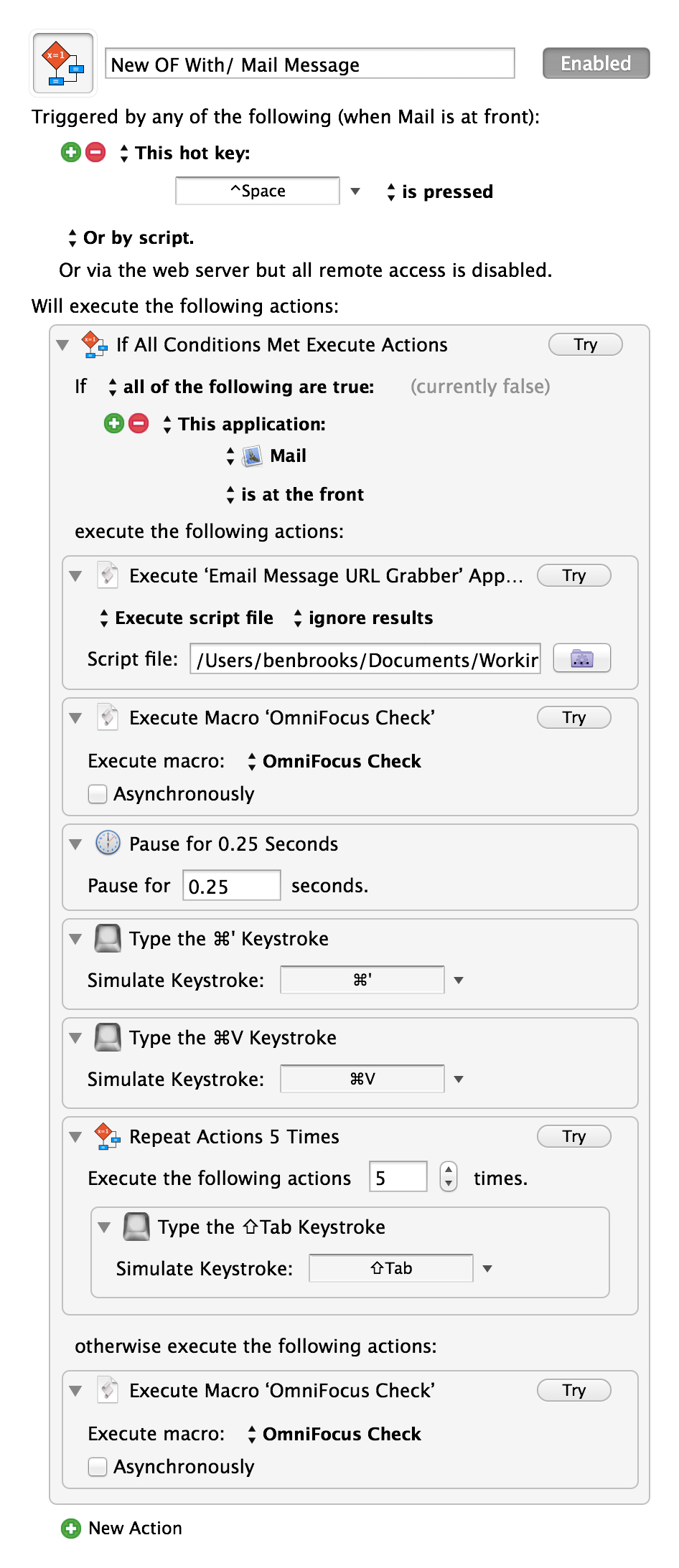
The ‘OmniFocus Check’ is simply a macro I have that runs Shawn’s above mentioned script. I’ve tested it, and it is fantastic — though I am not sure I want to keep it my normal shortcut, but for now I will. Thanks Matt.