Year: 2015

  • Why the ‘Queen of the Mommy Bloggers’ had to quit

    Michelle Dean:

    The problem, Armstrong says, was that because she felt so beholden to them, she was agreeing to do just about anything to keep the advertisers happy.

    I hate the title of this post, but it encapsulates so well what I talked about in the native advertising post. It’s not that people who do this are evil, or have bad intentions. It’s that they get caught up in it.

  • On bias, dishonesty, and native advertising

    Some great responses here to my native advertising post from Alvaro Serrano, well worth the read.

  • Making money along the way

    DHH with some interesting thoughts on Evernote and Dropbox:

    Both Evernote and Dropbox are facing increasing indifference from customers and competition from simply Good Enough features in someone else’s more complete offering. “You’re a feature, not a product”, as Steve Jobs famously dismissed Dropbox (see The case against Dropbox and Evernote, The First Dead Unicorn for but two deeper analyses).

    I know a lot of nerds will revolt against that theory, but they really shouldn’t. You may not like iCloud, but I assure you that it is very good and a lot easier to understand and setup for the average user. Notes is also getting closer to Evernote, is easier to understand and setup, and just there.

    When something is already there, and is almost good enough — in most cases that’s all you need to kill a 3rd party service or product. Dropbox and Evernote’s biggest problem was never someone doing what they do better, just someone building something close to what they do into something popular. Apple has already done that with iCloud and Notes.

  • What Would Your Ideal Workspace Look Like?

    Shawn Blanc:

    The way you default to concentrating when you are doing something enjoyable can give you some insight into how you may best be able to concentrate when doing all of your work.

  • Native Advertising is a Bad Solution

    Along with all the talk about content blockers, there has been a lot of talk about what the future of web publications might be. Whereby “future” people really mean: “how they will make money at some point in time that is decidedly not today”. People seem to be in one of three camps on this matter: nothing can change and we are doomed; “native” advertising is the bees knees; and what I shall call “lala land” whereby people think some form of magic will happen without any effort.

    I want to focus on native advertising, since it keeps popping up everywhere (likely because someone gave it a fancy new name). Let’s break down some examples of this so called “native” advertising:

    • Sponsored posts/reviews/infographics
    • RSS feed sponsors
    • Podcast ads read by the podcasters themselves and largely improvised

    Those are the three most popular methods of this advertising — you can currently see these on a lot of blogs and pretty much any podcast, but there are various other methods floating around as well.

    (more…)

  • Why the iPad Pro will be my laptop of choice: Accessibility

    Steven Aquino:

    Therein lies the rub. For as much as I adore the MacBook, the problem is that it’s still a laptop. In my experiences with laptops, I’ve found that their form factor works against me, accessibility-wise. As someone with low vision, I often need to get super close to the screen in order to see it. The issue, though, is that I find a laptop’s screen to be too “far away” to see comfortably. I have to lean in to see, almost to the point where my nose is touching the glass. Adjusting the screen’s position does help a bit, but it’s still too far away to be comfortable. There are things I could do on the software side to compensate for this, but it doesn’t negate the fact that the device’s form is less than ideal. To again paraphrase Jony Ive, with a laptop, I feel like I have to fit the device.

  • Ye Olde Content Blocking

    This is part four in a four part series on content blockers in iOS 9. Read part one, part two, and part three.

    I’ve been writing a lot this week about content blocking on iOS 9, and a large part of that is because the coverage for content blocking has largely been negative. I think a lot of that negativity is less about content blocking, and more out of the fear of losing of income from the chief income source for most sites. And since almost all of the sites rely off of ads to make money — it would be near impossible for any of them to cover content blocking with objectivity.

    That said, this site, only relies on membership for income, so it is in my best interest to do things to attract members. I also have a long track record of being privacy conscious and loathing ads in general. You are getting a fairly opposite view of advertising, as I neither need it, or like it.

    So far I have covered just the apps: which are the fastest, which are the most full featured, and which save you the most bandwidth. With those things out of the way, it is now time to talk about what content blocking is, how it is done, and the ethics surrounding the usage of content blocking.

    (more…)

  • Obi – A Smart Laser Toy for Pets

    Dan and Tom are friends of the site, but regardless of that — this looks like an awesome product. I sure hope it gets made.

  • Saving 30% or More of Your Data Transfer With Content Blockers

    This is part three in a four part series on content blockers in iOS 9. Read part one, part two, and part four.

    I grabbed my iPhone 6 plus, all my content blockers, updated my testing site list to add more, and ran the tests while connected to my MacBook to record the total page sizes. This measure has a direct effect on speed, and I believe it is a bit more accurate than pure timing. Either way, here are the results:

    (more…)

  • Disruption is better when it’s other people’s jobs

    DHH:

    The natural response to having your livelihood threatened is universally to FREAK OUT. It doesn’t matter if you’re a French farmer or cabbie or if you’re an internet writer or publisher.

  • Ad blocking

    Seth Godin:

    And so, just as the default for some advertisers is, “if it’s not against the law and it’s cheap, do it,” the new generation of ad blockers is starting from the place of, “delete all.”

  • A Few More Thoughts on My Top Three Content Blockers

    This is part two in a four part series on content blockers in iOS 9. Read part one, part three, and part four.

    When I speed tested the content blockers I laid out the top three fastest ones:

    What I didn’t do is really tell you very much about each of these, ((Apologies I was running late to take the family to a birthday party.)) so I want to go ahead and right that wrong now.

    (more…)

  • Ad Blocking, Ad Networks, & Your IP Address

    Sam Snelling:

    You cannot be against government / big business bulk collection of metadata, and not be pro ad blocker. Privacy is important. And leaking tons of identifying info about yourself all over the internet is not good.

    Yep.

  • iOS Pro

    Clayton Miller:

    The iPad as it stands fits the needs of some professionals. Viewed in a jobs-to-be-done framework, there are some jobs for which many will find it the best hire, but these tend to be all of a kind: They are performed by a single application with a narrow scope, such as a note-taking app to brainstorm or a marine navigation app to pilot a boat.

    I really like the above passage. The idea that what makes the iPad great is how good it is at just one application. That said, I don't agree with much else Miller has to say. While I don't think the iPad Pro will be for everyone, I bet it is for most people.

  • ‘Enabling of Ad Blocking in Apple’s iOS 9 Prompts Backlash’

    John Gruber, commenting on a New York Times post about content blocking:

    If you want to block all advertising, I don’t understand you, but I won’t argue with you either. No one’s going to stop you. But most people just want to block garbage — privacy-invasive trackers, JavaScript that slows our devices and drains our batteries, obtrusive ads that cover the content we’re trying to read.

    Gruber has been very clear that he thinks it is wrong and almost illogical to block ads from The Deck. All I have to say is that Gruber’s site is very fast, loading on average in about 2.3 seconds or faster for me on iOS 9.

    However, with content blocking turned on his site will load almost a full second faster, with three content blockers loading it that full second faster. So yes, Deck ads are nice, but even a very fast site can be much faster.

    Note: I just completed speed testing all content blockers available for iOS to determine which is the best. *Daring Fireball was among my test sites. The article about my testing may, or may not, be behind the paywall when you see this post.*

  • Which iOS Content Blocker is the Fastest?

    This is part one in a four part series on content blockers in iOS 9. Read part two, part three, and part four.

    Which content blocker for iOS 9 is the best? I have no clue, but I did test a bunch to find out which one is the fastest.

    URLs tested:

    Testing Method:

    All tests done on an iPhone 6 Plus, from the same position, on a fast wifi network, in this order:

    1. Clear history and website data
    2. Restart phone
    3. Adjust Safari settings for the test
    4. Launch each site from a bookmark
    5. Timed with iPhone (original)
    6. Assumed margin of error: 0.3 seconds.
    7. Time stopped when Safari stopped showing the X and instead showed the reload symbol

    Note: When I turned on each content blocker, I left Do Not Track on as well, as this is how you really should be using the app to begin with.

    Results

    Here’s the chart for iMore, shortest bar is the fastest.
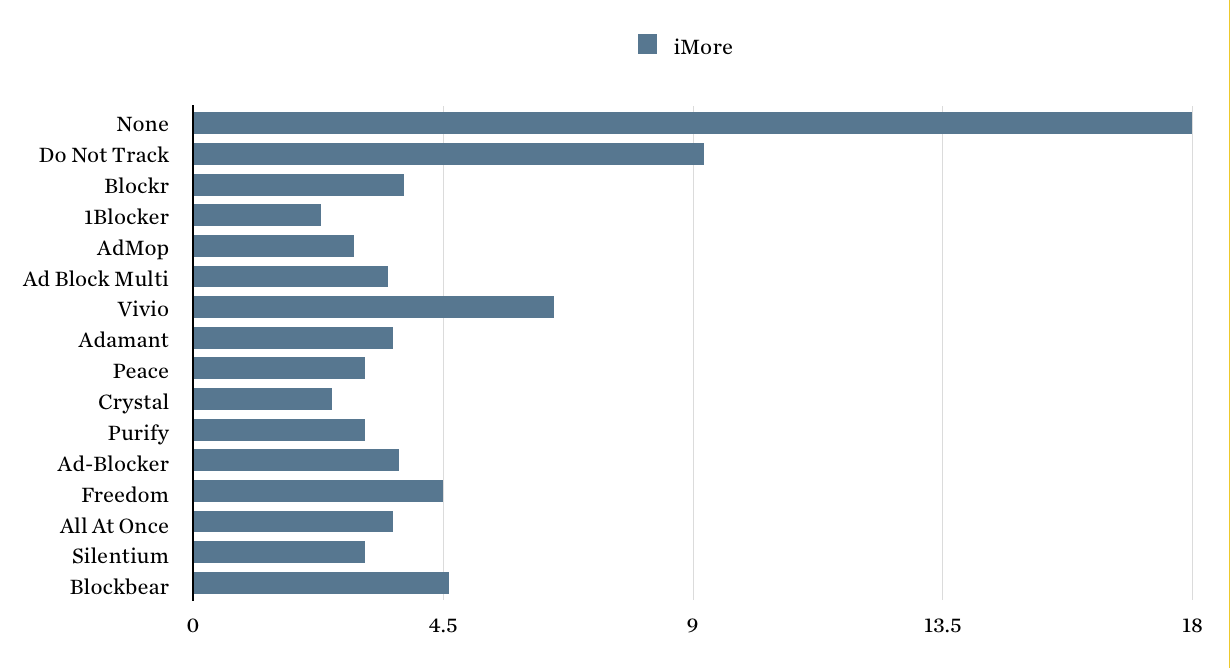
    Nothing on it was 18 seconds, the fastest blocker loaded it in 2.3 seconds.

    Here’s Daring Fireball, shortest bar is the fastest.
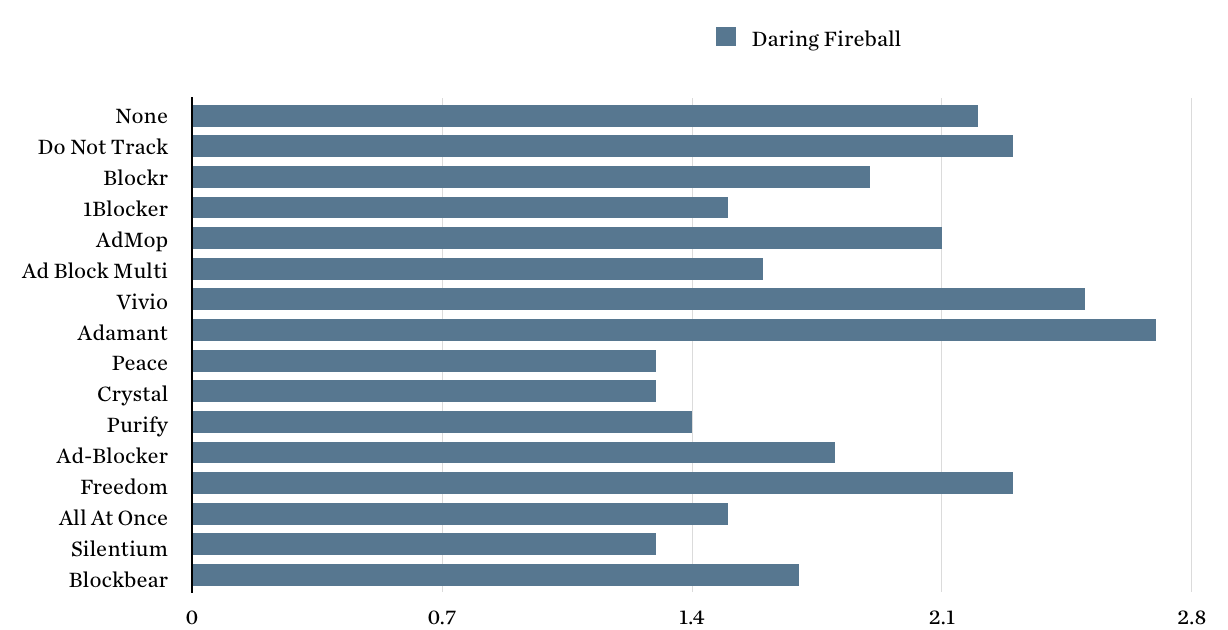
    Nothing on it was 2.2 seconds, the fastest blocker loaded it in 1.3 seconds.

    Here’s this site, shortest bar is the fastest.
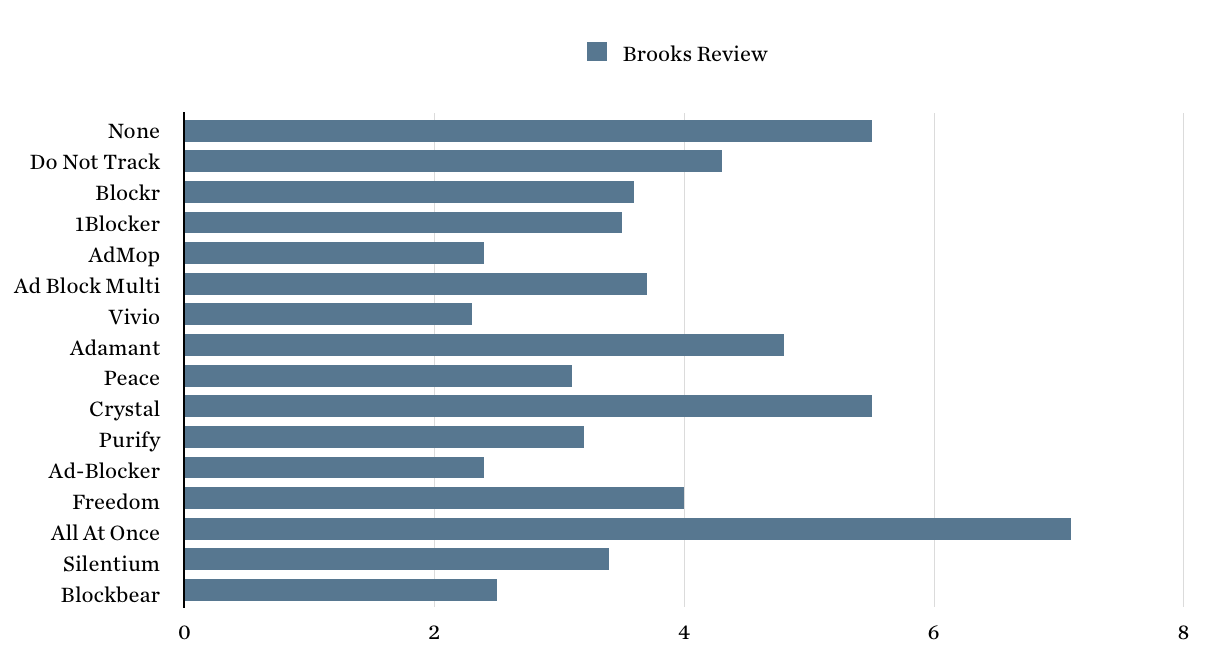
    Nothing on it was 5.5 seconds, the fastest blocker loaded it in 2.3 seconds.

    Here’s the Sweet Setup, shortest bar is the fastest.
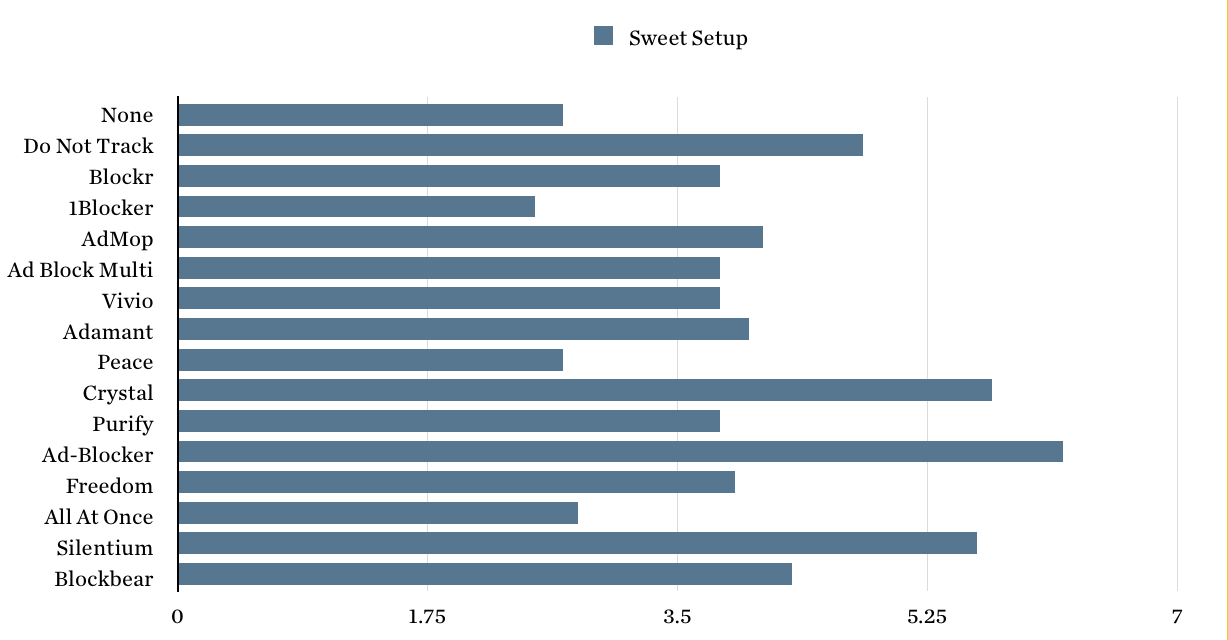
    Nothing on it was 2.7 seconds, the fastest blocker loaded it in 2.5 seconds. A note about this site: some blocks failed to fully load this site, and repeated loading was needed to complete tests with blockers on. This was the only site that did this.

    Here’s the New York Times, shortest bar is the fastest.
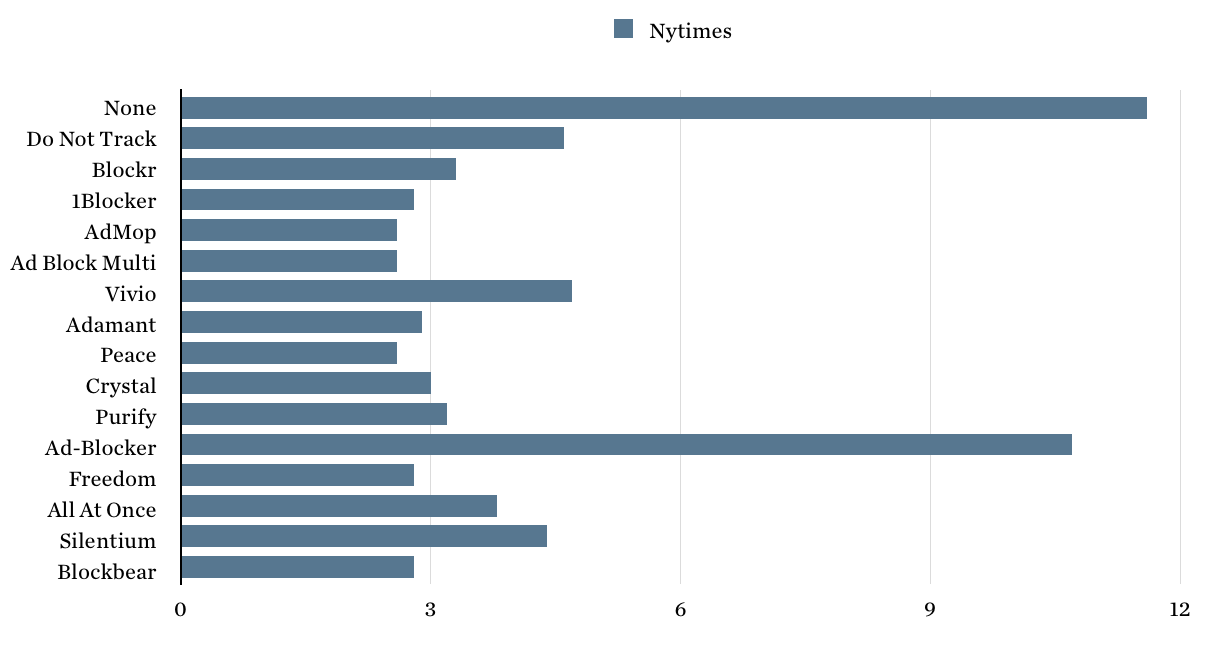
    Nothing on it was 11.6 seconds, the fastest blocker loaded it in 2.6 seconds.

    Here’s the New Yorker, shortest bar is the fastest.
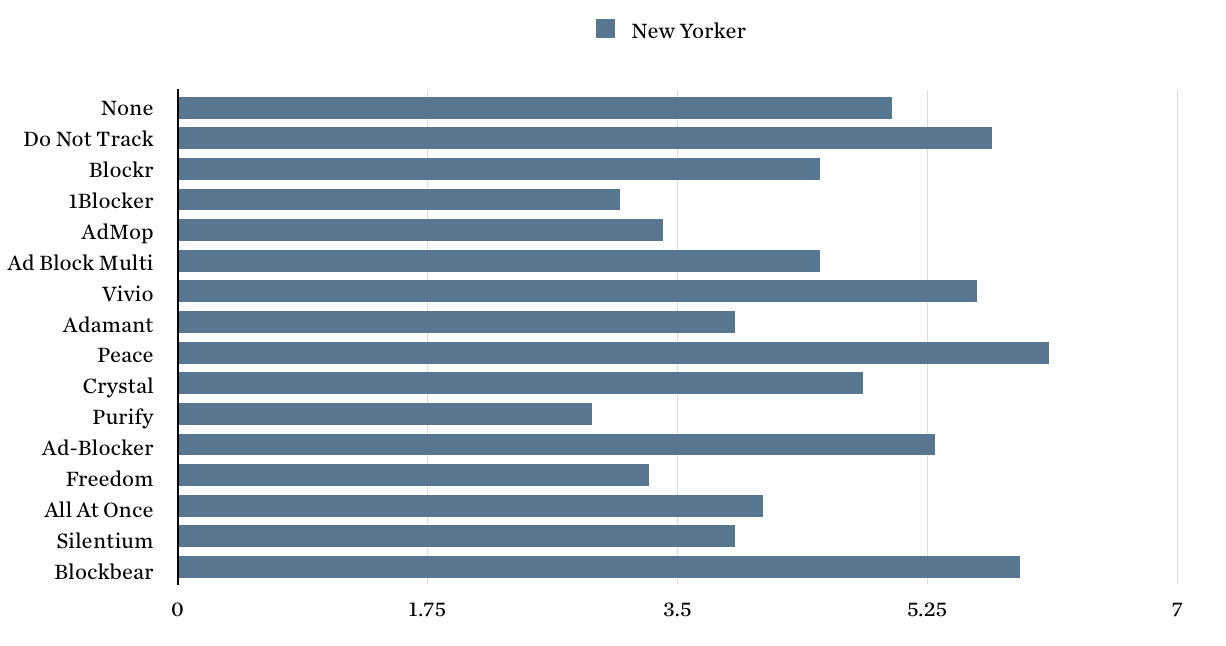
    Nothing on it was 5 seconds, the fastest blocker loaded it in 2.9 seconds.

    Here’s Bloomberg/Businessweek, shortest bar is the fastest.
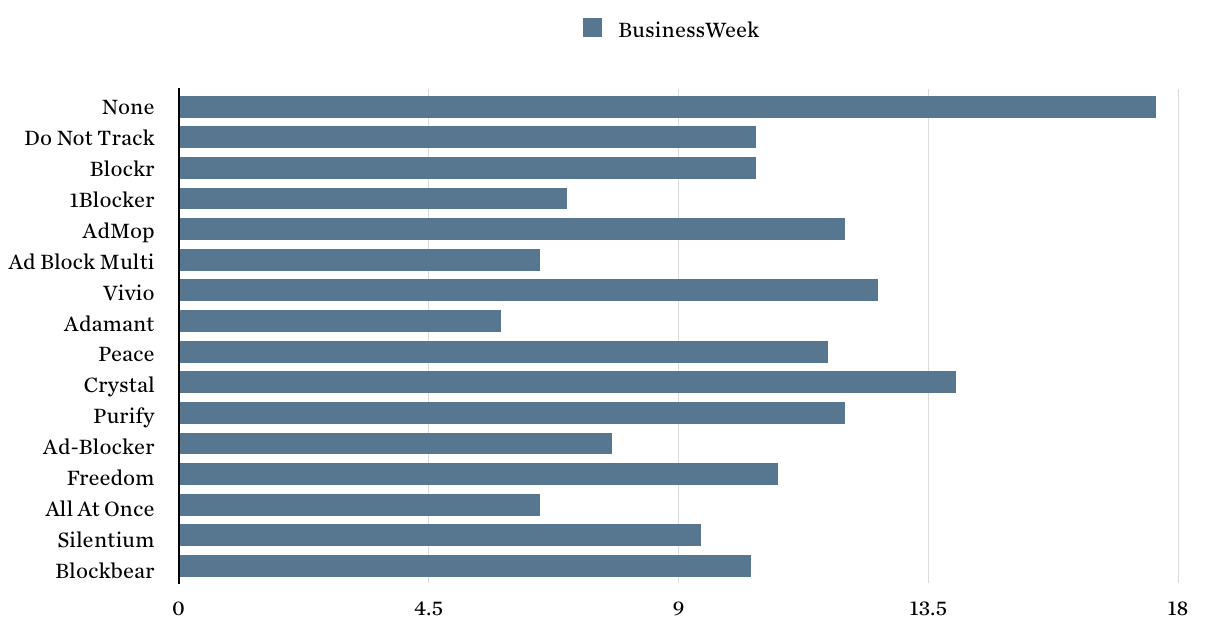
    Nothing on it was 17.6 seconds, the fastest blocker loaded it in 5.8 seconds.

    Here’s Apple.com, shortest bar is the fastest.
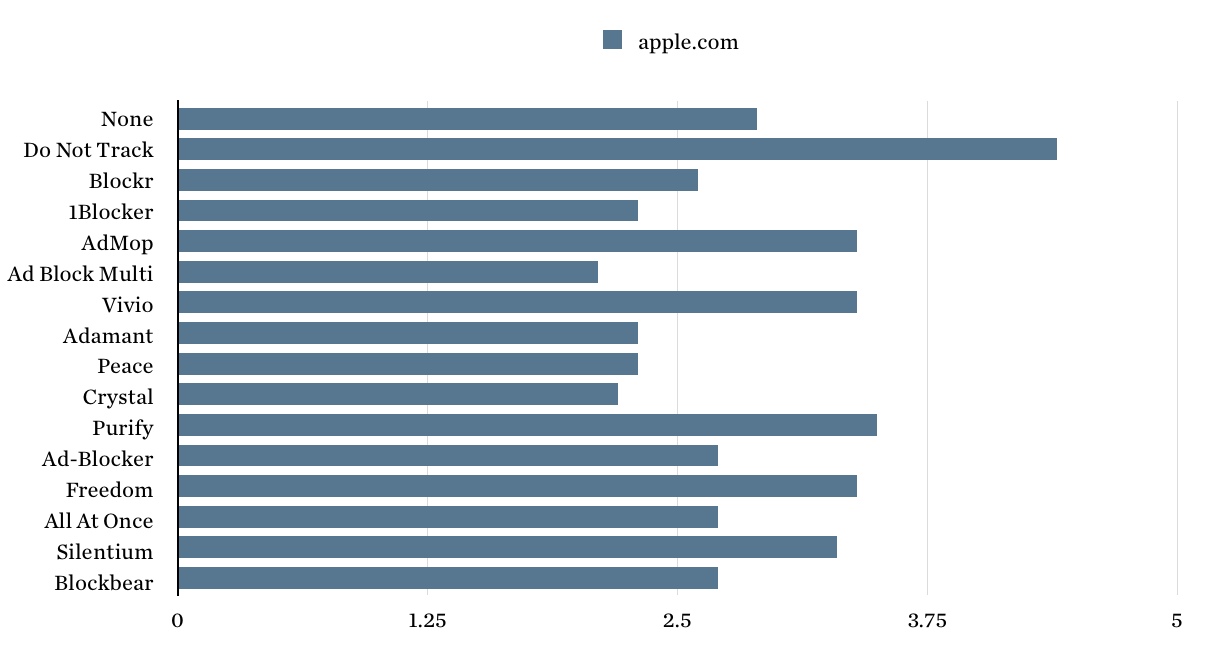
    Nothing on it was 2.9 seconds, the fastest blocker loaded it in 2.1 seconds.

    Insights

    When I tried with all blockers on, I did not get the performance of the fastest blocker, and instead got performance on the slower side of the blockers tested. It is my recommendation that you only use one blocker at a time.

    In order to determine a clear winner, I took the average load time of all the sites, and then calculated how fast each blocker was (as a percentage) compared to no blockers.
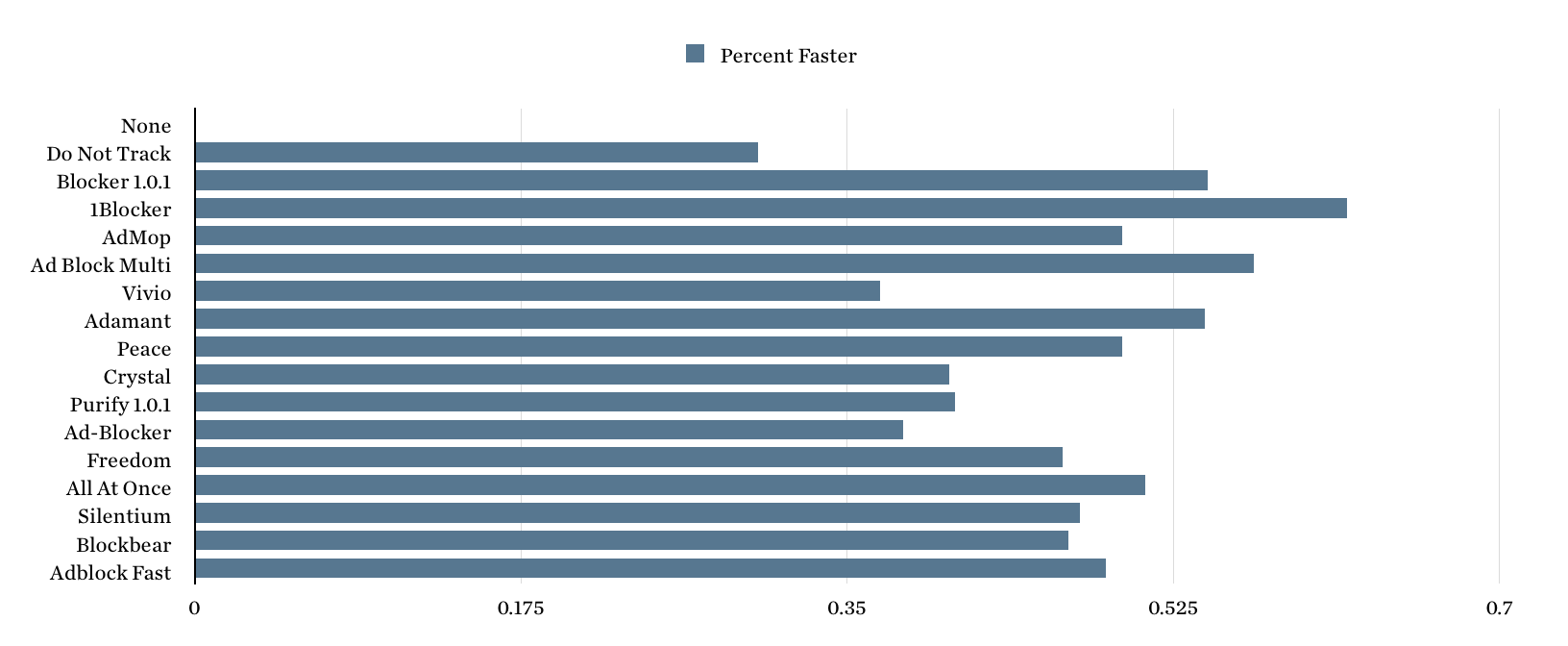
    As you can see, 1Blocker is the winner. It was (on average) 61.83% faster than having nothing turned on at all. That’s staggering. The worst of the lot seems to be Vivio, which was marginally faster than simply just turning on ‘Do Not Track’ in your browser settings.

    1Blocker is also highly configurable as well. If you want something on the simple end of things, which makes decisions for you to unblock ads from places like The Deck, Adamant is a great option. It was the third fastest overall, and is trying to support the indie sites ad revenue the best it can.

    Top three are (in this order):

    1. 1Blocker
    2. Ad Block Multi
    3. Adamant and Blockr 1.0.1 ties as well.

    For me, it is 1Blocker. I’ll check back again in a month or so. Go get it.

    Updates
    • Here’s some more thoughts on the three fastest.

    • Turns out that 1Blocker whitelists The Deck ads by default. To block them you need to add a custom rule, that rule should have the URL Filter that reads: http.*://connect\.decknetwork\.net/* (You will need a \ before each period to make it work) — putting that in will block those ads. Hat tip to: Marcelo Marfil

  • Good Advertising

    John Gruber:

    Good advertising goes down easy.

    No, not really. Good advertising (well targeted, with no tracking) is acceptable at best.

  • Adamant

    Now that Peace is gone, Adamant should be the go to option for you.

  • Why Peace 1.0 blocks The Deck ads

    Marco Arment on his Safari Content Blocker:

    I was therefore faced with a decision about The Deck. I had to either:

    • Omit The Deck from Ghostery’s database, carving out an exception for the advertiser used by me and many of my friends.
    • Enforce Ghostery’s database consistently, potentially angering my own site’s advertiser and my friends who use it.

    And once I looked at it like that, it wasn’t a difficult decision. It’s uncomfortable, but I’d rather be consistent and fair.

    He made the right decision. Oh, and FYI, if you are using a content blocker to block custom fonts — go for it, but this site will look like shit. I’ve never once tried to optimize it to be useable with fallback fonts. Sorry.