“Microsoft’s problem is that the public isn’t stupid.”
Author: Ben Brooks
-
Sponsoring TBR
Just a quick note: there is only one slot left to sponsor the RSS feed for September. Current subscriber count is 5,800 readers . All smarter than your average bear.
Get in touch if you are interested (other dates available too).
-
WeatherSnitch
My thanks to WeatherSnitch for sponsoring the RSS feed this week to promote their latest version of the app. WeatherSnitch has long been one of my favorite iOS weather apps — it’s month view offers one of the best weather forecast views of any app.
Give it a look-see and see what you think.
-
Which Girl Scout Cookies Score the Most Brownie Points?
Interesting break down. For the record I purchased 8 boxes of Thin Mints for my own consumption last year — I will not make that mistake again as it is clear now that more were needed.
-
Improving Alarms in Clock App
I second this motion, I always have to change my ringer volume before I fall asleep so that I don’t have a heart attack when it goes off the next morning.
-
How to Get Rid of DigiNotar Digital Certificates From OS X
Best get rid of this certificate for the time being and this is a nice write up on how to do just that.
-
A Markdown Primer
Following-up on my post [yesterday](https://brooksreview.net/2011/08/terpstra/), TJ Luoma has an old, but great Markdown Primer for those interested in learning an incredibly useful language.
-
Multi-Platform Is a Feature
David Sparks:
>Expect to see a lot of familiar apps on unfamiliar platforms soon.Sparks is making the argument that apps on more than one platform are going to basically become the standard before a consumer considers an app for use. It has been my standard since the iPhone was gifted the App Store.
-
Why Markdown? A Two-Minute Explanation
Well done. Read this, then take the 5 minutes to learn Markdown.
-
Byword Daily File
A pretty clever use of Lion’s versioning system. I like it.
-
U.S. Files Antitrust Complaint to Block AT&T, T-Mobile Merger
Tom Schoenberg for Bloomberg:
>In the complaint filed today in federal court in Washington, the U.S. is seeking a declaration that Dallas-based AT&T’s takeover of T-Mobile, a unit of Deutsche Telekom AG (DTE), would violate U.S. antitrust law. The U.S. also asked for a court order blocking any arrangement implementing the deal.Total penalties to AT&T if the merger does not go through? Round-about $7 billion. ((3 in cash alone.))
-
The Microsoft PC
Listening to the [latest episode of Hypercritical](http://5by5.tv/hypercritical/31) (#31), John Siracusa added some really great thoughts to HP’s *current strategy* of spinning off the PC division.
He looks at the move from the perspective of Microsoft.
It’s an interesting perspective since Microsoft now has one of its largest (if not its largest) Windows OS buyers wanting to exit the game, because it is no longer profitable for them to be in said game. Think about that for a minute — that *is* huge.
Siracusa makes the argument that continued consolidation among PC manufacturers would ultimately not be a good thing for Microsoft. To me his most interesting comments are about the hardware HP and others are currently producing: cheap crap (for the most part). Siracusa points out that the last time Microsoft saw this happening — with MP3 players — they made their own hardware (the Zune in this case) — and though it was too little too late, the hardware was actually pretty good.
I immediately had a thought.
What if Microsoft bought HP’s PC division to start producing their own hardware: the higher quality PC?
Ignore anti-trust concerns, monetary issues, and everything else — just think about this for a moment.
Microsoft has begun building Microsoft stores, they would have a nice, existing, retail presence. They have deals with all major retailers. They likely have more brand trust than any current PC maker.
In this scenario Microsoft wouldn’t become another me-too PC maker — they would be setting the standard. The standard for: price, quality, design, and speed.
This is not out of the realm of possibility — though it would be a risky move.
If Microsoft did do this and they decided that they wanted to make the best possible PC — something that competes directly with, say, MacBook Pros — wouldn’t that be an interesting change?
I don’t even think it is a market that Microsoft would have to be making more than 2-3 models of computers to be in just a laptop, desktop, and tablet. All Microsoft would need to do is make the best stuff a Windows user could buy and then sell it with a healthy profit margin. Doing that, by comparison to all other PC makers, would make all others look pretty bad — both to consumers and investors.
Certainly sales wouldn’t be robust at a higher price point, but it would prove a crucial point — a point that Microsoft really needs to prove — that Windows is *not* just the low-cost alternative.
-
Action, Reaction
Mike Vardy was kind enough to let me jump on his podcast this week. We talk about productivity and reacting versus being proactive.
-
Code Editors for iPad: Textastic vs. Koder
Last week I asked on Twitter what everyone was using to edit code from FTP sites on their iPads. The overwhelming majority voted Textastic. However a few brave folks mentioned Koder.
At first glance Koder caught my eye, but Textastic had such praise that I needed to buy and try them both. Before we can get into the comparisons here is why I want such an app: for making quick CSS tweaks to this site when I am no where near my MacBook Air. ((Yes, when I see something not looking right I *really* like to be able to change it right away.))
My thinking is that if I can tweak the code here and there on my iPad, I can eventually take a trip with only my iPad and no worries about “what ifs”.
I need an app that will allow me to connect to my server, edit CSS/PHP/HTML files and save/commit the changes to the server.
### Textastic
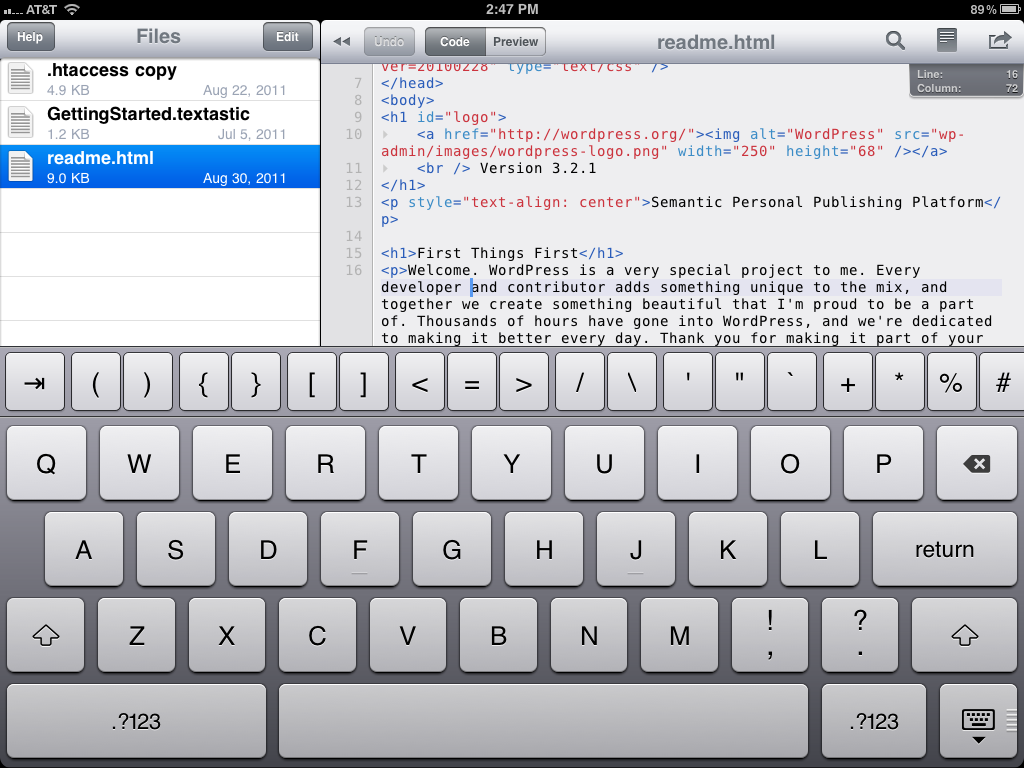
Of the two apps [Textastic](http://www.textasticapp.com/) ($9.99) offers the most basic iOS UI design and layout. There are three really great features in Textastic:
1. The ability to highlight/select and entire line of code with one tap in the margin.
2. Quick access to most used keys above the standard keyboard. The odd part of this is that those keys can scroll right and left so that you can get access to even more keys. This is nice because it allows for quick access to a lot of keys, but it also takes a bit of getting used to since the keys that you want to access may not be where you expect them to be (given that they can be scrolled around).
3. Password lock. You can set a password (not passcode) so that no other users can gain access to your server if they get a hold of your iPad. This is a great feature, almost a requirement at this point. ((Though you should be passcode locking your iPad, you do that right?))[
 ](https://f3a98a5aca88d28ed629-2f664c0697d743fb9a738111ab4002bd.ssl.cf1.rackcdn.com/textastic-1.png)
That’s the really great stuff, but the real question is not what is really great — no — it is always: how well does the app work. This is where a lot of personal preference is going to come into play, because while the app allows you to use TextExpander and does code highlighting, it is still no where near as robust as TextMate. Not that it needs to be as robust, but I did find with both apps that I was annoyed by a few things that TextMate does that these apps don’t do.
[
 ](https://f3a98a5aca88d28ed629-2f664c0697d743fb9a738111ab4002bd.ssl.cf1.rackcdn.com/textastic-2.png)
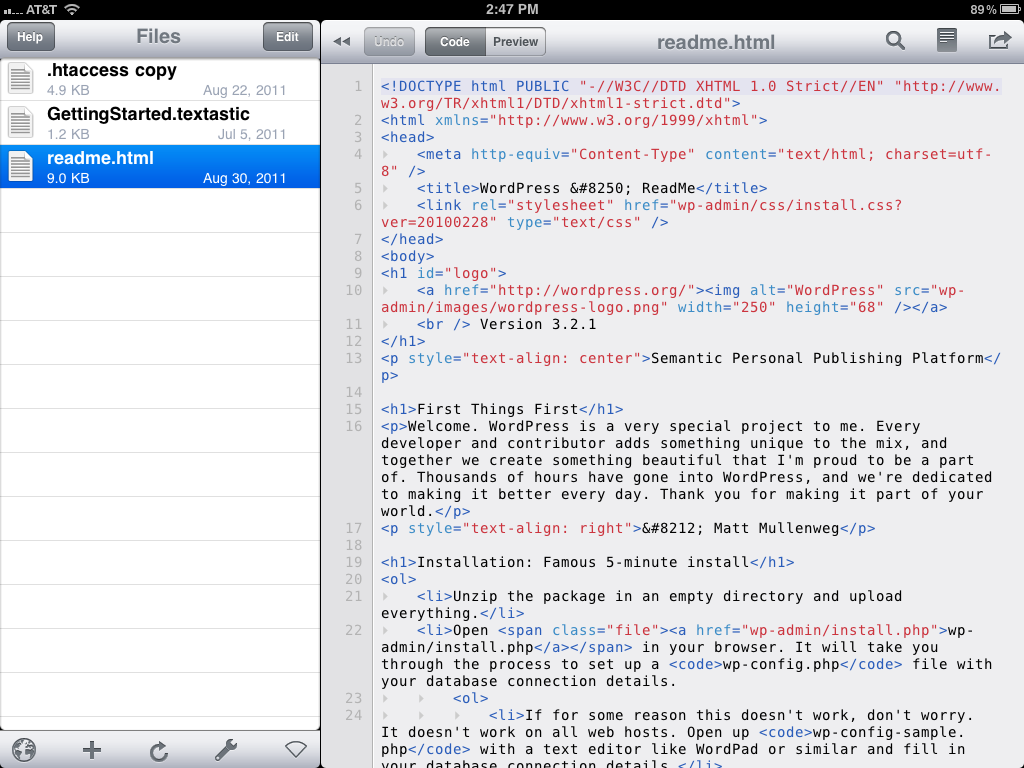
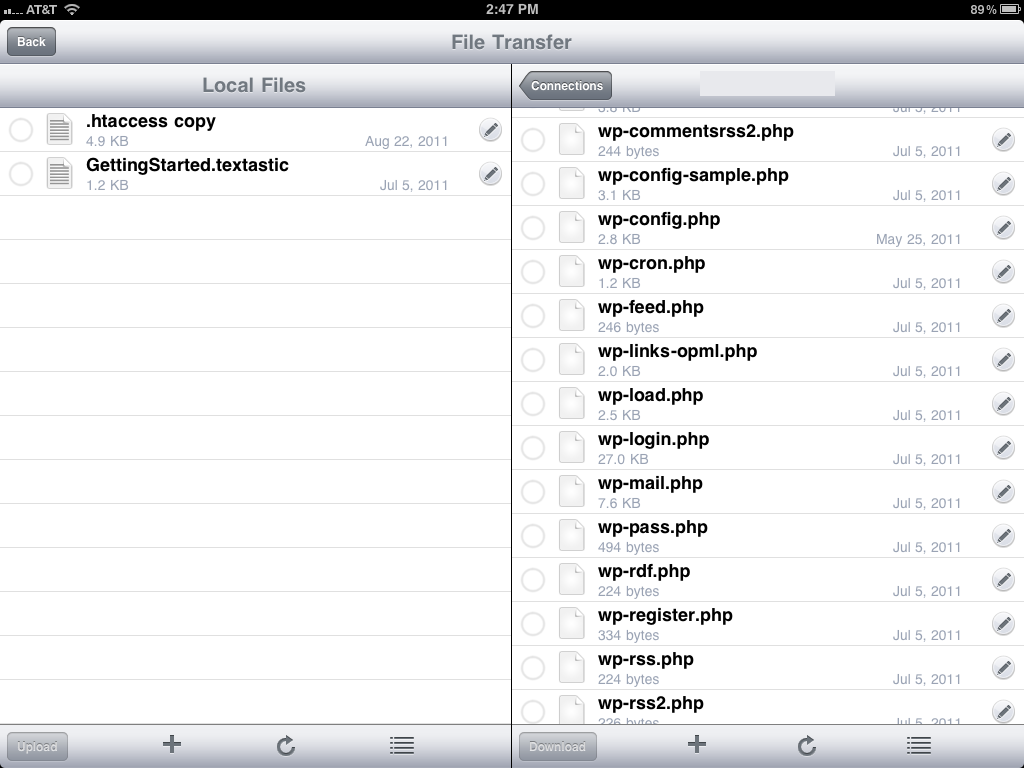
There is one thing about the core functionality of this app that I don’t like: the way you edit remote files. With Textastic you have to download the file to your iPad first and then you can edit the file. From there the app will sync the file back and forth easily with the remote host, but it means keeping a local copy of a bunch of similarly named files in a list to the left — which if that sounds confusion, well, you got the point. There is also this odd flipping behavior that the app does when you shift from local browsing to remote browsing that I could do without.
[
](https://f3a98a5aca88d28ed629-2f664c0697d743fb9a738111ab4002bd.ssl.cf1.rackcdn.com/textastic-3.png)
For me I would much prefer to be able to tap on a file and start editing it immediately without concern for whether the file is in sync or if the file is local or not. The app does a decent job of highlighting and has a nice soft wrap so that the user doesn’t need to scroll side to side.The switching behavior and the need to download first is the most annoying aspect of this app. ((FTR I hate the icon.))
### Koder
[Koder](http://www.koderapp.com/) ($5.99) takes a different approach and shows its colors as more than just an FTP based code editor. You can work with local files, FTP files, Dropbox files (Textastic supports this too), and iDisk files (not that this feature will be useful for much longer). Again the three best features of Koder:
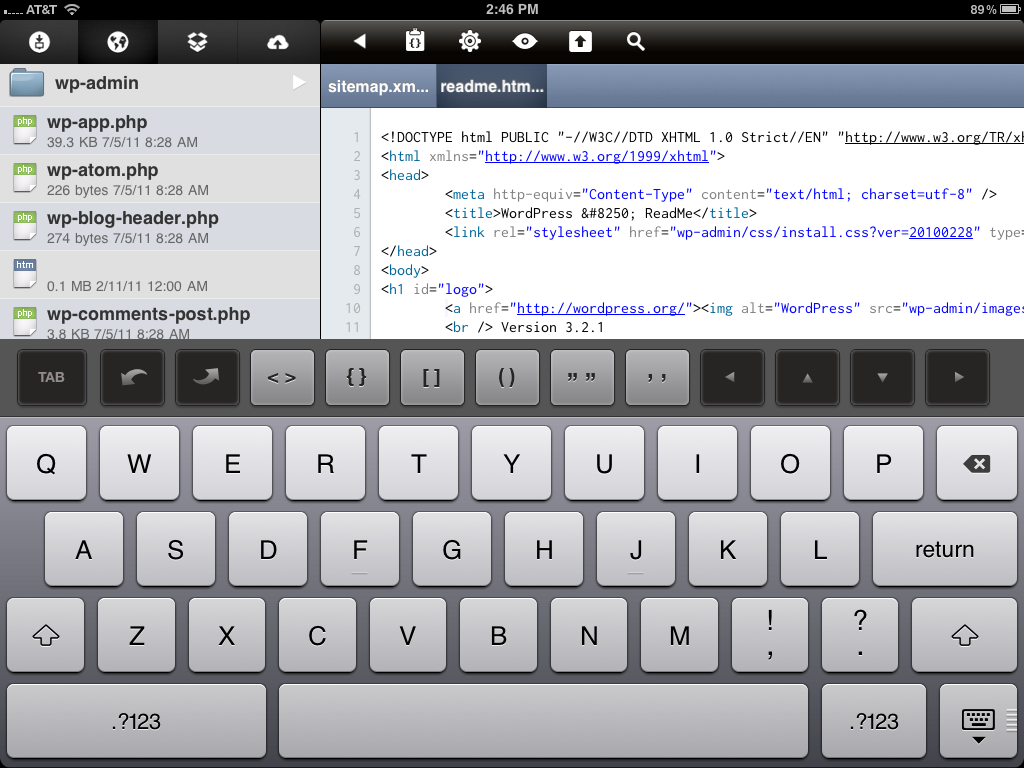
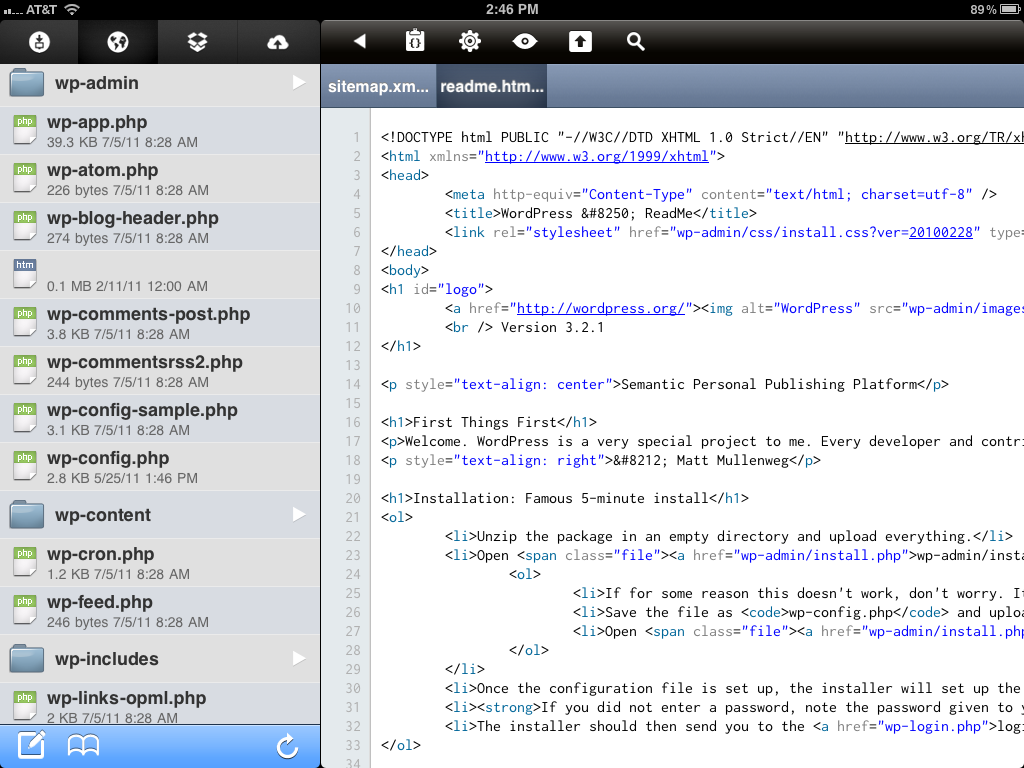
1. You work “live” with your files, there is no visible means to download the file first before you can edit them. You simply need to tap the file and you can get to work right away.
2. The tabbed interface for open documents allows you to quickly and easily switch between two documents at once. This is something that Textastic doesn’t do and instead refers you back to the main list of files.
3. Permissions, Koder will allow you to view the current permissions on both files and folders **and** will allow you to change these settings. This is a great little touch.[
 ](https://f3a98a5aca88d28ed629-2f664c0697d743fb9a738111ab4002bd.ssl.cf1.rackcdn.com/koder-1.png)
Koder fits my working style much better than Textastic because I can just tap and get going. However the program does not have any kind of password protection, leading to security concerns — especially given that revealing the path of a file shows your FTP password in plain view — this is not good.
[
 ](https://f3a98a5aca88d28ed629-2f664c0697d743fb9a738111ab4002bd.ssl.cf1.rackcdn.com/koder-2.png)
There is also a lack of soft line wraps, which will require you to scroll a lot side to side depending on the formatting of the file you are editing.
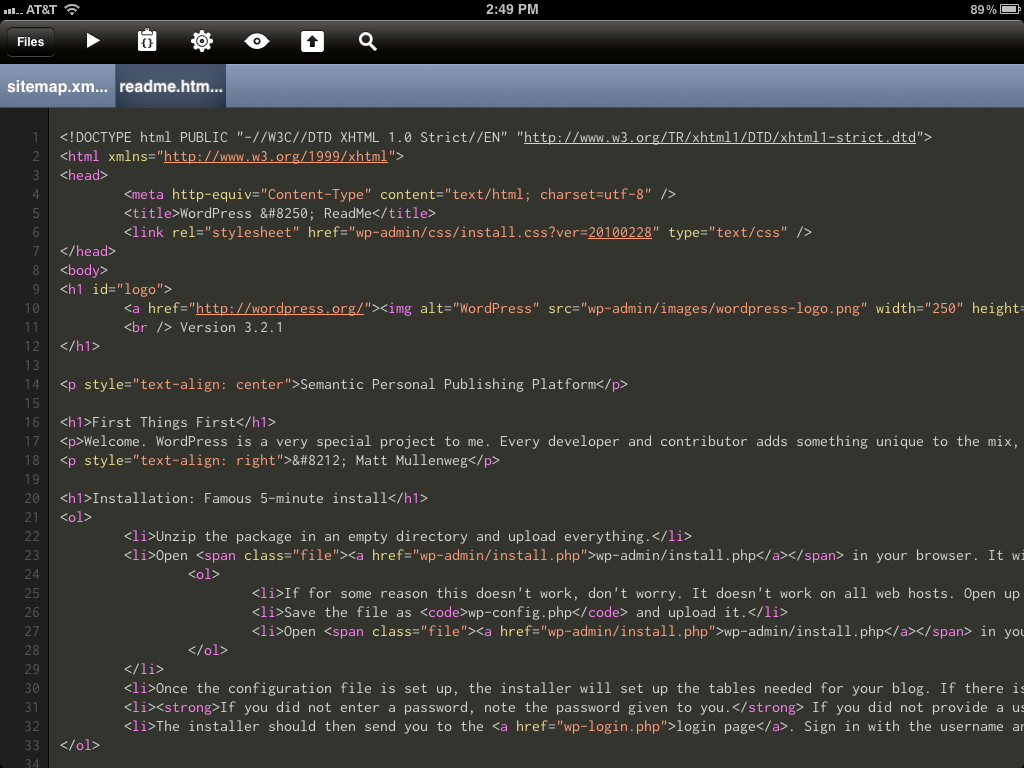
Koder does however offer a dark and light theme, something that Textastic does not offer. ((The icon is also very good.)) While I much prefer the light theme as the highlight colors of the dark theme are not in line with my personal tastes.
[
 ](https://f3a98a5aca88d28ed629-2f664c0697d743fb9a738111ab4002bd.ssl.cf1.rackcdn.com/koder-dark.png)
The custom keyboard in Koder is much different from Textastic’s. Where Textastic offers a lot more ‘quick’ access to common keys, Koder offers access just to a few of the likely keys and gives you arrows keys for navigation. One of the biggest differences between the functionality of code editing in the two apps is that Koder automatically inserts the open and close bracketing when you are editing. There is also a nice undo and redo set of buttons to help keep you from looking like a fool when you shake your iPad to ‘undo’ edits.
Lastly Koder does not offer TextExpander support — instead it chooses to have its own library of snippets that you can build in the app. It’s a toss up which method is better because at some point you have to create the snippets in either TextExpander or Koder. The advantage to Koder’s method is that you don’t need to remember expansion shortcuts, instead you just tap on the snippet that you want. Whereas the advantage to Textastic is that you may already have these snippets set, and at the very least could sync them to your iPad from your Mac.
### Overall
If I was cramped for space I would pick Koder and call it a day. Even with the limitations of the app, I passcode protect my iPad and the extras that it offers in the form of permissions control and tabbed editing makes a better solution for what I am looking for.
Luckily I am not cramped for space so both of these apps will fill different needs from time to time. All Koder needs is a passcode lock and better line-wrapping and it would be the hands down winner.
-
More TouchPads on the Way
Mark Budgell:
>Despite announcing an end to manufacturing webOS hardware, we have decided to produce one last run of TouchPads to meet unfulfilled demand. We don’t know exactly when these units will be available or how many we’ll get, and we can’t promise we’ll have enough for everyone. We do know that it will be at least a few weeks before you can purchase. See more information in the updated FAQs below.I checked the FAQ they posted and they did not ask themselves: “Do you know what you are doing anymore?”
Clearly the answer has become: nope.
-
OmniFocus and Geektool
houthakker in the Mac OS X Tips Geeklets section:
>It can be useful to glance at a key OmniFocus action list on the desktop, without having to fire up OmniFocus and choose a perspective. (A red Due Now list perhaps, or an orange Due Soon, or a context list, or simply the Inbox, as a spur to getting it clear). Here is an applescript which enables you to attach a range of customized list specifiers to one or more Geektool ‘windows’ (shell geeklets) at the same time.Basically you can print a bunch of OmniFocus data to your desktop. The value? I don’t know, but is sure looks cool. ((Haven’t tested it yet, intend to this weekend.))
-
Paul Thurrott on Explorer in Windows 8
Paul Thurrott points out another odd thing about the Windows 8 Ribbon UI in Explorer:
>The Microsoft post describing the new ribbon UI goes into great detail about telemetry data, which provides the company with information about what users are really using in Explorer and elsewhere in Windows. And according to that data, the top 10 commands represent over 81 percent of all commands used in Explorer. The bottom 18 percent of commands (by usage) include such things as Open, Edit (Menu), View Toggle, Organize, New Folder, Send To, and Edit. And yet, looking at a Microsoft screenshot of the new ribbon, what do I see in the default first tab? A bunch of commands–including Open and Edit, by the way–that are not in the 81 percent most-frequently used commands.
-
Shawn Blanc’s Amazon Tablet Thoughts
Shawn Blanc speculating on the Amazon Tablet:
>If Amazon is going to make an inexpensive device that is backed by their brand and ecosystem, then why not make a better Kindle rather than a crappy tablet?Shawn poses some very interesting questions and thoughts. That said I think he is wrong about the iPad 3 (or any iPad with a retina display) obviating the need for a dedicated reader like a Kindle.
Reason being that there are three (main) advantages that the Kindle has over the iPad (from my perspective as a Kindle owner):
1. Non-backlit screen.
2. Weight
3. WeightTo my eyes the resolution is a wash between the Kindle 2 and the iPad 2 — perhaps the Kindle 3 is better, but I doubt that this is the main concern. The Kindle screen looks like paper because it is reflective — not in the way that the iPad’s screen is reflective — and that makes a huge difference when you are reading and for the overall “feel” of the reader.
The biggest factor that makes me prefer my Kindle to the iPad? The weight, my arms don’t get tired and I can read laying in bed with the Kindle above my head — no problems.
*Now* having said all that there is one important distinction to be made: converting potential-iPad users and converting Kindle users. An iPad with a retina display would likely steer owners of neither device more towards the iPad, if they were even considering the iPad to begin with. However, if you are talking about converting a Kindle user to being an iPad user — you will need more than a retina display.
That said: retina display iPad please.
-
What Does the Amazon Tablet Need to Do?
Marco Arment responds to [my post](https://brooksreview.net/2011/08/speculation/) about his [Amazon Tablet speculation](http://www.marco.org/2011/08/27/amazon-tablet-guess). What’s interesting to me is how he views the usage of iPads versus how I view that same usage. I would love to see more concrete data on this matter — so email me if you have some data on it.
One thing I can’t agree with is a tablet without a web browser — that just shouldn’t be called a tablet to begin with.
My guess is that Amazon launches a Kindle on steroids.
The best part of Arment’s response:
>This is how the e-ink Kindle gets away with relatively poor interface design: most of the time, you’re seeing almost none of it.
That is a very good point.
-
Apple’s Vision for the Future of Computing Versus Microsoft’s
Looks about right.