“This tank is a good tool to solve the problem of parking in the wrong place”
Author: Ben Brooks
-
Amazon App Store: Rotten to the Core
Shifty Jelly:
>Update: (and this one surprised us) you can’t remove apps from their store! You have to ask them for permission via an email. Every other store lets you remove apps from sale.The entire story is crazy, but this update they posted is nuts.
[via DF] -
Bullying Anti-Piracy Lawyers Fined and Suspended
A pretty interesting story coming from the UK about actions being taken against a group of lawyers that sent out dunning letters hoping for payouts for alleged piracy. What came of it is fines and suspensions, but perhaps more importantly the news that not all those accused were guilty (shocking, I know).
I hope we start seeing some of this control of overzealous legal actions come to the US.
-
Measuring Broadband in the U.S.
A pretty interesting report that tells me three things:
1. Comcast isn’t as bad for everyone as it is for me.
2. Verizon fibre is the gold standard right now.
3. Cablevision, oh Cablevision, you suck. -
Essential TextMate Shortcuts, Tips and Techniques
Amazing that people still would think it valuable to readers to put up Tips and Tricks for *such* and outdated text editor. ((No it’s **not** amazing because TextMate still rocks.))
-
Digital Interruptions
I can’t stand interruptions when I am in the “zone”.
It’s something that I think most of us feel — nothings more annoying than a beeping phone mid-world-changing-thought. It can shatter and ruin everything that you are thinking about, forcing you to start fresh.
This past weekend I went hiking with my wife and a couple very close friends. We went to Shi Shi Beach which is just south of the most northwesterly portion of Washington State. We took off right after work on Thursday night and drove for a little over an hour and a half to our first camp site.
I only took my iPhone with me — no cameras, iPad, or computer. Thursday night before we started the camp fire I changed my voice mail message to tell my day job people they needed to call someone else for help and then my phone went into Airplane mode. ((There wasn’t going to be cell reception soon enough anyway.)) My iPhone stayed in Airplane mode until Saturday afternoon when we hiked back out — even then not getting cell phone reception until close to 3p that day.
I tell you this as a setup for this thought: during that entire period of time I never felt ‘interrupted’ about anything that I was doing. I sat and thought while staring at the ocean with no interruptions. I built a camp fire with no interruptions.
In fact I don’t think a single person in our group ever felt interrupted once that trip — save the moment when some crows stole some of our food.
Digital interruptions happen because we *let* them happen.
My phone rings because my phone is on and *I* have told people that it is OK to call me. My email lights up because *I* gave out the email address and have Sparrow open. Notifications and alerts happen because *I* don’t turn them off.
But we can all stop interruptions — we just need the willpower to stop them.
All in all this trip reminded me of the quiet time in the morning between 5:30a and 6:15a when I feel like I am the only person awake. I am now turning off every possible notification that I can with every chance I get.
Life is much better without these digital interruptions.
-
Quote of the Day: Dave Winer
“But also don’t delude yourself into thinking that tweeting and facebooking are revolutionary acts. They’re about as revolutionary as watching CNN.” -
Buyer’s Remorse Over Windows
[This is one of those stories](http://www.inc.com/tech-blog/buyers-remorse-over-windows.html) that you read expecting it to happen like this: writer illogically chooses Windows, realizes Windows sucks, more pain, buys a Mac reluctantly, falls in love. Except that in this version the story stops short of the buying a new Mac part.
It’s short and so let’s take a look at the story by [Renee Oricchio](http://www.inc.com/tech-blog/buyers-remorse-over-windows.html):
>My original plan was to upgrade to a Macbook Air. In the end, I could not justify the expense or stomach the transition of moving from Windows to the Mac. I blinked and picked up a full-size Toshiba laptop with Windows 7 for $329.
Wow, $329 is a price that I too think nothing could go wrong. ((Nope, that’s a lie.)) I am guessing you should have stuck to your original plan, but you didn’t ask me… Instead:
>It will do what I need to it to do. It’s faster. The screen is bigger so it’s easier to navigate large spreadsheets, view streaming videos and put together PowerPoints.
Ah, it *is* faster — I see now. I have also often heard that MacBook Airs are incapable of streaming videos and assembling PowerPoints’.
>That being said, setting up my new laptop, transferring files and reloading my key applications killed most of my Sunday afternoon.
Imagine how much longer that *slower* MacBook Air would have taken — weeks?
>Before the sun set on the day of purchase, Windows 7 froze on me twice and I got the “blue screen of death” once.
That’s what we call “user experience”, but at least the machine was $1000 cheaper.
At this point Oricchio goes into some analogies about buying things to only have them break down on you instantly — all of which you think is leading to the inevitable Mac purchase, but:
>There are two infallible truths about PCs.
This is going to be good…
>When Apple creates a product; the end user’s experience comes first, but they charge a King’s ransom for it.
I agree with you right up and until the “King’s ransom” part. Truth be told Apple just charges a reasonable price to make a great computer that doesn’t — oh I don’t know — crash. I won’t waste more time on this, but suffice to say there are a lot of people that think this are have also been proven wrong time and time again.
>When Microsoft creates a product; it’s all about what new code (features) can we slap on top of the old clunky, Byzantine code and call it an upgrade?
Wait are you asking me, or telling me? Either way: I disagree.
>And oh yeah, how cheap can we pressure the PC makers to keep their prices down? It is their only edge over the competition.
And *you* fell right into the trap even though you know better.
Now there is only one sentence left in the article, one, typically this is the one that says something like: “So I bought a Mac and it just works.” We have all read these stories, but not this time — not for Oricchio, nope:
>Mom was right; you do get what you pay for.
What? There’s quite a few things I don’t get here not the least of which is what I am supposed to glean from this “conclusion”.
What’s the resolution to the brand new crappy, but “fast”, computer that you just purchased?
If you “get what you pay for” does that not mean that in actuality you were incorrect in stating the “King’s ransom” bit about Apple laptops?
And if not, then do you not value you all the time you will waste “maintaining” your fancy, “fast”, new, $329, competitive edge, laptop?
You do know that you can return stuff right, specifically for reasons like “it crashed the first day”?
Are you aware that anytime I see your name as the author I will now skip past the article?
Well now you know and knowing is half the battle.
-
What Tiny Thing in Lion Makes You Smile or Has Caught You Off Guard?
A great thread of the improvements in Lion that really make it shine. There are more than a few that I hadn’t noticed/didn’t know about.
[via Daniel Jalkut] -
Review: Sparrow
When [Sparrow](http://sparrowmailapp.com/) came out I was pretty annoyed that it copied the look and feel of Tweetie so I consciously decided not to download it. This in addition to the fact that (like switching task apps) switching email apps is very disruptive to my workflow I decided not to try it at all. Lately though I have been seeing/reading/hearing from too many people that I respect whom have really taken to Sparrow.
I decided to give it a try.
I have been using it now for over a week and I think I have enough usage that I feel comfortable telling you my take as a hardcore Mail.app user.
It’s good, but it’s not better than Mail.app as an email app — yet I am switching to it. I can’t quite put my finger on it, it’s not the design of the app or the hideous icon — there is a lack of power in the app, yet I don’t miss the power.
I asked a couple of people that use the app why they like it better than Mail.app to see what I was missing, here’s what they told me.
[Chris Bowler](http://chrisbowler.com):
>Mail and Sparrow are close, but the integration of keyboard commands & more configurable interface make Sparrow the better choice.
Here’s what [Justin Blanton](http://hypertext.net/) had to say:
>It makes me hate email less. It’s prettier, simpler and just more fun to use. Also, for whatever reason, it makes me feel less guilty about firing off very short replies.
So while Chris seemed to have a “productive” reason for liking Sparrow, Justin has a more emotional response to the app — a response that I completely “get”.
When I use Sparrow I don’t feel like I am using a *real* email application, because it doesn’t look a feel like a *real* email application. It feels more akin to email on my iPad — robust, but not *the* tool. It’s an odd sensation that I am just now coming to terms with.
Chris is right in saying that there are a lot of little things in Sparrow that make it a very nice app — not the least of which is allowing ‘send and archive’ without having to invoke third party utilities. Sparrow just has a lot of common sense things in it, but it is sorely lacking in the bottom-posted email support…
I can’t say I have done my job as a reviewer unless I note some very really problems I have with this app, so here they are:
– **Bottom-posting**: You can’t do it automatically and I didn’t find a plugin or workaround on the net. What year is this? Instead I whipped up a Keyboard Maestro macro to bottom post emails replies for me — with the added benefit of it working better than my Mail.app hacks.
– **Multiple Email Accounts**: This still very much feels like an app designed for no more than two email accounts. The reason being: the avatars for each account. The sidebar is just bad. Where the pictures would be cute for users that only have a couple of email accounts — what picture am I to use for my business? What about this blog where I have three different email accounts? The avatar thing is just odd. (Yes I know about the extended sidebar, but it is hideous.)
– The icon is *really* bad.
– I wish I could turn off or change some of the colors the app uses, particularly the green. Not a fan of that shade of green.As you can see my complaints about this app are pretty minor and that is because of the apps greatest strength: keeping you out of the app (which keeps me from noticing too much).
### Why I Like Sparrow
I mentioned this earlier but Sparrow really feels like using the simplicity of an iOS email app on your Mac. What’s good about that is it makes me feel (as Justin said) fine with shooting off shorter replies — the same feeling I have when using my iPhone or iPad to respond to emails — which in turn means I reply more promptly.
I don’t hate the Sparrow interface, but I doubt that it will ever truly feel like ’email’ to me — that’s a good thing. In Mail.app I was constantly checking folders, tweaking rules, and staring at emails. In Sparrow I usually only look at the combined inbox and then I search for everything else — Mail.app has a nice search engine in Lion, but so does Sparrow. The biggest difference is that Sparrow encourages the use of search and all but forces a user to forget about “filing” their email.
Thank you. Well done.
### Closing Arguments
Mail.app is a better email app: it’s more powerful, has more add-ons, is free, and you can hack on it more. Sparrow is a better app for replying to emails — it’s not an email app so much as it is a communication widget. Sparrow feels weak, but it isn’t weak. It feels gimmicky, but it *still* works.
If you go into Sparrow thinking that it’s just another email app then you are already predisposed to hating it. If you go into using Sparrow with the mindset that you hate email and want to spend as little time emailing as you can — well you just may be surprised, I was.
### Tips
Here’s how I am bottom posting:
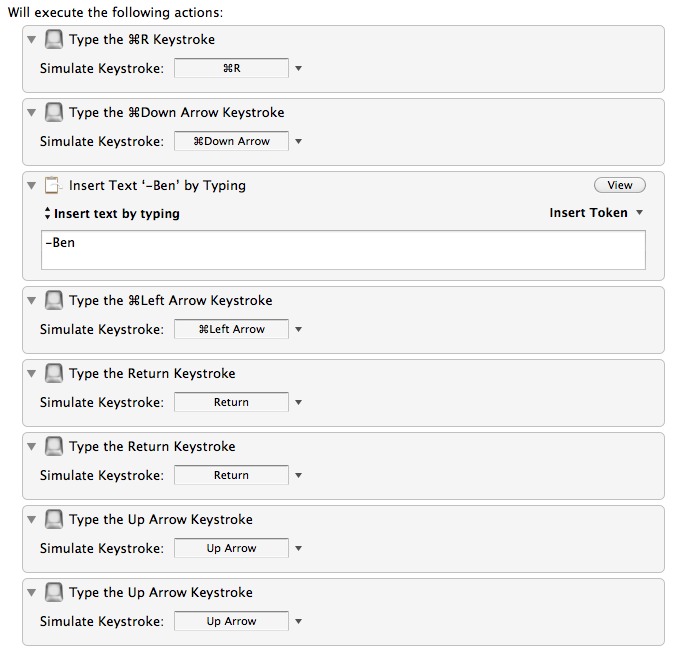
Basically I set this to trigger only in Sparrow when the `Command+R` keyboard shortcut is pressed.
And one tip to make things look better: turn off the sidebar and stick with the unified inbox with search to find ‘old’ emails.
### Still Missing
A Clip-o-tron for OmniFocus — this is really, really missing.
-
The Desktop Transition
Michael Lopp on Exposé in Lion:
>How would you react if, whenever you were wondering where something was on your desktop, I’d show up, pull every single thing off it and show it to you in a manner completely different from how you organized it?The above so perfectly explains why I was never a huge fan of Exposé.
-
“Microsoft.com is a terrible website”
Bill Gates in an email to Jim Allchin from 2003 describing his experience trying to download and install Moviemaker from Microsoft’s website:
>So after more than an hour of craziness and making my programs list garbage and being scared and seeing that Microsoft com is a terrible website I haven’t run Moviemaker and I haven’t got the plus packageCan you imagine getting an email like that from your boss, let alone if your boss was Bill Gates?
-
[SPONSOR] PostCheck
PostCheck adds additional functionality to Apple’s Address Book. With one click, PostCheck will fill in missing parts of your addresses, such as ZIP+4 Codes, as well as format your addresses to conform to USPS standards.
Whether you manage a mailing list, send clients invoices, or just like a neatly organized address book… PostCheck can save you a lot of time and help the Post Office get your mail to it’s destination quicker.
Read more about the benefits of PostCheck and download the demo on the [PostCheck website](http://briantoth.com/postcheck/).
-
Full Screen Shortcut
Great tip, I went with `CMD+CTRL+F`.
-
Camels and Rubber Duckies
Joel Spolsky on software pricing from 2004. Reading this last night I couldn’t help but think about the effect that App Stores have had on pricing of software since Spolsky wrote this piece. Seems that software en masse when the $0.05 route.
[via Amitava B] -
The New Home Button on the iPhone 5 (Allegedly)
Dan Provost on the rumored iPhone 5 home button redesign:
>The home button is special. In it’s purest form, it is not used to manipulate what is happening on the screen, but to manipulate the apps themselves (in most cases, closing them and returning to the home screen).His entire post is worth a read and a fantastic look at how Apple likely thinks about the home button.
-
Quote of the Day: Allison Arieff
“When’s the last time you had a creative breakthrough in a Monday morning meeting? Creativity springs from unexpected places and sources — from a walk in the park to the rare block of uninterrupted time — so thinking more broadly about the intrinsic motivations (autonomy, learning, etc.) that facilitate good work is likely to have a far happier outcome than the “latest” innovation in cubicles.” -
AT&T to Implement Data Throttling in Early October
Cleve Nettles:
>Rumored to be starting in the first week of October, we’ve heard that AT&T will start throttling the data speeds of the network’s top data hogs.Sure AT&T is spotty and not great as a company, but if done correctly (and it sounds as though it will be) it should help out the overall network quality.
-
Brew Review
My thanks to the Brew Review for sponsoring the RSS feed this week. If you are a beer drinker that constantly forgets which beers he likes (let’s face it there are a lot of micro brews out there) then this is an app you need.
It has a tons of features for the beer obsessed and yet still works great for a guy like me that just logs the name of beer and whether it was enjoyable or not. Be sure to support them and check out the app — I’ve found it very handy.
-
It Just Doesn’t Work
Harry McCracken:
>All of which brings me back to Apple. Heaven knows, it often ships products that don’t include all the features an average consumer might want. But even when its products don’t “just work” in a way that feels practically mystical, they do work. What does it say about the state of the tech industry that this comes as a refreshing surprise?This is a really good read that highlights a problem that has only been brought about due to the proliferation easy updates and acceptance of ‘beta’ labels.
[via DF]