Author: Ben Brooks

  • OmniFocus Quick Tip: Using Start Dates

    There is this little feature in OmniFocus that most of you have probably seen, but have never used. That feature is: Start Dates.

    We all know that we should be assigning due dates to time sensitive tasks in OmniFocus, but you should also be assigning start dates to help you keep a clear mind. Start dates do one very important thing: keep unavailable tasks from cluttering up your views.

    Due

    Most of us will set our ‘due soon’ times to 24 hours and as I have seen many people express some frustration that this is ‘24 hours’ and not just simply ‘tomorrow’. The difference is profound — if I set something to be due tomorrow at 5pm, then come today at 5pm that item will be showing up in the default ‘due’ pane of OmniFocus. It will also show as due in both iOS apps (not in the iPad Forecast view though, that shows due items by day).

    This can put a lot of undue anxiety on people when they get home from work and see that there are still tasks that are ‘due soon’. The simple way around this problem is to set start dates. If you have something that is due on 1-31-11 @ 5pm and you know that you can’t, or don’t, want to work on it until that day — then setting the start date of 1-31-11 @ 12am means that it won’t appear on the ‘due’ lists until that day.

    Each of us works differently, but I do know quite a few people that have lamented about this problem so I thought that it would be worth sharing. Typically I won’t set start dates for my tasks and I will just know that even though items show as ‘due’, they really aren’t due today. I do make extensive use of start dates for any actions that I am tracking, or actions that I truly cannot due until a certain date. This keeps the task from being in my thoughts and in my way. Especially if a task is location sensitive and I know I won’t be at that location until a certain day and time.

    If the Due view in the Mac app is still showing these unavailable tasks then edit the perspective to show only ‘available’ tasks and you should be good to go. I typically keep my due soon view on my Mac at 2 days and use start times to hide things I don’t want to see. This helps me get a head start on the next day if I find extra time.
  • An Open Letter to Twelve South

    Twelve South,

    You make some of the best looking and best functioning computer accessories that I have ever had the chance to use. Currently I own your BookArc stand, BackPack shelf, BookArc stand for iPad and your Compass mobile iPad stand. These are each excellent products and exactly what I wanted when I purchased them. Though one pays a premium for your products I have always found them to be excellent and have always recommended them to others.

    Today represents a massive failure in customer service and customer appreciation. When I went from a 15” MacBook Pro to a brand new 13” MacBook Air I immediately put the MacBook Air insert in the BookArc to hold my new MacBook Air. To my dismay the insert was too large for the newer, thinner, MacBook Air. I promptly emailed your customer service department to inquire if a new insert would be made that I could purchase.

    On October 27th, 2010 I sent you the following:

    I already own a BookArc (love it) but I just got a new MacBook Air and noticed the old MacBook Air insert is a bit loose. Is there a way to buy an insert for the new MacBook Air?

    I received a response that day that said:

    We have our factory working on inserts for the new Airs but these things take a little time. Sadly, Apple doesn’t give us any advanced notice regarding their new products so we have to wait like everybody else to get started on updates and solutions to accommodate the latest and greatest Apple offerings.

    Now we are talking — I knew that a bit of patience was all that was needed to get a better fitting insert. Fast forward to today, there still is no such insert (even though two relative amateurs can make a product in 5 months). Then I get an email announcing an all new BookArc for the MacBook Air, one that makes my current BookArc obsolete. The same BookArc I had just purchased on May 11th, 2010.

    I immediately complained on Twitter, but decided I would email to see if you would also be making the insert for existing customers.

    Back in October in this email below you led me to believe that you would be making an insert for the BookArc that I currently own — today I see that you released one exclusively for the MacBook Air, which does not solve the problem that I have.

    I feel mislead by this email — are you still planning on making an insert for the MacBook Air that goes with the BookArc?

    I received a response to this inquiry stating:

    I can certainly understand you feeling that way. When we corresponded last, a new insert for the old stand was the plan however, through time, this plan changed and a new stand, custom-made for the new Air and with cable management, was pursued instead.

    If your BookArc was purchased between the time of Apple’s announcement for the new Airs (October 20, 2010) and December 8th, when the final decision was made and the compatibility was changed on websites (in other words, it was purchased specifically for your new Air and you had no way of knowing it would be incompatible), we will put your name on a list of ‘early adopters’ who may participate in an exchange program. If you qualify, please provide me with proof of the date of purchase and your address, and I’ll add you to the list.

    In other words you are telling me to piss off. Fine Twelve South, I will piss off and take my money and recommendations elsewhere — there are plenty of other companies that make fine accessories that give a damn about their customers. My advice is that you try to give a damn the next time someone wants to be able to use a product of yours that is less than a year old — at the very least don’t promise something you will never deliver. Had you told me from day one that you would not be making the insert I would (believe it or not) be just fine with that. Leaving me hanging for three months garners no good will.

    Your Former Customer,

    Ben Brooks

  • Unexpected SMS From Mobile Carrier

    Ryan Singel:

    The would-be suicide bomber was planning to detonate a suicide belt bomb near Red Square, a plan that was foiled when her wireless carrier sent her an SMS while she was still at a safe house, setting off the bomb and killing her.

    Death is never funny, but…well I guess thank God for that text. It was reportedly wishing her a ‘Happy New Year’ — no joke.

  • Quote of the Day: Bill Keller

    “…a secretive cadre of antisecrecy vigilantes…”

    That is pure gold.

    [via DF]
  • Perfect Place to Write

    E.B. White:

    A hotel room is the perfect place to write. You’re cut off from all the routine and is so convenient, the way they’ll send you anything you want.

    I could not agree more with this. When I was in Miami I got a ton of stuff done sitting at an incredibly uncomfortable table, using a massively slow Internet connection.

  • “Smart” Phone Market Shares

    Dina Bass:

    Microsoft’s share of the smartphone operating-system market declined to 2.8 percent in the third quarter, from 7.9 percent a year earlier, according to Gartner Inc. Android’s share increased to 25.5 percent from 3.5 percent, while Apple’s iOS share declined to 16.7 percent from 17.1 percent.

    That is an incredibly small market share for Microsoft — for whatever reason that number blows my mind.

  • CNN’s 8 Least Evil Banks In America

    I am linking to the Consumerist post about this because they list out the banks so you don’t have to click through a slideshow. I am posting this not because it is ground breaking news, but to promote the bank I use: USAA.

    You don’t have to be military to use it, but if you love the experience you get with using Apple, then you will love USAA. They don’t have branches, but they do have a killer iOS app. The few times I have called in for help I was blown away by how great the customer service is.

    Maybe you think I am just full of it and if you do go to their site. Now where it says ‘free checking’, do you see the star ratings — yes USAA is so confident they allow users to rate their services and almost 8,000 members have rated their free checking at 4.7 stars out of a possible 5. Read that sentence again. Can you imagine your crappy bank allowing its members to rate any part of the bank and then being confident enough to display that rating on the front page? You need to flip to past page 600 to start reading the negative reviews.

    Honestly I cannot recommend USAA enough, it is the Apple of the banking world.

    (Note: There are services that you cannot get through them without being a retired or active Military individual. This includes depositing from the iOS app. A major bummer, but even without that, I recommend this bank.)

  • iPhone 4 “Glassgate” Lawsuit

    Matt Brian:

    LA resident Donald LeBuhn has filed a class action lawsuit against Apple, accusing the company of misleading customers as to the strength of the glass used in its iPhone 4…

    Except for the fact that it is called “glass” — which inherent to the word glass means that something is fragile. This bit though really pisses me off:

    The claimant is asking the court to get Apple to refund the price paid for the iPhone 4 to all of those in the class action lawsuit and to reimburse any repair fees charged, making Apple accountable for its actions.

    Apple should tell these idiots that they will give them their money back if they give Apple the phones back. My guess: not to many of these people would be willing to give up their iPhones.

  • In Meetings, Pen & Paper, Not Glass and Fingers

    Randy Murray, responding to my two posts that responded to his about not using an iPad in meetings:

    Ben may be right, but only for a select few, people like himself who can master the technology to a degree that it becomes invisible. It doesn’t work that way for me and I’m pretty good with the device. Most people I know simply couldn’t operate it at the level required to take accurate notes without bringing a meeting to a screeching halt.

    I still am unconvinced that paper and pen is a better medium to use during meetings. What I do know is that you need to use what works best for you. For Randy that is pen and paper with a digital recorder, for me that is the iPad.

  • Kyle Baxter Makes an Excellent Point

    Kyle Baxter in reply to this post by me:

    That’s all possible through an iOS application and AirPlay, but there’s no way something like that could gain traction following that route. Telling users to (1) purchase an Apple TV, (2) purchase an iOS application, and (3) stream it to their Apple TV is so convoluted few regular users would get past the first step.

    That is a great point, I may have to rethink this.

  • Is AirPlay the App Store for the Apple TV?

    Leading up to the launch of the Apple TV 2 there were rampant reports that the Apple TV would get iOS and its own App Store. At the time it only seemed natural that Apple would make such a move — netting more revenue for the Apple TV “hobby”. With a $99 price tag it seems like the Apple TV would be a loss leader for the company and perhaps an App Store would be the way to make up for such a loss. Perhaps, but does it really makes sense?

    They way I see it there are two possible types of apps that could be useful on the Apple TV:

    1. Games
    2. Streaming Apps (be it video, audio, or other)

    I don’t see much need for any other type of app, but just for shits and giggles I admit that somebody somewhere probably really wants to see OmniFocus on their 100” TV. I don’t.

    I also don’t see a need of any sort for any apps to make their way to the Apple TV, again there are two reasons why:

    Lack of a Good Controller

    This mainly applies to games and any apps that you would need to input text into, but any Apple TV owner knows that the remote is only good for navigating menus or hitting play/pause. I doubt that someone can make a compelling game that uses an infrared remote to control it.

    Angry Birds and Flight Control for instance would be nothing short of a nightmare with this type of controller as the interface to those games. Part of the reason games are so great on an iPhone/iPad/iPod touch is because you have multi-touch control coupled with accelerometers and gyroscopic controls. You just don’t get that with a little remote like the one paired with Apple TV.

    Yes you could set it up so that you would use your iPhone/iPad/iPod touch as the controller, but then that brings me to the next point…

    AirPlay

    Wouldn’t you just prefer to go the ‘two for one’ route and use AirPlay to route the video to the Apple TV? That is wouldn’t it just be easier to enable AirPlay on the Hulu iPad app than it would be to recode something for the Apple TV? Doing this would solve the crappy controller problem, and not cause the customer to download/pay for two apps all while reducing the strain on your companies mobile software development. This seems like a win-win scenario for everyone.

    It becomes even more of a no brainer for games too — just look at something like The Incident, where the TV becomes the screen and your iWhatever becomes the controller. Doesn’t that make a lot more sense than putting an actual app store on the Apple TV would?

    Essentially a game developer could turn the pairing of the Apple TV and iPhone/iPod touch into the Wii — which has seen mild success. ((I, of course, know it is a huge success — no emails needed.))

    No Sense, None

    From a consumer perspective I can’t see any reason why one would want an app store for the Apple TV — unless said consumer doesn’t own a proper iOS device. From a developer and Apple perspective the only reason I can see is monetary and I just don’t think Apple is as motivated by monetary means as others do. I think Apple sees this the same way I do: there is just no good way to deliver a consistently good experience with an app made by a 3rd party for the Apple TV.

    There is a reason NetFlix is packaged with the Apple TV: Apple wanted to control the UI and knew this was the only way to control that aspect.

  • No Opting Out From Facebook Turning Your Check-Ins, Likes Into Ads

    Jacqui Cheng on Facebook using users in ads:

    Still, there are ways in which the system could be improved, especially for those concerned about their privacy being respected. The most obvious is that users are not notified that their posts are being used in ads, and cannot block their posts from becoming ads unless they change their privacy settings to make the posts private. That’s one thing Facebook has going for it this time around, though—the company will respect all privacy settings so that only the people you’ve already authorized to see your posts will see ads with you in them.

    Ok so here is what is happening: say you check into Starbucks a couple of times. Facebook may use that data and your profile picture displaying it to other users that would normally be allowed to access this data already. Except that instead of seeing it in a normal way it is shown as an ad for Starbucks.

    This all seems rather harmless until you think about this: what happens when you check in somewhere that you would never want to come back to?

    Checking in somewhere is in no way an endorsement of that place – yet Facebook is using it as if you are endorsing it. Perhaps you are only checking into Starbucks because that is the only place you could find.

    Not only is this a privacy concern, but it could really piss off your friends if they think you are endorsing a particular place.

  • How to Turn Disaster Into Gold

    Jason Fried on apologies:

    “I apologize” is renting the problem. “I’m sorry” is owning it.

    CampFire had a lot of glitches in December and 37signals did an epic job handling the problem from a customer relations standpoint. If you want to know why they handle problems the way they do — or better — if you are having to deal with customers this is a must read post.

    I respect honesty and will forgive mistakes that are clearly explained and owned. What I don’t respect is thinking that I should just deal with the problem. This is a huge reason why I use 37signals products and why this site is hosted on Media Temple.

  • Quote of the Day: Khoi Vinh

    “Few companies seem to understand the concept of design so cannily and yet so incompletely as Google does.”
  • New Apple.com Design

    An all new navigation bar that looks modern and has a sweet fly-in bounce transition. Very nice.

  • “We’ll be retiring our support of OpenID on May 1”

    37signals:

    OpenID has been a burden on support since the day it was launched.

    I used Open ID on 37signals the minute it became available because it gave you a single sign on. It was a pain in the ass every time. I for one am glad to see it go and the 37signals ID that is has been in use for a while now is quite nice.

  • Read & Trust

    A new community of writers that I am honored to be included in:

    Everyone has a favorite online writer. And asking them which writers they recommend is a great way to expand our reading list and explore new topics and viewpoints. Read & Trust is committed to gathering together the best independent writers available—the ones recommended by the writers you read and trust.

  • Stand Tall

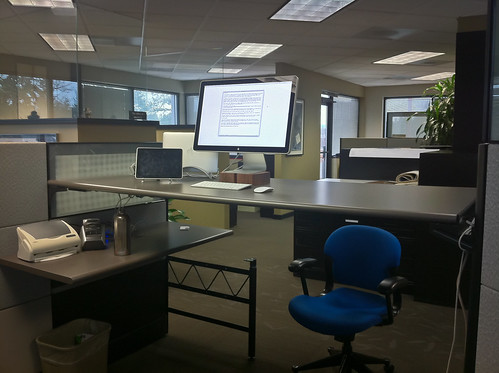
    I hate standing — it makes me tired and hurts my feet. Even though I hate standing I decided that my main office desk (a 6 foot by 3 foot desk) was going to be a standing station. I didn’t do this to be cool, nor because I hate my office chair (I love my office chair). I decided that I should stand for most of the day because I want to be healthier — this has nothing to do with New Years resolutions. ((I don’t make those.))

    I spend, at the very least, an hour and a half in the car each day (Monday thru Thursday). Usually you can tack on another thirty minutes or so and you can safely say that most days (Monday thru Thursday) I spend two hours in the car. That is roughly eight hours a week that is guaranteed sitting time. ((Not counting any drives I take on the weekend or Friday — my work from home day.)) Add to that another two to three hours each night when I get home and that isn’t even counting what I do, or don’t do on the weekends. Bottom line: I sit a lot, we all do.

    My best guess is that I spend roughly 26 to 30 hours a week on my ass, not counting any time I sit while at my office. ((This maybe adds another 2-3 hours a week now days.))

    I have linked to this New York Times post a couple of times now, but here is what it says about sitting:

    Men who spent more than 23 hours a week watching TV and sitting in their cars (as passengers or as drivers) had a 64 percent greater chance of dying from heart disease than those who sat for 11 hours a week or less.

    That number startled me the first time I read it and still puts fear in me every time I read it.

    Immediately after reading it I setup a part of my workstation as a standing station. I used it for a few weeks and then it quickly went unused. I just like to work with my 24” display.

    Last week I decided that I really need to start taking my health seriously (I am 28 now after all) and so I decided to make the big desk a stand up station and the smaller, less comfortable, station as my sitting area.

    I love this setup.

    I mean I don’t love the way my feet hurt when I get home — and they do hurt — what I love is that my drive now becomes an nice time where I can enjoy sitting. Lunch is also enhanced because I allow my self to sit while eating (that is also better for you — you tend to eat less).

    I don’t know if I have seen any health benefits yet, but I do know that I feel more focused and less tired with each day that passes. I know that it can’t be bad for me. I know that I enjoy working at the computer while standing and that I am less reluctant to walk over and grab something.

    Standing while working has turned out to be quite nice.

    Here is what the setup looks like for those interested, please note a few things:

    • I just set this up a week ago so it is not fully finished.
    • I added a lower side table to keep water off the desk where my computer is.
    • I hoped to hide the MacBook Air in clamshell mode below the desk, but the Cinema Display cord is not long enough.
    • I still need to get the wires under control.
    • The chair is there for height reference.

    Standing Workstation

  • Quote of the Day: Mandy Brown

    “I still believe that to be true, but with one important modification: it’s not that a blog post has permission to be rough so much as that roughness is its natural state. Meaning, blogging encourages exploration and experimentation. In this way, blogging is the kind of writing authors have done for centuries but which usually remained hidden away.”
  • Meetings and the 1960s

    A few people have asked what my reference to the 1960s was all about in my last post.

    It is nothing revolutionary, just based on my observations of 1960s meetings from watching Mad Men.

    Which means: the 1960s involved a lot of Scotch during meetings, which seems like a pretty nice addition to most meetings.