Author: Ben Brooks

  • Researcher Demonstrates ATM ‘Jackpotting’ at Black Hat Conference

    Kim Zetter:

    Scrooge lurks on the ATM quietly in the background until someone wakes it up in person. It can be initiated in two ways — either through a touch-sequence entered on the ATM’s keypad or by inserting a special control card. Both methods activate a hidden menu an attacker can use to make the machine spew out money or print receipts. Scrooge will also capture magstripe data embedded in bank cards other users insert into the ATM.

    They received bonus points for the name ‘scrooge’.

  • Proposals for busy people

    Liz Danzico:

    When you email busy people, you might believe the best option you can give them is to offer a wide set of options (“I’m available any time in fall 2010. Choose a day that works for you!”) You imagine you’re being generous. Accommodating. You’re not imposing on the busy person.

    Yet what you’ve done, in one fell sentence, is impose more busy work on an already busy person.

    True.

  • Android wallpaper app that steals your data was downloaded by millions

    Dean Takahashi:

    The app in question came from Jackeey Wallpaper, and it was uploaded to the Android Market, where users can download it and use it to decorate their phones that run the Google Android operating system. It includes branded wallpapers from My Little Pony and Star Wars, to name just a couple.

    Update: Lookout notes it does not capture browsing history and text messages: It collects your browsing history, text messages, your phone’s SIM card number, subscriber identification, and even your voicemail password, as long as it is programmed automatically into your phone. It sends the data to a web site, www.imnet.us. That site is evidently owned by someone in Shenzhen, China. The app has been downloaded anywhere from 1.1 million to 4.6 million times. The exact number isn’t known because the Android Market doesn’t offer precise data. The search through the data showed that Jackeey Wallpaper and another developer known as iceskysl@1sters! (which could possibly be the same developer, as they use similar code) were collecting personal data. The wallpaper app asks for permission to access your “phone calls,” but that isn’t necessarily a clear warning.

    Not much proof, but interesting.
    [via DF]

  • An Open Letter to Microsoft About Office for Mac 2011, and How to Keep it From Sucking

    Stephen M. Hackett:

    I’m hopeful that Outlook for Mac will finally let Mac users be able to live in Exchange land happily ever after. Entourage never really got that right — which is crazy. Microsoft, you do make both products, right? Mac users and PC users should have the same abilities in an Exchange environment.

  • Where the Greatest Opportunity Lies: Microsoft

    A thought passed through my mind the other day: if I could take over as CEO of any one company, right now, which would it be? I concluded that I would choose to take over Microsoft – which to many people seems shocking given my love and passion for Apple products. I thought about this for quite a while this weekend while I was away from technology on a hike, and below are my thoughts on what I would do if I somehow lucked into being Microsoft’s CEO.

    Step One: Communication

    The smartest thing a CEO can do right now is to directly communicate with its customers – this is something that Steve Ballmer has not been very good at. He talks a lot, but most of what he is saying is directed at employees, media and investors. Customers need to come first, the rest will fall into place.

    I am not saying that things like emailing customers back needs to happen (though it should as it does go a very long way towards building goodwill) at the very least Microsoft needs to start offering direct support – in person much like Apple has done with it’s Genius bars.

    Microsoft also needs to take the time to explain its decisions and actions to customers, to hype up what is going on and to show real products – not concepts. The customer needs to once again be made to feel like they are cared about, like Microsoft is designing its products to take care of them and their needs. Not to pad the bottom line.

    Step Two: Time to Simplify

    The ribbon is a great tool for those new to Office and for those experienced users it quickly became an annoyance. The one thing we can all agree on is that we need more simplicity in our life and that should start with the amount of stuff that we can see on the screen. Microsoft needs to go through and hide away some of the features and offer a basic view – a view that we can use to really write with no distractions. Then they need to make this view, the default view.

    I am not advocating throwing out features – that would alienate far too many existing users. Instead Microsoft needs to start putting billions into the design of the user experience – things just don’t need to be that complicated. Microsoft needs to spend the time and money to make complicated things seem very simple for end users.

    Step Three: Reward Creativity

    Instead of Ballmer proclaiming that he thinks Microsoft employees should make mobile apps in their free time, he should be allowing them to do so during work hours. Give them the 10-20% free time during the day to help make the Microsoft product stronger (via personal projects such as making mobile applications).

    Also the people that came up with the Courier project should not have seen it shut down as a ‘concept’ – they should be pushed to make it real and then to make something else. It seems (from the outside looking in, and those that work there that I have talked to) that Microsoft wants drones and the when you really have creative inspiration Microsoft is slow to support you in that vision (if they ever even get around to that). This is backwards – the innovators need to be given the freedom to innovate, not tossed aside until the defect to another company.

    Step Four: Embrace the Courier

    This is the real iPad killer, except Microsoft never gave the device a fighting chance. This should not be a concept, it was too well received. The courier needs to be brought to production and fast – when you have something as great as the courier in the dead projects bin it is a bad sign.

    Bring it back now.

    Step Five: Set the Standard

    Microsoft has made it clear over the years that they are software first and want to stay far from the hardware arena – this is counter to what Apple is doing, but doesn’t mean Microsoft has to make hardware. In fact when it comes to hardware Microsoft needs to look at what Google did with the Nexus One.

    Google was not happy with the Android phone offerings so they decided to up the ante for all of the manufacturers and set the standard for what an Android phone should be. Microsoft should be doing the same for laptops / smartphones / desktops and all other products.

    Setting the standard forces manufacturers to make better products which only helps Microsofts software to look and feel better. Customers are not only switching to Apple because of the software, they are switching because of the beautiful hardware as well. It is no longer about being virus free – it is also now about looking good.

    Step Six: Regulate Vendors

    Microsoft needs to tell all of its vendors that they better get their act together – start selling quality products or lose the right to sell Windows on your computers. This goes back to the last point about setting a standard, but takes it one step further. If Microsoft forces vendors to use better parts, faster and more reliable components, then it will begin to reach the standard of quality that Apple has in its computers – all without having to make them directly.

    Vendors need a swift kick in the ass, and shown the light or the door.

    Last Step: Stores

    The Microsoft stores need to start a massive rollout. Real estate leasing is at an all time low and spaces can be had for cheap. Microsoft needs to roll out stores across the country that do two things:

    First and foremost needs to be free support, just like Apple. Allow customers to bring in any machine with a Microsoft product that needs fixing – and fix it. This is a requirement, you can limit the amount of repairs by limiting the amount of employees dedicated to this task, much like Apple, but you need to get this free support out there to build good will and loyalty.

    The second thing these stores should do is to showcase only the best hardware that ships Windows and Mobile. They need to showcase only the top notch products for the hardware, and only sell the software. (this excludes actual hardware products Microsoft may be selling) If a vendor like say Dell wants in the store to show off a new computer – it better blow the doors off the competition or it can stay in the PNG and Dell’s website.

    Wrap-Up

    Microsoft it is time to get back to the basics. Embrace your customers or slowly watch your huge pile of cash dwindle. There is an opportunity here, the question is: will they grasp it?

  • 100 million Facebook pages leaked on torrent site

    James Nixon:

    The file contains user account names and a URL for each user’s profile page, from which details such as addresses, dates of birth or phone numbers can be accessed. Accessing a user’s page from the list will also enable you to click through to friends’ profiles – even if those friends have made themselves non-searchable.

    Further reinforcing my decision to delete my Facebook account a while back.

  • Seeing Pixels: iPhone 4 FaceTime Screenshots

    Chris Ereneta:

    Apple’s marketing screenshots have typically existed in a space of idealized fantasy, much like the gleaming, immaculately lit aluminum, steel, and glass of the hardware product images, each one resting on an invisible surface whose reflectance seemingly varies in relationship to the available negative space.

    Yet here I was seeing a deliberate choice to suggest a decrease in pixel resolution. On the FaceTime screens only.

    This was clearly done to keep themselves out of trouble for advertising the quality of the screen. Had the antenna issue not popped up my guess would be that people would be bitching about the video quality of FaceTime (which is not perfect – but it is superb in actual usage).

  • It’s a Bit Too Big / a Bit Too Small

    John Biggs:

    It’s a bit too big to be a phone and a bit too small to be a tablet. It is usable for ebook reading and video viewing, but it isn’t ideal for either of those purposes. In fact, I’m loathe to recommend it as an ebook reader simply because the screen is a tad too small.

  • Hard Graft Pocket iPad Case

    After my recent struggles with the DODO Case I was on the hunt for an excellent iPad case. That lead me back to a company that I have always wanted to order from: Hard Graft. They have always made very cool bags for your Macbook and that tradition carries on with the iPad.

    I took the plunge last week and order the Pocket iPad Case. This is not a cheap case so I was expecting a top notch product. I received the case about an hour ago and am thrilled thus far. It is a sleeve made of heavy felt – enough to protect the iPad from minimal drops and most all scratches (while in the case). I went for the Pocket case instead of the Heritage because the Pocket case has the benefit of a flop to cover the edge of your iPad and I wanted that extra bit of protection.

    I don’t have much more to say other than the little details of this case are exquisite and really show where the extra money you spent goes.

    photo 1.JPG

    photo 2.JPG

  • Introducing Campfire for iPhone

    37Signals purchased the Ember app and made it free (changing the name to Campfire) – it was/is the best way to communicate with Campfire while on your iPhone.

  • Facebook Adds Delete Account Option?

    Slashdot had this from roseability:

    “Facebook have quietly added the ability to delete you account. ‘Deactivate Account’, under Account Setting, has become ‘Deactivate or Delete Account’, and when checked it purports to permanently delete your account and all information you have shared. Facebook is actually willing to erase your data permanently? They must be counting on very few people doing so.”

    I have no way of verifying this but if true this is a step in the right direction.

  • Peter Sunde Banned From Operating The Pirate Bay

    TorrentFreak:

    Indeed, all of the three people who are now banned from operating the site no longer live in Sweden. This also complicates the enforcement of the rulings since it is pretty much impossible to check whether or not Peter, Fredrik and Gottfrid are complying with their demands.

    Now kids this is what we call “grasping at straws”.

  • The Real Scoop on Ad Age in the ‘Mad Men’ Era

    I am a huge Mad Men fan and watched the season premiere on Sunday night. I thought the episode was great as usual, but did notice the mention of Ad Age in the episode. Though I don’t think it warranted this response.

    Rance Crain:

    What’s wrong with this picture? No. 1, we never did interviews over lunch; No. 2, we didn’t take notes in shorthand; No. 3 we didn’t ask cute-ass questions; and No. 4, our pictures were never bigger than our stories.

    Sounds awfully defensive especially given the fact that Mad Men was not making fun of Ad Age, they were making fun of one of the characters. This is most likely a link bait play for Ad Age to publish this.

  • Samsung Galaxy S: Hands-On with the Latest Android Smartphone

    Mashable:

    The Samsung Galaxy S is a fantastic smartphone. Call quality is crisp, data connections are fast, and the phone flies through apps and web pages. While we wish Samsung had left some aspects of Android alone on the software side, some of the touches to TouchWiz are actually an improvement.

    The screen on the device is second only to the iPhone 4, and photo and video quality is serviceable, if not fantastic. If you’re in the market for a new smartphone — especially an Android device — we highly recommend checking out the Galaxy S. It’s one of the best smartphones on the market and easily one of the nicest Android devices we’ve tested.

  • How to Focus

    Clay Johnson:

    I’ve been using a second monitor for nearly ten years, thinking that vast amounts of space were key to productivity. The second monitor myth has been around for quite some time. Yet the only actual scientific study I could find linking multiple monitors to productivity was done in 2003 by a monitor manufacturer, a video card manufacturer, and the University of Utah. It’s actually kind of a marketing document, not a study. I’ve opted for one, large monitor. Two monitors just allows me to put distractions on one monitor, and actual work on another.

    I found that to be true for me as well.

  • 1Password: Automatic Syncing Using Dropbox

    1Password can now sync via the cloud using Dropbox – this is a long awaited feature and is implemented really well. 1Password is a must have for any computer user – it stores all your passwords and automatically logs you in to sites. It can help you create secure passwords and even store billing addresses and credit card info making checkout really fast on sites.

    A nice touch is that when you go to setup Dropbox syncing instead of asking you for your Dropbox password the program pulls it from your database and asks that you confirm it is the right one – very nice touch.

  • New Apple Products Out

    Today Apple released new products:

    The battery charger is very interesting as is the Magic Trackpad. I am going to be stopping in at my local Apple Store to see if they have either in stock today. I am curious to see how practical using a trackpad is with a desktop.

  • Nadia Camera Offers Opinion of Your Terrible Photos

    Charlie Sorrel:

    Instead of an LCD screen to check your pictures, the Nadia judges them for you and assigns a percentage score using the automatic rating engine Acquine. It does this even before you press the shutter, allowing you to compose and recompose, with Nadia offering an electronic opinion every time. When you judge the number to be high enough, you press the shutter and take the snap.

    That’s one way to stop every person with a camera from thinking that they take ‘the best’ photographs.

  • Final Thoughts on the iPhone 4

    I don’t like to review anything until I feel that I really know the device. The iPhone 4 has been with me for a quite a while now and I finally feel comfortable enough to share my thoughts / review with you all.

    So Sharp It Can Cut You

    On day one I described the new screen to a friend over text message as such:

    …it is all about this screen. If you sent me a picture of a knife and I touch the picture it would probably cut me. The screen is that sharp.

    Now we know this is not physically possible, but looking at the screen it sure seems that way. The screen is drastically improved and makes reading on the iPhone a no-brainer. With the iPhone 3G S I never felt comfortable reading on the screen for more than a few minutes – on the 4 I get lost in the screen.

    Interestingly the 4’s screen allows you to easily tell which App developers are active and working hard, and which are sitting back and collecting checks. A quick check of the blurry icons on my iPhone results in 33 blurred out of 83 or 40% of the apps on my phone are from lazy asses who have yet to update their apps. (this does not include web-clips known as webpages stored on the home screen as developers cannot yet offer the high resolution imagery)

    The screen on the 4 puts to shame every other screen I have seen to date – large or small. It is hands down the best display I have seen no matter what device we are talking about.

    Sooo – What About the Reception Problems?

    This is the big issue that everyone wants to talk about when they notice that I have the ‘new’ iPhone. The thing is – I have yet to experience anything out of the ordinary with regards to quality of the call, reception, or dropped calls. In certain instances I can make the bars go down, and that is odd. But it seems to be only in areas where the reception is crap.

    So as many others have already stated: if you get crap AT&T reception this may be a real problem for you, pretty much all other people will be fine. I certainly have found that to be the case for me.

    I have been to two places where the reception has been crap with AT&T: my office and the Oregon Coast. Now in my office at my desk (move 10 feet either way and the reception is good) I usually got about one bar with the 3G and 3G S – the 4 gives me 1-2 bars (with the updated software). Bridging the ‘weak spot’ causes me to lose the second bar – it has never caused me to drop a call or to lose reception.

    The Oregon coast (Manzanita to be exact) is a different story. I was getting next to no reception and unless I held the phone with the bottom pointed upwards I would never get more than a bar or two. This was all before the update – but the phone was going from 5 bars to no bars off and on even when on the table. This is not unusaul for the area as my other 3G iPhones always have had trouble there.

    Battery Powered

    I think of the battery that was in the iPhone 3G S as a V6 motor – it got the job done and did it with relative ease. So if the 3G S had an V6 in it, then the 4 has a V8 for a battery – it gets the job done with power left over.

    Since owning this phone there have been several instances where I have not charged it every night – I simply did not need to – which I can never remember willingly doing with older iPhones. There were only a couple of times when I ran out of juice before I went to bed and each of those times is because the iPhone was all I had for computing that day and I was sucking down data over the 3G network.

    This battery could use another 30-40% more juice and it would be damn near perfect – what I have right now though makes me very happy.

    Processor and RAM

    Re-read paragraph 1 from battery powered section.

    The speed of this device goes unnoticed – which is a good thing. You never notice that it is lacking in any areas, the 4 just does what you ask of it, when you ask it. Absolutely no complaints.

    Design

    When Apple released the iPhone 3G with the plastic back I was less than enthused – yes it felt good to hold, but not as good as the original iPhone felt. Nothing beat that cold aluminum feeling in your palm. The 3G S did nothing to the design and made the product feel a little stagnant. Now we have the 4 and what a design it is.

    There is nothing that I hate about the design, but there are several things that I love. The volume switches are one of the best improvements on the phone. I hated the rocker style switch on the last two iterations of the iPhone – the new buttons are the perfect feel and make for a much better volume adjusting experience.

    Coming in at a very close second is the silencing switch where you can flip the ringer on and off. With all previous models of the iPhone I was constantly turning that switch on and off without knowing it – it simply moved to easily. I have yet to have that same problem on the 4 – and it used to happen daily.

    Then there is the home button, the original iPhone’s home button felt great, on the 3G and 3G S it felt a bit shallower – almost unnoticeably so. The 3G and 3G S also seemed to have quality control problems with the home button as a couple of friends returned their phones because of that button – which Apple replaced for free with a better feeling button (keep in mind the button still worked). On the 4 the button returns to feeling perfect as it was on the original iPhone – it took 3 years but at least now the button is good again.

    Since the entire phone (well the front and back at least) are glass finger prints will always be an issue. Though on the 4 it appears that Apple has upped their oleophobic skills and really gotten that coating to work over time. I have noticed that I never need to wipe the phone clean as I was doing every few days with the 3G S (and still do with the iPad). The 4 seems to handle the smudges in stride and though there are always some on it, they seem to clean of by being in my pocket every so often.

    I talked about the antenna above and how I have yet to have problems with it. Now though we need to talk about how much better it really is than the previous models. Even with the corrected iOS 4.0.1 installed this antenna is much more sensitive and a lot better than phones before it. I get a lot better reception universally than I did with older versions – it is a noticeable improvement.

    The Camera

    The one thing that annoys me more than anything else is when people assume that good pictures can only be taken with expensive, high-resolution cameras. The camera can only do so much and the rest of it is the photographer. Loving photography as I do I was very excited to see the improved camera – even though it is ‘only’ 5 megapixels. This video should prove my above point about the camera having very little to do with how good of pictures you can take.

    Now that I have that out of the way I could not be more happy about the quality of this camera sensor. Apple has done a fantastic job at packing a high quality and average resolution camera into a cellphone. Add to the a nice little macro mode and you really can do a lot.

    The flash however is useless – except for in the most dire of situations. It is OK at adding a little light to your macro shots of paper – but in my opinion the color looks terrible and the light is really harsh. Best just to keep it off and see what you get with the noise of the high ISOs this camera can crank out.

    The really killer feature though is the HD video that the 4 can record. I have been impressed by its quality and though it is no substitute for a more expensive camera it does an admirable job at keeping up. See this video from a comparison with the massively more expensive Canon 7D.

    Overall this camera is perhaps the best camera to ever be put into any smartphone. I have yet to see another smart phones camera do as good of a job in as wide of a range of situations as the iPhone 4’s camera does. Kudos to Apple on that.

    Durability

    The other day I was messing around on my desk cleaning things up (as you can see I had yet to clean the desk) and I snapped this shot of all four generations of iPhones from the back side.
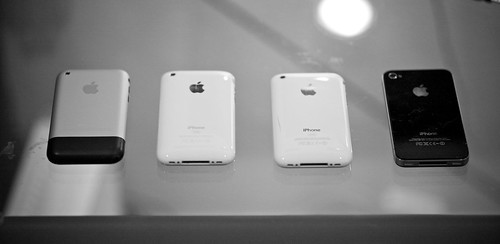
    4 Generations

    You can see a bigger shot here. Do you see that line on the iPhone 3G S (the one next to the 4), that line is a crack int he case and is just one of many on that phone. The screen also has lint under it and a couple of scratches.

    Now I have not had the 4 nearly as long but thus far it has proven to be far more durable that one would think a glass sided phone could be. Clunking around in my pocket and car has only resulted in a very light scratch on the back and another slightly longer light scratch on the front. It is however important to note that when the screen is on you cannot see the front scratch – which makes it a non-issue. (even with the screen off you have to clean it and then look for the scratch)

    The real test for this phone will hopefully never come: a drop only concrete or a smack in the leg by an object (while the phone is in my pocket of course).

    FaceTime

    This is THE feature that Apple has been advertising about the 4 – they have yet to advertise anything else about the phone in their commercials. I know two people with iPhone 4’s (Wife and Sister) so FaceTime conversations have yet to become a staple of my day. That said it is really cool to FaceTime with my Sister since I don’t get to see her very often (she lives in Phoenix). There is something about video calling on a phone that is infinitely more convenient to use than it is on a computer or dedicated device.

    Even still the FaceTime calling is extremely limiting given that you must be on Wi-Fi in order to make the call. I am hoping that we can get 3G capable FaceTime before next year as that would be the catalyst to make the service take off. Until the it is a great feature to have – but a rarely used one.

    Random Thoughts

    • It bugs me that there is no light telling you when the front facing camera is active. I am just waiting for some sneaky app developer to sell and app that takes secret pictures using that camera. This bugs me for some reason – I usually am not the paranoid type.
    • The ringer could stand to be a little louder.
    • The phone never seems to get hot – though it does get very warm at times. Which is annoying when it is in your pocket on a hot day.

    The Sum of the Parts

    All this is to say that the iPhone 4 raises the bar again. It is not about having the latest and greatest features – it is about being able to reliable and easily use all the features that your device has and the iPhone 4 does that. After all what good is a feature if you can’t use it? Just ask all the people you know with an iPhone 4 and nobody to FaceTime with.