Category: Articles

  • Fatal Design Flaw of the Workspaces

    Gizmodo has a [fascinating video](https://vimeo.com/55389782) on Vimeo showing a space that is only 350 square feet, but still a full living space. Most of these spaces have severe compromises — often no bathroom — but not this one. Every amenity is there, and the entire thing is amazingly well done.

    There’s [a lot of](http://huckberry.com/blog/posts/the-world-s-skinniest-house) [these types of spaces](http://huckberry.com/blog/posts/tiny-houses) out there and they always interest me — to see what can be achieved in a fraction of the space of my own home. In some cases they achieve more than I have been able to in my home.

    But these types of domiciles always make me think about my desk, and the surrounding work space. I like to keep the desk’s surface completely clear of anything unnecessary. That means: laptop, iPhone, iPad, pen (no paper: the pen is for signing things if people stop by my desk) and a drink.

    For me this affords the clearest workspace and helps to ease my mind — not from being distracted, but from being overwhelmed with the sheer amount of *stuff*.

    There is one constant annoyance though, and I suspect it’s the same annoyance that people in these tiny homes feel: sometimes it’s just easier and more productive to have everything out and ready to use.

    I was reminded of this when watching the video and seeing him pull out the keyboard and mouse on a very nice surface for his iMac. The cleaner I keep my workstations, the more time I spend taking things out and putting them away — and I can’t be alone.

    I often dream of my ideal workspace:

    – 10,000 square foot space of nothing.
    – Four foot by ten foot desk in the center, made of wood.
    – Herman Miller Embody chair.
    – Concrete floors.
    – No windows.
    – Thirty foot ceiling.
    – Spot light illuminating only my desk.
    – Just the laptop on the desk.
    – No cables in sight.

    It’s a pipe dream, obviously, but I like the idea of feeling no walls near me, nor seeing the walls. The blackness surrounding me, working as a green screen for my imagination. The spot light, placed high above, giving a sense that there is no roof over me, just sky. Alone, dark, big space, oversized desk, comfortable chair. Perfect.

    And then reality sets in. Where does the wifi, iPhone, iPad, backpack, TV, fridge, Scotch, bathroom, printer, cables, backup hard drives — all those things — go? If we’re creating the ideal space I shouldn’t have to go hunting for them on the other side of the room.

    My desk at my office is standing height and small (24″x54”). It’s a comfortable workstation if I’m just using my Mac, but every item I add to it makes the area feel cramped. I’ve tried everything:

    – Workstation with everything out and connected, neatly in its place.
    – Only what I use out that day, neat, connected.
    – Nothing out, all tucked away, but easily connected.

    The problem with each configuration is that they conflict with each other. Perhaps that’s why something like the [Milk desk](http://www.milk.dk/products.php) or the [StudioDesk](http://www.bluelounge.com/products/studiodesk/) has always intrigued me. The storage is built in. The desk is meant to be kept clean, but the items you need are stored right there: No opening drawers under the desk to get at the one cable you use *every* day.

    The more I think about it, the more I’m convinced that the problem isn’t stowing things away. The problem is that peripherals are only designed to be used on the desk, plugged in, ready to go.

    That, I think, is why so many people love to replace everything with just an iPad. The iPad is designed to be stashed away, pulled out, and at a moment’s notice ready to work or play. Printers, labelers, microphones are not made that way. Nor are laptops. If the flaw isn’t the way my office is designed, or how I prefer my desk, maybe the flaw turns out to be the design of the products I’m using.

    As I look at that small living space I notice the thought behind the design: Yes, everything has a place, but what makes the space functional — and not annoying — is that everything has been specifically designed, or chosen, for *that* space.

    The [dining room table](http://www.resourcefurniture.com/space-savers/space-saving-tables/goliath) is specifically chosen for where it’s stored and used. I wonder if this kind of design thinking is what’s missing from my workspaces. If I spent more time specifically designing the space to house my tools, would it be less of an annoyance to access and use them? Perhaps, however, I think to fully remove the annoyances requires a meeting of a specifically designed workspace with specifically designed tools.

    I wonder if my perfect office really involves a laptop, or if it would be perfect with only an iPad and keyboard.


  • ‘Why the Fuck?’

    [Reginald Braithwaite asks: Why the fuck?](http://raganwald.posterous.com/why-the-fuck)

    >Why the fuck are the greatest minds of our generation toiling away in the Googleplex, harnessing the greatest computing resources in history, trying to figure out how to get Scott Hanselman to click on ads?

    Braithwaite asks a really good question — his motivation, or underlying point, is to ask why people aren’t working on more important issues like better medical equipment. Though the question is very good, I think the answer is fairly simple:

    1. Google, et al, is where the money is.
    2. Google, et al, are where the jobs are.
    3. Google, et al, are where their friends are.

    Those are easy things to understand, but there’s more than that at play. I’d argue there are a couple of less obvious things at work:

    1. Medical research, while well funded, is a slow and frustrating field. Where at Google or Apple a product/idea can be used by millions in a matter of just hours, your work in medical fields may take years to get approval from the necessary “authorities” before you get to see end users using your creation.
    2. Your friends just don’t get that excited when they hear that you work for a no-name medical company — but they want to know more when they hear you work for a company that they know and use everyday.

    I don’t think there is any right or wrong here, I just think that it’s easier for a young talented mind to choose Google, Facebook, Apple, or others, than it is for them to choose a medical research company.

  • APPS Act

    [Congressman Hank Johnson is set to introduce the APPS Act](http://apprights-hankjohnson.house.gov/2013/01/apps-act.shtml), explained as:

    > This bill addresses the public’s growing concern with data collection on mobile devices. It would require that app developers provide transparency through consented terms and conditions, reasonable data security of collected data, and users with control to cease data collection by opting out of the service or deleting the user’s personal data to the greatest extent possible.

    It’s really great to see steps like this even being considered by Congress and the proposed bill seems reasonable to me, but I wonder why it is being limited to “mobile devices” and what that term means. Are we talking apps that are native to mobile devices, or web services in general? That is, Facebook’s native app, or Facebook.com *mobile* too?

    If not web apps, then why not? Why is it assumed that native mobile apps are more privacy invasive than web services like Google or Facebook?

    So while this is a step, it seems like an overly cautious one at best.

  • ‘Wouldn’t Have Acted’

    [Jeff Plungis reporting on the removal of backscatter machines from U.S. airports](http://mobile.bloomberg.com/news/2013-01-18/naked-image-scanners-to-be-removed-from-u-s-airports.html):

    > Sanders said the Rapiscan units did their job by screening 130 million passengers, and the agency wouldn’t have acted if not for the congressional mandate for privacy software.

    Kudos to Congress, but I love the blatant disregard the TSA has for privacy. Their disregard rivals Facebook and Google, but I digress, because we have more to quote:

    > The TSA is talking to other government agencies with screening needs that might not require the same level of privacy called for in a crowded airport, Sanders said.

    Good luck with that.

  • Some Winter Desktops

    I thought I would share some shots I recently took, which work out well as winter themed desktop backgrounds.

    You can download them all as a zip file, [here](https://f3a98a5aca88d28ed629-2f664c0697d743fb9a738111ab4002bd.ssl.cf1.rackcdn.com/Winter-Desktops.zip).

  • Archived Data, In the Cloud

    Thomas Verschoren has added some thoughts to [my argument *for* iCloud](https://brooksreview.net/2013/01/app-silos/) — specifically he [doesn’t like how iCloud deals with archived data](http://pintofcode.com/blog/2013/1/14/archived-cloud):

    >What Dropbox offers, and iCloud doesn’t is an archive. Dropbox is a place to make your content available everywhere, anytime at a moments notice, but only when you need it. iCloud only has storage as an option. Files are in your app, or you delete them, they can’t float just behind the horizon for future use.

    Verschoren makes some really smart points. The most damning is the case of photographs. With iCloud you only get the most recent 1,000 shots (via Photo Stream), but with Dropbox you can fill your account to its max with photos.

    This is another case where an easy change could be made. I’d love to see Apple implement a data and photo archive similar to the iTunes Match service. I can *see* all the music I own on my iPhone, but all of that music actually *isn’t* on my iPhone until I want it to be.

    This is the hard part about Dropbox and cloud services: iCloud documents are all in an active and synchronized state. With iTunes Match only what I want is on each device — the rest resides in “the cloud”. With Dropbox, however, *everything* exists on one master device (your main computer) and mobile devices only store pieces of that data when you explicitly tell them to.

    There’s obvious benefits and downsides to each.

    #### iCloud

    Positives:

    – Data is there when you open the app, little to no waiting for downloads.
    – Music is basically on-demand with an option for the newest music you buy to automatically be on every device.
    – The newest version of every file and photo is just *there*, the assumption being that this is the most important data.

    Negatives:

    – Impossible to archive old data in a way that removes it from your device while keeping it easily accessible.
    – Syncing isn’t always reliable.
    – Old photos aren’t available forever.
    – Apple, and App Store, only.

    Overall iCloud assumes your newest stuff is the most important. The fix is easy: photos and documents work more like iTunes Match.

    ## Dropbox

    Positives:

    – Works on every device.
    – You have to choose what data is stored on mobile devices.
    – Tons of space for archiving and no limits on media types (only storage size restrictions based on account level).
    – Syncing is rock solid.

    Negatives:

    – Must wait for synced changes to come in.
    – Must store *all* the data on at least one master device.
    – If you have no internet connection, you’re out of luck on mobile unless you had foresight to pre-load that data.

    Overall Dropbox works exceedingly well even though the file management is manual, which is less appealing to novice users and works against the iOS “no file-system” model. The cost is higher than iCloud and it’s less useful when your Internet connectivity is limited.

    The fix is to get the data fully in the cloud and not tied to one device, and optionally allow background downloading of new files to mobile devices.

    ## Ideology

    In these back and forth arguments about Dropbox and iCloud, one thing keeps ringing true: some people prefer one approach over the other. I don’t think either service takes the *best* approach to cloud data — both have substantial room for improvement.

    Ideally only the files I’m using would actually be on my devices. Everything else would be securely stored elsewhere. I liken this system to iTunes Match, but perhaps a better model is Apple’s own Fusion Drive.

    [Here’s how the Fusion Drive works, as explained by Lee Hutchinson](http://arstechnica.com/apple/2012/10/more-on-fusion-drive-how-it-works-and-how-to-roll-your-own/):

    >Schiller’s comments indicated that Fusion Drive keeps track of what files and applications are being frequently read, physically moving (or “promoting,” as it’s commonly called in enterprise tiering solutions) those files and applications from the HDD to the faster SSD. At the same time, files and applications on the SSD which haven’t been referenced in a while are moved back down (“demoted”) to the HDD, to make room for more files to be promoted.

    How does a great cloud storage system work using the Fusion Drive model? Just swap “SSD” with “your local device” and “HDD” with “cloud”. The OS intelligently decides which files it should keep locally — everything else gets off-loaded to the cloud.

    Of course this approach relies on a couple of things:

    – Fast and stable internet access.
    – Transparent file manipulation.

    Basically the OS would have to mount the cloud volume and transparently make it part of your normal Mac drive. This makes a ton of sense for mobile devices because cellular connection is ubiquitous and fast in most areas. It’s a harder sell for laptops, which rarely have a cellular connection built-in and are often used in areas with no Internet connection (e.g. a plane).

    Essentially we’re talking about a hybrid system that always keeps the most recent files locally stored and up to date on every device. The “archive” files all reside in the cloud, ready to be accessed when required, with no single device needing to be the “master”, from which everything is synced. This would benefit the user by allowing them access to everything they need in a relatively small space: for example, a 64GB SSD.

    It’s iTunes Match meets Dropbox meets iCloud.

  • Designing Technology

    [Nick Bilton with a quote from John Maeda](http://bits.blogs.nytimes.com/2013/01/13/disruptions-design-to-propel-technology-forward/):

    >“The automobile was a weird alien technology when it first debuted, then, after a while, it evolved and designers stepped in to add value to it.”

    I really like this Bilton post, as there is a ton of little tidbits that you can pull from it which give a great idea of how technology and gadgets are changing.

    Bilton follows up that quote with this:

    >Walk into most car showrooms in America and sales clerks might spend more time explaining the shape of the heated seat than the engine that moves the car along. Several decades ago, he might have been heralding pistons and horsepower.

    It’s a great analogy for computing because it is not only accurate, but it is about cars.

    I think Bilton is largely right if one considers mobile devices only, but for desktop and laptop computers there is only so much you can do about the design of the device and this is where the secret feature of the iPad lies.

    The iPad will likely be *the* mobile computer that people use in a not too far off future, because every aspect of the iPad is better designed then, say, a MacBook Air. The hardware is better, battery life better, tactile response is better, software is better, and so on…

    The iPad may not be better at every computing task, or even most computing tasks, but it’s only a matter of time before that changes and what it is better at is eons ahead of a standard laptop. The iPad was designed just to be a better computer and anything that it currently cannot do stems from a lack of computing power, or a lack of the right software. Both of those problems are easier to overcome than any one problem that faces a MacBook Air.

    So I don’t read that quote and salivate over what is to come from a laptop. I read that Maeda quote and salivate over what is to come from computing devices we haven’t even dreamed of. I point no further than to your first experience using an iPad — for me that was a ‘wow’ moment and it still is.

  • More Data Detectors Please

    If I had to guess, I would guess that 95% of all of my phone calls are work related. I would guess that most people in my age bracket would find the same to be true. The fact is: text messages and email are far easier for both the sender and receiver.

    All of this got me to thinking about the role of smart, OS-embedded assistants like Siri. Right now iOS’s Siri can only do two things:

    1. Find answers to very specific questions, given a small set of input phrases.
    2. Send reminders about tasks, timers, alarms, and appointments.

    That’s not much of an assistant — unless you hire your assistant to never leave her desk and to only make your phone beep…

    Yet Siri really *could* be the ultimate assistant, because Siri *could* always be listening and — since Siri doesn’t judge — that wouldn’t really be an issue for most people.

    Let’s imagine that Siri listened in on your phone calls. In my typical work call at least one of the following tends to happen:

    – A phone number is given to me.
    – I schedule a meeting.
    – I am given a task that needs to be done.
    – We exchange some information that I want to remember.

    Since I take most of my calls on the road, after hanging up I tell Siri to take note of the things I want to remember. Even at the office, after a call I have to open up the proper application on my Mac to note the item.

    But if Siri were listening to my call she could just remember that stuff for me.

    So if someone I’m speaking with asks me to “Call Bob at 432-737-0000”, when I end the call Siri could ask me: “Do you want to call Bob at 432-737-0000, or should I make a note of that number?”

    Now that’s helpful.

    Siri could also schedule appointments as you discuss them, remind you about tasks you agree to, and make notes of the things you mention that you want to remember. At the end of a long call Siri could present you with a list of those things and you could confirm or decline each item.

    That’s more than just helpful. That’s a killer feature.

    ## One Step Further

    If Siri listening to the call isn’t neat enough for you, imagine if she read your messages — email, SMS, voicemail — and told you if there was anything urgent.

    This is more than just voice message transcription, like Google Voice, it’s a fundamental understanding of the data within the messages — both text *and* voice. So if I’m in a meeting, not paying attention to my phone and my wife calls with a message that contains the word “hospital”, Siri could plaster a notification on my lock screen telling me I have an urgent message from my wife.

    Likewise Siri could auto-update meetings if someone left me a message saying they were going to be 15 minutes late, and she could alert me if that causes any conflicts with other meetings.

    This wouldn’t be easy, I know, and Siri would get a lot of things wrong, but even if Siri could just get *most* things right this would be amazingly helpful.

    If Bob left me a voice message that said “Hey Ben, you free for lunch on Tuesday at noon?”, Siri could pop up a question that asks me to confirm an appointment with Bob on Tuesday at noon — just like iOS already does from emailed meeting invites. Hell, Siri could even respond to Bob for me if I confirmed the meeting. *And*, if Bob didn’t suggest a location for the meeting, Siri could ask him *where* we should meet.

    ## Pipe Dreams

    Right now I feel like these are all *Star Trek*-level pipe dreams, but I have to imagine it’s something we will see soon.

    When? I think within the next 5-10 years.

    The other question is who gets there first? Google and Apple are obvious choices, but if computing is heading here, maybe it’s the perfect entry for a new player.

  • False Balance

    [John Timmer writing for Ars Technica about Fox News’ practice of ‘false balance’, which in this case takes NOAA’s weather data to task](http://arstechnica.com/science/2013/01/false-balance-fox-news-demands-a-recount-on-us-warmest-year/):

    >What are we to make of this chaotic jumble of unreliable sources and internal contradictions? As far as Fox is concerned, apparently nothing; the article doesn’t draw any conclusion about the science whatsoever. It’s a classic example of false balance, allowing the reporter to present a biased picture while maintaining the appearance of impartiality.

    False balance is a result of not wanting to ever be wrong. I don’t think this is at all about presenting more balance — no I think this is about covering your own ass. If every time I said something really sucks, I hedged with saying that some really like it and that updates could make it not suck, I’d be doing the same thing as Fox.

    If I did that every time I made a definitive statement then no one could ever say I was wrong, because in actuality I never really said anything important to begin with.

    [It’s like reviews on *The Verge*](http://curiousrat.com/home/2013/1/14/perspective-on-web-journalism).

  • “Open in” Is Not the Solution

    [Federico Viticci has a smart response to](http://www.macstories.net/links/open-in-is-not-the-solution/) my [post about App Silos](https://brooksreview.net/2013/01/app-silos/):

    >Therefore “Open In”: a menu that copies a file from Location A to Location B, getting from one document to two documents, now available in two different locations. And I would argue that the second most complicated aspect of managing documents is: figuring out the “right” version of a file.

    Viticci is right, of course, that’s something I hadn’t considered. The duplication effect would be horrible, so perhaps a better solution is something more akin to “send this here file to that there app”. Or just a button that reads “Send to…” or “Move to…” depending on which wording Apple likes better (my vote is Send to).

    That would essentially allow you to relocate a file from one silo to another instead of duplicating it. The trouble here for users would simply be remembering where they sent the file, but that’s still less frustrating for average users than seeing the actual file system as you do in Finder.

  • The Dyneema Smart Alec

    Tom Bihn is still iterating on the Smart Alec and their latest change is to the exterior fabric. They have added an option to the bag that has a 400d Dyneema exterior. This is the classic grid patterned nylon that Tom Bihn is known for on the interior of their bags, but a bit thicker now that it is used on the exterior.

    The result is a strong material that is also much lighter. I’m told the bag is now 30% lighter, and I can verify that you can feel the difference when you compare the two side by side.

    Tom Bihn sent me a review unit that I have been testing for a few weeks now and it’s still the fantastic Smart Alec that I love. In day to day use the weight savings aren’t felt, but if you load the two bags for hiking, or any other weight conscious activity, you can and will notice the difference.

    However the difference you will notice everyday is the look of the material. What I’ve always liked about the Smart Alec is its understated look. Yes it’s a nylon backpack, but it still looked handsome and not as nylon-y as other bags. The Smart Alec Dyneema looks like a nylon bag — there’s no way around that.

    At first I really didn’t like the look of the bag — just not my style. It’s less professional looking and a bit “louder”. My father, upon seeing it (he uses my original Smart Alec), loved how it looked and so have a few others that have seen the bag while I have been carrying it around.

    After about a week I was liking the look too, but I still like the original all black better. The gray grid is neat looking and different, but it a bit more outspoken.

    Overall this is yet another great Smart Alec that I’m sure many will love and that hikers should really give serious consideration when choosing a versatile daypack.

    Extras

    With the bag Tom Bihn has sent me some goodies that they just finished up:

    New Tool Strap
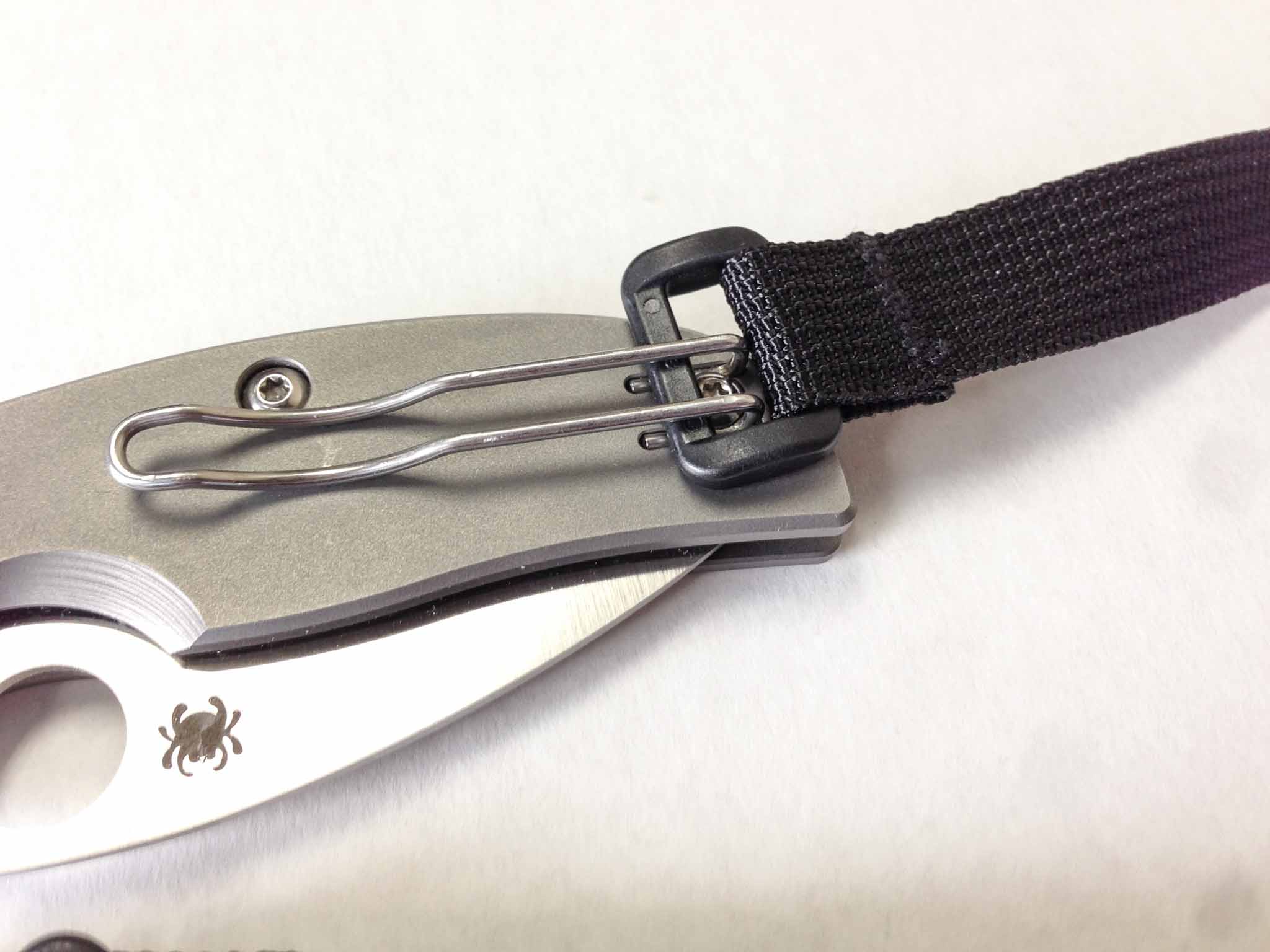
    • Tool Strap: This is an all new accessory that has not been released yet, but it is sweet. Basically it is the same as the keyring strap, but has a little rectangular d-ring on one end that allows you to clip things to it. What kind of things? Knives for one — though I believe Tom Bihn mentioned Flashlights too. Either way, what a great little strap.
    • 3D Mesh Organizer Cube: This is actually a great little cube. I have the original 3D Organizer that has clear sides and use that for toiletries, but this one makes an excellent cable tote. Much more compact than the Snake Charmer and thus better for day-to-day use for me.
    • Dyneema Organizer Cube: Same as above, but without the mesh. I don’t like it nearly as much as the mesh version as it traps a bit of air when zipped so it doesn’t compress as easily, but this would be handy to keep prying eyes away. If in doubt, go with the mesh one.
  • Keyboard Maestro as OmniFocus’s Little Helper

    [Patrick Welker has an amazing Keyboard Maestro macro for all OmniFocus users.](http://rocketink.net/2013/01/keyboard-maestro-as-omnifocus%27s-little-helper.html) Be sure to look at the rest of his site, and then kiss your weekend good bye.Just [another reason](https://brooksreview.net/tag/KM-SERIES/) why Keyboard Maestro really is an amazing tool.

  • Mobile News Reading and Delivery

    I am a news junkie. There’s no way around that fact. It started in eighth grade when our history/current affairs teacher required students to have a subscription to Newsweek. ((I went to a small, very wealthy, private school where such demands seemed very normal.)) I remember waiting every week in anticipation of the next issue, reading it cover to cover and being completely enthralled in events occurring in a world that I truly didn’t understand at the time.

    From that moment my love of periodicals exploded. In college I transitioned to publications like The New York Times and The Wall Street Journal. Then I got a Mac and heard about this little program called NetNewsWire and this technology called RSS.

    I was hooked.

    I’ve spent so much time since then reading RSS feeds that I don’t even care to guess at how long all that time would add up to. At one particularly dark point in my life I subscribed to over 700 RSS feeds.

    ‘700 RSS feeds of what?’, you may ask. To which I would answer: nothing really. I just always wanted there to be at least 100 RSS items to read when I checked in. This was when I discovered that many RSS programs don’t count over a few hundred unread items — oops.

    Life is markedly busier for me now. I still have over 450 RSS subscriptions, but increasingly I think that there *must* be a better way to read about today’s news.

    RSS readers like Fever° do an excellent job of showing what others are linking to and talking about. Things like NextDraft, The Brief, and Evening Edition, do an impeccable job of keeping you informed about worldwide current events and ensuring you don’t look foolish at the next trivia night. None of these really offer you the same experience of following one person, or one outlet, to see the entire river of information coming out of that site. So while you know the gist of what’s going on, you miss a lot of small and very interesting articles.

    With that in mind I set out to see if any enterprising iOS developer has solved this problem. I tested three apps: Summly, Prismatic, and Circa. All three want to rescue you from RSS and keep you informed.

    None of them come close to rescuing *me* from RSS.

    ## Summly

    I initially downloaded [Summly](http://summly.com) because the design looked very nice and—true to the screenshots—is very nice, if a bit confusing at times. Summly asks you to subscribe to different news categories: Headlines, U.S. News, Local News, Technology, World News, etc. Drilling down through the categories shows the different websites from where the news will be sourced, allowing you to “turn off” certain sites, like TechCrunch.

    Once you’ve chosen and subscribed to all the categories you’re interested in Summly shows a list of categories with an unread article count. You can then swipe through the stories, which have been loosely summarized, and see a word count for the article at the top should you decide to read the whole thing.

    The entire interface is gesture driven and it feels backwards. To get to the next story you swipe from right to left. Swiping from bottom to top will, annoyingly, take you back to the category list. Even more annoyingly: Swiping from top to bottom will take you to the full story — which annoys me because I wish I could just tap.

    The most annoying aspect of Summly’s interface is the cover-page. Here you’re shown a total unread count and a “hot” story. The entire page feels like you should be able to swipe and read through all your content, but nope. This is the dumbest screen I have encountered in an iOS app in quite a while.

    Summly’s layout and design is pretty, but its user interaction is horrible. Worse yet: There’s very little value being added to most of the stories and no real eye on “what’s important”. I can’t tell you how many European soccer stories I see. It should be clear, based on my location, preferences, etc, that I probably don’t care for European soccer stories.

    Overall Summly, like many before it, is simply a pretty RSS reader that hides the RSS technology from less advanced users.

    ## Prismatic

    [Prismatic](http://getprismatic.com/landing) has been getting rave reviews from fellow news junkie [Justin Blanton](http://hypertext.net) — that alone was enough to necessitate trying it — and I can see why Justin likes this app. The design is nice and the app is fast. Like Summly, Prismatic is simply an RSS reader with no import or export to OPML files. However, you can actually choose specific sites you want to subscribe to.

    Everything is shown in one long list that snaps to scroll points, which actually feels more like janky scrolling than a feature. Tap a story to read the full thing. You can share but you can’t send a story to a read-it-later service like Instapaper. (None of these apps allow this.)

    I really wanted to like Prismatic, but at the end of the day it’s just another RSS reader that lacks Instapaper support.

    ## Circa

    I had almost given up on the idea that “we” are ready to move beyond RSS when I came across [Circa](http://cir.ca). Let’s get something out of the way right off the bat: Circa is not a pretty looking app. There’s a lot of odd UI choices and overall I really hate the way it looks.

    That said, Circa really is a *good* app. Like Summly the news items are broken into categories, however, unlike Summly you can’t choose those categories: Circa gives you categories for Top Stories, United States, Politics, and World.

    Nothing new here. Clicking on a category opens a list of news headlines with photos and the opening paragraph of the story. Where Circa really changes the game is when you dive *into* a story. What you find is not the full story or a computerized summary of a story: You find a collection of snippets *about* the story.

    This may seem really useless at first glance, but it truly is neat. When I click on a story about black and white TVs still in use in the UK, I find in just five quick swipes the following information:

    – 13,202 users in the UK still use a Black and White TV
    – There are 25 million TVs total in the UK
    – There is some kind of license fee for a color TV that costs more than for a black and white TV
    – There’s a bit about sentimental value
    – And lastly information that Amazon.com sells just one black and white TV for $86.

    I listed those all from memory after skimming the snippets in Circa for 15-30 seconds. This is what Circa excels at: news for people that only want the talking points.

    But Circa doesn’t stop there.

    Let’s say you find a story about the TSA being charged with treason. (I can dream right?) You can hit a follow button on that story and as Circa adds snippets of information to the story, you have quick access back to that story to see subsequent updates.

    Let’s take a story we know a little more about: Apple’s recent rule changes for developers that prevent developers changing screenshots in the App Store without a review. Most readers of this site know, or have read, about this story and it’s a pretty easy concept to grasp.

    Here’s what Circa tells me about the story (in the order shown in the app):

    1. To fight scams, Apple now requires developers to re-submit their app for approval with any screenshot, or description change.
    2. This fights a scam where scammers upload an app and then, once approved, change the screenshot to match a more popular app’s screenshots and descriptions.
    3. This change sucks for legitimate developers, as they now have to pay the same penalty of re-submission.
    4. Panic showed how developers do this, using Mooncraft as an example.

    It’s a simplification of the story, but pretty accurately stated. We have the change Apple made, the reason, the impact to others, and credit to Panic who pointed out the problem.

    In a sense Circa is a larger scale version of Evening Edition or The Brief, where a human (or really good computer algorithm) takes several stories about one topic and uses them all to create an informative, but short, executive summary.

    You can see the source links if you want, but honestly this is best for people who want to read a lot of news, not a lot about the news.

    ## Is this the future?

    My goal was to see if there were any apps that could replace RSS for me. What I found was two RSS reading apps masquerading as something more, and one truly new app. I didn’t find a single app to replace RSS for me.

    Circa is easily the most interesting app of the bunch, which I could truly see myself using when I travel, over the holidays, or any other time I just want a break from RSS. It’s more of a news summary app than a news reader. Still, it’s very good.

    None of these apps do a very good job collecting the stories that are likely to interest me. Services like [Stellar.io](http://stellar.io), or [Instapaper’s social network](https://brooksreview.net/2011/09/ego-less/) do a much better job finding things that truly interest me — but those services only work if a lot of other people use them, which is rather hit and miss from day to day.

    RSS is still king for me, but Circa is a better news information tool than my RSS reader with over 450 RSS feeds. Impressive job, Circa.

  • Microsoft’s Office Suite and Printers Sitting in a Tree…

    [John Moltz makes the argument that part of the reason office suites are less important today is in large part due to the death of printed pages](http://www.macworld.com/article/2023572/office-for-ios-may-be-coming-but-does-it-really-matter-.html):

    >But eventually I, like many others, simply stopped needing to print. Everything I wrote I transmitted electronically or put on a webpage. And really, good riddance to printing.

    And if you really think about it, that’s what office suites do: transform your content into something that will fit onto a flat rectangle. Moltz really has a great point and I think it shows just why most people don’t care about office on their tablets.

    There’s a flip side to this, though, and that is spreadsheets. Those are still king of the mountain in business and there is a real need to read Excel files on a mobile device. Apple’s Numbers does an average job at this, but like on the Mac, it is no Excel.

    The problem that Microsoft is facing is of their own creation. Had Microsoft shipped Excel when tablets came out, for tablets, users would have just bought it without thinking twice (business expense FTW). Now that tablets have been in users hands for almost three years, Microsoft has allowed users to figure out that there’s a lot more that can be done on a tablet with no Excel — more to be done than most thought.

    That’s a dangerous line of thinking if you are Microsoft.

    Initially everyone figured that they needed Word, Excel, Outlook, and Powerpoint in order to make a tablet useful, but they bought one anyway and what users found instead was: Safari, iBooks, FaceTime, Angry Birds, Photo Booth, Mail, and so forth. What users found was a tablet that was only marginally less useful than a tablet with Office. Three years later the clamoring for Office on iOS is all but a whisper.

    That’s one big “oops” for Microsoft.

  • The Future of Design

    [Dave Wiskus has an article up on Macworld looking at the state of skeuomorphism in Apple design and where we are headed from there](http://www.macworld.com/article/2023604/apple-and-the-future-of-design.html). Wiskus makes a point that I never considered: that skeuomorphism ([which I loathe](https://brooksreview.net/2011/04/mimics/)) is a bridge, a stopgap, used until the world was deemed ready to be comfortable with digital only approaches.

    Wiskus thinks that change is about to come:

    >Technology is no longer witchcraft to be feared by the masses. We’ve grown accustomed to having phones, tablets, and computers around us to do things. With both visual and interaction design, we’re nearly past the point of real-world metaphors being useful, and the simplest representation is usually best.

    He points to the ascendence of Jony Ive over all things design at Apple as being the indicator that the time for skeuomorphism to die is coming near. (At least at Apple, who I see as the biggest contributor to the “movement”.)

    It’s a fascinating thought, that Ive will rid the app store of leather isn’t the most interesting bit, but that he will approach design as digital only. A digital only design is something that I cannot picture the look and feel of.

    What is a digital only interface?

    Is it really the interface, or lack thereof, of Clear, Letterpress, and others?

    Or is it something that we have yet to see? Something *more* intuitive to a generation that has grown up not knowing what a floppy disk, Dayrunner, Rolodex, and analog telephone are.

    To those users, the users that will soon be making the tools we use, such physical objects mean nothing. How do you convey saving, pictographically, if the user doesn’t know what a floppy disk is? Apple has largely answered this: you making saving a non-user controlled function that is done automatically (with versions stored for rollback). Apple’s removal of the save button altogether is a far better solution than changing the icon on the button.

    I hope we see more intuitive features like that — tools that allow users to just use the device without having to command the computer every step of the way.

  • The Apps that Stuck in 2012: iPad Edition

    As I noted in my [iPad app usage post from 2011](https://brooksreview.net/2012/01/apps-stuck-ipad/), my iPad is a much different beast than my iPhone. During 2012 the iPad went from a tool primarily used in meetings (those duties shifted more to my iPhone) to a productive part of my computing setup.

    With the removal of a MacBook Air from my toolset, and the retina MacBook Pro being much less portable, the iPad has picked up the slack. Over the course of 2012 I used my iPad for a few things (in order of most use):

    1. Reading.
    2. Writing.
    3. Wasting time.

    ## Reading

    I use my iPad to read a lot. Here’s the apps I use for reading:

    – [iBooks](https://itunes.apple.com/us/app/id364709193): I prefer this to Kindle because I can buy the books directly in the app — this is powerful for Apple — but don’t love the UI of the reading interface. It’s six-in-one half-dozen-in-the-other for Kindle v. iBooks.
    – [Instapaper](http://www.instapaper.com): Still the gold standard in the “read it later” game, although lately I’ve noticed more crashes than normal. Is it just me?
    – [NextDraft](http://nextdraft.com): It’s where I find the most interesting things to read on the web — and one thing I look forward to each work day.

    I have a few Newsstand apps, but none that I read often enough to feel they warranted inclusion on this list for 2012.

    ## Writing

    I use more than just iA Writer to write on my iPad. In order of most used:

    – [iA Writer](http://www.iawriter.com): It’s just perfect.
    – [Poster](http://www.tomwitkin.com/poster/): For getting stuff into WordPress. It even holds it’s own as a writing app.
    – [OmniOutliner](https://www.omnigroup.com/products/omnioutliner-ipad/): For outlining bigger posts and taking notes.
    – [Notesy](http://notesy-app.com): Dropbox access to my notes.
    – [Drafts](http://agiletortoise.com/drafts): My scratch paper.
    – [Paper](http://www.fiftythree.com/paper): My more literal scratch paper.

    The first two are most used by a wide margin. The rest are useful enough that they’re on my Home screen, but not so useful that I would miss one if they didn’t exist. The lack of OmniOutliner would be a pain, but I’m not a big outliner anyway.

    ## Time Wasting

    Another way of saying: ‘games’. I’m not a huge gamer on my iPhone, but I love to play games on my iPad. Here’s some of my favorites:

    – [Fifa 2013](https://itunes.apple.com/us/app/fifa-soccer-13-by-ea-sports/id547407138?mt=8)
    – [The Room](https://itunes.apple.com/us/app/the-room/id552039496?mt=8)
    – [Plague Inc.](https://itunes.apple.com/us/app/plague-inc./id525818839?mt=8)

    You may note the absence of Letterpress. I think Letterpress is better played on the iPhone.

    ### TV Shows

    I’ve mentioned before that [I stream videos from my old G4 Mac mini to my Apple TV using FileBrowser](https://brooksreview.net/2012/08/g4-for-life/). I also use FileBrowser to watch TV Shows on my iPad. It really is a good app, but it’s ugly as all hell.

    ## Honorable Mention

    Apple’s [Pages](https://itunes.apple.com/us/app/pages/id361309726?mt=8) gets a mention here because of its ability, added late in the year, to track and view changes made to documents. It’s become the best tool for me to review leases and other real estate documents. Pages is so much better that it may find its way to my Home screen by the end of January.

    ## 2013

    All I want for 2013 is a useable iPad calendar. I’ve been using Agenda and Calvetica, which are less than stellar on the iPad.

    Please, developers, just make a good calendar app already. (Maybe Fantastical for iPad?)

  • The Apps that Stuck in 2012 — iPhone Edition

    [Once again](https://brooksreview.net/2012/01/apps-stuck-iphone/) I tested a ton of different apps over the course of the year. Many of the apps I never, or perhaps only briefly, mentioned on the site.

    Let’s take a look at the apps that I ended the year using.

    ## Weather

    At the end of 2011 I was back on the [Apple Weather app](https://brooksreview.net/2012/09/apple-weather/). By the end of 2012 I have two weather apps on my Home screen — and a lot of other apps that challenged them.

    For a good chunk of the year I was using the built-in weather app. Apple’s done a better job than most transitioning the app to the iPhone 5, and I really give them credit for a job well done.

    At the end of the year, however, I am a firm believer in [Check the Weather](https://brooksreview.net/2012/10/check-the-weather/) as the best all-around iOS weather app you can currently get. It has everything, including Dark Sky integration.

    Speaking of [Dark Sky](https://brooksreview.net/2012/04/dark-sky-review/), it’s still worth having on your phone even if you own Check the Weather. The push notifications alone are fantastic, but moreover the app itself looks gorgeous and offers a better graph for upcoming precipitation. I *absolutely* love Dark Sky.

    Some others I tried but they didn’t stick: [S°lar](https://brooksreview.net/2012/07/solar-review/), [WTHR](https://brooksreview.net/2012/06/wthr/), and [Sun](http://pattern.dk/sun/). Each of those are good apps, with a pretty aesthetic, but I found each lacking in some way, shape, or form.

    ## Calendar

    I wish I could stick with one calendar app, but this year I was fed up with them all. [Agenda](https://brooksreview.net/2012/06/agenda-3/) has long been my go-to iOS calendar app, but it was dethroned on my iPhone this year.

    First [Today](https://brooksreview.net/2012/08/calendar-today/) kicked it off. The simplicity of today was a breath of fresh air, but the design of the app is terrible. Next, [Tempus](https://brooksreview.net/2012/04/tempus/) poked its head back up and showed me it’s refreshing design, but again the app was lacking. Finally I found an app I love: [Fantastical](https://brooksreview.net/2012/11/fantastical-iphone/). It really is *the* best calendar app on iOS — iPhone or iPad — hands down.

    At the end of this year I’m very happy with Fantastical. It’s not my perfect app, but it is the best calendar app in the store. The only caveat is the limited number of days visible at a glance: Agenda is still better if you need to see more.

    ## Flashlights

    I went on a tear this year to find the best—no, *fastest*—flashlight app. I chose [Lighty](https://brooksreview.net/2012/08/flashlight-iphone/), which was dethroned by [iTorch Pro](https://brooksreview.net/2012/11/itorch-4/) soon after.

    There’s a lot I don’t like about iTorch, the icon and the UI among them, but I love the speed of the app and the ability to dim the flashlight (if only a bit). Very well worth the money: It’s the fastest flashlight in the store.

    ## The Rest of the Lot

    That’s it for this year’s challenges. Now for the mainstays on my Home screen (i.e. the apps you should own):

    – [iA Writer](https://itunes.apple.com/us/app/ia-writer/id392502056?mt=8): Simply fantastic. Integrated and consistent writing interface between iOS and the Mac: What more could I want? I use this app everyday. The greatest testament is that I didn’t even bother trying to look for its replacement. (And is it just me, or has the whole Dropbox-powered iOS text editor sector died down lately?)
    – [Poster](http://www.tomwitkin.com/poster/): When stuff is done in Writer, I use Poster to send it to this site. Not only [is Poster excellent](https://brooksreview.net/2012/08/poster-a-wordpress-blog-editor/), it beats the crap out of the official WordPress iOS app. There’s not much I don’t like about Poster — it’s right up there for best new app in 2012 in my book.
    – [OmniFocus](https://www.omnigroup.com/products/omnifocus-iphone/): It isn’t even challenged these days — nothing compares. [End-to-end encrypted sync](https://brooksreview.net/2012/06/secure-of-sync/), robust, stable, perfection. It’s just silly to use anything else at this point.
    – [Soulver](http://www.acqualia.com/soulver/): Why anyone uses any other calculator app is beyond me — I’d have to ask an Android user to explain it to me.
    – [Sunstroke](https://goneeast.com/sunstroke/): Best way to read your Fever° RSS links on the iPhone. Actually it’s the best way to interact with Fever°, period.
    – [Scratch](https://itunes.apple.com/us/app/scratch-your-quick-input-notepad/id533320655?mt=8): What a great app. I like [Drafts](https://itunes.apple.com/us/app/drafts/id502385074?mt=8) too, but Scratch suits me much better for reasons I cannot verbalize.
    – [Felix](http://www.tigerbears.com/felix/): Hands down the best iOS App.net client on the market. Forget about robot interfaces, just use a *good* interface.

    ## 2013

    There are other apps on my Home screen, but nothing I would emphatically urge you to own. For 2013 I am hoping for a perfect calendar app, but not holding my breath. Oh, and [I still want this](https://brooksreview.net/2012/07/open-road/).

  • VIPR Teams

    [Christopher Elliot (writing on Linked In of all places) has this interesting nugget for us](http://www.linkedin.com/today/post/article/20130102105144-332179-the-tsa-wants-to-be-everywhere-in-2013-here-s-why-we-shouldn-t-let-it?_mSplash=1):

    >Few people know that $105 million of their taxpayer dollars are going to fund 37 VIPR teams in 2012, whose purpose is to “augment” the security of any mode of transportation. They don’t realize that these VIPR teams can show up virtually anytime, anywhere and without warning, subjecting you to a search of your vehicle or person.

    Who runs the VIPR teams? Well, that would be the incredibly “reasonable” TSA. Yep, say it all together now: FUCK.

    It can’t be all bad though because I do believe this is how North Korea operates and I don’t recall ever hearing about a terrorist attack on North Korean soil.

  • ‘Apple’s QA Guys Are Sleeping’

    [Craig Grannell commenting on the latest round of Apple’s software not working because of date issues](http://reverttosaved.com/2013/01/04/do-not-disturb-apples-qa-guys-are-sleeping/):

    >Do Not Disturb failing to work is something that shouldn’t have happened, because someone should have remembered Apple’s previous failings with time-related features and rigorously tested it. That the feature did fail points to either a lack of engineers/testers at Apple, or a lack of giving a shit, and neither of those things is really acceptable.

    It’s hard to argue with Grannell here. That Apple’s response was a knowledge base article that included no apology is also bullshit. There’s some things really concerning about this entire mess — and it is a mess — that I want to point out:

    1. That Apple’s only response is a support article.
    2. That Apple feels it is acceptable to users to “wait it out” instead of issuing a fix — assuming, of course, Apple can fix this in a day or two.
    3. That yet another date bug slipped through Apple’s testing.
    4. That the general Apple tech-press has largely decided to give Apple a pass, leaving only the “usual” naysayers to their business.

    How is this problem so acceptable to Apple and to those that love Apple?

    [Apple has refused to comment](http://arstechnica.com/apple/2013/01/ask-ars-why-will-apples-do-not-disturb-bug-fix-itself-next-week/). That even Jim Dalrymple, the purveyor of calling bullshit, [offered no commentary](http://www.loopinsight.com/2013/01/02/do-not-disturb-will-fix-itself/). [That John Gruber made a small joke out of it](http://daringfireball.net/linked/2013/01/02/do-not-disturb) (granted at Apple’s expense, but still [less of a slap on the wrist than Google got](http://thebrief.io/2013/friday-january-4th/#google_gets_off_the_hook_in_ftc_antitrust_investigation)). [Even the Android loving *The Verge* didn’t jump down Apple’s throats](http://www.theverge.com/2013/1/2/3828300/apple-do-not-disturb-fix).

    What the hell?

  • American Internet

    [Susan Crawford has a great piece in Bloomberg about the sorry state of America’s fiber Internet plans](http://www.bloomberg.com/news/2012-12-27/u-s-internet-users-pay-more-for-slower-service.html) (via [The Loop](http://www.loopinsight.com/2012/12/31/the-shoddy-state-of-u-s-internet-service/)):

    > Also in 2011, six Time Warner lobbyists persuaded the North Carolina legislature to pass a “level playing field” bill making it impossible for cities in that state to create their own high-speed Internet access networks. Time Warner, which reported $26 billion in revenue in 2010, donated more than $6.3 million to North Carolina politicians over four years. Eighteen other states have laws that make it extremely difficult or impossible for cities to provide this service to their residents.

    There should be little doubt in American minds that Cable companies are greedy and out to service themselves only. I’ve had a lot of run-ins with Comcast over shoddy service, and even worse customer service, but more troubling than an evil corporation is an evil corporation that hamstrings the government. Which is what the cable companies are succeeding at right now, and it’s bullshit.

    I think it’s a bit of a stretch to maintain that Internet access is as necessary as water or power, but I don’t think it is a stretch to say that lacking high quality Internet service significantly hampers innovation and a country’s ability to stay relevant in a global economy.

    Add fiber to the (long) list of things that America needs to get its act together on.

    Here in Tacoma, Washington we have Comcast, and [Click](http://www.click-network.com/Internet/tabid/73/Default.aspx). Click is actually run by the city and offers solid service with decent speed. When Click initially rolled out, any building that wanted to add their service had to install Click cable lines and jacks, because Comcast claimed ownership to the others. (Today I am told they have worked out this bullshit and share the lines. ) So I lived in one apartment that had two cable jacks right next to each other in every room. One was Click, one was Comcast, but by the time I moved in they agreed to share the jacks and thus one outlet actually didn’t work.