Category: Articles

  • Amazon Item of the Week: Lubricant

    I promise you, this is not *another* post [about a 55-gallon drum of sex-lube found on Amazon](https://brooksreview.net/2012/06/personal/) — though that still makes me smile. No, I want to talk to you about WD-40 and why you should buy something different. Don’t get me wrong, I like WD-40 just fine, but I have found a much better lubricant.

    [CorrosionX](http://www.corrosionx.com/corrosionx.html)

    I’ve actually been using it for years as my local locksmith got me hooked on it. It’s a fantastic lubricant, and I use it just about everywhere. Squeaky doors, stuck bolts, garden tools, knives (high-carbon knives I keep in my go-bag will rust so I keep a thin layer of CorrosionX on them so that they don’t, you know, *rust*). I don’t know much about the science all over the CorrosionX website, but I can tell you I won’t buy WD-40 over this stuff.

    Amazon, stupidly, doesn’t have the [aresol version](http://www.amazon.com/exec/obidos/ASIN/B0070WYVLA/ref=nosim&tag=brooksreview-20) for sale on Prime, but they do have nice [three pack of a pump sprayer version](http://www.amazon.com/exec/obidos/ASIN/B008R1HX0E/ref=nosim&tag=brooksreview-20) — which I didn’t know existed. (I will note, I have found it cheaper in stores locally than those Amazon prices. Plus, a three pack? Who the hell needs that much?)

  • Transporter

    [When Pat posted about Transporter](https://brooksreview.net/2013/05/transporter/) and mentioned I hadn’t written about it, I was shocked. I’ve actually had a Transporter for some time, so I was sure I must have written about it. [Transporter](http://www.filetransporter.com) is a very interesting, unusual hard drive and because of that I’m having a tough time figuring out how to approach talking about it.

    The way Transporter works is pretty simple: you connect the device to your network and put a HD inside of it. (Mine is connected via ethernet and has a 3TB drive inside.) You use a web interface to create shared folders, rather than just sharing the entire drive. Each folder can be shared to other people, or synced with another Transporter — or it can just be network storage for you.

    That’s the basics. From there you can install a menubar app on your Mac that will sync your files in a somewhat Dropbox-like manner. It’s actually a bit more complicated than Dropbox, because each folder you have access to has two options, which I will call *local* and *remote*. If you set the folder to local, it works much like Dropbox: the files are stored locally on your machine *and* on the Transporter — changes are synced in the background. Using the Remote option means the files are stored on the Transporter instead of your machine, but you can access them *if* you have a network connection.

    This is great, since my retina MacBook Pro has a 256GB drive and the Transporter has a 3TB drive. However you’ll notice I said it’s not exactly like Dropbox. There are three notable differences:

    1. It’s slower than Dropbox. With Dropbox you expect small files to show up almost instantly, however, with the Transporter you need to give it a good while (sometimes hours).
    2. For some reason the Connected Desktop folder, in which all your Transporter folders live, is either symlinked or aliased somewhere else. These folders act more like connected folders than native folders. 99% of the time this isn’t an issue, however, don’t try to set this folder as your Screen Shot folder, or nothing will work.
    3. You can sync one folder to multiple Transporters. This is different than just sharing a folder. Here’s how Connected Desktop describes it:

    > You can perform an initial sync between two Transporters on a fast, local network and then easily relocate one to a secure offsite location. Should something happen to your local network, you’ll never miss a beat. Our software will automatically continue to access files from any shared Transporter until your local network is restored.

    That’s a pretty neat feature as it offers a private and redundant data storage solution for “normal” people. So while there is no mirrored RAID, you can have data redundancy in the form of multiple Transporters. Better still, you don’t have to take one to a datacenter, you could just take it to your Mom’s house.

    That, in a nutshell, is the Transporter. On paper it’s a very cool device, but the big question is: does it work?

    The short answer is yes: Transporter is better than a file server, webDAV or FTP, but not as dead simple as Dropbox. After switching completely from Dropbox to the Transporter (only syncing files for apps via my Dropbox account) I’ve never lost anything or been frustrated by using it.

    My biggest issues with Transporter so far are:

    1. It’s slow to sync back to the actual transporter.
    2. The iOS app is painful to use.
    3. The menu bar app is hideous (I hid it with bartender).

    The first two are the biggest issues I have. While the sync speed is typically not a problem, the poor iOS app is a true shortcoming.

    There are some other really good things about the Transporter, like the fact it has 3TB of storage that’s easy and cheap to upgrade. It’s stable, too; I’ve never had to reset it.

    And it’s far more private: here’s what Connected Data says about the encryption and security of the file transfers:

    > We’ve implemented transport layer connections using industry-standard AES 256-bit encryption for communication among Transporter devices and their clients, which is the same technology that banks use. Unique private keys reside on the individual Transporter units, such that even Connected Data does not have access to them. Our Transporter Desktop apps and Transporter Downloader apps all use this encryption for items in transit. For communication with Connected Data web services, we use Secure Sockets Layer (SSL).

    That’s important given that Dropbox is joining PRISM and the NSA gobbles network traffic. The only thing left is the physical security: I’ve toyed with putting it in a safe. Then again, I may be a bit crazy, because I asked macminicolo.net if they’d host a Transporter for me (they will).

    ## The Sum

    I like it. But it’s not for everyone. The initial cost is higher than a Dropbox account, but the recurring costs are lower for any real volume of data. More importantly for most people it’s harder to use than Dropbox and I’ve yet to see a single app work with it (I don’t even know if that’s possible given the encryption). My verdict? I’m using it, I don’t have to think about it and I’m rarely ever annoyed by it. For most products that wouldn’t be a ringing endorsement, but for file syncing? I don’t know how much more I could ask for.

    #### Buy It

    You can buy from these links through Amazon, and I’ll get mad rich (or something), here’s the [empty Transporter](http://www.amazon.com/exec/obidos/ASIN/B00BFNJ2NW/ref=nosim&tag=brooksreview-20), [1TB version](http://www.amazon.com/exec/obidos/ASIN/B00BFNJ2OG/ref=nosim&tag=brooksreview-20), and [2TB version](http://www.amazon.com/exec/obidos/ASIN/B00BFNJ2O6/ref=nosim&tag=brooksreview-20).
  • ‘Cancer of Compromise’

    [Matt Gemmell on *not* making tough design decisions][1]:

    > The result is products that are riddled with cancer of the compromise. Yet our industry lionises the accompanying spec-sheets. Look at all these failures of imagination and commitment and *judiciousness*!

    Well put piece, and the best explanation of why spec sheets don’t matter that I have seen.

    [1]: http://mattgemmell.com/2013/07/15/constraints/

  • ‘Changing the Creepy Guy Narrative’

    [Chris Brecheen writing about a BART experience][1]:

    > The thing was, I had already heard this story, many many times.  I knew how it would play out.  I knew all the tropes.  I probably could have quoted the lines before they said them.  I wanted a new narrative.  Time to mix it up.

    A fantastic story, so do read it. The absolute hardest thing (for me at least) is when you see a wrong happening, a wrong that you could try to stop, to make the decision *to* try and stop it. It’s so much easier to walk away — I think we all know that — but I have massive respect for those that do step forward to try and right the wrong.

    *Anyways*, good story.

    [1]: http://chrisbrecheen.blogspot.co.uk/2013/07/changing-creepy-guy-narrative.html

  • ‘Your iOS Device isn’t as Encrypted as You Think’

    [Jonathan Zdziarski][1]:

    > The real question is, who do you want your data to be secured from? Your typical snot-nosed TSA agent certainly isn’t going to have a device capable of scraping data off of your phone, however both hackers and government might. If you jailbreak your device, it’s possible that a much larger pool of people will as well.

    I never assumed iOS was *that* secure, but not storing Keychain passwords in encrypted files is worrying to me. (*Note*: I have no clue why I had that in there as it is clearly not consistent with this article, sorry. -Ben) I think the above just about sums up all computer security though. The more you hack, the larger the potential to open up *more* security holes. However, the pool of people that can exploit and get a hold of your data, is small, but growing. They have to have good reason to want *your* data.

    (via reader Philip)

    [1]: http://www.zdziarski.com/blog/?p=2149

  • Keyboard Maestro Macro: Based on my Wifi, Do This

    With the ability to now trigger macros based on WiFi, I’ve come up with a doozey of a macro that I have been using as a sort of “geofenced” WiFi trigger for certain settings on my Mac.

    I like my computer to look and act a certain way at work, differently at home, and differently everywhere else. ((A few people have mentioned [Control Plane][1] to me, but in looking at it I prefer to stay with Keyboard Maestro.)) In the past I had a ton of Keyboard Maestro macros that I would invoke quickly to setup my computer — but no more (well *mostly* no more).

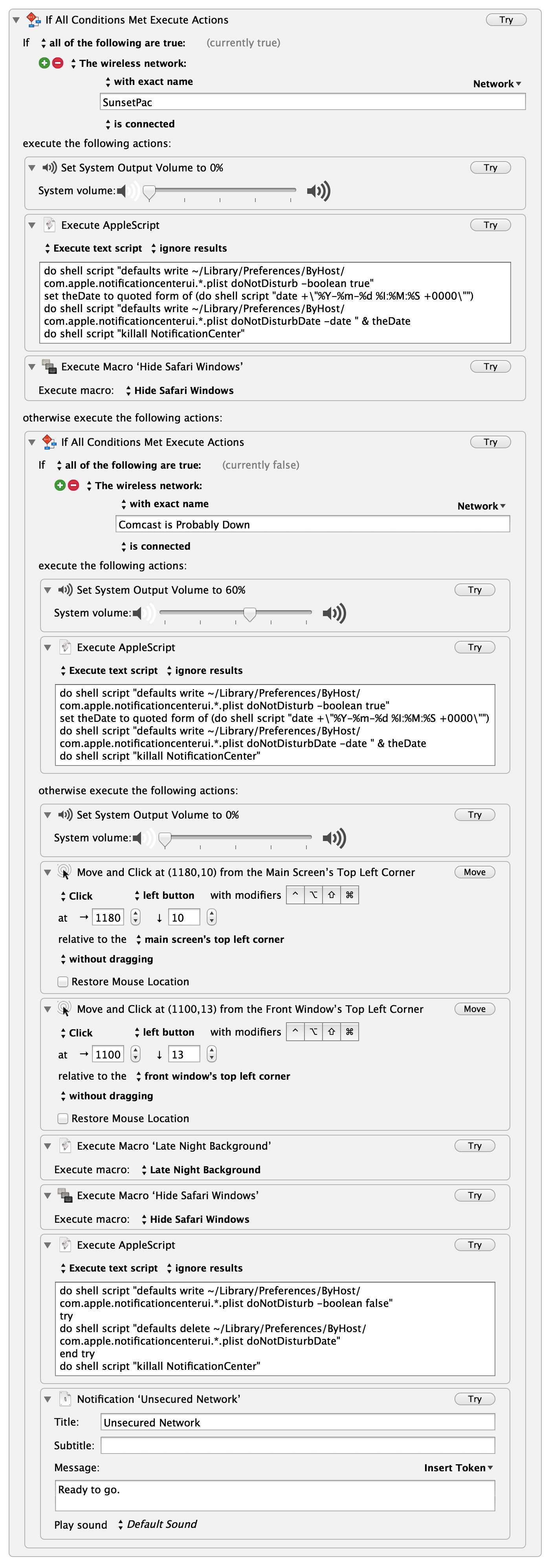
    My WiFi actions macro. (full-size here, open that in a new tab.)

    Instead I now have my computer tweak a few settings based on the WiFi network I am connected to. To the right you can see the macro, but I think I should walk you through this in case you aren’t familiar with some of the tools I am using.

    First the macro is being triggered by connection to *any* WiFi network, that is what the `.` denotes. The reason for this is simple: I want to do something specific if I connect to any other network than the ones I specify. This works well for me because I only have two “trusted” networks (my home network and office network).

    What follows for the actions is a large if/then statement inside the macro. The first condition checks to see if the WiFi network is my office network. If it is, then the macro sets the volume of my computer to `0%` and executes an AppleScript that turns *on* notification center. Lastly the macro hides all Safari windows — *WHO KNOWS* what I was looking at last.

    The next test is to see if I am on my home network (aptly named “Comcast is Probably Down” — a name that never ceases to make me grin). If I am home, then I turn my volume to `60%`, turn *on* notification center and leave it at that.

    The last is the `else` statement, meaning if my computer connects to any WiFi network that is not one of the two above, here’s what needs to be done. My assumption is that I have either connected to a coffee shop network, or am in another office for some reason (or another person’s house) either way, I want certain things to happen. ((I should note that I *could* set it up to act if I tether, but I have not done that because it would almost be identical to the else action.)) First, volume to `0%` again, because why wouldn’t you be polite? Next some mouse clicks, which are currently the only way I know how to automate turning on my VPN — which is what those mouse clicks do. From there I set my wallpaper to a specific background, which is all black for good measure. I hide Safari windows — I already touched on why. Then I turn *off* notification center. Lastly, I send a notification to let me know I am on such a sketchy network as to need all these precautions, but that the macro ran to protect me anyways.

    You can add as many intermediate WiFi network checks as you want, and you can add tons of actions to each one. Previously, I did some of this with time triggers, but those weren’t fool-proof and this method has yet to fail me — I love it.

    ## Further Playing

    I’ve also toyed with the idea of having KM take all the open tabs in Safari, grab the URLs, send them to Instapaper (or bookmark them) and then close Safari. That’d be something I would do if I was more presentation oriented, but I can’t remember the last time I presented something.

    ## Sum

    My ultimate goal is to just be able to close the lid on my laptop, and open the lid, without having to worry who is sneaking a peek, or what I was doing last.

    [1]: http://www.controlplaneapp.com

  • Johnnie Walker “Game Changer” on Vimeo

    [Joseph Kahn has a new ad for Johnnie Walker Blue Label — it stars Bruce Lee, how][1]:

    > EVERY shot of his head and every detail in there is completely cgi.

    As an ad for whiskey, I don’t get it. But take away the fact that it is for Johnnie Walker, and I like the video — man is that some good CGI.

    [1]: http://vimeo.com/69868746

  • ‘The NSA’s Surveillance Is Unconstitutional’

    [Randy Barnett on PRISM][1]:

    > The secrecy of these programs makes it impossible to hold elected officials and appointed bureaucrats accountable. Relying solely on internal governmental checks violates the fundamental constitutional principle that the sovereign people must be the ultimate external judge of their servants’ conduct in office. Yet such judgment and control is impossible without the information that such secret programs conceal. Had it not been for recent leaks, the American public would have no idea of the existence of these programs, and we still cannot be certain of their scope.

    Great article, and worth your time if you don’t get why “people like me” are so worked up about the NSA spying.

    [1]: http://online.wsj.com/article/SB10001424127887323823004578593591276402574.html?mod=rss_opinion_main

  • Keyboard Maestro Macro: Quoting a Website in Markdown

    I often run into this scenario: I have already invoked the actions to start a new post from a website I am currently reading, but now I want to add in additional quotes from other sites. This used to mean a lot of copy-paste and CMD-Tab. Of course that also means this is something that can be completely automated by Keyboard Maestro, so let’s do that.

    ## Scenario:

    You have just started writing about a quote you grabbed from Website A, and now you want to go back and quote (and link to) the source from Website B.

    ## Solution:


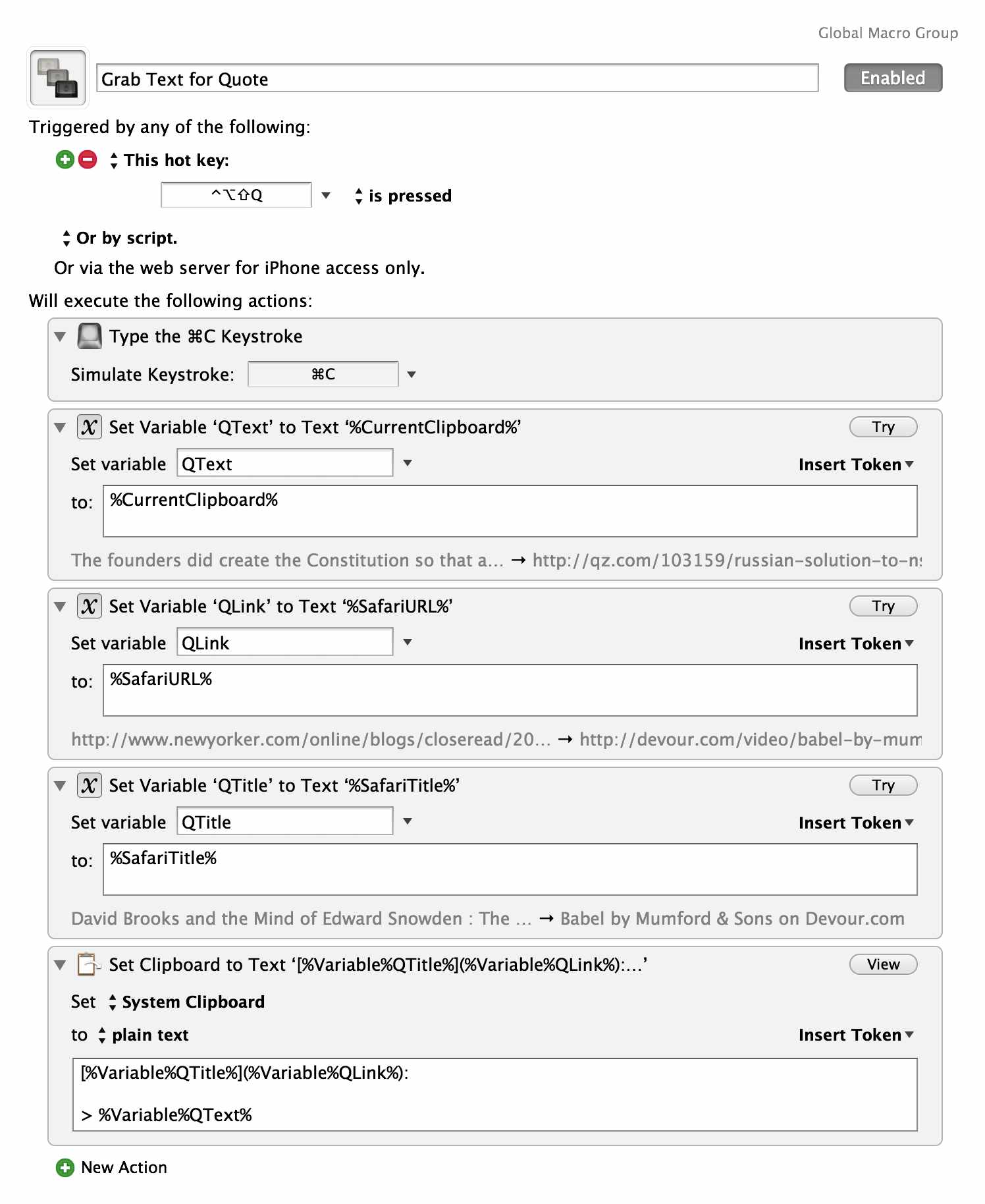
    To the right is my solution. Currently I have the macro linking the text from the title of the page to the URL, this is mostly because 20% of the time the author’s name might be in it, but regardless I have to edit that text 100% of the time anyway. Some of the formatting is also specific to the writing tools I am using, so you may need to adjust it (it’s all formatted for Markdown right now).

    The benefit is that now I can select text on a page, hit the hot key and paste to my document, saving a bunch of extra clicks. It’s not the best, but it sped things up a touch for me.

  • ‘One Microsoft’

    [Steve Ballmer has “realigned” Microsoft][1] so that it may better fit the business structure of Apple:

    > There will be four engineering areas: OS, Apps, Cloud, and Devices. We will keep Dynamics separate as it continues to need special focus and represents significant opportunity.

    Also, this:

    > **Going forward, our strategy will focus on creating a family of devices and services for individuals and businesses that empower people around the globe at home, at work and on the go, for the activities they value most. **

    That bold was as formatted from Ballmer. Also there’s no way Tim Cook (or any other sane CEO) would bold that much text in an email that is then later posted as a Press Release. What is it, fucking amateur hour at Microsoft? ((That’s a rhetorical question.))

    > Lots of change. But in all of this, many key things remains the same.

    Like the fact that Steve Ballmer is still piloting the [Costa Concordia][2].

    Seriously though, you copy and paste an email from your CEO? *Jesus*.

    [1]: http://www.microsoft.com/en-us/news/Press/2013/Jul13/07-11OneMicrosoft.aspx
    [2]: https://en.wikipedia.org/wiki/Costa_Concordia_disaster

  • Fresh Fonts

    When I launched *The Brooks Review* I used three fonts: Georgia, Verdana, and Helvetica. Georgia, believe it or not, was the body font for the site. I hate reading sites set in Helvetica for the body — it’s not a comfortable font to read. When I signed up for Typekit, I switched this site to FF Meta. From that point forward almost every element of the site was set in some variation of FF Meta — I even bought more weights to tweak the design just a year ago.

    I had no intention to change anything with the design.

    Then H&FJ launched their [cloud font service][1]. I love H&FJ fonts, specifically none of the fonts that I am using on this site, but I love their work. They have a clear passion for readable letter forms.

    I signed up just to play with the service and to see how it compared to Typekit. I loved it. I started playing with fonts, and as much as I tried to resist changing anything — I couldn’t help myself.

    Because the thing is, Ideal Sans (what this body is set it right now) is one hell of a readable typeface. It feels really good to read for long periods. It’s comfortable, and yet has personality. When I set the headlines in Forza things just clicked. I had it, I just needed to refine it.

    I figured I might do the refresh in a couple of weeks, but then I looked at the old homepage with FF Meta. It looked so drab I just made the switch. I think I have everything looking and working great (I even figured out that annoying bug where the underlines weren’t showing up on links on your iPhone).

    While I love the legibility of Ideal Sans, it felt too heavy at the size that Meta was set in — so I had to shrink it down on the Mac and push it up on the iPhone. I think I found a good balance, but I’ll let you be the judge. The thing I like most about Ideal Sans is the *italics* — Ideal Sans just looks gorgeous in italics.

    I think most agree that Ideal Sans is a great typeface.

    Forza on the other hand is a little bit more, shall we say, mixed. I’ve always liked the typeface, but never thought of using it. I went back and forth between a lot of options and settled on Forza because:

    1. I love the contrast of the block-monotonous feeling of Forza against the more casual Ideal Sans.
    2. For as monotonous as Forza looks, it has quite a bit of personality if used in spurts and not for everything.

    It is my thinking, then, that Ideal Sans offers the personality of the site, while Forza offers the structure. Initially Forza was the default for *Quotes of the Day*, and for *Headlines*, but some weren’t pleased. I liked it, but then I loaded up the site one day and realized I was already bored with that look. So Forza is now the menu elements of the site, and Ideal is almost everything else.

    We’ll see if this combination can outlast FF Meta’s run.

    [1]: http://www.typography.com/cloud/welcome/

  • ‘How Cryptography Is a Key Weapon in the Fight Against Empire States’

    [Julian Assange][1]:

    > Once upon a time the use of computer viruses as offensive weapons was a plot device in science fiction novels. Now it is a global reality spurred on by the reckless behaviour of the Barack Obama administration in violation of international law. Other states will now follow suit, enhancing their offensive capacity to catch up.

    Interesting post, worth a read even if you dislike Assange, as he talks about how US/China spying is not just a problem for individuals, but for Nations as well.

    [1]: http://www.guardian.co.uk/commentisfree/2013/jul/09/cryptography-weapon-fight-empire-states-julian-assange

  • Heml.is

    [Heml.is][1]:

    > Normally security results in a complex and unfriendly user experience. It should not be that way. Heml.is is a messenger for everyone so we are dedicated to create the most user friendly messenger ever.

    They are 88% funded, go back them for easy to use, but secure, messaging.

    [1]: https://heml.is/

  • ‘Geoff Dyer, Zoe Heller, Gary Shteyngart on Sitting vs. Standing Desks’

    [Ben Crair][1]:

    > What’s new is the entry of the medical establishment into the debate on the side of the standers, lending their preference an annoying air of moral superiority. The years the standers gain in longevity, though, are offset by lost pride: Is there a better symbol of corporate obeisance than the standing desk? Set aside writers for a moment, whose work routines are relatively idiosyncratic. Of course the long, stationary workdays of most Americans are unhealthy. The solution should not be to sit less, but to work less.

    I’ve been standing for a long time now, but to be honest with you, whenever I read an article about this stuff I cannot finish the article unless I sit down. Talking about sitting reminds me of how good sitting feels, my body aches and pangs for me to sit, so I sit.

    And when I finish reading I stand back up, my body feels fine once again, and so I get on with my moral superiority.

    [1]: http://www.newrepublic.com/article/113790/geoff-dyer-zoe-heller-gary-shteyngart-sitting-vs-standing-desks%23

  • ‘Coffee Shops Look to Oust Laptop Hobos’

    [Bruce Kennedy for MSN Money][1]:

    > But Starbucks and small, independent coffeehouses alike now have growing concerns about the large number of customers who camp out for hours at their tables. These “laptop hobos” are working, surfing the Web, using the shop’s outlets as an unlimited power supply for their wireless devices and occasionally getting downright territorial with other customers over space.

    This is a tempting argument to make, but wrongheaded. Coffee Shops started sprouting up *everywhere* in the U.S. because of massive demand for the coffee shop — not massive demand for coffee, mind you, but for the seats *in* the shops. This is evident with the way most shops are setup, but no more evidence needed than to look at the move of Starbucks providing free WiFi, instead of paid WiFi they started with.

    Starbucks made that change because the little guys were offering free WiFi, and their lack of free WiFi was hindering the ability of Starbucks, Starbucks, to compete — people went to where the better amenities were/are. Because, with very few exceptions, most coffee shops are frequented as a place to hang out, not as a place to get *good* coffee — that’s the culture that surrounds coffee shops. Whether you have a laptop, book, or tablet in front of you is irrelevant — you are asking your customers to “stay, talk, read newspapers, but god don’t use a computer”?

    Why?

    The power draw from laptops is minimal, the WiFi cost negligible (you telling me you wouldn’t have WiFi for your business already?). The hardest part about retail is getting someones ass in your door. Once they are in your door, you stand a good chance at making a sale. Yes, there are mooches, but do they so drain your business that you need to kick out the non-mooches, or so punish those that just want a sit and sip on their coffee for two hours?

    That’s crazy.

    I stirred up a shit-storm on App.net about this, but my logic is pretty simple: better to have a full coffee shop of people paying $4 each, than to have a quarter of the people spending $8 each.

    [Harry Marks][2]:

    > Remember kids: It doesn’t matter if you actually buy anything in a store, as long as you’re there taking up space. That’s how businesses make money apparently. [\#themoreyouknow][3]

    Seems to work fine for Apple Stores, but what do they know.

    [Mark Hughes][4], whom I don’t often agree with, sums it up nicely:

    > [@benbrooks][5] Some cafés tried limits, killing wifi, even kicking customers out when laptops and wifi first became popular, early ’00s. I got screamed at by an angry old man for having my laptop out, so I ditched that place. Those places went broke.

    They didn’t just go broke, they are *still* going broke (I saw it happen just last month) — with exception to (perhaps) Blue Bottle.

    [CJ Chilvers][6]:

    > [@hcmarks][7] [@benbrooks][8] Forget coffee shops. Libraries are evolving to fill this gap. My library goes so far as to have a snack lounge, seating by a fireplace, professional podcasting studios and an entire floor of conference rooms.

    > [http://ahml.info][9]

    Now *that’s* a library I would frequent.

    The problem isn’t WiFi or those mooching from it, the problem is that there is little reason to buy more than one $4 cup of shitty coffee. I don’t buy a new iPhone every year because they die every year, I buy them every year because they are compelling *every* year. Limiting access or time isn’t a compelling reason for consumers, that’s being hostile to them, a compelling reason is making your coffee actually taste good. ((Side note: Every coffee shop owner I ever talk to says the same thing: “We have the best coffee.” I think that mindset is a large part of the problem.))

    [1]: http://money.msn.com/now/post–coffee-shops-look-to-oust-laptop-hobos?sharedfrom=scpshrjwlinkedin
    [2]: https://alpha.app.net/hcmarks/post/7540723
    [3]: https://alpha.app.net/hashtags/themoreyouknow
    [4]: https://alpha.app.net/mdhughes
    [5]: https://alpha.app.net/benbrooks
    [6]: https://alpha.app.net/cjchilvers/post/7541978
    [7]: https://alpha.app.net/hcmarks
    [8]: https://alpha.app.net/benbrooks
    [9]: http://ahml.info/

  • ‘So, You Want to Hide From the NSA?’

    [Philip Bump posted a guide for][1] The Atlantic Wire on how to use encryption to hide your activity from the NSA. Except it’s a pretty shit guide. [Instead Micah Lee has a great guide][2] for the Freedom of the Press Foundation and [Tactical Tech has another nice outline][3] with guides for good secure software usage.

    The latter two guides are far better than the first, but the gist of all of them (and [as I have said before][4]) is that truly secure communications is hard, cumbersome, and requires both parties to be using it. That latter is the hardest obstacle to overcome.

    [1]: http://www.theatlanticwire.com/technology/2013/07/so-you-want-hide-nsa-your-guide-nearly-impossible/66942/
    [2]: https://pressfreedomfoundation.org/encryption-works
    [3]: https://alternatives.tacticaltech.org
    [4]: https://brooksreview.net/2013/06/encrypting-stuff-against-starbucks-hacker-bob/

  • PRISM Break

    [A great new resource for privacy conscious apps][1]. I haven’t tried most, but the interesting section (to me at least) are the operating systems. You won’t hear me say this about many things, but I’d rather let the NSA track me than try to get by in life using Linux. ((Yes, I have used Linux full time before — many times actually.))

    [1]: https://prism-break.org/

  • Reading List vs. Instapaper

    Back in May, [Chris Bowler posted][1] about his use of Reading List. His post actually inspired me to dump Instapaper and use only Apple’s Reading List feature instead. On the surface this seemed like a fantastic idea — I had full OS integration with reading things later (and I got to read them on the site itself, instead of in an app, [which is my preference][2]).

    Since May I have been doing nothing but using Reading List and its given me a new found appreciation *for* Instapaper. You see, Reading List isn’t horrible, and it’s readily available, but it’s not great. There were numerous times when links would get lost, or inadvertently get marked as having already been read. There were even more times when I thought I saved something, but — well — *nope*, not saved.

    I ran into many occasions when the current Reading List wasn’t up to date on my iOS devices, or my Mac. Other times when the link just didn’t get saved right. I couldn’t directly save links from Felix, or Sunstroke, or from the NextDraft and Digg apps. Those sources are where I get all my links from, and I had to jump through hoops to use Reading List with them.

    A few days ago I about threw my iPad mini out the window because I realized that the 15 links I had just spent time adding to Reading List didn’t actually get added (I think that was an iOS 7 bug), instead of tossing the mini, I switched back to Instapaper.

    Thank god for Instapaper.

    I don’t know what the future of Instapaper holds — especially with iOS 7 on the horizon, but I do know a couple of things:

    1. I have even [less faith in Pocket][3].
    2. Instapaper is far better than Reading List, even if nothing about Instapaper changes.

    I wasn’t going to write anything about this — it all seemed inconsequential — but then I saved a ton of links from Safari to Instapaper in record time with all the confidence in the world that they were *actually* saved. I’ll half read half of those links today, and know that they don’t get marked as read until I mark them as such.

    Yes, Instapaper’s website needs an update. Yes, we don’t know what Betaworks will do with it. Yes, it’ll need major work to look native on iOS 7. *But*, it’s still leaps and bounds more stable, and better functioning, than Reading List. Even more, Instapaper’s wide adoption with third-party apps makes it a useful service that you actually have to try *not* to use — I cannot say the same of Reading List, even though it has OS level integration.

    [1]: http://log.chrisbowler.com/post/50115173006/reading-list
    [2]: https://brooksreview.net/2011/01/bland-web/
    [3]: https://alpha.app.net/stevestreza/post/7183592

  • Your “Open” News

    [Andrew Leonard][1]:

    > Per [Wikipedia,][2] AdBlock Plus is the single most popular extension of any kinde for Firefox. But I’m betting that a hefty percentage of those millions don’t realize that major advertisers, [including Google,][3] can pay to have some of their ads “whitelisted” — in essence, given a free pass through AdBlock Plus.

    *The power of Open.*

    [Allie Jones][4]:

    > According to forensics researcher Richard Hickman, [Snapchat doesn’t delete photos][5] on the Android, it just hides them. With the right forensics software and a decent amount of ill will, someone could recover your old Snaps.

    *The power of Open.*

    [Antone Gonsalves][6]:

    > A Skype bug that enables an attacker to bypass the lock screen on several Android mobile devices demonstrates once again the need for additional security to protect corporate data against such flaws, experts say.

    *The power of not policing your App Store.*

    [Mark Milian][7]:

    > Google spokeswoman Gina Scigliano confirms that the company has already inserted some of the NSA’s programming in Android OS. “All Android code and contributors are publicly available for review at source.android.com,” Scigliano says, declining to comment further.

    *The power of…wait, holy shit, are you serious?*

    > NSA officials say their code, known as Security Enhancements for Android, isolates apps to prevent hackers and marketers from gaining access to personal or corporate data stored on a device.

    I guess you are serious. Never underestimate *the power of the hypocrite*, I guess.

    [1]: http://www.salon.com/2013/07/05/adblock_plus_lets_some_advertisers_pay_to_play/singleton/
    [2]: https://en.wikipedia.org/wiki/Adblock_Plus
    [3]: https://news.ycombinator.com/item?id=5995140
    [4]: http://www.theatlanticwire.com/technology/2013/07/snapchat-android/66868/
    [5]: http://www.guardian.co.uk/media-network/partner-zone-infosecurity/snapchat-photos-not-deleted-hidden
    [6]: http://www.techhive.com/article/2043765/skype-flaw-allows-android-lock-screen-to-be-cracked.html%23tk.rss_all
    [7]: http://www.businessweek.com/articles/2013-07-03/security-enhanced-android-nsa-edition

  • ‘The Price of Amazon’

    [David Streitfeld writing about Amazon book pricing][1]:

    > “Discounting, and especially inconsistent or shifting discounting, really messes with a publisher’s ability to price a book fairly and accurately to its cost,” he added. “You have to consider the fact that whatever price you put on the cover, Amazon is going to reduce it by as much as half — unless they don’t — or they may, but only for a while. But in short they’re going to make your book look like a thing with a cost lower than the one you placed on it.

    As a consumer I love Amazon, as a “business guy” I am fascinated by Amazon, but as a lover of well made and sustainably priced products, I hate Amazon.

    [1]: http://bits.blogs.nytimes.com/2013/07/05/the-price-of-amazon/?ref=technology