Top Posts

Leica Sofort 2June 13, 2024
Grand Seiko SBGX261February 23, 2023

Recent Articles

  • ‘Desk or Garage Design?’

    Michael Lopp on the simplification of Keynote: > There’s the simplification where you clean your desk. The clutter on your desk is bugging you, so you decide to clean it up. This small act of simplification gives you the pleasant illusion that world contains less chaos and you can suddenly magically focus on the task…

    Michael Lopp on the simplification of Keynote:

    > There’s the simplification where you clean your desk. The clutter on your desk is bugging you, so you decide to clean it up. This small act of simplification gives you the pleasant illusion that world contains less chaos and you can suddenly magically focus on the task that you were procrastinating on while you were cleaning your desk.

    Good read.

  • ‘Why I’ve all but given up on Windows’

    Adrian Kingsley-Hughes, a long time Windows user, on preferring OS X, iOS, and Android over Windows now: > My primary work system is a MacBook Pro, and in the ten months I’ve had it it’s flawlessly done everything I’ve asked of it, from run Microsoft Word to render 4K video. I’ve lost count of the…

    Adrian Kingsley-Hughes, a long time Windows user, on preferring OS X, iOS, and Android over Windows now:

    > My primary work system is a MacBook Pro, and in the ten months I’ve had it it’s flawlessly done everything I’ve asked of it, from run Microsoft Word to render 4K video. I’ve lost count of the number of notebooks I’ve owned over the years, but this MacBook Pro is, by far, the most reliable system I’ve owned, and I put part of that down to the fact that it doesn’t run Windows.

    And, on tablets:

    > My experience of Windows on tablets closely resembles that of my ZDNet colleague James Kendrick. Bottom line, they let me down too much to want to bother with them. Why would I trade a reliable iPad or Android tablet for an unreliable Windows 8.1 tablet? Why trade a tablet that just works for one that regularly sends me on quests, roaming the Internet looking for the right elixir to fix the system?

    Good read.

    (via Moltz)
  • A7 Speeds and Heat

    The iPad mini (retina) A7 appears to run slower than the iPad Air’s A7 does, this likely is a heat saving and power saving maneuver, [as Matthew Panzarino notes][1]: > The reduction may be due to thermal profiles which prevent the device from getting uncomfortably warm to the touch, a complaint with some previous models…

    The iPad mini (retina) A7 appears to run slower than the iPad Air’s A7 does, this likely is a heat saving and power saving maneuver, [as Matthew Panzarino notes][1]:

    > The reduction may be due to thermal profiles which prevent the device from getting uncomfortably warm to the touch, a complaint with some previous models of iPad. Many iPad Air owners and reviewers have noted that the tablet does not have the same warming issues even with heavy use.

    Interestingly I hadn’t noticed that my iPad Air gets hot at all. With the iPad 3 there were many times it would be very warm, hot even. The iPad mini got warm, but never hot. The iPad Air, as best as my memory tells me, has yet to even feel noticeably warm. Even after gaming, Geekbenching — no warmth.

    That may be the most impressive upgrade to the iPad line thus far.

    #### Side Note

    Panzarino [links to this Geekbench result][2] that is assumed to be the new retina iPad mini, clocking it at 1390/2512 on Geekbench 3. That seems to be on par with the iPhone 5s and just slightly lower than the iPad Air. We will need a lot more data points before anything definitive can be shown here though.

    What’s more interesting to me is the speed jump from the original iPad mini which clocked in at: 261/495. That’s almost comical to think about in comparison to what the iPads are putting out today. Amazing, really.

    I cannot wait for new applications to come out that take advantage of all the CPU power in the newest round of iPads.

    [1]: http://techcrunch.com/2013/11/12/retina-ipad-minis-a7-runs-at-1-3ghz-same-as-iphone-5s-and-slightly-below-ipad-airs-1-4ghz/
    [2]: http://browser.primatelabs.com/geekbench3/201561

  • Amazon Item of the Week: Spyderco Tri-Angle Sharpmaker

    I previously [talked about the Japanese waterstones](https://brooksreview.net/2012/04/wet-stone-amazon/) that are my preferred knife sharpening method — but it is hard to overlook the Spyrderco Sharpmaker as it is universally loved. What sets the Sharpmaker apart from all other sharpening systems is two things: – It is almost foolproof. – It works extremely well and extremely fast.…

    I previously [talked about the Japanese waterstones](https://brooksreview.net/2012/04/wet-stone-amazon/) that are my preferred knife sharpening method — but it is hard to overlook the Spyrderco Sharpmaker as it is universally loved.

    What sets the Sharpmaker apart from all other sharpening systems is two things:

    – It is almost foolproof.
    – It works extremely well and extremely fast.

    I hadn’t tried it before, but I ordered one to test out and I am blown away. I don’t think the edge is as fine as I can get with waterstones, but it is impressively — shave your hair — sharp. It’s a dead simple system, so if you own a knife this is something you should absolutely get, and it truly doesn’t take much time to keep a knife sharp with this.

    I actually used it to sharpen our kitchens knives and was blown away by how well it worked on them. It’s a great system, priced well, and easy to use. If you can hold your knife blade perpendicular to the table, then you can use this sharpener.

    Also, [you can pick up a set of ultra-fine stones](http://www.amazon.com/exec/obidos/ASIN/B0019JTNDQ/ref=nosim&tag=brooksreview-20) to get even sharper edges (I just saw them and ordered them).

  • Sapphire Displays

    Great post detailing how Apple may use sapphire displays. Think of the sapphire more as a protective layer on top — Zagg is probably praying this is all rumors.

    Great post detailing how Apple may use sapphire displays. Think of the sapphire more as a protective layer on top — Zagg is probably praying this is all rumors.

  • ‘Privacy Happens at the Endpoints’

    Fantastic post from Watts Martin: > The problem here isn’t how Google (or Facebook or anyone else) handles our privacy; the problem is that Google shouldn’t be managing our privacy.

    Fantastic post from Watts Martin:

    > The problem here isn’t how Google (or Facebook or anyone else) handles our privacy; the problem is that Google shouldn’t be managing our privacy.

  • ‘NSA’s Vast Surveillance Powers Extend Far Beyond Counterterrorism, Despite Misleading Government Claims’

    Trevor Timm: > So let’s get one thing straight: when the NSA vacuums up millions of innocent people’s communications and metadata, the agency is not limiting itself to counter-terrorism uses. Pretending there is a narrower scope is not an honest way to have a debate.

    Trevor Timm:
    > So let’s get one thing straight: when the NSA vacuums up millions of innocent people’s communications and metadata, the agency is not limiting itself to counter-terrorism uses. Pretending there is a narrower scope is not an honest way to have a debate.

  • ‘Apple Maps: How Google Lost When Everyone Thought It Had Won’

    [Charles Arthur][1]: > That means that Google has gone from having at least 31m users on the iPhone in April 2012 – and perhaps as many as 35m in September 2012, based on a model using a sliding scale of maps ownership – to around 6.3m who are using it monthly on iOS 6 and…

    [Charles Arthur][1]:

    > That means that Google has gone from having at least 31m users on the iPhone in April 2012 – and perhaps as many as 35m in September 2012, based on a model using a sliding scale of maps ownership – to around 6.3m who are using it monthly on iOS 6 and above.

    That his concluding paragraph — the rest of the article says this (more or less) several times over. That’s a massive hit to Google. These numbers are survey numbers and not comprehensive, and therefore should not be taken as gospel — still they show a very disturbing trend for Google.

    Mapping is important, but it is important to Google and Apple in different ways. Google uses mapping as a direct source of income (sponsored listing, targeted ads, other creepy things), where Apple uses mapping as indirect income: mostly as a feature to their iOS platform, just another selling point for the device.

    So whereas Apple could survive if they killed their mapping client all together (because users could install alternatives), ((Yes, still a lot of people would complain, but even *you* would buy a new iPhone if it didn’t have a native maps app.)) Google would take a substantial revenue hit if they lost all mapping. It’s in that light that I highly doubt the explanation for why Apple switched from Google maps is any more convoluted than: we don’t want to make money for our competitor.

    [1]: http://www.theguardian.com/technology/2013/nov/11/apple-maps-google-iPhone-users

  • How To Size iOS 7 Wallpaper

    I linked to [John Carey’s excellent iOS wallpapers](http://fiftyfootshadows.net/2013/11/06/ios-7-parallax-wallpaper-pack/) the other day, but Carey just posted details on how he came up with an ideal size for the parallax effect to work. Noting: > I tested this by cropping images to Apples default wallpaper resolution then drawing a red box on top the pixel size of…

    I linked to [John Carey’s excellent iOS wallpapers](http://fiftyfootshadows.net/2013/11/06/ios-7-parallax-wallpaper-pack/) the other day, but Carey just posted details on how he came up with an ideal size for the parallax effect to work. Noting:

    > I tested this by cropping images to Apples default wallpaper resolution then drawing a red box on top the pixel size of the iPhones screen resolution. I then loaded the resulting image into my iPhone and checked to see where the edges of the red box fell on screen. After trying a number of different cropped resolutions I discovered if I made any changes to the resolution set by apple the box would no longer line up ideally on the screen at a neutral position.

    No wonder they look amazing — they weren’t just cropped down, they are considered for each device. Something that is evident when you compare the iPad and iPhone versions of the same wallpaper that Carey sells. If you just set the image and don’t fiddle with it at all the end result is a fantastic looking image. I cannot imagine how big of a pain in the ass all this testing and tinkering was.

  • Quote of the Day: David Heinemeier Hansson

    “What it comes down to is that Google has made an appliance. A boring, no-thrills appliance. This is not a work of art. But it doesn’t pretend to be a work of art. “ — David Heinemeier Hansson

    “What it comes down to is that Google has made an appliance. A boring, no-thrills appliance. This is not a work of art. But it doesn’t pretend to be a work of art. “
  • Stuxnet, America’s Nuclear Plant-Attacking Virus, Has Infected the International Space Station

    *No* way to have predicted the speed like this. Ugh.

    *No* way to have predicted the speed like this. Ugh.

  • BitTorrent Sync 1.2 Now Available

    This is a really great update to my favorite syncing service. It adds two major features: 1. An iPad version. 2. The ability to use “open in” for images, and save images to camera roll. Now the only major shortcoming of the iOS app is a passcode to open it.

    This is a really great update to my favorite syncing service. It adds two major features:

    1. An iPad version.
    2. The ability to use “open in” for images, and save images to camera roll.

    Now the only major shortcoming of the iOS app is a passcode to open it.

  • Scheming for Privacy and Security

    Have you ever clicked a phone number in Safari to get the phone app to call that store you were searching for? Maybe you’ve clicked a link to a YouTube video and it opened in the awful YouTube application instead of Safari. In iOS, this interaction between apps happens via URL schemes, which are available…

    Have you ever clicked a phone number in Safari to get the phone app to call that store you were searching for? Maybe you’ve clicked a link to a YouTube video and it opened in the awful YouTube application instead of Safari. In iOS, this interaction between apps happens via URL schemes, which are available to Apple applications as well as third party applications. Everyone uses them without noticing they exist, just like file-type associations on PCs.

    ### URL Schemes
    Out of the box, iOS provides URL schemes for things like HTTP, email, text messaging, maps and telephone numbers. These URL schemes allow iOS to convert strings of text into actions, allowing time saving features like clicking a phone number in Safari to initiate a phone call.

    Third party applications use these schemes to enable workflows across apps. Each application can register its own custom handle and scheme. The scheme is how applications interpret the input. The handle is the prefix to URLs that will launch the app, registered with the system.

    A sample handle for a Great Application(TM):

    GreatApplication://

    [X-Callback-URL](http://x-callback-url.com/), a draft specification created by Greg Pierce of Agile Tortoise, has been created to allow two-way communications by applications. It allows sending an action to an application that will return a result back to the original application.

    When the URL is opened, iOS launches TargetApp and passes the URL as arguments (see implementation for details of handling incoming URLs). TargetApp will parse the URL, identify the action requested, and translate “Hello” to “Spanish” as passed in the parameters. The “translate” action and its parameters are all specific to TargetApp and should be documented by the developer. If TargetApp is successful in translating the word, it calls the URL in the x-callback parameter to return the result to SourceApp.

    ### Usage

    Applications such as Tweetbot use URL schemes both by providing a scheme to perform actions in Tweetbot and by configuring actions that use other applications, such as sending a photo to Camera+ for editing before tweeting.

    Most users have therefore used these URL schemes without knowing they exist, and advanced users take advantage of them to make iOS more powerful and friendly to workflows that would be otherwise unavailable.

    Some great examples of advanced workflows can be found in applications such as [Drafts](http://agiletortoise.com/drafts/), [Launch Center Pro](http://contrast.co/launch-center-pro/) and [Editorial](http://omz-software.com/editorial/).

    Launch Center Pro gives you a catalog of actions to pick and set shortcuts for. Using Launch Center Pro, you can quickly send a new task to OmniFocus, launch Camera+ in “Take a Picture” mode, append a string of text to a file in Byword and much, much more. Drafts works in a similar fashion, allowing you to create actions based on your text input.

    ### Issue

    URL Schemes are great. They are, however, a source of user input that should never be trusted as safe. To allow convenience without creating a security or privacy risk to the user, any application registering a custom scheme must keep in mind that input could be sent by an attacker.

    Safari for iOS, being a web browser, can be used to send actions to applications that implement URL schemes. The easiest way to test this is to find an application on your device supporting URL schemes, building an action in Launch Center Pro, and copying that URL in Safari. Here are a few samples you can try. You must have either WhatsApp or Felix installed for these examples to work.

    Launching WhatsApp will prompt you to pick a contact and show you a message ready to be sent with the word “Test”.

    **Warning: Clicking this on iOS will launch WhatsApp and prompt you for a contact to send “Test” to**

    [Try it.](whatsapp://send?text=Test)

    whatsapp://send?text=Test

    Launch Felix, which will show a precomposed message ready to be sent.
    **Warning: Clicking this on iOS will launch Felix with a message sheet with the text “Testing a few URL scheme things out…”**

    [Try it.](felix://compose/post?text=Testing%20a%20few%20URL%20scheme%20things%20out…)

    felix://compose/post?text=Testing%20a%20few%20URL%20scheme%20things%20out...

    Not only will Safari prompt you before launching the app, these two actions are built in a way where time is saved, but no action is actually performed automatically. You still have to send the message yourself.

    As applications implement actions, it’s easy for a developer to only think about the ease of use of an action and to be tempted to automate it as much as possible, especially if the goal is to use X-Callback-URL to send the user back to his original application.

    Compounding the issue is the fact that *Safari will launch these URLs automatically* if they are placed in an inline frame. This frame would perform the same action as the Felix example above, automatically.

    <iframe src="felix://compose/post?text=Testing%20a%20few%20URL%20scheme%20things%20out..." height="240" width="320"></iframe>

    In the case of well-built actions that require a user confirmation or that do not present a risk, this has little impact. But combined with a dangerous action, it makes automating an attack all that much easier.

    I sat down at the end of August and looked at the applications I had on my phone and found two examples of dangerous actions within a few minutes.

    ### Example 1 – Data destruction in Byword

    Byword allows a file to be overwritten through its URL scheme. The action is called “Replace File” and does exactly as it says: It replaces the file named ‘FilenameX’ with the new text you feed it. This string would overwrite ‘Important.txt’ with the string “haha”. For most users, recovering the data is impossible.

    byword://replace?location=icloud&path=&name=Important.txt&text=haha

    The only thing that mitigated the risk of this vulnerability being exploited is the fact that a file path and name is needed. However, with iCloud being flat, it is not so far fetched to imagine a person would have a file called ‘important.txt’ or ‘todo.txt’. In a targeted attack, someone could try to make an educated guess for a filename. If you sent me a file called ‘bigproject.txt’ and I know you are a Byword user it would be logical to assume you store that file in iCloud. Dictionary attacks could possibly be performed, though a good distribution method for the malicious pages would need to be obtained, as Safari will only launch the first URL targeting an application. By using social media, instant messaging or email, an attacker would distribute the URL to a page with an embedded inline frame designed to overwrite the file. The same method could target a whole population of users by performing a *watering hole* attack. Watering hole attacks consist of targeting a site known to be a frequent destination of your targets. If you were attacking Apple fans, any of the big Apple blogs vulnerable to a cross-site scripting attack would be an enticing target.

    [Metaclassy](http://metaclassy.com) responded quickly when I reported this issue and implemented a very good fix by prompting the user before overwriting a file.

    [More details on this vulnerability.](http://blog.binaryfactory.ca/2013/09/cve-2013-5725-byword-for-ios-data-destruction-vulnerability/)

    ### Example 2 – Leak a user’s identity in Tweetbot

    Tweetbot is my favorite Twitter client on iPhone, iPad and OS X. It supports multiple actions through its custom URL scheme, including following a user or marking a tweet as a favorite.

    This can be useful to add a link for users to follow you easily, but no prompt was presented to the user. This effectively means that you could get a Tweetbot user to follow you without them realizing. While this might seem minor, it is actually an important privacy risk. Imagine you are browsing a website, and an attacker either gives you a link to a malicious page or inserts the malicious inline frame in one of the pages. You barely have time to notice it and Tweetbot opens and follows someone. Once this has happened the person can now link you, or at least your Twitter account, to someone browsing that site or having received that email with a malicious link. As a lot of people, myself included, post enough details on social media to reveal our real identities, this could be used by attackers to reveal the true identity of anonymous users of a website, forum or email address. A political activist using an email account created only for this purpose could be revealed the moment he clicked on the malicious link.

    The same can be done by having you favorite a tweet. Remember that Twitter can send notifications for such events, so even if you quickly unfollowed or un-favorited, the damage has been done.

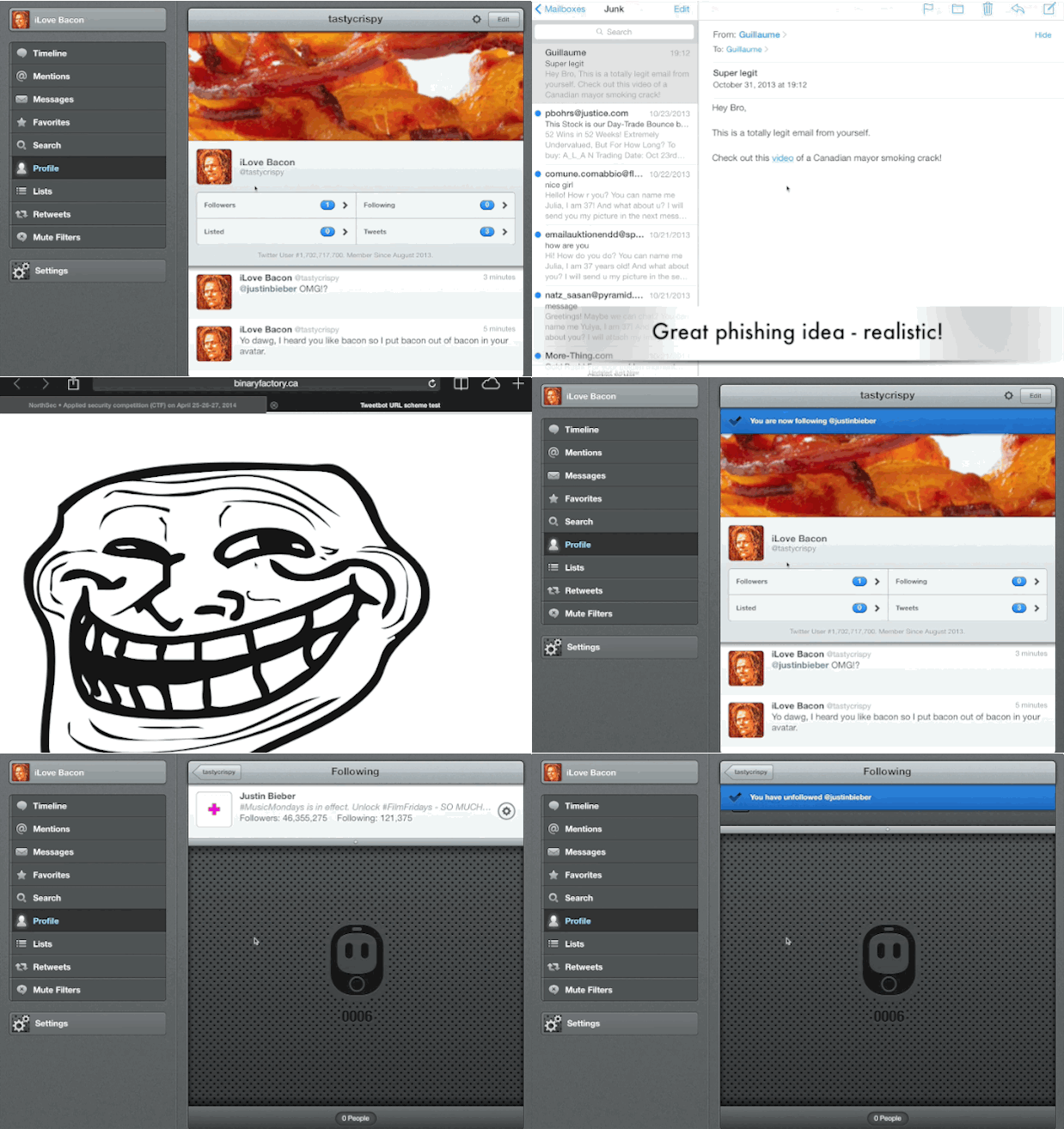
    In this image, you can see me receiving a phishing email. When I click the link, it opens Safari, which launches Tweetbot and has me following Justin Bieber.

    How embarassing is that?
    ![](https://f3a98a5aca88d28ed629-2f664c0697d743fb9a738111ab4002bd.ssl.cf1.rackcdn.com/URL-Tweetbot-iOS.gif)

    Tapbots has fixed this issue in Tweetbot V3 for iPhone, and fixes for the iPad and Mac version are coming. For the Mac, there’s a workaround which is to simply disassociate your browser from Tweetbot, as it is not using system-level handles like on iOS. If you’re on iPad, you can still try it out.

    **Warning: Clicking this on iOS or OS X could cause you to follow me**
    [Try it](tweetbot:///follow/gepeto42)

    [More details on this vulnerability.](http://blog.binaryfactory.ca/2013/11/cve-2013-5726-tweetbot-for-ios-and-mac-user-disclosureprivacy-issue/)

    ### Conclusion

    URL schemes will become more popular as developers try to get applications to communicate and enable great workflows. Some were expecting new official methods of app communication in iOS 7, which this has not materialized. Because of that, URL schemes are currently the only practical way for inter-app communications on iOS. As these schemes become more popular, it is important for developers to remember that input from URL schemes could be malicious. Developers should ensure that any action with the potential to damage data, threaten privacy or reveal confidential information should be confirmed by the user before being performed.

    If you want to play with URL schemes, I highly recommend using Contrast’s [support site](http://actions.contrast.co/) for Launch Center. Look at the applications you have and how they behave when you send them a potentially dangerous request for action. If you find something, notify the developer before disclosing the issue publicly.

    As more users attempt to centralize their computing lives, by replacing their laptops with iOS devices, it is only natural to want better interoperability between apps without interruption. Developers will have to add more support for URL schemes until better methods of inter-app communication are supported by Apple.

    I have a gut feeling that there must be some calendar applications that can set up unwanted alarms at 3am, without the user noticing. There must be text editors that silently overwrite data. Surely there are messaging apps that send messages without the user’s consent.

    Now we just have to find them.

    ***

    *This was a guest post from Guillaume Ross, an Information Security Consultant, whose writing can be found at [Binaryfactory.ca](http://blog.binaryfactory.ca). If you think you have an article to contribute, [get in touch](https://brooksreview.net/contribute/).*


  • RAW Image Editing on the iPad

    Since finding out that Filterstorm Neue can handle RAW images, I also found out that the photos app could too. I promptly went out to buy the Lightning SD card reader and imported half a dozen RAW images from my GX1 onto the iPad Air. Here’s a few things I found out that may be…

    Since finding out that Filterstorm Neue can handle RAW images, I also found out that the photos app could too. I promptly went out to buy the Lightning SD card reader and imported half a dozen RAW images from my GX1 onto the iPad Air. Here’s a few things I found out that may be of use to you:


    – It works. You can view *and* manipulate the images in the built-in Photos app.
    – It’s really slow. I had a 64GB SDXC card with 204 RAW images on it and it took the iPad Air about 5 minutes to build previews for all apps so I could import them. From what I could tell you cannot leave the app during that time or the operation is paused.
    – There is also no indication that images are still loading, which is needed. iOS first loads dotted squares to show the amount of images, and then fills in with previews. While you can tell if there are still previews left to generate, you can’t tell if there are still more squares to load in — some kind of dialog would be great here.
    – Once you start importing images it works reasonably fast. It’s not lightning speed, but it is acceptable.
    – As I said, you can edit the photos natively, which is nice.

    Overall the experience was pretty solid, it’s not ground breaking by any means but it is nice to have RAW support so that I can download, edit, and post images from my iPad without worry.

    *(Images in this post edited only on the iPad, naturally. The first image was edited in the photos app, the second in Filterstorm Neue.)*

  • Patent Trolls and Scam Artists

    Joe Mullin reporting: > “The issue here is not about the right to assert one’s patent,” said McCaskill. “It’s not even really about the patent system. It’s about the deceptive and unfair practice of threatening consumers. It’s about scam artists preying on the vulnerable.” Senator Claire McCaskill, my new favorite senator.

    Joe Mullin reporting:

    > “The issue here is not about the right to assert one’s patent,” said McCaskill. “It’s not even really about the patent system. It’s about the deceptive and unfair practice of threatening consumers. It’s about scam artists preying on the vulnerable.”

    Senator Claire McCaskill, my new favorite senator.

  • Subsidized by Google

    [John McDermott on a new NSA, wait no, Google “tool”](http://digiday.com/platforms/google-tracking/): > Google is beta-testing a program that uses smartphone location data to determine when consumers visit stores, according to agency executives briefed on the program by Google employees. Google then connects these store visits to Google searches conducted on smartphones in an attempt to prove…

    [John McDermott on a new NSA, wait no, Google “tool”](http://digiday.com/platforms/google-tracking/):

    > Google is beta-testing a program that uses smartphone location data to determine when consumers visit stores, according to agency executives briefed on the program by Google employees. Google then connects these store visits to Google searches conducted on smartphones in an attempt to prove that its mobile ads do, in fact, work.

    McDermott notes that this is mostly on Android devices since Google can have near continuous location reporting there, but it does happen on iOS too:

    > When an iPhone user stops using an app, it continues running “in the background.” The user might not realize it, but the app continues working, much in the same way tabs function on a Web browser.

    > Google’s namesake iOS app — commonly referred to as Google mobile search — continues collecting a user’s location information when it runs in the background.

    He also notes that all Google iOS apps have this “feature”, so be sure to turn off location services for Google apps.

    Obviously I hate this kind of thing, especially from Google as they have a strong financial motivation to sell off this information (which is exactly what they are doing with it), but it made me wonder about something else.

    How long before Android users get subsidized cell phone plans? Subsidized by Google, with the catch being that Google can push ads to you and turns on these location tracking features by default, no way to turn them off. The user gets low(er) cost cell phone plans in exchange for handing over tons more information to Google and seeing more ads. Seems like this would be a natural direction. I bet it will be hailed as a great humanitarian move from Google and Apple analysts will say Apple *must* offer similar plans or face sudden death.

  • iPad Air Speed

    Fraser Speirs: > I’ll leave you with this: my iPad Air is faster than that 11″ MacBook Air and it has the same amount of storage. My iPad gets at least twice the battery life of that laptop and tips the scales at less than half the weight. It cost 65% of the price of…

    Fraser Speirs:

    > I’ll leave you with this: my iPad Air is faster than that 11″ MacBook Air and it has the same amount of storage. My iPad gets at least twice the battery life of that laptop and tips the scales at less than half the weight. It cost 65% of the price of the MacBook Air and has integrated cellular networking that can’t be had on an Apple laptop at any price.

    I love the iPad Air in a way that is seemingly proven less irrational everyday.

  • The Fastest Way to Train iOS Autocorrect

    I have no clue why, but amazingly this works.

    I have no clue why, but amazingly this works.

  • A Googler’s Thoughts on the Nexus 7

    A good post from Richard Gaywood, and I think it is largely accurate. I am, however, a stickler about the fact that Gaywood (as stated in the article) is (might be?) going to work for Google, so he very much has a reason to *want* to like the device and I don’t think that fact…

    A good post from Richard Gaywood, and I think it is largely accurate. I am, however, a stickler about the fact that Gaywood (as stated in the article) is (might be?) going to work for Google, so he very much has a reason to *want* to like the device and I don’t think that fact should be discounted.

    That said, I think it is a pretty good take, and if I didn’t distrust Google so much I might try one.

  • iOS 7 Keyboard Shortcuts

    Good to know.

    Good to know.