Top Posts

Leica Sofort 2June 13, 2024
Grand Seiko SBGX261February 23, 2023

Recent Articles

  • Microsoft’s Office Suite and Printers Sitting in a Tree…

    [John Moltz makes the argument that part of the reason office suites are less important today is in large part due to the death of printed pages](http://www.macworld.com/article/2023572/office-for-ios-may-be-coming-but-does-it-really-matter-.html): >But eventually I, like many others, simply stopped needing to print. Everything I wrote I transmitted electronically or put on a webpage. And really, good riddance to printing.…

    [John Moltz makes the argument that part of the reason office suites are less important today is in large part due to the death of printed pages](http://www.macworld.com/article/2023572/office-for-ios-may-be-coming-but-does-it-really-matter-.html):

    >But eventually I, like many others, simply stopped needing to print. Everything I wrote I transmitted electronically or put on a webpage. And really, good riddance to printing.

    And if you really think about it, that’s what office suites do: transform your content into something that will fit onto a flat rectangle. Moltz really has a great point and I think it shows just why most people don’t care about office on their tablets.

    There’s a flip side to this, though, and that is spreadsheets. Those are still king of the mountain in business and there is a real need to read Excel files on a mobile device. Apple’s Numbers does an average job at this, but like on the Mac, it is no Excel.

    The problem that Microsoft is facing is of their own creation. Had Microsoft shipped Excel when tablets came out, for tablets, users would have just bought it without thinking twice (business expense FTW). Now that tablets have been in users hands for almost three years, Microsoft has allowed users to figure out that there’s a lot more that can be done on a tablet with no Excel — more to be done than most thought.

    That’s a dangerous line of thinking if you are Microsoft.

    Initially everyone figured that they needed Word, Excel, Outlook, and Powerpoint in order to make a tablet useful, but they bought one anyway and what users found instead was: Safari, iBooks, FaceTime, Angry Birds, Photo Booth, Mail, and so forth. What users found was a tablet that was only marginally less useful than a tablet with Office. Three years later the clamoring for Office on iOS is all but a whisper.

    That’s one big “oops” for Microsoft.

  • The Future of Design

    [Dave Wiskus has an article up on Macworld looking at the state of skeuomorphism in Apple design and where we are headed from there](http://www.macworld.com/article/2023604/apple-and-the-future-of-design.html). Wiskus makes a point that I never considered: that skeuomorphism ([which I loathe](https://brooksreview.net/2011/04/mimics/)) is a bridge, a stopgap, used until the world was deemed ready to be comfortable with digital only…

    [Dave Wiskus has an article up on Macworld looking at the state of skeuomorphism in Apple design and where we are headed from there](http://www.macworld.com/article/2023604/apple-and-the-future-of-design.html). Wiskus makes a point that I never considered: that skeuomorphism ([which I loathe](https://brooksreview.net/2011/04/mimics/)) is a bridge, a stopgap, used until the world was deemed ready to be comfortable with digital only approaches.

    Wiskus thinks that change is about to come:

    >Technology is no longer witchcraft to be feared by the masses. We’ve grown accustomed to having phones, tablets, and computers around us to do things. With both visual and interaction design, we’re nearly past the point of real-world metaphors being useful, and the simplest representation is usually best.

    He points to the ascendence of Jony Ive over all things design at Apple as being the indicator that the time for skeuomorphism to die is coming near. (At least at Apple, who I see as the biggest contributor to the “movement”.)

    It’s a fascinating thought, that Ive will rid the app store of leather isn’t the most interesting bit, but that he will approach design as digital only. A digital only design is something that I cannot picture the look and feel of.

    What is a digital only interface?

    Is it really the interface, or lack thereof, of Clear, Letterpress, and others?

    Or is it something that we have yet to see? Something *more* intuitive to a generation that has grown up not knowing what a floppy disk, Dayrunner, Rolodex, and analog telephone are.

    To those users, the users that will soon be making the tools we use, such physical objects mean nothing. How do you convey saving, pictographically, if the user doesn’t know what a floppy disk is? Apple has largely answered this: you making saving a non-user controlled function that is done automatically (with versions stored for rollback). Apple’s removal of the save button altogether is a far better solution than changing the icon on the button.

    I hope we see more intuitive features like that — tools that allow users to just use the device without having to command the computer every step of the way.

  • The Apps that Stuck in 2012: iPad Edition

    As I noted in my [iPad app usage post from 2011](https://brooksreview.net/2012/01/apps-stuck-ipad/), my iPad is a much different beast than my iPhone. During 2012 the iPad went from a tool primarily used in meetings (those duties shifted more to my iPhone) to a productive part of my computing setup. With the removal of a MacBook Air…

    As I noted in my [iPad app usage post from 2011](https://brooksreview.net/2012/01/apps-stuck-ipad/), my iPad is a much different beast than my iPhone. During 2012 the iPad went from a tool primarily used in meetings (those duties shifted more to my iPhone) to a productive part of my computing setup.

    With the removal of a MacBook Air from my toolset, and the retina MacBook Pro being much less portable, the iPad has picked up the slack. Over the course of 2012 I used my iPad for a few things (in order of most use):

    1. Reading.
    2. Writing.
    3. Wasting time.

    ## Reading

    I use my iPad to read a lot. Here’s the apps I use for reading:

    – [iBooks](https://itunes.apple.com/us/app/id364709193): I prefer this to Kindle because I can buy the books directly in the app — this is powerful for Apple — but don’t love the UI of the reading interface. It’s six-in-one half-dozen-in-the-other for Kindle v. iBooks.
    – [Instapaper](http://www.instapaper.com): Still the gold standard in the “read it later” game, although lately I’ve noticed more crashes than normal. Is it just me?
    – [NextDraft](http://nextdraft.com): It’s where I find the most interesting things to read on the web — and one thing I look forward to each work day.

    I have a few Newsstand apps, but none that I read often enough to feel they warranted inclusion on this list for 2012.

    ## Writing

    I use more than just iA Writer to write on my iPad. In order of most used:

    – [iA Writer](http://www.iawriter.com): It’s just perfect.
    – [Poster](http://www.tomwitkin.com/poster/): For getting stuff into WordPress. It even holds it’s own as a writing app.
    – [OmniOutliner](https://www.omnigroup.com/products/omnioutliner-ipad/): For outlining bigger posts and taking notes.
    – [Notesy](http://notesy-app.com): Dropbox access to my notes.
    – [Drafts](http://agiletortoise.com/drafts): My scratch paper.
    – [Paper](http://www.fiftythree.com/paper): My more literal scratch paper.

    The first two are most used by a wide margin. The rest are useful enough that they’re on my Home screen, but not so useful that I would miss one if they didn’t exist. The lack of OmniOutliner would be a pain, but I’m not a big outliner anyway.

    ## Time Wasting

    Another way of saying: ‘games’. I’m not a huge gamer on my iPhone, but I love to play games on my iPad. Here’s some of my favorites:

    – [Fifa 2013](https://itunes.apple.com/us/app/fifa-soccer-13-by-ea-sports/id547407138?mt=8)
    – [The Room](https://itunes.apple.com/us/app/the-room/id552039496?mt=8)
    – [Plague Inc.](https://itunes.apple.com/us/app/plague-inc./id525818839?mt=8)

    You may note the absence of Letterpress. I think Letterpress is better played on the iPhone.

    ### TV Shows

    I’ve mentioned before that [I stream videos from my old G4 Mac mini to my Apple TV using FileBrowser](https://brooksreview.net/2012/08/g4-for-life/). I also use FileBrowser to watch TV Shows on my iPad. It really is a good app, but it’s ugly as all hell.

    ## Honorable Mention

    Apple’s [Pages](https://itunes.apple.com/us/app/pages/id361309726?mt=8) gets a mention here because of its ability, added late in the year, to track and view changes made to documents. It’s become the best tool for me to review leases and other real estate documents. Pages is so much better that it may find its way to my Home screen by the end of January.

    ## 2013

    All I want for 2013 is a useable iPad calendar. I’ve been using Agenda and Calvetica, which are less than stellar on the iPad.

    Please, developers, just make a good calendar app already. (Maybe Fantastical for iPad?)

  • The Apps that Stuck in 2012 — iPhone Edition

    [Once again](https://brooksreview.net/2012/01/apps-stuck-iphone/) I tested a ton of different apps over the course of the year. Many of the apps I never, or perhaps only briefly, mentioned on the site. Let’s take a look at the apps that I ended the year using. ## Weather At the end of 2011 I was back on the [Apple…

    [Once again](https://brooksreview.net/2012/01/apps-stuck-iphone/) I tested a ton of different apps over the course of the year. Many of the apps I never, or perhaps only briefly, mentioned on the site.

    Let’s take a look at the apps that I ended the year using.

    ## Weather

    At the end of 2011 I was back on the [Apple Weather app](https://brooksreview.net/2012/09/apple-weather/). By the end of 2012 I have two weather apps on my Home screen — and a lot of other apps that challenged them.

    For a good chunk of the year I was using the built-in weather app. Apple’s done a better job than most transitioning the app to the iPhone 5, and I really give them credit for a job well done.

    At the end of the year, however, I am a firm believer in [Check the Weather](https://brooksreview.net/2012/10/check-the-weather/) as the best all-around iOS weather app you can currently get. It has everything, including Dark Sky integration.

    Speaking of [Dark Sky](https://brooksreview.net/2012/04/dark-sky-review/), it’s still worth having on your phone even if you own Check the Weather. The push notifications alone are fantastic, but moreover the app itself looks gorgeous and offers a better graph for upcoming precipitation. I *absolutely* love Dark Sky.

    Some others I tried but they didn’t stick: [S°lar](https://brooksreview.net/2012/07/solar-review/), [WTHR](https://brooksreview.net/2012/06/wthr/), and [Sun](http://pattern.dk/sun/). Each of those are good apps, with a pretty aesthetic, but I found each lacking in some way, shape, or form.

    ## Calendar

    I wish I could stick with one calendar app, but this year I was fed up with them all. [Agenda](https://brooksreview.net/2012/06/agenda-3/) has long been my go-to iOS calendar app, but it was dethroned on my iPhone this year.

    First [Today](https://brooksreview.net/2012/08/calendar-today/) kicked it off. The simplicity of today was a breath of fresh air, but the design of the app is terrible. Next, [Tempus](https://brooksreview.net/2012/04/tempus/) poked its head back up and showed me it’s refreshing design, but again the app was lacking. Finally I found an app I love: [Fantastical](https://brooksreview.net/2012/11/fantastical-iphone/). It really is *the* best calendar app on iOS — iPhone or iPad — hands down.

    At the end of this year I’m very happy with Fantastical. It’s not my perfect app, but it is the best calendar app in the store. The only caveat is the limited number of days visible at a glance: Agenda is still better if you need to see more.

    ## Flashlights

    I went on a tear this year to find the best—no, *fastest*—flashlight app. I chose [Lighty](https://brooksreview.net/2012/08/flashlight-iphone/), which was dethroned by [iTorch Pro](https://brooksreview.net/2012/11/itorch-4/) soon after.

    There’s a lot I don’t like about iTorch, the icon and the UI among them, but I love the speed of the app and the ability to dim the flashlight (if only a bit). Very well worth the money: It’s the fastest flashlight in the store.

    ## The Rest of the Lot

    That’s it for this year’s challenges. Now for the mainstays on my Home screen (i.e. the apps you should own):

    – [iA Writer](https://itunes.apple.com/us/app/ia-writer/id392502056?mt=8): Simply fantastic. Integrated and consistent writing interface between iOS and the Mac: What more could I want? I use this app everyday. The greatest testament is that I didn’t even bother trying to look for its replacement. (And is it just me, or has the whole Dropbox-powered iOS text editor sector died down lately?)
    – [Poster](http://www.tomwitkin.com/poster/): When stuff is done in Writer, I use Poster to send it to this site. Not only [is Poster excellent](https://brooksreview.net/2012/08/poster-a-wordpress-blog-editor/), it beats the crap out of the official WordPress iOS app. There’s not much I don’t like about Poster — it’s right up there for best new app in 2012 in my book.
    – [OmniFocus](https://www.omnigroup.com/products/omnifocus-iphone/): It isn’t even challenged these days — nothing compares. [End-to-end encrypted sync](https://brooksreview.net/2012/06/secure-of-sync/), robust, stable, perfection. It’s just silly to use anything else at this point.
    – [Soulver](http://www.acqualia.com/soulver/): Why anyone uses any other calculator app is beyond me — I’d have to ask an Android user to explain it to me.
    – [Sunstroke](https://goneeast.com/sunstroke/): Best way to read your Fever° RSS links on the iPhone. Actually it’s the best way to interact with Fever°, period.
    – [Scratch](https://itunes.apple.com/us/app/scratch-your-quick-input-notepad/id533320655?mt=8): What a great app. I like [Drafts](https://itunes.apple.com/us/app/drafts/id502385074?mt=8) too, but Scratch suits me much better for reasons I cannot verbalize.
    – [Felix](http://www.tigerbears.com/felix/): Hands down the best iOS App.net client on the market. Forget about robot interfaces, just use a *good* interface.

    ## 2013

    There are other apps on my Home screen, but nothing I would emphatically urge you to own. For 2013 I am hoping for a perfect calendar app, but not holding my breath. Oh, and [I still want this](https://brooksreview.net/2012/07/open-road/).

  • Quote of the Day: Don Melton

    “If your signature is longer than your actual email content, then you’ve failed at the Internet and you must leave. Now.” — Don Melton

    “If your signature is longer than your actual email content, then you’ve failed at the Internet and you must leave. Now.”
  • VIPR Teams

    [Christopher Elliot (writing on Linked In of all places) has this interesting nugget for us](http://www.linkedin.com/today/post/article/20130102105144-332179-the-tsa-wants-to-be-everywhere-in-2013-here-s-why-we-shouldn-t-let-it?_mSplash=1): >Few people know that $105 million of their taxpayer dollars are going to fund 37 VIPR teams in 2012, whose purpose is to “augment” the security of any mode of transportation. They don’t realize that these VIPR teams can show…

    [Christopher Elliot (writing on Linked In of all places) has this interesting nugget for us](http://www.linkedin.com/today/post/article/20130102105144-332179-the-tsa-wants-to-be-everywhere-in-2013-here-s-why-we-shouldn-t-let-it?_mSplash=1):

    >Few people know that $105 million of their taxpayer dollars are going to fund 37 VIPR teams in 2012, whose purpose is to “augment” the security of any mode of transportation. They don’t realize that these VIPR teams can show up virtually anytime, anywhere and without warning, subjecting you to a search of your vehicle or person.

    Who runs the VIPR teams? Well, that would be the incredibly “reasonable” TSA. Yep, say it all together now: FUCK.

    It can’t be all bad though because I do believe this is how North Korea operates and I don’t recall ever hearing about a terrorist attack on North Korean soil.

  • Quote of the Day: Chuck Skoda

    “Apple is a leader in building devices that people use.” – Chuck Skoda

    “Apple is a leader in building devices that people use.”
  • ‘Apple’s QA Guys Are Sleeping’

    [Craig Grannell commenting on the latest round of Apple’s software not working because of date issues](http://reverttosaved.com/2013/01/04/do-not-disturb-apples-qa-guys-are-sleeping/): >Do Not Disturb failing to work is something that shouldn’t have happened, because someone should have remembered Apple’s previous failings with time-related features and rigorously tested it. That the feature did fail points to either a lack of engineers/testers…

    [Craig Grannell commenting on the latest round of Apple’s software not working because of date issues](http://reverttosaved.com/2013/01/04/do-not-disturb-apples-qa-guys-are-sleeping/):

    >Do Not Disturb failing to work is something that shouldn’t have happened, because someone should have remembered Apple’s previous failings with time-related features and rigorously tested it. That the feature did fail points to either a lack of engineers/testers at Apple, or a lack of giving a shit, and neither of those things is really acceptable.

    It’s hard to argue with Grannell here. That Apple’s response was a knowledge base article that included no apology is also bullshit. There’s some things really concerning about this entire mess — and it is a mess — that I want to point out:

    1. That Apple’s only response is a support article.
    2. That Apple feels it is acceptable to users to “wait it out” instead of issuing a fix — assuming, of course, Apple can fix this in a day or two.
    3. That yet another date bug slipped through Apple’s testing.
    4. That the general Apple tech-press has largely decided to give Apple a pass, leaving only the “usual” naysayers to their business.

    How is this problem so acceptable to Apple and to those that love Apple?

    [Apple has refused to comment](http://arstechnica.com/apple/2013/01/ask-ars-why-will-apples-do-not-disturb-bug-fix-itself-next-week/). That even Jim Dalrymple, the purveyor of calling bullshit, [offered no commentary](http://www.loopinsight.com/2013/01/02/do-not-disturb-will-fix-itself/). [That John Gruber made a small joke out of it](http://daringfireball.net/linked/2013/01/02/do-not-disturb) (granted at Apple’s expense, but still [less of a slap on the wrist than Google got](http://thebrief.io/2013/friday-january-4th/#google_gets_off_the_hook_in_ftc_antitrust_investigation)). [Even the Android loving *The Verge* didn’t jump down Apple’s throats](http://www.theverge.com/2013/1/2/3828300/apple-do-not-disturb-fix).

    What the hell?

  • American Internet

    [Susan Crawford has a great piece in Bloomberg about the sorry state of America’s fiber Internet plans](http://www.bloomberg.com/news/2012-12-27/u-s-internet-users-pay-more-for-slower-service.html) (via [The Loop](http://www.loopinsight.com/2012/12/31/the-shoddy-state-of-u-s-internet-service/)): > Also in 2011, six Time Warner lobbyists persuaded the North Carolina legislature to pass a “level playing field” bill making it impossible for cities in that state to create their own high-speed Internet access…

    [Susan Crawford has a great piece in Bloomberg about the sorry state of America’s fiber Internet plans](http://www.bloomberg.com/news/2012-12-27/u-s-internet-users-pay-more-for-slower-service.html) (via [The Loop](http://www.loopinsight.com/2012/12/31/the-shoddy-state-of-u-s-internet-service/)):

    > Also in 2011, six Time Warner lobbyists persuaded the North Carolina legislature to pass a “level playing field” bill making it impossible for cities in that state to create their own high-speed Internet access networks. Time Warner, which reported $26 billion in revenue in 2010, donated more than $6.3 million to North Carolina politicians over four years. Eighteen other states have laws that make it extremely difficult or impossible for cities to provide this service to their residents.

    There should be little doubt in American minds that Cable companies are greedy and out to service themselves only. I’ve had a lot of run-ins with Comcast over shoddy service, and even worse customer service, but more troubling than an evil corporation is an evil corporation that hamstrings the government. Which is what the cable companies are succeeding at right now, and it’s bullshit.

    I think it’s a bit of a stretch to maintain that Internet access is as necessary as water or power, but I don’t think it is a stretch to say that lacking high quality Internet service significantly hampers innovation and a country’s ability to stay relevant in a global economy.

    Add fiber to the (long) list of things that America needs to get its act together on.

    Here in Tacoma, Washington we have Comcast, and [Click](http://www.click-network.com/Internet/tabid/73/Default.aspx). Click is actually run by the city and offers solid service with decent speed. When Click initially rolled out, any building that wanted to add their service had to install Click cable lines and jacks, because Comcast claimed ownership to the others. (Today I am told they have worked out this bullshit and share the lines. ) So I lived in one apartment that had two cable jacks right next to each other in every room. One was Click, one was Comcast, but by the time I moved in they agreed to share the jacks and thus one outlet actually didn’t work.

  • Quote of the Day: Marco Arment

    “But Google’s increasingly desperate push to cram Google+ down everyone’s throats hasn’t made Google+ any more relevant.” – Marco Arment

    “But Google’s increasingly desperate push to cram Google+ down everyone’s throats hasn’t made Google+ any more relevant.”
  • App Silos

    My [recent post on Dropbox versus iCloud](https://brooksreview.net/2012/12/linchpin/) sparked a [little debate on App.net](http://treeview.simon.geek.nz/home/thread/2187381#a2187381) (click the link below the last comment to show all comments) and in my inbox. The common thread that I have seen from naysayers — those who believe Dropbox will always be better than iCloud — is simply that access to the…

    My [recent post on Dropbox versus iCloud](https://brooksreview.net/2012/12/linchpin/) sparked a [little debate on App.net](http://treeview.simon.geek.nz/home/thread/2187381#a2187381) (click the link below the last comment to show all comments) and in my inbox. The common thread that I have seen from naysayers — those who believe Dropbox will always be better than iCloud — is simply that access to the file system is still needed. People believe that file system access is not only wanted, but necessary for *any* advanced computer user. I find this line of thinking short-sighted: Looking more at “the now” than “the future”.

    Dropbox is the best of the best right *now*, however, Dropbox is not likely the best for the future. Future technology is going to look more like iCloud than it does Dropbox — we know this already because tablets and smartphones are far more popular than computers and when is the last time you popped open Finder on your iPhone? This, understandably, worries many geeks.

    People don’t want to be tied to one app for a certain file type, stuck in these app silos where the data only exists within one app. This feels like a dictator telling us how we can use *our* devices and it understandably rubs advanced users the wrong way. Moreover the huge fear is that if we go the way of obscuring the file system, like it is in iOS, advanced users will be stuck in a world where we lack control over our own creations.

    You can see this pain right now by saving a PDF to iCloud in Preview on your Mac and then trying to retrieve that PDF on your iPad. You can’t retrieve it on your iPad because there is no Preview for iPad that can access that file. And even if you have PDFPen installed on your iPad, you still can’t access that PDF file. This is a legitimate problem.

    More frustrating still is that many users see this as restrictive and unnecessarily constraining a user to one single app. What if you want to write in ByWord on your iPad, Simplenote on your iPhone, and iA Writer on your Mac? The only way to “share” one file between the lot is with Dropbox, not iCloud.

    And while it’s up to Apple to solve the stupidity that is iCloud in TextEdit and Preview, the larger problem of obscuring the file system seems easily cured by Apple.

    The only thing that iCloud really needs is an iOS style “open in” dialog for transporting files around. Add that dialog to all iCloud enabled apps and I can’t see any need for Dropbox if you stay within Apple’s “world”. ((Meaning you use iOS and OS X only.))

    Users don’t need to see the file system as much as they just need to be able to open their files in any app that they wish. You could argue that you like folders, which mix file types, but I think it’s becoming clear that this is just not as necessary as many people *think*.

    Enter: [Plain Cloud](http://cookingrobot.de/plaincloud/).

    Plain Cloud is a little app that lists all iCloud apps with how many files each app is storing in iCloud. Click on an app and Plain Cloud opens the folder containing those files in Finder. Very simple.

    This doesn’t solve all problems geeks have with iCloud, but for users in between novice and geek, a tool like Plain Cloud actually makes iCloud *easier* to grasp and use than Dropbox. (Easier to understand too.)

    Here’s the iCloud workflow for typical users:

    1. Enable iCloud
    2. Open files from a dialog that pops up listing all the files you have made in that app.
    3. Saving is automatic.
    4. If you ever need access to a specific file outside of iCloud, open Plain Cloud.

    That’s an order of magnitude easier than the same workflow with Dropbox. Dropbox requires you to authenticate, select where you want the file saved, find that same location when you want to open the file, and choose the app to open the file with.

    Basically: Dropbox requires using Finder, and [Finder sucks](https://alpha.app.net/rands/post/2260591).

    iCloud requires that you use Finder via an “open” dialog, but that dialog is friendlier looking and better designed than Finder itself.

    The biggest shortcoming I see with iCloud is simply that it’s Apple only and yet I’m not sure how much that shortcoming matters. iCloud is a huge selling point for Apple if, and *only* if, it’s widely liked, which bodes well for users hoping things get better.

    I think the easiest way for Apple to appease those less than impressed with iCloud is to add the “Open in…” dialog to all iCloud apps and finally allow users to “share” iCloud documents between apps.

    This is not to say that Apple will change anything fundamental about iCloud. I don’t think we will see a move towards Dropbox-like ubiquity, but I do think Apple will make a few smaller tweaks that effect how apps interact with iCloud, which will greatly improve the service.
  • But These Ads are Pretty Ads

    John Gruber [makes a bold claim, while commenting on Sullivan’s post](http://daringfireball.net/linked/2013/01/02/the-dish): >DF, among [other](http://decknetwork.net/) notable examples, is living proof that advertising can be quick-loading, noticeable but un-distracting, and unrelated to the corrupting influence of pageviews. I hold Gruber’s site in very high regard, but his assertion that ads from The Deck are living proof of…

    John Gruber [makes a bold claim, while commenting on Sullivan’s post](http://daringfireball.net/linked/2013/01/02/the-dish):

    >DF, among [other](http://decknetwork.net/) notable examples, is living proof that advertising can be quick-loading, noticeable but un-distracting, and unrelated to the corrupting influence of pageviews.

    I hold Gruber’s site in very high regard, but his assertion that ads from The Deck are living proof of an ad that is “noticeable but un-distracting” is pure hyperbole.

    I reloaded that *Daring Fireball* article at least 50 times and grabbed screenshots of the page with every new ad shown — 14 in total. Of those 14 new ads, I tested each by looking at them one after another and I found that 7 pulled my eye immediately from the content to the ad. That’s not what I would call “un-distracting”. Fifty percent of the ads *were* distracting (albeit in a highly subjective test) — I think a better term for ads from The Deck would be: *less* distracting than any other ad on the web.

    The problem that publishers face is that ads *must* be distracting to be effective. That’s why I hope Sullivan succeeds: he’s going paywall without ads. I wish more people had the balls to do that.

    This is also where Gruber is getting tripped up with ads from The Deck: They are indeed great ads, mostly (there was one American Apparel ad that featured a nude woman only covered by a red bag — not offensive to me — but I’d be pissed if that was on my site) but no matter how great an ad looks, it’s still an ad. Ads are made to distract — even if just a little — it’s still a distraction.

    So here’s hoping 2013 is the year that content becomes king and advertising is shown the backseat, or better yet, the door.

  • Don’t Call it a Paywall

    [Andrew Sullivan’s ‘The Dish’ is leaving *The Daily Beast* to strike out on their own, with no ads and a paywall (which works much the same as *The New York Times’* paywall).](http://andrewsullivan.thedailybeast.com/2013/01/a-declaration-of-independence.html) Nothing new, but (and it’s hard not to do this) Sullivan, of course, thinks this is a “new” idea. I love Sullivan’s paywall…

    [Andrew Sullivan’s ‘The Dish’ is leaving *The Daily Beast* to strike out on their own, with no ads and a paywall (which works much the same as *The New York Times’* paywall).](http://andrewsullivan.thedailybeast.com/2013/01/a-declaration-of-independence.html) Nothing new, but (and it’s hard not to do this) Sullivan, of course, thinks this is a “new” idea.

    I love Sullivan’s paywall misdirection too:

    >There is no paywall. Just a freemium-based meter.

    Yep and I don’t have to pay for my gas either. Instead I just pay to use the pump.

    Let’s make this really simple for all publishers: if a reader has to pay to access any portion of your content, then you have a “paywall” in place. Plain and simple: *The Dish* is getting a paywall. [Shawn Blanc has a podcast that has a paywall around it](http://shawnblanc.net/members/).

    Now, I for one, don’t think there’s a damned thing wrong with this — but “paywall” is one of those words that marketing types spend months coming up with clever name-arounds for, so they never have to say what they really have: A paywall.

    I’m not a Dish reader ((Nor do I subscribe to Dish TV.)), but I do wish them the best and by all accounts it’s off to a great start. At $19.99 a year this seems like a steal for the amount of work they do.

    I had a quick chat over email with David Holmes, writing for *Pando Daily*, about this and I think he sums up [his article](http://pandodaily.com/2013/01/02/andrew-sullivans-blog-is-adding-a-pay-meter-does-that-mean-you-should-too/) perfectly:

    >I’m not saying aggregation, when done right, doesn’t have value, [a]nd Sullivan and his crew are among the best at what they do. But oxygen has value too, and no one pays for that. We only pay for what we can’t get for free.

    The struggle with any paywall is convincing people to pay while keeping some free content. This is the same problem I have: Subscriber growth was all but flat last month, while I’ve been working harder and harder to produce better content (and spending money doing so). That’s not a complaint, it’s a cold hard fact about paywalls.

    Paywalls are just harder than advertising. But if you *can* make them work they *will* eventually pay better and better with each new reader. The same can’t be said for advertising.

    The trick is convincing people to pay for what they previously got — or can get — for free. I do that by [charging for timely access to articles](https://brooksreview.net/members/), whereas *The Dish* will limit the amount you can read each month. Both approaches *can* work but are harder to *make* work than an all-out Paywall like *The Financial Times*.

    An all-out paywall is something I have seriously considered. I decided against it for one simple reason: I’d rather have my work read by more people than make more money.

  • One Computer

    *Note: This article first appeared in [The Magazine, Issue 4](http://the-magazine.org/4).* Recently I [mentioned](https://brooksreview.net/2012/06/yojimbo-sync/) in passing how I had moved from a one-computer setup to a two-computer setup: keeping one machine at work and one at home. I further differentiated the machines by only having work-related items on the work machine (so Mail.app only had my…

    *Note: This article first appeared in [The Magazine, Issue 4](http://the-magazine.org/4).*

    Recently I [mentioned](https://brooksreview.net/2012/06/yojimbo-sync/) in passing how I had moved from a one-computer setup to a two-computer setup: keeping one machine at work and one at home. I further differentiated the machines by only having work-related items on the work machine (so Mail.app only had my work email account on it and so forth). My work machine was my MacBook Air, while the machine at home, a retina MacBook Pro, had both work and personal stuff on it.

    This seemed like an ideal split. I never sent email from the wrong account. I felt more efficient at work. And I only had to carry my iPad from home to work and back. But it was only a few weeks before the drawbacks set in and I reverted back to a single machine that I always bring with me.

    The speed differences between the two computers and the lack of a Retina display on the MacBook Air I had predicted would bug me *before* I divided my life into two computers. In fact, I didn’t notice these hardware factors most of the time. The real reason I went back to just one machine is that it remains too hard to switch seamlessly between two machines without missing a beat.

    Yes, I can synchronize files using Dropbox and keep documents and other settings up to date with iCloud. Those two services get you close, but they fall short of the seamlessness that I want while working. Every switch is jarring, reducing my efficiency and causing me to duplicate efforts.

    For instance, I use Keyboard Maestro to handle macros, and the program doesn’t yet have synchronization built in, nor allow a straightforward way to keep sequences up to date across multiple computers. The [support wiki notes](http://wiki.keyboardmaestro.com/Syncing_Macros_Between_Macs), “So to sync the macros file you must ensure the Keyboard Maestro editor is not running on the target Mac, and you must explicitly ask the target engine to reload the macros after the sync.” This is exactly the sort of thing I didn’t want to have to manage.

    If a Keyboard Maestro macro was only made on one machine, not the other, I couldn’t use that macro without remaking it. More often, I edited the macro on one machine and not the other, which is actually *more* annoying because I don’t remember the small edit and/or which one was edited — meaning I just had things not working consistently across two machines.

    I ran into a number of other problems that didn’t seem at first to be as significant. I’d find I had installed an app on one machine, but not the one I was using. I would forget to log out of Messages. I disliked having to take the time to install updates on two different machines when, in my working style, I wanted both to be identical—as if they were the same computer.

    But what put me over the line was not being able to keep the “state” of both machines identical. Even though I use Coda 2 on both Macs, if I was working on a code change on one Mac right before I had to leave, I would have to:

    – Save all changes.
    – Head home or to work.
    – Open Coda 2 on second machine.
    – Connect to site with files.
    – Open every file I had open.
    – Remember where which file I was editing, and which line.

    That’s not horrible, but it was a huge pain. With two machines you simply cannot step from one machine to the next and pick up work where you left off. (You might argue Coda 2 could make this easier, but then you need to argue that every piece of software should preserve state across multiple computers.)

    From my working perspective, the two-computer setup was like having a malfunctioning magic desk. All the papers would be transported from one desk to another, no matter where it was, with no effort. Except when I arrived at the new desk, all of my papers were mystically mixed up. Sure, the papers were all there and ready to use, but they weren’t where I left them.

    I returned to lugging around a retina MacBook Pro wherever I go rather than having to deal with the constant “setting up this desktop to match the other desktop” routine. Until a point at which the precise working environment of a computer seamlessly shifts from place to place, one computer just works better.

  • Quote of the Day: Benjamin Franklin

    “Speak not but what may benefit others or yourself; avoid trifling conversation.” – Benjamin Franklin

    “Speak not but what may benefit others or yourself; avoid trifling conversation.”
  • Follow-Up On Black iPhone 5 Nicking

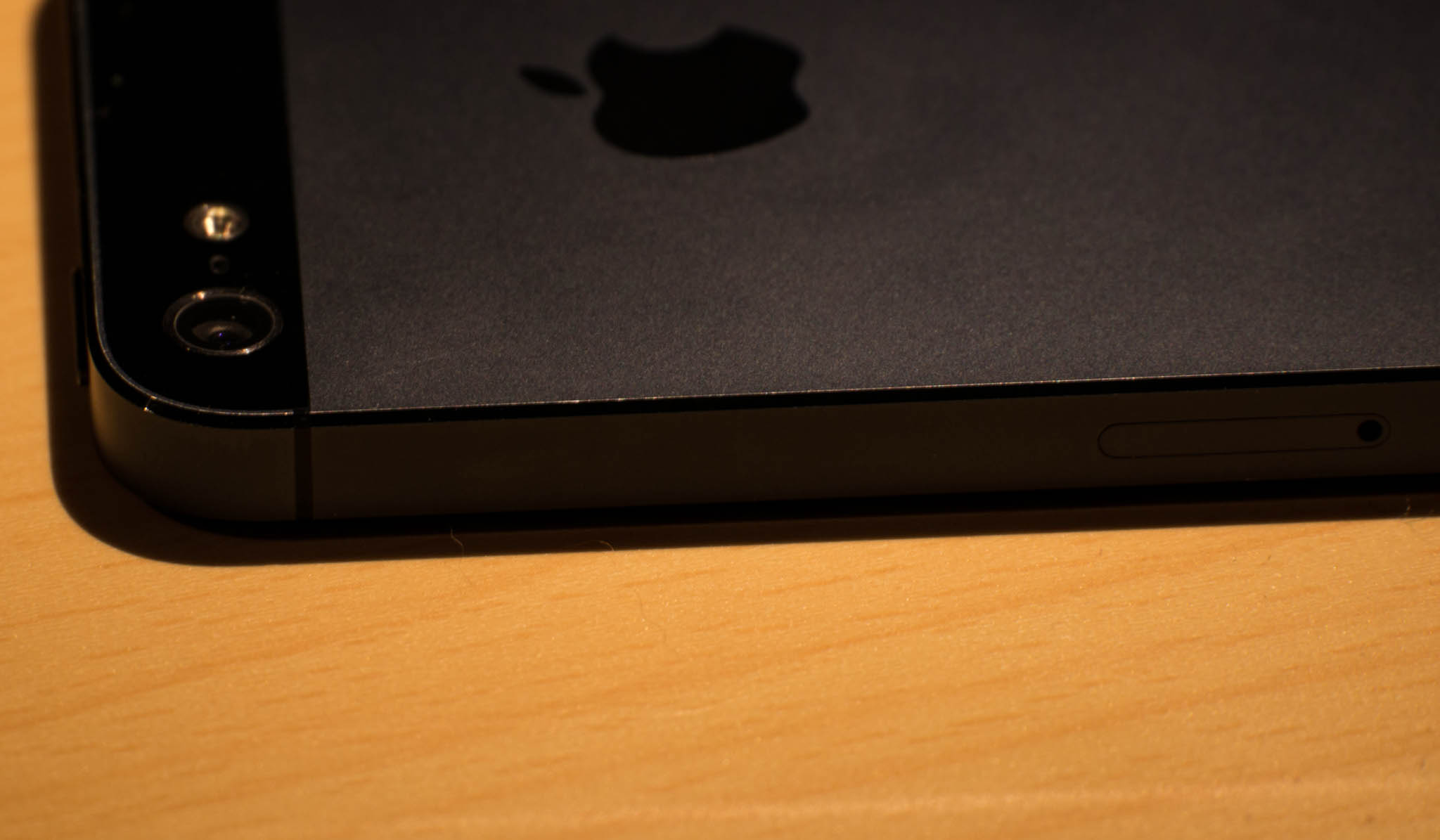
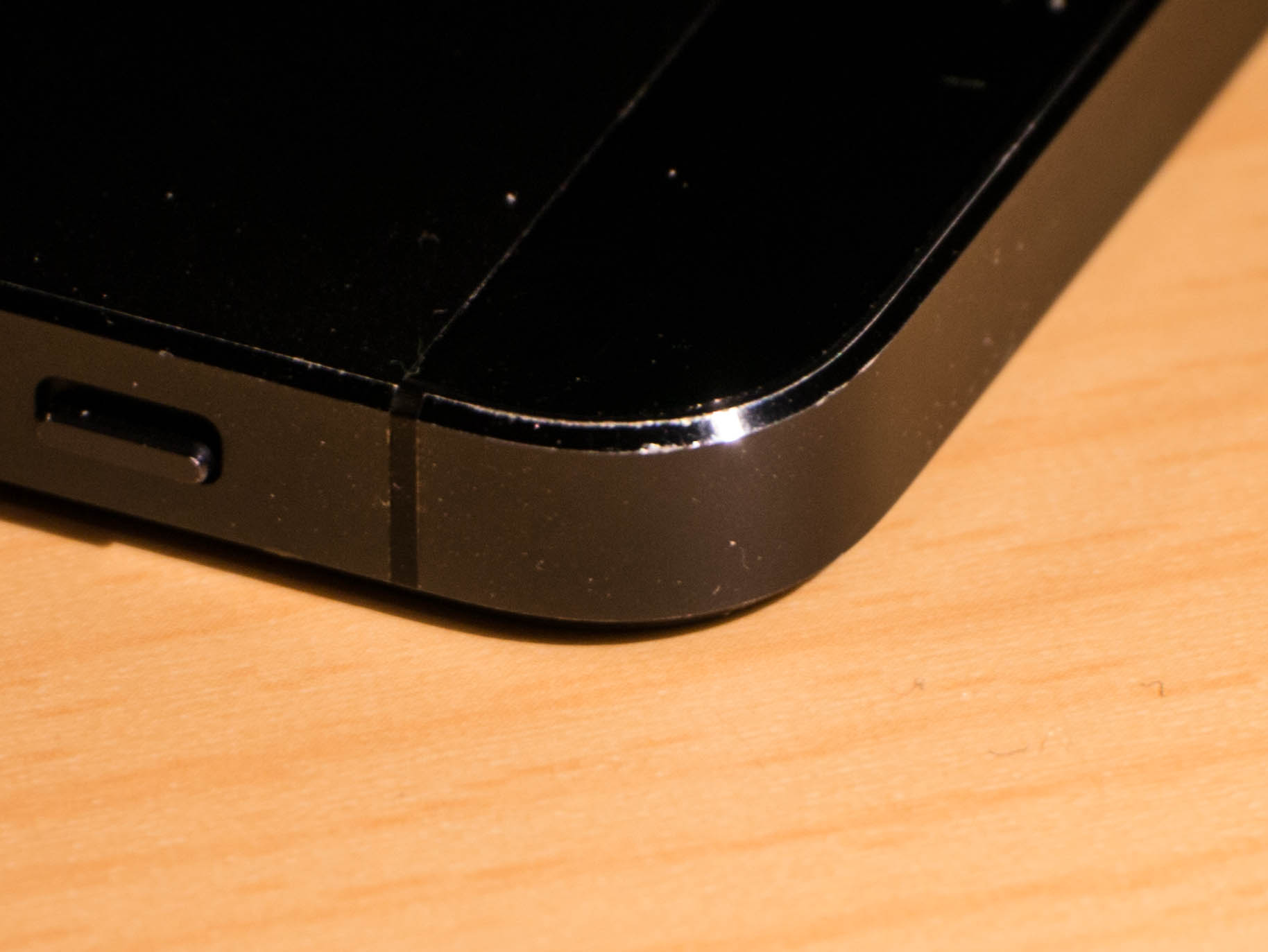
    [I posted, when I received my iPhone 5, that the black model appears to have a nicking issue along the edge band where the metal is actually painted](https://brooksreview.net/2012/09/nicked-black/). This problem has not subsided for me and I know a few people that have taken back their iPhones multiple times over this issue. I use my…

    [I posted, when I received my iPhone 5, that the black model appears to have a nicking issue along the edge band where the metal is actually painted](https://brooksreview.net/2012/09/nicked-black/). This problem has not subsided for me and I know a few people that have taken back their iPhones multiple times over this issue.

    I use my iPhone 5 everyday, keep it in a pocket alone, and never use it with a case, I also don’t baby it when it is out of my pocket. I, of course, take care not to intentionally damage my iPhone, but wouldn’t hesitate to set it down on a rough surface.

    Basically I use the phone, but I don’t abuse it.

    Since September my black iPhone 5 has two cosmetic problems that are unlike those that I saw in the iPhone 4/4S.

    ## Scratching

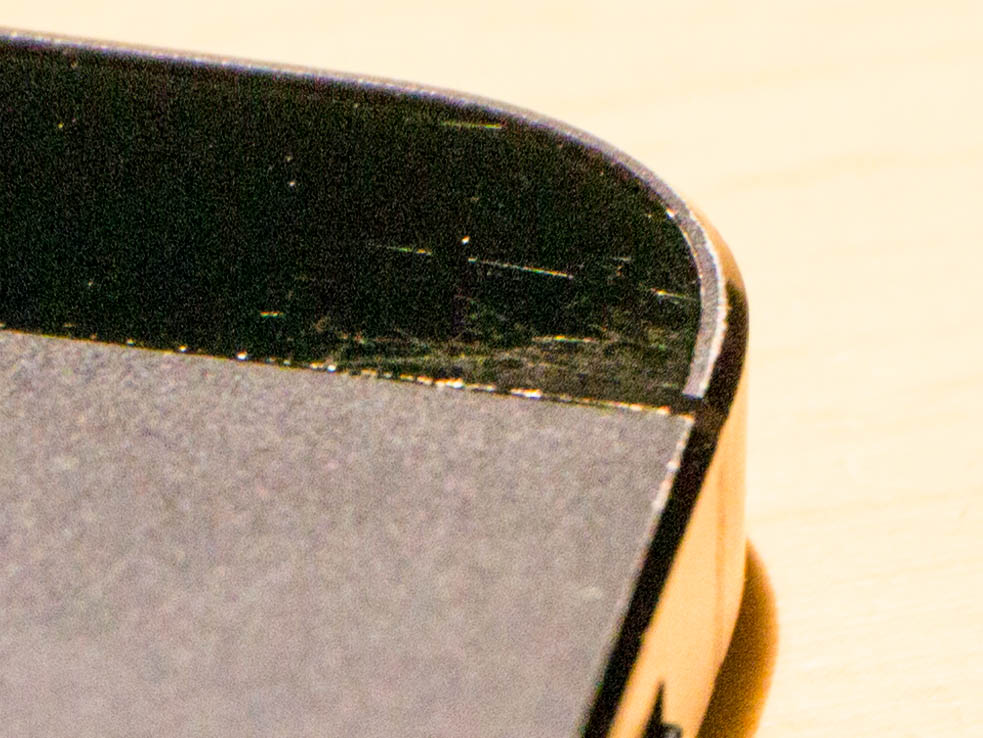
    Scratches in top right corner.
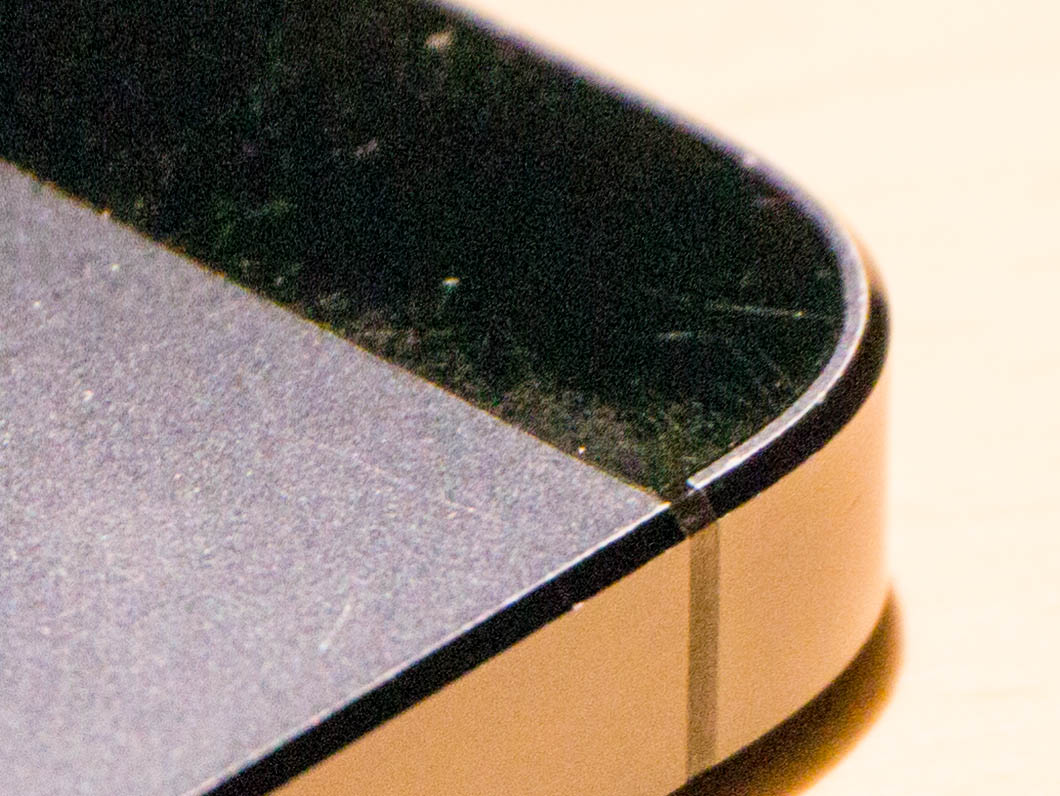
    Scratches in bottom left corner.

    The two rear glass panels on my iPhone 5 have significant scratching in two corners — both corners opposite each other. You can feel that the glass is raised in both of these corners, and flush with the metal on the other two corners (where no scratches exist — this is not something that I caused).

    The pictures you see have been enhanced to better show these scratches, but I assure you that you can see the scratches with your eye under normal light (you just can’t photograph them that well under normal light).

    These scratches don’t bug me that much, but it’s an odd manufacturing misalignment that has led to them.

    ## Nicks


    Well the nicking problem never went away. As you can see from the photos (again enhanced in Lightroom to better show the scratches), the edge continues to wear down specifically in the corners of the bevels. However it is only the very edge of the bevel that gets scratched, which makes it a bit harder to see.

    Overall this is the same issue that any woodworker would tell you is a result of not easing the edges enough. It’s very hard to get paint or stain to adhere properly to a sharp edge.

    ## Verdict

    Get the white iPhone 5 if this sort of thing bothers you. It bugs me, but I knew this may happen when I chose black and I am thus OK with how things have turned out.

    I do hope that with the next iteration of the iPhone these issues are resolved because the black model looks far better than the white.

  • Quote of the Day: Terence Eden

    I did have a quote from Terence Eden, then I found out what a [douchebag he is](https://posts.app.net/2269200).

    I did have a quote from Terence Eden, then I found out what a [douchebag he is](https://posts.app.net/2269200).

  • ‘Why I’m Quitting Instagram’

    [A very smart post from Ryan Block surrounding his departure from Facebook and Instagram](http://bits.blogs.nytimes.com/2012/12/31/126113/): >In my search for technology products and services that somehow enrich or add value to my life, Facebook and Instagram have been a net negative not only in their usefulness, but also in other, subtle ways most people don’t often consider.…

    [A very smart post from Ryan Block surrounding his departure from Facebook and Instagram](http://bits.blogs.nytimes.com/2012/12/31/126113/):

    >In my search for technology products and services that somehow enrich or add value to my life, Facebook and Instagram have been a net negative not only in their usefulness, but also in other, subtle ways most people don’t often consider.

    At the end of his post, Block turns the most often asked question back on people in a very smart way:

    >People wondering what there is to gain by thinning their online accounts sometimes ask: “Why quit?” Instead, I think every once in a while we should all ask ourselves: “Why stay?”

    [I’ve seen, and heard of, many conflicts](https://brooksreview.net/2010/11/facebooo/) that have started because of a stupid Facebook comment, “like”, or “tag”. It’s so dumb to me that at times I have a hard time stopping my eyes from rolling. ((It’s to the point where my wife knows better than to bring up that a fight started on Facebook to me, lest I go off on a 40-60 minute rant about how stupid that is.))

    These [small slights that people perceive](https://brooksreview.net/2011/05/follow/) with online social networking drive me further and further away from services where people are no longer rational.

    I think that is why I like App.net so very much. The paid nature of the service means that users of the service respect what is going on *more* than they do on free services. I’ve had plenty of negative comments on App.net, but rarely are they stupid negative comments like the ones I am used to in my inbox and on Twitter.

  • ‘Keyboard Maestro Macro: Append to Evernote Note’

    [Isko Salminen has written a post about appending your quotes to an Evernote note with Keyboard Maestro](http://iskosalminen.com/2012/12/19/keyboard-maestro-macro-append-to-evernote-note) instead of appending them to a text file, [as I do](https://brooksreview.net/2012/12/km-append-quote/). This is a particularly clever solution because it uses the Keyboard Maestro `Open URL` action to grab the same Evernote note each time. I’m not an Evernote…

    [Isko Salminen has written a post about appending your quotes to an Evernote note with Keyboard Maestro](http://iskosalminen.com/2012/12/19/keyboard-maestro-macro-append-to-evernote-note) instead of appending them to a text file, [as I do](https://brooksreview.net/2012/12/km-append-quote/).

    This is a particularly clever solution because it uses the Keyboard Maestro `Open URL` action to grab the same Evernote note each time. I’m not an Evernote user, but the URL scheme seems like a great feature of Evernote.

  • Delay Standby

    [Erv Walter has a great tip for delaying the standby mode](http://www.ewal.net/2012/09/09/slow-wake-for-macbook-pro-retina/), which kicks in on new retina MacBook Pros and Airs after an hour, to a more reasonable user configurable time. Walter chose 24 hours in his example, personally I went with four hours (14,400 seconds). Standby mode is very annoying when you expect to…

    [Erv Walter has a great tip for delaying the standby mode](http://www.ewal.net/2012/09/09/slow-wake-for-macbook-pro-retina/), which kicks in on new retina MacBook Pros and Airs after an hour, to a more reasonable user configurable time.

    Walter chose 24 hours in his example, personally I went with four hours (14,400 seconds).

    Standby mode is very annoying when you expect to be able to quickly use your Mac, only to find yourself waiting for the RAM to have the data written back to it.

    Which brings me to another thought: why does anyone care about laptop standby times? I doubt there are many people who don’t use their Macs for 30 days and therefore rejoice that the battery will last that long. I get wanting standby time for a weekend, or even 10-14 days for people that go on a long vacation, but 30 days? Seems a bit excessive to me.