Month: July 2011

  • The “Cloud” and “Privacy”

    *This is a reminder.*

    Unrealistic expectations: I think that is probably the best way to describe the general ‘internet communities’ take on Dropbox and the privacy/security woes the company has been facing. I know this to be the case because the fastest way to be the #1 story on the web right now, would be to post about how your entire life was ruined by any security lapse or overreaching policy that Dropbox has.

    “Man has entire life savings wiped out from security lapse at Dropbox.”

    “Women faces lawsuit after incriminating data turned over by Dropbox.”

    Normally it would be fair to say any and all of the following about me:

    1. Picky
    2. Paranoid
    3. Pessimistic

    However in the case of Dropbox I am not paranoid, nor am I pessimistic about their future. I think the biggest problem that Dropbox faces is user education.

    Companies really need to start hitting users over the head with the following information:

    – Bad things happen to good people and good companies. Once the data is out of your control, it is indeed out of your control — be vigilant about what data you let out of your control.
    – In the U.S. the government can and will seize your data through the use of the legal system. U.S. companies **must** comply with this, but you only need be concerned if your are doing something shady. ((Because of that ‘innocent until proven guilty’ thing we got going on I am going with shady instead of illegal.))

    ### Smart Usage

    I took a look through everything that I keep in Dropbox yesterday and I determined that, of all the files I keep there the most sensitive ones are financial files for iBank. These files don’t contain bank account numbers (they could, but I choose not to) so essentially you would just get to see how much money I make and how much *more* money I spend if you hacked into my Dropbox account.

    That is, yesterday you could potentially have seen that data.

    In about 5 minutes I created a few encrypted DMGs with the password saved on my Mac. That adds one extra step (opening the DMG) when I do weekly accounting, yet that one tiny step secured everything “sensitive”.

    Sure, I don’t *want* everything in my Dropbox folder to be public, but if it was to get exposed it certainly wouldn’t amount to anything more than a really bad day.

    With any “cloud” service you run the risk of your data being seen by someone other than you — it doesn’t matter which company is providing the service — this can and will happen.

    If you accept this inherent risk, and you use the services accordingly, there is nothing to fear. So stop freaking out about Dropbox and it’s security — either accept the risks or don’t use the service.

    ### Pondering a Way for a Better Security System by a Guy Who Knows Nothing About Security or Programming

    If you take Dropbox and how it currently works, say you ditch the website version. Once you ditch the website, Dropbox itself (as an entity) has no need to know which files are yours and where those files are, only your computers need to know that information.

    It would be like a giant pool of those gross plastic balls that kids “swim” around in, only each ball is owned by a different person. Each person has marked the balls that they own in a unique way, but only the person that marked the ball knows what the mark is theirs. Thus an individual can find the balls that they own, but no one else would know that those balls belong to them and since all balls look the same, well you get the point.

    Of course the whole thing is kept in a locked cage to keep out puzzle solvers.

    This is security by obfuscation. If you couple this type of routine with what Dropbox [is doing](https://www.dropbox.com/privacy#security), then you have a system that becomes exponentially more useless to would be attackers. That is, you could see my financial “data” above (again without the account numbers) but you wouldn’t have much of a way to attach that data to me.

    This also significantly makes government seizure a more difficult process — if Dropbox literally doesn’t know where, or what is, my data then how could they possibly hand it over?

    No system is going to be perfect, so remember that when iCloud launches.
  • Quote of the Day: Mike Monteiro

    “Because ultimately, people may come for the difference, but they stay for the stuff.”
  • The Doom of Publishing Circa 1982

    Robert Reinhold reporting for the New York Times on a National Science Foundation report from 1982, even then the coming technology was known to represent a massive change for publishers:

    >”Videotex systems create opportunities for individuals to exercise much greater choice over the information available to them,” the researchers wrote. “Individuals may be able to use videotex systems to create their own newspapers, design their own curricula, compile their own consumer guides.

    Fast forward almost 30 years and publishers are only just now realizing what was reported, by a newspaper no less.

  • Capture — the Quick Video Camera for iPhone

    This is a great little app that I have been beta testing for a while now. What I love about the app is how simple it is: tap the icon and the video starts recording the moment the app is launched. I don’t have kids, but I can only imagine this would quickly become a killer app if I did.

    Even without kids in my household this app gets plenty of use — I find that when I want to record something, the built in camera app is consistently too slow to make it worth my while.

    The app is $0.99 and available now — go get it.

    One last note: The app icon, it’s the best icon on my iPhone home screen.

  • Quote of the Day: John Gruber

    “If it works out as they hope, the result is that we’ll wind up thinking of this social network at least as much as we do about web search when we think of “Google”.”
  • Amazon’s Android Appstore, Not So Amazing

    Ryan Kim on Amazon’s Appstore:
    >Romanus said that after the bad review, Amazon lowered the price to 99 cents from $1.50, which was already a 50 percent discount, without explaining why.

    Sounds swell.

  • The Capacitive Button Cult Must Be Stopped

    Lukas Mathis:
    >I think phones have capacitive buttons for the same reason laptops have reflective screens, and TVs in stores have their brightness and contrast turned all the way up. It looks really cool when you see it in a store, and you don’t notice how screwed up it really is until after you’ve already bought it.

    That last bit, it’s spot on.

  • The Email Charter

    The email charter is full of great common sense ideas, like this one:
    >Ending a note with “No need to respond” or NNTR, is a wonderful act of generosity.

  • Dave Winer Deletes His Dropbox Account

    Dave Winer deleted his Dropbox account due to the [ToS changes](https://brooksreview.net/2011/07/dropbox-tos/), and notes this in his post on the subject:
    >To people who say I over-reacted. How could you possibly know?

    I am in the camp that thinks Winer over-reacted, but he is right that I don’t know yet if he did. What I do know is that the challenges that face the privacy and security concerns with Dropbox are the same that all other cloud services face — including Apple’s coming iCloud service and their past MobileMe services.

    When deciding whether to use a service like Dropbox you have to make two decisions before you use it:

    1. You must decide that the company you are going to use (in this case Dropbox) is not “evil”.
    2. You must know that anything and everything you store online could be seen by others, and use the service accordingly.

    If the changes bug you, then delete your account. If you just want to sync some encrypted data (that you encrypted) or some silly text files then use the service knowing that this data is not 100% private.

    I don’t agree with the take Winer has on the ToS, I think they are OK and within the bounds of what the law requires of them — I am not, however, an attorney.

  • WordPress Version 3.2

    A great update featuring a revamped Admin area and a fullscreen editor that is all the ‘rage’ right now.

  • Review: Keyboard Maestro 5

    Peter N Lewis, the creator of my favorite Mac app, Keyboard Maestro, sent me an email — I thought it was just one of the newsletter emails, then I read it — an invite to test out [Keyboard Maestro 5.](http://www.keyboardmaestro.com/main/)

    At this moment the heavens opened up and the sun shown on me brightly through the Seattle rain. Why do I tell you this: so that you, the reader, know that this review is written by a huge Keyboard Maestro fanboy — HUGE.

    ### What the Hell Does it Do?

    I really, truly, struggle to define what Keyboard Maestro (‘KM’) does for most computer users. Simply put, it makes my life very easy. It isn’t a tool for the ‘average’ user, it is a tool for people who don’t like repetition, a tool for people who want speed. There’s a learning curve to the app, but it’s not insurmountable.

    If I find myself doing the same repetitive task over and over, there stands a good chance that I can automate that action with KM, saving me a lot of time. You can do so much more though, that even such a miraculous sounding statement is not doing KM justice. Best just to tell you some of the things that I use KM for.

    #### My Uses:

    – Snap a screenshot using Acorn instead of the Mac’s built in tools.
    – Append a date to file names.
    – Set a click delay on the mouse so I can walk to the printer and load envelopes, then the print button is clicked.
    – [Create a ‘focus mode’ for TextMate](https://brooksreview.net/2011/05/km-tricks/).
    – Connect to a WebDAV server via keyboard in Finder.
    – [Launch Transmit with a shortcut and login to a desired favorite](https://brooksreview.net/2011/05/km-tricks/).
    – Mail the currently selected file with a specific email account (more on this later).
    – Launch various AppleScripts with keyboard shortcuts.
    – [Move selected files to a ‘To Archive’ folder](https://brooksreview.net/2010/12/keyboard-maestro/).
    – Create a new (from anywhere):
    – Blog Post
    – Email
    – iA Writer Document
    – Note
    – OmniOutliner Document
    – TextMate Document
    – Tweet
    – Check OmniFocus at certain times for unprocessed items in the ‘inbox’.
    – [Open my most used apps while closing windows of apps I don’t want to see after they are open](https://brooksreview.net/2010/12/keyboard-maestro/).
    – Paste current clipboard in plain text.
    – Running various Automator workflows with a keyboard shortcut.
    – [Super Quit](https://brooksreview.net/2010/12/keyboard-maestro/) (quits all open applications).
    – [Open Terminal and SSH into my servers](https://brooksreview.net/2011/05/km-tricks/).
    – [Create a Markdown style link from any app just like MarsEdit does](https://brooksreview.net/2011/03/mad-links-km/).
    – Center Reeder every time I switch to it.
    – Create a link blog post (more on this in a bit).
    – Grab current Safari URL and add it to the clipboard as a markdown formatted link with current window title as the linked text.
    – Create a quote blog.
    – Resize my Safari window to my preferred size.
    – [Move Twitter for Mac back to the perfect location on my screen](https://brooksreview.net/2011/05/km-tricks/) (I am forever accidentally moving that window).
    – Send current Writer document to TextMate for posting.

    That’s 30 things that I use KM for almost everyday and it’s not even all the macros that I have set up. It is crazy to think how much tedious work this program has saved me and I am forever thankful for it.

    ### KM 5

    With the release of [Keyboard Maestro 5](http://www.keyboardmaestro.com/main/) the software gains the following very awesome features (only the highlights as I see them):

    – Control Flow
    – Variables
    – Calculations
    – Undo-Redo

    If you aren’t a KM junkie that list may seem pretty underwhelming, but I assure you that the second item on that list is huge for KM and that is what I want to talk about the most. (The others are excellent features, but I haven’t found good uses for them just yet and I didn’t want to reach to find a use for them just to write about.)

    #### Variables

    For me the biggest addition is variables, which allows you to ask the user for input and output it in specific areas without having to rely on clipboard history. Meaning that making more complex macros just got a whole lot easier.

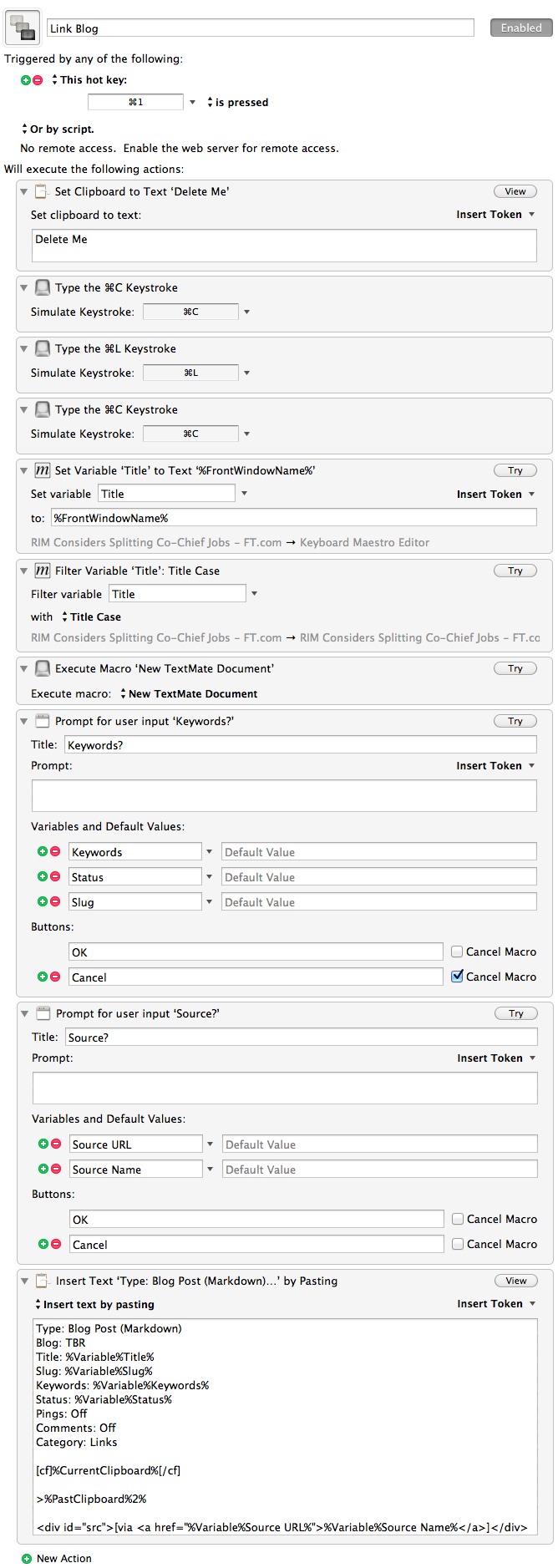
    Best just to show an example workflow. I mentioned above that I use KM to post linked posts to this blog, [here’s how I did it in the past](https://brooksreview.net/2011/03/cmd-one/) — now the process is much more automated. Here’s the process:

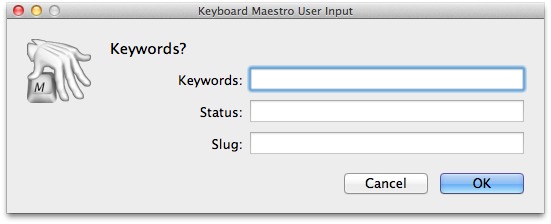
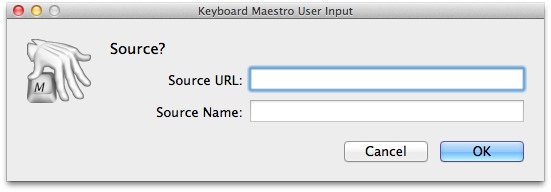
    The key here is the variables, which as I have them implemented present dialogs like this:


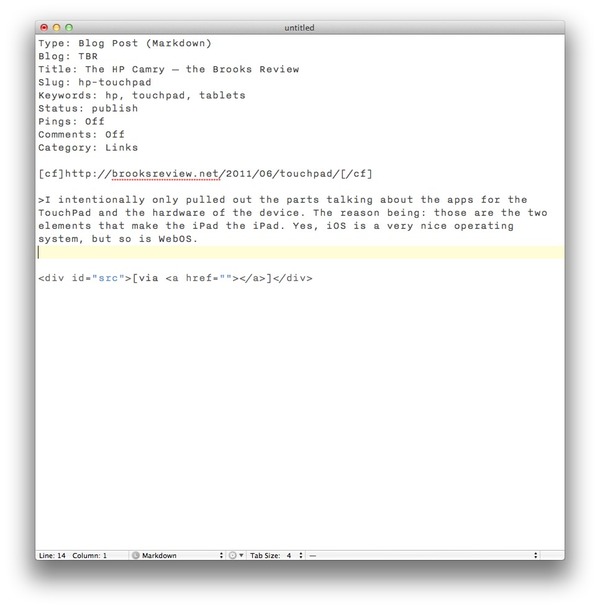
    When it is all said and done I get a TextMate document that looks like this:

    [](https://f3a98a5aca88d28ed629-2f664c0697d743fb9a738111ab4002bd.ssl.cf1.rackcdn.com/km-post.jpg)

    Pretty neat, right? I was able to do this before, but I had to click around and fill out the different ‘fields’ in TextMate, now all I need to to is add my comments and publish.

    ### Workflow, Mastered

    The way I like to think about Keyboard Maestro is that it is a way for me to master my workflow — to command it — so it doesn’t command me.

    Keyboard Maestro makes your computer work for you, not the other way around. It is one of the five best apps I have ever used on my Mac, hell on any device period. It is that good — be warned though, there is a learning curve with this software, but I believe the payoff is well worth the time spent getting to learn it. KM 5 also comes with a library of macros to get new users started.

    ### Learning, or How to Think About Macros

    Showing you everything that I do isn’t likely to be that helpful to you — we all work differently. I show you my workflows and tell you about things that I do in hopes that I will be able to spark an idea of how you could use KM — there is more than one way to do things.

    When I start to set up a new macro in KM here is how I work through getting the macro set up (I share this to help, if I can, you get going with KM):

    1. Defining the end result that I want to achieve. (e.g. Creating a TextMate document formatted the way I want to be, pre-populated with certain information.)
    2. Next I work through the steps that I would have to manually take to do this, noting along the way the areas that I would want to enter in specific data. (e.g. A file name or date.)
    3. I then set up the new macro in KM starting with a name and hotkey. This is done so that I an can quickly test the macro as I go along.
    4. Next I start to try and replicate each step in KM using the provided actions.
    5. If I can’t do something with the actions KM gives me I go into the app I am interacting with (e.g. TextMate) and see if there is a menu item, or something that I provided that I can call on.
    6. If I am still short on an action I move to Automator to see if it can do what I want.
    7. Still having problems? Time to look for solutions via AppleScripting on DuckDuckGo.
    8. Still issues? Time to dive into the command line and shell scripts.
    9. Button it all up.

    That’s less than ten steps that will take a look of planning, but hopefully pay off in spades. There has only ever been a few things that I couldn’t get accomplished with KM, kudos on version 5 — it is a great step forward.

    [Go get it](http://www.keyboardmaestro.com/main/), it’s $36 for new users or an $18 upgrade for current users.

  • [SPONSOR] Verbs

    Verbs, Simple instant messaging. Verbs is hands down the best IM experience on iPhone & iPod Touch. It’s fast, beautiful and it just works. Flick through chats with Safari-style previews, or tap and hold the page indicators to quickly swipe through them.

    With support for CloudApp and Droplr, you can view Images, PDFs, Office and iWork documents within Verbs. See your friends, your AIM buddies and your Google contacts in a unified buddy list. Verbs supports a wide variety of instant messaging networks, so you can chat to all of your friends anywhere you go.

    Verbs is currently on a ‘Fourth of July’ sale for $0.99.

  • The Dropbox Terms

    Over at the Agile Bits blog, Jeff does a great job breaking down the changes to the Dropbox terms of service:

    >The bottom line is that there is nothing in these Dropbox Terms of Service that gives them the right to do anything with your data that you don’t ask them to do. (The one exception is in the paragraph of the Dropbox privacy policy which states that they will comply with law enforcement requests for data stored on Dropbox.)

    I find the take to be pretty accurate, but I would say the bottom line is actually this: don’t keep anything that you don’t want other people to see in Dropbox, unless it is encrypted.

  • LaunchBar 5.1

    A great update to the best launcher you can get for Mac OS X. From the release notes:

    >The “Hide Dock Icon” option will now be preserved across updates, provided that the update gets installed via automatic software update.

    That’s a welcomed change.

  • Apple’s Latest Weapon Against Android: Nortel’s 6,000 Patents

    Ed Sutherland:
    >Translation: the patents are all aimed at hobbling Android, which along with Apple has eaten telecom veterans such as BlackBerry-maker RIM for breakfast, lunch and dinner. “The consortium will go out and seek to make a return by prosecuting the other people, particularly the Android camp,” predicts one analyst.

    Sorry I don’t buy this thinking for one second. The people Behind this purchase (mainly Apple) isn’t out to sue the pants off of any one — they don’t need to because they are already winning. This is a defensive move, it is a move that says: suing us for patent B.S. would be a very bad idea.

    Sutherland sums it up nicely:

    >As Apple and Android fight for smartphone marketshare, the Nortel patent library may become important as the struggle potentially moves from retail shelves into courtrooms.

    I for one am glad that these analysts that get quoted aren’t running things.

  • Hoban Cards

    My thanks again to Evan Calkins and Hoban Cards for sponsoring this weeks RSS feed. Evan makes some very nice calling cards at an amazing price.

    I like my calling cards so much that I have a hard time giving them out. You will too, I mean is *everyone* worthy of getting such a nice card from you?

    Just go order a few boxes.

    *Be sure to also check out the [custom letterpress work](http://www.hobanpress.com/) he does.*

  • Elliot Jay Stocks: First Impressions of Google Plus

    Elliot Jay Stocks on the ‘plus’:
    >Firstly, one of the reasons Plus is so appealing right now is because it’s not populated by the world and his grandmother — remember how much more fun Twitter was in the quieter, earlier years? — and once the unwashed masses step aboard, Plus will surely cave to their more generic needs. In all likelihood, it will become noisey, both in terms of visual clutter and content (see also: Facebook, Twitter, MySpace, etc.).

    I honestly doubt it ever gets to that user mass, most people don’t have a need for multiple Facebooks — thus ‘plus’ would need to prove that users would be better off with Google than Facebook, which I don’t see happening. People are just too content with Facebook to move.

  • Which Boss?

    Paul Taylor reporting for the Financial Times:
    >Responding to the letter, RIM said it was difficult to believe an employee would write anonymously, rather than address their concerns directly to the company.

    I bet the employee just didn’t know which CEO to address the concerns with.

  • Quote of the Day: Anonymous RIM Executive

    “Strategy is often in the things you decide not to do.”
  • 7 Things RIM Must Do to Survive

    Number 6 from Jim Dalrymple is my favorite:

    >Stop making stupid promises. Mike and Jim are full of stupidity. I’ve never seen CEOs make so many stupid statements as these two did in the months leading up to the launch of the PlayBook.

    RIM is all sorts of stupid right now and that starts at the top of the company.