Month: January 2012

  • Secondcrack

    Marco released his new blogging platform: secondcrack. The readme is comprehensive, but this bit in the FAQ is my favorite:

    >**Why should I use this instead of [existing solution]?**
    >I don’t know. You probably shouldn’t.

    I’m holding off for a bit on using it, but mostly because moving this site will be a lot of work.

  • Fanboy Theory

    Marco Arment on the use of the term ‘fanboy’ and writing opinions:

    >This is one reason why so many big publishers are so opinionless and seem to like everything. Saying you don’t like something, or that any choice is clearly the best for most people, will cause enough people to stop listening that the precious metrics that pay the bills might decrease.

    It always comes back to money doesn’t it?

  • One in 124 Seattleites Uses a Kindle Fire

    The funny part about this story is that it amounts to *only* 4,543 Fire tablets. Firstly I think they are only counting the Seattle proper population and am skeptical about these numbers.

    More importantly the last and only Kindle Fire I have seen out and about in Seattle was the one *I* owned and sold a while back. *Seriously*.

    Lastly most of this data is coming from within a mile of Amazon’s HQ — yeah.

  • The Commenting “Debate”

    MG Siegler:
    >If you’re saying something that you think is great, why would you want to do it as a comment on another site anyway?

    Great question.

  • iPad + Keyboard or MacBook Air?

    I have had an iPad since day one and up and until last week I had never once attached a keyboard to either of my iPads. I simply never saw the point and wasn’t the least bit curious.

    Then [two](http://technologizer.com/2011/12/05/how-the-ipad-2-became-my-favorite-computer/) [writers](http://www.zdnet.com/blog/mobile-news/ipad-2-as-a-serious-writing-machine-how-to/5964) came out and started talking about using an iPad 2 as their writing machine — [attaching various keyboard contraptions to them](http://www.macworld.com/article/164210/2011/12/macworld_buying_guide_ipad_keyboards.html). This had me intrigued, as I previously just used the on screen keyboard — which I know I am slower on, but it doesn’t require any more space.

    Then Dan Frakes had to go and post [that mega-guide for Macworld](http://www.macworld.com/article/164210/2011/12/macworld_buying_guide_ipad_keyboards.html) of all the different iPad keyboard options out there. That’s when I saw it: the Origami Workstation. I really wanted it when I saw it.

    After all I have several Apple Wireless Keyboards, it’s my favorite keyboard, and the Origami didn’t add extra bulk to the iPad since it didn’t actually connect to the iPad.

    I bought one to check it out.

    In short I am very happy with this little keyboard case, but I am not sure if it is better than just taking my MacBook Air (more on this later).

    The Origami Workstation is a solidly built case. It is more than rigid enough to place in your lap and type away on. The iPad isn’t locked in, but also never felt as though it was about to tip out of the stand when on my lap.

    This case does add bulk to the Apple Wireless keyboard, but not an awful lot. In fact, I actually never realized how much bigger the Wireless keyboard is than the iPad 2 until I wrapped it in the Origami and packed them in my bag — and that’s certainly not the fault of the Origami.

    There’s only one complaint I can lodge about the Origami case: velcro. Essentially you snap the battery compartment of the Wireless keyboard into a bit of plastic and friction holds it in place (and does so really well). The case covers the entire bottom and top of the keyboard — not the sides.

    To secure the top flap over the keyboard you have two velcro tabs that further wrap around the front of the keyboard. These tabs are also used to transform the case into a stand for your iPad. While the velcro holds fantastically well — I despise velcro.

    To me velcro is just a more civilized version of duct tape.

    It’s noisy and bulky — fully inelegant. I loathe velcro.

    Yet I don’t have a better solution that would hold as well as velcro, so I give this a passing grade — just barely.

    The Origami Workstation does just what it says it will and I have no real qualms with the product (outside of velcro) — what’s more interesting to me is the usage of the iPad + keyboard setup.

    ### Keyboard + iPad

    I tried to pair my Apple Wireless keyboard and it failed the first time. Worked on the second, but now I was afraid that using the keyboard with the iPad would prove extremely disappointing.

    I had 30 minutes to spare, a chair without a desk or table, a review to write and a case to test. I opened iA Writer on the iPad and got to the task at hand.

    Forty-five minutes later I realized I was running late and had written a ton.

    The ideas were flowing.

    Later I cleared my email inbox writing typo-free replies. I worked some more on that review and lost track of time because I stayed on task.

    That may be the best summation of the iPad + keyboard combination that I can give — but it has nothing to do with the case and everything to do with one missing shortcut: `CMD + Tab`. I couldn’t figure why I was more focused on the iPad, then I realized it is actually quite a pain to switch apps on the iPad.

    I am a huge user of `CMD + Tab` on my MacBook Air — it might just be the most used shortcut on my Mac. It is also the most distracting shortcut, taking me away from writing to Twitter and Reeder.

    The disconnect of having to reach up to the iPad to switch apps, instead of doing it on the keyboard, is what makes it such a fantastically focused writing device for me. It certainly is just as good with the on screen keyboard, but by adding in the external keyboard both my accuracy and speed increased significantly — as did my confidence.

    It’s truly a fantastic experience, but not to the point where I am about to go all iPad all the time.

    ### iPad + Keyboard or MacBook Air

    This is the real conundrum for me. Carrying my iPad 2 with Origami case is no different than carrying my MacBook Air — from weight and room in my bag perspectives. The only difference is that I have the option of *just* carrying the iPad 2, sans keyboard, if I so choose.

    The question then becomes: do I take the iPad 2 and keyboard on trips, or the MacBook Air and iPad 2 (since I can’t seem to leave the iPad behind)?

    I really don’t have a good answer to this. My mind tells me that, logically, I can do most everything I will want to do with just the iPad. My heart though can’t stand the notion of leaving behind the MacBook Air.

    Truth be told I could probably go on vacation and only bring my iPhone and remain perfectly happy and productive, but that doesn’t help me solve this *other* problem.

    No matter what I do I seem to have my mind made up that my iPad 2 must travel with me — nothing can beat it when you are on a plane, or in otherwise cramped areas.

    That means the decision is really between bringing my iPad 2 and Origami, or my iPad 2 and MacBook Air.

    I have put off writing this post because I don’t have a good answer to this question — and I couldn’t suss out why I didn’t have a good answer. Today, though, I finally figured it out: Amazon S3.

    There’s three critical things I need to be able to do when away:

    1. Remote login to my property management server.
    2. SSH into the TBR server.
    3. Post new content here.

    One and two are no problem for the iPad 2 — but surprisingly it was number three that I have trouble accomplishing. I can certainly post links and text, but it is when I want/need to add in an image to a post that things really start to become troublesome if all I have is an iPad — and that is because I choose to host all images on Amazon S3. ((This makes server load times faster and keeps the site up under extreme traffic.))

    There simply is no good way to upload an image to Amazon S3 and then set it public and grab the direct URL to that image. I have tried just about every Amazon S3 client I could get my hands on: all of them suck.

    I can do it, but it means using two apps — both of which are incredibly horrible to use. I have to use one app to upload the images — one at a time — then a second to set each file (individually) to public. Then generate a time sensitive URL to email for each image, but copy out just the normal bit of the URL.

    All in all: it’s a horrible experience.

    Until that experience changes I will be toting the MacBook Air.

    While it is not as lightweight, I can do pretty much everything on it much faster and with far less friction than I can with the iPad 2 and a keyboard.

    I do hope that changes, but for now it is a major stumbling block.
  • Components

    Matt Drance:
    >Not only is Apple more dependent on Samsung than we had previously thought, but we now know that *Samsung has access to A5 schematics*. This is proprietary technology designed in-house for products that make up as much as 70% of Apple’s revenue, and it’s in the hands of a competitor whom Apple is suing for patent infringement. It’s got to be driving Apple nuts.

  • Foot Meet Mouth

    Paul “Supersite” Thurrott:
    >I don’t want to reveal more, and I’ve been sitting on this information for weeks so that Microsoft can make its big announcement at CES this coming week.

    In other words: Thurrott does as Microsoft wishes, not what is best for his not-so-super site.

    See also: Matt Mullenweg’s take.

  • The Master of Information Systems Management degree from Carnegie Mellon University

    Carnegie Mellon University’s Master of Information Systems Management (MISM) degree with a Business Intelligence and Data Analytics (BIDA) concentration is developing an elite set of graduates cross-trained in business process analysis and skilled in predictive modeling, GIS mapping, analytical reporting, segmentation analysis, and data visualization.

    Students in the MISM-BIDA program acquire the skills to integrate cutting edge information and analytic technology practices with applied business methods. The program features world-renowned faculty teaching a cohesive blend of data analytics, management, strategy, and IT courses. It is this unique mix that makes our graduates highly valued by corporate recruiters. Our MISM graduates have a ten-year track record of receiving highly competitive employment offers from financial service firms, consulting companies, technology agencies and start-up organizations.

    Learn more at [Carnegie Mellon Heinz College](http://click.syndicateads.net/2012/01/CMU/brooksreview.html).

  • ‘Allows Photographers to Add Goofy Grins’

    David Zax reporting on the new Samsung DV300F point and shoot that he feels might bring point and shoots back into relevance:
    >There are also some “fun features,” to borrow a press release’s language, including a function that lets you insert one picture inside of another (not something I’ve ever personally felt inclined to do), and another one called “Funny Face” that “allows photographers to add goofy grins, comical noses or even crazy eyes to shots of friends and family in eight different modes.” The camera comes to stores in March.

    The use of the word “photographers” in this instance might ((It is.)) be a stretch.

    >The most interesting features of the camera are those dual screens and the built-in Wi-Fi; cameras have tried one or the other, but this is the first to combine both in one device, says CNET.

    Woah, no way? Really? How much? $199. Not bad, does it make calls and have apps? No. Really?

    Why are you telling me about this?

  • Yahoo Names PayPal Boss Scott Thompson as CEO

    Sounds like great news to me… for PayPal.

  • What SOPA Does…and Doesn’t Do

    Interesting look into SOPA over at *The Next Web* and a must read if you have any interest in the powers that SOPA grants the government.

  • ‘Rip Off Drunk People’

    Felix Salmon on iPhone controlled Uber cabs:
    >Uber loves to explain its surge pricing with fancy supply-and-demand curves, but you could call it a “rip off drunk people” strategy too. Mulligan has ideas about how Uber’s software could be improved: at the very least, it should display the current minimum fare prominently, rather than just the current multiplier.

    I’ve never used the service, but as Salmon points out they *start* at roughly twice the price as a normal cab.

  • CEO of the Year

    Om Malik:
    >Anyway, if you twisted my arm and made me pick CEO of the year for 2011, I know one thing for sure: It wouldn’t be Larry Page.

    It’s just a poor pick all around. And I agree with Malik that Cook isn’t a good pick either — too short of a sample size and luck/momentum plays a lot into it.

  • ‘How Samuel Palmisano of I.B.M. Stayed a Step Ahead’

    Steve Lohr writing about IBM’s exit from PCs and HP’s double down on PCs:

    >Today, I.B.M.’s stock market value, at $217 billion, is more than four times that of the struggling H.P.

    This is a great story about the smart moves IBM made to stay relevant and how they are now using that strategy to woo young talent to the company, largely by saying:

    >The pitch, he says, is that I.B.M. is a place where you can make a difference and do deep science.

    I also love the fact that as part of crafting a new strategy, Palmisano sat down and read old speeches from Thomas Watson Sr to get a better sense of what the company was meant to be.

  • Quote of the Day: MG Siegler

    “So why is the situation so shitty? Partially because for all the promise of Android disrupting the mobile game, Google has essentially just been turned into the carrier’s and OEM’s bitch. “
  • What iMessage Did to Neven Mrgan’s Text-Messaging Usage

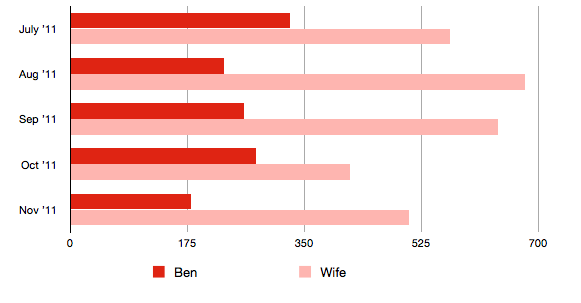
    That’s a huge drop. For comparison here’s what iMessage did to our family’s text message usage:

    It’s important to note that I was using iOS 5 since July, but that not many others were that I would normally text with. Also as you can see we didn’t have nearly as dramatic of a drop off as others had, yet we do text with a ton of iPhone users.

    I noticed that in late November and early December a lot more blue bubbles started to pop-up. That is, I believe, people are just now moving onto iOS 5 — these text numbers should keep dropping.

  • ‘I am done with the Freemium Business Model’

    Tyler Nichols:
    >Free customers are higher maintenance than paying customers.

  • ‘Gradually, Then Suddenly’

    A fantastic take by Larry Downes on why Best Buy is going to fail:
    >The reasons for the company’s dwindling prospects are easy to find. Just walk into one of the company’s retail locations or shop online. And try, really try, not to lose your temper.

    This is a long post but, as far as I am concerned, it is a must read.

  • Misconceptions About iOS Multitasking

    Fraser Speirs lays it out:
    >If someone tells you that all the apps in the multitasking bar are running, using up memory or sucking power, they are wrong.

    A really great post with some superb information about how background apps work in iOS. I have never once tried to “manage” which apps are in the multitasking tray, but I have heard tons of people advise others to “quit” some apps.

  • 21st Century Manners — or the Lack Thereof

    A nice rundown of a few things that really bug me by Armin Brott. I largely agree with everything said, but the dinner texting/phone call situation is a tricky one.

    I fully agree that if you get a phone call you can answer it at the table, but only if you intend to excuse yourself immediately after saying something like “Hi, hold on one second.” Being in my profession means that there will always be a work phone call while you are around family and friends — I always try to excuse myself and go in the other room to take the call.

    For texting, I don’t mind it that much if you tap out a quick message and put the phone away — unless you do so while we were in the middle of a conversation (e.g. we were the only ones engaging, not one person talking to the “group”). Of course this shouldn’t be done if you are on a date or in a very formal setting.

    Checking sports scores is fine if you are in a bar, everywhere else you just look douchey. Twitter? No. Facebook? No. LinkedIn? Knock yourself out, dumb ass.