Automatically Clear the Full Log of Your Mac Download History

[Last week I saw this post on the Mac OS X Hints site](http://hints.macworld.com/article.php?story=20120717025305161), and I was concerned. I had no clue that your Mac kept a full log of your download history. I know I am more paranoid than most, but hey, even Mac OS X Hints recommends clearing it out. It’s a quick terminal…

[Last week I saw this post on the Mac OS X Hints site](http://hints.macworld.com/article.php?story=20120717025305161), and I was concerned. I had no clue that your Mac kept a full log of your download history. I know I am more paranoid than most, but hey, even Mac OS X Hints recommends clearing it out.

It’s a quick terminal command, but I’ll never remember to do it.

Instead I created this Keyboard Maestro macro to clear it for me:
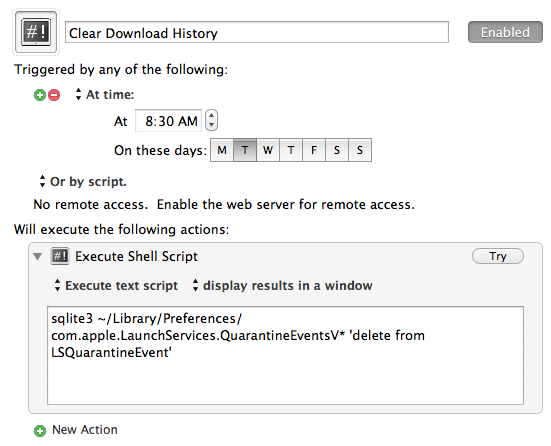
The simplest macro I have I ever created.

Now it will always be cleaned out, without me ever having to think about it.

[You can download it here](http://c276381.r81.cf1.rackcdn.com/Clear_Download_History.kmmacros.zip).

This website makes use of affiliate links whenever possible, these links may earn the site money by clicking them.


Discover more from The Brooks Review

Subscribe to get the latest posts sent to your email.