J.D. Tuccille on the TSA:
>But necessary evil or not, it’s increasingly apparent that the TSA is spectacularly inefficient and inept at everything it tries to do.
Great article rounding up most of what is hilariously wrong with the TSA.
J.D. Tuccille on the TSA:
>But necessary evil or not, it’s increasingly apparent that the TSA is spectacularly inefficient and inept at everything it tries to do.
Great article rounding up most of what is hilariously wrong with the TSA.

Dark Sky is a new kind of weather app. It uses state-of-the-art
weather forecasting to predict when it will rain or snow — down to the
minute — at your exact location, and presents it to you alongside the
most beautiful radar visualizations you’ve ever seen.
[Now only $3.99 in the App Store](http://darkskyapp.com/?ref=brooksreview#go_to_app_store).
Dan Benjamin shares his thoughts on *The Talk Show* leaving 5by5. Sometimes a scandal, just isn’t the scandal that the Internet [wants it](http://www.candlerblog.com/2012/05/18/where-did-the-talk-show-go/) [to be](http://www.quora.com/The-Talk-Show/Why-did-John-Grubers-The-Talk-Show-switch-podcast-networks).
I used to have a 45 minute commute and Dan & John were a large part of keeping me sane during that commute — thanks to both of them for a great run and a great show.
As for the *new* *The Talk Show* — I look forward to [checking it out](http://muleradio.net/thetalkshow/).
**Update:** [Richard Heath says I got it wrong](http://space36.com/a-few-words-about-the-talk-show), not the Internet. John Gruber has commented on the matter twice, basically saying he moved over business disagreements. What I don’t think you can do is to read into Gruber’s comments as much as many people are reading into them. Business agreements can be about more than just money (not often) and by assuming that was the reason — well — you are also making assumptions about a persons character. Maybe I am wrong, maybe not.
What I think still stands: this is not the scandal that the internet was hoping it would be.
I forgot to link to this after last week’s B&B podcast, but this iPhone laser tag gun looks downright awesome.
I have been using the `WP to Twitter` plugin for WordPress for a long time now — I much prefer it over Twitter Tools because it works faster and lighter. Not only that, but I can easily customized the tweet and automatically post “updated” tweets when I edit a post.
There has been one problem with my site and `WP to Twitter` — it posts the tweet before the database cache is done updating and because of that Twitter users often read the post before the server had a chance to flip around the linked list URL. So essentially Twitter users often think there is no link to the linked list post, instead just an endless loop. Whenever this happens I have to dump the cache, not hard, but annoying.
The biggest feature (for me) that WP Tweets Pro brings: a delay setting for the Tweets. Now all TBR tweets will be delayed by one minute, thus (hopefully) solving all my problems. This plugin also has some other cool features, and for $25 — why not.
Chuck Skoda on the Facebook IPO:
>Someone could be building something right now, in secret, that could obsolete Facebook. Software is ‘soft’ for a reason, it can change fast.
Some really smart points. Facebook’s massive user base does not mean it can outlast a good competitor,that could be launched tomorrow, by default. It’s going to be interesting to watch them.
Dustin Curtis:
>Basically, every time you visit a site that has a follow button, a “tweet this” button, or a hovercard, Twitter is recording your behavior. It is transparently watching your movements and storing them somewhere for later use. Right now, that data will make better suggestions for accounts you might want to follow. But what other things can it be used for? The privacy implications of such behavior by a company so large are sweeping and absolute.
That’s pretty shitty of Twitter if I am honest. I have been using the embedded Tweets and the follow buttons on this site without knowing that Twitter did this. So I am sorry about that. I took some time this morning and removed those embeds everywhere I could find, if you see one shoot me the URL of the post and I will remove it.
iPhone Laser Tag.
Also, due to a screw up on my end, the show didn’t get recorded as normal and so a big thanks are owed to Sean Sperte and Chris Wahlmark because without them we would not have a show to post this week.
Free until May 20th, which means you need to go download it now.
>Introducing DropKey. The hassle-free way to encrypt your files.
>We all send a lot of files. Whether it’s in Mail, with iChat, or even sharing them in Dropbox, files are still a huge part of our daily lives. Sadly, we haven’t had an easy way to make sure they can only be opened by the people they were intended for.
Now are you convinced?
Lex Friedman listing off some items he would like to see in iOS 6, mentions a great feature that I had never heard of:
>Some iPhone competitors offer a clever feature for conserving battery life: They use geolocation to figure out where you are, automatically enabling and disabling the Wi-Fi antenna when you’re away from a known hotspot.
Mark me down as someone who thinks this should be an iOS feature — sounds great.
Nick Bilton reporting on Twitter:
>It announced Thursday that it is joining Mozilla, the maker of the Firefox Web browser, and giving its users the ability to opt-out of being tracked in any way through Twitter.
Nicely done. Here’s hoping more web browsers and service adopt the ‘Do Not Track’ system.
So the data cap is now at 300GB from 250GB. That’s good, but it also sounds like this is not a firm cap and that if you should go over it you pay $10 for every additional 50GBs.
Ok, I have no problem with that, but a real question. In the past Comcast banned users that consistently went over the 200-250GB cap, so does this mean that you can use as much data as you want — so long as you can pay for it?
If so, I think that is great (or I should say, better).
Tim Bradshaw (whom FT wants you to know is in London, for some reason):
>The deal, which includes new funds from existing backers Andreessen Horowitz, Bessemer Venture Partners and FirstMark Capital, values Pinterest at about $1.5bn, putting the image-led “curation” site among the world’s hottest young internet companies.
That seems crazy right?
Not when you take a look at [this infographic from Shopify](http://www.shopify.com/infographics/pinterest) (hat tip to [Panzer](https://twitter.com/mpanzarino/status/203156438443507713)).
There are three key things in that infographic:
1. Pinterest already drives the same amount of referral traffic as Twitter.
2. Buyers from Pinterest spend (on average) 10% more than buyers from other social networks.
3. The average Pinterest order is twice that of the average Facebook order.
That means Pinterest has a huge and growing user base that is actually *willing* to spend their money. That is way more valuable, in my mind, than anything Facebook has. If Pinterest keeps this up, they will be the better investment.
Speaking of…, oh wait I don’t have a good segue. I am now directly selling the RSS sponsorship spots once again, so get in touch if you are interested in reaching the most discerning readers on the web.
This app might win the award for most clever app name of 2012. [Bang On](http://itunes.apple.com/us/app/bang-on-a-nice-search-app/id521507324?ls=1&mt=8) is a DuckDuckGo search app for your iPhone that will set you back $1.99. Say what?! Doesn’t DuckDuckGo already have a free search app? Yep, it does — Bang On is better.
When the developer of this app contacted me to ask if I would beta test it, he told me something along the lines of what you see in the app description:
>Ever wanted to say “search for Bob Dylan on Pandora” and have it work? Yeah. Bang On does that.
Huh. I don’t use Pandora, but now I am intrigued.
Bang On uses DuckDuckGo’s `!` syntax to search specific sites. Now that can be a pain to type, so Bang On has hot keys that you can tap to add in these syntaxes. This is neat, but not Earth shattering.
Where Bang On shines is in two areas: customization and voice.
### Customization
With Bang On you can setup custom `!` bang searches that are not a ‘normal’ part of the DuckDuckGo search engine. For example this site isn’t a part of the DuckDuckGo bang search syntax, but in Bang On, it is. So you can type: `blue icons !brooksreview` into Bang On and it will result in a Brooks Review specific search for blue icons.
That’s pretty cool, but of course I am not naive enough to assume that you want to search this site all that often. I do however, bet there is more than a few sites that you want to search often though, and with Bang On you can create a custom bang to do just that.
### Voice
The second cool feature is voice support (iPhone 4S only). When you hit the dictation/microphone button on iOS and say: “search for blue icon on Brooks Review” — well it does just that with a site specific search.
Which is what really makes this app killer for me. Say I am holding my daughter and want to search for something that I am thinking about or heard on the TV (‘wasn’t that actor in X’), well I can do it all one handed, and on the site I want to, with Bang On.
### Get It
Bang On is a universal app and is [$1.99 in the App Store](http://itunes.apple.com/us/app/bang-on-a-nice-search-app/id521507324?ls=1&mt=8) — if you like searching on iOS, then this is almost required.
I am not as crazy about note taking on my Mac as I am on my iPhone. On the iPhone I struggled for a long time to find the perfect notes app, on the Mac though, eh, I mean I need something to take notes but I never really *use* notes apps on my Mac.
On my Mac I need a few things: something that I can quickly open and drop text into, that syncs with my iPhone notes app of choice, that is fast and light weight, that doesn’t bug me when I look at it.
That’s all I really need, most ‘features’ in Notes apps will never get used by me on my Mac.
For quite a while now I have been using [Notational Velocity](http://notational.net/) and it’s offspring [nvALT](http://brettterpstra.com/project/nvalt/). Both are great tools. The latter is far more than I need and want in a Mac note app, but I have been able to ignore those features and just use what I need.
Then I got a little note from the developer of [Justnotes](http://selfcoded.com/justnotes/), asking if I would try it out.
It’s been my default app since I tried it out, so let me try to explain why.
### Use
As I explained above I don’t use notes apps on my Mac as often as I do on my iPhone, so here’s how I typically use those apps: I jot down little snippets of things that I might need to look at again in the future. Key word there is “might”, I usually don’t look at these snippets after I jot them down.
I just hit a Keyboard Maestro shortcut and a new note opens with the date filled as the name/title and then I jot down the name/number whatever I want to archive. I close the app.
Maybe, *maybe*, once a week I look back at my notes to get something I need. More often months go by before I try to find a note that I need. I want my notes synced to my iPhone for those just in case scenarios, because typically if I am looking for a note, I am not looking for it on my Mac.
Truly note taking on my Mac is minimal and mostly a transparent process.
### Notational Velocity / nvALT
The reason to move from these two apps is pretty simple for me:
1. Ugly icon.
2. I don’t like the UI of the app itself, the dual purpose search/create new notes field has always bugged me.
3. Both of these apps don’t work particularly well with the KM macro that I use to pre-fill the note title because of that omnibar thing.
These are my main gripes with NV type apps, but they were never a big enough deal for me to explore other options.
### Justnotes
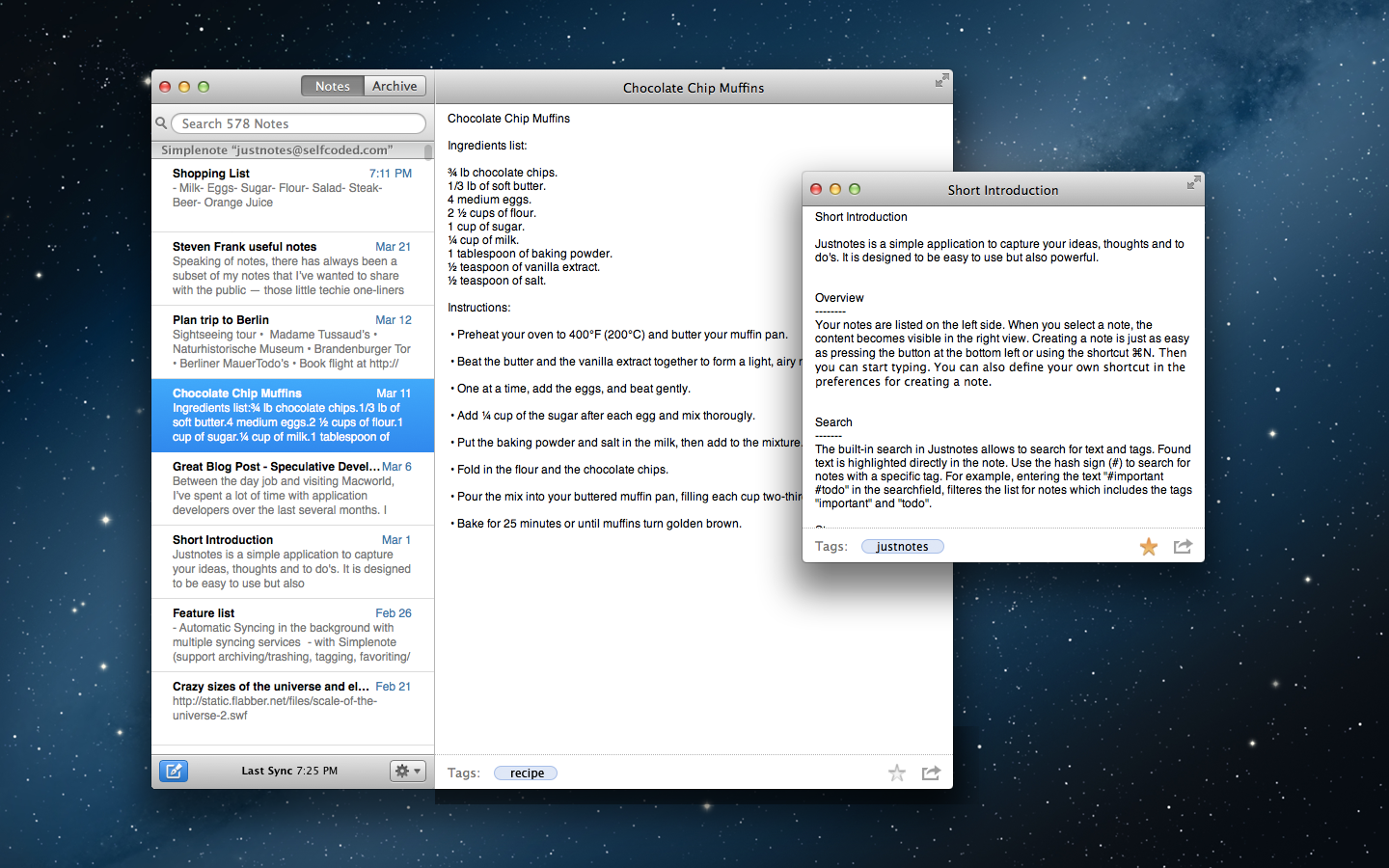
When I was invited to try Justnotes I was surprised because I never looked around and I didn’t realize how much those little things really bugged me on a daily basis in Notational Velocity. With Justnotes those little things are mostly gone and I am really liking it.
Justnotes syncs using Dropbox, you can tell it what file types to open, and you can use more than one folder in Dropbox for the sync of a note (the same note can only be in one folder or the other, not both) which is a clever trick for some.
These are neat features and they work well, but they are not the reason I actually like Justnotes.
I like Justnotes because the search bar is not an omnibar that also creates new notes. Creating a new note and searching are two different actions — that fits with my mental model of how a notes app should work. I much prefer this idea and thus Justnotes.
The overall UI of the app is simple, clean, and OS X. It’s great. The app requires more memory than Notational Velocity, but not enough to worry about as we aren’t talking about 100s of MBs.
Justnotes isn’t perfect, but it does have some cool features that note takers will find of interest, such as:
– Ability to archive notes (instead of deleting them so that you can still get access to the notes).
– Simplenote syncing (if used you can favorite notes and thereby keep them at the top of the list).
– Import your notes from Evernote.
– Open individual notes in their own window, a trick I am really liking and that allows me to use Justnotes more as a scratchpad too.
There’s a lot of little nice things in Justnotes and like I said — it’s now my default notes app.
If you are a note person, this is worth checking out. [It’s $5.99 for a limited time in the Mac App Store](http://selfcoded.com/justnotes/) ((Which is more than the free NV / nvAlt offerings, but you already know my stance on free.)) . ((Here’s the [direct link to the Mac App Store](http://itunes.apple.com/us/app/justnotes/id511230166?mt=12).))
**Update:** I forgot to mention that the way Justnotes names files is odd. It names them with what seems to be a random string when you use Dropbox — this will be really annoying if you go by notes names in iOS apps. So beware of that. Personally it doesn’t bug me because I just use search and notes previews in Notesy, but I can see how this is a deal breaker for some.
Christopher Mims:
>I don’t think Facebook actually has a plan. I think it’s the new AOL. But if it did have a plan, this is what it would look like.
Mims makes the case for Facebook to become a financial company, by buying Square or competing with it. He points out the power Apple has with all the credit cards stored in iTunes too. Here’s the problem with this idea:
1. As long as Zuckerberg is control I doubt this happens, the financial sector is just too boring for me to see him making that move. It would also be admitting that Facebook doesn’t work as a business, something he has gone to pains to make work as a business.
2. The analogy to iTunes is bad, because iTunes actually sells things that people want in ways that they can’t really get from other places (certainly not as easily). What does Facebook have to sell? Highlighted posts?
At the end of the post Mims quips that perhaps Facebook moves laterally to become a mobile phone provider. That’s closer to what I bet they try, but even Microsoft is having trouble in this market, so how does Facebook beat not only Apple, but Google and Microsoft?
As I posted the other day, it’s about buying intent. That’s where Facebook needs to get its user to.
Glen:
>Or, to put in another way, people are watching **only 1.5% of the films on Netflix Instant.**
With his math that number is 6% for iTunes. I feel the same way, I check Netflix first because I won’t have to pay *more* money for the movie, but they rarely have movies I want to watch — even if they have it I will sometimes opt for the iTunes movie to watch it in 1080p.
This strikes me as a real problem for Netflix, because right now Netflix is where my wife and I go to watch TV shows and that’s about it.