Month: February 2013

  • Adventures in Privacy: Google Edition (Part II)

    [Ryan Bateman has some more information about how Google treats its users’ personal data][1]:

    Google stores your wifi password if you have an Android phone and sign into it. It stores it in Google’s servers.

    According to Bateman, Google uses this information in its setup flow for new and factory-reset phones. Signing in to your Google account will download all of your stored Wi-Fi passwords, along with your contacts, calendars, apps, etc.

    In theory, this is a fantastic idea. One less password the user has to enter, one less possible point of frustration.

    But, consider for a moment:

    Have you visited a friend and joined the Wi-Fi network in their home? Have you had guests over and allowed them on your Wi-Fi network so you could watch that hilarious Harlem Shake parody video? Maybe you’ve visited a small business, whose owner lets you onto their company Wi-Fi network because they aren’t savvy enough to set up a guest network.

    My point is, you could potentially have dozens of Wi-Fi passwords on your phone, many of which are not your own, which are now—thanks to Andriod—stored on Google’s servers.

    At least we can rest assured that [Google doesn’t have a history of controversial behaviour related to harvesting information from Wi-Fi networks][2].

    Or [any of its users’ personal data, for that matter][3].

    [1]: http://everythinginthesky.com/post/44230045159/google-stores-your-wifi-password-if-you-have-an
    [2]: http://en.wikipedia.org/wiki/Criticism_of_Google#Information_collection_from_WiFi_networks
    [3]: https://brooksreview.net/2013/02/i-cant-believe-ben-missed-this/

  • Stop It, Stop It Right Now

    [I thought we covered this a couple of weeks ago](https://brooksreview.net/2013/02/ipad-workflow/), but here’s Ted Landau for Macworld, with the borderline link-bait headline: “[Why the iPad still can’t be a true Mac replacement](http://www.macworld.com/article/2028968/why-the-ipad-still-cant-be-a-true-mac-replacement.html)”

    > For wired connections, you are limited to connecting only one peripheral at a time—via the iPad’s Lightning connector. And even with Apple’s Camera Connection Kit, you are limited in terms of what you can connect. Most especially, a host of USB peripherals are impossible to use with an iPad.

    Also note that the iPad can’t burn CDs. WTF Apple?

    And:

    > Similarly, you can’t switch to a larger screen by connecting a Cinema Display to an iPad, as you can do with a MacBook. You can’t do this even via AirPlay. And even if you could, the Cinema Display is not a touchscreen, limiting how effectively you could use it.

    This is a stupid point. You *can* hook your iPad to a monitor via HDMI, or an Apple TV. Yes, those are not touch screens, but they *are* external monitors. Also, laptop users typically connect an additional keyboard and mouse, or trackpad, when using an external monitor. Why? Because twisting your head to look at a large screen while typing on your laptop keyboard is lame.

    Both quotes are factually accurate *today*, with the caveat: “as things currently exist”.

    AirPlay, for the uninitiated, is borderline amazing. I can sit on my couch and send jitter-free HD video and audio to my TV in a matter of moments. I highly doubt Apple is content to stop there with the AirPlay technology.

    So yes, connecting peripherals to iPads is crappy today but that could easily change *tomorrow*. That may sound like a cop-out, but what Landau and others are preaching reminds me of a sensational headline from 1996 by William Gibson, proclaiming that: [“The Net Is a Waste of Time”](http://www.nytimes.com/1996/07/14/magazine/the-net-is-a-waste-of-time.html). The content of Gibson’s article is even more interesting than its headline:

    > That is a large part of its appeal. It is something half-formed, growing. Larval. It is not what it was six months ago; in another six months it will be something else again. It was not planned; it simply happened, is happening. It is happening the way cities happened. It is a city.

    At launch, Apple knew the iPad was great for reading the New York Times website sitting on the couch. Apple didn’t know what else the iPad would *become* great for.

    Even I, just month’s after the iPad was released (and I started this site), [wrote this](https://brooksreview.net/2010/08/using-your-ipad-with-your-mac-pc-to-help-you-focus/) ((Which was picked up by Lifehacker, and amazingly still gets traffic from there.)) post arguing that the iPad was best used to offload distractions like Twitter from your Mac. That was my best use-case for the iPad — to make it a place for distractions that you ignored.

    Six months later the iPad was a completely different machine, and nearly three years later it can *almost* replace my Mac. Actually, over the past two days I’ve used my iPad *more* than my Mac.

    And iPad is still growing.

    Jean-Louis Gassée [adds to the debate](http://www.mondaynote.com/2013/02/24/ipad-and-file-systems-failure-of-empathy/):

    > This brings us to a major iPad obstacle: On a “real” PC the file system is visible, accessible; on the iPad, it’s hidden.

    And:

    > On an iPad you don’t navigate a file system but, instead, you launch an app that has it’s own trove of documents that it understands — but it can’t “see” anything else.

    Except in the case of cloud enabled apps like Dropbox, Box.net, Egnyte and so on. But yes, there is *no* way to get at the file system on iOS and now Apple will have to either ignore the half-a-dozen users clamoring for it, or have to completely capitulate and re-think iOS itself. I hope Gassée holds his breath for that one.

    Or Apple could just be depending on the strength of the opportunity that the App Store presents for developers to make the apps and tools needed. From the idea of the iPad being [a terminal for a server](http://yieldthought.com/post/12239282034/swapped-my-macbook-for-an-ipad), to robust apps like Dropbox, there is and *will* be a ton of apps that make the ‘lack of file system’ argument unimportant.

    [As Shawn Blanc says](http://shawnblanc.net/2013/02/the-ipad-can-be-a-true-mac-alternative/):

    > The iPad is a Mac alternative — and only if you want it to be.

    Astute.

    The argument many make is that *for them* an iPad cannot replace their Mac *right now*. But their headlines always scream “THE IPAD AIN’T MY MACBOOK AND THEREFORE IT IS SHIT”. It’s fair to say that the iPad is missing something for you, but short-sighted and stupid to dismiss it because you can’t connect USB devices, monitors, or see the file system.

    I don’t know where the future of the iPad lies, but I believe we aren’t even close to realizing the full power and usefulness that it packs.

  • Quote of the Day: John Gruber

    “Strapping a computer display to your face is not the answer.”
  • ‘Scheduling Do Not Disturb’

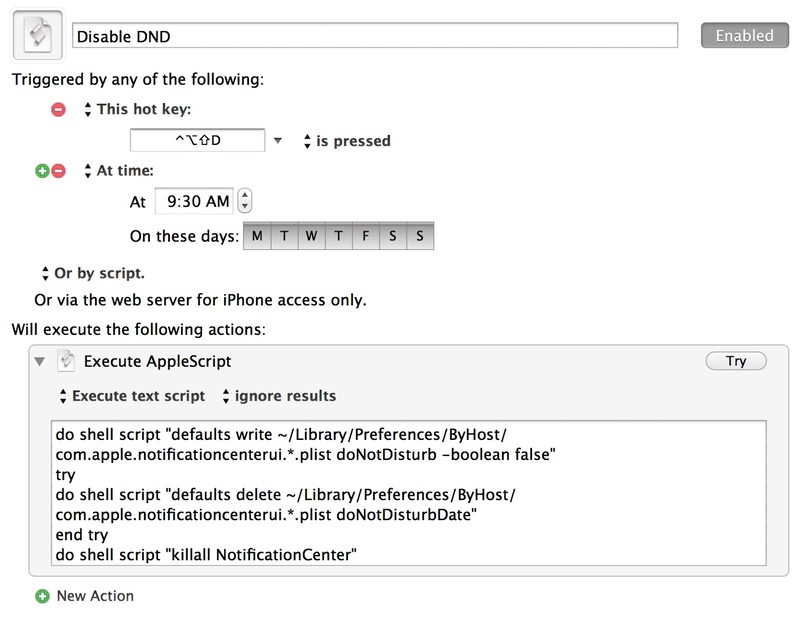
    The lovable Ben Waldie [posted a fantastic article detailing how to script Do Not Disturb mode on your Mac](http://www.tuaw.com/2013/02/04/applescripting-notification-center-scheduling-do-not-disturb/). He is using Automator and Calendar to schedule the script to turn on and off Do Not Disturb mode, but we can do one better because we have Keyboard Maestro.

    The macro.

    I simply created a hot key trigger (and timed trigger) in Keyboard Maestro that executes the Applescript that Waldie creates for either enabling or disabling Do Not Disturb mode. It works really well, and is a great tool to add to Keyboard Maestro.

    [via Shawn]
  • Getting Help

    I’m not ashamed to say that when I started this site I modeled it closely after *Daring Fireball* and *Shawnblanc.net* — in fact I aspired to make this site larger than either of those. But over a year ago I realized that my goals had changed.

    I became so busy that I had no clue what to do here. I wanted to keep posting but, hell, I didn’t have the time I used to.

    At that point I started to let the writing wander and find its own path. I introduced the paywall and removed linked-list posts. Things just changed.

    The one thing I try to keep consistent is honesty.

    And honestly I need a bit of help on content creation. I hired [James Martin](http://jamesmart.in) to help edit my posts — he catches the typos and helps with clarity. He’s been awesome.

    When I took a week off recently, [Pat Dryburgh took over the writing](https://brooksreview.net/2013/02/tired-ben/) and I realized how much more depth he brought to this site. I loved it and — judging from the responses I received — so did many of you.

    So I begged, bugged and coerced Pat into writing here regularly. For now it’s going to be once a week (hopefully), but we should all hope it’s more often than that.

    I’m grateful to James and Pat. Their help has been invaluable. And yes, they are both being paid, albeit not nearly as much as they’re worth.

  • Where’s the Style?

    Over the weekend I saw a post by Derrick Story in Macworld come across my RSS feed, its title: “[The 7-step edit in Aperture 3.4](http://www.macworld.com/article/2027127/the-7-step-edit-in-aperture-3-4.html)”. I rolled my eyes, saved it to Instapaper and went about my weekend.

    Then my in-law said something interesting. She was talking to my sister-in-law and remarked: “Why are the pictures you post to Instagram always so grainy?”

    *(Side note: My sister-in-law, I am told, does what she calls “double-gramming”, wherein she applies a filter and screenshots the image with that filter, and then imports that screenshot to add another filter on it. Yeah, I shudder at that thought too.)*

    The response that my sister-in-law gave was all over the place, but amounted to “style”. The response from my in-law: “But wouldn’t you just want a nice clean image?”

    Then I read Story’s post. His steps are common steps to take when editing an image, but they aren’t cookie cutter. And that’s what makes them useful.

    A lot of people seem to struggle with photography, and specifically editing, because they forget that you can’t just snap a picture and apply a filter. You have to think about the image and see the final product before you take the photo. If you can’t do that, and I am as guilty as everyone, then you will end up with snapshots only.

    Photography is both a technical skill and an art.

    You need style, and it has to be your *own* style.

  • The Free App.net Hoopla

    Dalton Caldwell [on the App.net Blog](http://blog.app.net/2013/02/25/introducing-a-free-tier/):

    > Although App.net has had only paid account tiers thus far, we initially conceived of App.net as a freemium service. It took some time to get to this point, but we are now ready to make this vision a reality.

    Marco Arment on [this change for App.net](http://www.marco.org/2013/02/25/adn-freemium):

    > What developers need is for App.net to add tons of users to the service they already offer. (Conveniently, that’s also what App.net’s users need.)

    > As long as the invitation requirement is in place, the free tier won’t do this. And when an invitation is no longer required, App.net is going to need to start battling the spam and abuse that all free social services face.

    This is a tough issue for App.net because Arment is absolutely right: App.net needs more users for anything to be viable a year from now. So “freemium” actually isn’t a bad plan, but I think App.net went about it wrong.

    The one thing missing from App.net so far has been: Spam and accounts that post links from websites. (And yes, I have @tbr for that very reason.) Today tons of websites with free accounts just sprung up.

    Which is exactly what App.net should *not* want to see happening. It’s not what I want to see (and yes, I see the hypocrisy here).

    Effectively App.net just made it easy for *BRANDS* and SPAM (both capitalized to show the similarity between the two words) to make their way into App.net and I really hate that. Such is life.

    I think a far more clever solution would have been to change the free tier from:

    – Max 40 follows
    – Invite only
    – Storage limitations

    To:

    – Unlimited follows
    – Only one reply to others per day
    – Only 50 followers allowed
    – No PMs
    – Available to anyone that wants to sign up.

    The solution App.net implemented encourages leachers, whereas I think my solution encourages people to *trial* the service. My proposal would entice active, healthy users to pay while weeding out the SPAM and *BRANDS*.

    I’m skeptical as to whether this was the right move for App.net.

  • Quote of the Day: John Moltz

    “It’s easy and fun to mock Google Glass (if only it were profitable, too), but I can’t very well mock it out of one side of my mouth while talking up an ‘iWatch’ out of the other side.”
  • Breaking: Twitter Users Actually Like Ads

    According to [April Underwood](http://advertising.twitter.com/2013/02/announcing-twitter-ads-api_20.html) (who is a “product manager” in the “revenue” division):

    >As interest in Twitter has grown, our focus has been on delivering *better* ads for users, not *more* ads. We believe our system is working well because users *like* the ads experience on Twitter.

    (Emphasis is original.)

    Allow me to translate that particular brand of bullshit:
    “Don’t forget that Twitter, or the interest people have in Twitter, is continuing to grow. Further, we have chosen to show less ads to users, and instead charge large sums for the few ads that we do show — so mad props to us for that. We aren’t sure if this system is working, but we sure hope it is. One time, at Ad Camp, a couple of users told me they like the ad experience on Twitter — don’t confuse that with liking ads — but it’s still very encouraging.”

    The rest of the article is an advertising wet dream.

  • ‘10 Steps to Prototyping With POP’

    [Alli Dryer details her 10 step process for prototyping with](http://badyewex.com/words/2013/2/21/10-steps-to-prototyping-with-pop-app), the new to me, app [POP](http://itunes.com/apps/woomoo/pop-prototyping-on-paper/):

    >With POP, you snap photos of your freehand sketches, bring them to life by linking them together to simulate the user experience, and then easily share your prototype with others.

    This looks like a fantastic way to flesh out an idea, or ideas, for iOS apps. Very clever app.

  • Quote of the Day: Marco Arment

    “But for Pocket to repeatedly state the opposite — that they were the first service like this, and that Instapaper followed their lead — is over the line, and I won’t sit here quietly and let that go unchallenged.”
  • Yonanas

    Karissa Bell [reviewing the](http://www.wired.com/reviews/2013/02/yonanas/) [Yonanas](http://www.yonanas.com) ice-cream-ish machine:

    > Here’s how it works: Drop pieces of frozen but slightly thawed (more on this later) fruit into the chute, switch it on, and push the fruit through with the plunger. Repeat as many times as you want. The result is a creamy, delicious blend of fruit that tastes damn close to frozen yogurt or sorbet. I didn’t conduct a formal taste test, but I suspect if you gave Yonanas to kids, they wouldn’t know the difference. It’s that good.

    My Mom actually gave us one of these for Christmas and we broke it out the other day to make some fruity-ice-cream-slush for our daughter (10 months old). It was just fruit, and she *loved* it, so it was a win-win.

    Seriously, any parent of a teething child should consider buying one of these. My wife thinks it tastes good — I eat real ice cream ((But I do admit this looks and feels damned close to real ice cream. Which is impressive on its own.)) — but mostly our daughter loves this.

    Bell’s review is spot on, however, clean up is a bitch if you don’t get on it before the fruit dries. I’ve found it’s best to spray it down with hot water immediately after use, and wash lightly with a bottle brush — the longer you wait the longer it takes to clean.

    *(If you want to support the site, buy one from [this Amazon link](http://www.amazon.com/exec/obidos/ASIN/B005083ECS/ref=nosim&tag=brooksreview-20).)*

  • Quote of the Day: John Gruber

    “You’d think if anyone would have a Copy function that worked perfectly, it’d be Samsung.”
  • Amazon Item of the Week: Krave Garlic Chili Pepper Beef Jerky

    I have a suspicion that posting about beef jerky could prove heated, but I will nonetheless. I learned about Krave Jerky a couple of weeks ago and promptly ordered a package, or four. Not knowing much about the flavors I went with the above “Garlic Chili Pepper” variety.

    And it’s good — I’m salivating just thinking about it, yikes.

    As a kid I was always an Oberto jerky fan, and then I slowly progressed to Tillamook Honey Glazed, then on to World Kitchen Hot & Spicy. Tillamook always had the best meat and flavor, but is expensive. World Kitchen’s meat is a bit meh, but the flavor is nice and spicy.

    Sadly the above mentioned brands seem to have been slipping lately (as I assume they work to grab more market share in a Yeti-dominated-Jack-Links-world).

    Krave is different — it’s *exceedingly* good.

    Good flavor, good meat, good heat.

    *(Note: Buying from this link could potentially make me a millionaire.)*

  • ‘An Unconventional Way to Comment Your Excel Formulas’

    [Jeff Davis offers two options for commenting Excel formulas](http://www.techrepublic.com/article/an-unconventional-way-to-comment-your-excel-formulas/1032346). The first way is the obvious comment feature, but this has downsides. The most notable downside is the red arrow that is present in the corner of the cell — something that would lead most people to worry that there is a calculation error on that cell.

    It’s a decent way around the problem, but since the comment exists only as a comment function, and not as part of the formula, it is easily missed when editing the formula.

    The second option that Davis mentions is by using the `N Function` — something I had never heard of before. Basically this is a hack that allows you to type a string into a formula which will always return `0`. So adding `+N(“My comment”)` will only add a `+0` to the formula. This is a really clever solution and exactly what I was talking about.

    But, it does have one huge downside: it isn’t supported in Numbers.

    For many this won’t matter, but Numbers removes the formula all together and simply shows the solution value. At my office we use Numbers for a few reports (rarely switching between Excel and Numbers) and it is a bit worrisome that your spreadsheet could stop being dynamic if a Numbers user opened it.

    For our complex, internal, spreadsheets the N function looks like a great, albeit hack, solution.

  • Write for iOS

    Some time ago Harry Marks posted about a preview of a new iOS app called [Write](https://itunes.apple.com/us/app/write-for-dropbox-plain-text/id587363157?mt=8). In his link to Write (which was where I first heard about the app) Marks notes:

    > […]but several aspects of Write’s UX really piqued my interest.

    That was enough to make me check out the app. What I found scared me a bit — the UX looked like a nightmare. Layers of screens that stack as you move back and forth — it all seemed confusing.

    Then Write launched and has received some good reviews, as Marks notes [in his own review](http://curiousrat.com/home/2013/1/24/review-write-for-iphone):

    > In the meantime, I’ll stick with Drafts for my everyday use, but I’ll continue to come back to Write because it’s such a fun and inviting app to use.

    And the wise [Brett Terpstra notes](http://brettterpstra.com/2013/02/16/ios-app-review-write-for-iphone/):

    > For everything in-between, Write is a standout editor in its class, combining intuitive gestures, Dropbox file management and a wide range of sharing and export tools.

    High praise from the man that knows about every Dropbox text editor.

    I purchased the app to give it a look and, unsurprisingly, my opinion differs quite a bit. Though the UX is far less confusing than I initially thought, I still find it odd.

    There seems to be gestures for everything, yet you must specifically hit ‘edit’ in order to edit a note — tapping in the text area doesn’t get you to edit mode. That seems bad. Like ‘missing copy and paste in your 1.0 feature set’ bad.

    And then there are the animations, of which there are many. The actions bar has a fold-out animation, moving from the ‘note’ to ‘file list’ is a smooth slide, as is dropping the bottom toolbar, and finally moving to the settings toolbar is an odd slide-up-snap-thing. Truly, it reminds me of a PowerPoint made by someone who wanted to use every slide transition effect there is. This is not even close to a compliment, in case you were wondering.

    A lot has been said, by Marks and Terpstra, about the cursor movement button. Honestly it seems uncouth in iOS, much like IBM’s insistence on keeping the eraser mouse long after trackpads came out, or BlackBerry keeping the jog dial so long after the touch screen revolution. The cursor dial just feels wrong. It’s a decent solution, but it feels out of place, rather than being a ‘native’ solution.

    Then there’s the oh-so-popular fifth keyboard row and the choice of items on it, which are fine, but there are actually *two* rows of key sets you can swipe between. This forces you to grab a handle to move between the sets, instead of just swiping anywhere on a row. It’s far more cumbersome than it needs to be.

    This problem is doubly annoying with the hyped “pull-to-save” action, which you can only pull from the large title/top-bar area. Pulling inside the text area just gives you the familiar elastic bounce syndrome.

    I’m not sure if this is a 1.0 bug, or just a “pull-to-delete” option bug. Imagine if you were rapidly scrolling to the top of a long document and then — oops — you deleted it.

    For all those faults, there are some things the app gets very — *very* — right. The icon is lovely, if a little vague. The name is simple. The overall design is pleasant and could be further improved by better looking buttons, in colors other than red.

    For me, the standout feature is the search option. I cannot tell you how many times I want to search for things on iOS, but then struggle to find a good app to do that in. ((Damn you iA Writer! Add search you feature-less bast…))

    Overall, I think Write is a very ambitious app that serves a very niche market — a market that I am simply not part of. I would love writing apps with actions to start gaining native XML-RPC posting support, but even then I don’t know if that would be enough to get me to use them. It would be a start though.

    (A thought just occurred, it would be great to be writing in Writer, edit in Write and post from Write, without having to do the “Open in…” hop-scotch to get between apps.)

    Write has rough edges, and some larger issues with its UX. These edges are rough enough that I think Write is unsuitable for the general population. However if you’re someone that takes the time to learn how an app works, you should be quite happy with Write as both a writing app and fast-note-taking app. As Terpstra notes, it’s an in-between tool, rather than a tool for power users.

  • The Power and Fragility of Excel Driven Business

    [James Kwak in a very smart post about Excel](http://baselinescenario.com/2013/02/09/the-importance-of-excel/):

    > But while Excel the program is reasonably robust, the spreadsheets that people create with Excel are incredibly fragile. There is no way to trace where your data come from, there’s no audit trail (so you can overtype numbers and not know it), and there’s no easy way to test spreadsheets, for starters. The biggest problem is that anyone can create Excel spreadsheets—badly. Because it’s so easy to use, the creation of even important spreadsheets is not restricted to people who understand programming and do it in a methodical, well-documented way.

    As far as I know there is no way to add comments to document what a formula is actually doing, which is a massive problem when you are creating fairly robust and complex spreadsheets. I have a spreadsheet that I use to calculate budgets for commercial real estate. The spreadsheet breaks down the expenses by tenants, based on square footage, and whether they serve food or not.

    There’s a lot going on in the spreadsheet, which is a strategic business tool for us, yet if another company got hold of it they would be lost. They would know what they were looking at, from a final data perspective, but have no clue how any of it was calculated. Simply put: it’s easier to build your own than steal mine.

    That really shouldn’t be the case though. This really should be something where I can comment on the formulas so that those that follow me can use the spreadsheet without having to recreate it.

    And this is only half the problem. More evident is how easy it is to break the spreadsheet just by adding in little things to help improve the readability. It’s awesome to have a powerful tool like Excel, but at the same time I always get the sense that I’m just moments away from breaking every formula in the spreadsheet.

    I had always hoped Apple, or some other enterprising company, would tackle this problem — but that’s not been the case. Numbers just isn’t the same type of program (but I still like it) and every new program tackles a specific problem for specific people in a specific industry.

    *(Note: As my editor points out to me, Google Docs has a [comments and discussion feature](https://support.google.com/drive/bin/answer.py?hl=en&p=spreadsheets_comments&answer=65129), but let’s face it: Google Docs isn’t Excel.)*

  • Quote of the Day: Shawn Blanc

    “The laptop of yesterday is the iPad of today.”
  • Talking Publishing with Marco

    One thing that has really been on my mind lately is how publishing is changing. Many think it is a bit crazy that I went with a paywall, but even more crazy is that I was thinking of shutting down the site as it is and doing a periodical on the iPad instead (cooler heads prevailed).

    I have a ton of questions about publishing, so I thought I’d ask some of them to someone more savvy than me, in this case, [Marco Arment](http://marco.org).

    *(This interview was done via email.)*

    Ben: I always felt like Instapaper really hit its stride with the iPad version — so even though the iPhone version came first, in my mind Instapaper really is an iPad app that just happens to have a web version and iPhone version. So I wonder if the iPad mini is going to be *that* platform for *The Magazine* and iOS reading devices alike, or if the full sized iPad still wins out at the end of the day. How do you think the iPad mini is going to shape digital reading?

    Marco Arment: It’s a tough call. For long reading sessions in Instapaper, I prefer the Mini’s much lighter weight, as I bet most people would. And I think Apple’s probably now selling far more Minis than 10″ iPads, so the Mini is going to become the dominant iPad form factor very soon.

    But for The Magazine, I actually prefer the 10″ Retina iPad — we invest a lot in getting great photos and illustrations, and while they look good on the Mini, they look absolutely stunning on a Retina iPad.

    So for now, I’m torn. A future Retina iPad Mini might make the choice easier.

    BB: I have to think that if/when a retina iPad mini comes out it will cannibalize sales of the iPad — that’s certainly not a reason to make such a device, but it seems that form factor is far more popular than the iPad is. I think the iPad mini finally does what people truly use these devices for right now: makes it easy to consume web/app content. On that note: Craig Mod’s Subcompact Publishing article is a treatise about breaking down publishing into its most simple aspects. At the heart of what Mod is talking about, I think, is a platform for delivering and monetizing content (without all the cruft). Both publishing and monetizing content are very difficult to do, but with *The Magazine* you seem to have captured this notion very well (and it seems successfully). And a lot of people are clamoring to have their own *The Magazine*-style app that they can publish to and make money off of. What does the future look like here? Would a single author, for pay, Newsstand app even stand a chance at success?

    MA: The Magazine brings value to readers in multiple ways: it delivers great writing, it develops each article with a professional editor, it garnishes and enhances the articles with great photos and illustrations, and it delivers this in a good Newsstand app.

    If you remove some of those parts, the result won’t be as compelling to readers. It’s hard to predict whether a single author, presumably without the editorial and art resources, would be successful even if the app platform was free.

    It would depend on the author. Like everything else, I’d assume some would be successful and most wouldn’t.

    It also depends on how you define success. Authors who are currently “successful” with blogs can probably get enough out of a Newsstand app to deem that a success, too, if they can minimize its costs. But then they face a big problem: either all Newsstand articles are available on their blogs for free, which means blog readers don’t have much incentive to pay in Newsstand, or the Newsstand articles are exclusive, which means their Newsstand apps are now competing with their blogs for the best articles and the authors’ attention. And that would probably lead to a decline in their blogs’ quality and eventual audience erosion.

    It’s a tough call, and a difficult balance, for people who already have blogs. That’s why The Magazine isn’t just Marco.org Magazine.

    BB: Have you found that the authors writing for The Magazine are running into some of the same issues you just described? The struggle between the lure of getting paid a going rate for an article, which they would have otherwise just posted on their site — perhaps a site that makes them very little (or no) money by comparison?

    MA: I set up The Magazine to help that in two ways: it pays more than many writers would get from their own blogs (currently $800 per article), and it also permits writers to republish articles written for us on their own sites just one month after The Magazine publishes them.

    Individual authors with Newsstand apps could take a similar approach — put articles in the Newsstand app first, then release them later on their sites. But that won’t be appropriate for many authors’ content. So, again, it depends.

    BB: As most know by now, I run a paywall here on my site. At one point we privately talked about the pricing of the paywall on my site, and I mentioned that I was thinking about lowering the price to spur membership growth — I asked you: ‘What do you think about lowering the price to $3/mo?’ Your response was that you thought I would be making 25% less money.

    The assumption I made with your answer is that once you charge, you charge, and consumers only view a price as a price and not a dollar amount. With you being an advocate for paid apps, and now charging for a subscription to a periodical, what have you found to be the consumer mindset around pricing of both one-time and recurring purchases?

    MA: Apps, The Magazine’s subscription, and TBR’s paywall are all strongly affected by perceived value of their medium and market expectations on price.

    For instance, as I’m sure people have made very clear to you, a lot of people believe that anything they read in a web browser should be free, because almost everything that can be read in a web browser has always been free.

    When the App Store launched in 2008, it was a new enough medium to most people that expectations were reset. Websites were still expected to be free, but apps were expected to be $0–10. (That fell to $0–3 after about two years and appears to be holding steady there.)

    Anyone who tries a paywall on a website (at any price), or tries to charge $30 for a mobile app, is going to lose most potential readers or customers. (This might not correspond to lower profits.) They’re breaking the market’s price expectations by pricing above the boundary for what’s usually acceptable. Today, that boundary for apps is about $5, but that boundary for most websites is $0. Once you’re above that boundary, it doesn’t matter as much whether you charge a few dollars more or less — you’re losing sales because it’s over the line, and it’s almost irrelevant how far over the line you are (within reason).

    Magazines are a fluke on iOS: they have different price expectations. Big-name iOS magazines can easily charge $5 per month. The New York Times charges about $15 per month. So for The Magazine to be $2 per month sounds extremely inexpensive in the magazine world, yet that’s $24 per year — far more than I could earn per customer with a traditional app.

    The perception of magazines being worth that much only works because people don’t feel like they’re paying for the app — they’re paying for the content. The app is just a container. I can’t charge $24 per year for a magazine *app* — I can charge $24 per year for magazine *issues*. Nobody buys your paywall subscription for your layout, no matter how nice you make it.

    But because you’re on the web and not considered “a magazine”, almost nobody expects you to charge anything.

    BB: Continuing along with that thought process and shifting a bit more to competition in the publishing industry I want to talk about some of the stuff I have seen popping up since the debut of The Magazine, or perhaps that I have just noticed because of The Magazine. [The Awl](https://itunes.apple.com/us/app/the-awl-weekend-companion/id557635306?mt=8) has a magazine that is very similar to *The Magazine*, in that it is very focused and very untraditional. [The New Republic](https://itunes.apple.com/us/app/the-new-republic-for-ipad/id454525980?mt=8) has also relaunched with a similar goal (but still old-school magazine feeling).

    Since launching my paywall I’ve seen a huge amount of others trying similar models (though I doubt doing it because of me). To my eye we are fast approaching a breaking point, where the early adopters of user-supported sites will continue to profit, but the late comers will find it impossible to gain traction.

    I think the same exists in Newsstand as users are only going to be willing to have so many magazine-like apps on their devices if they have to pay for them. As you said, The Magazine is $24 a year, when traditionally (at least with the car magazines I purchased as a kid) yearly subscriptions seemed to hover closer to $19.99 a year. What do you see this landscape looking like in 3-5 years — will we all be rolling back to advertisers, or will users be paying more for content? Or something else completely?

    MA: First, I disagree with the notion that there’s ever going to be a point after which it’s impossible for newcomers to gain traction. People say this a lot about web companies and the App Store. It’s true for some markets that have major network effects, like social networking and online auctions, or markets with huge barriers to entry, like web search and banking. But in the content or general-app business, a fresh take on an existing idea is always welcome. If you’re putting out something truly good, it’ll get traction.

    I think we’re seeing the App Store pricing model settle into a pretty mature state now, which isn’t too far from the web: if you want to make a newsworthy splash and get tons of users, your app, blog, or website needs to be free. You can either offer paid premium services, in-app purchases, or ads to cover costs, which may not end up being very profitable, but you could strike it big if you’re lucky.

    Or you can charge money and probably make much more profit per user, but you won’t have the explosive growth that only comes with free. The chances of striking it big with a huge audience or a big buyout are much lower this way, but with an app or web service, your chances of making a sustainable living are higher. For content sites, though, I’m not sure if that’s true.

    I don’t think this will meaningfully change in the next few years. It hasn’t changed much in the last few.

    BB: That’s a good point. Perhaps phrasing it as impossible was exaggerating a bit much — but I do think that with subscription type services it will be exponentially harder to gain traction after we reach point X. My reasoning is that people simply don’t cancel subscriptions that easily and can only realistically spend so much money on them. Therefore each person reaches a point of subscription saturation where before they take on a new subscription they have to cancel another. I think that is a hard thing to compel consumers to do. I guess time will tell here.

    MA: We’re very far from the point where most people actually can’t afford to subscribe to a few more publications. People who choose not to subscribe are usually doing so as a value judgment (“This isn’t worth paying for”), not because they can’t afford a few dollars a month. And with so many new subscriptions being so inexpensive, the “can’t afford more” point is being pushed even further away.

    When budget does become a factor, it might sort itself out more easily than you expect: people have limited money to spend on subscriptions, but they also have limited time to read them. So if someone wants to subscribe to something new and needs to make room in their budget, it’s probably pretty easy to choose what to eliminate: the one that they keep not making time to read.

    People feel content-overload guilt more when they’re paying for something. If you don’t read Marco.org for a few months and then start reading it again, it’s no big deal — you weren’t paying for it. But if a pile of unread magazine issues just keeps growing in your bathroom because you can’t get through them quickly enough, you’ll feel like that subscription is wasted money, and you’ll consider canceling it.

    One of the reasons The Magazine only publishes 5 articles every 2 weeks, and that I don’t intend to publish more articles or more frequently, is because feedback indicates that I’m keeping people’s backlogs manageable. For most readers, unread issues aren’t piling up, minimizing that guilt that they’re wasting their subscriptions.

    BB: To your point about a fresh take always having a shot, how do you plan on keeping The Magazine fresh — is that solely done through the content, or through exploring more publishing styles and avenues?

    MA: I think it’ll be done primarily through content. Content is enough if it’s good.
  • The CMS War

    In response to [my post waxing on about creating a CMS](https://brooksreview.net/2013/02/cms/) that I would actually love, more than a few people wrote in to ask for my opinion on their chosen CMS. Rather than attempt an in-depth examination of all major CMSs, and given my limited experience of most, I decided instead to give you my general thoughts on the matter.

    ## Hosted vs. Self-hosted

    Firstly, decide whether you want to manage the hosting of the site yourself, or not. It’s typically cheaper to handle higher volumes of traffic if you choose *not* to host the site yourself. (Unless you use Tumblr, which must be hosted on a third-world electrical grid, given the number of issues they have.) Personally I think that choosing a hosted CMS is pretty smart in almost every case.

    However, when somebody else owns your data or the hosting infrastructure, you may run into problems that are impossible to fix or resolve to your satisfaction.

    *(Note: Not all hosting is the same, the cheaper the hosting, the less control you typically have.)*

    Personally I choose to self-host because I want as much control as possible. I want to truly *see* where my data lives.

    ## What’s Important

    Once you decide on hosting, you need to decide what features are most important for you.

    Instead of focusing on which CMS “looks the best”, focus on features. Any platform can serve great looking pages, just as any platform can look like shit. Think about features first, then look at themes if you need a tiebreaker.

    When considering CMS features, I tell people to think about:

    – How important is a good iOS client?
    – Do you want to run a DF-style link blog? Can the CMS do that out of the box?
    – Do you want a robust developer community in order to find free resources for developing the site?
    – Do you want to have multiple authors?

    There’s dozens more important CMS features, but I think you get the point. Some popular CMSs do some of the above, but I don’t know of one that does them all well.

    ## WordPress

    I chose the self-hosted version of WordPress for a few reasons (in no particular order):

    – It runs on whatever server I want/need it to.
    – Lots of plugins, themes, and resources.
    – For the life of me I could not figure out Drupal.
    – I only half figured out MovableType before I banged my head into my desk.

    WordPress isn’t perfect — it has a lot of flaws — the most obvious being the server requirements to handle a high-traffic site (which can be mitigated with any free caching plugin). However, for all of WordPress’ flaws there are definite advantages: I was able to have a custom paywall built for a pretty low price. I can expand and modify WordPress to suit my needs.

    I’ve looked deeply into SquareSpace. I know a lot about Shopify. I had this site running on MovableType, and tons of other CMSs — but at the end of the day I realized that WordPress works fine and I need to concentrate on the things readers will actually notice.