Year: 2014

  • ‘The Plus in Google Plus? It’s Mostly for Google’

    Claire Cain Miller:

    Thanks to Plus, Google knows about people’s friendships on Gmail, the places they go on maps and how they spend their time on the more than two million websites in Google’s ad network. And it is gathering this information even though relatively few people use Plus as their social network.

  • On Evil

    I stirred up some controversy on App.net today, but among this was an incredibly salient point. Before I get to that, a little context.

    The conversation ((Or whatever you want to call it, I don’t care.)) was about Google and the topic of this conversation was “Evil”. You can now see why I was involved.

    Anna Tarkov chimed in to say:

    @duerig @benbrooks @jbouie I just want to chime in to say I agree. I think the way we use words is incredibly important. Language has meaning and we should be cautious. If Google is evil, if Microsoft is evil, etc, then “evil” ceases to mean anything.

    I knew this. I knew this. And yet I forgot it. We all seem to have forgotten it. Perhaps because Google famously says “Don’t be evil” is their motto we feel free to use evil when we disagree with that Google does. Even that motto doesn’t mean we should lower the debate, and devalue the meaning of ’evil’, by applying it to a technology company that has yet to, and may never actually do, something truly worth calling evil.

    Evil should be reserved for truly evil things, just as using the word “rape” should always be reserved for actual instances of rape. I’m glad to be reminded of this.

  • Lightroom Analytics

    A fantastic, free, Lightroom plugin that analyzes the metadata of your photos like you are the NSA. See what aperture, focal length, shutter speed, and more that you use the most of. It’s pretty interesting to see the break down.

    I tend to shoot around f/2 at 1/60th with a 35mm (full-frame equivalent) focal length.

    I would have bet money that I shoot more with a 50mm at 1/100th than any other length. Wow. The aperture setting was as expected.

    (I only analyzed my latest 6,600 images.)

  • Editorially Shuts Its Doors

    Looks like it’s back to Google Docs, Ben:

    Today brings some sad news: Editorially is closing its doors. The application will remain available until May 30, at which point the site will go offline.

    Editorially is — was — a collaborative writing tool which was used right here at TBR. In fact, I have the beginning of a piece I’m writing in there right now, which has been seen and commented on by Ben and edited by our editor James. It is — was — a pretty awesome tool, and one that will be sorely missed.

  • ‘Finding People’s Location Based on Their Activities in Cyberspace’

    Bruce Schneier on recent Snowden revelations:

    As fascinating as the technology is, the critical policy question—and the one discussed extensively in the FirstLook article—is how reliable all this information is. While much of the NSA's capabilities to locate someone in the real world by their network activity piggy-backs on corporate surveillance capabilities, there's a critical difference: False positives are much more expensive. If Google or Facebook get a physical location wrong, they show someone an ad for a restaurant they're nowhere near. If the NSA gets a physical location wrong, they call a drone strike on innocent people.

    This is a reaction to this post from Glenn Greenwald.

  • Confirm Your Email Subscription

    Guys, very sorry but a few hundred of you are getting legitimate email confirmations from me via aweber.com. This is because I need to send you a one time email pertaining to your account on this site.

    I am very sorry, and hoped to avoid this, but I cannot keep getting my email flagged as a spam sender so I needed to use a service.

  • ‘The NSA’s Secret Role in the U.S. Assassination Program’

    Jeremy Scahill and Glenn Greenwald:

    As a result, even when the agency correctly identifies and targets a SIM card belonging to a terror suspect, the phone may actually be carried by someone else, who is then killed in a strike. According to the former drone operator, the geolocation cells at the NSA that run the tracking program – known as Geo Cell –sometimes facilitate strikes without knowing whether the individual in possession of a tracked cell phone or SIM card is in fact the intended target of the strike.

    What amazing reporting, and a horrible program by the US.

  • Leica X2

    When Ben reviewed the Olympus OMD-EM5 he made a compelling case for buying previous generation cameras:

    A few months ago (maybe?) I told Shawn [Blanc]: “I am beginning to think the best/smartest/cheapest way to buy a new camera is to wait until it’s a year old.”

    As a slave to the full-price annual iPhone upgrade, the fact that one, two and three year old cameras are still perfectly usable and, in some cases, still the newest models offered by a manufacturer, makes me smile.

    I read some of the reviews of the OMD, thinking that a Micro 4/3 camera system and a couple of great lenses might be a perfect way for this amateur to step up into the ‘prosumer’ market. When we travel my Better Half wields a Canon 7D and a bunch of expensive ‘glass’, as she calls it. When I say, ‘she wields’, what I really mean is, ‘I carry the bag with all the lenses and accessories, while she takes the pictures’. Being relegated to the pack mule is no fun, so I decided it was time to get a camera of my own to use when we travel. She can carry her own glass.

    The last camera I bought was a Canon Digital IXUS75 (A.K.A PowerShot ELPH SD750). It packed a ridiculous 7.1 mega pixels and featured witchcraft-like ‘Face Detection’. I used it extensively on a trip I took to Australia in 2007. The pictures from that trip are predictably mediocre, exactly reflecting my ability as a photographer and the ‘consumer’ nature of the camera. Later that same year I bought the first iPhone.

    I haven’t even switched on the Canon since 2007 but I’ve taken thousands of photos with every model of iPhone released since.

    One of my big fears about the Micro 4/3 system was the interchangeable lenses. Having the option of changing the lens on a camera means that one thinks about changing the lens. Readers of this site can empathize: I imagined myself researching lenses, reading reviews of lenses, going to my local store and test driving lenses, and then inevitably buying lenses and attempting to use them.

    What if I just…took photos, instead of thinking about lenses.

    During my reading I stumbled on Steve Huff’s review of the Leica X2, in which he references its predecessor the Leica X1. Both cameras have 35mm-equivalent fixed lenses, very few ‘creature comforts’ (no video etc.) and apparently take wonderful photos.

    The more I thought about it the more I liked the idea of trying a Leica. One of my architectural heroes, Harry Seidler, carried a Leica 35mm film camera around with him at all times and was told by his photographer brother to, “only use Leica cameras and Kodachrome film, which is archival”. Seidler adhered to this advice and published the best architectural photographs he took over a 50 year span in an amazing book called, “The Grand Tour”, which is well worth a look if you love architecture, or photography.

    Leica enjoys something of a reputation for being either costly or expensive (and sometimes overpriced), depending on the opinion. If anybody reviewed the X2 (or any Leica) and claimed it to be excellent value, I couldn’t find it.

    Gavin Stoker, in his Leica X2 Review for Photographyblog.com:

    [The] gripe with Leicas largely appears to come down to the price tag, which sees them earmarked either as playthings of the rich or for successful pros only.

    Joshua Waller’s first impressions for ephotozine.com:

    From what we’ve seen so far, the X2 offers excellent image quality with low noise up to ISO3200, but without video and an optional electronic viewfinder it may only appeal to Leica fans, or those with a large wallet.

    Mike Lowe slams the X2 for its price in his review for pocket-lint.com:

    The Leica X2 is a bit like the Ferrari of the camera world. It looks gorgeous, has some enviable features, but it’s also extortionately expensive. […] This Leica is part statement piece, part camera. It’s lovable, but most will head straight for a “normal” compact and pocket the change.

    Price, among other things, is a sticking point in T3.com’s review of the X2:

    The Leica X2 is a bit of curio, to be honest. […] It comes across as slow, light on features, inflexible and expensive.

    My feet felt a little chilly at this point. The prevailing opinion appeared to be that the X2 is overpriced. What good could it possibly do a rank amateur photographer, looking to move past an iPhone, as their primary camera?

    A week later I sheepishly returned from my local camera store with a brand new X2, which raised some eyebrows at home: “You spent $2,000 on a compact? With a fixed lens? Are you mad?”

    Maybe I was mad. Compared to the simplicity of the iPhone I found full manual mode totally confusing. Those first days with the X2 were filled with uncertainty and hesitation as I constantly checked my focal distance on the display, double checked aperture and shutter speed and then wondered why I kept missing shots.

    Then I read an interesting post by photographer Alex Coghe about how he uses the Leica X2 for street photography. From here I delved into some traditional photography techniques for manual shooting, like the ‘sunny 16 rule’ and zone focusing.

    Zone focusing with the X2 is an incredibly satisfying way to take photographs. If you’re used to auto focus it will seem odd but it introduces a really interesting constraint: The focal range can be fixed at a known distance, which means no guessing about what the autofocus will lock on to and no way to alter your composition with a zoom lens. Simply fix your focal range (in feet or meters), estimate the distance to your subject, move your feet and concentrate on nailing the composition.

    After a few days of perseverance the uncertainty melted away and I found my ability to judge distance improved dramatically, allowing me to concentrate my attention on the subject and composition.

    I’ve now been shooting with the X2 for just over a month and have almost never used its auto focus, instead preferring zone focus with full manual ISO/shutter speed/aperture (occasionally I use Aperture priority, to prevent screwing up my zone focus when moving in and out of shadowy areas). I’ve taken almost a thousand shots with the X2. Most of them are truly horrible, unsalvageable messes but I’m putting it down to the learning curve. I have no intention of getting rid of this camera because the keepers are incredible.

    My biggest fear when buying the X2 was that it was going to be an over priced toy. Would I be a good enough photographer to to get anything out of it? I could have spent $1,000 less on a really decent M4/3 camera and a good prime lens. I could have bought a mid-range DSLR body. I could have bought a much less costly compact digital. But would I have used them? Would I have loved them?

    It is my genuine opinion that the X2 is worth every penny of its $2,000 price tag. Professional versus amateur be damned. This camera makes me want to take it along whenever I leave the house, so I do. This camera makes me want to learn more about the masters of photography, so I have. This camera makes me want to take photographs, and I am. In some ways, this camera is very much like the iPhone; a beautifully designed object that you want to have with you all the time that encourages you take photographs.

    If you take a lot of photos of fast moving subjects like children or dogs, or children playing with dogs, the X2 is probably unsuitable. If you need to take very wide angle photographs, or very close-up macro photographs, or use a tilt-shift lens to straighten out a tall building the X2 is probably unsuitable.

    If you’re looking for a portable, light-weight camera that reproduces color beautifully and removes a lot of the analysis paralysis inherent with interchangeable lens systems, the X2 is fantastic choice.

  • Great Deal On a Fuji System

    I’m supposed to be on break, but this is a great kit to get you started on the Fujifilm system.

    The X-M1 with kit lens. The lens isn’t the best, but the camera has a great sensor in it. By all accounts it is a solid entry level camera. Get it here for $600 on Amazon. There are also deals on all XF lenses so you could go body only and get the fantastic 35, 23, or compact 27 (the 27 is only $199).

  • Baby Girl

    Adrienne Victoria Brooks is here.

    She’s here!

    7 lb 7.4 oz
    19.5 in

    Snowden strikes again.

  • Going In

    Going In

    Godspeed, my friend. We’re pullin’ for ya!

    Addendum: It just occurred to me — several hours after posting this and a while after posting the follow up — that those seeing this screenshot who don’t understand the context might be worried about Ben.1

    And you should. He and his lovely wife just had their second kid and that diaper bill is about to go through the roof.


    1. I’m a terrible blogger. 
  • Really Really Simple RSS Synchronization

    I’m working on an initialism for a new standard of RSS Synchronization. It’s really, really simple synchronization, so the working title is RRSRSSS.

    Before Google Reader shut down last year, before any of the alternatives had launched, I preemptively replaced it with Fever, hosted on a small Linode VPS.

    I never really used Fever to its full potential. The web interface can’t compete with Reeder and I could never really understand how the ‘hot’ list worked, or what one is supposed to do with ‘kindling’ and ‘sparks’. For me, Fever was a glorified RSS read-position synchronization service. I also wanted to add feeds to Fever from Reeder, but apparently that’s not possible due to the Fever API. I thought perhaps one of the new Google Reader replacement services would be worth a try.

    I tried to sign up for Feed Wrangler, but the service was unavailable, errors littered the screen every time I tried to ‘Join for $19/year.’

    My confidence in RSS synchronization services was at an all time low. Google Reader was gone, Fever was costly to run, had many more features than I needed and Feed Wrangler did not inspire confidence.

    It was time to put a little more “really” in Really Simple Syndication.

    I added a new manual account to Reeder on my iPhone and then added four (4) RSS feeds to that account. Then I refreshed the feeds, checked that I’d read all the current articles and exported that list via email to my iPad where I imported it to Reeder.

    I read my RSS feeds once per day. I estimate that on average there are ten things to read each day. I have since added two new feeds to my list, making a total of six (6), feeds. After adding a new subscription, I simply ‘share’ the accounts via email from Reeder on one device, then import them on the other.

    Because the volume of things to read is low I have no trouble remembering what I’ve read between devices. There’s no need to automatically synchronize anything.

    If you find yourself overwhelmed by your RSS subscriptions, or unread count, or if you’d like to spend less time pruning your RSS inbox and more time doing something productive, I urge you to try this experiment for a month: Export your current RSS subscriptions as a backup, then delete that account from your RSS readers (all of them). Add a new manually refreshed account to your RSS reader, then add up to five (5) feeds to that account. Think carefully about your choices. Select feeds that provide quality material.

    Try Really Really Simple RSS Syndication (RRSRSSS) today. Cut the junk. Remove the clickbait. Spend between thirty minutes and one hour, once per day, reading your RSS feeds, then spend the remainder of your time doing something useful, like finishing that novel you started writing in college, or finally learning to water ski.

  • Avoidance, Delay, Denial

    Frank Gehry:

    Is starting hard?

    You know it is.

    I don’t know what you do when you start, but I clean my desk, I make a lot of stupid appointments that I make sound important.

    Avoidance, delay, denial.

    I’m always scared… that I’m not going to know what to do. It’s a terrifying moment.

    And then when I start I’m always amazed, “Oh, so that wasn’t so bad”!

    From Sydney Pollack’s wonderful 2006 documentary, “Sketches of Frank Gehry”.

  • It’s Davids All The Way Down

    Another story, this one from Chris Ashworth, founder of Figure 53, not to be confused with FiftyThree, creators of Paper. Or, well, one of them.

    Eight years ago, in 2006, I founded a company called Figure 53. We make tools for artists. We spend our days building products for OS X, iOS and the web.

    […]

    So it was with some concern when two years ago, in 2012, I noticed a new company named FiftyThree. A company with a strikingly similar name to ours, making software for artists.

    Phone calls were made, opinions expressed, trademark filings filed, filings rejected and amended, and in the end it appears as though they’re coming to some sort of reasonable conciliation. It’s interesting to me, though, that one company can so perfectly embody both the David and Goliath archetypes, in separate situations so remarkably similar in nature.

  • Papers

    I really thought we were moving towards a paperless society. And yet, here we are, with more Papers than ever.

    Remember the story from yesterday, the one about the creators of Paper — FiftyThree — complaining about Facebook using the same name for their app, Paper? Well, today iOS developer MiSoft updated the description on their app, Paper, accusing FiftyThree, creators of Paper, of the same tomfoolery FiftyThree is accusing Facebook, creators of Paper, with. At the time of reporting, the trees were unavailable for comment.

    More as the story unfolds.

  • YWO Index

    A year ago John Carey started a site called Yesterday Was Only. I am bummed because I didn’t follow it right away (I didn’t know about it), but I love following it now. Carey shot over a thousands photos over the course of the year for the site, and they are all good. He’s now making them into a small book:

    I am not limiting the amount of books sold but this will be the one and only run of the book. If you do not order now there will not be another opportunity to buy it in the future, once these first copies are gone, thats it. I will sign and number each copy based on the amount of them that are ordered when ordering closes.

    I ordered one, and it’d be smart of you to get one too. These types of books, photography focused, are the only physical books that I buy anymore.

  • ‘Fujifilm X-T1 Review’

    Wow, what a great camera. It seems to me that they had to really grasp to find complaints, giving it just one point shy of a perfect score. The sensor is the same (except the ISO range) as the X-E2 that I have. The X-T1 looks amazing, here's the conclusion from Mark Goldstein:

    The new Fujifilm X-T1 is the best X-series camera to date, and one of the best interchangeable lens cameras, mirrorless or otherwise, that we've ever had the pleasure of reviewing.

    It's going to take a lot of self-control to resist picking this up.

  • Does syntax highlighting actually help?

    There are as many text editors as there are different flavors of ice cream, or at least it seems that way. No matter what type of writer, thinker, or creative you are, there’s a text editor slanted to your unique process and style. When a new text editor comes to market, it usually has a main feature that attempts to set it apart from the pack, be it easy entry in a distraction-free environment, Markdown formatting keys, or multiple ways to export your words to other platforms.

    Writer Pro attempts to compartmentalize the writing process into four different modes: Note, Write, Edit, and Read. This is what I think the main selling feature of Writer Pro is. It’s innovative, interesting, and helpful.

    iA positions Syntax Control as another selling feature of Writer Pro. Syntax Control allows you to highlight words based on parts of speech. There are options to isolate nouns, verbs, adjectives, adverbs, prepositions, conjunctions, and sentences. It’s an interesting feature that has drawn a lot of feedback for multiple reasons. Apart from the patents and licensing issues, what’s great about this feature? And, more importantly, does it improve your writing skills? Is it better than another text editor that doesn’t have this feature? That’s what we want to find out.

    This article focuses on the Syntax Control feature of Writer Pro, but there is a lot more to this app besides this feature. For more comprehensive reviews, we recommend these:

    Like I said, one of the prominent features of the app was the four writing modes. I’m a big fan of the writing modes and really enjoy using them. Syntax Control is another feature that is new to this app, and if you’re familiar with iA’s previous writing app, Writer, then you’ll recognize that this is something of a large iteration on Focus Mode, which allows you to focus on one sentence at a time.

    Before we dive into what I think, here’s what a few people said about how they use the Syntax Control feature on App.net.

    “It’s been helpful to show me how repetitive I can be.” – @noahread

    “Have been and it’s rough goings.” – @smarterbits

    “I love the Syntax Control feature. I never realized what a slave to adverbs I am! I believe the app has significantly improved my writing. (See, there I go again with the adverbs!!)” – @jimhull

    We also put together a quick poll to ask the readers what they think about the feature.

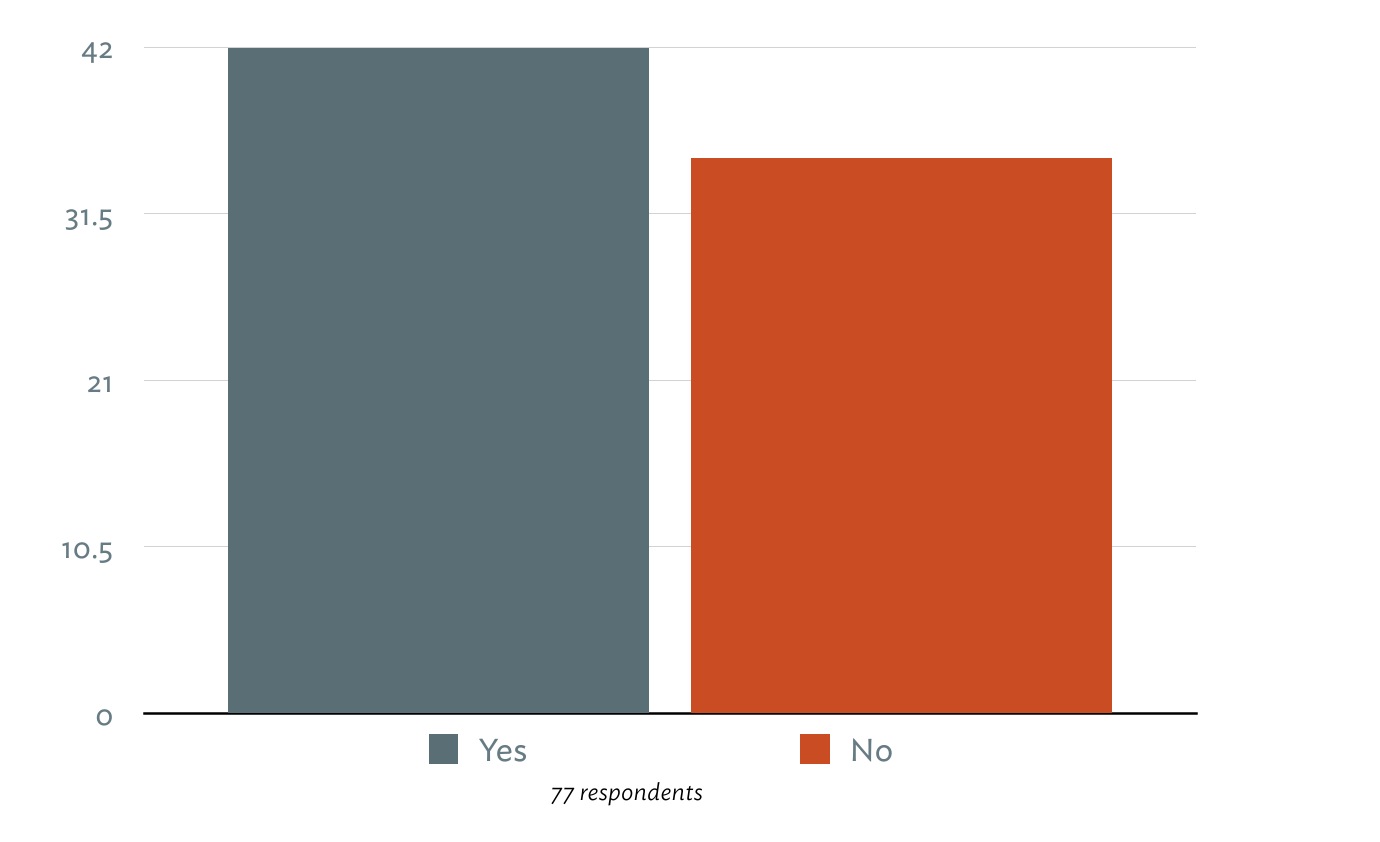
    #####Do you think the Syntax Control feature helps you improve your writing?
    helpful

    #####Which Syntax Control mode do you find most helpful when editing?
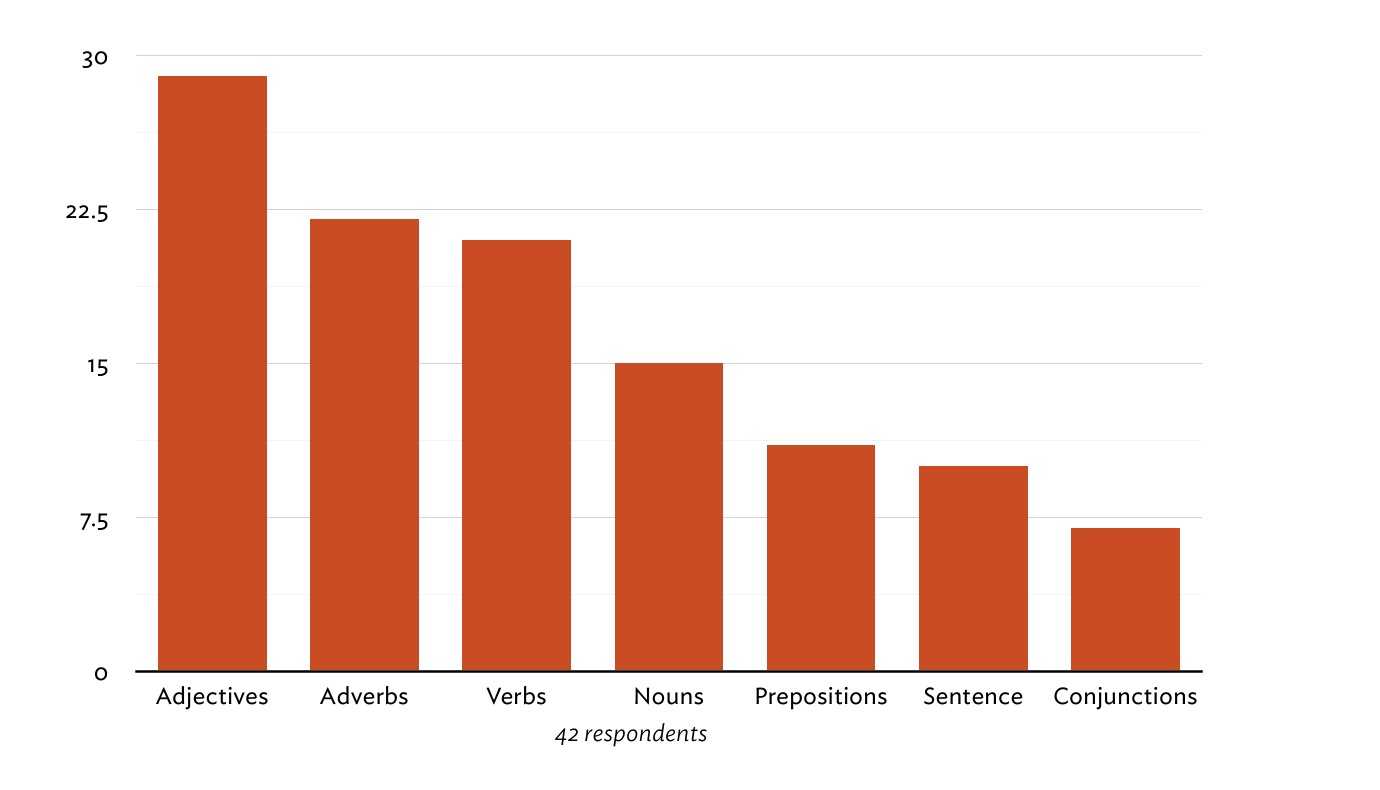
    speech parts

    #####Was Writer Pro worth the purchase price?
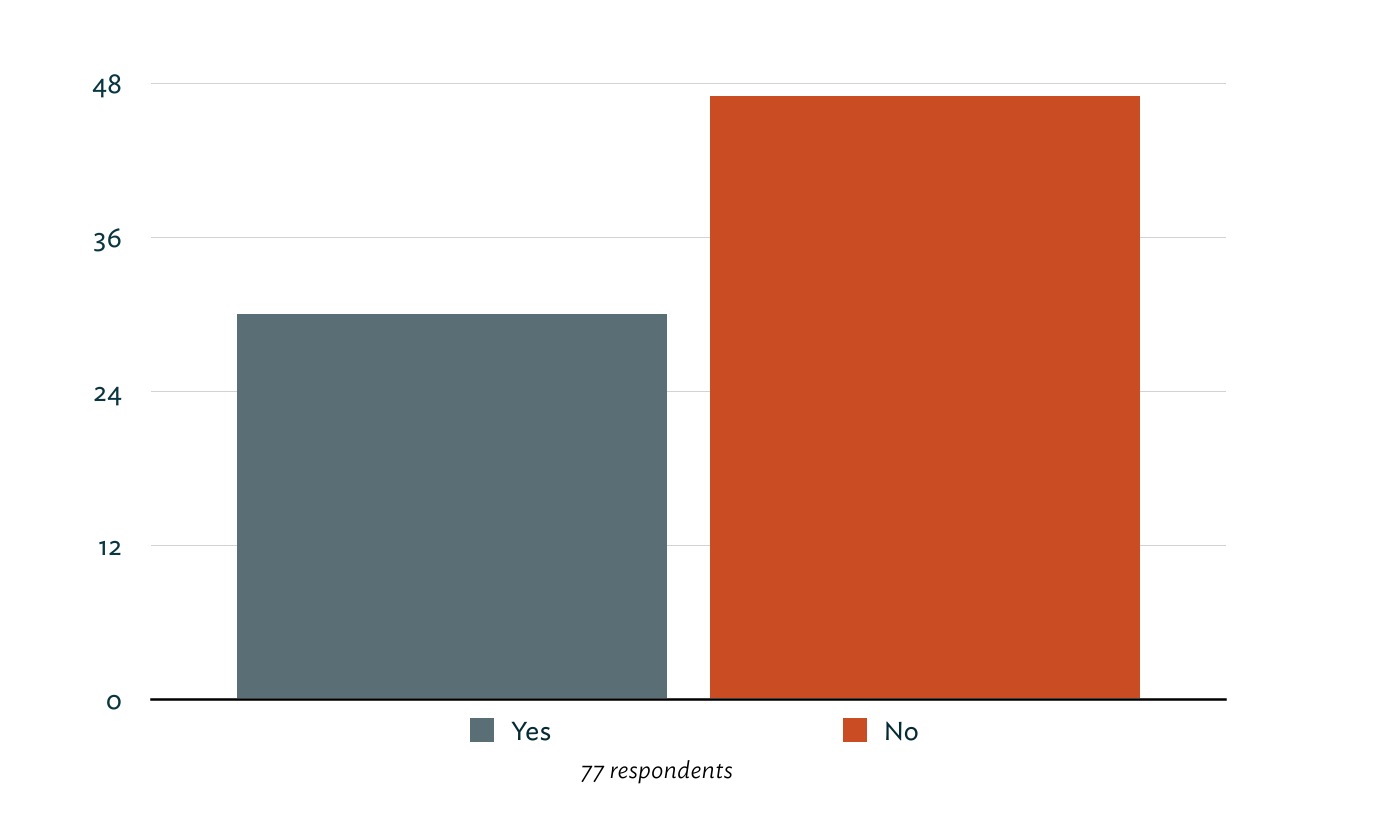
    worth it?

    #####Did you own the original iA Writer app?
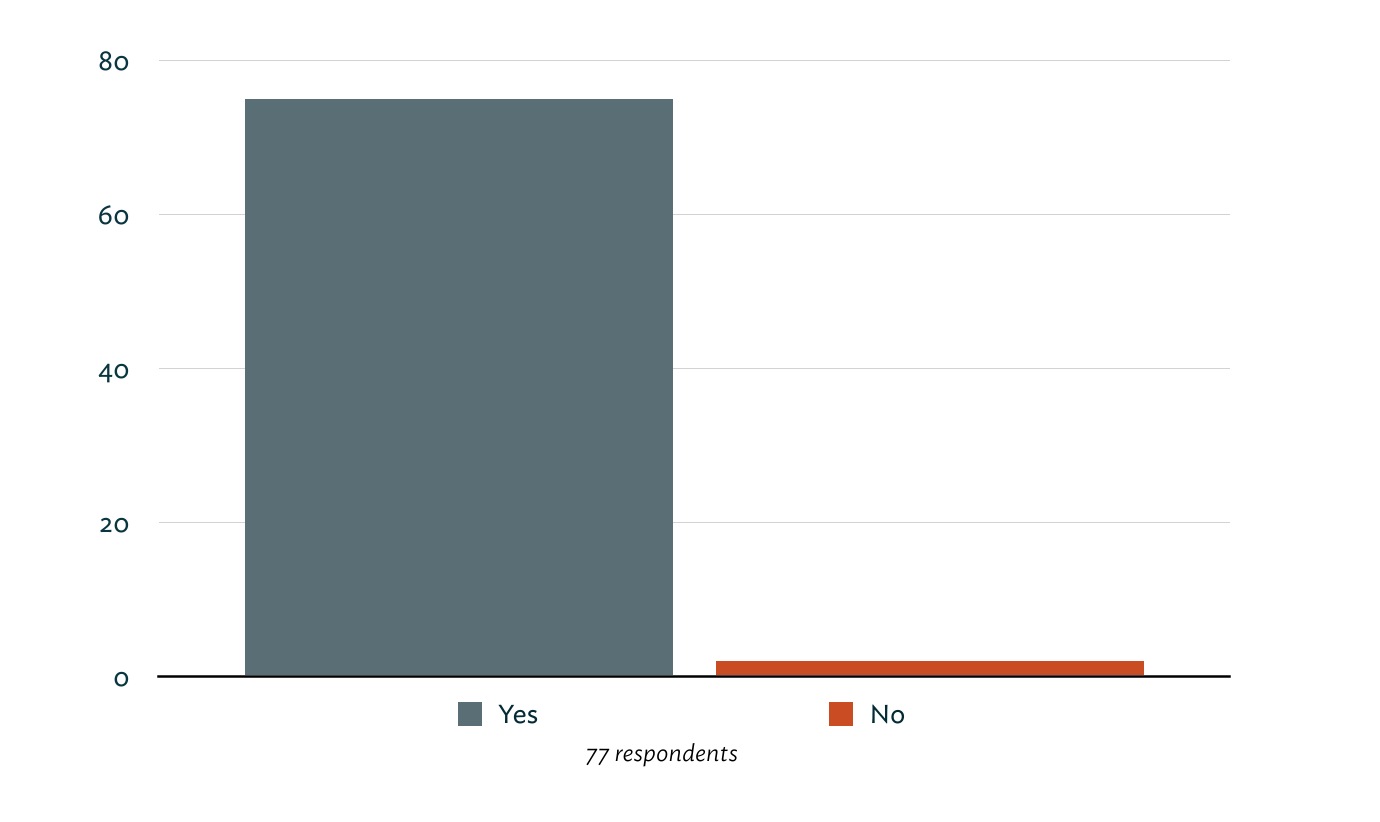
    iA Writer

    Roughly 55% of respondents said they think the Syntax Control feature improves their writing. The most common version of their reasoning was, “It points out repetition and weak adjectives and adverbs.”

    “Syntax Mode is my first editor. It helps me find obvious errors in my copy, and allows me to single out unwanted repetitions keeping my text tight.” – Ashish

    “Just a neat way to show me patterns in my writing.” – Shawn Blanc

    “Is it a must-have, revolutionary feature? No, but short of having my own editor, it’s a convenient way to ferret out canned verbs.” – Jared Sinclair

    “I have the bad habit of using too many words in my sentences. Syntax control helps me analyse each part of a sentence and trim out what’s not required.” – Ian Betteridge

    While this is an excellent tool in certain situations, I agree with Jared in that it’s hardly a must-have feature in writing apps.

    So, is this tool useful? Yes, it can show you words that you repeat often. It can show you all of the adverbs, adjectives, nouns, verbs and sentences in your writing. What it can’t do is tell you whether or not your usage of these highlighted words is good or bad. Only you, your editor, and your audience can determine that.

    On the other hand, this is an extremely useful tool in the context of teaching and learning English. Remember the years in grade school and middle school (and high school?) you spent learning and practicing the parts of speech in written word. It’s not an overly simplified process. When I was in school, we had to diagram sentences as an exercise to learn the parts of speech and how they all work together. I hated diagramming sentences, but in a way it was peaceful. Every word had a place. I tended to look at is as a puzzle that needed to be solved.
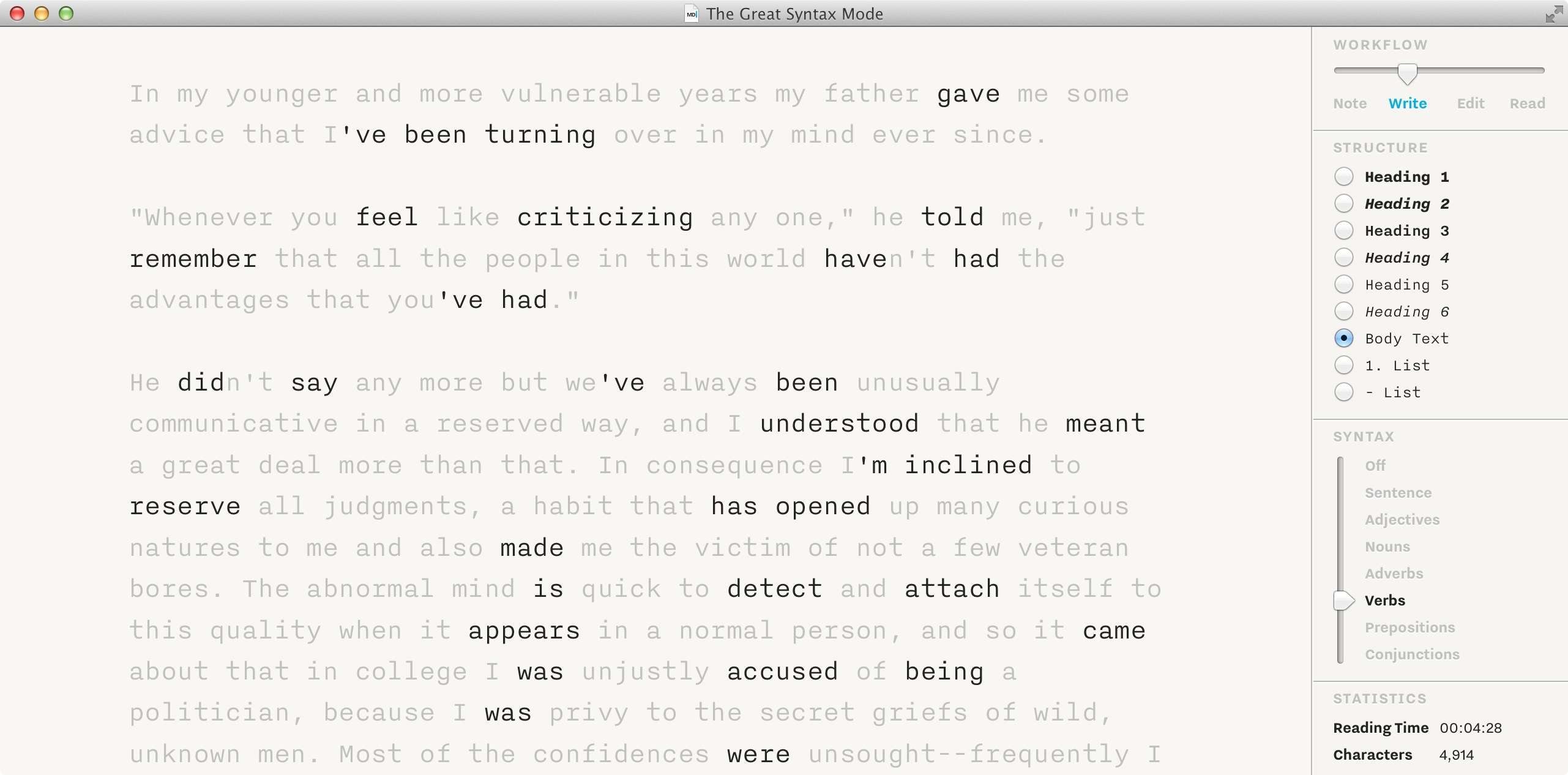
    Syntax Mode

    I really can’t say if the practice of diagramming sentences made me a better writer, but I do know that it taught me the underlying structure of our language and how to use it correctly (and incorrectly). Looking back at my primary learning years, I can see how a feature that points out certain parts of speech would be invaluable. I can also see how this would be an incredibly helpful tool when learning English.

    Greg Pierce, developer behind Agile Tortoise and apps like Drafts and Phraseology, took a few minutes to answer some questions related to this topic. Greg’s app, Phraseology, has a similar functionality to Syntax Control that allows users to see the itemized usage of different parts of speech. He offered to share some of the feedback he’s received since launching the app two years ago.

    The Inspect view has been what has drawn educators to Phraseology – it’s more helpful in repetition, because you get summaries by occurrence count, but provides other stats that are a larger draw. For example, I had a middle school teacher tell me how much her kids loved the “Grade Level” readability analysis because it gave them something concrete to get a feel for how well they were writing.

    If you’re not familiar with the app, the Inspect view mentioned above is a view that breaks down the parts of speech in the document and provides some useful statistics.
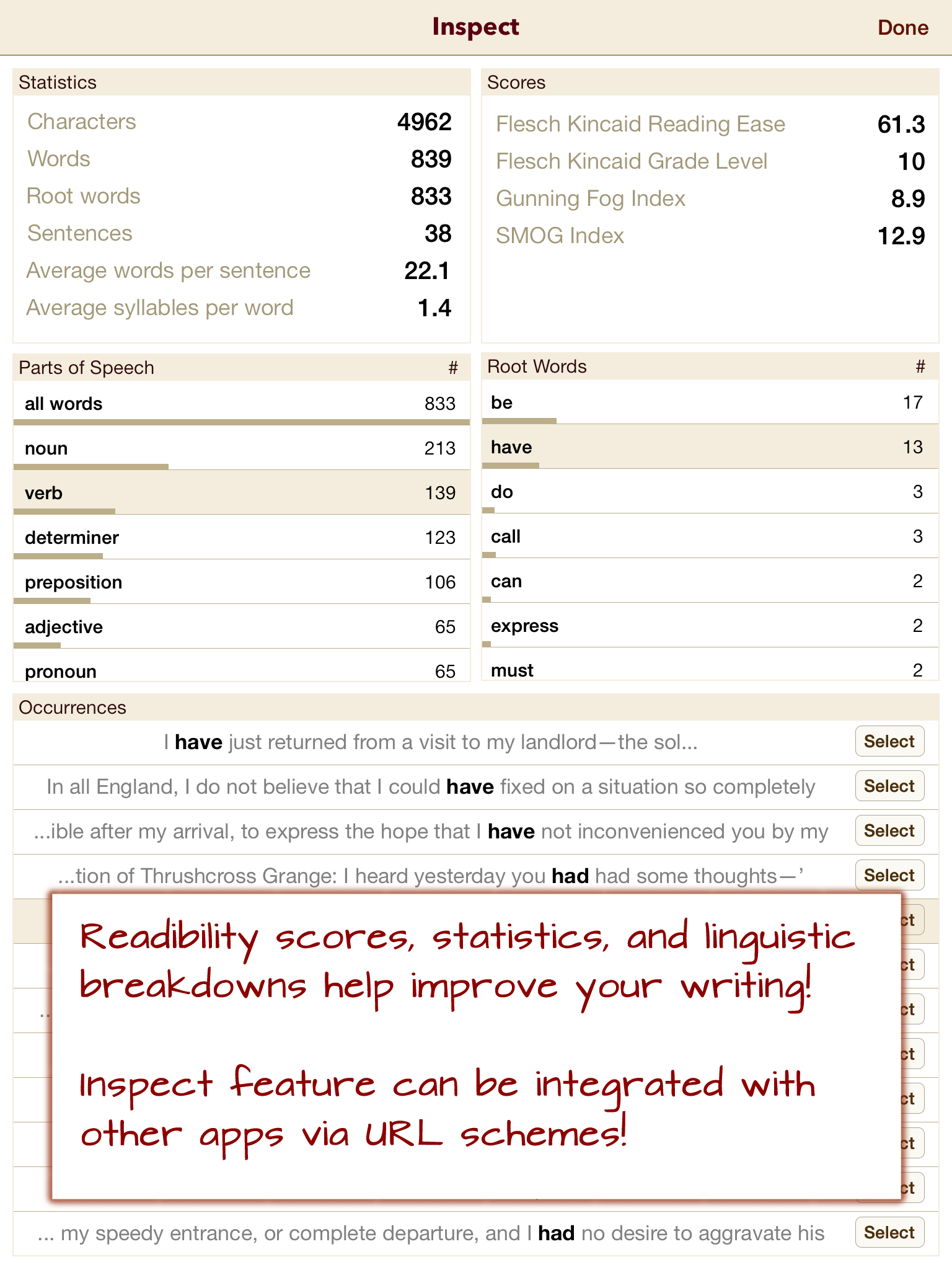
    Phraseology screenshot

    Phraseology takes a more analytic approach toward the syntax data. As Greg mentioned, this information can be invaluable to educators and students.

    Regarding more “mature” ((In the case of this article, let’s assume that “mature” writers are educated individuals with a desire to publish what they write in some form.)) writers, Greg echoed some of the same feedback we got from the polls. I asked Greg this question: “Can you think of any scenarios (or have you gotten feedback) where mature writers request or need speech parts analysis or highlighting?”

    No. Naturally, it would depend on the type of writer and how they go about writing. […] The one exception to that is writers who have (or editors who are particular about) certain ticks in writing – particularly excessive use of adverbs.

    Syntax Control is useful insofar as you can see the different parts of speech in your writing. It cannot tell you what’s wrong or what you could do better. It’s merely a looking-glass. In most writing scenarios, I don’t want to see individual word usage. If I want to really focus, I want to limit my view to one sentence or one paragraph at a time.

    Isolating certain words based on their syntax is an impressive feature, but there are other apps that take this a step or two further by offering more analysis. Phraseology can give you a grade level, which is a more human, or tangible, metric for your writing.

    A personal favorite of mine is 750words, a simple site that lets users write down their thoughts and achieve a daily goal of 750 words. This idea comes from a practice called Morning Pages. Basically, sit down and write 3 pages (roughly 750 words) before you start your day. It’s a way of clearing your mind and preparing for the day. I bring this site up because once you’ve finished writing, it offers up all kinds of data about your writing, such as typing speed, how often you were distracted, common emotional themes and concerns, mindset, and will even assign an MPAA rating to your writing (ie. PG, PG-13, R).

    Maybe this kind of data isn’t interesting to you, but it’s still a unique and impressive way of looking at words and presenting meaning. Yes, this approach does add a good amount of subjectivity to your words, but they’re taking this syntax analysis approach a step further and trying to give you something useful in the end.

    Another example of taking this syntax analysis to a more useful level is what Dr. Yejin Choi of Stony Brook University and her department are doing. Dr. Choi is the co-author of a paper titled Success with Style: Using Writing Style to Predict the Success of Novels.

    As the title of the paper implies, the Computer Science department at Stony Brook have created an algorithm that can predict whether or not a piece of fiction will succeed.

    “We examined the quantitative connection between writing style and successful literature. Based on novels across different genres, we investigated the predictive power of statistical stylometry in discriminating successful literary works, and identified the stylistic elements that are more prominent in successful writings.”

    Basically, they’re looking at the syntax of the literary work and comparing it to other literary works that have proven successful in the past. This algorithm is meant to help publishers select authors from the massive stacks of incoming novel pitches they receive daily. This type of work starts at the same place as Syntax Control: looking at the parts of speech. From there, they determine what qualifies as “good” writing, and go from there.

    This is fascinating work, and something I hope more developers try to achieve. Instead of having a syntax highlighter in your text editor, you could have access to a decent writing coach. Instead of “this is an adjective,” you could get feedback like, “This sentence is too passive.”

    A feature like Syntax Highlighting is going to appeal to some people and not matter to others. For example, of the dozens of responses we got from our survey, here’s a small handful that I think do a good job of representing the overall tone:

    “It’s a gimmick that represents a complete misunderstanding of what the actual pain points of writing are.” – Baldur in UK

    “It’s silly, gimmicky, and unnecessary. It has not improved or assisted my writing in any way. I no longer use Writer Pro for my writing.” – Andrew in California

    “You don’t have to be a professional writer to use it. I’m a student and this helps a lot for all the written work we have to do.” – Zeb in Switzerland

    Who might love the Syntax Control feature?

    The Syntax Control feature offers some great information for educators and students who are interested in improving and learning about parts of speech. It can also appeal to writers and editors who have certain “blind-spots” in their writing that they want to improve or catch.

    Why I don’t love the Syntax Control feature.

    On a personal level, I don’t see any benefit from using this functionality. I like Writer Pro because of the writing environment, not because it can show me my parts of speech. It’s an empty feature for me — but that’s me and my writing style.

    By writing style, I mean the way I compose and edit my words. I don’t think to myself when I’m writing, “Golly, I used way too many adverbs there.” I’m focused on the ideas when I’m writing. Features like this are distractions from the important thing.

    So what if you use “very” twice in the same article? Here’s the question you have to ask yourself. Who are you writing for? If you’re writing for a teacher or a boss, then follow the guidelines they’ve given you. If you’re writing for yourself, write however you please. If you want to improve your writing and have identified an unconscious pattern of using lots of insert speech part here in your writing, then this app could significantly help you in the editing stage of your writing.

    I don’t want to downplay the effort and time that went into creating this feature. It’s lightning fast and accurate. That’s amazing. Seriously. Just don’t think that it will make your words magically better. That’s all on you. This app might help you with that goal.

    Do you really want to improve your writing? Share it with a friend or colleague and ask for real feedback. When you give it to them, name one or two things that you don’t like about it. That gives them an open invitation to give you real critique, not the polite “this is awesome!” version.

    When Ben asked me to write this piece, I felt that my mind was completely made up. I didn’t see any value in the Syntax Control functionality. Honestly, I was surprised when the polls started coming in. 55% of you said the feature helps improve your writing. I didn’t understand. After reading through all the comments, I realized that this is a deeply subjective tool that only appeals to some writers and thinkers. For some people, this is a great feature that will get a lot of use. For other writers, it will never be touched. From reading all the feedback, my viewpoint was tempered a bit, but I still believe that this feature is mostly a gimmick that is marketed at magically making you a better writer. This simply isn’t true.

    Based on the feedback in the survey, my opinions will make some of you angry. That’s fine. I’m very happy that you have found an app that you enjoy and that adds value to your writing. Do us both a favor and go prove me wrong. When it comes to someone improving their writing skills, I’d love to be proven wrong and have my face rubbed in the mud. I’m just one guy, and ultimately we all have to figure this out for ourselves. There’s no universal answer. Find what works for you, then do it.

    My hunch is that you’ll know if this feature is right for you without even trying it. You’ll just know.

    As for the other features and the price, good luck with that. Not recommended. I recommend checking out Phraseology for this kind of syntax highlighting functionality. Excellent writing apps are plentiful in the App Store. I honestly prefer iA Writer over Writer Pro.

  • ‘Microsoft names Nadella as next CEO’

    Bill Rigby:

    Most agree that Nadella’s background in creating Microsoft’s Internet-based, or “cloud,” computing services makes him a safe pair of hands to take the company forward, but there remains a question over his ability to make Microsoft a hit with consumers or with impatient shareholders.

    Safe choices are always how you incite change… Oh, wait.

  • Unread

    Looks interesting, but I haven’t used it as it doesn’t support Fever. The best right now is Mr. Reader on the iPad, and looking at the Unread I’m not sure it would fit my usage pattern anyway.

    Seems like a very strongly designed app, which is nice to see for a change. ((I don’t like the name though, it gives me anxiety just thinking about it.))