Category: Articles

  • Secret Labs

    Admittedly I am not Google’s biggest fan. I don’t think they live up to their “do no evil” mantra and I think their design is largely crap.

    As a company I very much feel like their time at the top is limited.

    However, for what ever reason, this [talk of the Google X lab](http://www.nytimes.com/2011/11/14/technology/at-google-x-a-top-secret-lab-dreaming-up-the-future.html?_r=1&pagewanted=all) has really intrigued me — given me hope even for the sustainability of Google as a company. But I am cautious, because it takes more than just a building, smart people and money to create profitable things.

    Supposedly Google is running a secret lab (dubbed Google X) where engineers get to play with all the crazy ideas they want. A concept made popular by places like Xerox PARC (where many of today’s modern computing paradigms were established). It’s just that comparison though that worries me most — and should worry stock holders more.

    We all know that the Xerox Alto was an idea “stolen” not just by Apple and Steve Jobs, but also by Microsoft. The Alto was a marvel of engineering at the time, but Xerox couldn’t execute on the concept — for what ever reason — and thus, though it was an awesome innovation, it wasn’t so awesome for the company that thought it up.

    That’s my largest fear with the Google X lab. Google has proven many times over that they can indeed make some really cool stuff. The problem is that they largely fail at creating practical, consumer, applications for their products that they dream up (Google Wave, for example. Google TV as another example.)

    What good is a space elevator to Google? How does a self-driving car help Google?

    You can stretch to create answers for each. You could theorize that if people didn’t have to drive themselves they could search on Google more, or any other idea you wish. The fact though is that Google has only managed to make money off of one thing: ads.

    How does that translate into space elevators and self-driving cars? Because as cool as those things maybe (and they are cool) they don’t make a whole ton of sense for Google.

    Instead Google X feels more like a convenient distraction for potentially-problematic-restless co-founders of the company. Much in the same way that the Steve Jobs biography talks about Apple wanting Jobs to run AppleLabs instead of leaving — on the off chance he comes up with something useful, all the while keeping him away from infringing on the core money making businesses.

    I have no knowledge of Google X outside of the public reports on it, but I do know that allocating resources, however small, to such a division is potentially very frivolous. I have no doubt that such a division exists at Apple — but in a less official way — the difference in my mind is that Apple has proven they can create a market, that’s just not the case with Google thus far.

    Creating cool, off the wall, things is well and good. But it doesn’t make a lick of business sense unless those things directly help the bottom line. Not all of the innovations must help the bottom-line, but the ones that do, must offset of the cost of all those that don’t.

    So I ask again: space elevators?

  • The Problem with Siri Downtime

    The real problem with Siri is not that it (often) goes down, but rather how Siri informs you that it is down — which it does after you have already asked it to do something.

    Apple, and Siri users, certainly want the service to maintain 100% availability, but with services that rely on so many working parts — this is just an unrealistic expectation. So when Siri fails it should do so in the least intrusive way — it just so happens that’s not the way it fails right now.

    Typical scenario: Driving home and want to text my wife to let her know that I will be there in 20 minutes. Activate Siri and ask her to message my Wife. Siri comes back to say: something, something, I don’t work.

    Siri really should be smarter than this. Siri should tell me from the moment I activate it whether, or not, what I am about to do is going to work. How hard is that?

    – Activate Siri.
    – Siri checks servers.
    – Siri responds: “Sorry, I’m drunk as a skunk right now. I’ll sober up soon.”

    That’s really not that hard and offers a far less frustrating experience than the current solution of leading on the user, in hopes that — what — it will be back working by the time I am done speaking?

  • Branding

    As you have noticed by now there has been yet another redesign for this site. ((My apologies for some of the responsive/layout issues I am having this fixed. Completely my fault.)) When I get it in my head that I hate one aspect of the site ((This go around it was the menu.)) I start playing with it, what inevitably happens is that I start changing more and more things until — well — I have a new design.

    I don’t really think this design needs explanation and I don’t really think it is all that “unique” — what is the biggest change is the lack of “branding” anywhere in the header of the site. Most blogs/sites you visit will have a logo of some sort at the top — identifying where you are — this site used to have that, but it’s now gone.

    This has nothing to do with the design of the logo, I quite like the design of the logo — it has everything to do with the design of the site. I could go into some long, really philosophical, explanation of why I dropped the logo from TBR — but that would just be a lie.

    The truth is that I dropped the logo on accident when I was designing the new site (forgot to paste back in the relevant code) and I *kept* designing without it. Then I realized it was missing and added it back in, hated it, and I removed it again — this time on purpose.

    I just like the site without a logo weighing down the top, right or wrong, it’s really that simple.

  • The Mac Experience and the Mac Pro Experience

    There has been a lot of talk about the “future” of the Mac Pro — Apple’s beefiest Mac. I owned the first version of the Mac Pro, when Apple made the transition to Intel chipsets and I loved that computer. Now — as I think about my computing setup and where the different systems sit — I can’t help but think that the Mac Pro offers a decidedly un-Mac-like experience for users.

    Before you start emailing me, let me explain how I see the “Mac experience”, because only one half of that experience is software driven.

    ### The Mac Experience

    Here’s how I see the current Mac experience from the non-software half:

    – As few wires as possible.
    – Sits on your desk, because it is gorgeous looking.
    – Quiet.
    – Truly designed to not be touched by the user. (Caveats have been made for RAM access and the like, but for the most part these are “sealed” systems.)
    – As small as possible.

    There are surely more things that make up the Mac experience from a hardware perspective, but these offer us a good, simple, starting point.

    ### The Mac Pro Experience

    If you go through the above list of attributes you will notice that by and in large the Mac Pro goes against most of them.

    – It begs for more wires to make use of the vast amount of ports.
    – While gorgeously designed, no one in their right mind is putting it on top of their desk — it’s huge.
    – Depending on what you are doing it can sound like a sedate ceiling fan or a 747 taking off.
    – The entire side panel is easily — easily — removed allowing the user access to most all inner components of the machine. It was designed to be expanded upon from the hard drives and RAM to the PCI slots.
    – It may well be as small as it can be, but it still ain’t small.

    All of this is really the most undesirable part of Mac Pro ownership to me. I never could play video games on it, because the sound drowned out the TV in the next room — with the door closed. There was always a mess of cords surrounding it. I was always on the hunt for more RAM to add, swapping hard drives and various other things that I never think twice about with my MacBook Air.

    In reading the new Steve Jobs biography I can’t help but think that the Mac Pro is decidedly the computer that he likes the very least. I know he used/had one, but that doesn’t mean that he did so because it was his favorite machine — given an unlimited budget, I’d have five.

    As I think about everything that Apple stands for with its design and goals, I can’t help but suspect that the MacBook Air is the epitome of the Mac experience as Apple sees it. Small, quick, sleek, low-price, sealed.

    The MacBook Air and the Mac Pro are polar opposites: one a marvel of engineering — the other a marvel of brute strength.

    I don’t think the Mac Pro is going anywhere, but I also don’t think it is something that Jony Ive’s team has spent much time thinking about.

  • Mophie Juice Pack Reserve

    A while back I [purchased](https://brooksreview.net/2011/08/monoprice/) the [Monoprice](http://www.monoprice.com/products/product.asp?c_id=108&cp_id=10831&cs_id=1083110&p_id=8295&seq=1&format=2) PowerRocks for two reasons: I didn’t own a battery back up for USB powered devices and it was dirt cheap. It works well and packs quite a punch, but because of that it is big and heavy.

    I rarely carry it around and so it is usually stashed in my car, only making into my bag when I travel in a plane. With the battery woes on the iPhone 4S I decided that I really needed a small battery backup to carry in my bag, possibly in a jacket pocket.

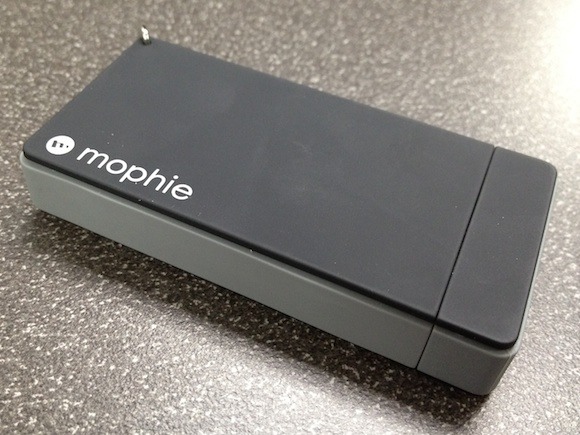
    I finally grabbed one of the reasonably priced, small, [Mophie Juice Pack Reserve](http://d.pr/wPuh).

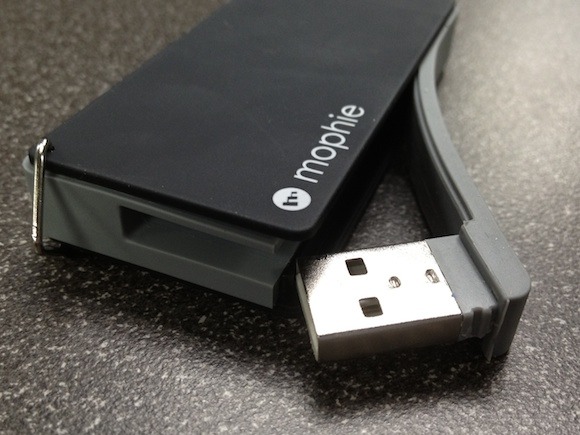
    What surprised me most about the Mophie is just how lightweight it is — it’s lighter feeling than most AA batteries — making it a great in-bag travel companion.

    [](https://f3a98a5aca88d28ed629-2f664c0697d743fb9a738111ab4002bd.ssl.cf1.rackcdn.com/mophie-closed.jpg)

    That’s great and I love it for that, but does it work? Kind of.

    I ran a few tests using the Mophie every time my battery started to run low (below 40% charge remaining). The only indicator on the Mophie is a single LED (green charged, red close to dead, no light is a dead battery).

    In my testing I found that you could expect to increase your battery life by 20 plus the current percentage shown on your remaining battery when you juice the phone off of a fully charge Mophie. So if you had 10% charge left, the Mophie would bump that up to 30%. That’s not earth shattering, but the thing is tiny and weighs nothing — for emergencies that’s not a bad bump.

    In one incredibly scientific test I moved my iPhone 4S battery from 14% to 38% in 50 minutes and roughly 30 seconds. The Mophie was completely dead after this and I only sent one text while the iPhone 4S was “charging”. That’s enough that carrying the Mophie is fine for me, but probably less than most would hope for.

    I would again remind you that the Mophie really is light weight.

    ### Is it Worth It?

    [](https://f3a98a5aca88d28ed629-2f664c0697d743fb9a738111ab4002bd.ssl.cf1.rackcdn.com/mophie-usb.jpg)

    That’s a question I have been struggling with because there are several factors I need to consider:

    1. For this device to be “worth it” I need to always have it on me when I need it. That’s not going to happen in the summer when I am out and about because I don’t have the pocket space to carry this thing. However, in the winter, I bet I would have to be careful not to wash the Mophie because it would be easy to forget it in a jacket pocket. Since I live in Washington State where it is more winter than summer — I’ll say it is worth it for me.
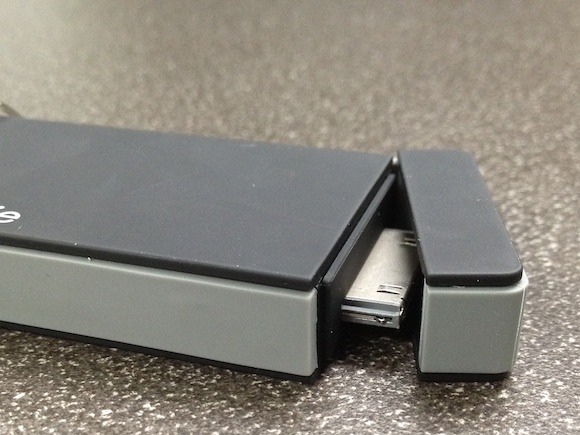
    2. How convenient is it? Turns out the built in charging cable for both the Mophie and your iPhone is pretty great. Making it super easy to charge your iPhone with and to recharge the device itself. However, it doesn’t fit securely enough for me to the bottom of the phone and when you set the phone down on the table it props up the end it is plugged into just a few millimeters — that’s not good if you want to hit the home button with the Mophie plugged in.
    3. The charge itself is a ok amount and has proven to be enough for the times that I have needed it — but it’s hardly a conference level battery backup solution.

    [](https://f3a98a5aca88d28ed629-2f664c0697d743fb9a738111ab4002bd.ssl.cf1.rackcdn.com/mophie-dock.jpg)

    Overall I would say that if near the end of the day you sometimes find yourself needing a boost — or when you know you will be out and about quite a bit, then this device is a pretty useful thing. However if you just need something to carry in your bag and size/weight is no issue — you are better off with something else. Also if you know you are going to for sure need it, one of those silly battery cases is probably a far better bet.

  • Apple Needs a Touch More Search

    One of my biggest annoyances with iOS and Apple TV is that I often know exactly what I want, just not where it is. Take for instance the Apple TV.

    At $99 it is a fantastic product and with an added subscription to Netflix it is a wonder how I lived before. What happens though if you want to watch a movie, say *Apocalypse Now*?

    Well if you are a Netflix subscriber that would be the first place you start, so you go into Netflix and search (with your Apple TV remote of course) through the database. For the sake of this example let’s say Netflix doesn’t have the movie, you must then back out to the main menu and search the iTunes Movie listings, again entering things with your remote, jogging about the virtual keyboard.

    Wouldn’t it just be far more convenient if there was a global search, that when used, returned a result that said: *Apocalypse Now* is available on both iTunes and your Netflix account, there are also 43 results on YouTube. Perhaps it even states whether buying from iTunes would be a higher resolution or not, but let’s not get greedy here.

    Wouldn’t that be a far better user experience, and potentially more lucrative for Apple?

    “Sorry, Netflix doesn’t have it — iTunes does.”

    ### Newsstand

    I have a similar issue with Newsstand and the implementation of separate but equal with periodicals on the iPad/iPhone. I subscribe to about 5 periodicals in Newsstand and I often find that I have read an article I want to reference, I remember what it is about, but can’t remember where or when I read it. I just know it was on my iPad in a “magazine”.

    As of right now I would need to go in and search each magazine “app” (if it has search) and hope to find it. Maddening.

    Why can’t I just perform a search at the Newsstand level and see what results I get, regardless of what “magazine” the article was published in? Why must I pinch, zoom, tap, pluck, swipe, and poke my way around until I find the article I need?

    Instapaper and Safari all allow me to quickly do this, why not these native ‘buckets’ that Apple has created and forced my content into?

    We need more search and less touch, especially when I am paying for so much of this content.

  • Siri, Reminders and OmniFocus

    I am a huge fan of having a “Trusted System” where you store anything and everything that is actionable. For quite a long time that has been OmniFocus for me. To the point where I don’t even bother to look at other reminder apps when they come out — I have no interest.

    Then Apple added the Reminders app to iOS, with the ability to remind you of tasks as you leave or arrive at certain locations. I thought: OK that is too cool and too handy not to give a go. And it is, incredibly handy and creates a somewhat ideal situation for a task management app — for people that don’t care about due dates.

    OmniFocus, being the smart ones that they are, quickly added this functionality to OmniFocus on iOS and just when I thought that I now could let go of Reminders, Apple upped the ante and brought us Siri.

    With Siri I can create a reminder that is location aware without ever hitting a key on my iPhone — that’s pretty powerful for a guy that drives ~90 minutes round trip every day. ((A side note: You can use Siri to create tasks in OmniFocus via email, but that is an inelegant hack that I have no interest in.))

    So do I use both apps, effectively destroying my trusted system, or do I forgo the added benefits of one or the other?

    I chose the former, but I found out it doesn’t destroy anything.

    What I have found (and am not alone in finding) is that you can have a pretty elegant solution by using both the Reminders app and OmniFocus. For any task that I create on my Mac, I use OmniFocus as the sole repository. It is still the best option and easiest to use when my fingers are already on the keyboard.

    However, OmniFocus has two big limiting factors:

    1. It does not natively integrate with Siri.
    2. Location aware reminders are based on the context that you add to the task, not the individual task as with the Reminders app. (More on this in a bit.)

    You could also add a third downfall, which is in my testing Reminders seems to remind you when you really are at the location, whereas OmniFocus seems to remind you when I get within 0.5 miles of the location — that’s a bit annoying.

    ### Location Reminders with OmniFocus

    As I noted above OmniFocus uses contexts to provide the location data to each task, whereas Reminders uses input on a per task basis. This is both good and bad. To get around the inevitable need for a reminder when leaving instead of when arriving, in OmniFocus you need to create two contexts, such as:

    1. Office – arriving
    2. Office – leaving

    Then setup your tasks accordingly. This is a pretty good solution, especially when applied on your Mac — but certainly not as elegant as Reminders.

    The problem with OmniFocus, though, is that the reminders are not pushed to the phone — you must manually pull them down by opening the app.

    Often I find that I set a reminder on my Mac for when I get home, only to arrive home never having seen that reminder. The problem is that I didn’t open OmniFocus on my iPhone prior to getting home. Bummer.

    My work around is Siri and the Reminders app and truthfully this is more of a solution than a work around.

    ### Siri + Reminders

    What I have found is that those one-off reminders that belong to no project and therefore are simple “reminders” fit pretty well in the Reminders app. ((Go figure.)) So instead of looking at Reminders as a competitor to OmniFocus, instead I look at it as a completely different app that complements OmniFocus.

    Siri is essentially my personal nagger. In that I always ask people (mainly my Wife): remind me next time we go to X to do Y. As any couple knows, asking your significant other to remind you of something is rather hit and miss — not so with Siri.

    So instead of using Reminders to store tasks I use it to store, well, reminders. OmniFocus stores my tasks, projects, and goals — everything else I just ask Siri to remind me of, because typically these are just simple things that truly are reminders.

    This doesn’t break my trusted system, instead it cleans it out for me. The reminders I input typically aren’t actionable things that I need to do, as much as things I just need to remember.

    This all works surprisingly well.

  • 3G MacBook Follow-up

    After posting my [3G MacBook post](https://brooksreview.net/2011/10/3g-macbooks/) I have been getting quite a few more emails than normal. The bulk of which agree that Apple should provide such an option, but worry that it never will for various reasons.

    Among those reasons the most common are: the iPhone already has a personal hotspot mode, data plans are expensive and this would add yet another data plan to pay for, and lastly that the data caps are so low such a computer is not realistic. I want to take a moment to better explain why I think all of these are poor excuses for Apple to *not* make a 3G equipped MacBook.

    ### Personal Hotspots

    The argument here is that Apple provided the personal hotspot mode on the iPhone so that it didn’t have to set about installing 3G in a MacBook.

    I disagree.

    I think the more likely reason Apple provided the personal hotspot mode is because they wanted to check the box on the feature comparison list with other smart phones. This feature of the iPhone never gets a ton of billing from Apple, likely because it is a quick fix to the deeper, more complex, problem of internet everywhere.

    The main problems with a personal hotspot mode are:

    1. It requires you to own two Apple devices. Something that Apple has been trying to stay away from doing ever since they introduced the first iPod. Take for example the fact that now, under iOS 5, a user can fully setup and restore an iPhone or iPad without the need for a computer.
    2. It is a clunky, non-seamless, system. To get hooked up you have to turn it on and then connect to it. This is not the type of solution that Apple likes.
    3. It’s a drain on the iPhone battery — something Apple goes to incredible lengths to prolong.

    The iPhone personal hotspot is a stop-gap, not a solution.

    ### Data Plans: Pricing

    Many have also commented that data plans are already pricy and the last thing Apple would want is to saddle users with yet another data plan. I largely agree with this, but I also see it as something that is mostly out of Apple’s control and thus something they would just ignore.

    While it would be ideal if you could share a data plan between your iPhone and iPad, that is simply not the case in the U.S.. I would suspect that Apple doesn’t much care about this, as the likelihood of a user having three data plans for three Apple devices is lower than most of the readers of this site suspect it is.

    I would guess that any 3G enable MacBook would have the same data plans and options as the iPad does: simple and à la carte.

    ### Data Plans: Caps

    Something that I had completely forgotten to address in my last post was my idea behind how Apple could deal with data caps for 3G toting MacBook users. If we assume that any 3G plan in the U.S. for a MacBook would only go as high as 2GB (maybe 5GB in rare cases) then it is safe to assume that this is not nearly enough bandwidth for the average user.

    Many readers wrote in about the potential for overage charges when you decide to download a movie on the go, or backup to Backblaze and other services. I think these readers missed the larger point of: this is not what a 3G MacBook would be for.

    I never meant to imply that we need a 3G MacBook so that we can go about our regular internet connected lives, I was simply saying that there is a subset of core services that we need and should be able to access anytime we want. Things like syncing files and checking websites.

    You would be hard pressed to go over a 2GB data cap if you stuck to actual work while on 3G. Still though I think there is an easier solution: create a bandwidth monitor mode in OS X.

    I would see it working like this:

    – OS X detects that a user is on 3G and automatically shuts off all known services that hog bandwidth.
    – OS X only allows user directed interject connectivity. (e.g. The users says fetch email, update Twitter, the user said go to this page.) All background internet enabled services are suspended.
    – There is a custom setting that a user can tweak to grant permission to certain apps, much in the same vein as how the current firewall or Spotlight settings work.

    The goal would be to create a version of OS X that would help to limit internet traffic while on 3G — all without interfering with how the user is directing the computer to act. I think such a solution is not only doable, but would be quite user friendly in a 3G MacBook scenario.

    ### Two Reasons Against 3G

    Demand and battery life hits to the MacBooks.

  • Meet Mike Elgan: An Idiot

    [Mike Elgan thinks](http://www.datamation.com/mobile-wireless/why-you-should-wait-for-the-iphone-5-1.html):

    >The truth, it turns out, is that the iPhone 4s kind of sucks.

    He boldly claims:

    >The iPhone 4s is the first stumble by Apple since the company launched the original iPhone in 2007.

    The rest of his article is filled with nonsense pilled atop of incorrect information. For example, Elgan states:

    >That last bit, the “reduced motion blur” is flat-out wrong. Apple claims that because they say the camera has image stabilization. But this feature is undetectable in real life.

    It doesn’t take a genius (or maybe it does) to read Apple’s tech specs page for the iPhone 4S and see that it says:

    >Video stabilization

    Note, that is not “image stabilization”, just video. Now, Elgan does note that:

    >I can’t detect any image stabilization in videos, either.

    Which is a far different statement from saying there is none. Either way he is an idiot.

    His biggest frustration with the phone is also his biggest love of the phone: Siri. Elgan states that 80% of the things he does on his phone is now with Siri, but it is still a pretty crappy phone. He also notes, in regard to Siri, that:

    >The problem is that it’s exactly what Apple says it is: an unfinished beta.

    Hmm.

    Elgan is flat out wrong, and idiotic about the iPhone 4S. You can make an argument that an iPhone 4 user should wait another year, that makes sense. But you can’t make that argument based on:

    – Siri being in beta, just as Apple says it is.
    – The camera being worse than the 4 — because it isn’t.
    – The camera not having image stabilization, like Apple never said it had.
    – iCloud, because that is an iOS 5 thing — something that iPhone 4 users get too.
    – The design of the new apps, because of the same reason as the last point.
    – The yellow screen, because this is always a complaint with new iPhones while the glue, or whatever, dries.

    In fact, Elgan’s only valid point is that the battery life isn’t as good — something I have experienced too. Mike Elgan: idiot.

  • The Argument for 3G MacBooks

    A while back — [when a non-unibody MacBook Pro prototype showed up on eBay](http://www.appleinsider.com/articles/11/08/14/purported_macbook_pro_prototype_built_in_3g_appears_on_ebay.html) with a complete 3G setup — I was going to write a little post about how Apple really needs a 3G MacBook. Things happened and the post was forgotten. Until now, when I was cleaning out my drafts folder and I saw the file name and thought: this is more true now than it ever has been.

    Up and until a few months ago the following used to be true about 3G wireless internet:

    1. It was slow.
    2. It was expensive.
    3. It wasn’t *really* needed.

    Obviously one is no longer true, with the 4S capable of speeds that are much faster than many home broadband connections (my 4S gets me between 4-7Mbps download at my home). You may argue that ~$25 for 2GB of data is pricey, but in practice not many people (even heavy users) come close to this amount each month and the general ubiquity of WiFi and better software monitoring built into the OS would help mitigate the need for more data thus removing number two as a factor.

    The third item though is what has really changed — more and more the average user could really benefit from easy 3G access on their MacBooks to keep on “working”.

    ### Multiple Devices

    At this point I think it is pretty safe to say that most Mac users are also toting a secondary device — likely one of either an iPhone or iPad, perhaps both. It used to be that these secondary devices were strictly used for a particular type of task — likely communication or short-term entertainment — now though these devices are increasingly used to *create*.

    So what happens when a savvy traveler gets off the plane after crafting a report on his iPad and arrives at his hotel. His hotel is one that someone shelled out big bucks for and because of this the hotel has a paid WiFi network that has a relatively poor speed — perhaps the network is even just Ethernet only (not uncommon in stupid expensive hotels) and he only has a MacBook Air. ((Argue all you want, but I have found that the more expensive the establishment the worse the WiFi and more expensive the connection cost. The Trump International in Miami set me back $17.99 a day for 756Kbps speed — a day.))

    Now you can’t work on that report until you find an Internet connection, thus you have a crappy scenario for most users. With a 3G connection on your MacBook Air you would have solved this lacking all the pain associated with how things currently are. The experience would have been far better for the user.

    ### Cloud

    More over, we are increasingly becoming dependent on internet connected services to “work”. Where it used to be that all you needed was a computer, fax, and a floppy disk, the web is more often becoming a floppy disk and the fax has been replaced by online communication systems.

    So guess what? You are not alone when you feel like your computer is ham strung by the fact that you don’t have a working Internet connection. It’s increasingly more true that a person can’t compute without the Internet.

    ### iCloud

    The above didn’t matter much to Apple because their cloud services were limited and it was always the feeling at Apple that email was just as good on your iDevice.

    With iCloud 3G becomes a bit more important.

    If Apple wants to sell iCloud as a Dropbox like service that just works to keep your documents updated on every device, well your device is going to need a reliable way to get on the Internet no matter where you are. That is: you can’t show a commercial with a traveler working on an iPad while flying, getting off the plane, sitting down with the MacBook, and opening that same document. Because right now that scenario actually looks like this:

    – Get off plane.
    – Connect iPad back to 3G
    – Wait for sync
    – Open MacBook Air
    – Find a WiFi network
    – Pay for WiFi and/or accept a ToS to use it
    – Test if it is actually working
    – Try again
    – Sync with iCloud

    Some steps can’t be eliminated, but 3G would eliminate most of the problems with “free” or “public” or “available” WiFi networks: mainly that you are often better off not using them. Every iPhone and 3G iPad owner knows what it is like to use a device without having to worry about an Internet connection — bliss.

    ### A Real Need

    It’s true that I have mostly centered these examples around travelers and that this group has always had a need for these types of devices, but I think now the average consumer really has a need for these devices too.

    When you really think about how the average person is using their computers, I don’t think it is much of a stretch to say that the overwhelming majority of what most people do on a computer is web-centric.

    Taking a look at how my Wife uses her computer to it becomes clear to me that often the most powerful and convenient tool she has is her iPhone 4. She has a full Apple compliment of devices: iPhone 4, iPad, MacBook Pro. However only the iPhone has a cellular connection and my Wife can often be heard saying: “My iPad is useless without 3G.”

    She feels the same way about her MacBook Pro, but truth be told she just means that for her any computing tool is useless if it doesn’t have an Internet connection — I agree.

    So it’s quite obvious that with more and more cloud enabled users, creating a seamless and “just works” Internet connection is becoming even more important to crafting a great user experience. It’s just that this isn’t all there is, because if that was all, the easier solution is to get more WiFi hotspots or go to Starbucks which is minimally painful to use WiFi at (and free). So it’s not about easy spots to get Internet — it’s about constantly being *able* to be connected without searching it out.

    ### Security

    You see the last bit that is going to become increasingly more problematic with more and more less paranoid and security conscious users on “cloud” services is the security of all these free WiFi hotspots (that are incredibly important to today’s computer users).

    If you keep all your financial data in a Numbers spreadsheet that is seamlessly synced via iCloud along with your calendars and the schedule of your kids — it certainly wouldn’t take much for someone to swipe that data for you on a maliciously setup, free, WiFi network. Which means you need a VPN, and while services like [Cloak](https://www.getcloak.com/) make it dead simple, they also are services that the average user must seek out — something that I doubt many users will know that they *should* seek out.

    Thus the more private data we keep in the “cloud” (and we are increasing the amount we keep there very quickly) the more we need to make sure that the networks we use to access this data is not only ubiquitous, but is relatively secure. Not only then would a 3G MacBook be more convenient, it would be more secure.

    Security, convenience, and a better user experience all come from a 3G/Cell equipped MacBook — sounds pretty Apple-ish to me.

    **UPDATED** (on Oct 24, 2011): Apparently iCloud is [securing with SSL](http://support.apple.com/kb/HT4865), so that shouldn’t be a security concern. Thanks to those that emailed this in.

  • This Occupy Wall Street Stuff

    If I am honest I feel kind of guilty for not posting more about this [Occupy Wall Street](http://occupywallst.org/) movement. I’ve been following along and there have been many interesting things that have occurred, I just never felt this was a topic I wanted to poke. Because to me the message of the movement has always been clear, but — problematically — the end goal of the movement has always been elusive.

    An end goal of: “Help Us” — well — that’s not really a goal.

    As best as I can make out the movement has some very legitimate objections — too many people are getting screwed over while under the false pretense that they are/were doing everything “right”. However, it would seem that the goal (though I could not find it explicitly stated) was to have someone — someone *else* — fix the problem. I completely get that, hell I take my car to a mechanic when I can’t figure out what is wrong, but it seems to me that the problem of the “99%” is not a problem that we should be relying on the “1%” to fix for us — the 1% created the problem (or had a hand in creating it) and therefore should not be trusted to fix it and therefore the movement is Occupying the wrong streets.

    Earlier [John Gruber linked](http://daringfireball.net/linked/2011/10/20/ows-lemony-snicket) to [this post “by” Lemony Snicket](http://occupywriters.com/by-lemony-snicket) in which there are 13 observations noted. Let’s take a look at number five:

    >5. There may not be a reason to share your cake. It is, after all, yours. You probably baked it yourself, in an oven of your own construction with ingredients you harvested yourself. It may be possible to keep your entire cake while explaining to any nearby hungry people just how reasonable you are.

    That’s a pretty apt summary of what is going on here — everyone is hungry for more money all while the very elite few hold the vast majority of it. It is, simply put, not fair.

    The problem though is that the world isn’t really designed to be fair.

    Acknowledgment of that fact does not in any way minimize the grievances of the movement — you just need to accept the unfairness before you can reasonably expect to change the world. That is: the issue isn’t really about “that’s not fair”, but the solution must recognize that we do not live in a world where perfect fairness has been proven to work.

    You see, the real issue I have here with this movement is the intended solutions. If you take the above analogy (cake) as the basis of the problem that needs solving, there are but three obvious solutions:

    1. Stingy rich guy solution (currently in practice): “It’s not my fault I have cake — I learned how to make the damned thing. You go out and make your own.”
    2. Guilty rich guy solution: “You can’t have my cake — it’s mine. BUT, I will teach you how I made my cake so that you too can make cake. All you need to do is get the ingredients.” (a.k.a.: The I feel guilty, but not *that* guilty, solution.)
    3. The 99% solution: “Share your cake.”

    It should be obvious to any reader here that none of these solutions work. We have stuck with the second for most of my life, because it eased the guilt of the obscenely wealthy while “inspiring” the poor. That, and the wealthy are in power.

    The third can be twisted into meaning communism, or more intelligently seen as a plea to stop hoarding all the money (depending on if you are Sarah Palin or not).

    The first is what happens when people stop noticing that we have a severe lack of number 2 and 3 happening.

    Snicket, again:

    >13. 99 percent is a very large percentage. For instance, easily 99 percent of people want a roof over their heads, food on their tables, and the occasional slice of cake for dessert. Surely an arrangement can be made with that niggling 1 percent who disagree.

    If you have read this entire post thinking that I am a jackass who doesn’t agree with the Occupy Wall Street notion — then you, sir, are wrong. In fact I agree with all of their grievances — every single one.

    What I don’t agree with is their methods for trying to change things, asking the 1% to concede. It seems to me that nothing gets the Occupy `Insert name of City` Twitter accounts more excited than the thought of *potentially* being arrested. A goal of a protest should never be trying to get arrested, it should be to try and get the cops on your side — that’s a winning movement. You take to the streets when you aren’t being heard, which is problematic for this movement because:

    1. The message isn’t clear.
    2. The “leadership” isn’t clear.
    3. The goal isn’t clear.

    People will only listen to complaints so long before they stop and ask: “and what would you like me to do?” There seems to be a profound lack of a clear answer to that question — the only question that really matters.

    You see it is easy to agree with a movement that has no goal, just a common complaint. I am asking for a goal.

    ### The Wrong Target

    At the end of the day, my biggest complaint here, is that the Occupy Wall Street movement is targeting the wrong people. The fat cats on Wall Street aren’t the problem — they just saw a shorter check-out line and stood in it — the real problem is the government agencies made to protect us from these situations and their failures to do just that: protect those that elected them, preferring instead to protect those that paid to elect them.

    We should be Occupying DC and every government office and asking them to get control of the 1%, which is — after all — their job.

    You can be mad at someone who learned how to make the system work exceptionally well for them, but should you get pissed at the system for not paying attention when people circumvent it.

    That is: should we be mad at Wall Street for doing their jobs exceptionally well, or mad at the governments for doing their jobs exceptionally poor?

  • My Continued Wallet Saga

    It has that sense, that feeling, you could tuck it away just anywhere and it would stay — yet it is none-to-hard to get to, always holding more than you thought, and yet, so gracefully disappearing into your pocket. It’s a near perfect wallet — the quest of any man. Conquered.

    If you have been following along at home, then you know that I have been looking for a new wallet for a few months now. A few weeks back, I sucked it up and sprung for a Dosh wallet — [it sucked](https://brooksreview.net/2011/09/dosh/).

    I went back to a trusty older wallet, but there was a reason I had left that wallet behind, and thus I still needed a wallet. Every search ended the same, nothing to show for it, save a few promising looking, overly photoshopped, pictures.

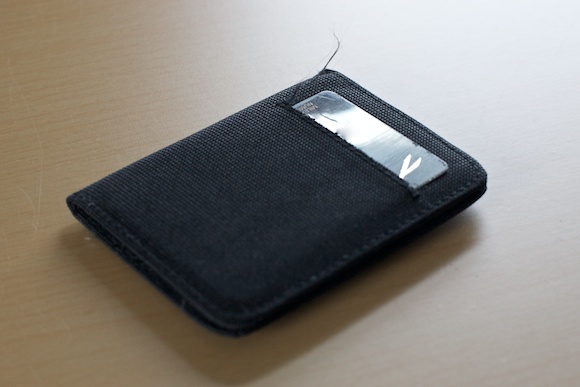
    Then, while buying my normal allotment of paranoid end-of-the-world supplies, I came across [this gem](http://www.countycomm.com/nyla.html). It’s cheap, it feels cheap, but oh is it glorious.

    I went with the nylon model to reduce weight and the texture has just the right amount of friction to keep it in a shallow pocket without hanging up when you need to take it out. It is very slim, it holds a surprising amount and offers two quick access panels so that I can pull out just a card and pay.

    This is, quite honestly, the best and cheapest wallet I have ever had. [The wallet is $6.50](http://www.countycomm.com/nyla.html).

    ### What I Like

    The wallet is near weightless when it is empty and close to flat. I have found through much trial and error and this is the ideal starting point for any good wallet. The wallet itself should not take up any space when it is empty, any space that it does take up is wasted — and thus should be as minimal as possible.

    [](https://f3a98a5aca88d28ed629-2f664c0697d743fb9a738111ab4002bd.ssl.cf1.rackcdn.com/wallet_002.jpg)

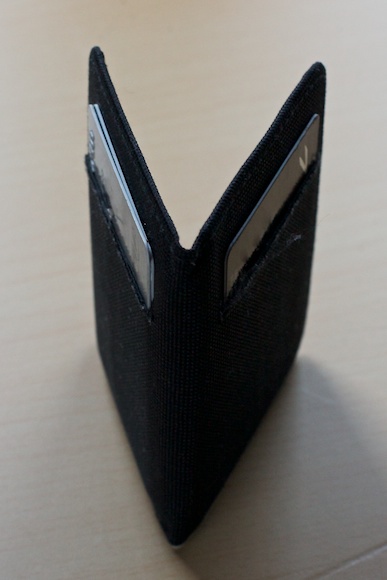
    The outside of the wallet has two “quick access” slots that can hold at most two cards. I like to keep my normal use credit card on one side alone and on the other, my next two most used cards. This allows me to quickly distinguish between the two sides while the wallet is in my pocket, allowing me to remove the card that I need — it’s a great “feature” of the wallet.

    [](https://f3a98a5aca88d28ed629-2f664c0697d743fb9a738111ab4002bd.ssl.cf1.rackcdn.com/wallet_003.jpg)

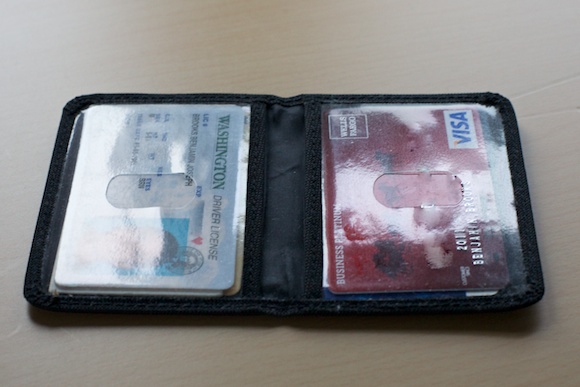
    Inside there are just two pockets that are covered with a clear plastic. I’m not a fan of showing my ID or other cards through clear plastic, but that doesn’t hinder the operational assets of the wallet. I am carrying seven credit cards and two thick business cards in the wallet — with room to spare.

    The full coverage of the two clear compartments means that you can store business cards in them without the corners getting mangled — a nice touch.

    ### What I Don’t Like

    There is no way to carry cash in this wallet, outside one single bill that has been neatly folded. I rarely carry cash, so this isn’t a big deal, but it would be nice to be able to carry 5-8 bills if I wanted too.

    [](https://f3a98a5aca88d28ed629-2f664c0697d743fb9a738111ab4002bd.ssl.cf1.rackcdn.com/wallet_001.jpg)

    The nylon feels fine, but as you can see it is fraying along the quick access pockets. How much can you complain about that on a replaceable $6.50 wallet? Not much.

    ### Conclusion

    For now, this is the best wallet I have found — the cheapest too. Pretty surprising given that it wasn’t really designed to be a normal wallet and more of just an ID wallet for cops.

  • Miscellaneous Thoughts on the New iPhone 4S

    *(For the record I purchased a White 64GB AT&T-locked iPhone 4S.)*

    ### Speed

    For starters the phone is much faster than the iPhone 4. We knew this though, so that’s not saying much. Practically speaking though the 4S renders most app splash screens to only showing for a brief moment. Apps just open considerably faster and while you may think that is “nice, but not worth the price of admission” well you are wrong — it’s actually *really* nice.

    The entire interface feels more fluid and that’s saying a lot given how nicely the iPhone 4 performed. I notice the speed difference the most in two areas: loading complex websites and while multi-tasking between apps. The latter of which (if you do it often) makes this a smart upgrade.

    ### I Can Hear You Now

    At my office, with my iPhone 4 sitting flat on the desk 12 inches from my keyboard, it used to get me 0-2 bars on AT&T’s network. ((A combination of the building materials, and where I am in the building makes for a crap signal.)) The 4S, though, gets much better reception to the order of 3 solid bars in the same location.

    More importantly than the static signal, is the signal that I get when I hold my phone. It wasn’t uncommon with all versions of the iPhone prior to the 4S that I would drop a call while talking because I covered the antenna a bit too much (the 3G was the worst). I haven’t dropped a single call with the 4S since I got it, and that’s down from about 1 a day.

    There’s another huge difference though: the speaker for the ringer and speaker phone is much louder. I never had an issue with the ringer volume, but the speaker phone always sounded too quiet for me. While the speaker phone is still not as loud as I would like ((Admittedly I don’t have the best hearing.)) it is a vast improvement over where it was on the iPhone 4. It actually feels like a speaker phone now — maybe that’s not a good thing.

    ### Good Vibrations

    I can’t quite explain how the vibrating alerts are different on the iPhone 4S — but they are. Here’s what I have noticed:

    – The vibration seems smoother and not as violent. Thus my phone doesn’t seem to rattle much and wiggle around when it vibrates while sitting flat on my desk.
    – The quality seems better. Meaning I can feel the vibrating alert much better when the phone is in my pocket. Again, no clue why that is, as it doesn’t feel like a stronger, more forceful, vibration.

    My best guess is that Apple spent sometime engineering the vibration in the iPhone, the same way they engineered the “breathing” of the LED sleep indicators. We already know that the motor is different for the iPhone 4S and I would guess that Apple had a hand in designing how that motor works.

    ### Tactile Response

    I can’t tell if this is because the phone is brand new or not, but the metal band feels gripper and the glass feels smoother to me. Perhaps the olephobic coating on the glass is just fresh and thus feels smoother and the metal hasn’t had a chance to wear down yet, but I really don’t think that is the case. It feels different.

    The feeling isn’t worse or better, it’s just different.

    ### White

    I went with the white model, even though I think the white iPads are the lesser of the two colors. I always wanted the white iPhone 4, but since they weren’t out on day one I couldn’t get one.

    I have many reasons why I went with the white model:

    – Easier differentiation from my wife’s phone.
    – To make the phone look “new” and “different”.
    – To be different.
    – The iPod was white.

    At the end of the day though, I just wanted white.

    I am glad I went with the white model because I actually like it quite a bit more than I do the black. Here’s a few reasons why:

    – Easy to find in the dark.
    – Doesn’t show finger smudges as much.
    – Looks more iPod-like.

    The white model is quality looking and well made — even the dock connector port has white innards as opposed to black and impressive bit of “attention to detail” from Apple. There are only two things I don’t like about the white model:

    1. Visibility of the forward facing camera.
    2. Visibility of the light sensor.

    Seeing those two black blotches on the front of the phone ruins the lines of the device a bit. Overall though I really like the white model.

    ### Camera

    I was pumped to try out the camera in the 4S and am happy to report that it is just as good as I hoped. It’s fast, sharp, and has low noise — what more can you ask for from a phone?

    If the iPhone 4 camera was good enough that you *could* leave your point and shoot at home. Then the iPhone 4S camera is good enough that you *should* leave your point and shoot at home.

    One thing that I always preferred a dedicated camera for was for fast snap shots. Most cameras you can turn on and snap a photo without looking, if you need to, and that was never the case with the iPhone 4. Now, with the speed of the 4S, and the volume-shutter-button on iOS 5 the speed difference between a dedicated camera and the 4S is very close. Close enough that it doesn’t matter any more.

    The iPhone 4S is truly a great point and shoot camera that does full 1080p video. Win.

  • An Instapaper 4.0 Review with Some Insight from Marco Arment

    Instapaper has now gone [version 4](http://itunes.apple.com/us/app/instapaper/id288545208?mt=8) and Marco Arment has been kind enough to let me test out this new version. I can say that this new version is, without a doubt, fantastic.

    Arment is fond of saying that Instapaper has the most generous update policy (every update has been free) and I would argue that the only software company more generous is Apple with iOS. But, why — why wouldn’t Arment charge for these fantastic updates? Let’s let him explain:

    >There’s no good way to charge for updates in the App Store. Maybe Apple will add this functionality in the future, but they don’t seem to care so far. Maybe they’ll add it when they want upgrade pricing for the next version of Aperture or Final Cut Studio.

    >But I’m not sure I’d charge regardless. I get a lot of goodwill from my customers by continually improving the product that they bought months or years ago, and that goodwill helps spread the word and drive new sales. I know I charge a “premium” compared to many other apps, but I want people to feel like Instapaper is a ridiculously good deal.

    In my book Instapaper is certainly a “ridiculously good deal” and that may sum up Instapaper 4 perfectly.

    ### New Icon

    Marco changed his now iconic icon for Instapaper and I risk being a hypocrite in saying this, but I *love* the new Instapaper icon.

    I say I risk being a hypocrite because I have previously criticized apps that use page curls in their bottom corners, but with the overall design of Instapaper’s new icon — I think it works very well and truly doesn’t feel like a gimmick. What’s important about this new icon is that it represents what’s new about Instapaper.

    The icon looks like a newspaper in the background, thanks to the large headlines and grid layout, but surprise… that’s actually how the new Instapaper looks — at least on the iPad.

    ### The iPad Grid

    Instapaper for the iPad has gone all grid on the home screen. Gone is the big list that looks like a blown up iPhone interface. It’s grid time, and then some.

    [](https://f3a98a5aca88d28ed629-2f664c0697d743fb9a738111ab4002bd.ssl.cf1.rackcdn.com/ip-grid.jpg)
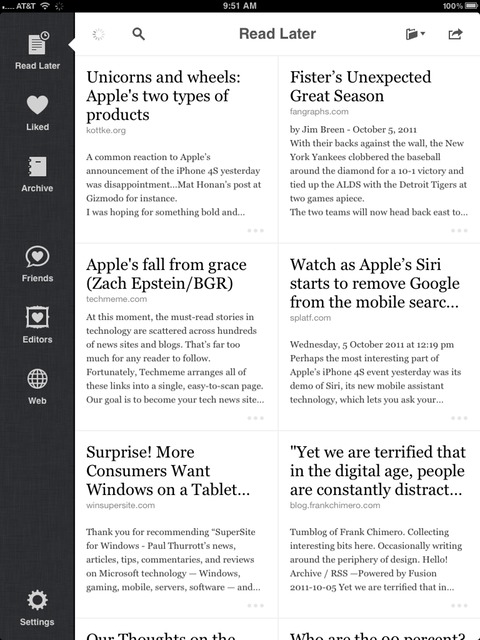
    The grid not only looks beautiful, but is a more functional layout on the iPad. There is also a clever bit that tries to figure out who the author of the article is and print that below the headline, something which I find helpful when I see that a *certain* tech blog made it in my queue.

    Among those nice touches is the still frame previews that the app will now grab for supported video sites — something infinitely helpful when you are trying to remember what the video is about.

    I don’t save a ton of videos to Instapaper, but when I do, I need help in remembering what the video is about (beyond the headline) and these little still frames are perfect for this.

    I also love the expanded text view that you get with the grid — something I find invaluable when you save links from Twitter (because the headlines get messed up).

    Overall the Grid makes the statement that Instapaper on the iPad is more than just a larger version of Instapaper for the iPhone.

    ### Social

    A while back Instapaper added a social element to the app that allowed you to ‘follow’ users to see their liked items. It was a very neat feature, but the implementation on iOS was never done in a way that I found useful.

    In version 4, this changes.

    There is now a friends tab along the left edge that when selected will pull up a ‘shared links’ view. This view shows all the links that are being shared on a social network of your choice (Twitter, Facebook).

    [](https://f3a98a5aca88d28ed629-2f664c0697d743fb9a738111ab4002bd.ssl.cf1.rackcdn.com/ip-friends.jpg)
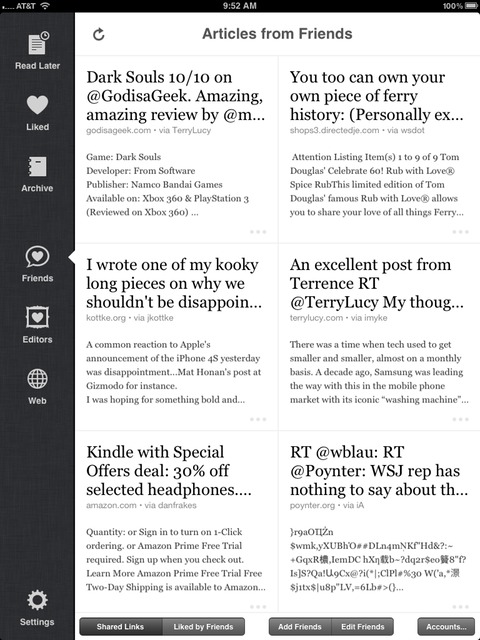
    You get the same grid view of the main screen, but this time you get to see all the links that are currently being shared. There is an option to switch to the ‘Liked by Friends’ view which gives you a portal into what the people you follow on Instapaper are ‘liking’. This is by far one of the best ways to discover new, great, reads.

    I save this section of Instapaper for my dessert course, I love diving into it after I go through all the posts I added — just to peep on what other people I respect are reading. This is the digital equivalent of peeking into someone’s personal library. ((Even more so than seeing their Kindle library, because I am guessing this will give you a better insight into their interests.))

    These features alone would be killer and really ups the sometimes challenging aspect on your iPad/iPhone of getting good content into Instapaper.

    You almost don’t need to leave Instapaper anymore with these nice little additions.

    [](https://f3a98a5aca88d28ed629-2f664c0697d743fb9a738111ab4002bd.ssl.cf1.rackcdn.com/ip-editor.jpg)
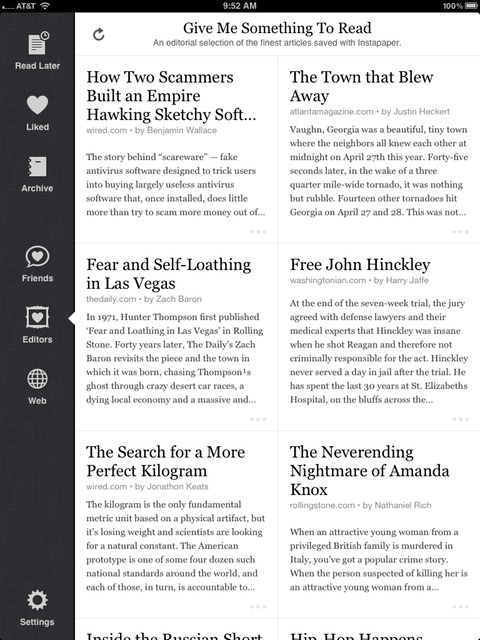
    Additionally the revamped ‘Editors’ tab pulls in the current articles on the Instapaper “Give me Something To Read” curation of articles. A very nice touch for loading up on long-form reads before you hit the plane — also getting a better variety of articles that you may not otherwise discover.

    Instapaper is the best cross-country-flight entertainment I have.

    ### Smaller Changes

    There are a few smaller changes that, when added up, make the app massively better.

    #### Footnotes Baby

    Instapaper 4 adds support for copious Footnoters ((Like me.)) where the app will show a glyph with an `…` in it anytime a footnote appears. Tapping the icon results in a nice pop-up that shows the footnote.

    [](https://f3a98a5aca88d28ed629-2f664c0697d743fb9a738111ab4002bd.ssl.cf1.rackcdn.com/ip-footnote.jpg)
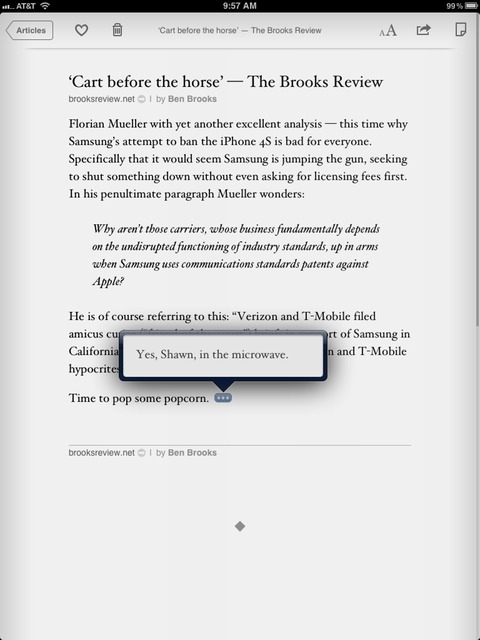
    This is perhaps the biggest change to the overall reading experience that version 4 introduces. Inline footnotes help keep you moving in the app instead of scrolling around to find the referenced footnote. It’s a great addition that was done seamlessly to the reading experience.

    #### Wikipedia Support

    It’s not often that I come across words that I need a definition of, but it is often that I come across things that I want to know more about — as in more reference information. For people like me, Instapaper has added a Wikipedia option to its dictionary.

    [](https://f3a98a5aca88d28ed629-2f664c0697d743fb9a738111ab4002bd.ssl.cf1.rackcdn.com/ip-wiki.jpg)
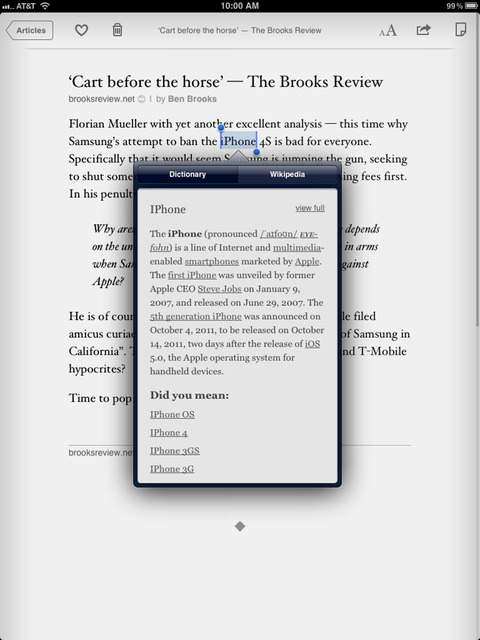
    Now if you highlight some words and ask the app to define them you will get a popup that has an option to view the Wikipedia information on the selected text.

    This is a very cool option.

    I find in-app Wikipedia information especially useful for finding out more information about companies while I am reading the article, or information on particular people that I don’t know much about.

    Come to think of it, this should actually be listed as a major feature.

    ### Search

    You might notice that the search bar at the top of your queue has disappeared ((On the iPhone.)) , replaced now by a dedicated search section of the app. The reason being: this new search function doesn’t just search the articles on your device — it searches the full text of every article you have saved to Instapaper, including those in your archive.

    It’s incredibly helpful, if like me, you often start telling someone about an article you read — only for them to ask that you send them the link. Instapaper saves me from having to spend hours on Google looking for the article because now I can just search the things that I have read all inside the place I read all my articles: Instapaper.

    The search is very fast (given the thousands of articles that it has to search for me) even over 3G.

    Most importantly search adds another revenue stream for Instapaper as it is only available via in-app purchase for the bargain price of $2.99 every three months. If you are already an Instapaper subscriber on the site then you will be granted access to this feature without needing to do the in-app-purchase.

    Either way, it’s the same deal and it really is a deal.

    ### Raising the Bar

    I am a huge Instapaper fanboy, and I don’t think I am incorrect in saying that with version 4.0 Marco Arment has significantly raised the bar in the ‘read later’ marketplace.

    The app is faster, better looking, more comprehensive, and helps you get more content to read. This is a free upgrade, but I would have gladly paid for it.

    ### Miscellany

    I had a chance to ask Arment about a few other Instapaper items, here’s that very short Q&A:

    TBR: You didn’t add feature X to Instapaper 4, why not? When’s it coming?

    MA: *There’s still lots of features I want to add, but I need to ship sometime.*

    TBR: It seems like the iPad version received more attention this time around than the iPhone version, is the eye deceiving?

    MA: *That’s correct. The iPad version had more room for improvement. Before 4.0, Instapaper on iPad felt like a scaled-up iPhone app. With 4.0, I’ve made the iPad app the premier way to use Instapaper, giving it an all-new navigation interface. Even in development, my priorities shifted: I’m now optimizing all new features for the iPad first and then figuring out how to port them to the iPhone.*

    TBR: What new feature are you most proud of?

    MA: *The iPad grid screen, by far. It was a lot of work, but completely worth every minute. I absolutely love using it.*

    Same here, the grid is killer.

    [Go get Instapaper 4](http://itunes.apple.com/us/app/instapaper/id288545208?mt=8) right now — you won’t regret it.
  • AT&T iPhone 4S Activation Woes

    Like many other AT&T customers, I am having great trouble getting my new iPhone 4S activated. It is stuck on the screen that reads:

    >Could Not Activate iPhone
    >Your activation is still pending. You will receive an email notification once your activation is complete.
    >We’re sorry. There was a problem connecting to the server. Please try again later.

    ### Here’s what I know from the horses mouth (AT&T) ###

    I was able to get through to AT&T customer care and the first representative could not get the phone activated even though the system showed it was activated. Now it is important to note that he was operating without any iPhone 4S and (likely) iOS 5 manuals. After ~15 minutes of trying he sent me on to a technical support person.

    The technical support lady could not get the phone working either and was not familiar with the error message. She called down to their specialized Apple staff and reported back to me: “The servers are really busy I am told, and your phone *will* activate in an hour.”

    I clarified that she was saying that it would for sure be active in an hour, and again she said “yes”. She said to just leave it as it is and wait. We hung up, but I arranged for her to call back in an hour to see if it worked. Its been about 25 minutes and still no activation.

    Check back as I will update this post with information as I get it.

    *(Side note: I am hearing Apple expected to sell 5 times as many AT&T models as other carriers. This problem also seems to have arisen once the West Coast of the U.S. started getting their phones. AT&T was also very helpful and nice — I still just want the phone working.)*

    **UPDATED** (on Oct 14, 2011): AT&T just called me back and the phone was still not activated even though they say everything looks fine on their end. The call was disconnected while I was on hold with them and they have yet to call back. This seems like a load issue on their network and best to just wait it out if you can.

    **UPDATED** (on Oct 14, 2011): AT&T was no help, but my internet went down (Comcast blows) and so I tried activating over 3G — that worked. And [I am not alone](http://www.ipatrix.com/3812/att-woes/).

  • OTA Everything

    I wrote about my [biggest annoyance](https://brooksreview.net/2011/10/notification-center/) with iOS 5 being the new Notification Center, now let’s talk about my favorite part of iOS 5: Over the Air Everything. From the OTA Delta updates to iOS itself, to iCloud, to WiFi sync — this is the stuff that really makes iOS devices feel magic.

    These are the *real* problems that iOS 5 solves, and it does so very well. What Apple has done is to truly create a device that you need never plug into a computer and as a user that feels magical in the same way that pinch-to-zoom feels magical — what other way would you do it?

    ### OTA Updates

    The most minor feature for power users is also one of the bigger features for ‘regular’ users — over the air, delta, updates of iOS. This means you only download the parts that changed and install those parts without ever plugging it into a computer.

    Incredibly, this was the most stable part of the beta process for me with iOS 5 — never once did I have an issue with this.

    The reason this is so huge for the general iOS user base is developers now can reasonably expect users to keep their devices updated. Even if a user isn’t up-to-date it is no longer “too much to ask” if you suggest that they update their phones.

    This is also something that general geeks should rejoice about: now you can trust that your parents can update their phones without you holding their hands — hooray!

    In all honesty this is going to be a bigger deal than I think most people realize because prior to iOS there was no easy, painless, way to keep your device updated — now there is.

    ### WiFi Syncing

    I won’t spend too much time on this, but we now have WiFi syncing. It’s just as slow as naysayers thought it would be and just has handy as the beggars wanted it to be.

    All in all, if I need to sync my iPhone or iPad I still prefer to plug it in. Not because WiFi sync is inherently bad, but because I tend to never leave my Mac on and thus am always waiting for the sync to finish — why not spend less time waiting and plug in.

    If you have a Mac that is left on all the time, then this likely will be a great tool for you — but for us Laptop only people it’s of limited utility.

    ### iCloud

    Of course iCloud is big and important, there are a ton of nice little things in iCloud already, but I think there will be many more great things to come in iCloud next year. iCloud is the first step in the right direction for cloud syncing, now we just need it everywhere.

    My two favorite parts so far:

    #### Music

    iTunes Match is the biggest of the new iCloud features. Allowing you to store all of your music from iTunes in the “iCloud” and download that music to your devices at will.

    It takes a bit to get setup, but from there on out it works just as described. One thing that drives me nuts is that when you activate iTunes Match you delete all songs off your device — forcing you to re-download them OTA.

    This isn’t bad if you don’t like to store a bunch of music on your device, but if you like to keep a base collection of 1-2GB — well you are in for some tedious work of getting that music back on each device. ((A [smart idea](https://twitter.com/talaviir/status/124211488712962050) is to create a Smart Playlist of your “base collection” and then use the download all functionality to get that music on each device.))

    This is just about the only annoyance I have with iTunes Match, so overall this is a huge plus.

    #### Backups

    This is, hands down, my favorite iOS 5 feature. The daily backups done when on WiFi and plugged in — typically while I sleep. Here’s why I love it:

    1. I can now restore my phone from anywhere that I can get online.
    2. I can set my phone to delete all contents after 10 tries — without worry of losing anything.
    3. It’s automatic, the way all backups should be.
    4. It’s invisible to the user.
    5. It’s so easy that my Mom, Wife, Dad, Sisters, et al can use this.
    6. It backs up the camera roll.

    This is just an excellent feature, priced right, and man is it good. The backups take a while to restore, but you can still use the phone while it restores — how great is that?

    Sign up for iCloud and start the backups now — there’s no reason not too.

    Overall Apple’s move to cable independence is a huge plus for users and I have a feeling Apple is just getting started.

  • The Annoyment Center

    One of the biggest new features in iOS 5 is the revamping of the notification system — this has been long overdue. The problem with the new notification system, though, is how the centralized ‘Notification Center’ works.

    As an idea it is great because now you can *finally* see all those past notifications. Except what the Notification Center really points out is that Apple had it right all along: old notifications truly are irrelevant and tend to be clutter.

    Overall the new way that notifications are displayed while using the device and on the lock screen is excellent — if not perfect for my needs. The notification center, however, is far from being great — it’s not even good.

    ### Calendars you want to hide

    First every calendar that is in the Calendar app on iOS is shown in the notification center — your only options about this is to turn all off, or limit the amount shown. One would think this is ideal, but what if — like me — you subscribe to a calendar for your golf club that has multiple events every day?

    Well, if this is the case, you are bound to have a bunch of meaningless events shown — all of which you can’t turn off without losing the ability to see *real* events. This drives me nuts.

    The ideal situation would be for Apple to just not show subscribed calendars, or allow you to pick which calendars are shown. Until we get that feature, I must turn off all Calendar displays in the new notification center, or be presented with worthless information.

    ### Old alerts

    Once an item notification appears in the Notification Center it will not leave until one of the following happens:

    1. You directly act on the notification from either the lock screen or the Notification Center.
    2. Newer notifications push it out of the notification center.
    3. Days have past, even then I don’t know.
    4. The developer of that App has the proper APIs in place to remove the notification when you launch the offending app.

    Do you see what I am getting at: overall the Notification Center just isn’t as smart as it needs to be, instead it’s much less useful then it could/should be.

    This amounts to a ton of old and outdated notifications — essentially it is now clutter and cruft that must be scrubbed free. Keep in mind there is no ‘clear all’ function and thus you now must actually clear the notifications by application that they come from. Oh and that clear button? Yes, it is tiny.

    Why you can’t set a default time for these items to disappear is beyond me — I have no reason to see some things hours after they happened — no reason.

    Notification Center appears to be the one part of iOS that is attempting to solve a problem solely created by users — thus it isn’t nearly as good as the rest of iOS.

    ### You don’t know when things are in there.

    All of this really leads to the most annoying part of the new Notification Center: the fact that there is no indication, or notification anywhere that there are *still* notifications in the Notification Center.

    The core function of a notification is to notify you of things. Notification Center doesn’t seem to understand this concept.

    So here’s a common scenario for me:

    – While driving home from work I get notifications from OmniFocus, Twitter, Text Messages.
    – At some point during the drive I need to make a phone call, so I unlock the phone and make the call, using voice dial or Dialvetica.
    – I get home and use my phone to check Twitter and Email, but now all the notifications that *were* on the lock screen are gone because I unlocked my phone and made that call.

    Therefore: I never see those notifications. I thought this entire system was designed so that I don’t miss notifications any more?

    In the old iOS 4 and earlier days this was the end of hope for knowing what those notifications were. However, we are now rocking iOS 5 and have this fancy Notification Center — yet after I check Email I forget to check the Notification Center.

    Why?

    Because I have no reason to, I have no indication that there is anything sitting in there waiting for me to see. (I have been using iOS 5 since beta 1 as my full-time OS — I still haven’t grown the habit of checking the Notification Center.) And so a couple of days go by and finally I check the Notification Center, only to clear out a dozen or so out of date notifications that have become completely meaningless to me.

    Thus, the Notification Center is really a Annoyment Center for me.

    Likely it will be for you too.

  • The Syndicate

    Starting October 31st, 2011 *The Brooks Review* will be joining The Syndicate — a new ad network for RSS sponsorships, made up of top-notch design, technology, development, and business writers.

    For you, the reader, the experience isn’t going to be a huge change. RSS sponsors will still be shown, and as carefully picked as they always have been.

    The Syndicate includes some of the best sites on the Internet such as: Marco.org, Subtraction.com, Asymco.com, and ShawnBlanc.net.

    ### Advertisers

    As an advertiser of [The Syndicate](http://syndicateads.net/) you have the chance to sponsor nine fantastic sites that reach handsome and highly engaged readers.

    There’s only one week left open for 2011 before the rate goes up in 2012, and we would love to have you.

    To find out more information please check out: [The Syndicate](http://syndicateads.net/).

  • To Inspiration

    Steve Jobs is a constant reminder to me that one man *can* change the world. And that he did, several times over.

    It is now on us to write the next chapter.

    Let’s make it a great one.

  • It’s Cheaper to Change Carriers for AT&T iPhone 4 Users, Than Upgrade to the iPhone 4S on AT&T

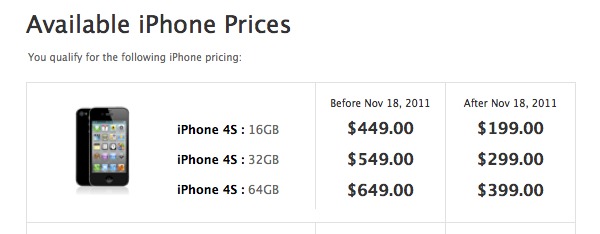
    As soon as I could check availability pricing for the new iPhone 4S, I checked. I am not eligible, in fact here’s my pricing break down:

    I don’t normally complain about such things on TBR — typically I reserve those complaints for Twitter — but in this case it seems to be a very odd problem, one that many users are facing, and a first for AT&T.

    ### Bit of Background

    I purchased the first iPhone on day one and before that had been a loyal AT&T customer since I was in seventh grade (over ten years ago). I am, for the lack of a better term, the perfect AT&T customer. It costs them nothing to keep me.

    AT&T has given me upgrade pricing for every model of the iPhone I have purchased after that first phone (3G, 3GS, 4), and I have been loyal because of it.

    ### The Big Problem

    For the very first time I am actually considering buying an iPhone fully unlocked and getting out of all of my contracts with wireless carriers — mainly because they all suck.

    It will set me back $649 to get the 64GB iPhone 4S — the one I want. I can afford it, but why does it cost my wife — who is also on AT&T (family plan, not the primary number) and who also bought an iPhone 4 on day one — only $399 for the same model?

    The solution, for me, is easy: buy the new iPhone under my wife’s plan and move it to mine. A bit of a hassle, but substantially cheaper.

    However, since complaining about this on Twitter I have received a ton of responses which all say a similar thing.

    It seems, for most people, that purchased the iPhone 4 on day one it would actually be cheaper for them to buy a new iPhone 4S on another network (Verizon, usually) and pay the AT&T cancellation fee. These people (myself included) would save — at a minimum — $50.

    Let’s just state this again: for many others and for me, it is $50 **cheaper** to break the AT&T contract and switch to another carrier.

    *Wow*.

    The idiocy of wireless carriers has reached a new low.

    ### Options

    Here are a few options that you may want to consider to try and get the upgrade pricing (this applies to AT&T customers, as I have never been a customer of another network):

    – Using a plan of a family member to buy your new phone. This only works if they like hand me down iPhones, or have no interest in buying a new phone for a couple more years.
    – Call AT&T and ask for the upgrade pricing. Threatening to leave to another carrier if they do not relent. This works in many cases, but not in all cases. You need to be courteous, but adamant — fine line and all.
    – Change your account to a Family Plan and add a new line, using that line to buy the iPhone 4S at the upgrade price. I have been on one so long I can’t say for sure if this is a better deal, but it is an option. Do the math first. The fringe benefit here is that you should always then be able to buy a new phone at an upgrade price — I emphasize “should” here.
    – Actually switch carriers.

    ### Why This is Odd

    Up and until this iPhone, AT&T has been fantastic about allowing existing iPhone users to upgrade at the upgrade price levels on day one. This has likely kept many customers on their network, after all why leave and pay a termination fee?

    Now, with two competitors getting the hottest phone in the country, AT&T decides that it is time to start screwing with (perhaps) their most loyal customers. That’s odd.

    *(Note about Verizon: I didn’t think Verizon customers would get the pricing, since they — unlike AT&T users — haven’t had the phone for over a year yet. It seems that in my informal Twitter poll, this is the case: no upgrade pricing for iPhone 4 Verizon customers. Likely, it would be cheaper for Verizon customers to switch networks also. Odd stuff.)*