Category: Articles

  • The Apple Social Network

    It sure seems like Apple now has a social network:

    – Music: Ping
    – Gaming: Game Center
    – Updates: Twitter?
    – DM/IM: iMessage
    – Video Chat: FaceTime
    – Location: Family and Friends
    – Photos: Instagram?
    – Email: @me.com
    – LinkedIN: No, thankfully.

    The point? At the end of the day Apple already has a social network that works vastly different than any other out there. Interestingly enough: you don’t really have to “join” any part of it, you just sign in with your Apple ID and go.

  • Amazon and Apple

    There are two huge differences between Apple and most other companies that it “competes with”:

    1. Apple has a knack for understanding what the consumer wants — even if the consumer is still not quite sure what they want. To illustrate this point I think it best to recall a story I grew up hearing about cars in the 50s, the ones with fins running down the back of the cars. The legend, the story, that I have grown up hearing about those cars is the auto makers stopped asking consumers what they wanted and started asking them what their neighbor would want. ((I doubt this story is true, but the point holds.)) The people asked then said something like: “Who Steve? He’d probably want something crazy with huge wings or something on it. That guy…” This research led to the finned era of cars (or so goes the tale) and spurred massive sales and pretty wild designs — it was a realization that consumers aren’t very good judges of what they want.

      Everyone said at the introduction of the iPhone that the lack of 3G would be it’s death. That the closed nature and web-only apps would be a problem. The original iPhone was still a hit despite those limitations — because what people actually wanted, what they actually cared about, wasn’t 3G or native apps.

    2. Apple also has shown many times over the willingness to introduce new technology the moment that they can. Some where (again, can’t find the source) there is a quote of Steve Jobs (I believe) saying that Apple likes to introduce new technology while that new technology stills seems magical. This is an important part of Apple’s products.

    ### Enter Amazon

    Up and until today I strongly believed that no major technology company was able to both understand and execute on both of these items in any way, shape, or form close to what Apple does. That’s why most tablets that we see simply look like clones of the popular iPad — albeit a crappy clone in most cases.

    Today Amazon showed that they, at the very least, understand the first point above. They seem to get what the consumer wants, or at least are willing to gamble on what they *think* the consumer wants. It’s an interesting and refreshing perspective.

    Amazon has never been in the business of providing the second item — the magical technology ((Unless you are Prime member, because that can be magical at times.)) . Amazon seems to understand that they, as a company, will prosper on pricing — that’s their goal, it’s Amazon’s second item ((It too is becoming one for Apple.)) . Amazon wants to ship products that attempt to meet what consumers actually want, at low prices. Apple adds in the magical part, while attempting both of the same things.

    It is an incredibly encouraging sign for Amazon, and for consumers, and I for one can’t wait to see how well Amazon executed this vision on the Kindle Fire.

    Whether the Kindle Fire is a success or not — it speaks well to Amazon’s longevity in the consumer electronics space.

  • The Small Monitor Experiment

    Last week [I wrote a post](https://brooksreview.net/2011/09/meticulous/) that was a response to [Trent Walton’s post](http://trentwalton.com/2011/09/20/unitasking/) titled “Unitasking”. I hypothesized that my productivity and general computing happiness would rise if I stuck with only using the screen attached to my 13″ MacBook Air, thus forgoing using my spacious 24″ Apple Cinema Display.

    I committed to do this for a week, here we are now well short of a week and I am willing to report back: this was a terrible idea.

    Let me first start by saying that I lasted approximately 5 days — three of which I wasn’t at my office (the only place where I have an external display). So I actually only lasted two days before I decided that this was a terrible idea and went back to using the larger display at work. ((You could argue that had I given it a full week I would have gotten used to it, but I so hated the setup and I couldn’t bear to give it that long.))

    ### Small Screen Usefulness

    None of this should be read as me stating that small screens can’t be as productive as large screens. I still believe that they are a far more focused — and therefore a better — way to work.

    The size and resolution of my MacBook Air’s screen is just about perfect for 99% of all tasks that I do on my MacBook Air. It’s not even those 1% of tasks that caused me to switch back over to my 24″ Cinema Display.

    ### Aesthetics

    This all comes down to aesthetics. Simply put my MacBook Air looked down right silly sitting on my office desk all alone and that, in turn, led me to feel silly using the setup.

    It made my workspace feel awkward at best, and down right annoying most of the time. I hated the way I felt exposed to the rest of the office and how dwarfed everything felt with just that screen sitting atop my `6′ x 3’` desk.

    My decision to switch back came down to two things:

    1. I hated the way it looked.
    2. I hated the way it felt.

    I have always believed that you are far more likely to use, and be productive with, something that you love. I just didn’t even come close to liking this setup.

    At home I just use the 13″ Air and have yet to have a problem and will continue to do so. At my office, I just felt weird the entire time I tried to not use my 24″ screen. ((I did reorganize the entire desk moving the 24″ screen out of site and re-running all the cabling. This was not a matter of a temporary feeling setup.))

  • On the Assumption that a Pundit Knows What Apple “Needs”

    Mike Elgan [wrote a lengthy post](http://www.cultofmac.com/115455/why-apple-needs-a-real-social-network/) for Cult of Mac on Saturday that argues: Facebook is now a major threat to Apple. Elgan sees Facebook’s move towards Movies and Music as a major threat to Apple’s core business:

    >Facebook is now more directly threatening to Apple’s business model than Microsoft, Google and Sony combined.

    That’s a load of crap. Elgan is assuming that Apple’s core business is content (music and movies), when in reality their core business is hardware — supplemented by software, which in turn is supplemented by content.

    Elgan:

    >Apple isn’t so much a consumer electronics company as it is a media platform. Apple’s success in the last 10 years has all been about changing how people create and consume media and content.

    If Apple is a media company, then it is a small one. Apple is very much a consumer electronics company, to say otherwise is flat out wrong. I agree that Apple’s success has hinged on shaping the way people consume content, but how does one access Facebook?

    Elgan, again:

    >Either Facebook will succeed as a “primary entertainment hub,” or it will fail. If it fails, then Apple has nothing to worry about. But if Facebook succeeds, it threatens Apple’s entire business, and the future of Apple’s stellar growth.

    Even if Facebook’s new initiatives are a massive hit, Apple still wins because Facebook doesn’t have or sell:

    – Computers
    – Operating Systems
    – Cell phones
    – iPods
    – Tablets

    Take those three things away from Apple and you have trouble, but Apple taking a hit in music and movies sales? Meh, it will hurt, but it won’t kill the beast that Jobs has created. What good is buying music and movies from Facebook if you don’t have something great to watch/listen to them on?

    The rest of the Elgan article is how and why Apple should be able to craft such a social networking competitor — Elgan even states:

    >[…]Apple already has the most difficult and expensive parts of a killer social network.

    Elgan wants Apple to build a Facebook competitor because he believes such a competitor could/should be better. The real question isn’t whether Apple needs to build a competitor (it doesn’t), but the question really is: Doesn’t Apple already have a social network?

    I’m not talking about Ping — I am talking about your Apple ID.

    Apple doesn’t copy things that they don’t perceive as working well — they re-imagine things. In that light wouldn’t a better social network — one that more directly helps Apple — be a network that you don’t even know you are using?

    Perhaps the next “big” social network doesn’t have a central domain that you login in to — now that would be a real threat to Facebook.

    ### Last Point ###

    Facebook makes money by selling ads, a business that Apple isn’t all that successful, or interested, in. If Facebook really takes away media sale profits from Apple, why wouldn’t Apple just partner with Facebook to give Apple users better access on their devices (they already have with Twitter)? Thus continuing to compel users to buy their devices to access Facebook on.

  • Hip-Checked

    John Gruber [reminded](http://daringfireball.net/linked/2011/09/22/cringely-apotheker-whitman) us all that Robert X. Cringley [called Whitman’s hip-check to Apotheker a while back](http://www.cringely.com/2011/02/why-leo-apotheker-will-be-fired-from-hewlett-packard/):

    >She’ll eventually get around to hip-checking Apotheker and taking his job.

    This is a terrible move by HP in every respect. It shows a clear lack of direction, strategy, vision, and control.

    I would guess that when Apotheker took the job of CEO 11 months ago, he did so by laying out a clear plan of action for HP to the Board. My guess was that this past month was him finally implementing the public side of those plans — his plan was the IBM plan, ditch hardware and consumer businesses and flock to enterprise and consulting.

    Mark Hurd is/was a product guy and he steered HP towards consumer products. He wanted WebOS so that he had a weapon to use against Apple and Google in the hot mobile sector.

    Leo Apotheker is/was an enterprise software guy, he used a slow WebOS start to kill the most consumer friendly products HP makes. Next he spent billions to bring in an enterprise company few had heard of and publicly announced his plans for reshaping HP.

    Enter Meg Whitman.

    Regardless of Whitman’s plans for the future of HP, instating her as CEO shows a complete lack of direction by the Board of HP. Hurd no doubt kept the Board in the loop about his strategy and plans — he may well have still been in power had allegations not been slung his way — and the Board approved his consumer oriented plan. They agreed with his direction.

    Upon Hurd’s ouster the Board hired Apotheker, full well knowing that his plans were the complete opposite of Hurd’s. They consented knowing that massive changes that were about to come forth — they reversed direction and hopped on the Apotheker train.

    Hurd, unlike Apotheker, was fired over ethical concerns. Apotheker, however, was fired for implementing the plan that the Board approved — that’s a big difference.

    Meg Whitman is and was on the Board during all of this. HP’s board is a clusterfuck of stupid and that includes Whitman — who is now President and CEO.

    ### Indecision

    When I was learning how to drive the hardest thing for me was deciding when to slam on the brakes versus when to speed up to make it through a light that had just changed to yellow. My Dad (who taught me to drive) told me this:

    >What ever you do, make a decision and stick with it. Indecision in this moment will kill you.

    That’s exactly what has been going on at HP since Hurd left: indecision and it has been killing the company. This is not the CEO’s fault, it’s the fault of the Board — who for better or worse is now also the CEO.

    HP didn’t give WebOS a chance, the moment it soured they killed it. Likewise they didn’t give Apotheker a chance to transform the company, the moment the stock faltered, they rounded up a scapegoat.

    For the past year HP has looked like a dog being tempted on opposite sides of the room by two treats. Constantly rushing back and forth so as to not lose either of the treats, but never actually getting either of the treats.

    The real question for Whitman now: can she actually get HP to stick to a plan — any plan — for more than a year?

    Is HP capable of making a decision — any decision — and sticking with it, for better or worse?

  • Meticulous

    Circa 2006 I was a huge proponent of computing with dual display setups. I often used my MacBook Pro with the lid open and an external display attached. A multiple monitors setup is supposed to make you more productive and efficient on your computer, but does it truly do as it claims?

    The problem with dual displays is that they are pretty lame to use, your options for positioning are either to position them so that when you look straight ahead you see the seam between the two monitors, not ideal. Secondarily you could position your dual displays so that one monitor is directly in front of you with the second off to the side — this creates the additional problem of your second monitor now being less useful and quite often unused.

    At some point in 2008-9 I started just using one display — this only after I measured my use of the second display finding that I rarely used it.

    Since that time I have held the opinion that one, large, monitor is the best action to take in the name of productivity.

    Now I am even questioning just how large of a monitor you need.

    Trent Walton has an [interesting post on the matter](http://trentwalton.com/2011/09/20/unitasking/), you should pop over and read it, but here’s his main point:

    >I noticed something interesting the day I was confined to just 13” of screen space. Even though I couldn’t see everything I needed to operate and reference at once, I became more focused. Only seeing one window at a time enabled me to mentally hunker down on the task at hand. My actions felt purposeful; my decisions, deliberate. Surprisingly, my productivity didn’t suffer.

    I too have noticed that on my Air. For about a month I have been debating and failing to pull the trigger on a monitor for my home. Monetary concerns are certainly a factor, but the bigger factor is that I quite like just having the small screen.

    So as I stare at this 24″ Apple LED Cinema Display as I am typing this post, I can’t help but wonder: what if I ditched it for just my MacBook Air screen?

    I’m not certain my productivity would suffer at all, in fact, I am writing this post in full screen mode — so no change there.

    I can think of just a handful of tasks that would be slightly more cumbersome, but as [Walton says](http://trentwalton.com/2011/09/20/unitasking/):

    >I did slow down, but also experienced a calm efficiency[…]

    Meticulous. That’s one thing that I am never really described as, but something that I greatly admire and respect. If you watch the excellent TV Series “Breaking Bad”, the character Gustavo “Gus” Fring is, perhaps, one of the most meticulous people on Television.

    Every time he removes his jacket you watch as he carefully folds it, rests in, and smoothes it (watch [this video](http://www.youtube.com/watch?v=fgJt82h4zBg) starting at the 1:30 mark to see what I mean). Everything action that Gus takes is meticulous and I love it.

    So, I am going to give it a go. For at least the next week my largest computing screen will be thirteen inches. My goal isn’t that I will instantly be more meticulous, my goal is that I will be instantly less distracted.

  • The Dosh 6-Card ‘Luxe’ Wallet

    Anything that I have to carry with me on a daily basis is something that is worth being picky over — very picky. Four days a week I lug a computer around with me, so I purchased the fastest, lightest, computer I could. Everywhere I go, I lug a phone with me, so again, I got the best I could.

    I buy shoes based on comfort and style — I am always willing to sacrifice a touch of style to keep my feet comfy. The two things that I can’t ever get by without having with me are: keys (in some form) and my wallet.

    I can’t remember the precise year, but at some point in high school I decided that the traditional folding wallets just weren’t for me. I went with the card-wallet plus money clip approach — I always felt cool having a money clip.

    Thinking back there is truly only one wallet I have had that I actually liked, a Tumi leather card wallet. My last wallet was just OK and served me well for a quite sometime, but I never liked the size or the look of it.

    I am always open to trying a new wallet, mostly because they are easy to try out and I have yet to find that perfect wallet. So I went and purchased a pricy [Dosh wallet](https://www.dosh.com.au/). Here’s what I think of it: it sucks.

    [](https://f3a98a5aca88d28ed629-2f664c0697d743fb9a738111ab4002bd.ssl.cf1.rackcdn.com/20110919-IMG_6590-full.jpg)

    ### The Feel

    One of the main reasons that I wanted a Dosh wallet is because it is made out of a material I have never used in a wallet before: “water-resistant polymer material”. What the hell is that?

    The short answer is that it is a rubbery plastic that feels like a grippy velvet to the touch. It actually feels quite nice to the touch and really solid, not cheap at all. Likewise the money clip is really nice, super high-quality.

    That’s where the niceness stops. The inside of the wallet is made out of a more “normal” feeling plastic and, well, feels like crap — I mean plastic. The inside is very rigid and truly ruins the overall feeling of the wallet.

    It’s a mixed bag, if you never open the wallet it is great, once you open it the experience is completely ruined.

    ### Looks

    I purchased the “Luxe Vintage 6-card” wallet and it looks good. I really like the look of the wallet from the closed perspective. When you open it you see the cheaper plastic and I hate the plastic used in the interior.

    Part of the assembly of this wallet is that some of that interior plastic shows through to the outside. The color match is excellent between the two materials, but while the rest of the exterior shows little wear, the harder plastic shows wear — I hate the unevenness of this. Even wear is fine on a wallet, but only wearing in certain areas, very small areas, drives me nuts.

    ### Functionality

    When Dosh says “6-Card” they mean it. I was hoping to sneak in an extra card or two, but that simply doesn’t work. There is only room for six cards, and business cards don’t fit well in the credit card slots.

    For the money clip I’d say that 10-bills is your comfortable max for this wallet — anything more than that and it will look like a [Costanza wallet](https://f3a98a5aca88d28ed629-2f664c0697d743fb9a738111ab4002bd.ssl.cf1.rackcdn.com/george-wallet.png).

    [](https://f3a98a5aca88d28ed629-2f664c0697d743fb9a738111ab4002bd.ssl.cf1.rackcdn.com/20110919-IMG_6591-full.jpg)

    The best thing I can say about this wallet’s functionality is that nothing falls out. I have held it by the edges and shook hard to see if the cards (that are only held in by friction) escape and they never do. I am actually quite impressed by this feat.

    There are three major functionality issues with this wallet (in order of annoyance):

    The soft feeling of the outside of the wallet turns the wallet into the most difficult thing to get out of your pocket. Wearing jeans while sitting and need to get your wallet? Fat chance. It literally will pull my pocket out when I try to remove the wallet. This is one of those things where you never realize how much you take your wallet in and out of your pocket until you have a wallet that clings to the inside of your pocket for dear life. Even after a week plus of use it is still just as hard to take out of and put back in your pocket.

    Each flap of the wallet has three slots, one card per slot. Logically you would think that since the slots are staggered your cards would all be visible. Thus you would see the top edge of each card with a bit to grasp each card with your finger tips. Apparently that logic, well, isn’t that obvious.

    [](https://f3a98a5aca88d28ed629-2f664c0697d743fb9a738111ab4002bd.ssl.cf1.rackcdn.com/20110919-IMG_6593-Edit-full.jpg)

    All the cards sit at the same level in the slots so that it looks like a perfect stack of three cards. Now try to not only find the card you want, but fetch out the middle card on either side. It’s not fun.

    [](https://f3a98a5aca88d28ed629-2f664c0697d743fb9a738111ab4002bd.ssl.cf1.rackcdn.com/20110919-IMG_6592-Edit-full.jpg)

    The money clip in the middle is really great, provided you aren’t low on cash. Try slipping in an wrinkled up old bill by itself and well you are likely to end up with two pieces of a wrinkled old bill — this happens with two bills sometimes too. I found a workaround whereby you can fold the wallet all the way open and slide in the bills, but that’s pretty stupid looking in practice (like “resetting” the compass on your iPad stupid).

    Honestly as a functioning wallet, this isn’t that great.

    ### Size

    My biggest concern about the Dosh wallet was the overall size: they are very thick when empty. Turns out my concerns were spot on, once you put your six credit cards and some cash in the wallet it turns into a very thick beast.

    So thick that it is in fact not comfortable to place the wallet and iPhone 4 in the same front jean pocket as I have been doing for years. Right there, that’s pretty much the deal breaker for me.

    ### Conclusion

    I should have known better when I saw that the entire website was Flash only… I think I have that old [Tumi](http://www.amazon.com/gp/product/B002BWP1GI/ref=as_li_qf_sp_asin_tl?ie=UTF8&tag=brooksreview-20&linkCode=as2&camp=217145&creative=399373&creativeASIN=B002BWP1GI) wallet somewhere.

    [](https://f3a98a5aca88d28ed629-2f664c0697d743fb9a738111ab4002bd.ssl.cf1.rackcdn.com/20110919-IMG_6594-Edit-full.jpg)

    #### Bonus

    The packaging is excellent and one of the few wallets that actually comes in a very nice case — a case which I now use for storing collar stays.

  • Thoughts on Metro

    Windows 8 with Metro UI was [unveiled](http://channel9.msdn.com/events/BUILD/BUILD2011/BPS-1004) this week and you have likely seen most of the UI and little tricks Microsoft is using to “re-imagine” Windows — and apparently Microsoft itself.

    If I am perfectly honest Windows 8 excites me a bit. Metro UI is anything but boring.

    I am not excited about Ribbon UIs and other UI monstrosities that Microsoft has jammed into their aging OS — I am very interested in everything that has to do with the Metro UI paradigm. It is something very original that is coming out of a company better known for “copying”.

    Metro UI is a risk for Microsoft, and that’s something that you can’t say about most of its products. The last risk was Windows Vista and that was a risk done by necessity so that the OS could keep up with OS X’s speed. Before that they gambled on Zune and Xbox. Both introduced well after the markets for each device was established.

    Metro is Microsoft acknowledging that Apple has something with iOS, but instead of Microsoft copying iOS (as they typically would have done) they decided to let their imaginations run wild.

    There is quite a bit about Metro that I think is darn clever and quite a bit that I hate. By and in large Metro is not an iOS clone, from what I have gleaned from playing with Windows Phone 7, erm, phones — Metro is a refreshing change. ((This would be in contrast to Android, which just feels like the Microsoft clone of iOS in my opinion. Ergo Metro is more like the difference between WebOS and iOS.))

    There’s a few things that I think are worth pointing out about Metro at this point, so let’s go through them.

    ### Copied from iOS

    There are two really interesting “concepts” that Microsoft took out of the iOS playbook: multi-tasking and Flash. There will be no “true” multi-tasking, instead Metro will kill off apps after a bit — much in the same way that iOS 4+ does multi-tasking. This was obviously done for battery-life and performance reasons, but I still find it very interesting that this approach was taken by Microsoft.

    The second thing is the [lack of Flash in IE 10](https://blogs.msdn.com/b/b8/archive/2011/09/14/metro-style-browsing-and-plug-in-free-html5.aspx). In fact just like in mobile Safari there will be no plugins that the user can install — again for battery life and performance reasons. I wonder if Adobe is still feeling pretty smug?

    Note that I don’t have any intention in calling Microsoft a copy-cat for taking these features, I just want to point out that these are very interesting (and often controversial) features to bring to Metro. It would have been far less controversial to let users install Flash is they pleased and to run down their own batteries by keeping a ton of apps open.

    Microsoft was faced with a choice of trying to please every one and trying to do what would be best for the user experience — they chose the latter, that’s interesting.

    ### Grid App Templates

    One of my favorite parts about iOS is the creativity that an App UI design can put forth. From the textures of Reeder, the crazy cards of Twitter (iPad), the awesome MLB At-Bat and more — they can all look very different. Certainly the apps can be made to look like first-party apps by utilizing many of the features built into iOS (button controls and bars), but even Apple goes outside the box on apps like iBooks. It’s fantastic.

    That’s why I was a bit worried while watching the Microsoft Build presentation about how any developer can make their apps beautiful by “dropping” them into the “Grid” template that Microsoft includes in Metro. There’s a joke to be made here about Windows developers and their eye for design, so in that light perhaps such a template is a good thing?

    I think it is potentially very bad. It is selling Windows developers short. I am sure you don’t have to build with that Grid template to get in the Microsoft store, but — and this is a big but — what will the Metro user think of non-grid apps?

    If 90% off all apps are built off the Grid template (which I think is a safe assumption given Windows apps I have seen) then wouldn’t a user be off put by an app not using this template?

    On iOS users tend to reward innovative and unique UIs, but will they on Metro when Microsoft is so heavily pushing and promoting that things all look uniform — right down to the baseline grid that the text sits on?

    What Metro apps end up looking like should be an interesting thing to watch and my guess is that (sadly) they will all look the same. I hope this isn’t the case.

    ### Landscape First

    I’m certainly not the [first to mention](http://getwired.com/2011/09/15/the-landscape-tablet-landscape/) this, but when it comes to tablets Windows 8 (and Metro) certainly look like they were first and foremost designed as a landscape UI. Certainly they rotate, but they are 16:9 widescreen and made with the “home” button on the bottom when you hold your device in landscape.

    I find that odd especially given [this post](https://brooksreview.net/2011/09/tablet-power/) that I wrote about tablets giving some power back to users through not forcing users or developers to pick an screen orientation.

    The only explanation that I can come up for this is that Microsoft really thinks of Windows 8 tablets, not as “tablets” but as laptops minus the keyboard bit.

    That is, I don’t think Microsoft sees users really using Windows 8 tablets as anything more than a slightly more portable laptop — that’s an interesting take for such a forward thinking Metro UI, it almost seems counter-intuitive to a Metro UI.

    ### Timing

    The unfortunate bit of all this Windows 8 talk is that the OS is at least another year away. By then iOS 5 will be out and we will certainly be awaiting the arrival of iOS 6 and perhaps even a new Mac OS X version as well.

    So why is that bad? Well, for starters, while Metro looks great now, in 2011, will it still look that good in late 2012?

    Perhaps you think that is the fanboy in me talking, but let me ask you this: does iOS 3 still look good to you?

  • The Masked Social Network

    There’s something incredibly unnerving the first time you start “following” the liked items of other users on Instapaper. Instapaper makes no suggestions to you of popular users and offers no list of current users — this is quite unexpected.

    You get the option of looking up people via other social networks, or just by email address, this is of course in stark contrast to just about any other social offering you will encounter — as they much prefer shoving as many users in your face as possible.

    It’s a purposeful mask that has been pulled over the “social” offerings of the inherently non-social activity of reading.

    Even if you use Instapaper you can still “hide” yourself from other users, if you so desire. Perhaps most jarring is that you get no indication *if* anybody is actually following you.

    There are no follower counts.

    No following counts.

    No popularity contests.

    No cliques.

    No ego stroking.

    There’s just a list of articles that people you chose to follow decided that they liked. All without knowing who, or if, anybody will ever see that they liked that article.

    It’s a fascinatingly private social system.

    I want more of it.

    Effectively Instapaper has found a way to keep its users engaged with the site’s main purpose, reading, while offering users ways of keeping tabs other readers. It’s like getting a peek at someone else’s bookcase, without them knowing that you peeked.

    Imagine what would happen if Twitter operated this way: you have no inkling of who is following you and others have no clue if you are following them. You just have an account that you post to, occasionally a person responds to you. The only way you know if a person is following you is when you go to Direct Message them.

    Imagine that, because what would really change?

    Some numbers go away, sure, some egos are deflated — that’s a bonus. But what is the worth of a follower? To businesses it is bragging rights, and job security for “social media experts” — but for you the individual, does it matter?

    I would argue not only does it not matter, but knowing these counts makes the service worse.

    The service is made worse because people behave differently given the setting they are in. Would you say the same things if you have ten followers as you would if you had ten million followers?

    I know I wouldn’t.

    Actually I know exactly what Twitter would feel like: blogging.

    If you have a site with no analytics on it at all, then you have an exact sense of what such a Twitter-without-counts would feel like.

    I know roughly how many people read this site (blogging equivalent of followers), but I don’t know who most people are — it’s a blind count. I know who some of you are because we have conversed via email and Twitter, but the overwhelming majority of you are, well, anonymous.

    I like it that way, I am guessing most of you like it that way too. Maybe Kim Jong-il ((I cite him because, well, it amuses me — feel free to substitute any name.)) reads this site, maybe he doesn’t — but if he did and I knew that? Well, my message would certainly change.

    Follower and friend counts play to the human ego and our curiosity, but sometimes I think it would be better to let us be curious. The knowledge of not only that you are being “watched”, but of who is watching you makes social networks far less interesting. ((I like to look at this in the context of dancing — something I hate doing with a passion. I am far less likely to dance around people that I know. Slightly more likely to do it when intoxicated around people I know. Even more likely to dance around people I don’t know. And most likely to dance in front of people that I don’t know while intoxicated.))

  • Death Spiral

    Right now consumers are pushing companies — many large, smart, companies — down a death spiral, a race to the bottom. Groupon, LivingSocial and coupon sites are the catalysts that have set this trend on fire, but it all started with the consumer “free” mentality.

    The idea that companies are making too much money screwing over the “little guy” with high prices.

    Increasingly $0.99 has become too much money to pay for things that others spend a non-trivial amount of their life creating. Not just iPhone apps, candy bars, or soda — food, haircuts, tours, clothing — the consumer wants it all for free, or at least 80% off.

    It is a recession after all.

    Groupon of course is just one of many sites that offer steep discounts on goods and services, but they are the most popular, so I will pick on them a bit.

    Oh, yes, the creators of these products, and the proprietors of these businesses, opt-in to these wholesale oriented sites — but the real question I have is whether it is bad business practices or the consumer that forces this hand.

    Do you think Groupon would be as big as they are today had it not been for the recession we currently are in?

    Do you think restaurants would be willing to forgo all profit for one night — in the hope that repeat business comes from it?

    Of course we know the answer to that last question: hell yes. And that’s just a bad business decision.

    ### It’s a Two-Fold Problem

    On the one hand consumers are “forcing” business owners to make the tough call of “liquidating” product/services via sites like Groupon — and make no mistake about it, this is a liquidation service. On the other hand Groupon is helping to make successes out of companies that are either: not profitable, or are just a bad idea. ((Of course, exceptions to every rule — and such.))

    Before you email me, let me explain what I mean.

    Say you open a cupcake shop in a busy area — an area with many other cupcake shops ((For the life of me I will never understand the appeal of such places.)) — and business pretty much sucks for you. Your prices are in line with your competitors and in your mind the product is comparable.

    You turn to Groupon as a last ditch effort to your failing business. You offer a 60% off special for one day only with Groupon.

    That “Groupon day” your sales are through the roof. Astronomical even. Customers were lined up and all you worry about is where you will store all your cash come tomorrows repeat customers — a day that probably won’t come.

    Your business picks up, it’s not quite break-even yet, but it is 30% higher than it was before the Groupon deal.

    You are ecstatic.

    You now have false hope, the deadliest kind.

    This false hope will cause second mortgages, cashing out retirement funds and many other irrational moves to keep the hope of that one day alive.

    This is the hope that digs you a financial hole that you won’t get out of for another 10 years.

    What Groupon has showed you is that your business can work if you continue down the unsustainable path of selling products at a loss. That’s not the consumers fault — they are being smart — that’s the fault of the business owner.

    Let’s use an example a little more close to tech nerds hearts: the TouchPad.

    ### TouchPad Example

    For all intents and purposes the TouchPad was bad product ((I the sense that it simply did not sell, and thus consumers voted with their wallets that they did not want it.)) that fell flat on sales, then with the help of liquidation (a $400 price cut on a $499 product) good sales lead to a stupid decision that will likely cost the company more money — all chasing that same false hope.

    HP decided to kill off the TouchPad. They decided that they needed to clear the retail channels of products and liquidated it for $99, again down from $499. They decided (wisely, perhaps) that it was not the business for them. They sold the product in record time, in record amounts (for this product at least) during a liquidation-get-me-the-hell-out-sale.

    Just as with our cupcake proprietor HP thought: “sweet! money!”. Of course it should have ended there for a company as smart as HP, but it didn’t. They were blinded. Instead HP decides that they should manufacture, or complete the manufacturing of, all existing materials to sell the TouchPad again.

    So where’s the problem?

    The problem is that the consumers bought the TouchPad not on the merits of the product, but solely based on the price — the deal — same with the cupcakes. When you discount a product as heavily as HP did to the TouchPad, the sales that the product garners during such a period has no bearing on what sales will be after discounting ends.

    If HP comes back with the TouchPad at $499 or even $399 — will it once again be a sales success? Likely not, we’ve already seen what those sales are like and it’s less than great. Consumers bought it at $99 because that was an absurd price, not because they had been longing for the device.

    Further if HP comes back selling the tablet at $99 — they essentially will be selling it at a loss ((Even if you argue that it is better than paying penalties, HP now has to support the device for more customers than they would have had. My guess: the cost of breaking contracts is about the same as the cost of supporting a money losing device.)) — what sense does that make?

    Two things could then happen because of the false hope HP gained during a fire sale:

    1. HP will come back with fire sale prices again, thus losing more money.
    2. HP will come back hoping for a bump in sales at the original product prices. Only to be disappointed, thus holding another fire sale. The end result of which is losing more money.

    ### Massive Liquidation is Bad Business

    Deborah L. Cohen reporting on a comment from [Ellen Malloy](http://www.reuters.com/article/2010/06/30/us-column-cohen-groupon-idUSTRE65T56R20100630):

    >If a business needs to drive traffic with discounts, she said, it often means there are underlying problems.

    These models are all about building a business off of bad, inaccurate, data and hiding that fact with sales surges spurred by nothing more than slashing prices below a sustainable level.

    Time again there has been one business model that has proven to be successful, as stated recently by [Marco Arment](http://5by5.tv/buildanalyze/42):

    >[…] the traditional style of spend less than you make.

    That’s the only way to make money, short of fooling someone into buying your company for more than it’s worth. ((Often called: potential for profits.)) It’s the model that all business should start off with and guess what flies in the face of such a model: selling products/services for less than it costs you to make/serve those items.

    Groupon liquidations are dangerous to business because they promote a race to the bottom. This is only exacerbated by more and more Groupon deals being “targeted” to specific areas, which is just a stupid way of saying the deals are not coming from giant companies, but from mom and pop companies in local areas.

    These types of business are prone to this type advertising because they are inexpensive. Small business don’t have money to spend on traditional advertising, so what’s cheaper in the mind of these business owners:

    1. Taking money out of their personal savings or getting a loan to advertise? Or…
    2. Taking in less money for a day?

    It’s always option number two and that can work, but you have to be willing to ignore the results of that one day — which is near impossible when it is *your* business.

    It’s hard to ignore that data point for the same reason people balk at the notion of paying someone $50 an hour to paint a wall when they can do that themselves — which is the entire reason Home Depot exists. Or paying someone to un-clog a drain when corrosive, often pipe ruining, Drain-O is $10 a bottle at Home Depot.

    Business owners often don’t value their time, the same way that homeowners don’t value theirs.

    ### Note to Consumers

    This is not to change your mind as a consumer — if a business is stupid enough to fall for these traps then you should, by all means, take advantage. A deal is a deal.

    You should note however that a company [willing to sell you “unlimited” storage for $10 a month](http://techcrunch.com/2011/09/12/with-bitcasa-the-entire-cloud-is-your-hard-drive-for-only-10-per-month/), when it’s primary competitor has decided they cannot do that at that price — well perhaps that new company won’t be around that long. Buyer beware.

    ### To Businesses

    This is a memo to all business owners large and small: pull your heads out of your asses and stop racing to the bottom. You cannot make a sustainable business by selling goods and services at a loss. You must — completely — ignore sales data gained by holding fire sales, that data is irrelevant to your normal operations.

    I started thinking about this with this very blog and the income streams that I use to pay for the costs and my time. I have the small Fusion ad and the RSS sponsorships.

    I don’t know the practices that Fusion uses to fill the ad spots, but I do know RSS sponsorships and just how hard they are to fill from time to time. It takes work, but could easily be filled if I dropped prices.

    In the past few months a ton of blogs have implemented these types of income streams — all at different prices and values to potential advertisers. Filling spots continues to get harder, but — luckily — most sites are steadfast in their pricing, thus avoiding a dreaded race to the bottom as I outlined above.

    Such a race is one I will never compete in. One that you shouldn’t compete in too.

  • Fireballs and WordPress

    It’s a joke as common as how Things will never get cloud sync (it is, well at least the beta is) or how TextMate 2 will never arrive (it will, at some point): WordPress will go down if you get a lot of traffic at once, right?

    Wrong.

    John Gruber often likes to joke that *another* WordPress site went down because he linked to it. ((To be fair, he typically also points out that it likely wasn’t cached.)) While it’s true that a massive surge in traffic *can* take down a WordPress site — it’s not true that it is Gruber’s fault, or the fault of traffic — it’s the site owners fault.

    I have been linked to from Gruber and other high traffic sites before and never once has this site crumbled under the pressure — even when I was on the cheaper Grid-Service from Media Temple. The fact is that if you properly cache and administer your site, well, you can handle a ton of traffic.

    Don’t believe me? Take a look at this graph showing TBR’s traffic from March 29, 2011 through today.

    The graph clearly shows my “base” traffic with five massive traffic spikes as a result of an influx in traffic. The largest spike represents a jump **twenty-two times** the normal amount of traffic, all in a single day. I didn’t upgrade to a faster server, stop posting to the site, or do anything special. WordPress just dealt with the traffic with no problem.

    If your WordPress site crumbles under the pressure — well — don’t blame WordPress. ((Looking at you [Matt Legend Gemmell](http://mattgemmell.com/2011/09/12/blogging-with-octopress/). I have no problem with him switching because he wants a different tool, but listing the site going down from traffic spikes is not the fault of the tool. It is fair to say that he couldn’t get it to stop going down and so he gave up, but…)) That 22x jump happened with WP-Supercache at the helm, however since that time I have switched to W3 Total Cache. Dr. Drang has [manned up](http://www.leancrew.com/all-this/2011/09/caching-out/) and decided not even to cache his WP site any more.

  • Tablets are Empowering Users

    There has always been a debate about widescreen laptops versus 4:3 (standard/normal/TV-non-HD) aspect ratio laptops — ever since widescreen became a “thing” in laptop users minds. The debate always came down to one or two points, but usually people would settle on the notion as follows:

    – A vertically oriented screen that best reflects your standard A4 sized page is the best for reading and writing. Whereas a horizontally oriented screen such as a movie theatre screen is better when trying to sit back to be immersed in the content (e.g. movies, photos). However, multi-tasking (more than one app open at a time) throws all of this out the window.

    This thinking has lead to a large swath of people lamenting over the fact that all computers seem to be becoming vertically challenged — because in fact for some tasks vertical screens are better.

    These people, however, might have cause for rejoicing.

    The tablets that are currently permeating the landscape are overwhelmingly shaped in the old 4:3 aspect ratio. The iPad ((I’ll mention others so as not to be called biased or something, regardless of the fact that the only tablet with meaningful sales to date is the iPad.)) , the TouchPad, the Galaxy Tab 10.1, these are the tablets that users are preferring.

    These tablets, despite their aspect ratios, are orientation ambiguous. They are made to be used both vertically and horizontally at the user and app developers discretion.

    But that’s not the end of it, because as any movie buff will tell you — the iPad is anything but “widescreen”. Unfortunately — for this subset — the general user couldn’t care less if widescreen is really, well, widescreen.

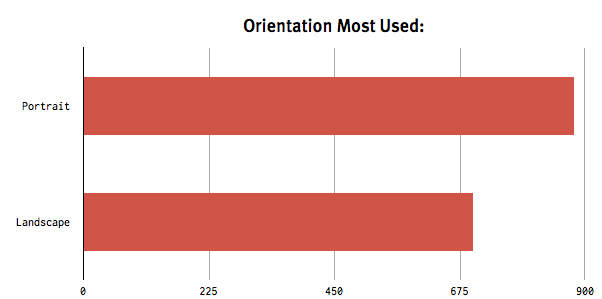
    I ran a little survey to gather a few data points on iPads and their usage. ((I specifically chose iPads because I needed a device with an actual user base.)) I tried to make the survey fun enough that users would quickly answer the questions I really wanted to know, without a lot of thought put into them. ((The more thought respondents put into questions, the less useful it is for me. I wanted true off-the-cuff answers.))

    Look at this split for the normal orientation that an iPad is used in:

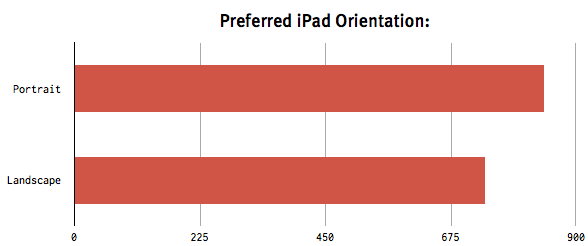
    That’s pretty astounding when you think about the fact that PC/Desktop/Laptop manufacturers all but ditched this type of view, thus preferring the widescreen view portal. What’s even more amazing to me is the user preference for the iPad’s orientation:

    Yep, most still like that vertical view — however — far fewer than I thought. Initially I suspected that most users (more than say 60%) would prefer the vertical orientation, but as you can see this is not the case. My guess is that it really depends on what and how each user is using the device.

    What’s telling about this data, the take away, after looking it over is this:

    – Users, by-in-large, use the iPad in whatever way they see fit for the task at hand — not in line with their screen orientation preference. That is if it is best to use the iPad in portrait than so be it — even if the user hates portrait devices.

    Think about this for a moment, because it represents a very important industry shift.

    **…**

    For the very first time in computing, the user has been put in control of how best to utilize the display portal they have been given — not the manufacturer.

    In fact it doesn’t matter that a slight majority uses the iPad more in portrait view than in landscape. What matters is the split — it’s close to even — because that shows that both views are important and crucial to the device.

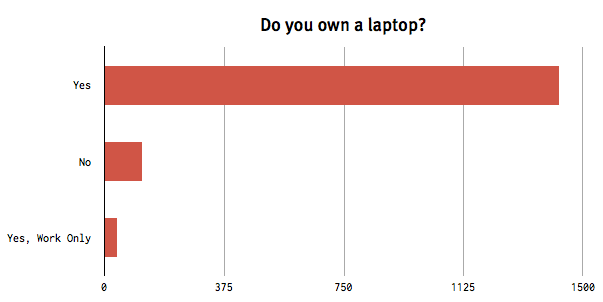
    Further consider this data about whether or not respondents own a laptop:

    The overwhelming majority has a laptop. Two portable computers, one with a forced widescreen aspect ratio and the other with an orientation agnostic workflow — both not only used by people, but valued enough to have been purchased to do similar tasks.

    Do we think now that the iPad is being purchased because it makes for great couch surfing, or could it be that it offers a level of flexibility and choice that consumers have yet to experience?

    I am beginning to think that the “you pick the orientation” attitude of the iPad and most of its apps is what makes it so appealing.

    I think initially both consumers/pundits/Apple thought that the iPad was going to see a lot of use as a video player. If turned out to be the case, then this data makes no sense:

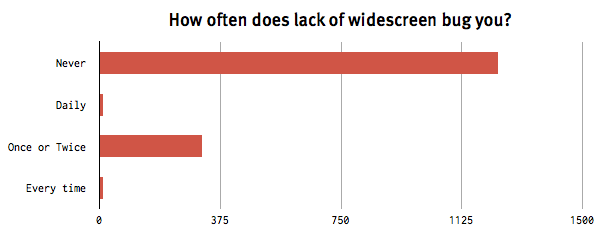
    Very few users give a crap about 16:9.

    Want to take a guess as to why?

    Yes, 16:9 aspect ratios would be great for movie watching, but it would be pretty piss-poor for just about any other task. Again, this is why the serious iPad competitors are closer to 4:3 than they were when the iPad first came out.

    When tablets first started competing with the iPad, the only thing that other companies could see the device usage for was movies. They were wrong and I think they know it now.

    ### The Developer Take-away

    You’d be foolish to make an app that only works in one orientation — even if your app is a game.

    Take Madden for example. This game is a Football ((AMERICAN)) game that is only played in landscape — but does that make the most sense?

    Certainly not when you are trying to make a hail mary pass, return a punt/ kickoff. Portrait would make much better sense in those scenarios because you could see a longer range of the field. In fact, in real life, Football fields are shaped in portrait — not landscape — for the players, not the fans.

    Most apps are better if they offer something unique about each orientation the app may be used in. Better keyboard in landscape, easier to read in portrait, for example.

    ### In Conclusion, or Something

    Tablets are not only a massive shift because of low-CPU powered computing and touch interfaces. They are shifting the balance of power back to the user.

    Tablets are giving the user a viable choice for how they want to view any given set of data the screen will show. Tablets are *actually* more malleable to the task at hand.

    #### The Rest of the Data

    I won’t leave you hanging in case you were wondering the response to the rest of the data. Here is the remaining data sets with a few comments from me on each.

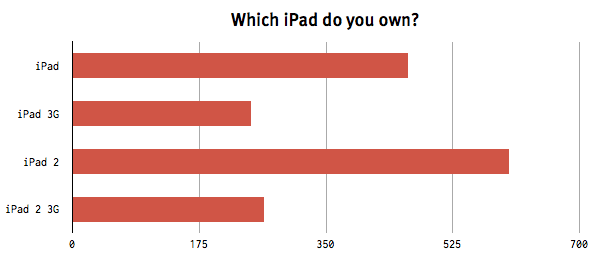
    The iPad 2 hasn’t even been out a year yet, massive ownership thus far.

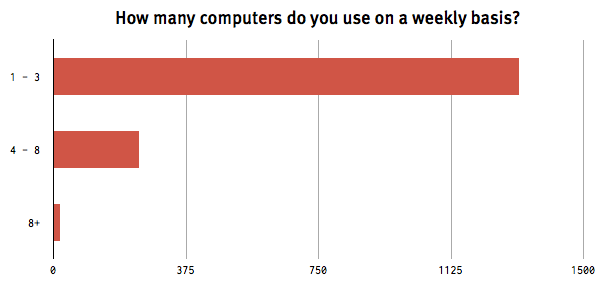
    This was just a test to see how nerdy the respondents were/are.

    We all knew this answer…

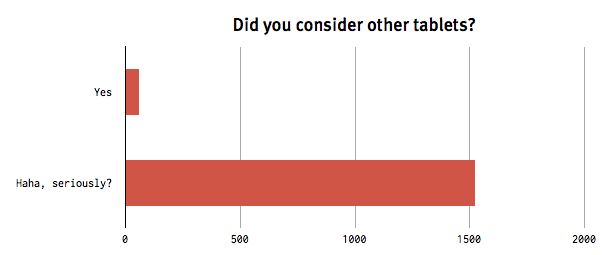
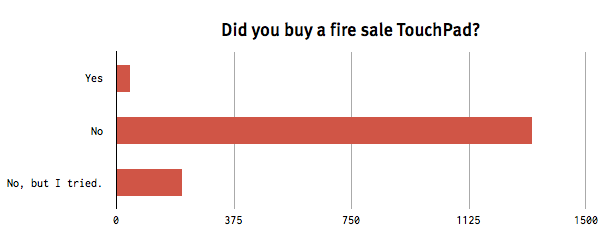
    Just goes to show that people still don’t want crap — even if it is absurdly cheap.

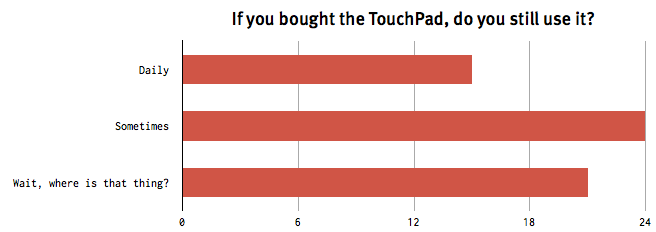
    My guess is that at least half of the people that answered “sometimes” are lying to themselves — they really should be in the “wait, where is that thing” category.

    *Thanks for playing.*

  • CEOs, COOs, and CFOs

    Carol Bartz was [fired via a phone call today](http://online.wsj.com/article/SB10001424053111904537404576555250572211010.html), unfortunately for her, she is no longer CEO of Yahoo. In truth it is a non-story to anyone who is not named Carol Bartz, or who is a part of her family.

    Yahoo simply is not relevant today.

    What is interesting to me is the reaction that I am seeing in my Twitter feed and RSS reader. The focus seems to be on two things, none of which are important.

    1. That the firing was confirmed by Bartz who emailed from her iPad.
    2. That the CFO was appointed as the interim CEO.

    The second point is one that many seem to be reading too much into. The logic is that the CFO is in charge of finances and so therefore it would make sense to have a CFO as your CEO if your company is in a death spiral and/or about to be sold.

    I can see where this logic makes perfect sense. but here’s the thing though: it’s a non-issue, there is nothing to read here. Typically CFOs are put in charge when a board gets tired of hearing that spending *more* money is the solution.

    In most C-level corporations the CFO is typically seen as the third in command behind the COO and then the CEO. However the CEO will also serve as the COO/President in many companies and in fact Bartz [was listed](http://www.reuters.com/finance/stocks/companyOfficers?symbol=YHOO.O&WTmodLOC=C4-Officers-5) ((Just in case, [here is a screenshot](https://f3a98a5aca88d28ed629-2f664c0697d743fb9a738111ab4002bd.ssl.cf1.rackcdn.com/bartz.png).)) as CEO and President.

    Essentially she was the CEO and COO of Yahoo, thus leaving the CFO as “next in line.”

    There was a saying in business school: “In times of prosper the marketers run the company, in times of decline the accountants run it.”

    It’s something that finance professors would tell you to try and woo you away from those splendid marketers, but it is a telling statement and relevant to the Bartz firing.

    This saying makes sense and is what people are reading into, except that they are missing that this saying isn’t meant to be an indicator of the health of a company, but rather the health of the economy. And guess what? We are in dire economic times, the sheer fact that there are some marketing/product types left running companies is what is truly amazing to me.

    Bartz is gone.

    An “accountant” is running the company for now.

    That’s all we know, it means nothing about a possible sale or the possible death of the company. If a company is going down, it’s going down no matter who is in charge.

    And if it is an acquisition? Well there is no point in the CFO being in charge and paying severance to a CEO — you just want the best negotiator in charge — maybe thats the CFO, but it isn’t the CFO by default.

    Don’t read things where there’s no writing.

  • The Microsoft PC

    Listening to the [latest episode of Hypercritical](http://5by5.tv/hypercritical/31) (#31), John Siracusa added some really great thoughts to HP’s *current strategy* of spinning off the PC division.

    He looks at the move from the perspective of Microsoft.

    It’s an interesting perspective since Microsoft now has one of its largest (if not its largest) Windows OS buyers wanting to exit the game, because it is no longer profitable for them to be in said game. Think about that for a minute — that *is* huge.

    Siracusa makes the argument that continued consolidation among PC manufacturers would ultimately not be a good thing for Microsoft. To me his most interesting comments are about the hardware HP and others are currently producing: cheap crap (for the most part). Siracusa points out that the last time Microsoft saw this happening — with MP3 players — they made their own hardware (the Zune in this case) — and though it was too little too late, the hardware was actually pretty good.

    I immediately had a thought.

    What if Microsoft bought HP’s PC division to start producing their own hardware: the higher quality PC?

    Ignore anti-trust concerns, monetary issues, and everything else — just think about this for a moment.

    Microsoft has begun building Microsoft stores, they would have a nice, existing, retail presence. They have deals with all major retailers. They likely have more brand trust than any current PC maker.

    In this scenario Microsoft wouldn’t become another me-too PC maker — they would be setting the standard. The standard for: price, quality, design, and speed.

    This is not out of the realm of possibility — though it would be a risky move.

    If Microsoft did do this and they decided that they wanted to make the best possible PC — something that competes directly with, say, MacBook Pros — wouldn’t that be an interesting change?

    I don’t even think it is a market that Microsoft would have to be making more than 2-3 models of computers to be in just a laptop, desktop, and tablet. All Microsoft would need to do is make the best stuff a Windows user could buy and then sell it with a healthy profit margin. Doing that, by comparison to all other PC makers, would make all others look pretty bad — both to consumers and investors.

    Certainly sales wouldn’t be robust at a higher price point, but it would prove a crucial point — a point that Microsoft really needs to prove — that Windows is *not* just the low-cost alternative.

  • Code Editors for iPad: Textastic vs. Koder

    Last week I asked on Twitter what everyone was using to edit code from FTP sites on their iPads. The overwhelming majority voted Textastic. However a few brave folks mentioned Koder.

    At first glance Koder caught my eye, but Textastic had such praise that I needed to buy and try them both. Before we can get into the comparisons here is why I want such an app: for making quick CSS tweaks to this site when I am no where near my MacBook Air. ((Yes, when I see something not looking right I *really* like to be able to change it right away.))

    My thinking is that if I can tweak the code here and there on my iPad, I can eventually take a trip with only my iPad and no worries about “what ifs”.

    I need an app that will allow me to connect to my server, edit CSS/PHP/HTML files and save/commit the changes to the server.

    ### Textastic

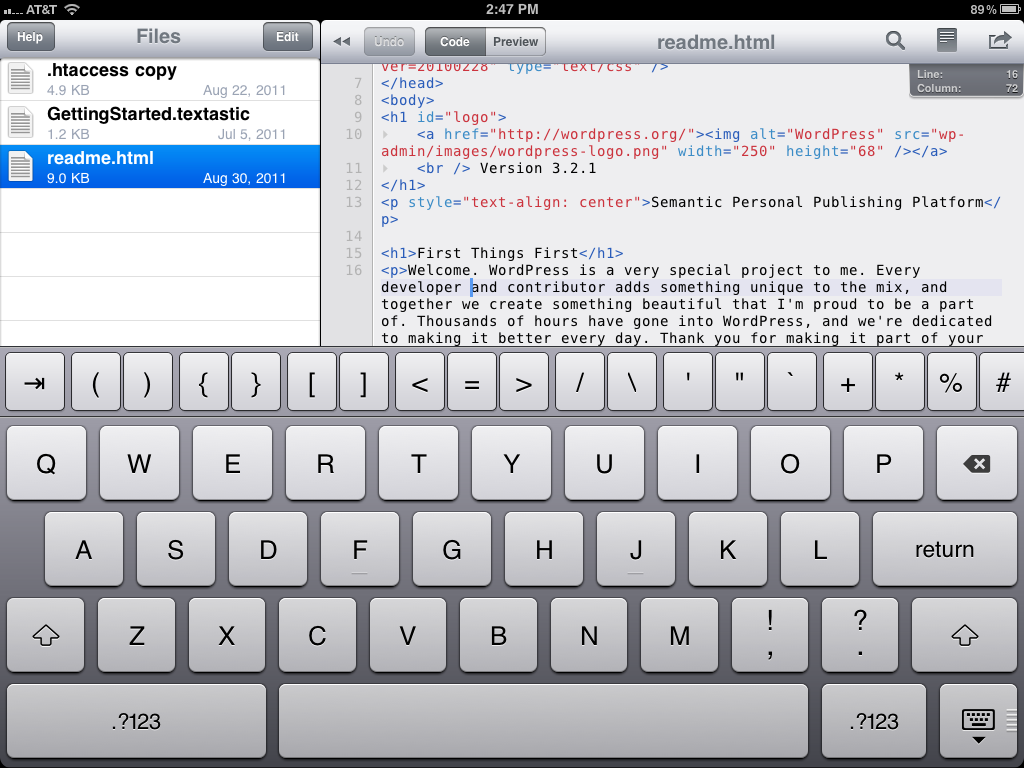
    Of the two apps [Textastic](http://www.textasticapp.com/) ($9.99) offers the most basic iOS UI design and layout. There are three really great features in Textastic:

    1. The ability to highlight/select and entire line of code with one tap in the margin.
    2. Quick access to most used keys above the standard keyboard. The odd part of this is that those keys can scroll right and left so that you can get access to even more keys. This is nice because it allows for quick access to a lot of keys, but it also takes a bit of getting used to since the keys that you want to access may not be where you expect them to be (given that they can be scrolled around).
    3. Password lock. You can set a password (not passcode) so that no other users can gain access to your server if they get a hold of your iPad. This is a great feature, almost a requirement at this point. ((Though you should be passcode locking your iPad, you do that right?))

    [](https://f3a98a5aca88d28ed629-2f664c0697d743fb9a738111ab4002bd.ssl.cf1.rackcdn.com/textastic-1.png)
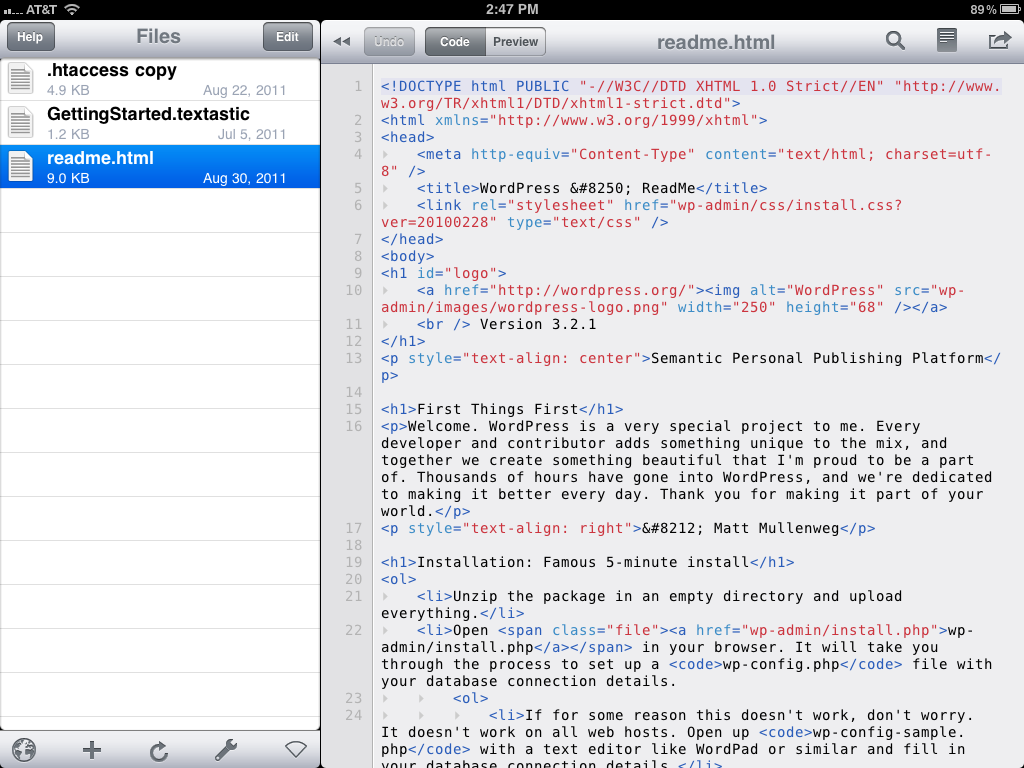
    That’s the really great stuff, but the real question is not what is really great — no — it is always: how well does the app work. This is where a lot of personal preference is going to come into play, because while the app allows you to use TextExpander and does code highlighting, it is still no where near as robust as TextMate. Not that it needs to be as robust, but I did find with both apps that I was annoyed by a few things that TextMate does that these apps don’t do.

    [](https://f3a98a5aca88d28ed629-2f664c0697d743fb9a738111ab4002bd.ssl.cf1.rackcdn.com/textastic-2.png)

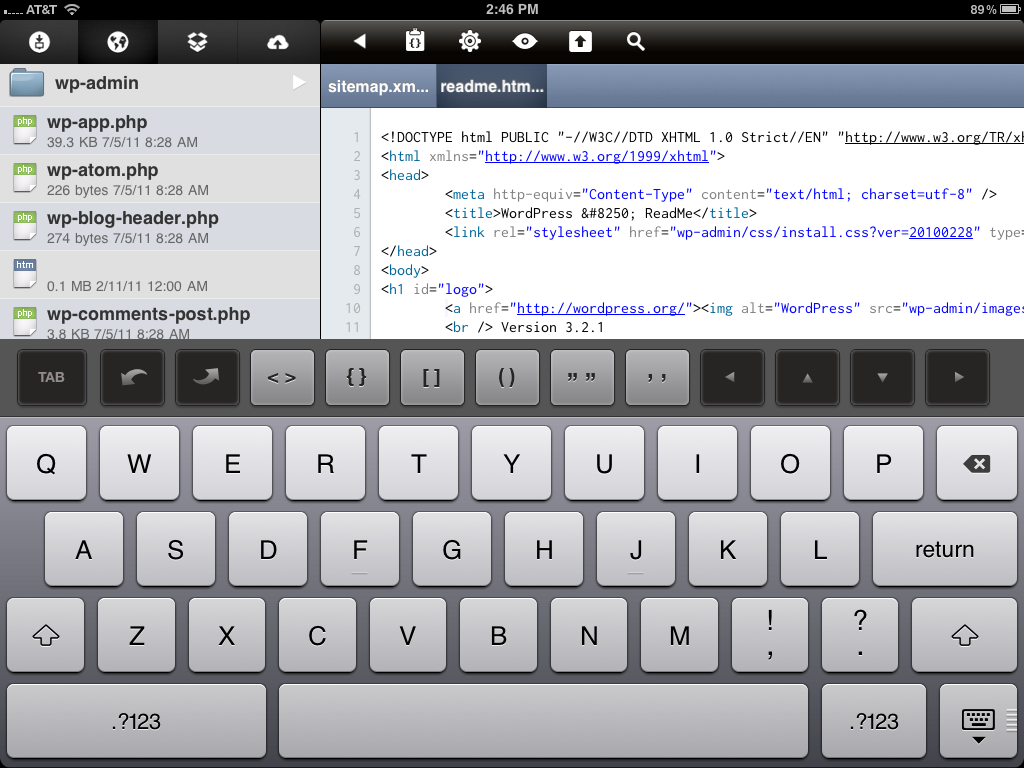
    There is one thing about the core functionality of this app that I don’t like: the way you edit remote files. With Textastic you have to download the file to your iPad first and then you can edit the file. From there the app will sync the file back and forth easily with the remote host, but it means keeping a local copy of a bunch of similarly named files in a list to the left — which if that sounds confusion, well, you got the point. There is also this odd flipping behavior that the app does when you shift from local browsing to remote browsing that I could do without.

    [
    ](https://f3a98a5aca88d28ed629-2f664c0697d743fb9a738111ab4002bd.ssl.cf1.rackcdn.com/textastic-3.png)
    For me I would much prefer to be able to tap on a file and start editing it immediately without concern for whether the file is in sync or if the file is local or not. The app does a decent job of highlighting and has a nice soft wrap so that the user doesn’t need to scroll side to side.

    The switching behavior and the need to download first is the most annoying aspect of this app. ((FTR I hate the icon.))

    ### Koder

    [Koder](http://www.koderapp.com/) ($5.99) takes a different approach and shows its colors as more than just an FTP based code editor. You can work with local files, FTP files, Dropbox files (Textastic supports this too), and iDisk files (not that this feature will be useful for much longer). Again the three best features of Koder:

    1. You work “live” with your files, there is no visible means to download the file first before you can edit them. You simply need to tap the file and you can get to work right away.
    2. The tabbed interface for open documents allows you to quickly and easily switch between two documents at once. This is something that Textastic doesn’t do and instead refers you back to the main list of files.
    3. Permissions, Koder will allow you to view the current permissions on both files and folders **and** will allow you to change these settings. This is a great little touch.

    [](https://f3a98a5aca88d28ed629-2f664c0697d743fb9a738111ab4002bd.ssl.cf1.rackcdn.com/koder-1.png)
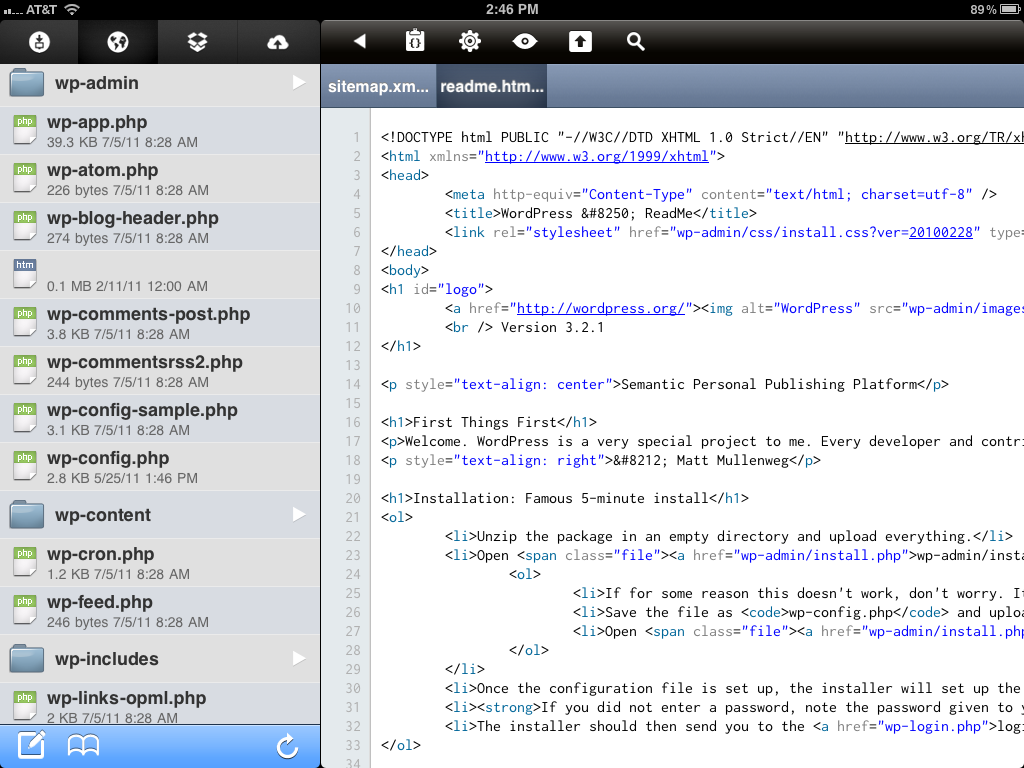
    Koder fits my working style much better than Textastic because I can just tap and get going. However the program does not have any kind of password protection, leading to security concerns — especially given that revealing the path of a file shows your FTP password in plain view — this is not good.

    [](https://f3a98a5aca88d28ed629-2f664c0697d743fb9a738111ab4002bd.ssl.cf1.rackcdn.com/koder-2.png)
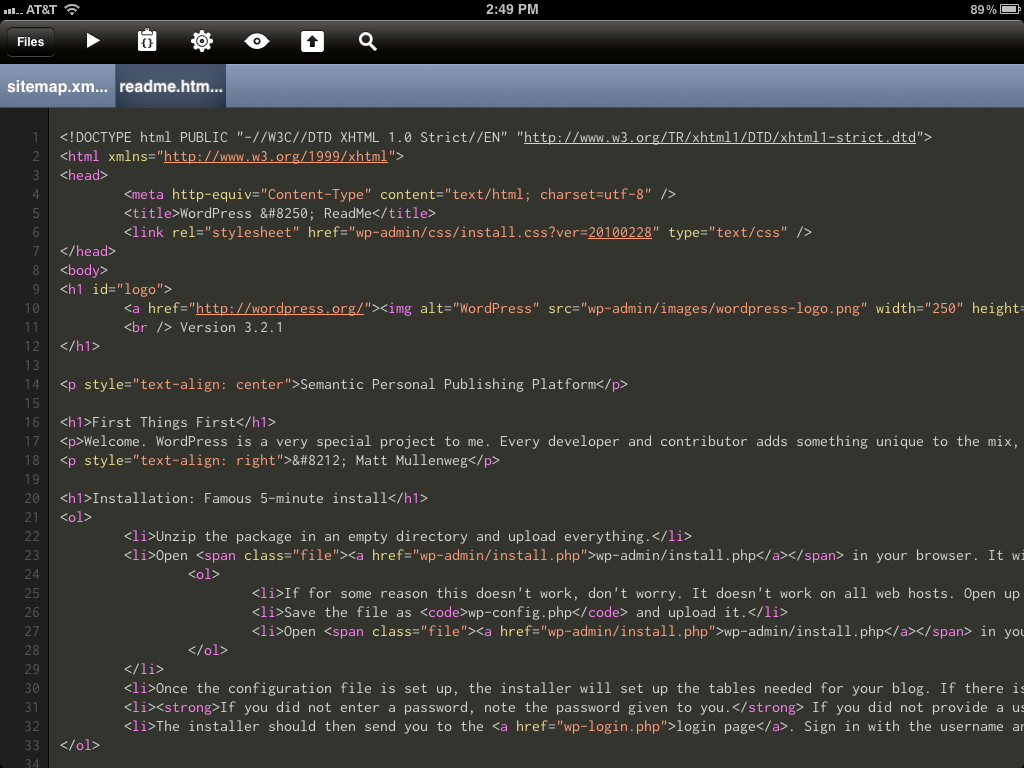
    There is also a lack of soft line wraps, which will require you to scroll a lot side to side depending on the formatting of the file you are editing.

    Koder does however offer a dark and light theme, something that Textastic does not offer. ((The icon is also very good.)) While I much prefer the light theme as the highlight colors of the dark theme are not in line with my personal tastes.

    [](https://f3a98a5aca88d28ed629-2f664c0697d743fb9a738111ab4002bd.ssl.cf1.rackcdn.com/koder-dark.png)

    The custom keyboard in Koder is much different from Textastic’s. Where Textastic offers a lot more ‘quick’ access to common keys, Koder offers access just to a few of the likely keys and gives you arrows keys for navigation. One of the biggest differences between the functionality of code editing in the two apps is that Koder automatically inserts the open and close bracketing when you are editing. There is also a nice undo and redo set of buttons to help keep you from looking like a fool when you shake your iPad to ‘undo’ edits.

    Lastly Koder does not offer TextExpander support — instead it chooses to have its own library of snippets that you can build in the app. It’s a toss up which method is better because at some point you have to create the snippets in either TextExpander or Koder. The advantage to Koder’s method is that you don’t need to remember expansion shortcuts, instead you just tap on the snippet that you want. Whereas the advantage to Textastic is that you may already have these snippets set, and at the very least could sync them to your iPad from your Mac.

    ### Overall

    If I was cramped for space I would pick Koder and call it a day. Even with the limitations of the app, I passcode protect my iPad and the extras that it offers in the form of permissions control and tabbed editing makes a better solution for what I am looking for.

    Luckily I am not cramped for space so both of these apps will fill different needs from time to time. All Koder needs is a passcode lock and better line-wrapping and it would be the hands down winner.

  • The Amazon/Kindle Tablet: Speculating on Speculation

    There’s a strong possibility that I will regret this statement later, but: I don’t think the Amazon Tablet, as rumored, is going to sell very well — even with “Amazon front page Help”.

    Marco Arment [argues that the Amazon Tablet](http://www.marco.org/2011/08/27/amazon-tablet-guess) will put battery life first, then price. Meaning it will be a crappy feeling product that is thicker than an iPad and will just be a price competitor. That sounds… *fantastic*.

    Dan Provost on the other hand is [arguing that the Amazon Tablet](http://www.therussiansusedapencil.com/post/9419824099/thoughts-on-a-kindle-tablet) should be something very special using some of the latest technology to make the ultimate tablet reading device. Likely this means tossing aside pricing and focusing on great hardware and software — I am not alone in saying Provost’s idea would be very compelling.

    Both of these men are just speculating, but as far as speculation goes — I have real doubts about the market success of either product.

    No matter what homepage you put either of these devices on — they are both doomed for failure as they have been outlined by Arment and Provost.

    ### The Marco Tablet

    Arment theorizes that such a tablet would feel cheap, but because it *is* cheap it would sell like crazy:

    >Like the Kindle 3, it’s going to feel cheap, but most people won’t care, because it will *be* cheap.

    Arment notes that with the exposure that Amazon would be giving it sales will be good (to say the least). I however don’t think that is the case — it certainly would sell more than any other iPad tablet we have seen thus far, but it won’t be a *true* iPad competitor. ((Maybe that *is* the point.))

    To understand why we need to understand what makes the iPad phenomenal from a users perspective: value. The iPad is not expensive — it isn’t cheap — ask anyone who has fallen in love with their iPad (shouldn’t be hard to find) and they will tell you the same thing when you ask them if the price is “worth it”: absolutely.

    In fact even users that are not as enamored with the device will tell you that they think the pricing is pretty damned good for what you get. For what you get. That is what defines value for the consumer that actually waits in line — the consumers that only Apple has.

    So the iPad has:

    – Excellent quality and feeling hardware.
    – Fluid and seamless feeling OS.
    – Thousands of quality *and* free apps.
    – Excellent user experience.
    – A price that is “worth” it.

    The Amazon tablet as Arment sees it will have only the last item on the list — that’s not a device that is a competitor to anything — that’s slapping a Ferrari logo on a Kia. Even at that it is not a sure bet that such a rumored Amazon tablet would even meet that last item of “worth” — after all even if a tablet is only $99, doesn’t meant that it is “worth” $99. ((Cough. TouchPad. Cough.))

    Amazon will ship a boatload at the beginning to people that want to try the device, but those people will soon report back that you are better off biting the bullet: buying an iPad.

    In the iPad market you simply cannot compete on price alone.

    ### The Provost Tablet

    While I would be lining up to get an Amazon Tablet as Provost outlines it — the line would be pretty short. The hardware needed to create such a tablet would be very expensive for Amazon and therefore it would make the Tablet very expensive for consumers. ((Based solely on the idea that: A: Provost wants high quality hardware. B: Color eInk isn’t cheap.)) The Kindle has already taught us that Amazon is not willing to sell a device at much of a loss — even if it would result in higher “content” sales — instead preferring ad supported models.

    With Provost’s idea we get:

    – Excellent hardware.
    – High price.
    – Poor user experience.
    – Limited tablet functionality.

    In other words the only bullet point Provost’s idea would be competing on is hardware.

    You can’t beat the iPad with hardware alone.

    Now I need to address the user experience for both Arment’s vision and Provost’s vision since I categorically claim that they will both be “poor”.

    ### The Arment Tablet UX

    The problem with the Arment Tablet user experience is two fold:

    1. The Android base OS that Arment theorizes will be apart of said tablet has already proven to be a pretty poor base OS for tablets. Case in point: Nook, Xoom, Galaxy Tab 10.1, et al. None of these devices are great. The one thing they all have in common? Android.
    2. Cheap hardware. By all accounts the HP TouchPad had some pretty nice hardware accompanying it, but even at HP, the developers saw that their OS ran *better* inside of Safari — on an iPad. So coupling cheaper hardware than what most manufacturers are using with Android is simply not a recipe for a smooth operating — well — system. In other words: Android already struggles to properly animate scrolling and pinch-zoom gestures, now you want to give it even slower hardware? Not a good idea.

    Having said all that there are three other majors issues with the Arment tablet speculation: core OS apps, weight, and the Amazon Appstore (one word because we wouldn’t want to be confusing it with another App Store).

    #### Core OS Apps

    The core OS apps are the apps that should be provided on any serious tablet from day one. Those apps include (at a minimum):

    – Web browser
    – Email client
    – Calendar
    – Maps
    – Music/media player
    – App Store, or someway of getting more apps.

    Let’s take the above and look at them again, this time in the sense of what Amazon is actually good at:

    – Web browser: the only Amazon web browser I have experience with is the one “experimentally” built into my Kindle 2. That web browser is terrible. Let’s assume they go with Webkit for any new tablet and that the browser is at the very worst: poor. I have no doubt the they could make a decent browser with a Webkit backbone and a half way decent UI designer working on it. This is a ‘meh’ app for them — nothing terrible, nothing great. It’s not going to sell tablets, but it likely won’t hinder sales too much.
    – Email Client: they have absolutely no experience here. If Arment is right and Amazon doesn’t take this tablet through the Android compatibility process to get “open” Android on the device, well this will be a pain point for the tablet. I could however see them going with something Microsoft powered, but even then I doubt it would be even a good experience — no one uses Hotmail.
    – Calendar: Again they have no experience building this type of software, but I don’t see it being too troublesome for Amazon. Another ‘meh’ here.
    – Maps: This would be a disaster if Amazon tried to build it themselves. Luckily I see their neighbor Microsoft willing to pitch in — which could actually result in a pretty good offering. If for no other reason than Microsoft wanting to show other OEMs that Bing mapping is a viable alternative to Google Maps.
    – Music/Media: Amazon cloud drive. Let’s just say this won’t be a *strong* selling point of the device, but it would have the magic “cloud” phrasing to go along with it. Where it would really shine is allowing people to stream a ton of video — that would really take the competition up a notch.
    – App Store: Appstore. The problem? Developers hate the Amazon Appstore and [for good reason](http://shiftyjelly.wordpress.com/2011/08/02/amazon-app-store-rotten-to-the-core/). More on this later.

    Amazon’s inexperience in OS level software and lack of viable partners is what will really kill them with a Tablet offering. Amazon needs to ask themselves: do we really want to become a software company? If the answer is no, then the Tablet needs to pass the Android compatibility suite. Otherwise Amazon is going to need to make a serious commitment too software design and development to even compete with fellow Android tablets.

    #### Weight

    Arment speculates that the Amazon tablet will be thicker than most tablets, thus accommodating a higher capacity battery. If this is true then we can naturally expect the weight of the device to be much heavier than an iPad.

    People already complain that the iPad is too heavy for general reading purposes — this is Amazon’s bread and butter. Making a tablet that is heavier than the iPad? That’s not a good idea, even if the battery life is significantly better.

    People like the Kindle (in part) because it is light and won’t break their nose if they drop it on their face while reading in bed.

    #### Amazon Appstore

    As I mentioned above the Amazon Appstore has already begun [pissing off developers](http://shiftyjelly.wordpress.com/2011/08/02/amazon-app-store-rotten-to-the-core/). The bigger problem is: will good developer flock to the platform?

    Without the subset of key apps, or even knock-off apps, no user will take such an App Store seriously. The current best selling listing for the Amazon Appstore is less then hopeful for the platform.

    ### The Provost Tablet UX

    The reasoning for stating that Provost’s tablet concept would have a poor user experience (right now at least) is much simpler and clearly stated by Arment himself:

    >I don’t think color e-ink is product-ready yet. Even if it could match the resolution and response time of today’s grayscale e-ink displays, that’s still nowhere near good enough to play video, animate anything, or smoothly scroll a page. I doubt that color (or probably even grayscale) e-ink will ever be fast enough for those roles.

    In other words: lag. Too much lag. Provost’s speculation also ditches a web browser — leaving me to wonder if you could even put such a tablet in the same category as the iPad.

    ### The Amazon Tablet

    This entire post is speculation *on* speculation. The point of it is to really say: that Amazon *must* do more than people are speculating to stand a chance at beating the iPad, or changing the rules of the game.

    Right now, where rumors and speculation currently stand, I don’t see Amazon doing much more that becoming another me-too tablet manufacturer competing for the crumbs the iPad leaves behind.

  • Some Apps I’m Playing With

    I haven’t talked about iOS apps in a bit, but I have been doing my duty and playing with a bunch of them. I wanted to talk (briefly) about a few of those apps.

    ### Glassboard

    [Just launched “private group sharing” client](http://glassboard.com/). It is mobile only, which is interesting. Personally I don’t much care for it, you must invite users using email — which sucks because you don’t know if those users are already using the service yet or not. This also means you risk annoying users and flooding their inbox — not good and will keep me from inviting people.

    I am beginning to think that I am just not the target market for these private group messaging apps, because I have yet to find one to be useful. There are a great many UI niggles that are bugging me — though in fairness I am running a beta OS so I don’t know what is a result of the beta OS and what is an actual bug (which is also why my iOS app reviews have waned of late).

    ### Elements

    There’s a [new version out](http://www.secondgearsoftware.com/elements/) and the icon is vastly improved, meaning that I can finally give it serious consideration. Unfortunately there are a bunch of bugs that are, again, likely iOS 5 only bugs.

    That said I still much prefer Notesy on both the iPad and iPhone.

    Though both apps need a lot of work on their iPad counterparts so those versions don’t look like scaled up versions of the iPhone app.

    ### Tempus

    This is a [new calendar app](http://itunes.apple.com/us/app/event-calendar-tempus/id456838001?mt=8) for iOS that is from the guys that brought us Calvetica. Guess what? It is a lot like the former versions of Calvetica — a stripped down and lightweight calendar app.

    Having said that this app isn’t bad by any means — its just not as good as Calvetica and about on par with Agenda in my book. Which is to say that it is a good app, bested by its older sibling.

    ### Diacarta

    [Diacarta](http://itunes.apple.com/us/app/diacarta-planner/id377198326?mt=8) is a very interesting calendar app — one that looks like nothing else. My biggest problem with Diacarta has always been that there wasn’t support for multiple calendars — with this new version, there now is.

    I gave it a spin for a day, but I have to say that I just don’t find it to be that useful from a utility standpoint. I like the look and “feel” of the app, but that isn’t enough to get me to use the app full time. I like the idea of seeing your schedule more visually, but I am too set in the ways of “regular” calendar apps to get used to this app.

    *That’s it for now.*

  • Mr. Chairman

    Steve Jobs has [resigned](http://www.finanznachrichten.de/21166402) from Apple.

    I don’t care to speculate on the health of people, but I would guess that Jobs did not want to step down at this point — rather he *needed* to step down.

    There is about to be rampant speculation and rumors running amok about this: ignore them all.

    Here’s what you really need to know:

    With Tim Cook presumably taking the role of CEO (it has yet to be made official) and Jobs moving to Chairman of the Board, Director, and Apple Employee — what really changes?

    Not much, mostly titles would be my guess. The unfortunate truth of the situation is that Jobs has had a very diminished role in Apple for the past several years while he battled various health issues. Cook has been Jobs’ go to guy doing this entire period — Cook has been running Apple a lot lately.

    That’s what you need to know.

    Jobs will still be heard when he needs to be.

    And Cook? Cook has already shown himself more than capable for the job.

    Life will go on, Apple will be fine.

    *Stay Hungry. Stay Foolish.*

  • Mac Pro Fast

    Robert X. Cringely responding to reports of “new Macs” and “radical” changes, theorizes on Apple killing the Mac Pro and instead [doing this](http://www.cringely.com/2011/08/is-the-mac-pro-dead/):

    >I expect Apple to move to a modular architecture where the building blocks for high performance computers are generally Mac Minis. Start with a new Mini or with a Thunderbolt iMac and expand both storage and processing by adding a stack of up to five more Thunderbolt-connected Minis. A maxed-out system would have six I7 processors with 24 cores, 24 gigabytes of DDR RAM (expandable to 96 GB!) and at least six terabytes of storage. And at $6000, it would be half the price of an equivalently tricked-out Mac Pro.

    The geek in me is all sorts of excited about such a prospect. Nothing says cool like daisy chaining a bunch of Macs to make a fully supported (by Apple) home grown super computer — people have been doing [this for years with Mac Pros](http://www.appleinsider.com/articles/08/07/24/virginia_techs_mac_pro_supercomputer_to_crack_29_teraflops.html).

    *Sorry, had to wipe drool off my chin.*

    While the geek in me would love to see such a scenario — as Cringely lays out — would such a play be in Apple’s best interest, or even “fit” with Apple’s philosophy on computing?

    ### Philosophy

    I think it is safe to say that Apple has an outward goal of making their lineup of products as simple as possible. So the argument, as Cringely states it, for such a move would be that eliminating the Mac Pro makes things all the more ‘simple’ for buyers. But does it?

    I think not.

    As it is the Mac Pro is the least confusing product — the most straight forward — that Apple sells. It is the high-end-price-is-no-object-geek-badge-of-bad-ass-ness-computer.

    That is: no consumer is ever torn between buying a Mac Pro and any other computer Apple sells. High-end buyers buy them and they already know that’s what they need/want. Even I know that a Mac Pro is vast overkill for everything that I do — even if I could do it all at once. The average consumer knows by price alone that such a computer is not for them.

    So by eliminating the Mac Pro and adding in the ability to chain Mac minis into mini-super computers — you would now be adding a layer of complexity to a process Apple has spent the better part of 10 years honing: the setup.

    Whether you buy a $699 Mac mini or a $10,000+ Mac Pro, the setup will always be the same: plug in the monitor/mouse/keyboard and plug everything into the wall, press the power button. For there you get one of the most highly polished and thought through setup procedures in computing.

    *Done*.

    Could you imagine how messed up the streamlined Apple setup process would be if you wanted to setup two, three, ten Mac minis — so that they were working together — as one? I think no matter how hard Apple would try such a process would be a nightmare for both the user *and* Apple.

    Not to mention: what does one do when the system isn’t working? Take the entire setup to the Apple store? Sure taking in a Mac Pro is a chore, but taking in a series of interconnected computers and their related power adapters?

    That’s down right “un-Apple”.

    ### Sensibility

    Then you have to take into account whether such a move would even make sense for Apple as a company. I am not certain, but I would guess the margin on the Mac Pro is much higher than on the Mac mini, especially when you start talking RAM upgrades.

    Even if that isn’t true, even if the Mac mini is a higher margin machine, is it worth not having a computer that you can dangle in front of every geeks face as the Mac Pro?

    If Apple ditched the Mac Pro, what then would Pixar use? What would they say is *the* machine that you should use if you are:

    1. A pro-photographer?
    2. Pro-videographer?
    3. Graphic design studio?
    4. Gamer?

    The same iMac you bought your Mom?

    There would no longer be a *the* machine, now it would be *the* machine*s* — and how many of you think that such an array would be feasible for the normal pro in the above list to setup stress free?

    As much as we want such a neat setup, how many actually believe that Apple could carry over the “Mac experience” to such a setup?

    I don’t.

    ### But Macs Are Fast

    Yes, the iMac is lightening fast. Yes, so is every other Mac. But they aren’t *Mac Pro* fast and that’s the problem.

    Even *if* Apple had such an idea in their head — why not keep the Mac Pro and allow users to chain them together, natively, out of the box, right now? If you think chaining Mac minis together would be sweet, imagine even the idea of doing the same with Mac Pros?

    *Crap, drool, again.*

    I just don’t see Apple doing this. The complexity of such a system is something that Apple is quickly moving away from. I have no doubt that they are not happy with the Mac Pro as it currently stands, but the answer isn’t killing it — the answer is just making a touch smaller *and* faster.

    Apple isn’t about to try and teach/support users on chaining Macs together, no matter how much they want to drop the Mac Pro from the line up.

  • Why Do People Buy iPads?

    That’s the question asked by Christopher Phin at Tap! Magazine. Phin’s basic answer boils down to this:

    People buy iPads both specifically because they can see where it’s going to fit into their home or office lives, and because they’re understandably drawn to a shiny slab of Apple gorgeousness – from where the useful, practical, productive bit often follows.

    I can certainly see that logic. He is not saying that iPads are useless, but that often people just don’t know what the hell they are going to use them for when the get them — but they just want one because they look so damned neat.

    When the iPad came out my wife asked if I was getting one, my answer that the time was ‘no’. I was set in two thoughts:

    1. It’s not as good as a laptop.
    2. It’s just a big iPhone and I have an iPhone.

    It took just two weeks for the then still unreleased iPad to change my mind. I bought an iPad with the following thought: at the very least it will be a better screen to watch movies on while flying.

    That was the extent of my “reason” for buying an iPad. Since then I am a huge proponent of an iPad and if given the choice between a 13″ MacBook Air with no iPad, or a desktop computer + iPad — I would choose the latter.

    Hands down, without a shadow of a doubt, the iPad is the best “couch computer” I have ever owned. It is also the best: meeting tool, coffee shop companion, flying entertainment device I have ever had.

    But honestly so would be the 11″ MacBook Air.

    Oh I almost forgot the iPad is better than anything I have ever used at doing a few specific tasks, including:

    • Reading RSS (Reeder)
    • Reading articles (Instapaper)
    • Restarting my web server (Prompt + 3G)
    • Reading books (Kindle)

    I think Phin is spot on when he states:

    But there’s something I see time and again with the iPad: people often don’t have, as Darren implies, a clear practical use in mind when they’re buying one; but over weeks and months, they start using it more for all kinds of both predictable and unexpected tasks, and using traditional computers less.

    This is partly do to the excellent apps available, but I think a larger part of it all is because people simply want to use the device.

    Craig Grannell in response to Phin’s post stated:

    Only by embracing new technology and then seeing what we can do with it can we ensure we don’t remain stuck in the past. And for everyone moaning about the lack of obvious utility in tablets, people once said the same thing about computers—and look where that got us.

    I can completely relate to this because growing up I had no need for a computer, but I sure as hell wanted one. After getting a computer guess what? I found a lot of things I could use that computer for.

    Of course all of this discussion started because of Darren Murph’s post at Engadget where he questioned the utility of the iPad while still disclaiming that he does think they are useful, to someone, somewhere, probably.

    Murph:

    […]but this isn’t about proving that a tablet can do one or two things; it’s about the limitations and awkwardness of using one that no one seems to talk about.

    and:

    Tablets, for whatever reason, seem to defy logic when it comes to purchase rationalization in the consumer electronics realm.

    The brunt of Murph’s argument seems to be that he finds the very awkward to use, laptops to be more useful and buyers of tablets to be anomalies.

    In fact he believes his smartphone is a far better alternative and cheaper too.

    What Murph misses is that no consumer decisions are rational, that’s why we have a world with Ferraris. That’s why we have first class and coach. That’s why we have tailor made hand-stitched clothing and one size fits all shirts.

    Consumers sometimes, how ever un-rational, want something neat and shiny. What Murph seems to miss that Grannell and Phin both pointed out is that something can be both “neat and shiny” while still offering a lot of utility.

    We saw it first with computers, then the Internet, smart phones and now tablets.

    Murph ends with these two questions:

    But here’s a genuine question: how many of you actually use your tablet (of any brand) for productivity tasks as much as you thought you would when you lined up around the block to buy it? And after you invest a couple hundred in accessories to make it halfway useful, aren’t you better off (financially and otherwise) with a bona fide laptop?

    You already know from my statements above that I use the iPad for far more tasks then I ever thought I would — and it is indeed my preferred way to read email. I don’t for one second think it would have made more sense to buy a “bona fide laptop” because:

    1. I already had a “bona fide laptop”.
    2. And my laptop can’t do some of the things that my iPad can.

    If you (you as is anyone) continue to think about tablets in comparison to laptops then you will never understand the value that tablets hold. In the same way that someone that compares car travel to airplane travel will never understand the value of the road trip.