Category: Articles

  • My Home Desk [video]

    Tour of my Desk from Ben Brooks on Vimeo.

    A quick look at my home desk (thanks to Brett Kelly for the idea). Sorry for the shakiness, I was shooting with a camera I am not familiar with (Canon 5d mkII).

    What you see in the video:

  • Quick Hit: Microsoft & Nokia

    I had a few emails in my inbox today about the new Nokia and Microsoft partnership that the collective ‘we’ of the Internet had been expecting. Here is the announcement from Microsoft and here is Nokia’s. Those that did write me about this wanted to know what it means for Windows Phone 7 — nobody cared about Nokia. That should be telling about the relevance of Nokia in todays smart phone market.

    So does this partnership allow Windows Phone 7 to gain traction?

    I don’t think this announcement does much for either company. Windows Phone 7 is a very good 1.0 smart phone operating system — and the mobile OS I would choose if I were not able to have an iPhone — but Microsoft already has a decent selection of Windows Phone 7 handsets out there that are not selling that well. Nokia is a lost brand on consumers these days — most U.S. consumers will only remember the iconic ‘dumb’ phones that cellular providers would give you for free.

    A few things happen with this announcement:

    1. Microsoft gets yet another manufacturer to join the fold, this can only help with unit sales.
    2. Nokia is no longer a known brand and because of that consumers don’t care — consumers only know two cell phone brands these days: Smart phones and iPhones. Thus, Nokia proves its irrelevance.
    3. Google should feel embarrassed.

    This doesn’t really help make Windows Phone 7 a major competitor and I don’t think this deal helps Nokia in the slightest. Nokia is now a lesser HTC and Windows Phone 7 is now being sold by a lesser HTC. Big deal. Consumers couldn’t care less about a manufacturer — that in the U.S. is not known for smart phones — so this deal is irrelevant here. I imagine that in Europe this is a bigger deal, but more so because of the implications for the once great brand of Nokia.

    This deal should really make the Android team at Google wake up — why would Nokia choose a platform that ‘costs’ them money? ((There are reports that Microsoft paid Nokia.)) I think the answer lies in both Elop and Nokia’s culture. Clearly Elop is tied with Microsoft, but more than that Windows Phone 7 is far better looking and feeling than Android and that matters.

    Nokia wanted something that looked good on its phones — not just something that was free. They can’t get iOS, so Windows Phone 7 is the next best thing. This doesn’t mean they are done making their own OS and if they are smart that are buying time with Windows Phone 7 so they can make a true competitor.

  • Micro-Payment Dilemma

    I am a huge fan of Readability’s new payment system — both because I want to support others and because I appreciate any support of this site. I was also very excited when Instapaper and Readability were tied in together since I don’t normally use Readability. I have one major problem though: I send everything I read through Instapaper and I don’t necessary want to support every site that I read.

    That may seem unreasonable, or even mean to some, but truthfully there are some sites that I read that I really don’t want to support.

    I thought perhaps that Instapaper solved this problem with the recent addition of these options:

    Screen shot 2011 02 10 at 8 48 13 AM

    Originally I had the first option selected, but by virtue of the fact that I didn’t want to give money to all publishers I read, I changed to the second option. Now only publishers whose articles I star will get credit.

    This seems like a great solution — until I got to thinking about it more.

    The problem is I star very few articles — I save starred items for articles that I think are of excellent quality — which means that there are some very good articles on sites that I truly want to support, that just won’t get support under this system. I don’t want to star non-excellent articles just so I can support the publisher — I only star things that I think are excellent.

    The last option seems like it would be ideal, except that when I want to remove an item from Instapaper I would need to delete it — otherwise that publisher gets my money. Deleting items in Instapaper requires two clicks. Two clicks is too much friction for me.

    Perhaps this all seems silly to you, but I truly want to be able to give select sites money with as little friction as possible.

    For now, my solution is to keep the Readability bookmarklet in Safari so that I can give those not-quite-star-worthy articles money, as well as those that I star in Instapaper. I don’t know what the best solution is, because adding a ‘send-money’ button in Instapaper would also require two clicks (one to send the money and one to archive it).

    What I can tell you is that what I have today is a far better system than what I had two weeks ago.

  • The Stylus

    Touch screens never used to really be touch screens — we all knew that they required one very important tool to use: the stylus. That small, cheap, piece of plastic, that bent uncomfortably in our hand, is what we used to control our Palm Pilots, our Treos and the grocery store credit card terminals.

    Touch screens were devices that lived on TV and while they could be operated with our chubby fingers they were imprecise tools at the forefront of technological dreams. We bought styluses in packs of three, four times a year — losing them was a common occurrence.

    The iPhone came out and we Treo and Blackberry wielding masses wondered where the stylus was stored. Turned out, the iPhone was the first device that didn’t require such a clumsy input device. Then came the iPad, further pushing out the idea of the stylus.

    This all seems logical, except: last week I bought a stylus for my iPad.

    iPad Stylus

    Sixty-seven seconds after unpacking the stylus I immediately regretted the $20 purchase.

    I should be clear here, I purchased the Griffin Stylus for iPad and it is not a flawed product – it is an unnecessary one.

    Why

    The few people that saw me using the stylus immediately asked why I would want one and the answer is simple: to have another piece of digital ammo for meetings. I thought that perhaps a stylus in conjunction with the iPad and an app like Penultimate would make for a killer setup. I wanted to accomplish a few things:

    1. Better sketches.
    2. Be able to write readable handwritten scrawls that don’t take up an entire screen.
    3. To be able to draw straighter lines and rounder circles. ((No, really.))

    I figured that $19 plus shipping and handling wasn’t too much money — so why not just give it a go.

    Result

    Much in the same way as Photoshop can’t make you a better photographer — a stylus for your iPad does nothing to make you a better sketcher. My hope was that I could get more nuanced control of the sketches, but in actuality the stylus is no more finite than using my pinky finger is. ((I honestly should have guessed this.))

    That’s OK, I moved on to the handwriting tests. I tried very hard to see if I could get normal looking handwriting with the stylus and the best I came up with were scrawls that were 20% smaller than if I used my index finger.

    That is: no you don’t write better with a stylus than you do with your finger on the iPad. I think a large factor of this is the multi-touch surface. You really need to be able to rest your hand on the screen, without invoking an action, before you can write legibly on the iPad.

    I bet you have guessed by now that having a stylus will not help you draw straighter lines or rounder circles. I actually think it may be worse off for that.

    At the end of the day the stylus I bought did nothing that I wanted it to do.

    In a fit of desperation, trying to find something good to say about using a stylus with the iPad I opened up Layers Pro. I will say that the stylus does seem like it might be helpful for painting type work — but people seem to get along just fine with their fingers alone.

    Hardware

    That leaves use with the hardware of the stylus itself. There isn’t much to say as it is a sturdy, but small piece of aluminum. The tip is interesting — it feels like a deflated inner-tube. It is rubber and glides across my finger print laden iPad screen with greater ease than my finger normally would.

    iPad Stylus Tip

    Overall I think it is a solidly made product.

    Future Improvements

    The greatest reason why a stylus doesn’t make sense for the iPad is because there is no pressure sensitivity on the multi-touch input tablet. Most people that have used a Wacom tablet will tell you that they love being able to vary the brush size based on how hard they are pressing — this is how you actually draw, with light and heavy strokes — all without having to stop and adjust the brush size.

    Right now there is no pressure sensitivity on the iPad and therefore no reason to own a stylus.

    This is not to say that the iPad needs pressure sensitivity — it probably doesn’t — but in order for a stylus to make sense with the iPad, the iPad needs pressure sensitivity.

  • ‘A Mans Desk’

    This is a picture of Shawn Blanc’s desk, which he comments on his site:

    That’s a man’s desk. 21 square feet of simplicity and awesomeness built from scratch by yours truly.

    I agree, it is a desk to envy. If you are going to build or buy a desk, here are somethings I think you should keep in mind:

    1. Size: I personally think a three foot by six foot desk is optimal. We don’t all have that much room in our lives for such a perfect desk size, so build it as big as you can. The depth is very important so never go less than 24″ or more than 40″ for a single user desk. Again, I think 36″ is the optimal depth. ((Here is Stephen Hackett’s desk which is also lovely.
    2. Think about how and where you will route your cables. Personally I think a grove or a sliding compartment on the desk top is ideal. You must also think how those cables will be stored below the desk, typically I use zip ties that can be screwed into the bottom of your desk (you can find these in the electrical aisle of a hardware store). I also like to have a place in the legs to route the power down and if I am making the desk a compartment to hide the cables in. I am a huge fan of the way this desk hides cables. ((I am going to get a picture of the desk my Grandfather built as it is stunning and has smart cable management.))
    3. Don’t ever build your desk to custom fit anything you have right now. You can build it to the space you want it to fit in, but don’t get fancy with the shape. Keep it a simple rectangle and keep in mind that you should expect it to last 10-15 years (at the very least).
    4. Building a desk is often cheaper and easier than one thinks. If you borrow and rent most of the tools you can build a desk that would cost you $3,000 for $300 and a weekend of your time.
    5. An old carpentry rule: ‘cut once, measure twice’. If this is your first time woodworking then I recommend measuring a ton of times.
    6. Sanding is the most important thing you can do for the finish of your desk. What the wood feels like before you apply any stains or paint or lacquer is what it will feel like in the end. Sand and then sand some more.

    You may be asking: “But Ben, come on, your desk isn’t hand made — how could you possible know this?” Correct, but I have worked in construction for over 5 years of my life mostly with a hammer or Skil saw in my hand. I have helped to make countless buildings and custom pieces of furniture with my Grandfather. On top of all that, I designed this and helped build it. ((That is teak wood, and is about $2,000 worth of material, where mistakes get costly.)) It may be ‘just a headboard’ but I assure you that if you saw the work that went into the craftsmanship, you would never want to make a headboard. ((For size reference the bed is a California King.))

    [Updated: 2.8.11 at 8:58 AM]
    I was just reminded by a friend that I also was (allegedly) the main guy behind a huge bar that was built in the house I lived in during college — complete with a chandelier. For legal reasons I will not be sharing those pictures.

  • Iain Broome’s iPad Life

    I would like to welcome a fantastic writer and a fellow Read & Trust member, Iain Broome to my iPad Life interview series. You can find out more about Iain on his blog Write for Your Life.

    Tell me a little about yourself, what do you do, where do you live?

    Well, I’m a writer and I live in Sheffield, which is in the north of England.

    By day I’m a copywriter for a tip-top UK design company called The Workshop, where I write copy (obviously), but also work on UX, UI and accessibility. By night, I write fiction. My first novel is called A is for Angelica and is represented by literary agency, Tibor Jones & Associates.

    I also run a couple of websites for writers – Write for Your Life and the rather stupidly named Broomeshtick.

    What was your reaction when the iPad was launched?

    Goodness gracious, how am I going to persuade my partner that we need one of those? That was my first reaction.

    Then I started to think about it with a little less emotion. That’s the thing about Apple. They tug on our heart strings before they start to talk technical. It’s wonderful and wallet-scaring in equal measure.

    Anyway, apart from initially not having the money to buy an iPad, I also wanted to think about whether I would really use one or not. I had an iMac (still do), which is totally aces, and my partner had an old Sony Vaio laptop, which she used primarily for browsing the web and studying.

    I spent the best part of six months working out how I could – and if I should – fit the iPad into our lives. It was the first time I’d ever bought a computer that wasn’t a natural upgrade. I was worried my iPad would be a luxury. A toy, even.

    I wanted a mobile device but couldn’t afford any of the Macbook line up and the old Sony Vaio’s battery was next to useless. In the end I bought an iPad because I decided that, as a writer, all I needed was a keyboard and a screen. The iPad has both plus all of this other fantastic stuff too.

    I convinced myself that together, me and my machine, could create as well as consume.

    Which model did you order and why?

    I bought the 16GB WiFi only version because it’s all that I need.

    My iPhone works nicely as a play-anywhere MP3 player and I’m quite happy to switch movie files to and from the iMac when I need them. I knew that I wouldn’t need the extra storage. Like I say, purchasing an iPad was a carefully considered decision.

    As for 3G, again I felt pretty sure it wouldn’t be a problem not having it, and that’s proved to be the case. I use the iPad primarily at home, where it connects to our WiFi network. I can’t envisage a time when I’ll be out and about and the 3G connection I get with my iPhone won’t be enough.

    How are you using the iPad on a daily basis?

    I use it in the same way that you do Ben, and all us other technofolk. I read articles, blog posts, books and play games. I also watch the occasional TV show or movie. Importantly, I write. But enough about me. I can’t tell you anything new.

    What’s been far more interesting is the way both my partner uses it, and my two nephews who are three and five years old.

    My partner is never off the iPad. She has no interest in technology whatsoever, and yet she absolutely loves this rectangular bundle of joy. See, although she doesn’t give two hoots about what version OS she’s using, or whether it’s a 16 or 32GB version, she does like browsing the internet, checking Facebook and, inevitably, playing Angry Birds.

    For people like her, you know, normal people, who don’t know or care about the hows and whys of computing, these things can be a chore. All that most users care about is the doing. With the iPad, my partner can do. And she does. All the time and wherever she wants. That’s a significant shift, both in our house and for casual web users everywhere.

    Then there’s my nephews. They are children – infants – and they can use the iPad. As someone who works in usability and accessibility, that’s pretty amazing. Watching the three year old figure out ‘swipe to unlock’ in under ten seconds was mind-blowing.

    It made me think back to my Commodore 64. So many wasted hours waiting for something to load. We’ve come so far. They’ll never know that anguish.

    Can you give me a quick run down of the apps that you use the most?

    I use Safari all the time for browsing the web, of course. And I use the official Twitter app on a daily basis to, you know, tweet.

    I also use Simplenote a lot, originally for my to do list, but I’ve now reverted back to pen and paper for that. However, Simplenote is very much the place I put ideas and sentences when they come to mind.

    The jewel in the crown is PlainText and this goes back to my only needing a keyboard and a screen. When the iPad launched, I was wary because I couldn’t see an easy way for me to write on the iMac and then seamlessly carry on writing in the same document with the iPad. But with the aid of Dropbox, PlainText allows me to do just that. It’s utterly brillotine.

    Finally, I use Instapaper and Reeder to keep up with what’s going on in the world.

    Broome small

    Which app is your favorite?

    I should probably say PlainText as that allows me to do what I love, but I think I’ll go for Instapaper. It’s just fantastic, isn’t it?

    I know it’s wildly popular already, but I really wish that more of those normal people I talked about earlier were aware of things like Instapaper. It’s just a great way to read the web and so many people are put off by all the nonsense that gets crammed into websites.

    I should start a petition or something. Maybe send an angry email.

    Do you have any bag/stand/case recommendations for people?

    I have just one iPad accoutrement, and that’s the Compass from TwelveSouth. It does exactly what I want it to. It holds my iPad up for me. Lovely stuff.

    I don’t have a case yet. My partner (who has featured in this discussion more than anticipated) is pretty nifty with the needle and thread, and I’ve commissioned her (asked politely) to make me a nice iPad wallet of sorts. Just something to protect it from the elements. And by elements, I mean me dropping it.

    What features do you want to see in a future iPad?

    I honestly can’t think of anything that would drastically change the way I use my iPad. A front camera might be nice for Skype, but not essential. A really fantastic microphone would be great for interviews on the move, but unlikely to ever beat proper recording equipment.

    So nothing, no extra features required. I love what it does and it does it how I need it to. You can’t say fairer than that.

    Have you ever had an American pronounce your first name correctly?

    Ha! I do get some strange spellings, but it’s actually just the Scottish version of Ian. As in Sir Ian McKellan or Ian McEwan. Although I am in no way Scottish. I don’t know what my folks were thinking.

    I want to thank Iain for taking the time to share his iPad life with me. Be sure to follow Iain on Twitter where he is @iainbroome.

    More iPad Life

    To see more people’s iPad Lives take a look here.

  • The Daily, Hourly, Minutely, Secondly, Real-timey

    Put aside for a moment that ‘The Daily’ has a laggy, ugly, non-text-selectable user interface — even throw out the fact that a new “issue” takes over a minute to load — throw all that out and you still have one major problem: stale content.

    The title says it all: do you the reader and consumer of news want information that is a day old? Would you prefer an hour old, perhaps a minute old, seconds, what about real-time? If you take an honest poll of news readers that are using iPads ((It is important to denote these readers as iPad readers, because iPad readers differ in needs and wants to those that get news from paper newspapers.)) and you will find that for most the sweet spot is a few hours old. That is, most iPad news consumers want the news they are reading to be up to date within the last few hours — they rarely want to know the news from yesterday. ((Again just iPad readers here.))

    This is the problem with the Daily: stale news that was no longer relevant the moment I started downloading it, five minutes ago. The only time you can get away with publishing content that is out dated is if that content is opinion and not fact based. That is I care to read about the Super Bowl the day after the Super Bowl if — and only if — you are going to add to the discussion, perhaps telling me why TV crews felt it necessary to show the disgusting scene where Cameron Diaz feeds A-Rod steroids, but I digress.

    Opinion pieces (known as Op-Eds in the super fancy newspaper industry) should be relevant weeks after it was published — if it isn’t, then it is a mark of a bad piece. News about the who won the Super Bowl was irrelevant a few hours after it happened for most all iPad readers.

    This is where the Daily app is missing the boat. Flipboard is wildly popular because the content us up to date — and I mean up to date — you won’t find stale content on that app. The Daily could have swooped in and pulled news from the many different News Corp entities to create a truly fantastic news aggregation service that is custom designed for the iPad and shockingly up to date. I would pay for that.

    Which means the the Daily fails as a news app fails, but does it fail as an opinion app?

    Are the Op-Ed articles in the Daily worth the cost of the subscription? I don’t know because I only re-installed the app to make sure I was accurate for the purposes of this “Op-Ed” post and because that question is subjective.

    I have read a ton of commentary on the Daily and most all of it focuses on the design and layout and not on the content. Rightfully so — to each his own — we must all decide for ourselves if the content is going to be worth the price. The bigger issue that I see with the app long term is how relevant the content truly is by the time the reader gets around to reading it.

    Design and layout issues are easily fixed, but you can’t easily fix stale content. The Daily should have a constant stream of new content, so that when I load up the news section I can see what is happening right now — not late yesterday evening.

    Until the Daily fixes that, I truly have no interest in the app. ((For the record I deleted the app again.))

  • Derek Lunde’s iPad Life

    I would like to welcome one of my best friends and fellow Mac lover Derek Lunde to my iPad Life interview series. You can find out a more about Derek on his Tumblr.

    Tell me a little about yourself, what do you do, where do you live?

    My name is Derek Lunde, and I am a husband slash April Fools Baby. I have a cat who is addicted to carbohydrates, and she is a good reminder for me to go to the gym (another hobby I’ve learned to enjoy in lieu of caffeine in the morning). By day, I run the Visual Communication and Strategy practice at one of Washington state’s largest design firms, BCRA. My time is commonly split between advising our clients on marketing strategies and managing our team of designers, copywriters and project managers.

    I live in a cozy flat overlooking downtown Seattle.

    What was your reaction when the iPad was launched?

    My first reaction when the iPad was announced (we’ll get to the launch in a second), was “OMG, the name’s a joke, right?” It wasn’t until peripheral items like the iMaxi were announced that I came to grips with this less-than-appetizing moniker.

    When the iPad was launched, I kicked myself for not pre-ordering one. Mostly this was because my wait outside the Apple Store in Bellevue Square Mall on launch day was about five hours (need I mention I was surrounded by Microsofties the whole time). As a marketing person, I was in complete amazement over the perfectly synchronized efforts in promotion and sales with strategic product placement, media reviews and articles published locally and internationally. What also amazed me was the skepticism that existed among many “expert analysts” on Wall Street (for example…).

    As I look back on the launch, I never could’ve imagined the new micro-economies that have evolved out of the release of the iPad.

    Which model did you order and why?

    16GB WiFi. It was the cheapest model, which helped me get approval from wifey. But, looking back, I wished I would’ve researched the 3G plan details a bit more. The convenience of signing up month-to-month for service just didn’t click with me at the time, and in hind sight I probably would’ve waited to get a 3G model instead. I do prefer the look of the WiFi only model over the 3G and its black antenna bar. Obviously, impatience also had a lot to do with it.

    How are you using the iPad on a daily basis?

    In the morning, the iPad is my excuse to take a quick couch break in between the gym and heading into the office. I check twitter, weather, and feature stories through Pulse.

    In the office, I like to use the iPad to check in on personal projects and follow the social networks. Of course, it has replaced a paper notepad in meetings and was used as a guinea pig for our firm’s adoption of the iPad as a portfolio marketing tool. I also use it as a quasi-second workstation when necessary for simple multi-tasking or research.

    At night, I’m checking emails, FB, and twitter with it. Most importantly…Sim City. Lunde Metropolis, run by Mayor Adam West, is growing quickly. It has plenty of utility capacity, is still lacking a museum, and can respond to fire emergencies in 2 minutes.

    Can you give me a quick run down of the apps that you use the most?

    Pulse: still a great news feed summary tool. I check this once per day in the morning.
    Twitter: love the interface. I check this a lot.
    Flipboard: nice way to display social network and news feeds. I check this once per day at night.
    Keynote: much of my work involves pitch-decks, and the functionality would leave PowerPoint with two black eyes in a cage match.
    Looptastic HD: as one who wants to reincarnate as a DJ, this is a fun app to get lost in for way too long.

    Lunde iPad Homescreen

    Which app is your favorite?

    iBooks: it’s an old skool choice, but it’s simple, clean, and yet robust enough to do the little things. BBC News and Twitter are a close second in terms of usability.

    Do you have any bag/stand/case recommendations for people?

    The Roots I-Sleeve leather case is great for people who like to use the iPad naked, but want a soft, stylish, simple case. And, it fits super snugly (a top concern of mine). I just bought the Tumi T-Tech Empire Freedom bag (aka murse) to carry my stuff around, and coincidentally the bag has a perfectly sized pouch the iPad can slip into. I haven’t purchased a stand yet, but would love a few suggestions.

    What features do you want to see in a future iPad?

    SD or MicroSD card slot: It’s lame to have to carry around an adapter for that – especially on vacation and taking pics.

    Retina display: Why not? Might as well go for the gusto.

    Backing that doesn’t make my hand sweat, picks up scratches less easily, and can be gripped a little bit better than the aluminum: I like the look right now, but it’s less functional than it could be.

    I want to thank Derek again for taking the time to do this, and you all should be following him on Twitter where he is @derekjlunde. Lastly I think we can all agree that he should be writing a regular blog — so once you follow him be sure to let him know that you want to see more of his writing.

    More iPad Life

    To see more people’s iPad Lives take a look here.

  • Recommended Podcasts

    I received a good amount of email since yesterday’s post mentioning that I listen to podcasts on my way to and from work. Rather than list what I listen to several times in email, here is what I listen to and thus, what I recommend.

    Die Hard Fan Level

    • Back to Work: Dan Benjamin and Merlin Mann talk about productivity, well they kind of do.
    • Build and Analyze: Dan Benjamin and Marco Arment talk about iOS app development.
    • Hypercritical: Dan Benjamin and John Siracusa talk in depth about stuff. I mean really in depth.
    • Mac Power Users: David Sparks and Katie Floyd talk about workflows and tips for getting more power out of your Mac.
    • The Talk Show: Dan Benjamin and John Gruber talk about movies and baseball.

    I Listen to if the Topic is Good

    • The Big Web Show: Dan Benjamin and Jeffrey Zeldman talk with a guest about all sorts of stuff.
    • Enough / Minimal Mac: Patrick Rhone and Myke Hurley talk about what is an isn’t enough in computing and how you can find that.
    • The Macgasm Podcast: The Macgasm guys talk about all sorts of Apple stuff.
    • The Pipeline: Dan Benjamin interviews a person and talks about how they came to be.
    • WorkAwesome: Mostly interviews with guests about life, work and productivity.

    Only Two Video Podcasts

    • Beautiful Places in HD: Beautifully shot video of places you can really only see off the trail.
    • Chase Jarvis Photography: Chase is a local Seattle photographer, but is internationally recognized as cool. Chase’s work is amazing and his videos rival his photography and are full of great little tips and trick to learn.
  • A Lion with a Vista

    Everyday I listen to podcasts during my commute to and from work and while I was listening to some very smart people talk about Mac OS X Lion, I began to think that Lion may be a lot like Windows Vista. A thought I am sure sparks fear in fanboys worldwide, but bear with me because I do see a striking resemblance.

    Vista was by all accounts a pretty bad operating system. It was buggy. A lot of Windows apps needed to be re-written or modified to run properly on it. There was no option for a user to ‘upgrade’ to the OS that didn’t involve completely wiping their current data from their machine. It was a huge problem for users upgrading, but by all accounts it was also a necessary evil.

    In order for Microsoft to advance the Windows OS platform, they needed to make some major changes to the underlying architecture of Windows itself. All of these changes made Windows 7 possible and Windows 7 by all accounts is a great upgrade for all users — a vast improvement over Vista.

    It is in this same respect that I think the forth coming Mac OS 10.7 ‘Lion’ will be the Vista for Mac users. I need to clear up some things before I talk further about this:

    • I am not saying Lion sales will be weak.
    • I am not saying Lion will offer no easy upgrade path.
    • I am not saying Apple is Microsoft.

    What I am saying is that Lion, like Vista, is going to be a stepping stone OS update for the Mac OS X platform. Which is a rather long way of saying 10.8 should be awesome.

    I think what we should expect to see in Lion is a lot of core iOS technology making its way into the aging desktop OS, along with some of the iOS philosophy. None of these changes are going to bring forth significantly radical OS changes — meaning Apple is not going to remove Finder. What Lion stands to do is to provide a half way point for OS X and where Apple would like to take OS X in the revisions to follow Lion.

    That is (and this is just made up and in no way my actual thinking) if Apple wanted to do something dramatic like removing Finder all together — to obscure the file system in the similar manner that iOS does — Lion would see an inkling of that. That inkling might start by changing the Open/Save dialogs so that they list only files that application can open and only saves those files in a targeted location for each app. Thus removing the Finder view that you get when you go to Open or Save a file.

    In this scenario Finder would still be present, but Apple would be steering users away from needing to look at the file system. 10.8 would then take this idea and further advance it — perhaps by removing Finder all together, or relegating it to a hidden part for power users (meaning it’s gone from the Dock, or so I can dream).

    I don’t see Lion being a crazy mess like Vista was/is, but I do see it as more of a stepping stone update. Apple really wants to bring some of the ideas and technology that they have learned from making iOS to OS X. What they can’t do is spring that on users all at once — that would truly make Lion a Vista mess. The logical thing is to slowly make the transition — much the same as how nicotine patches work to slowly reduce the craving for nicotine (and therefore cigarettes).

    Thus, I have proven Lion is going to be like a nicotine patch. ((In no way did I prove this.))

  • Running an Applescript at Specified Times

    Yesterday I posted about a great Applescript that a Platinum Level reader made for me. Jered gives a link for setting it up in iCal, but that is a rather inelegant solution if you ask me. The last thing I want is some unneeded event in iCal. Instead I use Keyboard Maestro to run the Applescript at any given time that I want, this way the entire process stays hidden.

    Here’s what that looks like:

    Screen shot 2011 02 02 at 2 00 25 PM

    (These times are the times when I am likely to be in front of my computer starting work, or an hour or so before I wrap up work for the day.)

  • I Just Noticed This

    I just noticed this in TextExpander:

    Screen shot 2011 02 02 at 9 40 31 AM

    I can’t think of a more compelling reason to use it.

    [Updated: 2.2.11 at 9:55 AM]

    Also my stats may be broken as I can’t fathom how this is possible. But I’m going with it because I like to think that is true. ((It really is not true as far as I can tell.))

  • A Better Way to Track Device Sales

    To all of my readers and to all makers and seller of products:

    You may think that quoting random sales statistics is a great way to share a device’s success with the masses, but in actuality it is a piss poor method. Let me tell you why: “I have sold 100% of all iPad 2s that I have in stock.” Do you get why that is a meaningless statement? Do you get why saying that sales are up 100 fold year over year is stupid? Because if you only had one to sell, or if you sold none the year before, then these relative terms are pretty stupid. Along the same lines saying that ‘we couldn’t make enough’ is a pretty poor statement. What if you were only making 100 iPhones a year — then that changes everything, but if you are making 100 ever half second then that changes the meaning again.

    Here is how I gauge if a product is popular and selling well — which in turn means it will survive — I ask myself if I have seen normal people using the device, in the real world. I knew the iPad was a hit the moment I started seeing people that seem like technophobes using the device. The moment grandparents started buying iPads, is the moment I knew that the iPad was a massive hit.

    Likewise I know the Tab is a failure because I have yet to see one in public — literally speaking I have never seen one outside of my possession in public. So when I read that 15% of Tab buyers are returning the device — guess what — I am not surprised.

  • A Few Thoughts on Readability and Paying for Content

    I am fully on the Readability band wagon, they have created a great service for both readers and writers. My goal with this site from day one has been to keep it highly readable and to minimize the distractions. On the local install of this blog that I have on my MacBook Air I am constantly playing with trivial aspects of the site — trying to make it just a touch better each time I push new changes.

    Now a day or so removed from the Readability announcement I have received quite a few questions from people and I have read some rather interesting thoughts across the web. A few of which I would like to chime in on.

    Rewarding Poor Design

    Shawn Blanc said:

    It seems to me that the sites which I most want my 70% subscription payment to go to are the sites which are already optimized for reading on the web.

    While Justin Blanton more directly said:

    Relatedly, if the service gets really popular, it’s not hard to imagine authors/publishers making their sites slightly more difficult to read in an effort to compel readers to route their articles through Readability (thereby generating a micropayment).

    This presents an interesting problem for the service, the reader, and the publisher. Readability certainly doesn’t want to reward people who are gaming the system by making their backgrounds #FFF and their text #FAFAFA, but how do they separate people gaming the system, from people that just suck at design?

    Likewise a reader doesn’t necessarily want to support every site they visit — especially if it is an eye sore — but how do they avoid using Readability to support a site when all they really want is a better way to read the content? That is: if the site is ugly and I still want to read it with Readability or Instapaper, how do I go about that without generating a micro-payment to that site? The reason you might not want to pay the site is infinite, but let’s just assume it appears the site is gaming the system.

    Lastly, if I am content provider what constitutes crossing the line and how do I get as much of my cut of the money as possible? Do I make the text low contrast, can I make it small? Is it OK just to have the Readability button on my site, what about a link to Readability, or am I supposed to do nothing?

    A lot of questions, none of which I have the answer to right now. Further, I don’t think anybody has the answer to these questions except the last bit. Making your site purposefully more difficult to read in order to generate more Readability hits is wrong no matter how you look at it. In fact when/if sites start doing this I won’t be reading those sites.

    Micro-micro-payments

    Justin Blanton again chimes in saying:

    My $5.00/month spread amongst the thousands of articles I read each month isn’t going to amount to much for an individual author, even in the aggregate.

    No kidding, in fact the payments you should expect from this service is on par with payments you would get from something like Google AdSense: next to nothing. This is doubly true if your site is actually readable.

    The fact is, if you only have $3.50 (after Readability takes their cut) to spread out over 100 sites (my guess as to what a fairly average web savvy reader might read) in a given month then you are only paying each site 3.5 cents a month. Say you have 1000 readability hits in a month at 3.5 cents a hit you will only end up with $35 a month.

    I don’t even know if it is likely that TBR will get 1000 hits on Readability in a month. At the end of the day yesterday I had 16. Which if that stays constant I will end the month with just shy of 500 Readability hits, or at the minimum $5/month level I will get $15 or so — in theory.

    Is that free money? Yes it is, but it would only pay for the VaultPress on this site. Not to mention the fact that I have decided to put 100% of the money I earn from Readability back into Readability to help fund the sites I read. So no matter what I will get $0 a month, my hope being that I get to support all the sites I love for $0 a month.

    There is no way around micro-payments on the web — as bloggers we live off of micro-payments. Sure advertisers and I agree to a sum and there are set rates for RSS sponsorships, but those are all based off of traffic numbers. No matter how you slice it each visitor is given a dollar amount and bloggers are paid based on that. It would actually be more fair to say that each visitor is given a penny amount.

    Readability is just another micro-payment stream for bloggers to try and buy some coffee with. It should not be confused with a way to make a substantial sum of money — not in its current form.

    Smile

    All of this takes a rather negative look at the new Readability model, but I don’t actually hold a negative view of it. Personally I think this can only be good, as readers were already choosing to use Instapaper and the like to read this site — I now stand a chance of getting a touch more money from that habit.

    What I think all publishers should be smiling about was summed up best by Shawn Blanc:

    I’m excited about what users seem to be complaining about. They’re complaining that Readability doesn’t have an even easier way to support and fund the sites they love.

    Amen to that.

  • The Fall of a Titan — So Long Sony

    I posted a quote from Jeff Yang in an article he wrote for The San Francisco Chronicle titled: “How Steve Jobs ‘out-Japanned’ Japan”. It has been noted, that the article really should have been ‘how he ‘out-Sony’d’ Sony’ — much of the article is about Sony with the remaining bits about Apple and specifically Steve Jobs — the insight he draws into both Apple and Sony makes for an informational read. About a month ago I started to write a post about Sony and how it is quickly fading away in both consumer relevance and technological relevance. I got one sentence into it: “What the hell happened to Sony?”

    The answer to this question starts back in 2007, when I was in Japan visiting relatives. ((I am one-quarter Japanese and can speak 1% of the language, while understanding a far greater percentage.)) I had the opportunity to go into a Sony building/store that was in Tokyo. In this store I saw one of the most impressive pieces of technology I had ever laid eyes on: a 13” (I think, metric system and Japanese writing makes it hard to remember) OLED TV/Monitor. The color and resolution was superb and the device was as thin, or thinner, than an iPad. It was really a sight to see and it cost an arm and a leg (if memory serves it was over $1000 US).

    Growing up I always wanted Sony stuff — their stuff was always the best looking gadget you could buy — Sony seemed to epitomize cool. They made black computers long before it was cool to make black computers. Sony was always at the high end of the market, charging premium prices for premium design.

    They were cool.

    I don’t know when it happened, but if you browse Sony’s website you get a clear picture that they are selling mid-range products with mid-range design. The biggest design element that Sony uses is applying color with reckless abandon to all of their devices. All of the prices seem to be run of the mill, nothing too expensive and nothing too cheap. It all seems so very average.

    There is no one thing you can point your finger at as the problem, except perhaps their CEO. You don’t keep a great company great by saying things like this:

    No — you have to launch [it]. It’s there. Competitive pressures — you read in the papers, so-and-so is the first to release 3-D TV. You don’t want to be the last.

    —Sony’s CEO Sir Howard Stringer [source: Jeff Yang for the San Francisco Chronicle]

    Compare this to what Jeff Yang explains as the idea that Sony’s founder Masaru Ibuka instilled Sony with:

    That statement was simple and to the point: “Sony will be the company that is most known for transforming the global image of Japanese goods as being of poor quality.” It defined Sony by what it would not do — make bad products — making it something of an omission statement, if you will.

    I don’t quote that snippet to imply in any way that Sony has started making poor quality products, but I think they make very average products today. The current crop of leaders at Sony are after two things: profits and market share. I don’t think they truly care which one they get, so long as they get one of them.

    The CEO needs to go. Hell, the senior management needs to go.

    Sony may still make products that are durable and pass Q.A., but what they don’t make is products with quality design. They haven’t made something like that in quite a while.

    I used to waste hours in college looking at Dynamism as they would have the latest computers available in Japan for import to the U.S. We are talking about spending $500-1000 in marked up prices to get the latest cool notebook. Now you browse that site and you have to be left with the feeling of: so what. I remember how cool the Carbon Fiber sony laptops used to look.

    Sony should be the Windows supplier of beautiful computers — instead they let Apple take that away from them with Bootcamp. The competition is between Apple and the PC world, with Sony being lumped with the likes of Dell as just another PC manufacturer. Where Dell used to represent the anti-Sony — Sony has now found themselves lumped in the category of just another computer maker.

    Ibuka has to be rolling over in his grave.

    I just spent about 30 minutes of my time looking through Sony’s US website to see if there was anything I wanted to buy. I came across this:

    sony.png

    I think we all now know exactly what the problem with Sony is. ((Hint: Look at the prices and the fact that they are selling Tape a CD players…still.))

    [Updated: 2.1.11 at 8:37 AM]

    A reader pointed out that he thinks the main mistake was moving to hire a ‘western’ CEO and not a Japanese CEO. I have spent most of my life in the Japanese culture and with that mindset this sentiment makes complete sense to me. There is a huge difference in mindset between the western world and Japanese culture.

    For example Japanese employees typically all do a serious of stretches and a light work out at the beginning of each work day — a western CEO might not think that is important. There is one danger in this line of thinking: if Stringer has this knowledge base then the only problem would be that he is not Japanese — but I don’t think that this is fundamentally a problem. So long as the CEO understands AND respects the Japanese way the company should still be doing fine.

    Sony is not doing fine, so either Stringer does not understand the Japanese culture, or he simply doesn’t respect it.

  • Federico Viticci’s iPad Life

    Please welcome Federico Viticci the editor-in-chief of MacStories.net, where he always has great scoops on Apple and their products. Federico was kind enough to take some time from his busy schedule and geek out about iPads with me.

    Tell me a little about yourself, what do you do, where do you live?

    Hi, my name is Federico Viticci and I am the editor-in-chief of MacStories. I live in Italy and more specifically in Viterbo, a small town 80 kilometers away from Rome. Life is pretty good around here, although I wish I’ll be able to move to the States someday, both for work purposes and personal reasons.

    What was your reaction when the iPad was launched?

    I remember the months ahead of the iPad announcement. People were skeptical about the “Apple tablet”, they didn’t know how such a device would run OS X (yeah, some people actually thought Apple would come up with a new portable Mac) and, above all, they didn’t see why users would need another thing to fit in their workspaces. Personally, I wasn’t skeptical at all. I knew I needed a new device, possibly touch-based, to put between the MacBook and a smartphone, and Apple delivered just that.

    Being based in Italy, I had to buy an iPad from the US on day one. Our editor Cody Fink drove to the nearest Apple Store to get one, shipped it inside a UPS box and, thanks to the super-expensive & super-fast Express shipment, I received it in 60 hours. When I first opened the box, first reaction was “Wow, this screen is large”. Second reaction was “Well, this is heavier than I thought”. I’ve been using the iPad since April 6th and I love it. I know we’re just getting started with the tablet market and better iPads will come in the next years, but the iPad 1 has definitely changed the way I work, read, play games and consume media.

    I also remember being one of the few folks in my town with an iPad didn’t help getting people away from the screen.

    Which model did you order and why?

    I got a 16 GB WiFi-only model because a) WiFi model was the only choice available in April and b) I didn’t think I would need much storage on a tablet. Now I can say my next iPad is definitely going to be a 32 GB model with 3G connectivity. For as much as MyWi and, most recently, Apple’s Personal Hotspot have helped me using the iPad on the go, I want to be able to connect to the Internet using 3G with no additional devices or apps required.

    How are you using the iPad on a daily basis?

    Mostly for reading, writing and playing games. Well, actually my friends grab my iPad to play games, but still. The iPad is perfect to read long articles saved from the web: with the combination of Instapaper and Read It Later, I take the device off its stand to read and focus on what I’m reading (I can’t do that on a desktop browser) at any time. The iPad’s large screen is equally impressive to write down articles and quick ideas for MacStories: notes go into Simplenote, articles are written into Writings, a Dropbox-based text editor I started using a few months ago.

    Overall, though, I believe it’s not about “how I use my iPad” — it’s about how I can’t use it. This thing can do almost anything besides Flash, movie and photo editing and other desktop-related tasks that require professional software. Which, as you can guess, it’s not really a problem for me. So every time I found myself using the iPad instead of my MacBook or the iPhone, I’m surprised of how this device is changing the way I work every day.

    Can you give me a quick run down of the apps that you use the most?

    I have too many apps installed on my iPad, but these are the ones I come back to on a daily basis:

    Screens: Awesome VNC client I use to connect to my MacBook Pro and iMac;

    Twitter for iPad: Many people and well-known bloggers hate it, I love it. It’s got its issues and bugs, but I believe the Twitter team will get them fixed soon. I use Twitter because it’s fast, intuitive and lets me see lots of information at once.

    OmniFocus: See reply below. It’s the app for iPad.

    Writings: The text editor I use to write articles for MacStories and sync them through Dropbox. With Notational Velocity running on my MacBook Pro, I can also sync these articles to Simplenote.

    iFiles: A great app to get files out of the iPad (with a built-in WebDAV server) and into it via supported internet services. I use iFiles every day to share iPad screenshots with my Mac or upload them to Rackspace.

    iCab: An alternative to Safari that’s actually great and good-looking. It’s got tabs, it’s fast and never crashes. I love it.

    Read It Later / Instapaper: The perfect combination to read articles from the web. Read It Later works better with articles that have lots of images and video.

    Reeder: I have tried several RSS readers on the iPad since April, but Reeder is where I sticked. I use Silvio Rizzi’s app on the iPad, iPhone and Mac. I guess I’m just too much of a Reeder fan.

    Colloquy: IRC client to communicate with my team. The UI is minimal and it makes IRC easy.

    1Password: Seriously, there’s no better way to manage passwords and logins. 1Password is must-have both on OS X and iOS.

    viticci-tmb.png

    Which app is your favorite?

    OmniFocus. Ever since it came out it dramatically improved the quality of my GTD workflow by offering cloud sync, a great UI (way better than the Mac version) and an impressive feature set. Of all the apps on my homescreen and the ones I’ve tried, OmniFocus might be the single reason to get an iPad if I didn’t have one already.

    Do you have any bag/stand/case recommendations for people?

    Sure. I only use a case and a bag for my iPad: a Griffin Elan Passport case (ecru leather model) and a Tom Bihn Ristretto bag. The Ristretto is a great, high-quality bag that can easily fit cables, iPad camera connection kit dongles and iPad (inside the case) + ZAGGmate Bluetooth keyboard with ease. I also know some people who use the Ristretto to carry the iPad + MacBook Air 11-inch without any problems.

    What features do you want to see in a future iPad?

    I can tell you the features I can imagine, because you can’t really know what Steve Jobs will come up with. Anyway, I would like a front-facing camera for FaceTime and Skype, a thinner and lighter design, a higher resolution screen (even though it looks like we won’t get it just yet with the iPad 2) and the obvious faster processor / more RAM / more storage. I also think touch-sensitive bezels would help in allowing developers to enable multi-touch gestures without overriding Apple’s ones (that aren’t coming with iOS 4.3). Oh, and a software developed by Apple to integrate the desktop with the iPad. Like a full-featured VNC client + lightweight Finder + cloud-based file management. I think a future iPad with more powerful specs will be able to handle this kind of desktop -> iOS portability.

    Last question: You seem to tweet all day while I am awake, yet I am in Seattle and you are in Italy — do you set your schedule based on U.S. times, or just stay awake all day long?

    That’s a good question. Yes, even if I live in Italy I have adjusted my life to the U.S. time zone. It’s better for work, but it lead to some “issues” with my friends and family at first. They have come understand my needs and times though, so it’s not really a problem now. The amount of caffeine I have every day doesn’t help sleep either, so that’s why it looks like I’m always online and available.

    Thanks again to Federico for taking the time to give us a peek at his iPad life. You can follow him on Twitter he is @viticci.

    More iPad Life

    To see more people’s iPad Lives take a look here.

  • OmniFocus Quick Tip: Using Start Dates

    There is this little feature in OmniFocus that most of you have probably seen, but have never used. That feature is: Start Dates.

    We all know that we should be assigning due dates to time sensitive tasks in OmniFocus, but you should also be assigning start dates to help you keep a clear mind. Start dates do one very important thing: keep unavailable tasks from cluttering up your views.

    Due

    Most of us will set our ‘due soon’ times to 24 hours and as I have seen many people express some frustration that this is ‘24 hours’ and not just simply ‘tomorrow’. The difference is profound — if I set something to be due tomorrow at 5pm, then come today at 5pm that item will be showing up in the default ‘due’ pane of OmniFocus. It will also show as due in both iOS apps (not in the iPad Forecast view though, that shows due items by day).

    This can put a lot of undue anxiety on people when they get home from work and see that there are still tasks that are ‘due soon’. The simple way around this problem is to set start dates. If you have something that is due on 1-31-11 @ 5pm and you know that you can’t, or don’t, want to work on it until that day — then setting the start date of 1-31-11 @ 12am means that it won’t appear on the ‘due’ lists until that day.

    Each of us works differently, but I do know quite a few people that have lamented about this problem so I thought that it would be worth sharing. Typically I won’t set start dates for my tasks and I will just know that even though items show as ‘due’, they really aren’t due today. I do make extensive use of start dates for any actions that I am tracking, or actions that I truly cannot due until a certain date. This keeps the task from being in my thoughts and in my way. Especially if a task is location sensitive and I know I won’t be at that location until a certain day and time.

    If the Due view in the Mac app is still showing these unavailable tasks then edit the perspective to show only ‘available’ tasks and you should be good to go. I typically keep my due soon view on my Mac at 2 days and use start times to hide things I don’t want to see. This helps me get a head start on the next day if I find extra time.

  • An Open Letter to Twelve South

    Twelve South,

    You make some of the best looking and best functioning computer accessories that I have ever had the chance to use. Currently I own your BookArc stand, BackPack shelf, BookArc stand for iPad and your Compass mobile iPad stand. These are each excellent products and exactly what I wanted when I purchased them. Though one pays a premium for your products I have always found them to be excellent and have always recommended them to others.

    Today represents a massive failure in customer service and customer appreciation. When I went from a 15” MacBook Pro to a brand new 13” MacBook Air I immediately put the MacBook Air insert in the BookArc to hold my new MacBook Air. To my dismay the insert was too large for the newer, thinner, MacBook Air. I promptly emailed your customer service department to inquire if a new insert would be made that I could purchase.

    On October 27th, 2010 I sent you the following:

    I already own a BookArc (love it) but I just got a new MacBook Air and noticed the old MacBook Air insert is a bit loose. Is there a way to buy an insert for the new MacBook Air?

    I received a response that day that said:

    We have our factory working on inserts for the new Airs but these things take a little time. Sadly, Apple doesn’t give us any advanced notice regarding their new products so we have to wait like everybody else to get started on updates and solutions to accommodate the latest and greatest Apple offerings.

    Now we are talking — I knew that a bit of patience was all that was needed to get a better fitting insert. Fast forward to today, there still is no such insert (even though two relative amateurs can make a product in 5 months). Then I get an email announcing an all new BookArc for the MacBook Air, one that makes my current BookArc obsolete. The same BookArc I had just purchased on May 11th, 2010.

    I immediately complained on Twitter, but decided I would email to see if you would also be making the insert for existing customers.

    Back in October in this email below you led me to believe that you would be making an insert for the BookArc that I currently own — today I see that you released one exclusively for the MacBook Air, which does not solve the problem that I have.

    I feel mislead by this email — are you still planning on making an insert for the MacBook Air that goes with the BookArc?

    I received a response to this inquiry stating:

    I can certainly understand you feeling that way. When we corresponded last, a new insert for the old stand was the plan however, through time, this plan changed and a new stand, custom-made for the new Air and with cable management, was pursued instead.

    If your BookArc was purchased between the time of Apple’s announcement for the new Airs (October 20, 2010) and December 8th, when the final decision was made and the compatibility was changed on websites (in other words, it was purchased specifically for your new Air and you had no way of knowing it would be incompatible), we will put your name on a list of ‘early adopters’ who may participate in an exchange program. If you qualify, please provide me with proof of the date of purchase and your address, and I’ll add you to the list.

    In other words you are telling me to piss off. Fine Twelve South, I will piss off and take my money and recommendations elsewhere — there are plenty of other companies that make fine accessories that give a damn about their customers. My advice is that you try to give a damn the next time someone wants to be able to use a product of yours that is less than a year old — at the very least don’t promise something you will never deliver. Had you told me from day one that you would not be making the insert I would (believe it or not) be just fine with that. Leaving me hanging for three months garners no good will.

    Your Former Customer,

    Ben Brooks

  • Is AirPlay the App Store for the Apple TV?

    Leading up to the launch of the Apple TV 2 there were rampant reports that the Apple TV would get iOS and its own App Store. At the time it only seemed natural that Apple would make such a move — netting more revenue for the Apple TV “hobby”. With a $99 price tag it seems like the Apple TV would be a loss leader for the company and perhaps an App Store would be the way to make up for such a loss. Perhaps, but does it really makes sense?

    They way I see it there are two possible types of apps that could be useful on the Apple TV:

    1. Games
    2. Streaming Apps (be it video, audio, or other)

    I don’t see much need for any other type of app, but just for shits and giggles I admit that somebody somewhere probably really wants to see OmniFocus on their 100” TV. I don’t.

    I also don’t see a need of any sort for any apps to make their way to the Apple TV, again there are two reasons why:

    Lack of a Good Controller

    This mainly applies to games and any apps that you would need to input text into, but any Apple TV owner knows that the remote is only good for navigating menus or hitting play/pause. I doubt that someone can make a compelling game that uses an infrared remote to control it.

    Angry Birds and Flight Control for instance would be nothing short of a nightmare with this type of controller as the interface to those games. Part of the reason games are so great on an iPhone/iPad/iPod touch is because you have multi-touch control coupled with accelerometers and gyroscopic controls. You just don’t get that with a little remote like the one paired with Apple TV.

    Yes you could set it up so that you would use your iPhone/iPad/iPod touch as the controller, but then that brings me to the next point…

    AirPlay

    Wouldn’t you just prefer to go the ‘two for one’ route and use AirPlay to route the video to the Apple TV? That is wouldn’t it just be easier to enable AirPlay on the Hulu iPad app than it would be to recode something for the Apple TV? Doing this would solve the crappy controller problem, and not cause the customer to download/pay for two apps all while reducing the strain on your companies mobile software development. This seems like a win-win scenario for everyone.

    It becomes even more of a no brainer for games too — just look at something like The Incident, where the TV becomes the screen and your iWhatever becomes the controller. Doesn’t that make a lot more sense than putting an actual app store on the Apple TV would?

    Essentially a game developer could turn the pairing of the Apple TV and iPhone/iPod touch into the Wii — which has seen mild success. ((I, of course, know it is a huge success — no emails needed.))

    No Sense, None

    From a consumer perspective I can’t see any reason why one would want an app store for the Apple TV — unless said consumer doesn’t own a proper iOS device. From a developer and Apple perspective the only reason I can see is monetary and I just don’t think Apple is as motivated by monetary means as others do. I think Apple sees this the same way I do: there is just no good way to deliver a consistently good experience with an app made by a 3rd party for the Apple TV.

    There is a reason NetFlix is packaged with the Apple TV: Apple wanted to control the UI and knew this was the only way to control that aspect.

  • Stand Tall

    I hate standing — it makes me tired and hurts my feet. Even though I hate standing I decided that my main office desk (a 6 foot by 3 foot desk) was going to be a standing station. I didn’t do this to be cool, nor because I hate my office chair (I love my office chair). I decided that I should stand for most of the day because I want to be healthier — this has nothing to do with New Years resolutions. ((I don’t make those.))

    I spend, at the very least, an hour and a half in the car each day (Monday thru Thursday). Usually you can tack on another thirty minutes or so and you can safely say that most days (Monday thru Thursday) I spend two hours in the car. That is roughly eight hours a week that is guaranteed sitting time. ((Not counting any drives I take on the weekend or Friday — my work from home day.)) Add to that another two to three hours each night when I get home and that isn’t even counting what I do, or don’t do on the weekends. Bottom line: I sit a lot, we all do.

    My best guess is that I spend roughly 26 to 30 hours a week on my ass, not counting any time I sit while at my office. ((This maybe adds another 2-3 hours a week now days.))

    I have linked to this New York Times post a couple of times now, but here is what it says about sitting:

    Men who spent more than 23 hours a week watching TV and sitting in their cars (as passengers or as drivers) had a 64 percent greater chance of dying from heart disease than those who sat for 11 hours a week or less.

    That number startled me the first time I read it and still puts fear in me every time I read it.

    Immediately after reading it I setup a part of my workstation as a standing station. I used it for a few weeks and then it quickly went unused. I just like to work with my 24” display.

    Last week I decided that I really need to start taking my health seriously (I am 28 now after all) and so I decided to make the big desk a stand up station and the smaller, less comfortable, station as my sitting area.

    I love this setup.

    I mean I don’t love the way my feet hurt when I get home — and they do hurt — what I love is that my drive now becomes an nice time where I can enjoy sitting. Lunch is also enhanced because I allow my self to sit while eating (that is also better for you — you tend to eat less).

    I don’t know if I have seen any health benefits yet, but I do know that I feel more focused and less tired with each day that passes. I know that it can’t be bad for me. I know that I enjoy working at the computer while standing and that I am less reluctant to walk over and grab something.

    Standing while working has turned out to be quite nice.

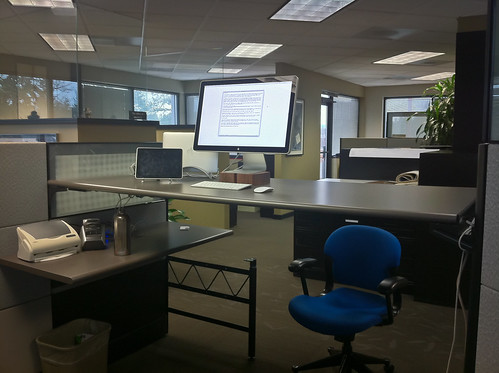
    Here is what the setup looks like for those interested, please note a few things:

    • I just set this up a week ago so it is not fully finished.
    • I added a lower side table to keep water off the desk where my computer is.
    • I hoped to hide the MacBook Air in clamshell mode below the desk, but the Cinema Display cord is not long enough.
    • I still need to get the wires under control.
    • The chair is there for height reference.

    Standing Workstation