Just got my new iPad bag dropped off today – Booq Boa Push. Very small, very nice looking – review to come.
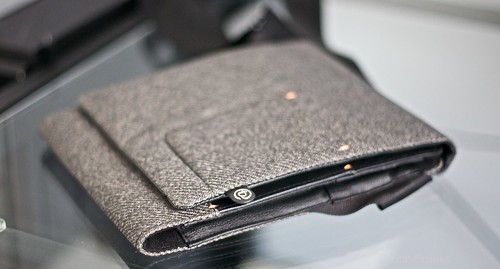
Just got my new iPad bag dropped off today – Booq Boa Push. Very small, very nice looking – review to come.
Thought I would post a quick shot of my home office where I have been working for the past couple of days. I love this setup and usually only work from home on Fridays, however my car has been in the shop since yesterday. I took some time to de-clutter it a bit and here is what it looks like now.
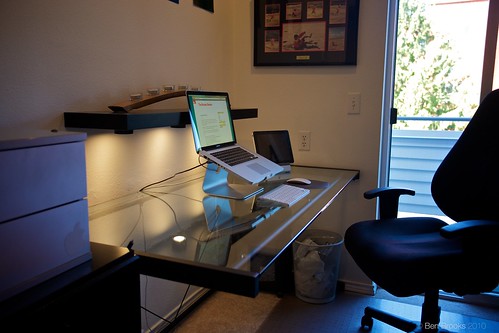
A couple of notes about the setup:
The drawer on the left with the Apple sticker on it houses a USB hub (that is the USB cord you see plugged into the Macbook Pro) and four hard drives (backup and media drives). The MBP stand is from Raindesign and the iPad stand is from Griffin. The cord you see sticking up just above the black cabinet on the left is a charger for my bluetooth headset and Verizon MiFi. Under the desk is a large (huge) batter backup, a shredder and an always full garbage can.
Last night my wife and I were too tired to cook and didn’t want to spend time in a restaurant – so we walked over to the Taco Time that is a few hundred feet away. What follows is from a discussion I was having with my wife (whom I am sure was bored) about this Google hubbub.
After explain the situation to her and toying with the idea of going Google-less in my life I came up with a few predictions about the future of Google.
(Note that for the past year now I have had a strong feeling that Google would not be around in 5 years – that is they would be around in the sense that AOL is still around now).
That about covers it.
One thing that people seem to be forgetting with this whole Google-Verizon net neutrality cluster (f) is that companies are here to make money – not to help consumers. This isn’t just a view of Google either, I have seen it in a couple of places where people state something along these lines: “Wouldn’t it be great if Steve Jobs wrote an open letter supporting net neutrality”. The clear answer is yes that would be great, the more support for net neutrality (no matter which individual) the better off we all are. What people fail to realize though, as the fact that it is not the obligation of other companies to speak up, the obligation of all companies (excluding non-profits) is to make money.
In the pursuit of money consumers are usually the ones that get hurt.
Now of course it is important to note that companies are not out to screw over consumers, doing that would doom any business. What I am saying is that companies will choose profits over consumers any day of the week. It takes a special kind of company that won’t abide by that rule – so special that none come to mind. Sometimes (often) choosing to help your customers as much as you can will benefit you financially – however there are rare cases where this does not hold true. Net Neutrality is one of them, insulin is another.
It is simple economics at work, these huge corporations realize when they have you over the barrel and you are at their mercy. If they pass anti-net neutrality legislation they will have such a case. Google I think is assuming that right now they have customers in such a position, search, email and docs are all very powerful tools that many rely on for everything. For diabetics insulin is that product – no matter how much companies charge for it people will continue to buy insulin, because without they may die.
For most companies the thought process is as such:
Customers are number one while things are running smoothly, when we feel threatened our investors start to worry and our jobs are no longer secure, thus companies will begin to do what ever they think they need to do to survive.
But is Google is feeling threatened? Think about it, Bing is doing an impressive job, Android gets very little press compared to iOS (Apple), and Apple is now entering the mobile advertising space (iAds). You better believe that Google is feeling threatened, that is not to say that they think they are on the verge of collapse, or that even I think that – they aren’t. Google though is very much in a territorial fight with Microsoft and Apple, that is why they are putting customers aside in an unapologetic search of more control and profits.
Google must have realized that right now in time they hold a unique opportunity to try going out and screwing over consumers, while at the same time not losing any customers. We need to speak up, loudly.
Flipboard the iPad app that allows you to view news and social networking in a beautiful magazine styled wrapper, launched a couple of weeks ago with a lot of fan fare. Their servers were immediately over loaded and it took the site days to get back up and running so that people could use the full features of the app.
I got Flipboard when it came out and waited for two days before I could get Twitter up and working on it – some people waited even longer. Last night I got an itch to clean up some of my iPad apps and get rid of the ones that I just don’t really use – turns out Flipboard was one of them.
I was surprised when I came across the Flipboard icon and needed to decide what to do with the app – after all it is a beautifully designed app and there really is nothing wrong with it. Except for the fact that I don’t use it. Flipboard doesn’t fit into my workflow at all, it is too slow to actually get updated on news, Reeder is much better. It is not all that great at conveying information – though it does an excellent job displaying information.
Flipboard then is like an awesome new gadget that you truly do not need. It is the iPod nano when you already have a shuffle and four other iPods – sure it looks and works great, but when do you use it over all the other iPods you have?
Ultimately Flipboard is staying on my iPad, not because I will use it, or because it is useful – rather it is staying because it makes a power case for people when they want to be wowed by the iPad. Flipboard is an beautiful and well thought out app, however just because it is beautiful doesn’t mean it is useful.
It was a rallying cry that every twenty-something in the tech world could rally around “Don’t Be Evil” – the unofficial slogan of internet sensation Google. In fact many of us did rally behind Google, it was the antithesis of Microsoft, more open than Apple – home spun and loved by all. This quickly made Google a success with billions in dollars and lead to a search monopoly and we are soon to see that it probably does have a email (gmail) and mapping monopoly as well.
The past two years has really told a different story though. Street view came out and we all loved it, still do. Then we found out that Google was sniffing Wi-Fi data and storing it. Tsk tsk many of us said, as we brushed the event under the carpet. Regulators and governments were pissed, but the end user seemed not to care. Yet in this instance Google broke its own motto, Section 4 and 7 were broken – they failed to preserve confidentiality and obey the law.
We kept loving Google though, they were after all still Google and costing us nothing – we can’t imagine a world without Google Search and Gmail. Don’t forget about this little thing though:
We launched Google.cn in January 2006 in the belief that the benefits of increased access to >information for people in China and a more open Internet outweighed our discomfort in >agreeing to censor some results. At the time we made clear that “we will carefully monitor >conditions in China, including new laws and other restrictions on our services. If we determine >that we are unable to achieve the objectives outlined we will not hesitate to reconsider our >approach to China.”
So Google was censoring search results in order to obey the Chinese law, but in the end that was not respecting their guideline of “Serve Our users” in Google’s motto. So they decided to change it (after 4 years) and remove the censorship. Naturally this broke Chinese law and now Google has made a work around where the search is not censored and no laws are broken. This however should have never happened if Google followed its motto, this should have been done from day one in China. Of course hindsight is 20/20, but Google clearly broke its motto in this instance.
And now of course comes the hot topic of the week, the Verizon and Google proposal on Net Neutrality to the FCC and Congress. Google had long taken the stance that the 100% supported Net Neutrality, something that every techie breathed a sigh of relief by. Now though it seems they only support convenient net Neutrality. (Read about all this crap, here, here, here, here and here.) The gist of all this being that Google is screwing over the users of the Internet – which our their users, thus breaking their code of conduct once again.
This answer is way more simplistic than most would think: investors happened. Ask any entrepreneur and they will tell you that you can do whatever the hell you want to do when you are the primary investor, but once you take someone else’s money you have to start listening to them, and things change. Google is a for profit company, they need to make money to satisfy the stock price and to continue to grow. Don’t be Evil is an idealistic slogan that was started by two guys that are clearly no longer in control of the company they started.
Google started sniffing WiFi data to see what they could learn and to see what they could monetize off of it. They censored search in China to gain access to a billion new potential users, that would in turn hopefully click on Google’s ads. They are turning against Net Neutrality to satisfy and business partner in Verizon – which is key to Google’s mobile OS strategy. Every single action that Google has taken to date that violates their motto is a direct result of a company trying to increase profits.
Profits by themselves are a great thing, and no one can fault Google for trying to be more profitable – that is the end game of any company. Google is however at fault for not following their own code of conduct – their self imposed rules of governance. Google is evil right now, not because they seek more profits, but because they are doing so while ignoring the edict that they stated at the outset.
Time to change your code of conduct, or change your conduct Google.
It was reported yesterday that Apple and Mark Papermaster have parted ways. By all accounts from people seemingly in the ‘know’ Papermaster was fired. Papermaster had been in charge of mobile device hardware design/engineering coming from the mobile processors devision of IBM. This firing has of course led to rampant speculation in the blogosphere as to why he was fired, most concluding that it all comes down to the negative PR and the issues associated with the iPhone 4’s antenna design.
This seems like the natural reason why he would have been fired – after all the iPhone 4’s antenna does have a ‘weak spot’ and it caused Apple to have to give stuff away for free – something that no company likes to do. So it seems natural that this was the reason for his firing and it very well could be the reason.
However as I stated here, and John Gruber pointed out here I think it could have to do with (at least in part) the delay of the manufacturing for the white iPhone 4, which keeps getting pushed back leading many to wonder if it is 2010’s biggest vaporware product. Ask yourself what is more embarrassing for Steve Jobs, shipping a less than perfect product, or not shipping a product on time after announcing it?
I think the answer is the latter – Jobs ships products and he usually does so on time. The timing of this firing just doesn’t make sense for it to be solely based on the antenna – if that was the case it would have happened just before or right after the iPhone 4 press conference. Leaving Apple to say that they are giving free cases and have fired the person responisble for this ‘weak spot’. Instead of firing comes much later – well after the bad press around the antenna had subsided.
Add to all this the fact that many are reporting that the iPhone 4 antenna had been designed long before Papermaster was on the scene – leaving him to just finalize the design – and I think the story begins to tell itself.
My guess (and this is a wild shot in the dark) is that Papermaster didn’t fit in Apple, be it with Jobs or the management team as a whole (culturally or otherwise, remember IBM and Apple are very different companies) and the delays to the white iPhone 4 coupled with the antenna issues did Papermaster in.
We may never know but what seems clear to me is that now was probably the best time to fire Papermaster. Had Apple waited until things were going smoothly there would have been wild speculation and much concern from investors (read: Wallstreet) that would have negatively impacted Apple’s stock. A firing now leads people to think that Apple is not putting up with failure and is trying to correct course (albeit a minor correction) which will only make investors more confident, thus pushing up the stock.
At the risk of sounding like a bad movie, Apple fired the right guy at the right time. ((You know they always try to use the movie’s title in the dialog.))
Listening to Dan Benjamin and John Gruber the other day (Talk Show Episode 2) really got me to start thinking about all the market share bull between the iPhone and Android phones. It is mostly a meaningless market for consumers – mind share matters more – but investors pay attention to these metrics and that affects stock prices. All the analysts seem poised to give Google a win this coming holiday season, expecting Android sales to eat into iPhone sales and finally tame the ‘beast’ that is the iPhone and Apple.
I however think it would be dead simple for Apple to completely and utterly kill Android sales come this holiday season. This is a simple two pronged attack that they need to wage.
The iPad needs to come in swinging – it is already wildly popular at a price point of $499 – so imagine how people would react if in September Apple announced a new lower price. Say $100 off each model, they did this with the original iPhone (though that was because of a subsidy from AT&T) and I think they may do it again here. Often Apple will price high in case it doesn’t sell well, and by all accounts the iPad is a smash hit.
Lowering the price by any amount would make it that much easier to swallow for all those parents looking for gifts for their students and gadgets for dad (and mom). It would also squash any price point that Android and Microsoft would be able to come out with – $399 for and iPad, I would buy another at that price.
This is the dirtiest tactic and I would love it if Apple did it. Come september they need to hold a special press event – that this event they announce that the iPhone is coming to all major U.S. carriers (AT&T, Sprint, Verizon, T-Mobile) and roll out will begin immediately. The key here is that the phone does not have to be immediately available, just available on one carrier – say T-Mobile as that would not require any new hardware (I think).
Do you really think many kids will be asking for an Android phone for Christmas if they know that patience will net them an iPhone? I think this would be the first time we see patience in teenagers.
This approach does not come without risk – Apple would have to be able to ship phones for all the carriers no later than January to keep from being creamed in the press and minds of consumers.
Even the announcement that the iPhone would be coming to T-Mobile (a carrier not many people care if it is on) would hurt Android sales. Such an announcement would serve to fuel the fires of bloggers, and journalists that just maybe an iPhone on Verizon is imminent. That alone should be powerful enough to humble the sales of Android.
This of course could all be blocked up by Google if they decide to play dirty. They could try to tell carriers that if they sell the iPhone then they can’t have Android phones (not likely). They could force vendors to cut prices, roll out massive new updates, or innovate.
Of course for every play that Google can do, Apple can do as well.
This morning when I was packing up to leave and subsequently riding the elevator I started to think about how much I use each device (Mac, iPad, iPhone) and I estimate that I use the Mac on average 6 hours a day M-F, the iPad for 4 hours and the iPhone for 3 hours. I don’t know what all this means just yet, but there is something to be said about this break down.
On the weekends you can throw those numbers out the window, it probably looks more like 3-6-3 (Mac-iPad-iPhone) unless I am out and about then you can scale down the iPad use and scale up the iPhone use.
Astounding to me that I spend more time on inexpensive mobile devices than I do on expensive ‘mobile’ devices (e.g. Macbook Pro).
This must be the fifth time that I have written a OmniFocus versus Things post (not just for this blog), yet I find myself compelled to do so again. Every time I write this I come away with something different, for myself and the reader. It is unfair to judge either App by just one of its components (iPhone, iPad, or Mac) so I think it is best to look at each as a complete bundle – which sadly for my wallet I own them both for all devices.
I am far more versed with OmniFocus as I have been using it since day one (which was before Things was released) and even before that as it was known by the name kGTD and worked with OmniOutliner Pro back then. When Things was launched I was wooed away due to all of the positive press and the seductive looking screenshots on the product page – I made the switch from OmniFocus to Things for about 5 months before coming back to OmniFocus.
I had almost entirely given up on Things until the iPad was released, but after being patient (for entire month!!) for OmniFocus to come out on the iPad I decided the wait wasn’t worth it and switched back the Things.
My general take on both Apps is that they are both fantastic and really depend on which one you are more apt to use and like – visually and feature wise. The crux of all task management Apps is that they cannot make you do anything, they can only organize the things that you need to do. That being said they both do a wonderful job and you cannot go wrong with either one.
There is however trade offs to using either OmniFocus or Things, some are manageable and some will drive you crazy.
I am starting with the Mac clients because this is going to be the shortest section of the three clients, the reason being: the Mac client is no longer the most important client. That’s right the only reason you need the Mac app is for syncing and backup, and entry while working on your Mac, but it is certainly not the most important part.
Things wins over most people with its beautiful interface, it is a modern looking app that has been made with design in mind. There are a lot of little things to love, here are just a few:
The grandaddy of all task management GTD apps for Mac users is a complex beast. It is not nearly as seductive looking as its German counter part, but there is a lot to love about it:
As you can see there are a lot of pluses with both apps on the Mac side and for most it will come down to which they like the looks and interface of best. There are however a couple of substantial differences between both apps that you must consider before purchasing.
Things allows you to tag each action, these are meant to help further define when and where you can perform each action. With OmniFocus this same thing is called Contexts where you define the same attribute. The key difference though is that in Things you can apply as many ‘Tags’ as you want to each action, whereas with OmniFocus you can only apply one ‘Context’ to each action.
This alone is not bad knock against OmniFocus for only allowing one context – it is matter of preference, as GTD users will tell you OmniFocus does this ‘correctly’. Personally I have always found the Context system of OmniFocus to be cleaner and less cluttering than Things’ Tagging system is. That being said Things certainly makes it easier to add a task and know what it is without assigning it to a project.
Things is a Wi-Fi only syncing mechanism where all clients need to be on the same Wi-Fi network in order to sync. OmniFocus uses various Over-the-Air (OTA) solutions to do the same thing, giving you the ability to sync anywhere you can get online.
Now there are trade-offs with each of these solutions, the way that Things syncs the clients is incredibly fast and very accurate. OmniFocus wins on convenience and is best for those that are forgetful (meaning you can’t remember to sync up with your computer before going mobile) but it is a slower system and seems to be a much larger database. It is a performance versus convenience debate – the choice is yours.
As stated before Things and OmniFocus take very different approaches to the design of their apps. Things adheres to a more Apple like standard where they pick the way it should be and you can’t change it. Luckily Things looks very nice to begin with, so the few things I do not like (spacing between projects in the Today view for instance) are not a huge concern.
OmniFocus gives you a very basic slate that you can work with, and further options to customize not only the looks but how the data is displayed as well. This is the ultimate for those that liken themselves to a designer and for those tinkerers among us (I hit on both of those categories).
When you are modifying or working with your projects and actions in either App there are various options and controls that you can use – both Apps take a very different approach in presenting those to you. Things uses an expanded entry mode to allow you to add the particular options that you want and to control different aspects (such as whether it should repeat or not). OmniFocus uses the well known to Mac users, inspector method to present the plethora of options and controls to you.
Both are excellent and annoying at the same time. OmniFocus allows you to really control every aspect of actions, the sacrifice is that you must have the inspector open that takes up even more room on the screen. Things presents a much better laid out set of controls, but they are simple and not as ‘powerful’.
I stated at the very beginning that you really can’t lose with either Things or OmniFocus and I very much believe that to be the case. This is why if you look around the web so many people struggle with deciding between the two, they are both excellent and it all comes down to a matter of preference.
This however, only holds true with the Mac clients of the two apps, as we will see in the next section the iPhone and iPad variants are not as evenly matched in my opinion.
Things and OmniFocus start to look a lot different when you purchase thier iPhone app counter parts. Here I think that both apps again are very good, but there are some really great standout features for OmniFocus that tip the scale in its favor.
The iPhone version of Things may make some wary when they see the $9.99 price tag on the App which is certainly higher than most iPhone apps. I would encourage you to ignore the pricing for both Apps and decide based on what you like, as choosing the cheaper option when you want the other will leave you with a broken system that is useless.
Pros:
Cons:
If Things gave you a sticker shock, hang on, OmniFocus for the iPhone costs $19.99 – not cheap by any metric. Again I stress that you don’t fret about the price, but I feel it important to mention because OmniGroup is basically saying that thier App is worth twice as much as Things. Let’s take a look:
Pros:
Cons:
I say yes, on the surface these two apps look very similar. Once you really start using a digging into each you begin to see the level of complexity and thought that went into OmniFocus. Being able to hit one button and seeing what I need to do, or how far away (physically) I am from being able to do a task is very futuristic feeling. The convenience of being able to fly right back to the main screen with a tap of a button instead of having to hit back over and over, and the comfort of having your custom views travel with you is truly great. However the biggest bonus is that you can sync OTA without having to worry about where you are, that alone is worth the extra money.
Again both of these Apps are excellent and both get the job done, however OmniFocus has a clear advantage on the iPhone. The use of location data in OmniFocus and the ability to sync OTA make the app far better than its counter part. Do not dismiss the ability to see a list based on your location – I often will put items I need to buy at certain stores on it and before I check out I will look at OmniFocus to make sure I didn’t miss anything (too often I have missed something).
Ah yes the iPad – lack of an iPad client is the entire reason I switched from OmniFocus to Things a couple of months ago. The OmniGroup kept promising OmniFocus and that it would be truly great – meanwhile Things was there and was already beautiful. Things costs $19.99 while OmniFocus costs $39.99 – giving us the same paradox as on the iphone – is OmniFocus work twice as much money? Let’s find out.
After waiting for a month with no task management app on my iPad I decided to purchase Things. On the iPad Things feels the same as it does on your make, very familiar.
Pros:
Cons:
Overall Things on the iPad is just what you expect to get, everything you see on the iPhone and Mac versions with nothing more or less. This is both a plus and a minus for the app. The UI has been well polished and looks much better than most all other Apps in the store.
I was beginning to think that OmniFocus for the iPad would be vaporware and was really frustrated at how long it took to show up in the App store. That said I think the wait will be worth it for many people.
Pros:
Cons:
Overall OmniFocus on the iPad is the best version of OmniFocus and the best looking by far. You get all the features of the Mac and iPhone clients and then some. The forecast view alone is worth the purchase.
As of right now there is no doubt in my mind that it is worth twice as much money. I have never been a fan of the way that the OmniGroups apps have looked, but with OmniFocus on the iPad I am now a fan. This is one of the best iPad apps to date and there is a very good and well deserved reason for it being so hyped.
Things once again turns in another solid offering that is well rounded and as to be expected. OmniFocus however really raises the bar with its iPad offering, gaining features that many people want to see in the Mac app. If you were just picking based on the iPad I think it would be silly to pick anything other than OmniFocus, price is a concern, but what you spend on OmniFocus will be made up in productivity (hopefully).
There is only one way to decide which App is best for you, and that is to try both. Since you can’t try either for the iPhone or iPad, do so on the Mac first to get a feel for each. Whichever you prefer or think that you are more likely to use is the one that is right for you. It really is that simple.
Personally I can see the appeal of both Apps and for me OmniFocus is the best choice. I highly doubt that it will be the same for everyone.
From a straight feature look I have to give the edge to OmniFocus, this however does not mean that it is better. A Bentley does not make a better race car than a Formula 1 car even though it has a feature edge. The Bentley does however make a better road car, and as with those two cars choosing the right app comes down to how you are going to use it.
There are two additional notes to consider before your purchase. The first being that with OmniFocus you can sync the iPhone and iPad without every buying the Mac version, something that is not possible with Things right now. Secondly Things is always adding more features and they have a status blog here, where you can see the slated features and information about the timing of them.
The last thing I leave you with is a link to a screenshot gallery I have put in place to give you a better idea of the look and feel – also so you can see what I am talking about in some of the above points.
Enjoy.
One of the things that annoys most every MobileMe subscriber is the speed of the iDisk online storage that you get – it is miserable to try and use. Great for storing small files, but unbearable for storing large files, which is annoying because it is 15gb of online storage.
A couple of days ago I came across a great tip for using iDisk: use it with an FTP client like Transmit. I own and love Transmit so I decided to give it a try, and wow is it fast. Nothing ground breaking here, but never again will I use iDisk via Finder, it is easily faster using a program like Transmit. I have no clue why, but trust me it is faster.
Now some of you may be wondering why I use iDisk to begin with. Well for starters I pay for it, and DropBox is just to small of storage to store large backups. Large backups are what I use iDisk for, it houses tons of archived websites and PSD files.
Give it a try with an FTP client (not all work with it) and see if you can’t give it new life.
Aside from email (which I hate) there are two things that really distract me while I work on my Mac during the day: Tweetie and Things / OmniFocus. Before the iPad (Bi) I used to have Tweetie open on one screen and my task management app of choice open on another. Between those two apps I would spend a stupid amount of time organizing tasks and changing due dates, and reading tweets and replies.
A few weeks ago I thought this was all a waste and that there had to be a better way of dealing with these distractions. Keeping them on their own space was not good enough – I had to remove them from my Mac. The answer was of course the loyal iPad sitting in its lovely stand next to my computer.
Now I check Twitter during the work day on it with Twitterific and review my tasks on it as well. I keep the task management app open on my Mac, but the window closed, so that I can quickly enter a new task, but I never actually mark off tasks on my Mac. Same goes for Twitter, Tweetie stays open so that I can tweet quickly if I desire, and so that if someone DM’s me I can see it via Growl, but I never read through the stream on my Mac.
All of this means that I check Twitter once or twice and hour instead of every 15 minutes and that I only look at tasks when I need a new one. The best part is that the iPad screen turns off automatically after a bit so I really can’t be distracted.
Hello focus, welcome back.
I was reluctant to buy OmniFocus for the iPad when it came out – I had just switched to Things (for the fourth or fifth time) due to the lack of an iPad app for OmniFocus and have been very happy with Things. Ultimately my curiosity won over and I got OmniFocus for the iPad to use. A couple of quick things before I get to my otherwise quick thoughts: I have been a heavy OmniFocus user since before it was available for purchase and have switched between OmniFocus and Things regularly, the only reason that I have been using Things for the past couple of months is due to the lack of an iPad version of OmniFocus.
I will of course be doing a full write up on OmniFocus versus Things in a couple of weeks so look for that here. I am not just going to be looking at the iPad apps, but at the full suite of apps for each.
Listening to the latest episode of The Talk Show with Dan Benjamin and John Gruber they mentioned something very interesting about SSD startup drives. Gruber explained the speed difference as intangible things that can’t be seen in benchmarks and as I posted a few weeks back I too upgraded my Macbook Pro startup drive to an SSD and I could not agree more with Gruber – the speed is insane and intangible.
However because you can’t all come use my computer to see it for yourself (nor would I want you to) I thought I would do my very best at describing just how different having an SSD drive as a startup volume is. The first thing that you will notice you you use an SSD drive is that everything becomes ‘snappy’ on the computer – Gruber described it aptly as a larger difference than switching from PowerPC Macs to Intel Macs was. When you click something, or open something stuff starts to happen immediately – there is no discernible delays.
As you start to use the computer more and more you will also notice that no longer worry about what apps are left open and which you close (except in rare cases where you have less than 1gb of RAM). That is to say that when I had a ‘normal’ hard drive and I was editing photos with Photoshop I would do everything in my power to leave Photoshop open until I was done. If I did accidentally quit it I would be frustrated the entire time while it re-opened. With the SSD it really doesn’t matter, Photoshop launches so fast that I don’t have time to get mad at my mistake.
The same holds true for apps you leave open that get put into Swap – thinking of you Safari – as it used to be over long periods of time Safari would be using so much Swap that it was sluggish and so was the rest of my machine. Since switching to SSD I have yet to notice any Swap related slowdowns, this could be the single coolest thing about SSDs.
Then there comes the habits that change with using an SSD. It used to be that I always tried my hardest to keep my machine from having to be restarted – I hated how long it took. Now I don’t care, I truly don’t care if I need to restart 3 times in a day, it is so fast that it is done while I check Twitter on my iPad.
The even larger came with startup items – the things that you assign your computer to launch when it restarts / logs in. I used to keep this to a bare minimum – then I changed and had it load up everything I normally used in a day before I changed back. I would agonize over waiting for Launchbar to get up and going when my computer restarted. With the SSD that all changes, I still don’t have any apps open at login, but all the background utility type apps I use (Dropbox, Launchbar) load so quickly that I no longer have to take a stroll when I restart.
I could continue talking about pointless things that are near impossible to understand without experiencing them, but instead I put together this little video to show you the speed of this SSD. I am doing everything as I normally would – launching apps with Launchbar.
Watch the video on Vimeo (I refuse to embed flash).
A thought passed through my mind the other day: if I could take over as CEO of any one company, right now, which would it be? I concluded that I would choose to take over Microsoft – which to many people seems shocking given my love and passion for Apple products. I thought about this for quite a while this weekend while I was away from technology on a hike, and below are my thoughts on what I would do if I somehow lucked into being Microsoft’s CEO.
The smartest thing a CEO can do right now is to directly communicate with its customers – this is something that Steve Ballmer has not been very good at. He talks a lot, but most of what he is saying is directed at employees, media and investors. Customers need to come first, the rest will fall into place.
I am not saying that things like emailing customers back needs to happen (though it should as it does go a very long way towards building goodwill) at the very least Microsoft needs to start offering direct support – in person much like Apple has done with it’s Genius bars.
Microsoft also needs to take the time to explain its decisions and actions to customers, to hype up what is going on and to show real products – not concepts. The customer needs to once again be made to feel like they are cared about, like Microsoft is designing its products to take care of them and their needs. Not to pad the bottom line.
The ribbon is a great tool for those new to Office and for those experienced users it quickly became an annoyance. The one thing we can all agree on is that we need more simplicity in our life and that should start with the amount of stuff that we can see on the screen. Microsoft needs to go through and hide away some of the features and offer a basic view – a view that we can use to really write with no distractions. Then they need to make this view, the default view.
I am not advocating throwing out features – that would alienate far too many existing users. Instead Microsoft needs to start putting billions into the design of the user experience – things just don’t need to be that complicated. Microsoft needs to spend the time and money to make complicated things seem very simple for end users.
Instead of Ballmer proclaiming that he thinks Microsoft employees should make mobile apps in their free time, he should be allowing them to do so during work hours. Give them the 10-20% free time during the day to help make the Microsoft product stronger (via personal projects such as making mobile applications).
Also the people that came up with the Courier project should not have seen it shut down as a ‘concept’ – they should be pushed to make it real and then to make something else. It seems (from the outside looking in, and those that work there that I have talked to) that Microsoft wants drones and the when you really have creative inspiration Microsoft is slow to support you in that vision (if they ever even get around to that). This is backwards – the innovators need to be given the freedom to innovate, not tossed aside until the defect to another company.
This is the real iPad killer, except Microsoft never gave the device a fighting chance. This should not be a concept, it was too well received. The courier needs to be brought to production and fast – when you have something as great as the courier in the dead projects bin it is a bad sign.
Bring it back now.
Microsoft has made it clear over the years that they are software first and want to stay far from the hardware arena – this is counter to what Apple is doing, but doesn’t mean Microsoft has to make hardware. In fact when it comes to hardware Microsoft needs to look at what Google did with the Nexus One.
Google was not happy with the Android phone offerings so they decided to up the ante for all of the manufacturers and set the standard for what an Android phone should be. Microsoft should be doing the same for laptops / smartphones / desktops and all other products.
Setting the standard forces manufacturers to make better products which only helps Microsofts software to look and feel better. Customers are not only switching to Apple because of the software, they are switching because of the beautiful hardware as well. It is no longer about being virus free – it is also now about looking good.
Microsoft needs to tell all of its vendors that they better get their act together – start selling quality products or lose the right to sell Windows on your computers. This goes back to the last point about setting a standard, but takes it one step further. If Microsoft forces vendors to use better parts, faster and more reliable components, then it will begin to reach the standard of quality that Apple has in its computers – all without having to make them directly.
Vendors need a swift kick in the ass, and shown the light or the door.
The Microsoft stores need to start a massive rollout. Real estate leasing is at an all time low and spaces can be had for cheap. Microsoft needs to roll out stores across the country that do two things:
First and foremost needs to be free support, just like Apple. Allow customers to bring in any machine with a Microsoft product that needs fixing – and fix it. This is a requirement, you can limit the amount of repairs by limiting the amount of employees dedicated to this task, much like Apple, but you need to get this free support out there to build good will and loyalty.
The second thing these stores should do is to showcase only the best hardware that ships Windows and Mobile. They need to showcase only the top notch products for the hardware, and only sell the software. (this excludes actual hardware products Microsoft may be selling) If a vendor like say Dell wants in the store to show off a new computer – it better blow the doors off the competition or it can stay in the PNG and Dell’s website.
Microsoft it is time to get back to the basics. Embrace your customers or slowly watch your huge pile of cash dwindle. There is an opportunity here, the question is: will they grasp it?
After my recent struggles with the DODO Case I was on the hunt for an excellent iPad case. That lead me back to a company that I have always wanted to order from: Hard Graft. They have always made very cool bags for your Macbook and that tradition carries on with the iPad.
I took the plunge last week and order the Pocket iPad Case. This is not a cheap case so I was expecting a top notch product. I received the case about an hour ago and am thrilled thus far. It is a sleeve made of heavy felt – enough to protect the iPad from minimal drops and most all scratches (while in the case). I went for the Pocket case instead of the Heritage because the Pocket case has the benefit of a flop to cover the edge of your iPad and I wanted that extra bit of protection.
I don’t have much more to say other than the little details of this case are exquisite and really show where the extra money you spent goes.


I don’t like to review anything until I feel that I really know the device. The iPhone 4 has been with me for a quite a while now and I finally feel comfortable enough to share my thoughts / review with you all.
On day one I described the new screen to a friend over text message as such:
…it is all about this screen. If you sent me a picture of a knife and I touch the picture it would probably cut me. The screen is that sharp.
Now we know this is not physically possible, but looking at the screen it sure seems that way. The screen is drastically improved and makes reading on the iPhone a no-brainer. With the iPhone 3G S I never felt comfortable reading on the screen for more than a few minutes – on the 4 I get lost in the screen.
Interestingly the 4’s screen allows you to easily tell which App developers are active and working hard, and which are sitting back and collecting checks. A quick check of the blurry icons on my iPhone results in 33 blurred out of 83 or 40% of the apps on my phone are from lazy asses who have yet to update their apps. (this does not include web-clips known as webpages stored on the home screen as developers cannot yet offer the high resolution imagery)
The screen on the 4 puts to shame every other screen I have seen to date – large or small. It is hands down the best display I have seen no matter what device we are talking about.
This is the big issue that everyone wants to talk about when they notice that I have the ‘new’ iPhone. The thing is – I have yet to experience anything out of the ordinary with regards to quality of the call, reception, or dropped calls. In certain instances I can make the bars go down, and that is odd. But it seems to be only in areas where the reception is crap.
So as many others have already stated: if you get crap AT&T reception this may be a real problem for you, pretty much all other people will be fine. I certainly have found that to be the case for me.
I have been to two places where the reception has been crap with AT&T: my office and the Oregon Coast. Now in my office at my desk (move 10 feet either way and the reception is good) I usually got about one bar with the 3G and 3G S – the 4 gives me 1-2 bars (with the updated software). Bridging the ‘weak spot’ causes me to lose the second bar – it has never caused me to drop a call or to lose reception.
The Oregon coast (Manzanita to be exact) is a different story. I was getting next to no reception and unless I held the phone with the bottom pointed upwards I would never get more than a bar or two. This was all before the update – but the phone was going from 5 bars to no bars off and on even when on the table. This is not unusaul for the area as my other 3G iPhones always have had trouble there.
I think of the battery that was in the iPhone 3G S as a V6 motor – it got the job done and did it with relative ease. So if the 3G S had an V6 in it, then the 4 has a V8 for a battery – it gets the job done with power left over.
Since owning this phone there have been several instances where I have not charged it every night – I simply did not need to – which I can never remember willingly doing with older iPhones. There were only a couple of times when I ran out of juice before I went to bed and each of those times is because the iPhone was all I had for computing that day and I was sucking down data over the 3G network.
This battery could use another 30-40% more juice and it would be damn near perfect – what I have right now though makes me very happy.
Re-read paragraph 1 from battery powered section.
The speed of this device goes unnoticed – which is a good thing. You never notice that it is lacking in any areas, the 4 just does what you ask of it, when you ask it. Absolutely no complaints.
When Apple released the iPhone 3G with the plastic back I was less than enthused – yes it felt good to hold, but not as good as the original iPhone felt. Nothing beat that cold aluminum feeling in your palm. The 3G S did nothing to the design and made the product feel a little stagnant. Now we have the 4 and what a design it is.
There is nothing that I hate about the design, but there are several things that I love. The volume switches are one of the best improvements on the phone. I hated the rocker style switch on the last two iterations of the iPhone – the new buttons are the perfect feel and make for a much better volume adjusting experience.
Coming in at a very close second is the silencing switch where you can flip the ringer on and off. With all previous models of the iPhone I was constantly turning that switch on and off without knowing it – it simply moved to easily. I have yet to have that same problem on the 4 – and it used to happen daily.
Then there is the home button, the original iPhone’s home button felt great, on the 3G and 3G S it felt a bit shallower – almost unnoticeably so. The 3G and 3G S also seemed to have quality control problems with the home button as a couple of friends returned their phones because of that button – which Apple replaced for free with a better feeling button (keep in mind the button still worked). On the 4 the button returns to feeling perfect as it was on the original iPhone – it took 3 years but at least now the button is good again.
Since the entire phone (well the front and back at least) are glass finger prints will always be an issue. Though on the 4 it appears that Apple has upped their oleophobic skills and really gotten that coating to work over time. I have noticed that I never need to wipe the phone clean as I was doing every few days with the 3G S (and still do with the iPad). The 4 seems to handle the smudges in stride and though there are always some on it, they seem to clean of by being in my pocket every so often.
I talked about the antenna above and how I have yet to have problems with it. Now though we need to talk about how much better it really is than the previous models. Even with the corrected iOS 4.0.1 installed this antenna is much more sensitive and a lot better than phones before it. I get a lot better reception universally than I did with older versions – it is a noticeable improvement.
The one thing that annoys me more than anything else is when people assume that good pictures can only be taken with expensive, high-resolution cameras. The camera can only do so much and the rest of it is the photographer. Loving photography as I do I was very excited to see the improved camera – even though it is ‘only’ 5 megapixels. This video should prove my above point about the camera having very little to do with how good of pictures you can take.
Now that I have that out of the way I could not be more happy about the quality of this camera sensor. Apple has done a fantastic job at packing a high quality and average resolution camera into a cellphone. Add to the a nice little macro mode and you really can do a lot.
The flash however is useless – except for in the most dire of situations. It is OK at adding a little light to your macro shots of paper – but in my opinion the color looks terrible and the light is really harsh. Best just to keep it off and see what you get with the noise of the high ISOs this camera can crank out.
The really killer feature though is the HD video that the 4 can record. I have been impressed by its quality and though it is no substitute for a more expensive camera it does an admirable job at keeping up. See this video from a comparison with the massively more expensive Canon 7D.
Overall this camera is perhaps the best camera to ever be put into any smartphone. I have yet to see another smart phones camera do as good of a job in as wide of a range of situations as the iPhone 4’s camera does. Kudos to Apple on that.
The other day I was messing around on my desk cleaning things up (as you can see I had yet to clean the desk) and I snapped this shot of all four generations of iPhones from the back side.
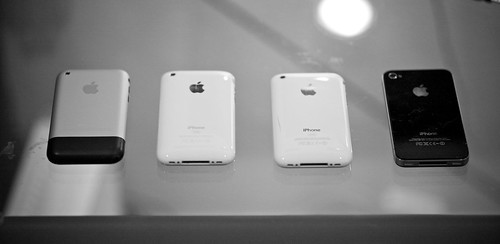
You can see a bigger shot here. Do you see that line on the iPhone 3G S (the one next to the 4), that line is a crack int he case and is just one of many on that phone. The screen also has lint under it and a couple of scratches.
Now I have not had the 4 nearly as long but thus far it has proven to be far more durable that one would think a glass sided phone could be. Clunking around in my pocket and car has only resulted in a very light scratch on the back and another slightly longer light scratch on the front. It is however important to note that when the screen is on you cannot see the front scratch – which makes it a non-issue. (even with the screen off you have to clean it and then look for the scratch)
The real test for this phone will hopefully never come: a drop only concrete or a smack in the leg by an object (while the phone is in my pocket of course).
This is THE feature that Apple has been advertising about the 4 – they have yet to advertise anything else about the phone in their commercials. I know two people with iPhone 4’s (Wife and Sister) so FaceTime conversations have yet to become a staple of my day. That said it is really cool to FaceTime with my Sister since I don’t get to see her very often (she lives in Phoenix). There is something about video calling on a phone that is infinitely more convenient to use than it is on a computer or dedicated device.
Even still the FaceTime calling is extremely limiting given that you must be on Wi-Fi in order to make the call. I am hoping that we can get 3G capable FaceTime before next year as that would be the catalyst to make the service take off. Until the it is a great feature to have – but a rarely used one.
All this is to say that the iPhone 4 raises the bar again. It is not about having the latest and greatest features – it is about being able to reliable and easily use all the features that your device has and the iPhone 4 does that. After all what good is a feature if you can’t use it? Just ask all the people you know with an iPhone 4 and nobody to FaceTime with.
I was pumped when I got my first DODO Case for my iPad – it was awesome, beautiful and looked like my Moleskin notebooks, a perfect case. The other day I saw this post about DODO talking about what a wild success they have been, and it got me to thinking about how much I have grown to hate that case.
The first DODO case I got warped after sitting on my desk for just one weekend. (see picture 1 and picture 2) It took me two and a half weeks to get a new case from DODO (free replacement) and I returned the warped case. I don’t know why the case warped – though I suspect that the wood may have been too ‘green’ (meaning it was not fully dried) and that is what caused the warping. This is most likely do to trying to ship the product as fast as they can and really does not reflect on the quality of the manufacturing.
The second DODO case arrived and I watched it very closely to make sure that it was not warping. To date it has not warped, but last week marked the last week that I would have a DODO case to use for my iPad.
One month ago I dropped my DODO case (with my iPad in it) on to the ground. The case landed on the corner, on office carpet from a distance of about 3 feet. I scrambled to pick it up and checked my iPad out – all was OK and the iPad was sufficiently protected.
Fast-forward about three days and I am starting to notice that the iPad is not fitting as secure in the case as it did when I got it. The same symptoms the case exhibited when it was warped – I checked the case for warping and noted none. I did however see that the wood that holds the iPad in place was cracked in the corner that I dropped it.(picture 1 and picture 2 of cracking)
Some super glue later and the crack was repaired – it wasn’t pretty but the iPad was secure once again. Last week sitting on my couch I noticed a chuck of wood fall from the case. It was a chunk that broke off in a completely different corner, and the glue had broken free. Marking the death of the DODO case for my iPad.
The DODO case is a beautiful case for the $60 that it costs you. I would still be using it today if it could hold up – but in less than a couple of month’s time it has completely fallen apart. This is a shame as the case is really great, perhaps more of a shame is the fact that I don’t even want to bother trying to get a new one from the company – the customer service was poor the last time and I frankly don’t want to use this case any longer.
On to the next one…
It seems the answer to the above question brings a mixed bag from people. The way I see it there are two camps: those that think Apple needs to do more, and those that think Apple has reached a resolution. What is more telling though is exactly who is saying what.
This crowd is made up of people that are experiencing dropped calls due to the ‘weak spot’ on the iPhone. They are not satisfied with Apple’s free case solution and yet are not willing to return the phone. These people also are getting terrible coverage with AT&T and just didn’t know it before due to the screwy algorithm that Apple was using.
This crowd wants a real solution where no matter how they hold or use the phone they experience no problems. This is not unreasonable on the surface, but it is far from possible at this point.
This group may or may not be able to make the weak spot drop bars, and are rarely experiencing dropped calls outside of the normal ‘I-am-on-a-major-highway-in-Seattle-and-the-call-dropped-while-I-was-on-Bluetooth’ calls. Further they couldn’t be happier with their iPhone 4 and a free case is just icing on the cake.
It has become apparent to me that the real problem is not the iPhone 4 it is actually AT&T (and every other cellphone provider). You see every other major smartphone on the market suffers the same fate of the iPhone 4 if held in certain ways (you can argue if you want that the iPhone 4 is more prone due to the manner that you hold it, but it is irrelevant). If the only way to solve this problem (at least that I have heard about from antenna engineers) is to go back to external antennas that you have to pull out on the phone, or the nubs at the top – then I think we can all agree it is a solution that none of us want.
So the only solution then would be to improve the cell network coverage of all the major carriers. This means that if I touch the ‘weak spot’ on the iPhone 4 I only lose one bar instead of two, which means there is no dropped call (assuming the better network gives us all full bars).
We should all be pissed at the cell carriers: AT&T, Verizon, Sprint, T-Mobile. It is they who have failed us, not the smartphone manufacturers. It may take AT&T 3-years to get a new cell tower in downtown San Francisco as Steve Jobs stated, but how long does it take to roll out free Femtocells to customers with poor reception? Shouldn’t AT&T just be giving these away – why would you charge for one, they are far less costly to install than a regular cell tower and guess what: they can be installed in days.
Even better AT&T keeps charging you for the bandwidth used on these devices even though you are the one paying for the internet connection. Femtocells is not the end solution to the entire problem – better network coverage is – but they are certainly a great stopgap. They are a stopgap that AT&T just may need to use to stop an exodus to other carriers if/when the iPhone goes to them.


