Top Posts

Leica Sofort 2June 13, 2024
Grand Seiko SBGX261February 23, 2023

Recent Articles

  • The HP LaserJet Pro 200 Color M251NW

    [Marco Arment was talking about printers][1] and mentioned the cheap color laser printer he has at home, the HP CP1525NW, and noted: > Since printer models change almost as often as GPUs, it looks like it’s been replaced in the lineup now by the [HP LaserJet Pro 200 color M251nw][2], which just rolls off the…

    [Marco Arment was talking about printers][1] and mentioned the cheap color laser printer he has at home, the HP CP1525NW, and noted:

    > Since printer models change almost as often as GPUs, it looks like it’s been replaced in the lineup now by the [HP LaserJet Pro 200 color M251nw][2], which just rolls off the tongue. 

    I bring this up because I actually have the HP LaserJet Pro 200 color M251nw Doid Akon LL Sweet K, or some name like that. We bought it to replace a shitty Konica Minolta color laser that we had in my *office*. We use the M251nw everyday, for printing every document we send out. There’s four people in the office and my accountant uses it. ((I note my accountant because three of us don’t print much, but my accountant seems to print non-stop.))

    We’ve had this printer in service for about three months and the only issue that I have run into is that large graphics in documents print slowly. ((Slower than I would expect, that is.)) Beyond that the color is good, the quality is sharp, and it hasn’t broken. The toner still costs an arm and a leg, but it always does.

    It’s a solid printer, and I recommend it.

    [Buy here, with my affiliate link][3], or you can use Marco’s in his quote above. (It’s currently $206.95 with Prime shipping, what a steal. I’m thinking about buying another.)

    [1]: http://www.marco.org/2013/09/04/drang-epson
    [2]: http://www.amazon.com/dp/B008ABLJHE/?tag=marcoorg-20
    [3]: http://www.amazon.com/exec/obidos/ASIN/B008ABLJHE/ref=nosim&tag=brooksreview-20

  • PayPal Freezes Mailpile Campaign Funds

    [Brennan on the Mailpile blog][1]: > Af[t]er 4 phone calls, the last of which I spoke to a supervisor, the understanding I have come to is, unless Mailpile provides PayPal with a detailed budgetary breakdown of how we plan to use the donations from our crowd funding campaign they will not release the block on…

    [Brennan on the Mailpile blog][1]:

    > Af[t]er 4 phone calls, the last of which I spoke to a supervisor, the understanding I have come to is, unless Mailpile provides PayPal with a detailed budgetary breakdown of how we plan to use the donations from our crowd funding campaign they will not release the block on my account for 1 year until we have shipped a 1.0 version of our product.

    That’s some bullshit from PayPal. PayPal is one of the worst online banking solutions, but it is also the largest and most popular. They are holding about $45,000 of the Mailpile funds, but Mailpile is confirming they will still make the product happen — which is great.

    Now, to shame PayPal into admitting the truth here. (I tend to think it may be governmental pressure on PayPal since Mailpile is a secure email service.)

    Update: [PayPal has released the funds](http://arstechnica.com/business/2013/09/paypal-freezes-45000-of-mailpiles-crowdfunded-dollars/).

    [1]: http://www.mailpile.is/blog/2013-09-05_PayPal_Freezes_Campaign_Funds.html

  • Meet Perch on Vimeo

    > Perch is an always-on video communication app designed to bring you closer to the people you talk to everyday regardless of where you are. It connects two separate spaces together in a way that facilitates natural and spontaneous video conversation. My buddy Pat Dryburgh showed me this video a while ago, and I was…

    > Perch is an always-on video communication app designed to bring you closer to the people you talk to everyday regardless of where you are. It connects two separate spaces together in a way that facilitates natural and spontaneous video conversation.

    My buddy Pat Dryburgh showed me this video a while ago, and I was impressed (not just with the video). The original idea of Perch was never one that I understood, but this incarnation is very cool. You should watch the video.

    Now, if only I had remote workers to Perch with. (I am thinking about setting up a Perch to my house so my daughter can talk to me whenever she needs me.)

  • A Well Constructed Opinion

    [Michael Lopp writing about his never-ending obsession with the long gone][1] Instagram `Gotham` filter: > In a world where we mindlessly repeat the loudest and most compelling tweets as fact, a well-constructed opinion is rare. It’s rare because a well-constructed opinion can defend itself. Through a combination of experience, facts, and, occasionally, passion, a well-constructed…

    [Michael Lopp writing about his never-ending obsession with the long gone][1] Instagram `Gotham` filter:

    > In a world where we mindlessly repeat the loudest and most compelling tweets as fact, a well-constructed opinion is rare. It’s rare because a well-constructed opinion can defend itself. Through a combination of experience, facts, and, occasionally, passion, a well-constructed opinion is a refreshing signal among a sea of unstructured, unattributed noise.

    That bit is such a perfect encapsulation of what I try to do every time I review a product. It also perfectly explains what is frustrating to me about 95% of product reviews on “other” blogs.

    I often say: give your opinion. I know you guys know I am not short on opinions, but I am a very long way away from having truly well-constructed opinions. So when I say “have an opinion Verge”, what I mean is: develop a well-constructed opinion that is also reflected in your 0-10 rating scale.

    [1]: http://www.randsinrepose.com/archives/2013/09/04/rip_gotham.html

  • ‘Tor Is Less Anonymous Than You Think’

    [Meghan Neal][1]: > So, how bad is the security risk? The study found that even if an attacker had no control routers, 80 percent of Tor users could be de-anonymized within six months. With control of one AS, nearly 100 percent of users were likely to be uncovered, within three months. With two, it could take just…

    [Meghan Neal][1]:

    > So, how bad is the security risk? The study found that even if an attacker had no control routers, 80 percent of Tor users could be de-anonymized within six months. With control of one AS, nearly 100 percent of users were likely to be uncovered, within three months. With two, it could take just one day.

    Given all of the tidbits passed along in this post, it seems to make logical sense to assume that the NSA could de-anonymize any Tor user within a day or so. This is both impressive, and immensely concerning.

    [1]: http://motherboard.vice.com/blog/tor-is-less-anonymous-than-you-think

  • Quote of the Day: Bruce Schneier

    “The more we expect technology to protect us from people in the same way it protects us from nature, the more we will sacrifice the very values of our society in futile attempts to achieve this security.” — Bruce Schneier

    “The more we expect technology to protect us from people in the same way it protects us from nature, the more we will sacrifice the very values of our society in futile attempts to achieve this security.”
  • How Shawn Blanc Sells His Old iPhones

    Among his other tips, this one probably works really well: > […] take some cool and professional-looking pictures that have super-shallow depth of field […] The crux of Shawn’s strategy is that he is selling a legally unlocked iPhone — good pictures or not — and there’s a market for unlocked iPhones (it seems to…

    Among his other tips, this one probably works really well:

    > […] take some cool and professional-looking pictures that have super-shallow depth of field […]

    The crux of Shawn’s strategy is that he is selling a legally unlocked iPhone — good pictures or not — and there’s a market for unlocked iPhones (it seems to be a strong market too).

    But, I would guess that market will be a bit *less* strong this year. I say this because the Verizon iPhone 5s were *all* sold sim-card unlocked. That’s huge and that makes the supply of unlocked-year-old-iPhone-5s that much bigger. So my guess is that there will be slightly depressed pricing in the used market, but then again it’s a `5` and not an `s` model so that may help keep the price up.

    Needless to say, Shawn’s strategy is *not* one that I would bank on. I’d use it as more of a “I hope I can get this, but can still pay rent if I don’t” type of strategy.

  • Meet: The Hemisphere Project

    [A DEA and AT&T program to search call records of Americans (records that date back to 1987)][1]. Scott Shane and Colin Moynihan for the New York Times: > The government pays AT&T to place its employees in drug-fighting units around the country. Those employees sit alongside [Drug Enforcement Administration][2] agents and local detectives and supply…

    [A DEA and AT&T program to search call records of Americans (records that date back to 1987)][1]. Scott Shane and Colin Moynihan for the New York Times:

    > The government pays AT&T to place its employees in drug-fighting units around the country. Those employees sit alongside [Drug Enforcement Administration][2] agents and local detectives and supply them with the phone data from as far back as 1987.

    What’s happening is that administrative subpoenas (i.e. not from a court) are issued to AT&T directly and implanted AT&T employees search a 20+ year database of all calls passing through AT&T switches. This data is use to catch Americans and non-Americans alike who are suspected of committing crimes.

    Now the important difference to the NSA here is that AT&T is storing the data, not the government. *Another* important difference is that the data goes back to 1987 and grows by 4 billion records a day — whereas the NSA only keeps data for 5 years.

    Yet another government program to watch out for. I do wonder how communications like Skype/Facebook/Google Hangouts/FaceTime affect this type of tracking. ((Yeah, Skype is compromised, but by the NSA not DEA.)) That is, these services are essentially internet traffic so I have to wonder if the smarter criminal strategy is to move from burner phones to encrypted IP based communications…

    [1]: http://www.nytimes.com/2013/09/02/us/drug-agents-use-vast-phone-trove-eclipsing-nsas.html?pagewanted=all
    [2]: http://topics.nytimes.com/top/reference/timestopics/organizations/d/drug_enforcement_administration/index.html?inline=nyt-org

  • Microsoft’s Illusion

    *Editor’s Note: Don’t forget, I own Microsoft stock.* It was [announced today] that Microsoft would acquire Nokia. ((Finally.)) There’s only one point that I want to touch on in this “acquisition” and that is: Microsoft isn’t buying the brand or patents — instead Microsoft just gets to *use* the brand “Nokia” and the patents in…

    *Editor’s Note: Don’t forget, I own Microsoft stock.*

    It was [announced today] that Microsoft would acquire Nokia. ((Finally.)) There’s only one point that I want to touch on in this “acquisition” and that is: Microsoft isn’t buying the brand or patents — instead Microsoft just gets to *use* the brand “Nokia” and the patents in the form of a license.

    Read into that what you will, but that is certainly a less than ideal situation for Microsoft and its shareholders. Microsoft will now be saddled with tens of thousands of additional employees with only a (roughly) ten year license to the Nokia name (the patents look to have been granted in a license that will renew in perpetuity). ((I assume this is why it was a “substantially acquire” wording that is clumsy and confusing.))

    There are red flags all over this deal, but I want to focus on what I will call ‘Microsoft’s Illusion’. Before I dive into what that means, first let’s take a quick peek at what *made* Microsoft so dominant for so very long.

    ##### The Microsoft Dominance

    I believe (contrary to others) that there exist but two important factors to the Microsoft dominance of yore:

    1. The `.doc(x)`, `.xls(x)`, and `.ppt(x)` file formats.
    2. The near universal support of application developers (called ‘programs’ back then).

    Many people argue that Microsoft’s true lock-in was the Office suite, but I believe that’s a slight misdirection. The true lock-in is the file formats *created* by Office. At one time there is no doubt that Office itself was the lock-in, but it’s the above mentioned file formats that there is no escaping.

    You can use whatever office suites you want now, but if you don’t save to those formats, then no one will know what to do with your files. I’d even argue that `.doc` is more well known in offices than `.txt`.

    Secondary to all of this is that it used to be a near universal statement that *all* software was made for Windows. Mac user? Wait three years, only to then have the developer tell you it’s not coming after all. That’s not some bitter exaggeration, it *was* the truth. Everything was made first and foremost for Windows and then maybe, *just maybe*, for Mac OS.

    Today, I think both of the above factors are changing. Yes, the Office file formats are still demanded and pervasive in the business world, but the developer focus certainly feels more split. Sometimes even feeling like Mac apps are made first, and then Windows.

    Think about it like this: most crappy electronics you buy, like bluetooth headsets, come with software for both Mac and Windows. That *never* used to be the case.

    So where you used to have lock-in with Office and with developers only creating for your platform. You now middy have lock-in with Office and are *losing* the developer support — which is important to note that I mean not just “Windows first”, but that I mean “Windows only”.

    ##### So, Microsoft’s Illusion Then

    What you will notice about the (admittedly biased) two reasons for dominance above, is that neither focus on design, or software development prowess. There is no doubt that Microsoft has done some really great software work, and continues to do so, but it’s no longer overly compelling work (as evident by the user revolt to Windows 8, the lack of Windows Phone adoption, and the general ‘meh’ reviews from geeks). Microsoft’s business was largely shored up by Office lock-in which is now waning and by developers *only* developing for Windows — which is certainly circling the drain.

    So, naturally, Microsoft goes and buys a hardware company to try and be more… Apple-y?

    The thing is, to buy Nokia and assume it will help you leap forward as a company, is to also assume that you have a strength in software. Software strength just doesn’t exist at Microsoft right now. It *could* exist there, but Microsoft would have to let go of the idea that they might irritate entrenched users by removing things like the Start menu.

    The illusion that Microsoft holds for themselves is that they are a ‘fantastic software company’ that has been beaten down by shitty hardware providers. That’s an illusion that couldn’t be further from the truth.

    Microsoft, I would argue, is a mediocre software company with fleetingly good software ideas, saddled with corporate ineptitude. To change that they will be adding tens of thousands of *hardware* employees to compete in a market saturated with high-quality hardware and high-quality software — where they already offer their software on high-quality hardware (e.g. Nokia, HP, etc).

    Microsoft is trying to fix their internal illusion, that they make some of the best software on the market, by selling hardware themselves. The better idea would have been to just double down on making the tough software decision to move their software forward. Instead they now have to try and make hardware *and* software at a high quality level.

    Good luck.

  • Goodbye Dropbox

    Let me start by saying that I really love Dropbox. When I first saw the working beta video of Dropbox it was a rare moment in technology, where I was grinning from ear to ear, eager to get my hands on it, amazed at the simplicity and speed. Since signing up I have never had…

    Let me start by saying that I really love Dropbox. When I first saw the working beta video of Dropbox it was a rare moment in technology, where I was grinning from ear to ear, eager to get my hands on it, amazed at the simplicity and speed. Since signing up I have never had a problem with Dropbox. It’s been a fantastic tool, and an even better service, which many developers have built great apps on.

    Yesterday, I did this:
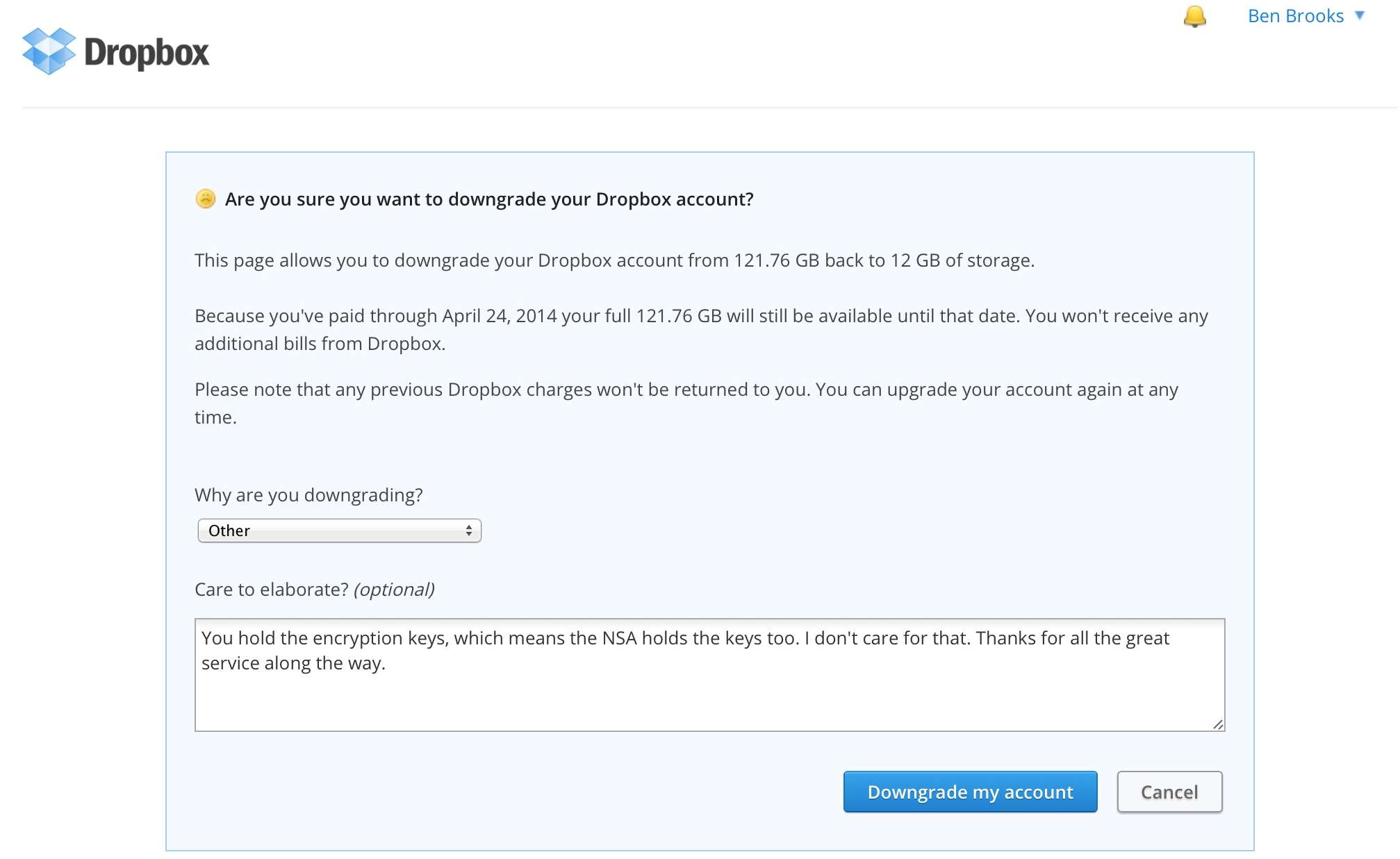
    I mean every word of that statement but I didn’t want to do it. I wanted Dropbox to revise their system and make it less susceptible to snooping by the NSA, but they haven’t. There are many, *many*, alternatives out there and I haven’t settled on just one. Instead I’m spreading out and doing the nerdy-masochistic method of using a lot of different services. I’ll still keep Dropbox around, but instead of keeping 50GBs in the folder, there’s just 12MBs now — mostly old B&B Podcast stuff, and syncing files for a few apps.

    Some of the alternatives I’m currently using are: BitTorrent Sync, ownCloud, and File Transporter. Let’s take a brief look at my experiences with each.

    ## BitTorrent Sync

    It seemed like the moment I started posting about the NSA scandal, readers began emailing me to ask about [BitTorrent Sync][1]. The first thing to know is that BitTorrent Sync is very much *not* Dropbox. Meaning there is no central server in the cloud where your files are stored. Files are synced from computer-to-computer.

    Because of BitTorrent Sync’s peer-to-peer nature, you get a bunch of options that you don’t have with Dropbox. Notably:

    – File transfers are encrypted with keys that are stored with *you*. (This is good.)
    – *Any* folder on your computer can be synced.
    – Each folder has its own encryption key and must be added individually to a new computer or device. Unlike Dropbox, you can’t login to BitTorrent Sync on another computer and see all of your synced folders.
    – Each folder can be shared with full privileges, or shared with read-only privileges.

    That’s the basics of BitTorrent Sync, which is a *far* more complex, yet more secure, offering than Dropbox. Since there’s no central server there are no size limits on storage — you can sync whatever your devices can store.

    ##### What I Use It For

    Right now I use BitTorrent Sync for two folders on my Mac to my Mac mini server: My Photos folder, which creates a nice backup for my ever changing Lightroom library and any other photos in that folder. I also sync what I call my “Working” folder, which is the folder where I keep all active documents on my Mac.

    Essentially, BitTorrent Sync provides a real-time backup of my two most essential folders. Together these folders weigh-in at between 5-15GBs (depending on when I last cleared out my Lightroom Library).

    ##### iOS

    The iOS app is fairly new to me but seems to work well. There’s a few great features like mobile-to-mobile sharing and more standard features like automatically backing up the Camera Roll.

    Since the private keys are very long, BitTorrent Sync makes connecting your iPhone a bit easier with (probably) the best use of QR codes I have ever seen. I can’t comment too much on the stability of the app, since I have only ever used it with iOS 7 Beta and can’t be sure which bugs are in iOS 7 and which are in the app.

    The app works much like the Dropbox equivalent, showing the shared folders, file names and types. Tapping a file downloads it (presumably one of your devices *must* be online for this to work). The mobile-to-mobile sharing is located in its own tab, and you can choose to either send files or wait to receive them. This is an active process (you need to initiate it) and not something that could happen in the background because you have to actually scan the QR code on the other device.

    A passcode to restrict access to the app would be ideal, but it currently doesn’t have one.

    ##### Overall

    BitTorrent Sync is fast, and very secure. It’s the security that will make it annoying for most users — that and the lack of a central server. In order to use this as a full Dropbox replacement you need to have at least two computers and a reasonable expectation that one of those computers will always be on and connected to the web.

    Sadly, I couldn’t find many (any?) apps that use it as a backbone the way apps use Dropbox. As usual, I’m concerned about the service/platform being free, because I can’t pay to support its ongoing development.

    ## ownCloud

    The second thing I installed on my Mac mini server was an instance of [ownCloud][2], by following these [great instructions][3]. This is an entirely self-hosted solution, so you really need your own web server to make use of this tool. However, once its running, ownCloud is a *full* Dropbox replacement, and much more.

    In addition to files, ownCloud can share, host, and manage contacts and calendars (among other things). For the purpose of this post I am just looking at files. It is by far the closest (and a better) solution for teams and businesses that have their own web server. Individuals benefit from increased privacy over Dropbox, but there seems to be a much better set of features for companies using the paid enterprise version.

    Like Dropbox your files are hosted on a server, but unlike Dropbox you can choose to control that server yourself. The files are not stored on the server in an encrypted manner (as far as I can tell). You should encrypt the drive yourself. There is an option to transmit all data to and from the server over HTTPS, which I recommend.

    ##### What I Use It For

    Currently I only use ownCloud for my text notes.

    ##### iOS

    Like BitTorrent Sync, the only iOS app that I could find to support ownCloud is the official app, which is decent but not amazing. The app offers a passcode lock, which is always nice to have.

    ##### Overall

    I like the idea of ownCloud a lot, but the lack of support by third-party apps makes it a tough sell. It’s not as *strong* as BitTorrent Sync, and even a bit less secure given that usernames and passwords are used instead of keys. Like Dropbox you must store everything under the ownCloud folder, which is inflexibility I have grown to dislike.

    ## File Transporter

    I’ve already given [an overview of the File Transporter][4], but the synopsis is this: it’s basically Dropbox in a little mini-server. You can set it up at your house, or have it [professionally hosted][5]. I like the idea a lot, and the version 2.0 beta software is really advancing the system but there are downsides.

    The File Transporter is a software driven device, and the software really isn’t that good. It basically works fine but its design is pretty lackluster and currently it’s a long way from a “just works” solution.

    With version 2.0 of the File Transporter software you can choose from two options: files are stored on your computer *and* on the Transporter, or *only* on the Transporter. (You can do this folder by folder, which is nice.)

    Access speed for files hosted on the Transporter largely depends on the Internet connection where you host the device. I have mine hosted by Macminicolo.net and it’s pretty fast, but there’s a noticeable lag when requesting a file listing, which can be annoying. When I had the device at home it was rock solid, but not nearly as fast to access files once I left the house.

    ##### What I Use it For

    The Transporter is my basic “archive of crap”. It’s everything that I want to keep around, but don’t want to keep on my Mac. It’s the stuff I *might* need, so I save it just in case.

    (I have my Mac mini backup my Working folder every night to the Transporter as another “just in case”.)

    ##### Overall

    The File Transporter is a solid solution, and as the platform and software matures I suspect we’ll see wider adoption. From what I can tell (info is scarce), the files do not appear to be encrypted on the device. So while the transfer of files is encrypted, the files are, yet again, stored unencrypted. This is a major bummer if you have your device hosted in a location you don’t control physical access to.

    With the other options you can configure the storage you are using to be encrypted, but with the Transporter there is no such option. My fear with keeping the Transporter at home was: a burglar could get all the files if they jacked it — this is only slightly lessened in a hosting facility. I hope Connected Desktop addresses this, but have no word if they will.

    ## Concluding Thoughts

    So now what? I’ve outlined three options, but there are others out there. You should investigate services like [Bitcasa][6] and [SpiderOak][7], seems to be the most secure, Dropbox-like, offering requiring no special hardware.

    If you already have a web server, or a computer that is always on, I think BitTorrent Sync is the best option. It forgoes almost every convenience for the sake of being the most security conscious of the non-server options. Simply using whole-disk encryption should solve your woes with file privacy between two computers when you use BitTorrent Sync.

    If you really want something like Dropbox, but not Dropbox, your best options are either SpiderOak, or File Transporter. I have concerns about File Transporter overall — and would recommend having two (one to back up the other), but otherwise it’s a solid offering. My hunch is that SpiderOak is the best bet for *most* people. They seem hell-bent on user privacy and offer a service that has been around for a long time now. ((I’ve used them in the past, and plenty of readers recommend their service.))

    The biggest problem with moving away from Dropbox, isn’t finding more secure alternatives, it’s that *no* other offerings have a third-party developer ecosystem like Dropbox. You can’t run a search in the App Store without finding something that syncs with Dropbox, which is great, but there are few (if any) third-party apps working with the Dropbox alternatives I have listed here.

    Ultimately, the only reason to leave Dropbox is if you don’t like the idea that Dropbox employees and the government could gain access to your files. If that is impetus enough for you to leave, then SpiderOak or BitTorrent Sync is what I recommend. If that isn’t enough for you to leave, then Dropbox is by far (truly leaps and bounds “by far”) the best option.

    [1]: http://labs.bittorrent.com/experiments/sync.html
    [2]: https://owncloud.com/
    [3]: http://blog.macminicolo.net/post/30393400851/install-owncloud-on-a-mac-mini-server
    [4]: https://brooksreview.net/2013/07/transporter-2/
    [5]: http://transporterhosting.com
    [6]: http://bitcasa.com
    [7]: https://spideroak.com
  • ‘Text a Driver in New Jersey, and You Could See Your Day in Court’

    [Ben Brumfield and Chris Boyette][1]: > They {a New Jersey court} ruled that if the sender of text messages knows that the recipient is driving and texting at the same time, a court may hold the sender responsible for distraction and hold him or her liable for the accident. I thought that would be the…

    [Ben Brumfield and Chris Boyette][1]:

    > They {a New Jersey court} ruled that if the sender of text messages knows that the recipient is driving and texting at the same time, a court may hold the sender responsible for distraction and hold him or her liable for the accident.

    I thought that would be the stupidest part of the article, it was, but not the most concerning:

    > And [new legislation proposed by state Sen. James Holzapfel ][2]would let police thumb through cellphones if they have “reasonable grounds” to believe the driver was talking or texting when the wreck occurred.

    That’s messed up. Now, I would be fine with searching a phone’s records for texting after a court ordered it so, but a police officer doing so simply because they suspect it? Fuck. That.

    [1]: http://www.cnn.com/2013/08/29/us/new-jersey-texting-crash-sender-liable/index.html
    [2]: http://www.cnn.com/2013/06/12/tech/new-jersey-cell-phone-traffic-stop/index.html?iref=allsearch

  • Quote of the Day: Marco Arment

    “‘Fn’ key should be pronounced like you’re censoring the swear word: ‘effin’ key.’” — Marco Arment

    “‘Fn’ key should be pronounced like you’re censoring the swear word: ‘effin’ key.’”
  • Gadget Site Reviews

    [John Gruber, in a parenthetical comment][1], in an article about the horribleness of the Q10: > Why weren’t the gadget site reviews of the Z10 and Q10 more scathing? Weren’t they? I don’t know, I didn’t read them, but let’s take a look: – **The Verge**: “But for the faithful, make no mistake: the Q10…

    [John Gruber, in a parenthetical comment][1], in an article about the horribleness of the Q10:

    > Why weren’t the gadget site reviews of the Z10 and Q10 more scathing?

    Weren’t they? I don’t know, I didn’t read them, but let’s take a look:

    – **The Verge**: “But for the faithful, make no mistake: the Q10 is the ultimate BlackBerry. All paths in BlackBerry’s nearly three-decade history lead to this phone. Happy Bold users will, and should, upgrade in droves. Unfortunately, BlackBerry needs much more than a stop-loss product.” [That’s the last sentences][2] of the 7.3 rating that *The Verge* gave the Q10 — sounds like they like it a lot. I mean I didn’t read the rest of the post, just the summary, like every other reader…
    – **Engadget**: [Their summary][3] is so all over the board that they don’t even bother to make a conclusion on the device. Instead they offer up sentences that allow you to draw the conclusion you want to draw about the Q10. In one paragraph saying they would choose the Z10 and the next saying that the Q10 might be better for a certain niche. You’d think it would have been easier to write a definitive answer rather than stumble over this many words…
    – **Trusted Reviews**: (I don’t read this site, but the domain forced me to include them.) [In their 7.0 review][4] of the Q10 they conclude: “The BlackBerry Q10 will not challenge the Samsung Galaxy S4 or HTC One, but this is not really what it has been designed to do. For business users, the Q10 will be a welcome and giant step up from an aging BlackBerry Bold 9900. It is unlikely to turn around BlackBerry’s fortunes just yet, though.”

    All of these left me with this (if I was interested in this phone): “Seven out of ten isn’t bad, but I don’t understand why I should buy the phone. Wait, maybe I shouldn’t. Crap I don’t know.”

    And that’s the point of reviews on major sites like the ones above: they don’t want to tank a rating, and they don’t want to be too opinionated. Doing either would *hurt* their business.

    Yes, it would *hurt* their business to be honest.

    Why? Because if they piss the company off that makes the devices they review, then they may not get press invites or review units — and that may in turn seriously hurt their revenue as they are based off of ad sales. ((Though Trusted Reviews doesn’t look to have many (any?) ads on the site.))

    But are the sites wrong to give these devices 7 out of 10s? [Amazon lists][5] the international version of the Q10 with 41 user ratings which average out to 3.5 stars out of 5. Now I find that once Amazon has 200+ reviews on any item, the reviews are pretty accurate. ((That’s why I only buy things with four or more stars.)) Three and a half out of five, by the way, is the same as seven out of ten.

    Now, it’s only 41 reviews, but there are a few other versions of the Q10 that we can add in (I didn’t do the math), all those versions have 5 stars. So Amazon reviewers are seemingly liking the device more than the above reference “review” sites.

    [There’s reason to think][6] that the Q10 is shit and should have been called out on that, but that doesn’t seem to be a universal feeling. As much as I like to give *The Verge* shit, their rating seems to be tracking with the user ratings on Amazon thus far.

    That’s not to excuse their lack of opinion and objective advice, that’s still shitty reviewing, but their ridiculous point ratings seem to be acceptable in the case of the Q10 by comparison of user ratings on Amazon.

    [1]: http://daringfireball.net/linked/2013/08/30/how-did-q10-ship
    [2]: http://www.theverge.com/2013/4/29/4281730/blackberry-q10-review
    [3]: http://www.engadget.com/2013/04/23/blackberry-q10-review/
    [4]: http://www.trustedreviews.com/blackberry-q10_Mobile-Phone_review_multimedia-apps-battery-life_Page-3%23tr-review-summary
    [5]: http://www.amazon.com/Blackberry-Factory-Unlocked-International-Version/product-reviews/B00C1DIGRI/ref=dp_top_cm_cr_acr_txt?ie=UTF8&showViewpoints=1
    [6]: http://blackberryq10.tumblr.com

  • HTTP Status Codes

    This is a fantastic tool — love it. ((It helps that I just recently learned how to use the `.bash_profile`.)) {via Keith Smiley}

    This is a fantastic tool — love it. ((It helps that I just recently learned how to use the `.bash_profile`.))

  • Fast-Flashlight for iPhone

    It’s the fastest around for now, but when iOS 7 launches I can assure you that there will be no need for flashlight apps any longer (unless you like that pulsing shit). {via my entire inbox}

    It’s the fastest around for now, but when iOS 7 launches I can assure you that there will be no need for flashlight apps any longer (unless you like that pulsing shit).

    {via my entire inbox}
  • Doing it Horizontally

    [This post][1] from Adam Glynn-Finnegan is making the rounds. In the post he offers *another* redesigned airline boarding pass. I don’t much care about what he did, but I want to bring up a few points that have been driving me nuts (since it seems every 6-months these posts about new airline boarding passes pop…

    [This post][1] from Adam Glynn-Finnegan is making the rounds. In the post he offers *another* redesigned airline boarding pass. I don’t much care about what he did, but I want to bring up a few points that have been driving me nuts (since it seems every 6-months these posts about new airline boarding passes pop up):

    1. Why are you still designing them horizontally? That’s a stupid direction because it’s not the easiest way to hold a pass and read it in a human hand — portrait is. There are more problems with this orientation too, like the fact that the line length becomes too long to easily scan with an eye, so you get lost in the wash of data, instead of honing in on the important data.
    2. Why are all these boarding passes being design for paper? That’s so dumb it hurts me to think about. ((Yes, in the linked post he asks if the concept is dead, but that was answered two years ago (at least).)) Most airlines, most airports even, allow you to pull up the pass on your phone and use it that way. Now, that means you not only need a portrait pass, but that you also should be designing for the best solution (phone use) instead of the archaic one (paper). Even at that, there’s a ton of people that come to the airport having printed out their passes on a computer using 8.5″x11″ paper — not a thermal printer at the airport, which is likely the least used these days — so at the very least you need to consider these being printed on a much larger paper size.
    3. Why are we still using the tear-off option here? Given what I said in point #2, there are very few people with perforated tickets to begin with, and even fewer instances where airline staff are tearing off and keeping parts of the tickets. There’s a reason for that barcode on the ticket.

    All of that brings me to my last and final point: security and airline staff are relying on the barcodes, not the printed information. The *only* person relying on the printed information is the passenger. For the very rare instance other people need to review the ticket, they can read smaller print.

    In other words: the entire ticket should be designed mostly for the user, with a huge barcode for easy scanning, and a ticket made to work best on a portrait-held smartphone first a foremost.

    ``

    [1]: https://medium.com/design-ux/c72084d7793e

  • ‘How Many Leakers Came Before Snowden?’

    [Bruce Schneier has an interesting thought][1]: if the NSA truly didn’t know what, or that, Snowden stole documents then… > Given that, why should anyone believe that Snowden is the first person to walk out the NSA’s door with multiple gigabytes of classified documents? He might be the first to release documents to the public,…

    [Bruce Schneier has an interesting thought][1]: if the NSA truly didn’t know what, or that, Snowden stole documents then…

    > Given that, why should anyone believe that Snowden is the first person to walk out the NSA’s door with multiple gigabytes of classified documents? He might be the first to release documents to the public, but it’s a reasonable assumption that the previous leakers were working for Russ{i}a, or China, or elsewhere.

    *Yikes*.

    [1]: http://www.schneier.com/blog/archives/2013/08/how_many_leaker.html

  • ‘Reviewing Documents With OmniFocus And Hazel’

    This is a fantastic little Hazel rule to add to your tool belt.

    This is a fantastic little Hazel rule to add to your tool belt.

  • ‘What Happens When You Stand for 2 Years’

    [Arshad Chowdhury has a post making the rounds][1] wherein he talks about the things he has learned and gained from standing at work all day long for two years. I have not noticed either of the side effects he mentioned (both the positive and negative), but most of what he says I am in agreement…

    [Arshad Chowdhury has a post making the rounds][1] wherein he talks about the things he has learned and gained from standing at work all day long for two years. I have not noticed either of the side effects he mentioned (both the positive and negative), but most of what he says I am in agreement with.

    I started standing occasionally [on October 10th, 2010][2] and went full-time [on January 25th, 2011][3]. What I can tell you about standing is that it has done wonders for me. It has alleviated a lot of back pain, and leg numbness that I had. My feet don’t get tired standing and truly don’t seem to ever get tired anymore.

    I can also tell you that sitting down feels really fucking great. I don’t know if any of the health benefits are true, but my guess is that a mix of standing and sitting is the best for people. Since I don’t care to stand while I drive, or while I watch TV at home, I stand while I work.

    I do advise against the setup as Chowdhury has pictured, and seems to recommend. If that’s his setup in the picture, I’d run away from that (which is easier because I am already standing). The problem with his setup is that he is looking down too much, and that will always be an issue if you use a laptop as your entire setup (meaning as your monitor, mouse, and keyboard).

    I use my laptop for the screen, but have a keyboard and trackpad separate from it. This type of arrangement allows me to raise up the laptop screen to a height more inline with [ergonomic guides][4] on the issue.

    If you are standing for health reasons, you should probably make sure you get *all* the benefits by adjusting your screen height. Even if you don’t stand, it’s a good idea to get that screen a little higher than you are probably used to.

    [1]: http://arshadchowdhury.com/1485-what-happens-when-you-stand-for-2-years/
    [2]: https://brooksreview.net/2010/10/stand-up/
    [3]: https://brooksreview.net/2011/01/stand/
    [4]: http://www.thehumansolution.com/ergonomic-office-desk-chair-keyboard-height-calculator.html

  • Secure Archiving, and Fast Searching of Email

    The oldest email I had on my Mac was dated January 1st, 2006. That was in an archive folder for my iCloud email. ((What’s great is that the email was to a buddy talking about using group iDisk and iCal for a project we were working on. Man, did Dropbox simplify things.)) Now, what’s the…

    The oldest email I had on my Mac was dated January 1st, 2006. That was in an archive folder for my iCloud email. ((What’s great is that the email was to a buddy talking about using group iDisk and iCal for a project we were working on. Man, did Dropbox simplify things.)) Now, what’s the point of mentioning that? Well if you got a hold of my iPhone, and guessed the four-digit passcode, you essentially would have access to every email I have received since that date. All neatly stored in my archive folders, totaling well over 50,000 messages — attachments included. A good chunk of my digital life.

    You don’t need NSA computing power to read all my emails. You could get a full archive by getting into any of my iOS devices, getting into my email server, or getting into my Mac. Some of those things I can properly secure. Some (most?) are almost impossible to secure completely. I’m guessing my passcode wouldn’t be too hard to guess if you just recorded me for a few hours — you’d probably get it in fifteen minutes and I wouldn’t notice.

    That bothered me from the geeky “I wonder if I can secure that” perspective. So that’s what I set out to change.

    I searched around to see if there was a way to encrypt the mail database stored on my OS X Server providing email services — there are, but none that I understood. Even still, those methods wouldn’t secure my iOS devices, or my iCloud archive. *Damn*.

    It’s also been making me uneasy that my Mac mini is sitting there with no encryption — as encryption would make it very difficult to remotely administer a Mac, given that I have no way of physically getting to that Mac.

    The solution then seemed to present itself: get the data off of the Macs, iOS devices, and Servers. Take my email archive out of IMAP and into something that is encrypted. I then thought about how I use that archive right now: reference. Even just for reference Mail.app does a piss poor job of searching, finding, and displaying old email messages. So Mail.app actually is a pain in the ass for managing my email archive.

    I began searching for email archiving applications that I could use to achieve my goal. None of them offered encryption, more on that later, but I found three applications to try: [MailSteward](http://www.mailsteward.com), [Mail Archiver X](http://www.mothsoftware.com), and [Email Archiver](http://emailarchiverpdf.com) (which is least like the others).

    ## Email Archiver

    You can find this on the Mac App Store for $24.99. It takes a range of emails and converts them to searchable PDFs. This sounds appealing for future safety, but in practice this is very slow, and very useless for referencing archived files. I quickly gave up on this app.

    This app is better suited for archiving things project by project — if you are wont to do that.

    ## Mail Archiver X

    Strike one was the lack of retina capability, but Retinizer quickly solved that. In fact the biggest issue I have with Mail Archiver X is that the search capabilities are lacking. In Mail Archiver X you get just one search box, much like Mail.app which I have already mentioned sucks at search.

    This was ultimately the reason I steered clear of Mail Archiver X.

    ## MailSteward

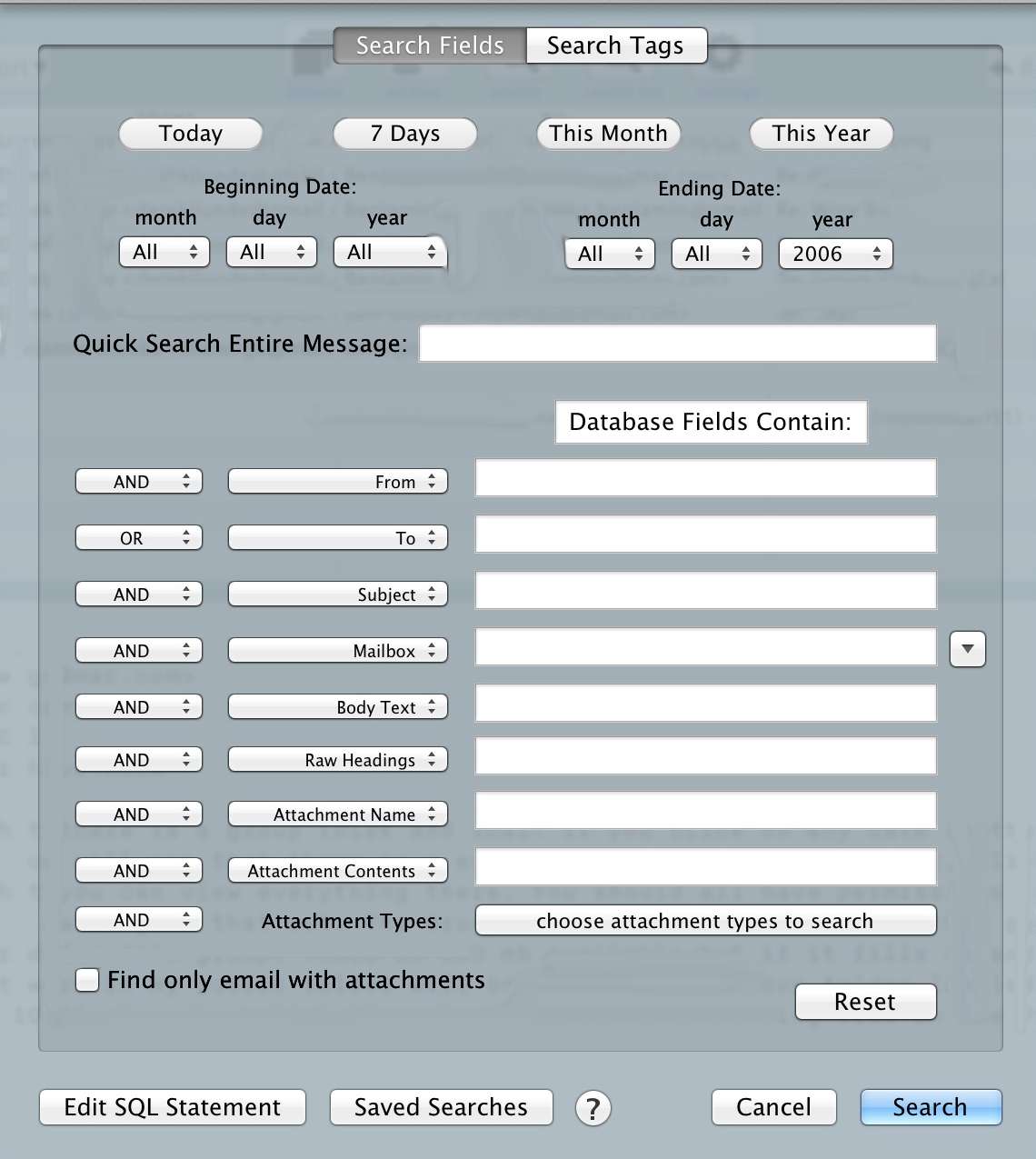
    Obviously, with the other two out, I chose MailSteward. I chose it because of it’s search power, which looks like this:

    That’s a powerful tool, especially given that my dataset is 50,000 emails — some with attachments. There’s a ton of great options in the app, including scheduled archiving and auto-tagging (which I have yet to implement). Overall I ended up with a database well over 15GBs, but a program that can search it faster and better than Mail.app could.

    So now I have a better search method stored locally on my Mac.

    ## The Result

    This solution does not solve every problem. While it offers better search of my email archive, there are still a bunch of new issues that popped up. Here’s the system I currently have in place:

    – My MacBook Pro archives email in everything except my inbox daily at 10:21pm.
    – My Mac mini also has a copy of MailSteward installed and it archives everything once a month from all inboxes to a local database.
    – I have mail rules set to delete any email over six months of age. ((These rules are pretty hit and miss. So far I had to do the initial delete manually.))

    Therefore, at most, someone could grab the last six months of my email. As I get more comfortable with this system I plan on shortening that time period to one month for personal stuff, one week for this blog, and two months for work.

    Now, you may ask, what about the database for MailSteward sitting on your Mac mini? Well, that database sits *inside* a Truecrypt volume. ((My MacBook Pro is encrypted by FileVault 2, which is good enough for that database.)) I just have to remember to mount that volume before MailSteward wants to run each month, or after restarting the machine (which I typically only do for software updates).

    All of this means I get no access to old emails from iOS, ((I *could* VNC into my Mac mini and search that way if I want.)) but it also means that I have secured my old email from people who gain physical access to my devices.

    Yes, the NSA *might* already have copies of my stuff, but that’s no reason to make it easy for someone who gets access to my devices to have a robust database on me.

    Overall, this is a far better solution for people that like to search their email archive, and it *can* be more secure if you set it up correctly. I was, however, a bit uneasy deleting all those emails and relying only on MailSteward.