“So, my challenge to others would be to stop, think, and make something for the future.”
Top Posts
Leica Sofort 2June 13, 2024
Grand Seiko SBGX261February 23, 2023
Casio Duro MDV-106 Re-ReviewDecember 15, 2022
Recent Articles
-
Quote of the Day: Chris Sauve
“So, my challenge to others would be to stop, think, and make something for the future.” — Chris Sauve
-
Retina Font Choices
[A really interesting article, and quasi-review, of the retina MacBook Pro from John Gruber](http://daringfireball.net/2012/08/pixel_perfect). In it he dives into why (to his eye and mine) text looks so much better on the retina MacBook Pro than it does on the retina iOS screens — especially given the fact that the retina MacBook Pro has a…
[A really interesting article, and quasi-review, of the retina MacBook Pro from John Gruber](http://daringfireball.net/2012/08/pixel_perfect). In it he dives into why (to his eye and mine) text looks so much better on the retina MacBook Pro than it does on the retina iOS screens — especially given the fact that the retina MacBook Pro has a lower PPI count than its iOS counterparts.
Gruber also brings up an interesting point about font choices, saying:
>Regarding font choices, you not only need not choose a font optimized for rendering on screen, but should not. Fonts optimized for screen rendering look cheap on the retina MacBook Pro — sometimes downright cheesy — in the same way they do when printed in a glossy magazine.
The font I use on this site is FF Meta Web, it has been designed to be used on the web, which means it has been optimized for screen rendering. I personally don’t think it looks “cheap,” but I agree that many fonts (like Lucida Grande) do look rather cheap on such a display.
More interesting is that during a font change on this site a couple weeks ago, I was toying with a lighter font weight to better accommodate retina displays. What [I found in my testing](http://dev.brooksreview.net/blog/2012/07/the-review-of-the-font-choices/) was that the lighter font weight looked perfect on the iPad (3), difficult to read on the iPhone 4S, nice on non-retina screens, and decent but not highly-comfortable on the retina MacBook Pro.
It was because of this testing that I only use the lighter weights in navigation menus and block quotes. It is also because of the retina MacBook Pro, that for the first time since switching to FF Meta Web, I am thinking about moving to a new font.
The problem though: *what font?*
I need a font that simultaneously looks great on non-retina screens, on retina iOS screens, and on retina Mac screens — and I really don’t think such a font exists. So, for as much as I am against “mobile versions” of sites, I am beginning to wonder if each device should have a font specifically targeted for that device. Right now I don’t think retina displays are prevalent enough to worry about this, but I doubt that will be true come 2013.
-
Amazon Item of the Week: Sunglasses by American Optics
Even though I live in the rainy Pacific Northwest I still need to wear sunglasses fairly often. As such I am very sensitive to finding a good pair. The last few sunglasses I have owned have all been Rayban sunglasses and before that Persol. While I highly recommend the [Persols](http://www.amazon.com/s/ref=sr_pg_1?rh=n%3A1036592%2Cn%3A%211036682%2Cn%3A1040658%2Cp_4%3APersol%2Cn%3A2474937011&bbn=1040658&ie=UTF8&qid=1344970174) — they were simply out…
Even though I live in the rainy Pacific Northwest I still need to wear sunglasses fairly often. As such I am very sensitive to finding a good pair. The last few sunglasses I have owned have all been Rayban sunglasses and before that Persol.
While I highly recommend the [Persols](http://www.amazon.com/s/ref=sr_pg_1?rh=n%3A1036592%2Cn%3A%211036682%2Cn%3A1040658%2Cp_4%3APersol%2Cn%3A2474937011&bbn=1040658&ie=UTF8&qid=1344970174) — they were simply out of my budget this go around. So I went with some from American Optics, which claim they make the “[original](http://www.aoeyewear.com/index.html)” government issued fighter pilot sunglasses. Let’s face it, Top Gun influences boys that grew up around the time I did.
I went with the 57mm and the Silver model, and I really like these sunglasses.
What I like most about them is that they are solidly made — I truly feel like they might even survive being sat on (if left on the car seat). [Be sure to check out AO’s handy guide for choosing the right size for your face](http://www.aoeyewear.com/documents/templeslenses.html), and then [go get a pair](http://www.amazon.com/exec/obidos/ASIN/B000XXV7Q0/ref=nosim&tag=brooksreview-20) if they are your style. They are inexpensive and well made.
-
‘Access All Your iCloud Files From the Finder Sidebar’
[Since I posted this tip](https://brooksreview.net/2012/08/icloud/), and it has worked its way through the paywall, I have been getting a lot of tips from readers about how to go about adding this folder to the Finder sidebar. The tip I am linking to is one tip I only heard about yesterday, but the tip didn’t work…
[Since I posted this tip](https://brooksreview.net/2012/08/icloud/), and it has worked its way through the paywall, I have been getting a lot of tips from readers about how to go about adding this folder to the Finder sidebar. The tip I am linking to is one tip I only heard about yesterday, but the tip didn’t work for me.
Besides it not working for me, the tip really is a messy hack.
More readers emailed in with a slightly less complicated solution: create an alias to the Mobile Documents folder and add that alias to the sidebar in Finder. That’s pretty good, but I can do you one better.
Reader Matt H. wrote in with a screenshot of his computer showing the most dumb-foundingly easy solution. Here’s what you do:
1. [Navigate to the Mobile Documents folder](https://brooksreview.net/2012/08/icloud/) (aka iCloud).
2. Go to the `File` menu and select the command `Add to Sidebar`.You are done. I don’t know why this works and dragging in the folder doesn’t, but I am sure glad it works. Thanks Matt H.
-
Quote of the Day: Guy English
“I rage read Daring Fireball voraciously.” — Guy English (Happy tenth DF.)
“I rage read Daring Fireball voraciously.”— Guy English (Happy tenth DF.) -
Today Calendar App
Interesting new calendar app that was inspired by thoughts that have been circling around the web relating to how crappy most calendar apps are. I really like the underlying idea of the app, but I question the execution. Mostly the design of the app is just bad, skeuomorphic, and I loathe the font choice. That’s…
Interesting new calendar app that was inspired by thoughts that have been circling around the web relating to how crappy most calendar apps are. I really like the underlying idea of the app, but I question the execution.
Mostly the design of the app is just bad, skeuomorphic, and I loathe the font choice. That’s all I have to complain about though, because the rest of the app is pretty nice.
I won’t pretend I like the design, but I think that it takes the right approach with how it shows calendar data and that might be more important in the end. Regardless of my thoughts on the design I have moved the app to my home screen to give it a real shot at replacing Agenda.
[via Minimal Mac] -
IT HASN’T SHIPPED BUT I KNOW IT TO BE GREAT
Anil Dash, writing for Wired about Microsoft’s Surface tablet and the company in general: >If anyone questioned whether Microsoft could get back in the fight once the cuffs finally came off, Surface should put those doubts to rest. The gorgeous PC/tablet hybrid is the only example in recent memory of a company clearly and emphatically…
Anil Dash, writing for Wired about Microsoft’s Surface tablet and the company in general:
>If anyone questioned whether Microsoft could get back in the fight once the cuffs finally came off, Surface should put those doubts to rest. The gorgeous PC/tablet hybrid is the only example in recent memory of a company clearly and emphatically going toe to toe with Apple on the industrial design front. The iPad will have to improve. Android tablets will have to improve. Surface isn’t another me-too device—it moves the entire category forward.Of course, Dash, you mean: the “only example in recent memory” of a device that has yet to actually *ship*. I’ll give Microsoft credit for announcing the Surface, but Dash is talking like the Surface is a real shipping product that is currently competing with the iPad and yet it’s not.
Further: “the iPad will have to improve.” Improve what? You can’t just toss a statement like that out there and not explain what the Surface does better — you especially can’t do that when no consumer has even seen a Surface in real life, because, you know, they aren’t shipping.
It’s important to remember the scrutiny Microsoft has been under, but it’s a massive overstatement to label the Surface as a game changer — long before Microsoft actually ships the Surface and the general consumer gets to touch it.
-
‘Banking With Simple’
James Duncan Davidson’s thoughts on Simple jive with mine. I received my account a month ago and while I won’t be switching from USAA right now, I could see that happening in the next year. The UI for the website and iOS app, the card, and the ethos that surrounds the company really appeal to…
James Duncan Davidson’s thoughts on Simple jive with mine. I received my account a month ago and while I won’t be switching from USAA right now, I could see that happening in the next year. The UI for the website and iOS app, the card, and the ethos that surrounds the company really appeal to me.
It’s a bank, so there isn’t much to say, other than this one important thing: it’s a bank that you won’t hate and that in return, doesn’t hate you for being a customer.
That’s about the most different a new bank can really be at this point and Simple has achieved that thus far.
-
The Redirect
[Todd Bishop over at GeekWire scored an interview with the infamous, Nathan Myhrvold and it is a doozy of a post](http://www.geekwire.com/2012/feisty-nathan-myhrvold-defends-quest-global-good/). In the post Myhrvold has two central themes that he redirects every question Bishop asks to: 1. No one else in technology is doing what Myhrvold deems to be “good”. 2. Most all technology…
[Todd Bishop over at GeekWire scored an interview with the infamous, Nathan Myhrvold and it is a doozy of a post](http://www.geekwire.com/2012/feisty-nathan-myhrvold-defends-quest-global-good/). In the post Myhrvold has two central themes that he redirects every question Bishop asks to:
1. No one else in technology is doing what Myhrvold deems to be “good”.
2. Most all technology is just a pile of toys for what he calls the “rich-world”.The statements from Myhrvold range from ridiculous to downright insane babbling.
Let’s take this answer from Myhrvold responding to a quasi-question about the naming of his new position, “VP for Global Good”:
>You know, I was at a conference recently where someone said, “Well, do you feel good about what you’re doing?” I turned to this person who is an entrepreneur at a prominent social networking website, and I said, “OK, fine. You’re about people sending little messages to each other and having fun on a social network. How big is your malaria project?”
First, he didn’t answer the question he was asked, typical of someone who knows others won’t like the answer. Second, let’s assume he is talking about Twitter — what Myhrvold is actually missing is just how much good Twitter is doing. Twitter gives a global voice to the oppressed in countries like, for example, Egypt. It *is* a powerful tool — just because it doesn’t cure malaria, doesn’t mean that there is no “good”, unless I guess your name is Nathan Myhrvold.
Every answer Myhrvold gives is the same load of bullshit, so I will just quote one last response, in its entirety (you should read the entire interview):
>Q:What about just being more transparent about your different dealings with patents and all the holding companies and actually making sure that if you have a patent, it’s being used for an actual product and not just squatting on something?
First, this is a fantastic question — basically a nice way of asking: “why not stop being a patent troll?”. Love it. Myhrvold’s non-response:
>(Laughs.) Well, it’s another question that is like, “When are you going to stop beating your wife, Todd? That’s what we all really want to know.” …
No, he really said that. Is he implying we shouldn’t tell people to stop beating their wife? ((I get the reference, still an absurd answer.))
>Many, many companies that are involved with patents have very good business reason to structure their things through a series of patent holding companies, including virtually any technology company you could name does things entirely analagous to what we do. 100 percent.
Translation: “Everyone does it, mom said it’s ok.”
>In terms of transparency, all patents are transparent. What you’re really supposed to do is see if you’re infringing anybody’s patent. So what somebody says, why don’t you tell me which patents you have, Nathan, so I can avoid them, you’re supposed to be avoiding all of them! You’re saying, Nathan, I’d like to be honest with you but cheat everybody else. What’s up with that?
Actually, that wasn’t the question. The question wasn’t: “why not be transparent with *your* patents”, but rather: why hide behind 50 shell companies and not cop to the fact that you sue the shit out of others that even look at a patent you own. That’s the question.
>The truth of the matter is that big technology companies use patents as a strategic tool. You see Microsoft and Apple and Samsung and Yahoo and Facebook, you name it, they are using patents as a strategic tool. And they use every trick in the book when it comes to doing that for themselves. But there’s a set of folks, including some of those same companies, that quite hypocritically don’t want other people collecting any money from them on patents. It’s this very funny thing, “My patents are holy and great, and all of the ways I structure and hide my patents, that’s wonderfulness. But Intellectual Ventures, we’re upset with them because they might actually make us pay for some of the inventions we’ve made billions of dollars on without paying. Gosh it sure is more fun to get ‘em for free!” …
That’s a great redirect by Myhrvold. Basically instead of answering anything close to the question he dropped Apple’s name and made you think that what Intellectual Ventures does is basically the same as what Apple does. Which isn’t true. But, hey, he didn’t have to answer the question this way.
The only honest answer was the one about Todd beating his wife — which is basically Myhrvold’s way of saying: fuck off. Well, that’s how I read it.
-
Mars Rover Curiosity to Receive OTA Update
Mike Wall, in writing about the Mars Rover update, notes this: >The MSL team calls the flight software that guided this daring touchdown R9. With Curiosity now safely on the surface, it’s time to switch over to R10, which was uploaded during the rover’s eight-month interplanetary cruise. Uploaded to the rover, while in space, on…
Mike Wall, in writing about the Mars Rover update, notes this:
>The MSL team calls the flight software that guided this daring touchdown R9. With Curiosity now safely on the surface, it’s time to switch over to R10, which was uploaded during the rover’s eight-month interplanetary cruise.Uploaded to the rover, while in space, on the way to Mars. That is one hell of a OTA update if you ask me. Especially when you consider the trouble Google is having just [keeping Android users on the latest version of their OS](http://developer.android.com/about/dashboards/index.html) while on *Earth*.
-
Keyboard Shortcut to Save Directly in iCloud
This is awesome-sauce from Zettt: >With the advent of iCloud, there is now a new shortcut to save files in that location, for apps that support iCloud: Command-Shift-I. I tested this in Writer and it works like a charm — Command-Shift-D (to move the desktop) is probably the most used shortcut across various apps that…
This is awesome-sauce from Zettt:
>With the advent of iCloud, there is now a new shortcut to save files in that location, for apps that support iCloud: Command-Shift-I.I tested this in Writer and it works like a charm — Command-Shift-D (to move the desktop) is probably the most used shortcut across various apps that I use, something tells me that by this time next year that shortcut will be Command-Shift-I.
I am going head first into iCloud for document storage — I hope every app that can, adds support for it.
-
Finding a Good Flashlight App for the iPhone
Have you ever tried to find a good flashlight app in the App Store? You might as well close your eyes and download one at random, you will either get a slow app, or a hideous app. Take your pick. Actually, if we are honest, there really is only one aspect of a flashlight app…
Have you ever tried to find a good flashlight app in the App Store? You might as well close your eyes and download one at random, you will either get a slow app, or a hideous app. Take your pick.
Actually, if we are honest, there really is only one aspect of a flashlight app that matters: speed.
To that end I downloaded all of these:
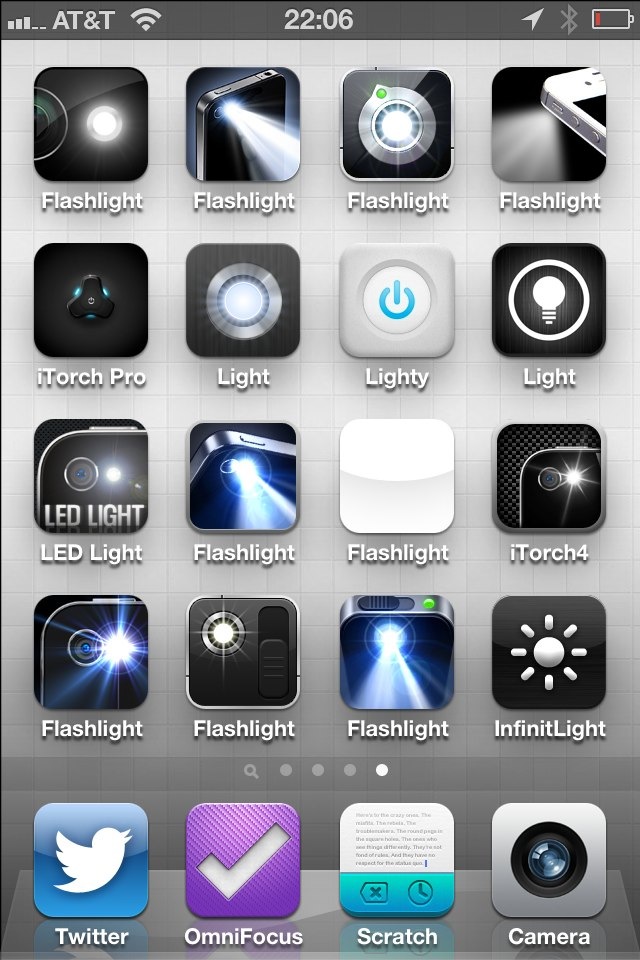
How I spend my weekends. I’d take the time to name them all, and link to every single one, but there’s one problem: all of them but one sucks. So instead I am just going to number them from the top corner to the bottom and tell you one thing about each: their speed.
### Side Note
Why are all flashlight apps called: `flashlight something`. Twitter developers can come up with neat names, ditto weather devs, so what’s wrong withe flashlight developers? This is another reason it’s very difficult to link to each app.
### The Speed
With a fresh reboot on my iPhone (running iOS 6b4) and no flashlight apps present in the multi-tasking tray, I launched each app and timed the speed until the LED light came on, to the best of my abilities.
Here’s the key:
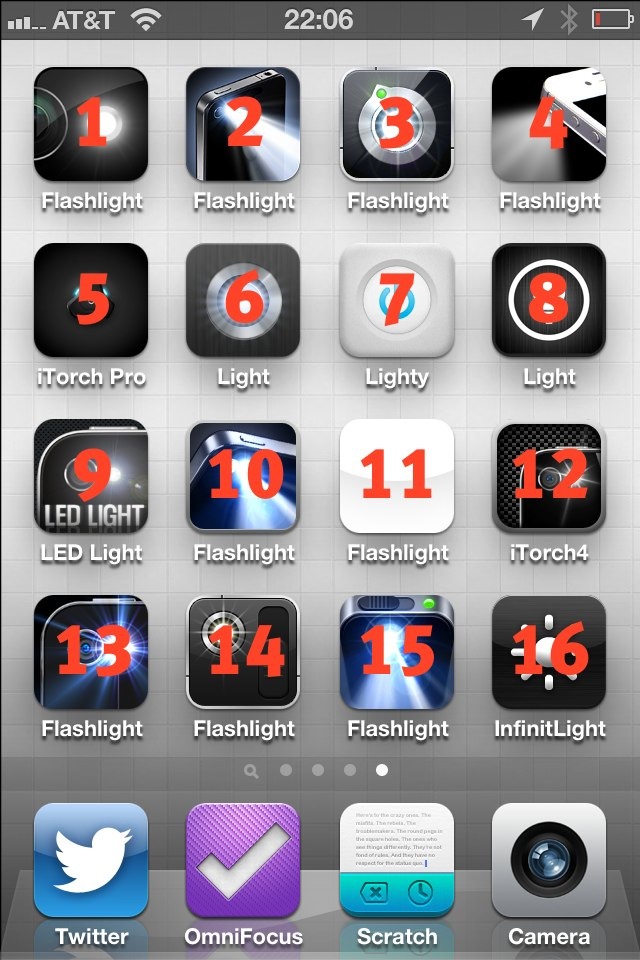
The number overlay corresponds with the list below of launch times. Here’s the results:
1. 1.6s
2. 3.3s
3. 3s
4. did not launch to an “on” LED
5. 2.1s
6. 1.6s
7. 1.1s
8. did not launch to an “on” LED
9. 2.2s
10. 2.4s
11. 2.1s
12. 1.8s
13. 1.2s
14. did not launch to an “on” LED
15. 4s
16. 2.4sThe winner is #7, also known as, Lighty. It’s a paid app (bonus points) with a decent icon and decent UI. More than that it is just the fastest of the lot. There are probably about 4,324,322 other flashlight apps, but these were the only ones I tested.
### Launch Center Pro
When I polled Twitter to see what flashlight apps they were using, I got a ton of people saying they use Launch Center Pro. I did too, but then Launch Center Pro moved off of my home screen making it a bit harder to use. My main issue with using Launch Center Pro is that it takes two taps to activate the light — I want one tap to activate the light so I can get to it as fast as I can.
### Lighty
If you are a person that uses a flashlight app on your iPhone, I have to say: of the 16 flashlight apps I tested, [Lighty](http://itunes.apple.com/us/app/lighty-flashlight-for-iphone/id391503046?mt=8) is the best.
-
White House Pulls Down TSA Petition
You have got to be kidding me, 2,500 votes shy of holding the TSA responsible and the public petition is pulled. Why even bother asking for petitions if you don’t intend to honor them? This better be a mistake, because this is bullshit.
You have got to be kidding me, 2,500 votes shy of holding the TSA responsible and the public petition is pulled. Why even bother asking for petitions if you don’t intend to honor them?
This better be a mistake, because this is bullshit.