A great, and thorough, explanation of a new security feature coming to Mountain Lion.
Top Posts
Leica Sofort 2June 13, 2024
Grand Seiko SBGX261February 23, 2023
Casio Duro MDV-106 Re-ReviewDecember 15, 2022
Recent Articles
-
About Gatekeeper
A great, and thorough, explanation of a new security feature coming to Mountain Lion.
-
Friday Gripe: Redirections
Here’s a common scenario for me: I find an interesting article on my iPhone in Reeder/Twitter/Fever and open it in Safari, then decide I don’t have time to read it, so I send it to Instapaper. The next time I am at my computer reading articles in Instapaper I come across that article I saved…
Here’s a common scenario for me: I find an interesting article on my iPhone in Reeder/Twitter/Fever and open it in Safari, then decide I don’t have time to read it, so I send it to Instapaper.
The next time I am at my computer reading articles in Instapaper I come across that article I saved from my phone. Ah, but the web admins were clever and had redirected my iPhone to a mobile version of the article. So now when I load it up on my Mac I have to either: a) find the “full site” button, or b) try removing the m/mobile portion of the URL.
Here’s my gripe: if you are so clever that you can redirect my iPhone to a severely crippled ‘mobile’ version of your article, then why the fuck can’t you redirect Safari, on my Mac, back the — oh I don’t know — full site version of the article?
*Pathetic.*
-
Writing Kit for iOS
Speaking of great iPad text editors, don’t forget about Writing Kit. I was thinking about this the other day and realized that if I had to do all of my writing on the iPad and could only have one of the plethora of writing apps installed on my iPad: Writing Kit would be my choice.…
Speaking of great iPad text editors, don’t forget about Writing Kit. I was thinking about this the other day and realized that if I had to do all of my writing on the iPad and could only have one of the plethora of writing apps installed on my iPad: Writing Kit would be my choice.
Don’t get me wrong, I love writing in iA Writer far more than any other app. But the features that Writing Kit offers makes it the best all-in-one writing/research app that I have tried. A lot of that has to do with the previewing and HTML export, but there are also other killer features in the app.
It’s worth checking out if you like to write on your iPad/iPhone.
-
Phraseology for iPad
It seems like it has been far too long since I talked about iPad text editors here. Dave Caolo has a nice review of Phraseology and talks about one of it’s most unique features: >The Arrange Menu offers drag-and-drop control over the body of your document. Specifically, you can rearrange paragraphs, sentences and line breaks…
It seems like it has been far too long since I talked about iPad text editors here. Dave Caolo has a nice review of Phraseology and talks about one of it’s most unique features:
>The Arrange Menu offers drag-and-drop control over the body of your document. Specifically, you can rearrange paragraphs, sentences and line breaks with a swipe. Just grab the handle next to each and drag that element to its new home. The Arrange Menu even shows the word count and character count for every paragraph and sentence. Deleting elements is just as easy; tap the red delete button and they’re gone.I don’t remember when or who told me about this app, but it is quite clever in a few areas. Admittedly I am not a fan of writing in it, but I am a fan of editing my documents in it (for those rare times when I do: a) write 100% on my iPad and b) actually edit). It’s worth giving it a look (or just reading Dave’s review) if you are into iPad text editors.
-
Messages Downloads Your Previous Conversations
David Chartier: >In fact, if you’ve previously chatted with someone on your iPhone or iPad with iMessage, then start talking to them in Messages on your Mac, the app will download your previous conversation and begin keeping it in sync with your other devices. Not only that but I didn’t open my MacBook Air from…
David Chartier:
>In fact, if you’ve previously chatted with someone on your iPhone or iPad with iMessage, then start talking to them in Messages on your Mac, the app will download your previous conversation and begin keeping it in sync with your other devices.Not only that but I didn’t open my MacBook Air from 4p yesterday to 6a this morning and all of my iMessage conversations during that time when my Mac was asleep were up on my screen right away in Messages when I opened up my Air. This was at once very weird and also kinda cool.
-
‘Google Tracked iPhones, Bypassing Apple Browser Privacy Settings’
Julia Angwin and Jennifer Valentino-DeVries for *The Wall Street Journal*: >To get around Safari’s default blocking, Google exploited a loophole in the browser’s privacy settings. While Safari does block most tracking, it makes an exception for websites with which a person interacts in some way—for instance, by filling out a form. So Google added coding…
Julia Angwin and Jennifer Valentino-DeVries for *The Wall Street Journal*:
>To get around Safari’s default blocking, Google exploited a loophole in the browser’s privacy settings. While Safari does block most tracking, it makes an exception for websites with which a person interacts in some way—for instance, by filling out a form. So Google added coding to some of its ads that made Safari think that a person was submitting an invisible form to Google. Safari would then let Google install a cookie on the phone or computer.
Given all the privacy issues Apple has faced this week, with the address book issues, you have to think they are pissed about this one. This was a pretty self-serving and short-sighted move by Google.
Can’t wait to see how this one plays out.
-
”As OS X Mountain Lion Proves, Twitter Is Apple’s Social Network’
MG Siegler: >More importantly, Twitter has now firmly established itself as not just the iOS go-to social service, but Apple’s go-to social service. I still can’t believe the level of integration Twitter is getting — but I am glad that it isn’t Facebook.
MG Siegler:
>More importantly, Twitter has now firmly established itself as not just the iOS go-to social service, but Apple’s go-to social service.I still can’t believe the level of integration Twitter is getting — but I am glad that it isn’t Facebook.
-
Apple Wins German Injunction Against Most of Motorola’s Slide-to-Unlock Implementations
Florian Mueller: >Today’s ruling and the revelation of this new Microsoft lawsuit show that the noose keeps tightening around Android’s neck in many ways. With more and more patents being asserted against Android in different courts, Google needs to come up with a better way to address its intellectual property issues than possibly trying to…
Florian Mueller:
>Today’s ruling and the revelation of this new Microsoft lawsuit show that the noose keeps tightening around Android’s neck in many ways. With more and more patents being asserted against Android in different courts, Google needs to come up with a better way to address its intellectual property issues than possibly trying to reach a state of mutually assured destruction on the basis of FRAND-pledges standard-essential patents, a kind of misconduct that antitrust regulators won’t tolerate because standard-essential patents are a fundamental issue, unlike Google’s desire to get away with infringement.The mutual destruction path seems to be where all this is headed for now, but what a win for Apple. I can’t imagine not having “slide-to-unlock” on any touchscreen smartphone.
-
‘Apple to Take on Windows 8 With OS X Mountain Lion’
Paul ‘Supersite’ Thurrott on the OS X Mountain Lion release: >There were absolutely no rumors to indicate such a release was coming, and given the timing, one can logically assume that Apple is trying to steal some thunder from Microsoft’s eagerly-awaited Windows 8. [Apple CEO Tim Cook to the Wall Street Journal](http://online.wsj.com/article/SB10001424052970204880404577226864202052768.html): >I don’t really…
Paul ‘Supersite’ Thurrott on the OS X Mountain Lion release:
>There were absolutely no rumors to indicate such a release was coming, and given the timing, one can logically assume that Apple is trying to steal some thunder from Microsoft’s eagerly-awaited Windows 8.[Apple CEO Tim Cook to the Wall Street Journal](http://online.wsj.com/article/SB10001424052970204880404577226864202052768.html):
>I don’t really think anything Microsoft does puts pressure on Apple
Who to believe, who to believe…
-
Daring Fireball on Mountain Lion
John Gruber: >And then the reveal: Mac OS X — sorry, OS X — is going on an iOS-esque one-major-update-per-year development schedule. That’s going to be great. Be sure to read Gruber’s entire post about this — he offers a lot of great insight.
John Gruber:
>And then the reveal: Mac OS X — sorry, OS X — is going on an iOS-esque one-major-update-per-year development schedule.That’s going to be great.
Be sure to read Gruber’s entire post about this — he offers a lot of great insight.
-
OS X Mountain Lion. Innovation Comes Back to the Mac.
Apple on the new OS X: >Messages, Reminders, Notification Center, Twitter, and more. You love them on iPad. Now you’ll love them on your Mac. And with iCloud, they all work better together. “Mountain Lion”? Really?
Apple on the new OS X:
>Messages, Reminders, Notification Center, Twitter, and more. You love them on iPad. Now you’ll love them on your Mac. And with iCloud, they all work better together.“Mountain Lion”? Really?
-
Messages Beta
Say goodbye to iChat and hello to Messages (with support for iMessage).
Say goodbye to iChat and hello to Messages (with support for iMessage).
-
Samsung Galaxy Note Review by Walt Mossberg
Walt Mossberg’s conclusion: >The Samsung Galaxy Note isn’t for everyone, and I can’t recommend it as the main mobile phone for most people. But as a stylus-driven small tablet, it might be just what some users are looking for. *I’ve been dying to get my hands on a “stylus-driven small tablet” that’s at once too…
Walt Mossberg’s conclusion:
>The Samsung Galaxy Note isn’t for everyone, and I can’t recommend it as the main mobile phone for most people. But as a stylus-driven small tablet, it might be just what some users are looking for.
*I’ve been dying to get my hands on a “stylus-driven small tablet” that’s at once too big to use as a phone and too small to replace an iPad. Sounds fantastic.*
-
‘Apple: App Access to Contact Data Will Require Explicit User Permission’
John Paczkowski: >“Apps that collect or transmit a user’s contact data without their prior permission are in violation of our guidelines,” Apple spokesman Tom Neumayr told AllThingsD. “We’re working to make this even better for our customers, and as we have done with location services, any app wishing to access contact data will require explicit…
John Paczkowski:
>“Apps that collect or transmit a user’s contact data without their prior permission are in violation of our guidelines,” Apple spokesman Tom Neumayr told AllThingsD. “We’re working to make this even better for our customers, and as we have done with location services, any app wishing to access contact data will require explicit user approval in a future software release.”That’s about the *only* response Apple could give at this point.
-
‘Female Passengers Say They Were Targeted for TSA Body Scanners’
Kim Zetter reporting for Wired.com on the alleged targeting of attractive women for the porno scanners: >“She says to me, ‘Do you play tennis?’ And I said, ‘Why?’‘You just have such a cute figure,’” Ellen Terrell recalled to CBS News in Dallas. The best part of this though is that there are over 500 complaints…
Kim Zetter reporting for Wired.com on the alleged targeting of attractive women for the porno scanners:
>“She says to me, ‘Do you play tennis?’ And I said, ‘Why?’‘You just have such a cute figure,’” Ellen Terrell recalled to CBS News in Dallas.The best part of this though is that there are over 500 complaints — so the TSA responded by:
>When asked about the complaints, the TSA released a statement to CBS saying that scanners at the Dallas-Ft. Worth airport, as well as at the Love Field airport, had been upgraded so that they now showed only a generic body outline, rather than a detailed image.
Why even bother with these scans then? Wasn’t the point, from the get go, to have a detailed accurate scan to see if there is hidden contraband on the persons body? How then does this make sense?
Also: “Upgraded”???? I think the word you are looking for is “downgraded”.
My mind hurts.
-
You Can Buy Stuff From Ikea on Amazon!
Holy amazing. Prime shipping here I come. ((The wife and I are moving right now.))
Holy amazing. Prime shipping here I come. ((The wife and I are moving right now.))
-
At the Speed of OmniFocus
Shawn Blanc perfectly sums up, in his review of Clear, [why I am using both Clear and OmniFocus on my iPhone](https://brooksreview.net/2012/02/clear/): >But the biggest caveat with OmniFocus is its speed. It takes more than a few seconds to launch the iPhone app and enter something in. New OmniFocus items beg to be given contexts, projects,…
Shawn Blanc perfectly sums up, in his review of Clear, [why I am using both Clear and OmniFocus on my iPhone](https://brooksreview.net/2012/02/clear/):
>But the biggest caveat with OmniFocus is its speed. It takes more than a few seconds to launch the iPhone app and enter something in. New OmniFocus items beg to be given contexts, projects, start dates, and due dates. While this is OmniFocus’s greatest strength, but there are moments when this is also OmniFocus’s greatest weakness.I love OmniFocus and if forced to pick between Clear and OmniFocus, the latter will win every time — no hesitation. Luckily I don’t have to choose one or the other.
-
Clear
[Clear is a new task management app from Realmac Software](http://www.realmacsoftware.com/clear/) and it had quite the attention while I was down at Macworld. I was shown a demo from Nik Fletcher and was blown away by how nice it looked and how fun the interactions are. The folks over at Realmac sent me a promo code,…
[Clear is a new task management app from Realmac Software](http://www.realmacsoftware.com/clear/) and it had quite the attention while I was down at Macworld. I was shown a demo from Nik Fletcher and was blown away by how nice it looked and how fun the interactions are.
The folks over at Realmac sent me a promo code, and an early look at the app, so let’s take a peek.
[
 ](http://c276381.r81.cf1.rackcdn.com/clear-1.jpg)
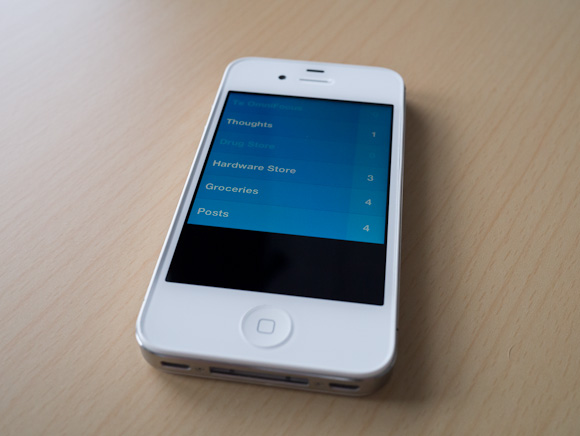
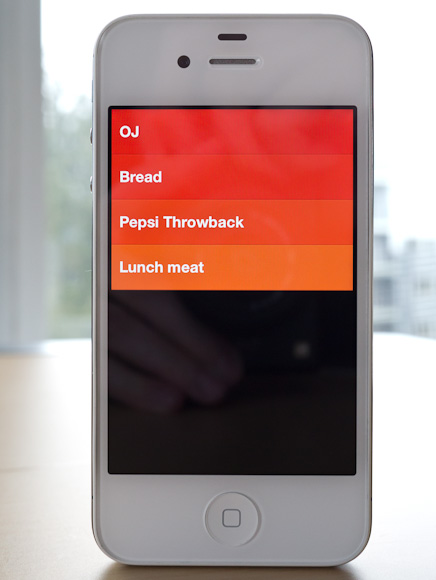
There is literally no UI chrome in Clear. No status bar, tabs — hell there aren’t even any buttons in the app. The entire app is driven by gestures, movements, and taps.
[
 ](http://c276381.r81.cf1.rackcdn.com/clear-2.jpg)
The idea of no buttons may sound confusing, but it is surprisingly intuitive to use Clear once you get going with it.
The biggest advantages to Clear over just about any other app I have used: it is concise and fast. You can’t get buried in the details with the app because there are no details to get lost in. You can actually only enter in a task that is under 30 characters long. Clear forces you to be *clear*.
Clear is the fastest way to enter in new tasks on my iPhone: swipe down/pinch open/tap to create a new item, start typing, pull down to create another, type, pulldown… and so on. It’s fast — faster than OmniFocus.
But Clear doesn’t sync, there are no backups of your data (beyond iCloud/iTunes backups). There is no Mac/PC client. So your data, your tasks, are only on your iPhone. This is what ultimately will keep a lot of people from trying Clear, but I think I have found a pretty neat use for it.
### Where it Fits
The biggest question for me is: where do I use Clear if I am already using OmniFocus for everything? Within 5 minutes I found my answer: location specific lists. I am pretty tired of location reminders from OmniFocus and Reminders.app popping up at times when I can’t, or don’t want to, act on them — so I turned that feature off.
I still want those lists though, I just want and need those lists to be passive — and easy to dump lots of things into quickly.
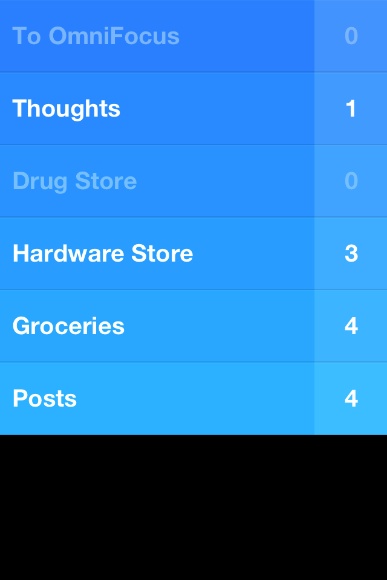
Here’s the system I came up with:
[
 ](http://c276381.r81.cf1.rackcdn.com/clear-ss-3.jpg)
That’s five lists in Clear that I don’t use/need in OmniFocus.
– To OmniFocus: this is pretty simple, but why not just input into OmniFocus? Clear is faster, so if I am in a meeting and want to input a lot of things fast, Clear is going to be a better option. I also can’t get distracted by adding due dates and contexts and creating projects. I can do that later on my iPad, for now let’s just get the tasks down.
– Thoughts: random things I think of that I may want to remember? Check. The length limitation is also helpful in paring down the thought to the lowest denominator. Keeping these non-actionable thoughts out of OmniFocus, but somewhere more handy that Notesy is great.
– Drug Store: Next time I go, I need to buy…
– Hardware Store: Next time I go, I need to buy…
– Groceries: I will be hungry if I don’t buy…
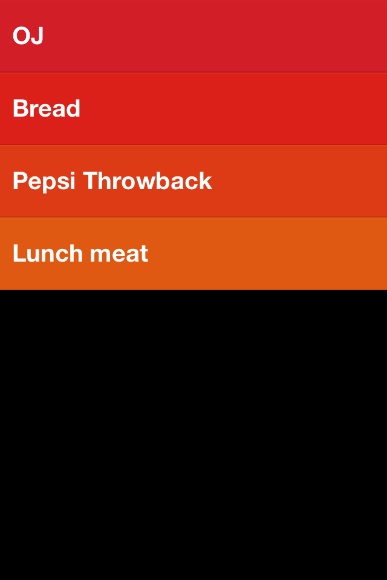
– Posts: I want to write about…All of this could be done in OmniFocus. All of it used to be done in OmniFocus. With Clear I hope to not get tangled up in the planning of these tasks. I just jot them down and walk away. Nothing I put in Clear is time sensitive, but all are things I want to remember.
[
 ](http://c276381.r81.cf1.rackcdn.com/clear-ss-1.jpg)
The icon is actually pretty great. It pops more than any other icon on my home screen — and there are a lot of great icons on my home screen. The design of Clear alone is worth the download — I suspect Clear just started a new trend in iPhone app design.
Ultimately, for me, Clear has earned a seat on my home screen. I love the no interface-interface. I love how clever and fast it is. I just have to remember to not think of Clear as a task manager — instead looking at Clear as a list making app.
And it’s fantastic at making lists.
Here’s the App Store link: Clear
-
Apple CEO Tim Cook Speaks at Goldman Sachs Technology Conference
Apple CEO Tim Cook on the iPad market: >We started using it [the iPad] at Apple well before it was launched. We had our shades pulled so no one could see us, but it quickly became that 80-90% of my consumption and work was done on the iPad. From the first day it shipped, we…
Apple CEO Tim Cook on the iPad market:
>We started using it [the iPad] at Apple well before it was launched. We had our shades pulled so no one could see us, but it quickly became that 80-90% of my consumption and work was done on the iPad. From the first day it shipped, we thought that the tablet market would become larger than the PC market and it was just a matter of the time it took for that to occur. I feel that stronger today than I did then. As I look out and I see all of these incredible usages for it, I see the incredible rate and pace of innovation, and the developers — If we had a meeting at this hotel, and we invited everyone doing cool stuff on PC, we wouldn’t have anyone here.If he did 80-90% of his work/consumption on the iPad *before* it launched — do “we” think he even uses a Mac anymore?
-
The Lack of Consistency in Twittelator Neue
An astute observation from Will Simons.
An astute observation from Will Simons.