The phrase: “grasping at straws” comes to mind.
Top Posts
The Hype: Yoshida & Co’s Porter BagsAugust 26, 2025
G-SHOCK DW-H5600 After 7 MonthsJuly 31, 2025
Casio Duro MDV-106 Re-ReviewDecember 15, 2022
Recent Articles
-
Teardown of an FBI GPS Tracker
iFixit has a nice teardown of what, one model, of an FBI GPS tracker look like. It’s really fascinating and if this is what the FBI typically uses — well it would be a cinch to spot under your car to even an untrained eye. Having said all that I am supremely disappointed with the…
iFixit has a nice teardown of what, one model, of an FBI GPS tracker look like. It’s really fascinating and if this is what the FBI typically uses — well it would be a cinch to spot under your car to even an untrained eye. Having said all that I am supremely disappointed with the use of D-Cell batteries, they are basically sticking a [Mag-Lite](http://www.maglite.com/product.asp?psc=6DCELL) under your car — that’s going to effect your fuel mileage.
-
You Can’t Replace Email if You Require Email
Google Wave was an idea with the lofty goal of trying to replace email, that didn’t work out so well for them. Facebook wants to replace email, and Twitter seems to have the same ambition too (though probably wanting to replace text messages and IM over email). The problem with every service that has been…
Google Wave was an idea with the lofty goal of trying to replace email, that didn’t work out so well for them. Facebook wants to replace email, and Twitter seems to have the same ambition too (though probably wanting to replace text messages and IM over email). The problem with every service that has been a serious contender of replacing email is these services rely on email to function.
You can’t replace pants with shorts when your definition of shorts is: everyone buy pants and cut the legs off — pants will still be a viable business (the consumer is just altering the usage). Same too with Twitter, Facebook, et al, they are still relying on email for certain parts of their service (like adding new users or sending notifications) while wanting to replace email at the same time.
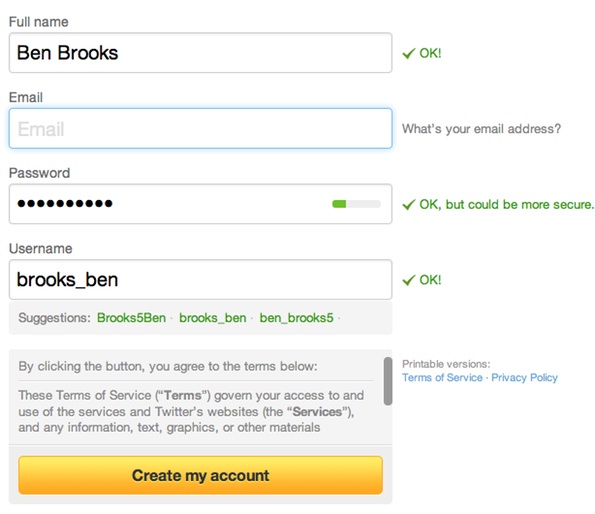
Take a look at the Twitter sign up:
Here is Facebook’s:
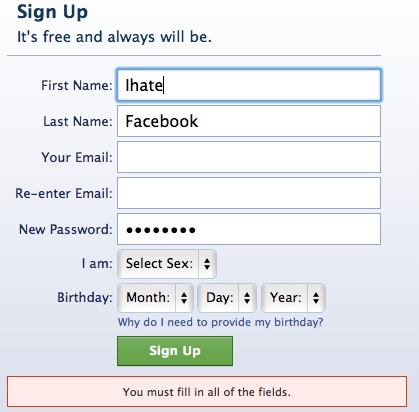
Neither service would let me signup unless I provided an email address. Two massively important communication tools — for millions of people — will not let you sign up without providing an email address, what year is this?
If these two companies were in charge when email services were a hot commodity, you would have had to provide a mailing address when trying to sign up for an email account.
So here’s a pro-tip to all current thinkers out there: if you want to build a service to replace email, **don’t** require the user to provide an email address when they signup.
There are many practical reasons for requiring an email address to sign up for a new service:
– Password recovery ((This is easiest when done over email, but can be done with a series of ‘challenge questions’.))
– Verification
– Spam control
– Helping other users find each other.There are more reasons, but those four are at the core — the first being of huge importance.
Remember that when email first came about, it was not tied to anything for users — we had no way of looking someone’s email up (we still don’t). We built our email databases the old fashioned way: by exchanging business cards.
That’s not entirely practical anymore — however it’s not out of the question to assume that your user is not willing to slowly build their network. Provide robust search and have faith in the fact that users will want to broadcast their “handle” to the people they want to correspond with instead of relying on email.
Also, please make something that replaces email and fixes all of its problems. ((An impossible dream, I know.))
-
Realism in UI Element Design
Lukas Mathis: >The goal is not to make your user interface as realistic as possible. The goal is to add those details which help users identify what an element is, and how to interact with it, and to add no more than those details. Great post by Mathis for the UX Magazine.
Lukas Mathis:
>The goal is not to make your user interface as realistic as possible. The goal is to add those details which help users identify what an element is, and how to interact with it, and to add no more than those details.Great post by Mathis for the UX Magazine.
-
Justin Williams Reviews the Motorola Xoom
Justin Williams on the Xoom and Honeycomb: >Google’s developer ecosystem lets them down in this aspect. Despite having thousands of apps in the Marketplace, very few of them are good and none of them are great. I have been using Android devices for over a year now the only app I can say I prefer…
Justin Williams on the Xoom and Honeycomb:
>Google’s developer ecosystem lets them down in this aspect. Despite having thousands of apps in the Marketplace, very few of them are good and none of them are great. I have been using Android devices for over a year now the only app I can say I prefer on Android over iOS is Kindle because Amazon is not behest to Apple’s commerce policies.This is not your run of the mill review, this is a *real* review and he does a damned good job at touching on everything you need to know about the device and the OS.
-
Defend Behavior
Adam Hartung: >Microsoft spent 8 times as much on R&D in 2009 as Apple – in both dollars and as a percent of revenue – and all investors received were updates to the old operating system and office automation products. That nearly $9B expense generated almost no incremental demand. While revenue is stalling, costs are…
Adam Hartung:
>Microsoft spent 8 times as much on R&D in 2009 as Apple – in both dollars and as a percent of revenue – and all investors received were updates to the old operating system and office automation products. That nearly $9B expense generated almost no incremental demand. While revenue is stalling, costs are rising.and, later:
>Buying into any of the losers as a “value play” meant you lost money.
This is a great take on why Microsoft is still on the decline, despite snazzy looking financial statements. See also: [Microsoft Needs to Learn from Apple’s Near Death](https://brooksreview.net/2011/01/ms-apple/).
-
Just Give It a Yank
Wired.com on how to find and remove a GPS tracker from your car: >Just get under your car and look around. If you see a black box, give it a yank. If it comes free, it’s probably not factory-installed. Even if you’re not sure what a normal car underside looks like, a surveillance device is…
Wired.com on how to find and remove a GPS tracker from your car:
>Just get under your car and look around. If you see a black box, give it a yank. If it comes free, it’s probably not factory-installed. Even if you’re not sure what a normal car underside looks like, a surveillance device is going to look out of place.I was really pumped to read this (admittedly paranoid) article, but come on — all the different options Wired gives readers are pretty pathetic. I am going to go ahead and recommend that you not climb under your car and start yanking on things.
-
Via
In the past six months there has been a lot of talk about ‘via’ links — the links that link-blog posts use to give credit to other people and websites for turning them on to particular links. It is a courteous practice to list a via link to another site and I tend to do…
In the past six months there has been a lot of talk about ‘via’ links — the links that link-blog posts use to give credit to other people and websites for turning them on to particular links. It is a courteous practice to list a via link to another site and I tend to do it when I remember where I found the link, or if there is good reason to do so.
I have seen a few people now not doing via attributions and also saying that they find the pratice rather pointless. I couldn’t care less about whether someone cites me in a via link, and I doubt that I make any substantial traffic difference to sites that I provide via links to.
Or do I?
I have been reading *In The Plex* which is a sort of biography on Google itself — in the book they make reference to just how important linking is on the web. This got me thinking about how we conduct ourselves when link blogging.
We all know how PageRank works, the more links people are sending to a particular page, the higher the PageRank — the higher the PageRank the higher you appear on Google search results. PageRank is derived, by links between sites. ((This is a very simplified explanation, but accurate enough for our purposes.))
Additionally sites like Alexa.com, that try to “rank” websites, will use “sites linking in” as a metric for success. Ergo, by linking to the source site with a tiny and easy ‘via’ attribution you are essentially helping to support that site — indirectly.
Again, I don’t care if people provide attribution to me in form of via links — but I do know that I want to help out other sites that have helped to provide me with content. That’s why I use via links and have since the beginning.
In short, don’t use via attributions to be nice — use them to help show other people sites that you find relevant on the web. Use via as a way of sharing hidden gems with all of us, while also supporting those hidden gems.
-
How Tablets Change Our Computer Usage
Nielsen Wire: >When asked whether they used other connected devices more often or less often since purchasing a tablet, 35 percent of tablet owners who also owned a desktop computer reported using their desktop less often or not at all, while 32 percent of those who also owned laptops, said they used their laptop less…
Nielsen Wire:
>When asked whether they used other connected devices more often or less often since purchasing a tablet, 35 percent of tablet owners who also owned a desktop computer reported using their desktop less often or not at all, while 32 percent of those who also owned laptops, said they used their laptop less often or never since acquiring a tablet. Twenty-seven percent of those who also own eReaders said they use their eReader less often or not at all – the same percentage as those who also own portable media players. One-in-four tablet owners who own portable games consoles are using those devices less often, if at all, since purchasing a tablet.I have noticed this with my usage. My wife though — she seems unchanged.
-
Laptop size, weight, and power
Marco makes some great points about carry weights and being practical about what your laptop “needs” are. Also, be sure to read Marco’s first footnote — while I don’t agree, that doesn’t mean he is wrong.
Marco makes some great points about carry weights and being practical about what your laptop “needs” are. Also, be sure to read Marco’s first footnote — while I don’t agree, that doesn’t mean he is wrong.
-
Apple, ARM, Intel
Chris Foresman: >With no clear performance or efficiency benefit derived from moving to ARM, it doesn’t seem likely Apple will be ditching Intel wholesale for its notebooks, even two years from now. However unlikely, though, that doesn’t necessarily mean that Apple won’t use ARM processors for future Mac-like computers. If this move happens it’s only…
Chris Foresman:
>With no clear performance or efficiency benefit derived from moving to ARM, it doesn’t seem likely Apple will be ditching Intel wholesale for its notebooks, even two years from now. However unlikely, though, that doesn’t necessarily mean that Apple won’t use ARM processors for future Mac-like computers.If this move happens it’s only going to be for low-end Macs, but even then keep this in mind:
>Effectively, Intel could make a 22nm clone of Sandy Bridge processors with identical performance at close to 50 percent of the power requirements. Imagine the performance of today’s MacBook Pro with something like double the battery life—there’s a lot more to it than just the CPU power requirements, but you get the idea.
Hello new MacBook Air.
-
Tablets and Doorstops
Philip Greenspun: >Not useful as a computer; too light to serve as a doorstop. >My friend has not asked for the tablet back (he got it for free at a conference). [Looks like I wasn’t *too* far off](https://brooksreview.net/2010/09/playbook-prototype/). [via DF]
Philip Greenspun:
>Not useful as a computer; too light to serve as a doorstop.
>My friend has not asked for the tablet back (he got it for free at a conference).[Looks like I wasn’t *too* far off](https://brooksreview.net/2010/09/playbook-prototype/).
[via DF] -
#1 in Boring
It should come as a surprise to no one that I abhor meetings. Peter Bregman hits on a great point: >PowerPoint presentations inevitably end up as monologues. They focus on answers, and everyone faces the screen. But meetings should be conversations. They should focus on questions, not answers, and people should face each other. I…
It should come as a surprise to no one that I abhor meetings. Peter Bregman hits on a great point:
>PowerPoint presentations inevitably end up as monologues. They focus on answers, and everyone faces the screen. But meetings should be conversations. They should focus on questions, not answers, and people should face each other. I know it sounds crazy, but I’ve found that even the hum of the projector discourages dialogue.
There are two types of meetings in my book:
1. Colossal wastes of time.
2. Super productive and inspiring.The problem is that #1 happens 90% of the time. Running a good meeting is simple:
– Know what you need to convey.
– Know what you want the end result of the meeting to be.
– All attendees should know the above information *before* the meeting.Good luck.
-
Saving USPS
So Google and other executives that know nothing about mail delivery and mostly just about advertising are getting together to talk USPS and see what they can think of doing to save it. Ed O’Keefe notes: >USPS anticipates losing about $7 billion during the fiscal year that ends in September and is in the process…
So Google and other executives that know nothing about mail delivery and mostly just about advertising are getting together to talk USPS and see what they can think of doing to save it.
Ed O’Keefe notes:
>USPS anticipates losing about $7 billion during the fiscal year that ends in September and is in the process of eliminating 7,500 postmaster and administrative positions to save money.There is a glaringly obvious solution here: raise postage prices. It is awesome that I can send a physical piece of paper from Seattle to New York for less than 50 cents, but that is also absurdly (and obviously unsustainably) cheap. Charge me $5 and we solve a bunch of problems.
1. Less junk mail means mail is more meaningful.
2. Higher revenues.
3. A little thing called “covering costs”.
4. Less mail sent means less paper used, which in turn is better for the environment.I know this is overly simplified and that it would result in a lot of jobs lost — honestly though, no matter what you think, this is the only way to keep the USPS from being taxpayer funded — at a loss.
-
Why User Privacy is Bad for Google / Facebook
Matthew Lasar: >But whatever you think about this issue, the letter shines light on the degree to which Facebook and Google not only identify with advertising companies, but see themselves as such companies.
Matthew Lasar:
>But whatever you think about this issue, the letter shines light on the degree to which Facebook and Google not only identify with advertising companies, but see themselves as such companies. -
Why the 13″ Air Is Better Than the 13″ Pro
After posting about “Macs and Cars” yesterday I received a lot of great comments from readers, none more annoyed at me then those that actually like the 13″ MacBook Pro. To each your own and all that, but truly the 13″ MacBook Pro is a pretty silly choice at this point. Instead of refuting each…
After posting about “Macs and Cars” yesterday I received a lot of great comments from readers, none more annoyed at me then those that actually like the 13″ MacBook Pro. To each your own and all that, but truly the 13″ MacBook Pro is a pretty silly choice at this point. Instead of refuting each claim let’s just try to do it all here.
Reasons the 13″ MacBook Pro is silly:
– Lower screen resolution than the 13″ Air
– To get everyday use performance equal to a MacBook Air you will need the SSD. Making the cheapest 13 Pro option $1449 ((Honestly this is the only way you can make the Pro better than the Air.))
– Disk drives are going the way of pagers — you are buying something you will never use.
– It’s heavy.Here’s the crux of the issue: you are essentially paying a premium for “specs” that you are likely to never use or notice. While at the same time forgoing things that you will notice *every* time you use the computer (screen resolution and the performance of an SSD). If you really need more power than you get out of a 13″ Air then you honestly should be looking at the 15″ Pro as it is much faster. The 13″ line is dual core only, while the base 15″ is quad core.
To stick with the car analogy, buying a 13″ Pro is like an SUV that doesn’t have 4-wheel drive — that’s just pointless. What though of users who are budget constrained and want the most horsepower for their dollar? MacBook Air or iMac both will cost you around the same amount. The iMac will give you the CPU speed, but the drive speed will be had by the Air (comparing base specs here). Unless you are doing lots of gaming or encoding work the Air is likely to feel faster than any MacBook Pro/iMac that doesn’t have an SSD.
I am not saying that the 13″ MacBook Pro is an inherently bad computer — what I am saying is that it is a pretty bad buying decision given the current slate of Macs. I would be so bold to guess that if I plopped my MacBook Air in front of any current 13″ MacBook Pro owners and asked them to use it for an hour and tell which computer is faster — 98% would say the Air is faster. It’s not about performance specs, it about user experience and how people use their computers — most people just don’t do that many CPU intensive tasks on anything but an occasional basis.
That’s why the Air makes more sense than the 13″ Pro.
-
Mac App Store Sales
A tale of 11 downloads after one day in the #6 spot for your category in the Mac App Store. Those are some surprisingly low sales numbers. I would say that part of this is aided by the fact that it is an odd app that most can’t use, but it passed things like BBEdit…
A tale of 11 downloads after one day in the #6 spot for your category in the Mac App Store. Those are some surprisingly low sales numbers. I would say that part of this is aided by the fact that it is an odd app that most can’t use, but it passed things like BBEdit and Coda.
This leaves me to think that Apple’s algorithm is not what most think it is for determining rank. My bet is that when you have a sudden surge of downloads (relative to your app), you start moving up in anticipation of more downloads.
Still, 11 sales seems pretty low.
-
BlackDeath
I don’t think BlackBerry stands a chance to be relevant in 2012. They lack innovation, they lack strategy and they lack vision. Their history proves that they had one great idea and kept selling the same idea until — well — now, when it isn’t selling anymore. ((Relatively speaking.)) Here is where BlackBerry started: Here…
I don’t think BlackBerry stands a chance to be relevant in 2012. They lack innovation, they lack strategy and they lack vision. Their history proves that they had one great idea and kept selling the same idea until — well — now, when it isn’t selling anymore. ((Relatively speaking.))
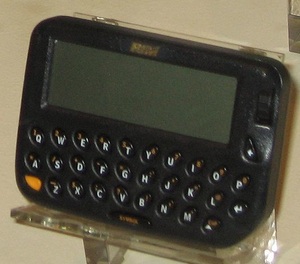
Here is where BlackBerry started:
Here is BlackBerry today, with a just announced new phone:
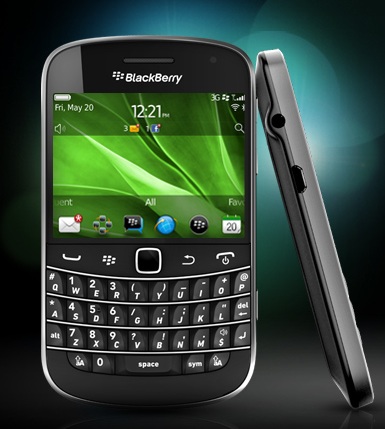
That’s called iteration, not innovation.
That’s the crux of BlackBerry’s problem — their devices aren’t compelling in the current landscape to both the general market and to the current BlackBerry users. If your customer base can’t be compelled to update their device then why should anyone want to buy your device? The users that you have, should be the most vocal proponents of your products, not silent “it’s ok” advocates.
[Updated: 5.5.11 at 7:33 PM]
Also see Marco here.
-
The B&B Podcast Episode 10
For this installment Shawn reports live from Hawaii on coffee and Pineapples. We also talk Mac OS X Lion, Mac App Store, writing bad reviews, and Shawn’s next computer purchase. Thanks very much to [Fontcase](http://bohemiancoding.com/fontcase) for sponsoring the episode.
For this installment Shawn reports live from Hawaii on coffee and Pineapples. We also talk Mac OS X Lion, Mac App Store, writing bad reviews, and Shawn’s next computer purchase.
Thanks very much to [Fontcase](http://bohemiancoding.com/fontcase) for sponsoring the episode.
-
Thinking About Macs as Cars and Trying to Figure Out What the Hell You Should Buy
Marco Arment [posted some great advice](http://www.marco.org/2011/05/04/imac-vs-mac-pro-vs-macbook-pro) about Mac buying decisions and he is right on his thoughts about the new iMacs being more disposable like laptops are seen. Since I am also a car nut, I find it much easier to break down the current slate of Macs by applying a car type to each…
Marco Arment [posted some great advice](http://www.marco.org/2011/05/04/imac-vs-mac-pro-vs-macbook-pro) about Mac buying decisions and he is right on his thoughts about the new iMacs being more disposable like laptops are seen. Since I am also a car nut, I find it much easier to break down the current slate of Macs by applying a car type to each model. This makes the decision process easier for most people.
**Mac Pro**: This is your workhorse truck. Its the big Chevy/Ford barreling down the road with all sorts of crap mounted to the bed. Maybe you have a fifth-wheel setup, maybe a toolbox with an oil pump on it. Perhaps you have a fancy rack carrying a ladder and some doug fir. Trucks are highly versatile machines that bear the brunt of the hard tax labor. Of course they can always be cleaned up and driven into the city — but that’s a bit over kill. Good luck finding parking too. Often your truck will be too big for parking garages and too big for parallel spots.
**iMac**: You know those large sedans that you see people driving around so comfortably in? That’s what we have here, lots of power for your average drive and plenty of room and creature comforts for those riding along. You can take it into the city with ease — though parking garages and valets are your domain. Old ladies drive these, so do car services and so do “normal” people. This isn’t the car for most people, often it is too much car, but for a great many this will be a perfect car.
**MacBook Pro 17″**: Stupid — I mean it’s a really big SUV. Think Hummer, or Ford Excursion — both that have seen end of life because of the limited market. This is a car without the full benefits of a truck, while still having all the downsides of the truck. Such as not being able to fit in parking garages, or in parallel stalls — all while not having the versatility of a truck. Basically you get all of the bad, without *much* of the good.
**MacBook Pro 15″**: This is the workhorse of the everyday man, best represented by your average SUV. It has all the benefits of a “normal” car and some of the power and versatility benefits of the truck. You can take it most everywhere and do most everything with it — certainly there are tasks best suited to trucks (like moving), but these are tasks most people don’t face that often. For the average person, this purchase represents a “safe” choice.
**MacBook Pro 13″**: It’s a Geo Tracker. Ok, well it’s really not *that* bad, but it is stuck in the same rut that the 17″ model is. You get all the bad things of the “Pro” line (size and weight) without the benefits of the “Air” line. It truly is the mini-SUV of the Mac line-up — far too small to be supremely useful, with limited power and a funky size class.
**MacBook Air 13″**: Mid-sized Sedan all the way. It’s the car that most of us *should* be driving instead of the SUV that we convinced ourselves that we *needed*. You get all the power you need for most everyday life driving around, enough room to comfortably fit four when needed and yet a perfect size for taking into the city and parking anywhere. You can haul groceries, golf clubs, or take and extended road trip — sure there will be some times of the year when this car isn’t right — it will be the *right* car 90% of the time for 90% of people.
**MacBook Air 11″**: This is your two-door car (not to be confused with a sports coupe, which is a different class) it isn’t as practical as an everyday driver for most, but makes a very nice secondary car. You get a smaller more efficient package, while sacrificing room for people and luggage.
**iPad**: I am including this because I have an analogy and because some are considering it as a secondary computer. The iPad is really the motorcycle of the Mac line-up. You can get a great many places with it and go where cars won’t fit, but you do so at a sacrifice to overall utility of the vehicle. Passenger support is limited and you can’t carry much with you. You can however park it on the sidewalk, or annoy the crap out of everyone else around you with how “small” it is as you dive in and out of traffic.
**iPhone**: Same reasons for including the iPad, except I don’t know where the iPhone exactly fits here. Initially I was billing it as a bicycle, but I don’t think that fits. I think the best fit for the iPhone is actually your shoes. You can go most anywhere with just your shoes, but you are going to get damned tired of using just your shoes after a few miles. Yet your shoes are always with you.
##### The Key #####
So how do we decode the above information? Here’s a limited key for you:
– Luggage = storage space (think hard drives).
– “Going into the City” and Parking = storing your computer and carrying it with you.
– Versatility and Utility = ports and expandability.
– Passengers = nothing really.
– “Creature Comforts” = things like backlight keyboards.
– Power = CPU, RAM, ports.So while it makes sense to buy a truck and also have a small two-door car as a secondary, it doesn’t make sense to buy a Truck and a large sedan. It also doesn’t make a ton of sense to buy and SUV if you never go off-road or drive in poor weather. Likewise it doesn’t make sense to buy a mid-sized sedan if you have a need to go off-road or drive in snow on a fairly regular basis.
*P.S. I am aware I left out Mac minis and the MacBook. There are many reasons, but suffice to say I don’t seem them as compelling options for anyone over what is currently listed here. Much more niche, like say smart cars (small, pointless and expensive) and oh Scions (the appeal of being cheap, but to get something decent it’s going to cost you the price of a ‘regular’ car).*