Year: 2011

  • Justin Blanton on the iPad 2

    Justin Blanton perfectly sums up my biggest fear:

    I kind of can’t wrap my head around how thin it is—just 8.8mm (that’s thinner than an iPhone 4!). Whether this helps or hurts its ability to be comfortably held over a protracted session remains to be seen; my guess is that, even with the lighter weight (1.33 pounds vs. 1.5 pounds), it will make it more difficult to hold, especially since it still has the same slippery aluminum back. I really wish they’d rubberize these things.”

    I don’t agree with rubberizing it, I think that has a poor tactile feel and is prone to looking dirty. I can say though that I worry that this will fatigue your hands if you are holding it to read while laying in bed — a thin device like this requires a better grip to support the weight than a similar, but thicker, device would.

    Justin has a great look at the iPad from one of the few people I know that sold theirs because they couldn’t find a use for it.

  • Apple’s Digital AV Adapter

    A nice rundown by TUAW on what the new HDMI dongle for the iPad will and will not do. Basically you can use it on older iOS devices (the ones currently available), but those devices are limited to playing back movies and slideshows through the dongle one.

  • The B&B Podcast – Episode #2

    This weeks episode was recorded earlier today — and earlier than normal — so that Shawn and I could get our iPad 2 thoughts out there. The episode title is: “Are you listening to anything I am saying?”.

    A big thanks to our two sponsors Instapaper and NoteTask, both make some great iOS and iPad apps.

  • Finish Him…

    The iPad 2 is out and without even touching one (though I have watched and read a lot of reports from people who have) I think this second iteration is going to leave many of the iPad’s competitors in a bad way. It’s like Sub-Zero in Mortal Kombat just dealt you a cold blast that freezes the iPad competitors solid — one of two things will happen when they unfreeze, there will be a bloody announcer saying “Finish Him…”, or Apple will come back at them with a swift roundhouse sealing their fate. ((Said roundhouse would be the iPad 3 with iOS 5.))

    None of this has to do with how well the iPad 2 actually performs.

    Size

    It’s safe to say that most of the competitors are going with the 7” form factors and those that are trying their hands at 10” (truthfully 9.7”) tablets are doing so with much thicker devices. That is: most manufacturers were struggling to create a tablet as thin as the original iPad and now the iPad 2 changes the game by creating a mind boggling thin iPad 2. The iPad 2 is thinner than the iPhone 4 — which when the iPhone 4 was announced it was proclaimed to be the thinnest smartphone on the market.

    Let that sink in for a moment: the iPad 2 is thinner than the iPhone 4.

    Battery Life

    10 hours — Apple couldn’t make the device smaller and at the same time increase the battery life, so they are giving you what you already have. By all accounts, Android makers have yet to get anything better than 10 hours — safe to say then that 10 hours is the entry battery life you need for a successful tablet and the iPad 2 has it.

    Check.

    Dual Core

    It doesn’t even matter how fast the dual cores are — Apple effectively swiped the buzzword that all other tablet competitors have been freely slinging in the iPads direction. In the average consumer mind it doesn’t matter which tablet is actually faster, it only matters if they can check off a feature list — and they can with the iPad 2.

    Dual core? Check.

    Not to mention that by all accounts the new A5 processor is absurdly snappy.

    Verizon and AT&T

    You could complain about the fact that the iPad was only available on AT&T and use that as your reason for getting another tablet, but again Apple just took that away.

    Two largest U.S. wireless carriers? Check.

    Apple wasn’t about to listen to people complaining and judging their device based on the carriers that it works on, so it was crucial that they have Verizon out of the gate.

    Price

    The real death blow — the real jewel — in the announcement is the price. $499 to start. This is a price that every other competitor has yet to figure out — sure 3G costs more, but in the consumers mind it is all about the price you can advertise — and Apple can say $499.

    It is all about the up sell and even though we all know that, we still feel like devices that we get up sold on cost much less.

    Final Thoughts

    I was going to skip this version of the iPad if it was a minor update, but this is no minor update. This is a major revision and one that I will be buying on day one.

    I think the iPad then deals a death blow before you even start to talk about the benefits that iOS has over Android and others.

    (P.S. I am going with the leather cover in red — I don’t know why red though, it just jumps out at me. Probably black and hopefully 3G on AT&T.)

    [Updated: 3.4.11 at 9:56 AM]

    In TUAW’s link to this post they make it sound as if I want the iPad to kill the competition — which couldn’t be further from the truth. I very much want competition, as it’s a good thing.

  • The iPad 2

    How can it be thinner than the iPhone 4? That seems like it wouldn’t be comfortable to hold, but I will be buying this on day one. Sweet upgrade all around.

  • Apple’s Strategy Tax

    John Siracusa:

    Apple’s long-term success is tied to the success of its platforms. These platforms, in turn, rely on the efforts of third-party developers—that’s the very nature of a platform. Given this, if the health and success of the platform is to be maintained, anything that hurts third-party developers must be offset by some other advantage to customers.

    Which is precisely why I think we have yet to see the whole picture surrounding the new in-app purchase rules and the new subscription model. (Perhaps we will find out more in less than an hour.)

  • Android developers form ‘union’ to protest Google policies

    Joel Falconer:

    Among the Android Developers Union’s demands are a renegotiation of the 32% Google cut on applications sold through the store, more payment options and public bug tracking.

    That extra 2% is just down right greedy. ((Sarcasm.)) But it is interesting that these developers actually felt a need to form a union and that they think a union will actually help.

  • “Mobile Notifications”

    Fred Wilson:

    The reason I think mobile notifications, done right, are a game changer is that notifications become the primary way I use the phone and the apps. I rarely open twitter directly. I see that I have ’10 new @mentions” and I click on the notification and go to twitter @mention tab. I see that I have “20 new checkins” and I click on the notification and go to the foursquare friends tab. I see that I have “4 new kik messages” and I click on the notification and go to my kik app.”

    This strikes me as a view point of a very reactive, or perhaps passive, mobile phone user. That is, the type of person that is only reacting to changes and is not actively using these applications. The type of user that only looks at DMs or the type of user that only responds to certain beeps and pings.

    Or, not me.

    I go out of my way to turn off as many notifications as I can — instead I prefer to actively move to those apps when I want to use them (which is quite often in the case of apps like Twitter and Mail). I don’t need, nor do I want, a ton of notifications because often I am already aware of what these notifications will say before the notification actually goes off.

    That is the real crux of any notification system and is only compounded on mobile devices: how do you meet the needs of the different user classes without alienating the average, non-technical, user? Too many options breeds too much confusion and frustration. Too few options pisses off people (case in point: iOS).

    I don’t even know if a “happy medium” exists here.

  • “Dirty Percent”

    John Gruber with an excellent take on Apple’s controversial 30 percent cut of subscriptions:

    It is, in Apple’s view, a privilege to have a native iOS app.”

    A revocable one at that.

  • A Calmer Reading App

    Cennydd Bowles imagining a calmer reading app:

    An estimated reading time accompanies each article, calculated from its word count. It’s harder to estimate the scale of a digital work than its physical counterpart, since we can’t skim to the end or feel the paper it’s printed on. The reading time estimate helps users to fit reading around their schedules, reducing the chance they’ll have to abandon an article halfway through. It also promotes the understanding that it’s OK to graze on short articles. Reading needn’t be just about marathons of concentration.”

    I love that idea and I hope it is one that Instapaper includes. (In fairness Instapaper currently uses vague dots to signify article length — this is better than nothing, but a time estimate would be killer.)

  • Oh Man…

    Gary Marshall on the iPad 2:

    Make no mistake, the iPad 2 we see tomorrow will be a disappointment. But it won’t be a disappointment because it’s a bad device, or because it doesn’t take the iPad forward.

    It will be a disappointment because it isn’t the entirely imaginary device the internet has been happily inventing for the last few months.

    Umm, ok…

  • A Yeti Review

    Nothing is worse then watching a TV show in standard definition when you know that the high definition version exists — granted you have to find the channel first. Likewise listening to audio in mono, instead of stereo is equally as annoying. Or listening to your favorite song being piped through your laptop speakers instead of through your $300 Bose headphones. Or having to make do with a non-retina display iPhone — blurry text is no fun.

    When you know there is something better out there, it becomes very difficult to sit back a deal with subpar things, especially when the better version is within your grasp.

    Recently I posted a list of podcasts that I love to listen to, and what should be clear to most is that I really like podcasts that have great production quality. Quality matters.

    Occasionally a podcast, or a guest on a podcast, will be saddled with a pretty cheesy microphone — perhaps the one built into their computer, or the headphones that came with the iPhone, or a cheap USB headset bought to be used with Skype. You can hear the difference.

    Mike Vardy contacted me and asked me to be interviewed for the WorkAwesome podcast and I graciously accepted. I knew that I needed better audio fidelity and fast (I didn’t want to be that guy). I swung in and exchanged something at the Apple store for the Blue Snowball microphone. I was immediately unhappy with this microphone — it was just too ugly looking and I couldn’t find ideal sound.

    As most of you are aware now, Shawn Blanc and I started The B&B Podcast. We started the podcast by recording a few trial runs and the first try was recorded with me on the Snowball. Not having pro mixers for the audio, my levels ended up being massively lower than Shawn’s and everything sounded like amateur hour. Not our forte.

    I quickly exchanged the Snowball for the Yeti so that I could get gain control on the mic and Shawn bought the same.
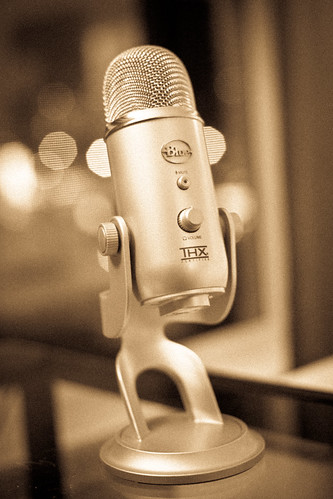
    Yeti

    The Yeti is a damn fine microphone.

    It is big. It is heavy. It is sexy looking.

    I tested recording on the Yeti against recordings from the built-in Air’s, the Jawbone Jambox, the iPhone headset, and the Blue Snowball’s microphones. The Snowball is a nice mic, but the Yeti is an excellent mic.

    With the Yeti you get:

    • Gain Control: allows you to adjust how loud your output is.
    • Passthrough Audio: you can plug headphones into the bottom of the Mic so you can hear your audio and the audio coming out of your Mac.
    • Patterns: decide which type of mic sensitivity is right for you.
    • 2 People One Mic: the Yeti is actually packed with three microphones arranged in a manner that you can set the Yeti in the middle of a table with two people facing each other, so they can use that same mic.
    • Volume: you can also control the output volume on the mic for your headphones.
    • Mute: you may never use the mute button, but it’s nice to know that you can.
    • Price: $150 might sound expensive to most, but it is far more costly to sound crappy in audio recordings. You can also find the same microphone on Amazon for $99 (affiliate link if you would be so kind).

    Yeti

    Noise Pickup

    My biggest complaint about the Yeti is that it is too good at times. To get the audio levels to a good point the microphone needs to be turned up a bit and with that comes the pick-up of a lot of background noise. Especially any noise from clicking and tapping on the desk. The foam on the bottom of the Yeti’s stand is not sufficient to muffle that sound. I solved this problem by using a piece of foam cloth material I had kicking around my camera bag and Shawn solved it with a hand towel under the stand.

    The best solution of course is to get a boom arm with a shockmount, but the shockmount that fits the Yeti costs more than the microphone itself — a none starter.

    The Yeti does a decent job blocking out background noise in the room, but you are still going to hear it if the noise gets loud enough for you to hear through your monitor headphones — which is precisely why you want the monitor headphones.

    Overall I am incredibly happy with what the Yeti does and does not pick up, unless you are in a studio you can’t expect perfection. With the Yeti I have found that it is perfectly manageable to sit in my living room and record a podcast.

    The Sound of You

    I have never been happy with the way my voice sounds when it is recorded. To me the sound never sounded like me — I am told this is because of the way we hear our own voice, compared to how others hear us. ((Has something to do with our bones and how they pick up sound when we speak versus when we listen.)) My voice always sounded too deep or deep tinny when I heard it, but now with the Yeti I am very happy to say that my voice sounds pretty close to how I hear it — my wife agrees.

    I think this is the most important factor for whether you are happy with a microphone or not: you need to be happy with the way you sound. It doesn’t matter as much to other people because they are likely to not know the difference between you in person and you on compressed audio being served up from a remote Amazon server somewhere presumable in the Amazon.

    Yeti

    Conclusion

    Even if the Yeti gets barely used I am very pleased to have it sitting on my desk. The Yeti is a truly great looking product and a great feeling one (it weighs a lot). I love the way it makes me sound and the way it looks. For $99 from Amazon you really can’t go wrong.

    However I think that you can get decent sound out of cheaper microphones with a little more work and planning. The Yeti offers me the sweet spot of less editing and less planning for equally great (and often better) sound. I would be lying though if I didn’t acknowledge that the look of the microphone plays a huge role in just how happy I am with it.

    Tips

    After using the Yeti for quite some time here are a few tips that I have found useful:

    • Put the Yeti on something padded and tape the USB cable coming into it down. This keeps a lot of noise from bumping and tapping the desk down, ditto with the cable as a slight jostle there can cause a nice audio pop in the Yeti.
    • If you have the Yeti on your desk with your Laptop and mouse do yourself a favor and find a way to deaden the tapping sound coming out of your computing activities. I rest my Air on a Rain Design stand when we record for B&B, that allows me to type without the listener hearing it. To solve the problem on my Magic trackpad I set tap-to-click to on and try to remember to only tap on it.
    • I position my Yeti between me and the keyboard when I am recording. This is not ergonomic or comfortable, but it puts the Yeti right where I need it to get good vocals. I try to stay between 10-12 inches from the mic.
    • Recording audio is a lot like taking a picture — you just can’t rely on Photoshop to make your pictures look great. Same with recording, if you don’t want to spend all day editing the audio tracks then you really need to take the time getting the setup correct. That means that if you have two people you need to adjust your levels until you are both pretty equal.
    • Controlling your voice is key — if you notice how singers will back away from the microphone when they belt out a word, the same is true with speaking. You don’t have to be monotone, but you should be aware that a loud outburst should be followed by leaning back from the Yeti.

    Well, at least that’s my experience so far.

  • TUAW Doesn’t Get It

    Victor Agreda, Jr writing on Mac OS X Lion’s NDA:

    It’s become painfully clear that Apple wants all of us to poke and prod and test and above all write, record and post about Lion.

    I am assuming that they are referring to this, from Apple’s developer website:

    In case you can’t read that, this is what the text reads:

    “Pre-release software, including information about pre-release software, is Apple Confidential Information and is subject to the terms of your Mac Developer Program License Agreement. Unauthorized distribution or disclosure of Apple Confidential Information is prohibited.”

    So I ask TUAW, what about the above statement makes it painfully clear to you that Apple wants this information disclosed?

    I can tell you that if someone comes by and steals $1 from me, I am not going to report it to the Police — why? Well, because reporting a $1 theft to the cops really isn’t worth my time, nor is reporting a $100 theft — but I still don’t want anyone taking my money. Perhaps it is not that Apple wants someone to break the NDA, but that it isn’t worth their time to yank access and send out C&Ds to all these websites.

    Agreda again:

    So from here on we’re going to ignore the NDA like every other Mac news outlet on the internet.

    Cool, because I remember when all the Verizon iPhone testers broke their NDAs and when the original iPhone testers broke their NDAs too. ((Actually that didn’t happen.))

    I am not saying you shouldn’t break the NDA — I don’t care — but don’t rationalize breaking this agreement by claiming that Apple clearly wants you to break the agreement.

  • The Very Rich Indie Writer

    A fantastic look at how a large group of previously unknown writers are striking it big by solely publishing with the Kindle store. The 100,000 sales a month mark set by Hocking isn’t likely, but there is a huge group hovering around 2,500 a month — that is enough to earn a living off of I would guess. ((I figure the publisher nets $3 after Amazon’s cut on average for $7,500 a month.))

  • New In-Game Advertising Model

    Christopher Mims on Tap Me’s new game advertising model:

    So imagine your in-game avatar is about to start its race across the game world. Want a speed boost? OK, here’s one for free — but it’s got the Nike logo plastered across it. Want the ability to fly? Why not let Red Bull give you wings? It’s not hard to see how brand advertising could integrate with a mobile game.

    That is rather clever.

  • Answering Reader Email: MacBook Pros and Airs

    I try to make an effort to answer all email that comes in (I will never get a response to everything though) and this email from Tyler Guidry stands out as one that I thought my response was best shared with all my readers. Here’s Tyler’s email:

    […]
    You did a great write up on the MPA 13 end of last year and was wondering what if anything would get you to move back to a MBP.

    I have been nursing a MBP 13 (Mid 2009) and holding out since last summer waiting for MBP line to refresh. I really had to restrain myself especially after the MPA review you did. I had been holding out for 1440 res on the new MBP 13 and was severely disappointed. Seriously, the 11.6 MPA has higher resolution than the 13 MBP.

    Any thoughts on why the 13 MBP did not get bumped resolution? And does the 13 MPA still feel like a solid primary machine 120 days in?

    There are only two ways that I would move back to a MacBook Pro:

    1. My computing changes in such a way that I would need more processing power.
    2. The MacBook Pros become lighter weight enough that the gap between the Air and Pro is much closer.

    Honestly though, I will probably always stay with a MacBook Air and instead choose a desktop (Mac Pro) to stay at home if I ever truly needed more processing power. I just don’t ever want to have to lug around all the weight that comes with a MacBook Pro.

    Which brings me to Tyler’s last question — 120 days in I think the MacBook Air maybe the best Mac that I have ever owned, even better than the fabled 12” Powerbook G4. The size, weight, and performance are all just perfect for me. Don’t even get me started on the awesome battery life.

    The 13” MacBook Pro

    I too was surprised that the 13” Pro didn’t get a resolution bump to make it on par with what the Air has — makes very little sense. I honestly think that this might be the beginning of the end for the 13” MacBook Pro line.

    If you believe that the Air line truly is the roadmap that Apple will follow then you believe the following:

    1. All portables are getting thinner.
    2. Optical discs are dead.
    3. SSD or bust.
    4. Battery life, lots of battery life.

    So if you take the current 13” MacBook Pro, remove the superdrive, grab an SSD, jam more battery in, and make the entire package smaller — you basically end up with a faster version of the 13” Air.

    Or look at it this way: once the Pro line ditches optical drives, what will be the difference between the 13” Air and the 13” Pro? Not much. I wouldn’t think Apple would keep two different notebooks that are essentially the same (price, and performance being the main differences). I just don’t see Apple trying to sell the Air line and the Pro line with the differences being computing speed. One will have to die, so will it be the 13” Air or 13” Pro? Doesn’t matter, they will be the same at that point.

  • Quote of the Day: MG Siegler

    “Just like the floppy disk before it, the optical disc will fade into irrelevance. And now you see why Apple has never included a Blu-ray drive in any of their machines.”
  • The B&B Podcast – A Technology Talk Show

    Halfway into January Shawn Blanc and I had an idea to start a technology talk show, we both quickly began learning about podcasting and getting some sweet high-quality microphones. During all this we recorded practices episodes, until a few weeks ago we kept things hush-hush. A few weeks ago we teased our Twitter followers with an unofficial first episode that we could also use to submit to iTunes and now we are launching full scale.

    Yesterday we pushed our first episode of The B&B Podcast and you can go check it out here and you can subscribe in iTunes here.

    If you like what you hear please leave a rating and/or reviews in iTunes. Thanks!

    [Updated: 2.28.11 at 2:10 PM]

    Shawn posted a little bit about the name “The B&B Podcast”. Also we are looking really good in iTunes right now, thanks to everyone who has rated the podcast!

    Lastly, I dig the logo and I know you do too — big thanks to Shawn for designing that, looks fantastic.

  • How To Turn A Laser Into A Tractor Beam [Not Ready for the Enterprise Yet]

    The Technology Review:

    If the scattering angle is just right, the total momentum in the direction of propagation can be negative, meaning the particle is pulled back towards the source and the light becomes a tractor beam.

    I don’t know what I want more now: a laser that cuts through walls or a tractor beam. Nah, who am I kidding — I want the cutting laser.

  • Quick Takes on Five Apps No. Two

    Last week was the first installment of the ‘Quick Takes on Five Apps’ posts that I plan on doing weekly — if you missed that be sure to go take a look at it. Here is the second installment.

    Thermo (iPhone)

    Sometimes all you need to know is the temperature outside based on where you are right now — that is exactly what Thermo is for. You can get it for free and upgrade in-app to a version with no ads (recommended). This app is not only gorgeous, but is pretty handy too — it is vying for a spot on my homescreen right now. Every time I run out of the house I like to know if I am going to need a jacket or not, Thermo is the perfect app for knowing that information. Love it. My favorite part is that the entire look of the app changes when the temperature drops below freezing — instead of being ‘normal’ red looking mercury, the app becomes icy and blue — what a great touch.

    What Cocktail? (iPhone)

    If you ever have to order a drink, then you probably could use this app. Also if you love seeing gorgeous design, then you really won’t want to miss this app. This is a simple app that tells you what to drink based on a simple input from you (your mood). I love that not only does it tell you a cocktail (or sometimes water/coffee), but that it also tells you a bit about the drink. The utility of this app is limited and I rarely use it — but it is truly a beautiful app.

    MLB At Bat 2011 (iPhone and iPad)

    If you are a baseball fan then you are sure to love this. Not cheap at $14.99 for each device — each season — MLB At Bat has been a staple on my homescreen since the app debuted. Live gameday information, live scores, live radio broadcasts for both the home and away team. You get videos of top plays, condensed game replays and if you subscribe to MLB.tv (waste of money) you can watch the game live. This is a great app, with a steep price. Personally I use it on my iPad to ‘watch’ Mariners games all season long.

    WebKit Nightly Builds (Mac/Windows)

    Chrome 10 was damned fast for me, but too limited. Going back to Safari left me with a yearning for more speed and the WebKit nightly’s have proven to be a touch faster. They are not as fast as Chrome 10 and can be very glitchy at times, but I rather like using them.

    Sound Studio (Mac)

    I didn’t know a thing about audio editing, but when I needed to do some no program came more highly recommended to me than Sound Studio. I have been using it for a month or so now and I really like it. Dead simple to use and looks great. Most importantly I can do what I need to do without getting hung up trying to find things in the app. The more I use it and get to know the app — the more I enjoy it.