Month: April 2012

  • ‘RIM Evolves Its Server Software to Manage iPhones, Android Devices’

    Ina Fried:
    >Acknowledging it is no longer a BlackBerry-only world, Research In Motion on Tuesday released the first version of its server software to manage other company’s mobile devices.

    >The update to BlackBerry Mobile Fusion, as promised, can help businesses keep tabs on Android and iOS devices in addition to BlackBerry phones and PlayBook tablets.

    [So it starts](https://brooksreview.net/2012/04/rim-ms/).

  • State of the iPad App Store: Calendar Apps

    Along with Weather apps, I like to keep tabs on the current state of the art for calendar apps — I am still looking for that perfect app. Right now Agenda on the iPhone comes to [near perfection](https://brooksreview.net/2012/03/cal-redux/) for me and Fantastical/QuickCal suffice on my Mac.

    Here again though I am faced with very little innovation in the iPad sector. This time around the problem seems to be the abundance of screen real estate and the love of skeuomorphic design.

    Before we dive into the iPad calendar apps here are a couple of primers about what I am looking for in calendars:

    1. [Calendar Apps Suck, Here Are My Suggestions](https://brooksreview.net/2010/09/sucky-calendars/) – in this post I talk about what I want out of a calendar app.
    2. [Calendar Redux](https://brooksreview.net/2012/03/cal-redux/) – in this post I talk about why I like Agenda and how I oscillate between Fantastical and QuickCal.

    ### Back to the iPad

    I think the biggest problem that iPad calendar developers face is with how people use the calendar on their iPad. I am going to make a very general assumption, but that assumption is that most iPad users own a smartphone and desktop/laptop computer of some type in addition to the iPad — something that I don’t think is too far off from reality.

    The fact that users have multiple devices creates an interesting problem to solve on the iPad. By far the iPhone/smartphone is going to be much more readily available for checking appointments and entering new ones. The computer is also going to be far more heavily used than an iPad because people are more used to it — and because of the (generally speaking) larger screen nature of the computer, coupled with the fact that this is likely what people are sitting in front of while at work for 8 hours out of the day.

    That leaves the iPad with an odd swatch of real estate to cover. The iPad needs to be both good at quickly looking up the days appointments and also great at long term planning and entering new events. In my opinion it’s almost an unfair situation for the iPad — so it’s not wonder to me that there aren’t any great calendar apps for it.

    ### Apple’s Offering

    Apple’s built in calendar app is annoying at best and down right hideous most of the time. If you can get over the [little bits of torn paper](https://brooksreview.net/2011/04/mimics/) at the top, then you likely can’t get over the fact that it is just a rather useless port of iCal. My largest gripe here (besides the design) is that I can’t pinch to zoom at all to move from day to week to month views — or even to adjust how much of the screen the hour takes up.

    Add to that the fact that the day view is a nightmare of wasted space and repetitive data, and well I can’t stand to use the app.

    ### The Incumbents

    There has been only two calendar apps for my iPad that I thought were worth keeping around: [Agenda](http://getappsavvy.com/agenda/) and [Calvetica](http://mysterioustrousers.com/calvetica). Both are nice apps, but both don’t fill the void for me. Lacking in both utility and design.

    #### Agenda

    The app I love to use on my iPhone, seems to have lost its way in the port over to the iPad. My biggest gripe is that there is not one good viewport that accomplishes everything in a logical manner.

    The week view is nice, but the layout is confusing. The day view has the signature scrolling list down the side, but wastes a ton of space showing just one days appointments. It’s a solid app, but it’s not a great app.

    #### Calvetica

    A slightly different approach than Agenda, Calvetica features a design that is more pleasing to my eye, but still feels like it is wasting too much space.

    Is the best use of the screen to show a large scrolling month view? Not for me it isn’t. I do like the gestures for switching between day, agenda, and week views on the right — but I also find the app really sluggish at loading in the calendar data when scrolling through the months.

    I’ve always had a soft spot for the design of Calvetica and think they have done a great job creating a quick entry system, but the fact remains that I mainly use a calendar for viewing appointments and in this case Calvetica doesn’t fit the bill for me.

    ### Interesting New Options

    Again I dug through the App Store looking only at paid calendar apps. Of all the offerings just three caught my eye enough to download and try out because they were the only three that looked to be trying to do things a bit differently.

    #### iCalendar

    Not to be confused with iCal, [iCalendar](http://itunes.apple.com/app/icalendar/id492076105?mt=8) is an interesting option for one reason and one reason only: the design is a departure from the norm. iCalendar features very large type, and while that doesn’t work out too well for short appointments, it does make your data a bit more “glance-able”.

    Honestly I just downloaded the app because the design caught my eye. Nothing about this app screams “new” or “different”, but if dark backgrounds are your thing, you may find the app nice (once they get a retina update out).

    #### 12months

    First a note about [12months](http://www.app.net/12months): no retina support here. It is a very unique app though. The entire years worth of calendar dates are listed out as little numbers. Tapping on any date shows the appointments for that date in a pop-up window. That’s it.

    As far as I can tell there is no way to add an appointment, but it you can edit them. The app also only works in portrait orientation.

    This is a niche app if I ever saw one. I’m not sure in what scenario this app would be useful, but I am sure it would be of interest to some. Personally I just find it odd.

    #### Calendar ABW

    Let me first start by saying that [Calendar ABW](http://itunes.apple.com/us/app/calendar-abw/id478605600?mt=8) is the only app of the lot that doesn’t pull in your calendar data — a nugget I learned only after plopping down the $9.99 for it. The calendar data you enter is all sandboxed in the app — making it the hardest of all the apps mentioned here to start using. That said it is also the most interesting of the apps I tried.

    Your entire day is broken into one hour segments, shown four at a time. Each day is one row. When you add an event you can either have it be 30 minutes or a full hour. That’s it.

    This is quite interesting, and though it doesn’t work for me, I bet it would be great if you practiced time boxing. Here’s a screen shot so you can see what I mean:

    [](http://c276381.r81.cf1.rackcdn.com/IMG_0057.PNG)
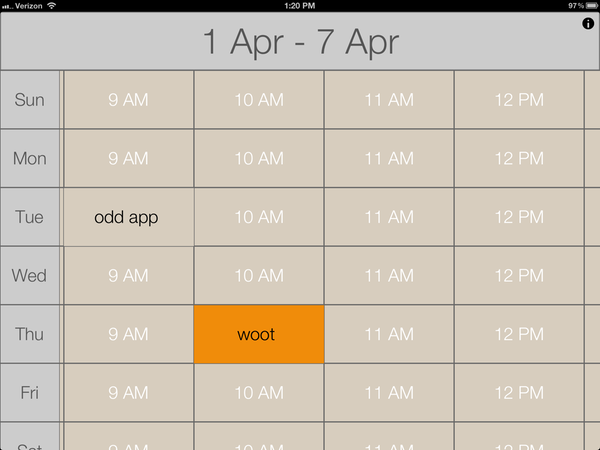
    It seems to be to be built as an app you reference a lot, maybe for a conference schedule — as a day-to-day calendar app I don’t find it to be that great given that it doesn’t sync with my Agenda calendars.

    ### State of the App Store Summary Findings

    At the end of all this searching I am left with two conclusions:

    1. It must be incredibly difficult to build a calendar app for the iPad, because;
    2. All current calendar apps for the iPad leave a lot to be desired.

    For now, I’ll stick with alternating between Agenda and Calvetica.
  • ‘Joey Votto’s Massive Extension Changes the Game’

    Dave Cameron, writing for my favorite Baseball site FanGraphs, about the recently announced Cincinnati Reds extension of star first baseman, Joey Votto (a 12-year, $251.5 million total contract):
    >This deal is going to have lasting repercussions on the sport. Not only does it suggest that the Reds are going to remain competitive in the NL Central going forward, but it also resets the price expectations for every pre-free agent player in the sport. Congratulations, players, all of your expected prices just went up. Way up.

    It’s a massive contract and shows two things:

    1. Players are going to be getting paid a lot more.
    2. Teams expect that to make financial sense.

    Item number 2, that amazes me.

  • ‘Being Gifted’

    Jorge Quinteros:
    >A new camera means a new incentive, a new enthusiasm to shoot more and most likely, an immediate and substantial upgrade to whatever you might have own before but what it doesn’t mean is being gifted with any additional artistic talent to produce something you may not have been able to create with your previous equipment.

    Most common question I get from writers just getting started on the web: what tools do you use? The answer is irrelevant, because having my tools won’t make you any better of a writer (probably would make you worse). What Jorge says in the above passage really rings true to me: good tools are great to have and use, but they don’t instantly make you any better at what you use those tools for.

  • 10.7: Remove the Dock’s Display Delay

    This has been floating around for a week or so, but I just got around to doing it — and oh man is it great.

  • Seasonality Core

    Just found this app this morning, a nice version of Seasonality for your Mac. I have a lot of the same complaints and accolades for it as I do the iPad version. I do like the control you have over the graph data. Seasonality’s graphs did take me a minute to figure out what they are for, so don’t feel like you are the only one if you get confused at first.

    *(Also there is [Wx](http://hrtapps.com/wxmac/) that offers a far more, umm shall we say, nerdy view of weather data.)*

  • Anil Dash Calls Foul

    [Anil Dash responding to criticism of Readability writes](http://dashes.com/anil/2012/04/readability-instapaper-the-network-and-the-price-we-pay.html):
    >But, foolish fanboy enthusiasm on both sides has got people choosing “sides” between the apps and turning legitimate feature debates into some sort of moral judgment of the people building the tools.

    That’s three sentences into his entire argument and he has already discredited himself (in my opinion) by dropping the term “fanboy”. But let’s see what else he has to say.

    > First, I should loudly and clearly disclaim: I’m theoretically conflicted all over this. I am an enthusiastic and proud advisor to the good people at Readability and consider them friends. I am a long-time fan of Marco Arment’s from even before Instapaper was created, and whenever we’ve seen each other socially, I’ve been really impressed by his thoughtfulness.

    Actually, there’s nothing “theoretical” about his conflict: Anil Dash is an advisor to Readability and therefore has a vested interest in the success of Readability. That he is a “fan” of Marco Arment is a “theoretical” conflict, but in no part is there anything “theoretical” about his bias towards Readability. There’s nothing wrong with bias — we all have it — but to pretend it only “theoretically” exists is bullshit, pure and simple.

    I consider Marco a friend, and for that people have said that I only am defending Instapaper because of that friendship. I can see how people get there, but let’s go into some background on this:

    1. I became friends with Marco because I love Instapaper — so my defense and love for Instapaper predates the friendship.
    2. I am the loudest and biggest critic of things out there and doubly so if they are a friend. I can’t verify that, [but I am sure anyone who listens to Shawn Blanc and I talk every week can verify my critical nature](http://5by5.tv/bb).

    That’s my bias and I own it. I do not, however, think it comes into play with my main complaint about Readability: that they are collecting money in the names of other people, without the consent of those people. That’s not a complaint about popularity or competition — it’s a legitimate complaint about ethics behind such a model.

    Back to Dash:

    > And, since I’ve been through this kind of stupid fanboy battle before and know exactly what it costs, I want to explain what I think is at stake and why we’re headed down a dangerous road.

    There’s that word again, a word meant to belittle the situation via negative connotation without having to provide a strong argument why. This is not, in my eyes, a “stupid fanboy battle” this is a select group of publishers very clearly stating that they do not, and will not stand for, someone else collecting money in their name without entering an agreement with that person first. The only reason that Instapaper is mentioned is because it is a popular competing service that does not commit this egregious act of collecting money in the name of others.

    The way I see it: this is akin to emailing someone asking for permission and stating in the email that you will assume permission is granted if no response is received. Again, this is a bullshit move.

    Dash goes on to list out some of the arguments and here’s what he lists as one of the “debatable” issues:

    > Apps like Readability offer a system where a subscription payment holds the majority of its revenues (in their case, 70%) for publishers, but requires the publisher to register with the app in order to receive their payment. Some people consider this objectionable because it’s opt-out instead of opt-in for the publishers, and because it’s not clear enough what happens to unclaimed payments.

    Firstly, it’s not clear at all what happens to the unclaimed money. I have heard it was intended to be donated to a literacy charity and if that is really the case, how hard is that to setup and write a blog post about? Secondly, it’s not just that the system is opt-out, it’s that unless the publisher opts out the user has no way of knowing if their money is actually going to the site they hope it is going to.

    This isn’t so much an issue for sites like the New York Times, but imagine if a reader only reads two sites and wants to contribute to them, but neither site is signed up, or opted-out. The reader has no way of knowing this, but every month has to pay the subscription — where is that money going and why not tell the reader if a site is signed up?

    >I saw a number of critical posts which (falsely) described Readability as “VC-backed” or as a “big company” swooping in on the little guy.

    I’ll take ownership of making that mistake and I do apologize for alleging that Readability was VC-backed.

    Lastly Dash alleges:

    > Because if we succeed in vilifying Readability for trying to figure out a publisher payment model, Instapaper is going to go down with it for charging for its app. If we succeed in attacking Instapaper for providing ad-free views of content within its app, Readability is going to go down with it.

    I agree with the latter statement, but the former makes no sense to me. How is Instapaper hurt if Readability’s business model doesn’t work — they are two separate and distinctly different business models.

    This is a long post on a subject that many of you are losing interest in (I am sure), but the fact is that the argument keeps getting twisted.

    There is one major argument: We do not want Readability collecting money in our name, without our permission.

    I can’t say it any more clear.

    Lastly, there’s two questions that I feel Readability must answer:

    1. Why does Readability feel it is OK to collect money in another’s name without that persons permission?
    2. What, specifically, happens to the unclaimed money?

    I think users and publishers deserve answers to both of those questions.

    UPDATE: I missed [this post where Readability CEO Rich Ziade](http://curiousrat.com/home/2012/4/2/interview-with-readability-ceo-richard-ziade.html) states that all unclaimed money thus far is still in an escrow account. That’s great, but doesn’t change the fact that we don’t know what will happen to that money.

    UPDATED 2: [At some point Readability did add a check mark to indicated sites that are “signed up” to get payments](http://twitter.com/chartier/status/186908355737042944). That’s a very welcomed feature.

  • ‘RIM’S Future: Dead, Alive, Reborn?’

    Jean-Louis Gassée on RIM:
    >Of course, there is one intriguing possibility left: Microsoft could do to RIM what it did to Nokia. They could convince RIM to abandon its unlikely-to-succeed “native” software effort and become the second prong in Microsoft’s effort to regain significance in the smartphone wars. We can picture the headlines: RIM Joins Nokia in Adopting Windows Phone, Microsoft Now Firmly Back in the Race…

    I think the smart move for RIM is to forget about devices and create apps for Windows Phone, Android, and iOS. You have your BlackBerry app that ties into your secure corporate server where your email, contacts, BBM, and calendars await you. Yeah, I wouldn’t use it, but I bet RIM could convince security conscious companies that this is a “smart move”.

    I think Gassée is right when he speculates that no one is going to buy RIM for their patents — and at this rate why buy them at all?

  • Fools of the Year

    I think Lyons should be a bit higher, but that’s just nit-picking.

  • State of the App Store: Weather Apps

    I love to nerd out on weather apps and weather data in general. I have always been fascinated by weather forecasts and I have always relied on them for planning events and my wardrobe. Yet there is still no good weather apps out there.

    The best weather app on iOS is Apple’s own weather app, but it’s only available on the iPhone for some damned reason. It used to be among the bottom tier of weather apps, but the addition of the current location and hourly forecasting moved it to the top of the list. A very close second is [My-Cast](http://itunes.apple.com/us/app/my-cast-weather-radar/id348779486?mt=8), but it’s starting to get long in the tooth.

    So we have a useable — serviceable? — weather app on our iPhones, but what about our iPads? Sadly, we face a choice between bad and useless on the iPad.

    Just the other day I browsed the app store, looking only at paid weather apps for the iPad. There seems to only be two types of displays that developers are using.

    ### Display Type One: Weather Station

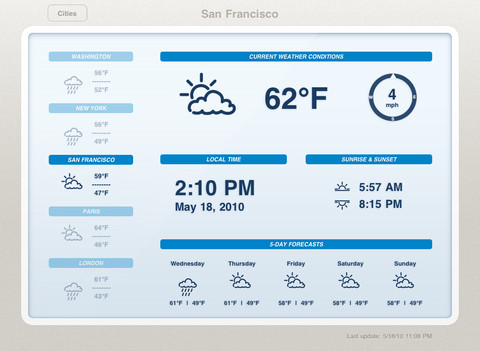
    The first display design are modeled around LCD weather “stations” that *used* to be popular among the Sharper Image crowd. This is the type of weather app that generally looks like this:

    It’s not bad, but I would argue it’s not even scratching the surface of possibilities given the device that is powering it. These types of apps are static, not interactive, and that’s bad.

    ### Display Type Two: Demo

    The second type of app is what I call a demo app — it’s an app that looks and works fantastic for giving a demo, or presentation, to someone — but when you get right down to it, it too sucks. The best example of this is [Weather HD](http://itunes.apple.com/us/app/weather-hd/id364193735?mt=8). It’s a beautiful large graphic that is clearly taking advantage of the iPad, just not in a way that helps someone wanting weather information.

    By and in large most of the “new” weather apps I see on the iPad app store take this approach:

    1. Show incredibly beautiful graphic of the current weather conditions.
    2. Relegate all other (more important) weather information to a smaller section of the screen.

    I cannot be clear enough: I hate these apps.

    In my mind, they are completely useless.

    ### Both Display Types are Useless

    Thinking about it a bit more I actually think it is fair to say that both display arrangements are fairly useless, because both assume the same thing: that the user is going to leave their iPad on, and with that app up in the foreground.

    That’s the only way these apps become useful: if you are dedicating your iPad to the display of these apps. ((To be fair, weather apps are not alone in this category.)) The problem with that is that weather data is begging to become interactive.

    Radar maps look like they are from the 90s, and yet they could be so much more. [Take a look at the wind map across the U.S. to see just how amazing weather data can be if we try](http://hint.fm/wind/). You may think that wind map isn’t useful, but I actually learned quite a bit by looking at it and the way the wind was moving throughout my corner of the country, but just imagine what we can do with precipitation and temperatures…

    ### Is There Anything Good?

    Short answer: no. Longer answer: [Seasonality Go](http://getseasonality.com/go/) is about the most interesting of the iPad weather apps ([still](https://brooksreview.net/2011/04/seasonality/)), but it’s not very nice looking. Where it lacks in design, it somewhat makes up for it by making graphs and layouts interactive. Additionally the Radar map actually works — and does so quickly. It’s not good, but it’s the only thing I found worth keeping on my iPad.

    ### Moving Forward

    As I said above, it seems to me that developers of weather apps for iOS have reached an impasse, where they can’t move outside of the box of current weather display methods. The last thing the app store needs is another Weather app that shows a giant sun radiating heat with the temperature data shoved in the corner.

    What iOS needs, the iPad specifically, is a weather app that asks what a user truly wants and needs — because I really doubt there are many people that want to buy a $500 device to leave it in a stand showing your fantastic radiating sun all day long.

    UPDATE: Some confusion over what I am trying to say here. First that weather apps suck right now. Second that the weather data needs to be more interactive. If you are wondering what a “perfect” weather app for me would look like, I can’t tell you. I think that, right now, developers are just trying to show weather states and temperatures, instead of asking what a user wants to learn from weather info, and that goes beyond: “do I need an umbrella?”

  • [SPONSOR] One More Thing – iOS Conference

    Interested in the design, development and business of iOS apps? At One More Thing, our goal is to get developers confident, psyched, and ready to move from dreaming of making apps to just doing it. Learn from awesome developers & designers such as:

    – Loren Brichter (Tweetie/ex-Twitter)
    – Neven Mrgan (Panic)
    – Karl von Randow (Camera+)
    – Raphael Schaad (Flipboard)
    – Matt Rix (Trainyard)
    – Shaun Inman (Last Rocket)
    and many more…

    They’ll be in Melbourne, Australia on the 25th & 26th of May, 2012. Register before April 12th for discounted early-bird pricing. It’s a perfect excuse to visit Australia too!

  • iOS Text Editor Comparison

    A comprehensive and detailed list and comparison chart of just about every iOS text editor I have heard of, by Brett Terpstra.