A great post by Dr. Drang talking about how Microsoft could re-learn stuff they used to know from Instapaper:
>Maybe Steve Ballmer should ask Marco for advice.
If you don’t get why Office on iOS is important for Microsoft, then read this.
A great post by Dr. Drang talking about how Microsoft could re-learn stuff they used to know from Instapaper:
>Maybe Steve Ballmer should ask Marco for advice.
If you don’t get why Office on iOS is important for Microsoft, then read this.
MG Siegler taking down ridiculous statements from the Chairman of Creep:
>The same is true for the vast majority of new startups — I talk with dozens each week. The refrain: iOS first. Android second. Down the road. At some point. Maybe.
Great post and paints the sad consumer side of Android: slow updates, lack of top developer support, and on.
I have an on again, off again, relationship with Osfoora for Mac. I love the UI and the fact that it actually works well, but I have not been a big fan of the icon, or lack of streaming API.
Both of those things changed today. The latest version of Osfoora supports the streaming API (finally) and they updated the icon. The icon is better, but not sure if I like it.
The streaming API addition alone is enough for me to give Osfoora a go again as my full-time Mac Twitter client.
When I posted yesterday that no one freaks out because Office isn’t on their iPad, the only response I got was from people who use track changes all the time. Well, let’s see what Mr. Sparks has to say about that:
>Office² just released an update with the holy grail for iPad attorneys, track changes.
Now, it would seem, we can all agree that Office is irrelevant on mobile devices.
We all have WiFi routers in our homes and the industry is at the point now that a decent router can be had for next to nothing. ((If you don’t care about speed, they can be had for less than $15 on Amazon.))
The problem: none of those cheap routers will be something that you are happy with. They will all cause you to have days where you can claim: “I was fixing my wireless, again”. I’ve been there, I hate that place.
In my opinion you are wasting your money if you buy anything other than the Apple Airport Extreme/Time Capsule.
For a few reasons:
1. Apple’s routers are a device that you aren’t going to have to constantly tinker with to get working. You need only set them up once and you are done.
2. AirPorts have great range, but if you need more, Apple makes it easy to extend the network. Hell, you can even add in an AirPort Express, or three, if you need to extend quickly and cheaply.
3. Apple makes the process of setting up super fast 5Ghz networks simple.
4. AirPorts make setting up a guest network dead simple.
5. You can administer AirPorts from your iPhone.
6. Wireless printer sharing is easy.
7. Quite literally, grandparents can set them up.
8. Hard drive sharing is easy.
9. If you get the Time Capsule, backing up is seamless, wireless, and (you guessed it) easy.
I’ve only ever had three Apple routers: an Airport Extreme, Airport Express, and Time Capsule.
I bought the extreme when they first came out and the Express to extend it. Both were replaced by the Time Capsule, but only because I wanted the new features of adding in a guest network and 5Ghz speed. If it weren’t for those reasons, I still would likely not need a new router beyond that first AirPort Extreme.
Compare that to all the Netgear, Linksys, D-link routers I owned before (top of my head count: 8) and why Apple just outshines each of those in every facet. I have only had three Apple routers, but really I only bought more because I wanted new features — not because I was tired of trying to mess with my current router. Pre-Apple routers I would buy new routers because I was convinced I had a dud.
I have installed DD-WRT on routers. I know, and can vouch for, just how fast non-Apple routers can be. The problem: they require a lot of work, and more than that, a lot of maintenance. I had one router that needed to be reset every time ~10GBs of data passed through it — no really.
I know a lot of people who constantly have trouble with their ’wireless internet’ and after I convince them to get the Apple router I don’t hear another peep from them.
I know these routers aren’t for everyone, but they are for *most* everyone.
Go get yours, set it up, and then forget about your network for a couple of years.
### Buy One
– [Apple AirPort Extreme](http://www.amazon.com/exec/obidos/ASIN/B0057AVXJA/ref=nosim&tag=brooksreview-20)
– [Apple AirPort Express](http://www.amazon.com/exec/obidos/ASIN/B0015YJOK2/ref=nosim&tag=brooksreview-20)
– [Apple Time Capsule 2TB](http://www.amazon.com/exec/obidos/ASIN/B0057AVXP4/ref=nosim&tag=brooksreview-20)
– [Apple Time Capsule 3TB](http://www.amazon.com/exec/obidos/ASIN/B0057AVXTA/ref=nosim&tag=brooksreview-20)
This is like the [CableDrop that I mention a while back](https://brooksreview.net/2012/05/amazon-item-cabledrop/), but made for handling more cords. It’s a nice addition to the side of my desk, where I can use it to hold:
– MacBook Air power cord
– USB cable for HDs
– iPod/iPhone/iPad Cord
I only have three cords there and before I used two CableDrops to hold them — now the Cable strip does this job a bit better. For less than $10 for two, it’s worth checking out.
*Bonus tip*: A couple readers mentioned that double stick tape doesn’t hold well — to combat that clean the surface you are sticking anything to with alcohol (not the drinking kind) first and you will get a long lasting hold.
Farhad Manjoo:
>And then what will we have? A movie about a guy who was great at being terrible — a sure hit, but not one that tells us anything about how Jobs pulled off the biggest corporate turnaround of all time.
He’s probably right. “Good movie, not accurate, and a wasted opportunity.” Is probably how my review would read.
Wolf Rentzsch ((Yes, I am late to reading this.)) on how to decide where to buy a particular app from, says:
>Fortunately Apple now only accepts sandboxed Mac apps, clarifying the situation: customers should buy Mac apps directly unless there’s a good reason not to.
I disagree. Rentzsch makes some great points and arguments for buying apps directly, but there is a simple reason why most Mac users should buy only from the Mac App Store: peace of mind.
As Rentzsch lists, there are a few really strong reasons to buy from the Mac App Store — what he doesn’t say is that most of the reasons to buy direct don’t apply to the non-nerd population, which is most of the Mac user base.
Personally, being a nerd, iCloud alone is reason enough to only buy from the Mac App Store.
Nicole Perlroth:
>The researchers, Yair Amit and Adi Sharabani, discovered that LinkedIn’s mobile app for iOS, Apple’s mobile operating system, included an opt-in feature that allows users to view their iOS calendar entries within the app. Once users opt in to that feature, however, LinkedIn automatically transmits their calendar entries to its servers. LinkedIn grabs details for every calendar on the iOS device, which may include both personal and corporate calendar entries.
And a bit later:
>She did not clarify why LinkedIn transmits calendar information to its servers.
This is shady of LinkedIn, but two things strike me about this. It’s opt-in, so the privacy busting feature is off by default — that’s not an excuse, but it makes this entire thing slightly less offensive to me. Basically LinkedIn asks to access your calendar and the user grants it.
The shady part is not that the app gets access to all of this, but that all that calendar data is sent back to LinkedIn servers. This, however, is a failing on Apple’s part.
This is the very thing that the App Store was made to protect users from: shady companies, doing shady stuff with your personal data.
LinkedIn = shady company.
Sending calendar data to remote servers = shady stuff.
Calendar data = personal data.
We already know LinkedIn is a SPAM king, so what would you expect from them? Nothing less than this.
In my view, the failing here is on Apple.
For quite sometime now [Agenda](http://getappsavvy.com/agenda/) has been *the* calendaring app that I use on my iPhone. The fact is: I typically only use iPhone calendar apps to view appointments and rarely to add appointments. With the addition of Siri this is doubly true.
There are, however, those times when you really need to manually input an appointment and Agenda has always been lackluster in that department.
No more.
With Agenda 3.0 the add appointment screen was overhauled and rethought. They did a very nice job with it.
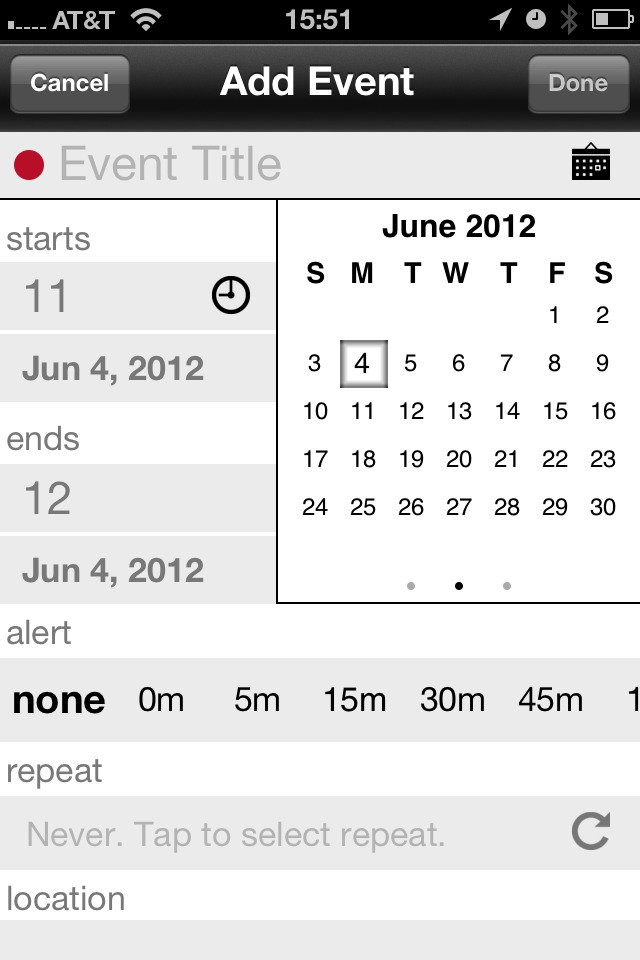
I personally would prefer slightly larger tap zones for the Title area, but that’s a minor complaint in the grand scheme of things. One thing that I really like is that this screen is mostly laid out the exact way my mind thinks when I input a new appointment:
– Title
– Start
– End
– Alert
I would like it if Location and Repeat fields were flipped around, but again: minor complaint. (I also like that there are lots of new defaults that you can set here too.)
For a feature that I rarely use, this is a very nice update. It’s certainly not as fast as speaking the appointment to Siri, but as fast as anything else I have used on the iPhone (including natural language, which is hampered by the small keyboard size on the iPhone).
### Status Updates
One very clever addition is the ability to import a contact for easier adding into an event. This isn’t the same as inviting someone — I actually think it may be better — by adding a contact you allow yourself to send very quick, pre-filled, status updates.
Some of the defaults are: confirmations, I’m here’s, late, and of course you can add custom messages (and customize the defaults). What I particularly like is just how easy it is to send the messages.

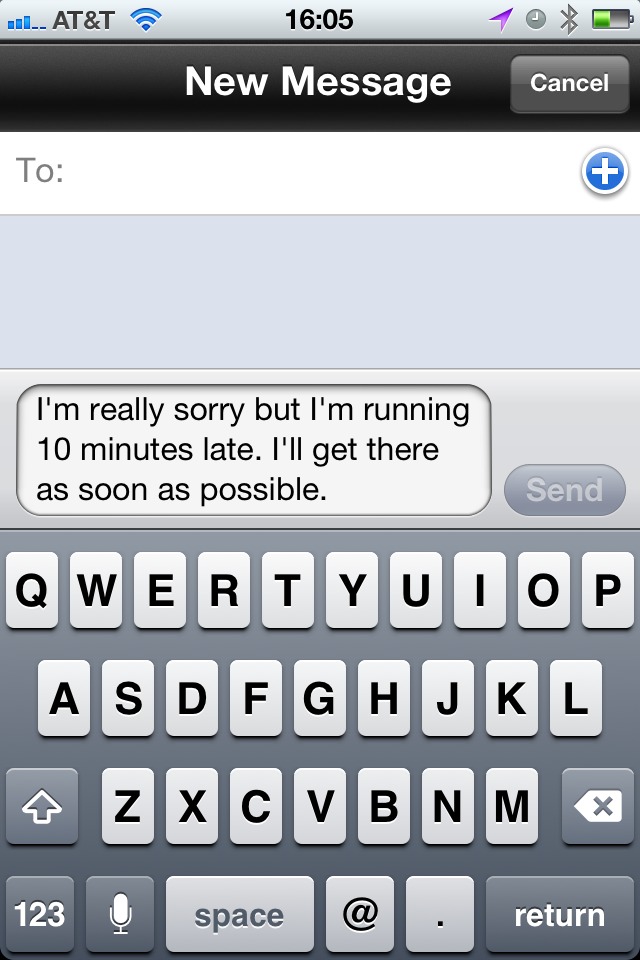
All you do is open the event view, and tap one of two very large buttons (your decision between emails and texts) and then the message and time/date inputs that you specify as variables (so, 10 minutes, in the above example).
That’s really clever and useful, especially now with imported contacts.
Now I just need to remember to attach contacts to all my meetings.
### Get It
Agenda is/was great. Agenda 3.0 *is* better. If you don’t own the app, [now’s the time](http://getappsavvy.com/agenda/).
Ole Begemann found a nice quote from Steve Jobs on the file system and after seeing this I have to conclude that we won’t see a Files.app in iOS anytime soon.
A great list of stupidity from Kottke.
Personally I wish their press release said: “Check.”
This should worry Microsoft, as I talked about already today, Microsoft’s office is becoming even more irrelevant to mobile users. With this Google is taking yet another step towards trying to woo more and more people from Office, to Google’s own platform.
Barb Darrow:
>Tier 1 analyst Carl Brooks said this Windows first strategy is nutty in this day and age. “Microsoft wants to own user data in Office across the clients and in the cloud obviously. But this is a fight Apple’ s going to win on its own platform,” he said. “Microsoft can obviously deliver a better experience on Windows devices, but waiting too long or restricting Office to Windows would be suicide. I can already read .docs and .ppts on my iPhone and it gets easier all the time,” he said.
Microsoft is in a very interesting position on mobile: they want users to be on their platforms, but they also want to sell as many copies of Office as they can. It was a long held belief by many in the corporate world that iOS could not, and would not, be successful for businesses without Office on them. Turns out they were wrong about that one and because Microsoft still hasn’t shipped Office for iOS/Android there have been many third parties that have risen to the challenge and made great apps that open these documents.
If you use iOS, you have probably never once thought about the fact that you don’t have Word or Excel on your device — yet this was a real fear for the platform when it launched. Now though, would you even bother buying Office for iOS if it came out?
I wouldn’t — and that’s a problem for Microsoft because now users have no compelling reason to buy Microsoft software *and* no compelling reason to *move* to Windows platforms.
Khoi Vinh on the “Allow use of location data” prompt that iOS presents when an app wants access to the photos on the device:
>From a technical perspective, this dialog box makes sense, because the sensitive information at question isn’t the photos but the location data. Nevertheless, it’s a very confusing way to ask the question, because most users don’t think of their photos as being anything more than just that — photos.
It’s a really poor dialog, but it has to convey two things to users:
1. That the app wants access to photos.
2. That your photos *do* contain location data.
It’s quite a challenge to do this with one small dialog — here’s hoping it gets changed in the next update. Perhaps just allow Apps to get to Photos while stripping the location data?
(Vinh also points out how annoying it is to change your mind at a later date too. Can’t imagine the support emails for that alone.)
The headline says it all. Oracle is pissed that Lodsys started to threaten their customers, so they want Lodsys’ patents invalidated. That’s good for anyone not invested in Lodsys.
Here’s the thing about Oracle: Larry Ellison is a worse person to piss off than Steve Jobs was.
I think that about sums up how this is going to play out.
I love Merlin Mann’s retort to those complaining that “GTD is not for X”.
When Apple announced their reminders app, and a new API, that allows geofencing in iOS, I was pretty pumped. To be able to schedule a task to alert you the moment you enter or leave a location seemed pretty cool. But, as with many things, the demo proved to be much cooler than the actual real world use case.
My biggest gripe with geofencing is that most apps that implement it do not allow you to set the radius for the geofence. For OmniFocus that means that even driving by certain places will set off the reminders. This is not only *not* helpful, but I find it down right annoying.
Sometimes a wide fence is good, but most of the time you need the geofence as tight as can be — say 10 yards. Even at that it’s just not accurate enough most of the time to be a feature I find useful in day to day situations.
### Are We Holding It Wrong?
Or, better yet are we using the geofence technology wrong? Was Apple’s application of geofencing for reminders simply the only example they could think of within the current apps they had and wanted to offer?
I think this may partly be the case. I just posted about Instapaper’s new geofence for background updates — a task that simply doesn’t need to be massively accurate to be performed well. In my mind this is a better use case for a geofence, as the service currently exists, than something like location based reminders.
### Another Problem With Reminders
Most of the time geofence reminders reminding you when you arrive somewhere is simply not that helpful. I hardly want to be reminded of 59 tasks the moment I get home, so I rarely use arrival reminders because, overall, I find them to be very invasive. (They are handy if you want to be reminded of something you need to do the moment you get home, but those times are pretty rare for me.)
What’s even more worthless is reminders when you leave. In my life there are simply very few use cases where I want to be reminded *after* I leave a place. What I really want, and what I expect many really want, is a reminder when I am just *about* to leave.
“Don’t forget your keys!”
That reminder is worthless *after* I have left, and worthless when I arrive and if you don’t leave at the same time everyday, you can’t set a time based reminder for such an item.
Now, I have no clue how to do this, but it would be pretty great if I could exclude my garage from the geofence. Therefore once I get in the garage my phone assumes I am leaving. How you do that? No clue.
Even if my car could talk to my iPhone and tell it “Ben is in his car now” — that would be a great time to trigger a couple of reminders.
### Geofuture
A lot of what I want relies on more accurate GPS locations and dreams. What does make me excited is to see more applications that use geofencing in new ways, much like what News.me and Instapaper are doing now.
Here’s a thought: geofence based calendar alerts. If my meeting is at my office, and I too am in my office, set the alert to only 5 minutes before. If I am at home and my meeting is at work, set alert for 15 minutes before.
That would be cool, and that would be helpful.
Here’s to better usage of geofencing.