From two CEOs, Chairmen of the Board, and COOs to just one CEO and COO — no word on the chairmen situation. ((I’m on pins and needles over here.)) All this in an effort to follow chapter one of thier new iBooks *Business 101* textbook.
Year: 2012
-
Quote of the Day: Watts Martin
“[…] given that the RIAA and MPAA together have a higher douchebag quotient than a Los Angeles BMW dealership.” -
‘Bridge to the Future’
Fraser Speirs:
>Apple already revolutionized education when it invented the iPad. While iBooks textbooks are a bridge from the past to the future—and we do need a way to get to the future—they are not that future.
Interesting take on the announcements by Speirs — who might be the most knowledgeable person out there when it comes to using iPads in education.
-
The B&B Podcast – Episode 43: My Computer Is Slow This Week
>This week Shawn and Ben talk about Ben’s meeting avoidance tactics, the snow in Seattle, Jelly Belly jellybean flavors, and what Apple’s iBooks announcements mean for independent writers.
Big thanks to our sponsor: [Verses](http://kepner.me/versesapp).
-
‘Too Many Gadget Choices’
Joshua Topolsky on the plethora of gadget choices presented by companies:
>For a journalist, it’s daunting — for shoppers, it’s starting to seem impossible.
And a bit later:
>As differentiation between like-minded products becomes smaller and smaller, and the market stratifies around specific platforms or standards (iOS and Android in the case of smartphones), buyers seem to be finding the myriad selection distracting or upsetting instead of exciting or enticing. Anyone who’s been in a cellphone shop lately can probably tell you this.
I agree there are far too many choices out there — particularly in the Android device market. However isn’t another solution — a solution more geared towards what *The Verge* does — to provide solid, [opinionated](https://brooksreview.net/2011/12/failure/), reviews to better help consumer choose?
There is a real need for companies to slim down their product lines and gain focus on a few great devices, but I also think that white-washing every review of a product, well, tends to not help the situation either.
[via Shawn Blanc] -
‘Lumia 900 Introduction to Trigger Smartphone Renaissance for Nokia and Microsoft’
Wayne Lam for iSuppli:
>Largely based on Nokia’s strong support, Windows Phone is set to regain the No. 2 rank in the smartphone operating system in 2015. Finnish-based Nokia in 2009 lost its second-place worldwide ranking because of rising competition from Google Inc.’s Android and Apple Inc.’s iOS.>In 2015, however, Windows Phone will account for 16.7 percent of the smartphones shipped, up from less than 2 percent in 2011, according to the IHS iSuppli Mobile & Wireless Communications Service at information and analysis provider IHS (NYSE: IHS). This will allow Windows Phone to slightly surpass Apple’s iOS to retake the market’s second rank behind Android, as presented in the table below.
This is a surprisingly confident statement given that it is a prediction of the mobile market *three years from now*.
[via Cult of Mac] -
The Apps that Stuck in 2011 — iPad Edition
When I wrote the [iPhone edition](https://brooksreview.net/2012/01/apps-stuck-iphone/) of this post I had planned on writing an iPad version as well. Except when I started to dive into what the iPad version would list and talk about, I quickly realized that it’s not nearly as interesting to me — so I canned the post.
Since then I’ve gotten a bunch of requests for the iPad version, so I decided it was worth the time to look at the post once again. What I realized upon second consideration is that I have fundamentally changed the way that I use my iPad over the course of last year.
I believe I change my usage for the better.
Initially I used my iPad in a similar way as I used my iPhone: a tool to fill small bursts of time and to supplement my Mac. In other words my iPad was a part of my arsenal, but a part that could be eliminated with minimal pain.
At some point around September (the best that I can tell) my iPad shifted from being equivalent to my iPhone to becoming more equivalent to my Mac.
The practical difference between the two is that when I used to sit at my iPad it was for any length of time — now when I sit down at my iPad it is almost always going to be for an extended period of time. In that regard it is a lot like my MacBook Air.
That means that time filler apps (e.g. small games, Twitter) they have been back-burnered, whereas more time intensive apps ( e.g. [Instapaper](http://www.instapaper.com/), [iA Writer](http://www.iawriter.com/), [Reeder](http://reederapp.com/)) are now the most used.
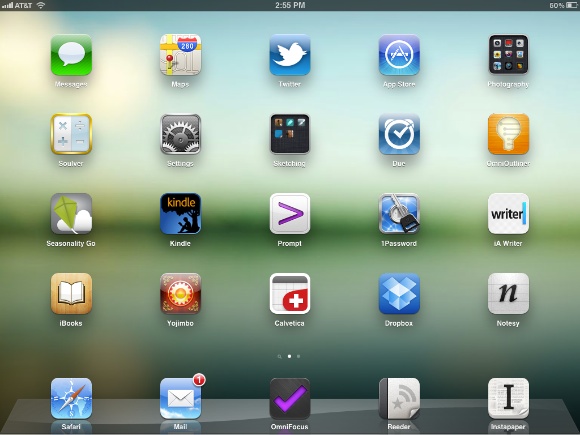
Here’s my iPad home screen at the start of my writing this post:
[
 ](http://c276381.r81.cf1.rackcdn.com/iPad-hs-original-lg.jpg)
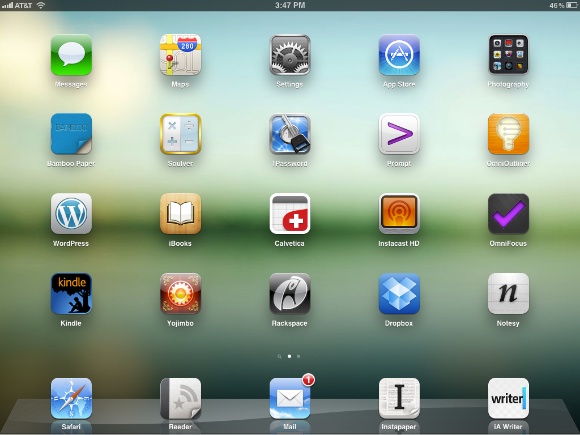
I took some time and went through all the apps to determine the ones that I actually use and rearranged the layout based on that. Here’s what my home screen looks like now:
[
 ](http://c276381.r81.cf1.rackcdn.com/iPad-hs-new.jpg)
Most of these apps I am not in everyday, but they are still my most used. The change here is that I look at my iPad as an essential part of my workflow, instead of just an aid to that workflow.
There’s only three apps that were actually “challenged” in 2011 on my iPad: [Calvetica](http://mysterioustrousers.com/calvetica), [Notesy](http://notesy-app.com/), and iA Writer.
### Calvetica
For the iPhone I strongly recommend Agenda, but on the iPad I much prefer Calvetica. I find that there are only two instances that I ever use the calendar on my iPad for: scheduling a meeting while in a meeting, and looking up “am I busy on day X” inquiries if I am already using my iPad.
For those two things Calvetica’s split view works a lot better for me. Seeing the monthly calendar and weekly agenda is just nice. Contrasting that to [Agenda](http://getappsavvy.com/agenda/) on the iPad: I get a more chaotic feeling about my schedule with Agenda on the iPad.
This is a highly personal preference and honestly I use the calendar so infrequent on the iPad, that it probably doesn’t even need to be on my home screen.
### Notesy
[Elements](http://www.secondgearsoftware.com/elements/) kept bumping heads with Notesy all year long and Notesy has mainly stuck because it is the app I prefer on my iPhone. That makes my life a bit easier and is all there really is to that decision.
### iA Writer
A dozen, maybe more? That’s how many apps I “tested” that sought to replace Writer, or create a better writing environment than it. There’s a lot of good options, from Elements to [Daedalus](http://www.the-soulmen.com/daedalus/) touch and [Writing Kit](http://getwritingkit.com/). There’s a lot to like about all of them, but in the end the seamless integration with Writer on my Mac is unfathomably good.
iA Writer is as simple as it gets and at the end of the day that is exactly the tool that I prefer. The fact that Writer exactly mimics its desktop counterpart only enhances my ability to transition from my Mac to iPad in a seamless manner. Perfect.
### The Rest
Here’s a quick rundown of the other apps you see, for those interested:
– Messages: I actually like using iMessage on the iPad — it feels more conversational.
– Maps: I use the crap out of this on my iPad. Best Google Map experience you can get.
– Settings: WiFi, Airplane mode, 3G, VPN.
– App Store: This is the only “time killer” on my home screen.
– Photography folder: Just apps for cropping and editing photos for TBR posts (not used often, but I like to play around in them).
– [Bamboo Paper](http://itunes.apple.com/us/app/bamboo-paper-notebook/id443131313?mt=8): I try to use this app anytime I feel the need to reach for paper.
– [Soulver](http://www.acqualia.com/soulver/): Best calculator, hands down.
– [1Password](https://agilebits.com/onepassword): Because I don’t remember any passwords, but more importantly I often forget usernames.
– [Prompt](http://itunes.apple.com/us/app/prompt/id421507115?mt=8): Quick way to restart Apache.
– [OmniOutliner](http://www.omnigroup.com/products/omnioutliner-ipad/): I was big on outlining when this came out for the iPad, but it gets used less now. I do use it for meeting notes and ideas. Specifically if I have a post idea and want to write down a bunch of points about the idea, but don’t have time to write out complete thoughts, this is the app I use.
– WordPress: This is how I post most articles to TBR when blogging on the iPad. More often though: this is how I fix typos.
– iBooks & Kindle: I try to read the occasional book — still hope to finish that Steve Jobs biography someday.
– Instacast HD: I like listening to podcasts at lunch and around the house. For the most part I do that listening on the iPad, always in Instacast.
– [OmniFocus](http://www.omnigroup.com/products/omnifocus-ipad/): My brain.
– [Yojimbo](http://www.barebones.com/products/mobile/yojimbo/): Every post on TBR, every show note for B&B, and a ton of other quotes and links live here. It’s my memory.
– Rackspace: Uploading photos to be used in a TBR post. Works fantastically well.
– Dropbox: I drop leases in here for reference when I meet with tenants (day job).
– Reeder: My preferred app and device to read RSS feeds with.
– Mail: Necessary evil.
– Safari: Ditto.
– Instapaper: If I could only have one iPad app, this would be my choice.### The Change
I have changed the way I not only use my iPad, but the way that I view my iPad. Right now my iPad is only slightly less capable than my MacBook Air. Most of this *is* actually limited by a lack of good apps in certainly niche categories that I need — not by speed and power of the device.
I am honestly not trying to be sensational when I say that. Nor am I saying I want to only work on my iPad, or that anybody else should, I am simply saying that with each passing month the iPad becomes exponentially more capable because of the app ecosystem that has developed for it.
-
The ‘Audacity of the iBooks Author EULA’
Dan Wineman:
>Apple, in this EULA, is claiming a right not just to its software, but to its software’s output. It’s akin to Microsoft trying to restrict what people can do with Word documents, or Adobe declaring that if you use Photoshop to export a JPEG, you can’t freely sell it to Getty. As far as I know, in the consumer software industry, this practice is unprecedented.I saw rumblings of this on Twitter and didn’t have time to dig into it, but it is as bad as some have feared.
[John Gruber says](http://daringfireball.net/linked/2012/01/19/ibooks-author-eula):
>This is Apple at its worst.
Indeed.
[via DF] -
The Perfect Twitter iPhone App
Justin Williams in looking at different iPhone Twitter app clients and has a perfect comment about Tweetbot:
>I consider Tweetbot to be the best designed Android app available for iOS.and:
>I don’t dislike using Tweetbot, but I certainly don’t enjoy using it either.
A lot of people ask why I don’t like Tweetbot and the above two statements from Williams are two great starting points for explaining why I don’t care for the app.
I am with Williams here, there is no perfect Twitter app for me right now. I have tried most of them and still stick with Twitter’s official client — it’s not perfect — but it’s far better than everything else out there.
-
Apple Aiming at Kindle Singles
Here’s a [quick FAQ](http://www.apple.com/itunes/content-providers/book-faq.html) (has been around a while) from Apple detailing how you get a book on Apple’s iBookstore. You can compare and contrast it with Amazon’s for the Kindle Singles [here](http://www.amazon.com/gp/feature.html/ref=amb_link_354802082_5?ie=UTF8&docId=1000700491&pf_rd_m=ATVPDKIKX0DER&pf_rd_s=browse&pf_rd_r=1CRR091ZCKXT26JN88GT&pf_rd_t=101&pf_rd_p=1326127342&pf_rd_i=2486013011).
Even more information about publishing from Apple’s iBooks Author tool can be found in the help for the software. There’s a very interesting, distinctly different, feel between these two FAQs.
I am talking about Kindle Singles because I think Apple is really bringing the fight to Amazon, the fight for independent publishers. [We already know that Amazon wants these writers](http://pandodaily.com/2012/01/17/confessions-of-a-publisher-were-in-amazons-sights-and-theyre-going-to-kill-us/), but Apple seems to be making it a bit more competitive for this niche.
This is a line from Amazon’s Kindle Singles FAQ:
>We are currently not accepting how-to manuals, public domain works, reference books, travel guides, or children’s books.
Do you notice a common thread amongst those types of books?
Imagery.
How-to manuals, travel guides, and children’s books — these three types of books *need* to have great images in them to make the books infinitely more useable and entertaining. Beyond the imagery the design and layout of these books can often make or break them — something that you would be hard pressed to control when the book is read on a keyboard-less Amazon Kindle.
Black and white e-ink screens, well, don’t do so well with this type of media — the iPad though? Yeah, now you see why this is a shot across Amazon’s bow.
Amazon also limits the word count and price of Kindle Singles — I have yet to see mention of Apple doing that. Both services review books before publishing them, though it’s fair to say Apple will be just — if not more — stringent that Amazon.
This should be interesting.
-
‘Pilot Pricing’
Peter Kafka on the iBookstore textbooks:
>All of that assumes that the book pricing stays at $15. After Apple’s event, McGraw-Hill executives repeatedly used the phrase “pilot pricing” to describe their near-term plans. And they told me that they have the ability to change the price when and if they want.
>But when I posed the same question to Apple media boss Eddy Cue just now, I got a much different response. “This isn’t pilot pricing,” he said. “All of our books will be $14.99.”Sounds to me like Apple isn’t budging from the $14.99 pricing, but the McGraw-Hill, for one, is willing to walk away if that pricing doesn’t work out. ((Of course they may try to negotiate a new price with Apple, but we know how stubborn Apple can be.))
-
Mac App Store – iBooks Author
Write, design, and publish your own ebooks to the iBookstore — for free. I’m excited.
-
xScope 3
It’s badass:
>Easily view the contents of any Mac desktop window on your iPhone, iPad or iPod touchxScope is a fantastic tool and it just got better, much better.
-
TMS Broadcast to the World via iPad
Iain Broome talking about *Test Match Special*:
>And today, during three hours of radio wave blackout in Dubai, it was broadcast around the globe via nothing but an iPad and Skype. By a bunch of old blokes. Now that’s incredible.That is incredible.
**Update:** [*The Guardian* has the story too](http://www.guardian.co.uk/media/2012/jan/19/bbc-test-match-special-ipad), with comments from the commentators…
-
John Gruber on the Scope of Apple’s Education Initiative
Gruber:
>I’m guessing Apple’s pitch to the textbook companies is something like this: “Digital transformation of your industry is inevitable. Here’s our plan; we’d like you to come along for the ride. But if you choose not to, we won’t hesitate to leave you behind.”The nice thing about that pitch is that Apple can resuse it.
-
‘Pivot’
Jenna Wortham trying to explain what it means to ‘pivot’ in business:
>To pivot is, essentially, to fail gracefully.
*Strike One.*
>“Ideas are like lightning in a bottle, so if the company is small enough and didn’t seem to capture lightning on their first try, it makes sense to try again,” said Ben Horowitz, one of the founders of the venture capital firm Andreessen Horowitz.
*Strike Two.*
>Sometimes a pivot is necessary when the pace of Internet evolution has made a start-up’s original plan obsolete.
*Strike Three.*
The sad thing is, Wortham actually got it right before trying to sugar coat the term:
>Theirs is just one example of a start-up that decided to cut its losses and pivot — choosing an entirely new direction in the hopes of transforming a dud of a business into one that might have a shot at success.
*Home run.*
Pivoting is just a face-saving way of saying: “our idea was shit.”
-
The Hidden Danger of Touchscreens
Franklin Tessler, M.D., C.M:
>Currently, the main unique problem with touchscreen keyboards is their lack of tactile feedback. Unlike mechanical keys, which move and offer resistance, virtual keys don’t react when they’re pressed. As a work-around, manufacturers typically let you turn on audible key clicks, but that’s not always effective, particularly in noisy surroundings. As a result, says Hedge, users strike virtual keys with as much as eight times the force as they tap real ones — and all that force puts strain on your fingers, wrist, and forearm.I’ve seen this many times. Personally I don’t think I strike touchscreen keys very hard at all, but I doubt I am the majority case. I will say that the most evident cases of “over pressing” is among the older users — as far as I have seen.
Because of that, I am not sure that this is a problem in dire need of solving. As touch screens become more prevalent we become more accustomed to them — and thus will ease off on the pressure we apply to software keys.
At least I would think…
[via David Zax] -
The Apps that Stuck in 2011 — iPhone Edition
I tested a ton of apps in 2011 — too many to count. Because of that process it meant that new apps were constantly challenging the old guard on my iPhone, here’s the apps that I ended the year with (well the ones worth mentioning).
### Calendar
The second most popular email I get is: what calendar app do you use on your iPhone… I tested a lot of calendar apps during the year and every time I came back to [Agenda](http://getappsavvy.com/agenda/). It’s certainly not perfect, but it works really well for my needs.
I love the continuous scroll view that allows me to consume a lot of information very quickly. For that reason alone it has been fantastically hard for me to even bother giving another calendar more than a couple of days on the home screen.
A big point of friction on the iPhone was entering calendar data — this made a lot of other apps challenge Agenda. However with the release of Siri it has become easy enough to tell my phone a new appointment and then look at my schedule in Agenda.
Without Siri I maybe using something like [Calvetica](http://mysterioustrousers.com/calvetica).
### Weather
Ah yes: weather apps. [I was a big fan of My-Cast](https://brooksreview.net/2011/04/weather/) and it still is a very good app. Truthfully though once I got my hands on the iOS 5 beta I switched back to the stock weather app and I am still using it.
While I don’t like the overall look of it, it excels in simplicity and telling me exactly what I need to know. I have been mostly happy with the app and frankly Siri handles a lot of my weather queries these days.
Many have asked if I have looked a new weather app X and for the most part I have. I still haven’t found one that is more practical than the built-in app that Apple now offers.
### Check-In
Big changes here in the social space as [Gowalla](http://gowalla.com/), my long favored location check-in app, is dead and gone from my iPhone. I have replaced it with [Foursquare](https://foursquare.com/) and though I don’t much care for the app itself — it actually fills the need perfectly. ((I use it as a breadcrumb for myself, so that when I ask myself “have I been there?” I have a way to check.))
I do miss the original Gowalla though…
### Notes
This was perhaps the most challenged app on my iPhone home screen, but [Notesy](http://notesy-app.com/) is still there. I am not joking when I say this app was challenged — it felt like every other day another note-taking Dropbox app made its way to my iPhone, but time and time again Notesy came right back into its home on my first screen.
I am not sure if it is my affinity for the app icon, or my love of the Solarized themes in the app that does it, but for an app that hasn’t been significantly updated in a while — it sure holds its own.
### The Less Interesting Ones
Of all the changes for apps on my iPhone, perhaps the most notable to me was moving [Instapaper](http://www.instapaper.com) back onto my home screen. I hadn’t been using it much on my iPhone, so it was moved off in favor of giving my a space to add an app I wanted to heavily test.
However in the last 4 months of 2011 I found myself using Instapaper so much that it made no sense to not have it on my home screen. I don’t use Instapaper on my iPhone in the same way that I do on my iPad, but I do use it to fill tiny voids in my day with non-game content.
So back Instapaper came.
There has been one app that went unchallenged in 2011: [OmniFocus](http://www.omnigroup.com/products/omnifocus/). Not even a single new task management app piqued my interest enough to think about trying it in lieu of OmniFocus. I find that interesting given how competitive the space has historically been, but not surprising given how good OmniFocus really is. Reminders from Apple came the closest, but even then it was just a supplement to OmniFocus — that is until OmniFocus baked in the Siri support.
Lastly, [Capture](http://skyballoonstudio.com/capture) stuck on my home screen even though it is one of the least used apps on my iPhone. It’s one of those apps that when you need it, you need it. For that reason alone I have found it worth keeping on the home screen.
Personally I find it very interesting that most of the apps that are on my home screen have been on there for a very long time. It’s interesting not only because of how many apps I tested, but because of how competitive the app market is.
Further I noticed that I could move too different kinds of apps because of the addition of Siri to my iPhone. The Apple weather app is the prime example — it’s not good enough without Siri, but with Siri it is more than sufficient.
When/if Siri is opened up to third party developers things should get very interesting in the iOS app space, let’s hope that happens soon.
-
Doxie 2.1
Doxie has released version 2.1 of its Mac software [that adds OCR functionality and a better icon](http://www.getdoxie.com/resources/files/release_notes.txt). Not sure when this was released, but I just caught it yesterday.
**Update:** I can confirm that the OCR now works (though you have to plug your Doxie Go into your Mac to activate the setting) and that the application icon is vastly better.
-
‘Learn How to Set Up iCloud on All Your Devices.’
An Apple support page for installing iCloud on Windows. Looks to me like it doesn’t sync the Documents and Data over, but all other items it does. ((Naturally no back to my mac either.)) I didn’t realize this utility was out there.
*This is an update to my [previously linked item](https://brooksreview.net/2012/01/short-sighted/).*
[via email from reader Terry Thiel]