Month: October 2013

  • The iPad Air vs. iPad mini Retina

    The iPad air: is the iPad that you should get, but allow me to explain.

    I’ve been mulling over which iPad to get, as I suspect many are. Before the event I figured on getting the retina iPad mini, but the Air really changes that. Right now, and I suspect with the faster chip and retina display, the mini is (and will be) primarily fantastic for three reasons:

    1. It’s easier to stash in a bag, or on your person.
    2. It’s easier to hold when reading for long periods. (Especially in bed, where I expect many mini lovers are using it.)
    3. It may be the best wifi hotspot you can buy.

    Ok, so number three isn’t really something I would consider when deciding which iPad to purchase, but it is still a fact. What the mini is not better than a full-sized iPad for is:

    1. Actually reading. Perhaps this changes with the retina screen, but I have a hard time getting the font sizing feeling ideal in any app, and the mini sucks for reading web pages when compared to the full sized iPad.
    2. Typing. I’m typing this on my iPad, and I type posts often on my iPad, but I actively try to avoid typing on the iPad mini. I even prefer to type on my iPhone over the iPad mini. The mini keyboard isn’t bad, it’s just very awkward to use because of the size of the device.
    3. Games. Yes a faster mini will help with this, but it’s almost always a lot better to play games on a bigger screen. (I can’t think of a reason a smaller screen is better, but I don’t feel like fielding emails about this, so we will stick with “almost always”.)
    4. Watching video. If smaller was better, we would have never moved beyond the original video iPod.
    5. Sharing the screen with someone (i.e. “here, look at this”) is a joke on the mini. You may think this doesn’t happen often, but it does for me at work and I can’t imagine I am alone. I often share the screen when viewing PDFs, and pictures.

    So unless you plan to only use your iPad when reading in bed, or a hotspot, and you usually need to quickly be able to stash the iPad — well unless you need it for *just* that, you will likely enjoy the full sized iPad air much more.

    The iPad mini will always feel awesome when you pick it up, but that quickly fades once you start using it and realize that you just wish your large iPad was lighter.

    Now it is.

    Having both, I can say that I love the way the mini feels, but I almost always *want* to use the full size iPad if I can. I suspect that, with the iPad Air, I will have little need *or* want for an iPad mini.
  • ‘NSA Monitored Calls of 35 World Leaders After US Official Handed Over Contacts’

    [James Ball][1]:

    > The National Security Agency monitored the phone conversations of 35 world leaders after being given the numbers by an official in another US government department, according to a classified document provided by whistleblower Edward Snowden.

    Sorry, where’s the problem here? Is this not the NSA’s job?

    I assume the story is that President Obama agreed not to monitor a leaders phone calls? I have to assume that because this seems an awful lot like *actual* best practices for national security to me.

    [1]: http://www.theguardian.com/world/2013/oct/24/nsa-surveillance-world-leaders-calls

  • ‘Off’

    Marco Arment on Apple’s iPad event:

    > The lines were so tightly scripted that the presenters often stumbled off-script slightly, and rather than rolling with it naturally, they’d just jump back and awkwardly retry the line.

    I made that note too. Cook seemed to be struggling and it felt awkward to watch. The products Apple launched were great, but the problem was the shipping times. It needed to be sooner, that’s what gets nerds excited. “Oh shit, I have to clear my calendar for Friday!”

    Instead we now have a lot of time to consider the purchases, to consider the changes — to realize those changes are iterative.

    I personally think Apple needs to make these presentations a one man show — where that one person gets to decide how much time each product gets. Where they can cut stupid collaboration demos. And I don’t think that person should be any of the executives that were on stage presenting. It needs to be someone else.

    After all, there’s probably a really good reason Ive never presents.

    Cook usually does fine, but (like me) he doesn’t project a person that gets excited about things and that makes him a poor MC. Apple needs that cheerleader, that person that doesn’t just show fake excitement, but believes you are crazy if you aren’t excited with them.

    Steve Jobs was always good at that. When he spoke of the iPhone and iPad you knew, inherently *knew*, that he was speaking with genuine passion and excitement. Jobs wasn’t trying to convince anyone of his excitement, or to be excited with him because he thought what he was presenting spoke for itself.

    The MacBook Pros didn’t need to be presented, nor did iWork being free. Or even the new iWork — they weren’t that great. They could have been just an update on the store website and left at that.

    But when you have a team of people presenting, they will all want their babies in the presentation. They worked hard on them, no doubt, but they weren’t the products the press assembled to see.

  • Styles in Ulysses III

    Full documentation on creating styles in Ulysses III for exporting — this is an incredibly powerful tool.

  • Define Hypocrite For Me

    [Charles Arthur for The Guardian][1]:

    > Yet writing in December 2005, the then head of search and user experience Marissa Mayer insisted that following a tieup to provide search for AOL, that besides never providing “biased” results, “There will be no banner ads on the Google homepage or web search results pages. There will not be crazy, flashy, graphical doodads flying and popping up all over the Google site. Ever.”
    > Asked why Google had gone back on that clear promise, Google said in a statement that “We’re currently running a very limited, US-only test, in which advertisers can include an image as part of the search ads that show in response to certain branded queries.”

    I love the response from Google, well the non-response. It’s the old “but *our* ads are different, and users (read: advertisers) will love them.”

    [1]: http://www.theguardian.com/technology/2013/oct/24/google-breaks-promise-banner-ads-search-results

  • ‘iPad mini or iPad Air?’

    David Sparks on which iPad he is getting:

    > The only difference at this point is that one is nearly 10 inches and one is nearly 8 inches. With this as the only deciding factor, for a lot of people this will make the decision really easy. They will know immediately whether they want a large one or the small one.

    That’s a great way to look at it. Personally I think I may get a 32GB iPad Air with Cell and a 16GB iPad Mini (retina) with cell — like Sparks there is a lot of value in having both.

    Hopefully sanity prevails and I just get the iPad Air — I think I can make my current mini last another year.

  • ‘Mail in Mavericks Changes the Gmail Equation’

    Joe Kissell on changes to Mail that hate on Gmail:

    > Mail and Gmail were never a fantastic combination out of the box, because Gmail has a wacky, highly nonstandard way of using IMAP, and Mail always wanted to treat Gmail as though it were a conventional IMAP server.

    Pairing a Gmail email with Mail.app is just about the worst thing you can do. I don’t say that in jest either — the two just do not play nicely with each other.

  • GPGTools

    [GPGTools is now compatible with Mavericks][1]. For those of you that don’t know what GPGTools is, it is the easiest way to setup encrypted email on your Mac. It installs two things:
    1. A Mail.app plugin that allows you to toggle signing and encryption on a per-email basis with a couple of nice and easy to use buttons.
    2. It installs a GPG Key manager app that helps you create an encryption key, and optionally send it to a key server for others to search.

    Once you get this installed it is pretty easy to start sending secured emails. You will be prompted to enter your password to read/send encrypted emails, but that’s just about the hardest part. (The most confusing part is that you have to do a key exchange first, before you can send and receive encrypted emails. That’s why many people, including me, post their public keys on contact pages.)

    They have a [nice screencast for new users here][2], and good [instructions to get setup here][3].

    [1]: https://gpgtools.org/
    [2]: http://support.gpgtools.org/kb/how-to/watch-our-screencast
    [3]: http://support.gpgtools.org/kb/how-to/first-steps-where-do-i-start-where-do-i-begin

  • Ulysses III v1.1

    I started using [Ulysses][1] back with version 2. I used it off and on, and I generally liked it, but didn’t love it. When Ulysses III came out, it was a brand new app and it only took me a day to fall in love with the app. If I am writing on my Mac, then I am writing in Ulysses III. All of my old posts are stored in an Archive folder in the app and it just handles everything I throw at it.

    I really love Ulysses III, but sometimes it can be cumbersome to my workflow. If I start writing correspondence in Pages, then realize it is a longer item, and now I might want to compose in Ulysses — well I have to copy paste and copy paste. This can happen when I think I am writing a short business letter, but it becomes something more. For a while now The Soulmen have been teasing about version 1.1 of Ulysses III, and some of the features they are adding to the app.

    One of the most interesting to me is the idea that there will be Ulysses style sheets for exporting. Meaning you can send text from Ulysses III to a pdf, formatted just how you want it. For writers this will be awesome, but I also think it is killer for anyone who needs to have documents with a consistent look (be it letterhead or anything else) in any part of their work or personal life.

    The Soulmen were kind enough to send me a beta of 1.1 to try out, and after a bit of fiddling I love this app even more now. Allow me explain in one short sentence: Ulysses has just eliminated the need for me to create any new Pages or Word documents. Yep, instead of opening a new file in Pages (on company letterhead), I can write in Ulysses and just export to company letterhead with a click.

    This is going to be great.

    To be fair, I have yet to find a way to embed the logo in the ULSS style sheet, but as a work around I have the document export to PDFPen Pro as I want it, with a click. From there I grab my letterhead in the Media Library in PDFPen Pro and drag it onto the document. Boom, done.

    So cool.

    Did I mention: no Pages or Word. NO PAGES OR WORD.

    There are other things in 1.1 that people have been begging for, such as:

    – Global Search.
    – Export to Word (much better support)
    – Typewriter scrolling — a feature I dearly missed.
    – Smart lists and auto-completing tags. This is really nice to have again.

    There are a ton more additions, but those are my favorites.

    This is a really great writing app — the best out there and I highly recommend it.

    [Go get it][2].

    [1]: http://www.ulyssesapp.com
    [2]: https://itunes.apple.com/app/ulysses-iii/id623795237

  • ‘Liebeck V. McDonald’s: The Big Burn’

    > In 1992, Stella Liebeck spilled scalding McDonald’s coffee in her lap and later sued the company, attracting a flood of negative attention. It turns out, there’s more to the story.

  • ‘Scroll Hijacking’

    Trent Walton:

    > Sites like Milwaukee Police News and Apple’s recent string of product 1-pagers are beautiful, but hijacking a user’s scroll rate for marketing purposes has to be one of my least favorite things in web design these days.

    This drives me crazy too. I thought my trackpad died when I visited the iPad Air page — when I realized it was working as designed I was more than annoyed.

  • ‘Edward Snowden is No Traitor’

    Richard Cohen:

    > I am sure that police powers granted the government will be abused over time and that Snowden is an authentic whistleblower, appalled at what he saw on his computer screen and wishing, like Longfellow’s Paul Revere, to tell “every Middlesex village and farm” what our intelligence agencies were doing. Who do they think they are, Google?

  • Leaf on Car

    Yesterday I was working on a side project for a buddy, and was out and about shooting some pictures with my old Canon 5D in my yard. As I was walking back inside I noticed that one leaf had fallen on our car. I thought it might make a neat shot to post on Favd, so I snapped a picture with my 5S, posted it and forgot about it.

    Today I was looking for a picture in my Photostream on my Mac and saw the photo there. I was blown away by how sharp the image was. It’s not a great photo, but the quality of the image the iPhone 5S produced — well I am not sure I could have got that with any of the other cameras I own. (I don’t have a macro lens.)

    This 5S camera is going to be a lot of fun.

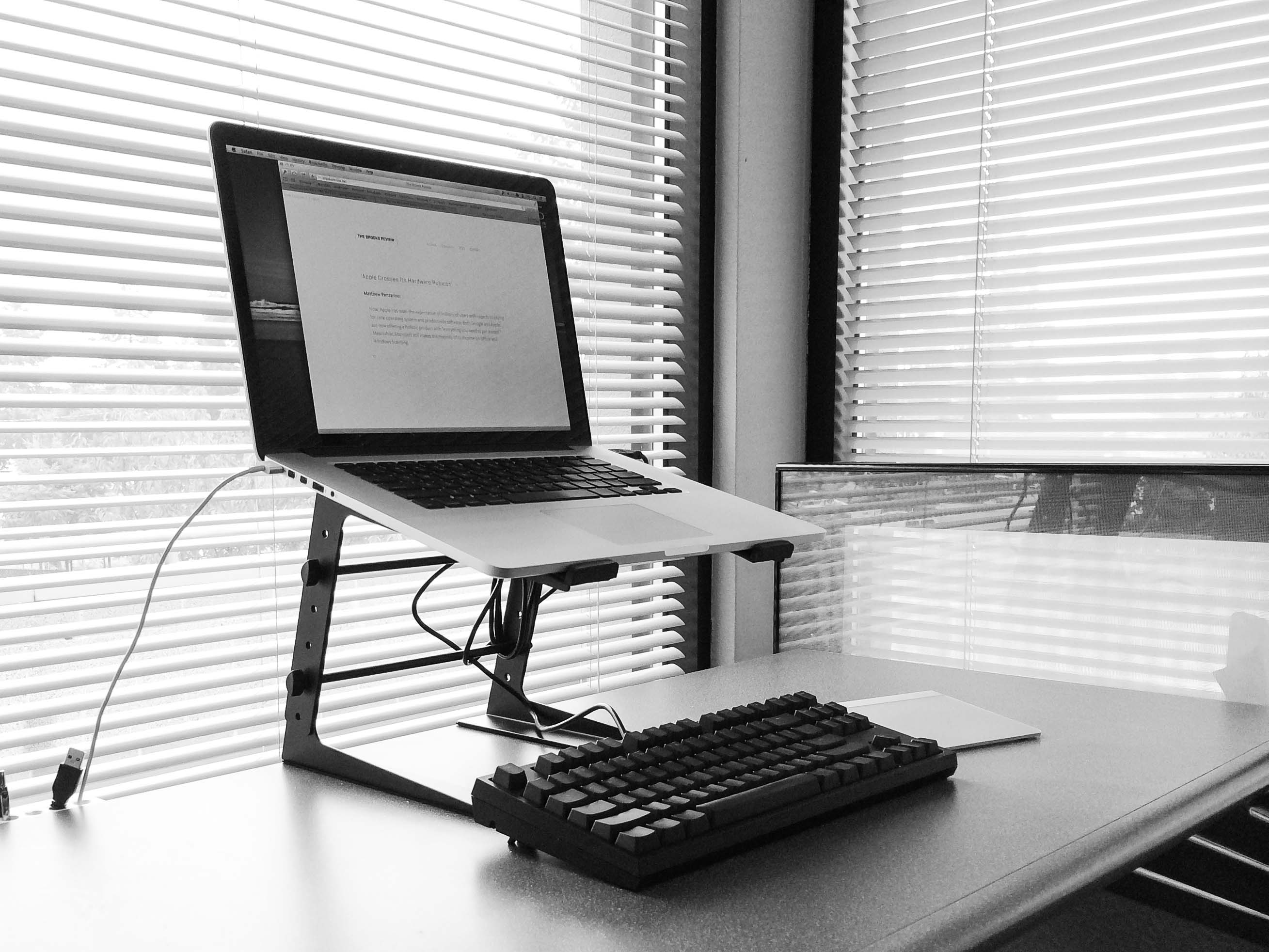
  • Amazon Item of the Week: PYLE-PRO PLPTS25 Laptop Computer Stand for DJ

    I ran into a problem a few weeks ago: my laptop wasn’t sitting high enough on my desk to get the monitor up to where I needed it. It was annoying and tiring. I have tried almost every well marketed Mac laptop stand and they universally suffer from one or both of these issues:

    1. They don’t get high enough to place the display at a truly ergonomic level.
    2. They are wiggly or wobbly, or simply not confidence inspiring that your MacBook Pro won’t slide off if you sneeze.

    The PYLE stand at my office.

    So I went looking through the depths of Amazon (only Prime items, I’m not stupid). There I found this PYLE stand marketed for DJs. It looks horrible, but it looked like it would get really tall, be stable, and a bit adjustable.

    I’ve been using it for a while now and I actually really like the stand. It doesn’t look great, but it does a good job staying out of the way, getting high enough, and being rock solid. I really mean rock solid. You can push on your laptop when it is on the stand and there isn’t much of a wiggle at all. Amazing. I am buying one for my home too.

  • ‘Apple Crosses Its Hardware Rubicon’

    Matthew Panzarino:

    > Now, Apple has reset the expectation of millions of users with regards to paying for core operating system and productivity software. Both Google and Apple are now offering a holistic product with “everything you need to get started.” Meanwhile, Microsoft still makes the majority of its income on Office and Windows licensing.

  • ‘NSA Surveillance Creeps Onto Tech’S Lobbying Agenda’

    Tony Romm:

    > Apple shelled out $970,000 for D.C. lobbying in the third quarter, the most the company has spent in any three-month period here. To date this year, the company has spent $2.38 million in Washington, compared with about $1.4 million by this time last year. As it launched its first-ever lobbying push on government data collection, Apple also pressed for smartphone location privacy protections and patent reforms in the third quarter.

    Nice.

  • Quote of the Day: Jim Dalrymple

    “Everything you need to operate a Mac or iOS device is free. Spreadsheet, photo, music, presentation, word processing, and movie-making software, all free.”
  • ‘A Huge Regression’

    [Clark Goble on the new iWork][1]:

    > I could go on about how almost none of the problems I’ve been griping about for four years in Numbers have been fixed. But what’s the point. Apple has spoken. It wants the OSX iWork to basically be the same as the iOS version and designed purely for casual use. By making it free they kill the market for any competitors other than Office. So if you run a small office, even if you hate MS-Office, there’s really no alternative anymore.

    Goble is right that Apple wants to make iWork for casual users, but that’s not new. That was the premise of iWork from the outset. Business users don’t want pre-made letterhead, brochures, and flyers. Business users pay someone to design custom ones for themselves — they don’t need Apple telling them how a budget spreadsheet should work.

    From day one, iWork was for the normal person. Which was and is a huge win for everyone. Word and Excel are cumbersome, overwrought, tools for 90% of the people using them. iWork simply isn’t.

    Goble is also wrong that Apple has killed the third-party market. Apple just split it wide open. Create a spreadsheet app that rivals Excel, but works with Applescript and works with your sanity — worth $99 in my book. It’s a large shoe to fill, but it exists right now (especially given how crappy Microsoft Office is on the Mac).

    [1]: http://www.libertypages.com/clarktech/?p=6597

  • Software as a Feature

    Yesterday Apple made an announcement that we will not likely know the ramifications of (fully) for some time. That announcement centered around their software: iWork, iLife, and OS X are now free (as is iOS iWork and iOS itself). For many this will be seen as a nice little gift from Apple. iLife is solid, OS X is excellent, and iWork is mostly better than Office for 90% of users (power users being the 10% exempted). ((My argument here is that if you are starting fresh to office suites, iWork is easier to learn and get value out of. Excel is really the only reason Office is better, but that’s only for in-depth data analysis, as the rest of the features are largely replicated in Numbers.))

    With that single announcement Apple made their software a feature of their devices, and not the other way around.

    Now when a buyer compares a Windows laptop to a Mac, they need to factor the cost of Office to it, because you essentially get that software free with your Mac. You also need to factor in Windows upgrade pricing (not that Windows users upgrade).

    Your MacBook Pro, iMac, Mac mini spec sheet now includes a bullet point that reads: Office apps included.

    While it is obvious to draw the attack Apple lobbed towards Microsoft, it is also very much a direct response to Google.

    Google’s office suite is free, has better collaboration, and runs everywhere. (Even though I’ve never liked it, I am sure it is prevalent in schools.) There’s no way not to see the new iWork with iCloud integration for collaborating as anything but a response to Google’s offering.

    Apple’s two largest competitors are Microsoft and Google. On the Microsoft front Apple wants to kill them with free software (as software is where Microsoft makes their money). On the Google front Apple wants to kill them with with *better* software (as Google needs quantity of users to make money).

    It’s a smart plan. It may not work, but it’s a smart plan nonetheless.

  • Transporter 2.0 is Here

    Sweet update:

    > 2.0 works just like Dropbox using a regular folder on your computer and adding right-click support for quickly sharing files and folders. You no longer need to create top level folders using the web management software as everything can now be done using Finder on Mac or Explorer on Windows. When you drag-and-drop files to your Transporter folder, they will now automatically sync across all of your Transporters with no further setup required.