Year: 2014

  • What Task Management Apps Are Missing

    As I’ve been struggling to find the perfect task management app for me, I’ve come across some things that I don’t think many task management app designers think long and hard enough about.

    (Note: Begin ignores almost everything on this list by design, it’s meant to be overly simple. What I am referring to is the apps that are for “power users” — whatever that means.)

    For me, then, the perfect task management app hits on all of these points in addition to what you would normally find in an app like OmniFocus.

    Collaboration

    I’ve said it before, but it bears repeating: if your app is not built for collaborating with a disparate group ((Not only ‘teams’ or companies, but groups of freelancers, or groups consisting of one or more people not at the same company.)) of users, then you are skating to where the puck was. ((I am beginning to hate that turn of phrase.))

    At the most basic level I believe that collaboration in a task management app should be implemented to include the following:

    • Assignment of tasks.
    • Assignment of a project, with ability for tasks within that project to be assigned to others.
    • Commenting on tasks.
    • Partial, or progressive, completion indicators. This would be like sub-tasks, but would not need to be implemented from the creation of a task. Meaning, if someone assigns you to ‘create budget’, and you are waiting on items. Then you can link your waiting task to this budget task, and show when that waiting action was completed, thus showing the state of progress on the budget task itself. This idea also allows for marking the task as ‘drafted’, or ‘reviewing’ and thus moving a progress indicator along. Doing this partial progress report removes the need of a manager to bug you about where you are as they can see progress — and removes your need to type explanations as you can show progress through completing the supporting tasks. Hell, even allowing someone to arbitrarily mark a task as XX% complete would go along way towards making life easier.
    • Sharing of files within a task/project. Even if that is just a linked Dropbox folder, it would be better than nothing. Not a day goes by where I don’t look at my tasks, then jump into a folder to open the file(s) I need to complete the task.
    • Built-in ability to decline an assigned task. Most collaborative task management apps assume you will accept a task without complaint — give us the ability to say “hold the fuck up, whatchyou talkin about”.
    • Ability to collaboratively assign time estimates. Going along with the last, if I assign a task I can tell the person I am trying to assign it to two things: how long as a manager I think the task should take, and what the time commitment is. That way the person being assigned not only knows my expectations, but knows the demand which is going to be put on them.

    Just the basics here — we don’t need the most massive collaboration features, but we do need a better way of tracking work others are doing, and accepting work from other people.

    Project management, or task management

    Almost more important than collaboration is to define if your app is for project management, or for task management. Even still, a good app needs to do both well. Project management apps like Basecamp are all about collaborating, but you should also be able to use such an app on a personal basis. In other words I shouldn’t have to copy tasks between systems and check them off both places.

    I shouldn’t need two apps: one for my manager to create schedules and assign tasks; and another for me to drill down the task and mini-projects into actionable tasks. This should be done within one app in order, not only for people to work better, but for managers to more easily manage their staff.

    Send Reminders For Me

    There should be a special class of tasks that is a reminder task, where you want to remind, or follow-up, with another person. You should be able to compose and send that email/text/notification within app, right there in the app. See the task, perform the action, task is marked complete and you get asked if you want to have it pop back up in X days.

    Managers, or team leaders, spend an inordinate amount of time checking to see if things were/are done. We need a better way for everyone to manage this. I shouldn’t have to make a call, and you shouldn’t have to answer a call (or email) to let me know that you did go to the store and buy that thing.

    Defer / Snooze

    I’ve taken to calling the Defer date (formerly Start dates) in OmniFocus as one of the best, yet most under promoted, features of the app (but why doesn’t Forecast view show me every ‘deferred’ task instead of just those coming available today, this drives me nuts). David Sparks will fill you in on why they are so powerful, but it’s like a can of magic when you start using them.

    The best way to think about these dates is to think of them as snooze buttons for your tasks. If you can’t, or don’t, want to do a task today then you shouldn’t see it just because you are looking at all tasks due this week. Moreover it shouldn’t be hard to push the defer date off (or the due date for that matter) on any task.

    Even the mighty OmniFocus fails when it comes to quickly being able to change the dates on your tasks. ((AppleScripts can solve this, but that’s a hack.)) With Begin that was one key thing we focused on (albeit easier given the two-day-only nature of the app): making it just as easy to push a task off until tomorrow, as it is to complete the task.

    Every task management app excels at quickly allowing you to complete a task, but I have to re-assign dates just as often as I have to complete tasks — yet for some reason little thought seems to be given to the workflow of putting off tasks. ((You can argue that this is “for productivity”, but I call bullshit. Sometimes stuff comes up and you need to put things off, it’s highly unproductive to make me jump through hoops to do that. And yes, I use Applescripts to speed this up, but I shouldn’t have to.)) There is immense power as a person, if a task is easy to shove off your plate. Having something on your todo list for today, when you know you won’t do it today, is more distracting.

    In a nut shell: help people hide what they can’t act on, and quickly snooze what they can’t get to today.

    Work modes

    In an interview with the OmniGroup Shawn Blanc got this nugget about how Derek Reiff uses OmniFocus:

    I separate my tasks at the very top level by using two folders: Work and Home. When I’m at the Omni Group office, I enable Focus on the Work folder and every view or perspective I switch to from that point on will only show Work actions and projects.

    I think that pretty clearly shows the trouble people have with task management apps: they are personal apps that are used for both work and personal things. One thing I love about Flow is that I can have a Personal and a Work ‘workspace’ — and yes you can do that to a degree in OmniFocus, but these ‘spaces’ should be taken to the next level.

    I’d propose a more time-sensitive set of views (not the only views, but perhaps on the level and display ability of what OmniFocus’s forecast view provides):

    • Overview: Allow me to see a general overview of my day, week, month. I get to set the time/date range and can easily see what is starting, what is due, etc. This would be the planning mode. You can use it each day, or just at the beginning of the week. OmniFocus’ forecast view does some of this, but it’s only part of the way there.
    • In the task: I’d like there to be a view for when I am working on the task. I wouldn’t use that with everything, but for larger tasks this would be great. It could show me the comments, how many times I snoozed the task, supporting documents, etc. In other words: a dashboard for getting that task done. Ideally this would also work with Projects too. This is your organizer for things you need for that task.
    • Mid day: I’d like there to be another overview that I step into after lunch. Here I see just the tasks from a subset of projects that I want to see (added by drag and drop and keyboard shortcuts for speed, removed easily from a list somewhere else). I can check in and see what wasn’t done, and what must be done for the rest of today. It’s a view that shows you just the most important stuff — perhaps just flagged items, or some other means. The goal of this view is simply to make sure you plan time for the really important stuff (now that the day is half wasted at least).
    • End of day: Here only the important tasks from the last view are shown if they were due and not completed and now I also see my personal tasks that I want to do this evening. This would also be time/location based so once it is past say 8p, or I am at home, I don’t see the work tasks anymore.
    • Weekend: No work tasks, just my personal tasks. This view hides anything not personal so completely that I don’t even know I have work tasks and thus I can just focus on my honeydew list.

    This all sounds complex, but it should be fairly automated using some AI to figure out where things go for you.

    Integration

    A task management app should integrate with other apps to show me activities, discussions, and emails that I may need to add into my task management system. (Flagging keywords which sound like I need to act on them.) I’d like to see a task management app that plays nice with tools like:

    • Slack
    • Basecamp
    • Trello
    • Asana
    • IMAP
    • CALDAV

    I don’t always want to jump into those tools, but I might be ‘forced’ to use them at the office, so make that easy on me. Make it so that I don’t really have to use those tools — just your app.

    Keep Me From Forgetting

    Hit me in the face with important tasks. Really.

    I should be able to assign things as “must do this today” and have the app remind me constantly so that there is no way to forget. ((Whereby constantly is user configurable — duh.)) This isn’t a feature you use everyday, but you use it when that really important thing needs to be done yesterday. This is great for something like “Today is your anniversary”, or “Taxes Due”.

    For the things you are very likely to forget, but are imperative they get done.

    Easier Creation

    Calendar apps have gotten really great at natural language input, and I’d like the same in my task management apps. I should be able to tell a quick entry screen: “Work, Write proposal, start tomorrow, due in two weeks”. That entire string should parse correctly into my app.

    Additionally, there should always be two entry modes: hit me with tasks as fast as you can; and the detail “quick” entry you see in apps like Flow and OmniFocus. Allowing me to brain dump if needed, while also being able to add a considered task when I want.

    Further the app should be guessing at things like projects and contexts based on my previous usage of the app. So if I say Email as a start, the context is quickly assigned as ‘email’.

    Auto Lists and Categories

    Or another way to think about it: smart groups. A lot of times I will have tasks to email or call people, but instead of using ‘email’, or ‘phone’ as the context, I will simply do something like ‘office’ because I know I don’t want to make that call unless I am at my office. But I’d still like to be able to see all tasks which have a phone number attached, or ‘call’ in the title together.

    There’s a lot of things you can do with such smart groupings that I am only scratching the surface with the above. This should be there already, but I’ve yet to see it anywhere.

    It’s Hard

    It is easy for me to type all these rather obvious things out, but building even a basic to-do app like Begin was really challenging. Just finding what would work isn’t easy — I get that — but at the same time there’s a lot of mature apps that seem to be focusing on the wrong parts of their apps. Making tasks more granular instead of helpful.

    The above is simply meant to help some of these apps get back on path — because we, no, I need this app.
  • Fifteen Dollars

    Recently the City of Seattle passed a $15/hour minimum wage. It’s not as brutal to businesses as many make it out to be (it raises from current level to $15 over a few years).

    What’s interesting isn’t so much the debate, national or local, or the dollar amount. But to me the most interesting part is the perception of value. Washington state already has a ‘high’ minimum wage ((Comparatively.)) at around $10 (just under), now Seattle and SEATAC have $15 minimum wages (with the latter city having some exceptions). So if you are within a reasonable commuting distance to either, why would you take a lower wage when you could commute to a much higher wage.

    It’s not about the dollar amount, it’s about the fact that it is so much higher. If you live in a state and you are making less than $8 an hour, and you look at Seattle’s $15 an hour minimum — well you get a different perspective on the value of that money you are making.

    How this all plays out should be very interesting to watch.

  • Ios 8 Randomises the Mac Address

    Redditor iOSecure:

    In iOS 8, Wi-Fi scanning behavior has changed to use random,locally administered MAC addresses.
    The MAC address used for Wi-Fi scans may not always be the devices real (universal) address.
    Once the iOS device is done scanning it will give the real MAC ID.

    Very cool feature to make it harder to “track” iOS users.

  • Pixel Winch

    I heard about this from some drama going on surrounding it, but man am I glad I heard about it. This is like xScope, in that it is for measuring things — but holy shit is it awesome. There’s a free beta right now, so give it a shot if you design at all on the screen. Really stellar tool.

  • Unread for iPad

    I’ve been beta testing the app, and it is wonderful. Most of what I said about Unread for the iPhone apply — well the good things. I don’t really like checking RSS on my iPhone anymore — it’s too good on the iPad.

    Here’s what Stephen Hackett had to say:

    Like most apps that exist on both the iPhone and iPad, the new tablet version of the app is great to read with. Unread’s lack of Chrome makes the app just about indistinguishable from something like Instapaper or Pocket.

    Agreed, which makes it a lovely way to read your articles.

    Federico Viticci:

    Thanks to the larger screen, Unread works better for two core aspects: focus on text and comfort.

    I think Mikhail Madnani hits the nail on the head for me:

    Mr Reader is great for triaging and working on your list quickly if you subscribe to loads of feeds and Unread now provides the best reading experience.

    I am a big fan of Mr Reader, and the change between the two is jarring — but I think a change well worth making. Go buy it, and be happy with your RSS zen.

  • Secret Wires

    Juliette Garside:

    Vodafone, one of the world’s largest mobile phone groups, has revealed the existence of secret wires that allow government agencies to listen to all conversations on its networks, saying they are widely used in some of the 29 countries in which it operates in Europe and beyond.

    That’s not an NSA thing, thats an, almost every other government thing

  • Update on A6000 Post

    Some odd glitch on my end lead to the photos on the A6000 post not being viewable, apologies. Now fixed. (Thanks to all who let me know.)

  • Maintaining Your Place

    Thomas Brand:

    Instead of re-envisioning how an iOS application should look, Blixt has reinvented how an iOS application should behave. Users are no longer content navigating their apps the same way they browse their address books. Being pulled along a string of endless lists tied together by the Back button. Instead Blixt takes a new approach. Giving users full screen content in stacks they can shuffle using just their fingertips.

    Thinking about it, it is quite remarkable how you never get lost in Blixt. If you are an iOS developer you must download this app, because it just raised the bar.

  • Creating the Office with Walls

    Olga Khazan:

    She has partnered with Steelcase, the office furniture maker, to create new types of office spaces that will allow introverts to both work and respite in peace. Some of the new modules will house desks, others will contain couches, and others still will have yoga mats. All will have walls.

    WOW, walls? What a new and novel concept — taking a desk and wrapping walls around it. Wow, I wonder what a floor of these ‘offices’ may look like.

  • Article Comments

    Adam Felder:

    Respondents who saw comments evaluated the article as being of lower quality—an 8 percent difference. In other words, authors are judged not just by what they write, but by how people respond. The presence of comments did not make a statistically significant difference in a person’s likelihood to read more content by the same author, nor did it make an appreciable difference in respondent self-reported mood.

    The results seem contradictory. Having comments make the perception of the article quality to be less, but not your likelihood to read or enjoy the article? Huh?

  • The Device

    Nate Barham:

    Think, “I am using my Mac,” or “I am using my iPhone.” Unlike Microsoft and Google, for whom the device is a layer of abstraction between the user and the primary product, which is the respective company’s services, Apple’s devices are zero layers of abstraction from their primary product: the device itself.

    Such a fantastic article about the Apple line of thought. “What ever makes users love our devices more.” That’s what it is all about, that’s why iCloud is now front and center and will likely get a lot of resources to be great.

  • More Thoughts on Apple Search

    A little bit ago I published a link to a post about the latest Apple acquisition, which was related to mapping and search. In the post I declared that I think Google should be very afraid of Apple when it comes to search. Unfortunately I barely scratched the surface.

    I’d like to double back to that thought now and dive into the topic a little bit more.

    In a nutshell I see Apple attempting to create a search tool which shows the answer, instead of the search tool that Google has which shows a list of answers. The distinction is linguistically simple, but vastly different in implementation.

    Of course we already know that Google sees the value in showing answers, as they will for some questions already, and we know Apple is building this as we have all used Siri.

    What makes Apple so dangerous is not simple:

    1. Apple has the ability to not be beholden to any one tool. Apple owns very little in the way of search, but because of that they can switch to anything that is better at any time. Apple’s users will never notice, or never need to adapt to a new backend service — because they never saw that service to begin with, all they saw was Siri, or Spotlight. So if you ask Siri what the capital of Kazakhstan is, you’ll never notice or care how Apple gets that answer. If you ask that of Google, and all of a sudden Google just shows the name: ‘Astana’. Well that’s a little jarring. Both provided the same (correct) answer, but because you only expected Astana from Apple, and a list of links from Google, you were off put by Google’s change. That’s a huge problem for Google.
    2. Apple isn’t showing ads. No really. Apple doesn’t need to, and Google must show ads.
    3. Google’s play seems to be to predict what you need, whereas Apple just wants to have the answer you need to you as fast as it can. One is creepy, the other is logical. I don’t remember Captain Picard walking around the Enterprise and upon asking another crew member “where did Earl Grey come from?” having the fucking ship’s computer chime in and say “Charlton & Co. of Jermyn Street in London… Maybe, it’s not clear”. No instead Picard would have had to ask the computer. Why ask the computer? Because having a computer chime in as a know-it-all would be exceedingly annoying.

    In the end Apple is interested in telling you what a research paper concluded, but Google is more interested in showing you the research paper, and the bibliography for it while occasionally, and seemingly randomly, offering a summary as well. And how to you get a user to look at search results long enough to monetize that user if all you show is the one answer?

  • Apple Acquires Spotsetter

    Sarah Perez:

    The end result was a social search engine built on top of a mapping interface.

    Everyone’s watching the visible Apple versus Google battle that is taking place in courts and on smartphone/tablets — but the real war is being waged in search. Apple has been upping its efforts to building a better search solution than Google can offer.

    No, I’m not joking.

    Look again at how Apple is approaching this. You won’t ever go to Apple.com/search you just will pop open Spotlight, or Siri, on your Apple devices and magically get the result you wanted. All the while bypassing Google completely through the use of clever built-in search tools.

    Google wants to give you robust search offerings, complete with highly targeted ads. Apple wants to give you the single right result, without you ever having to visit a web browser.

    That should scare the shit out of Google, because Apple is trying to build the more elegant, and built-in, solution.

  • Delete Your Facebook

    Very well done video. If you think about Google and Facebook as magicians, both trying to get you to look the other way while they collect data on you, Facebook comes in as the master magician to Google’s amateur hour.

    In other words, Facebook is collecting more than Google, and yet you notice them way less.

  • Shooting at Seattle Pacific University

    Kirk Johnson:

    The police are crediting the quick response of students at Seattle Pacific University in subduing a man who opened fire on the campus Thursday afternoon with keeping down the number of victims.

    It’s a sad state of affairs that, like with plane hijackings, we as citizens now know that we must act decisively and quickly to stop those who wish harm on us.

  • Why We Can’t Have Fiber Internet

    Jason Koebler:

    Throughout the country, companies like Comcast, Time Warner Cable, CenturyLink, and Verizon have signed agreements with cities that prohibit local governments from becoming internet service providers and prohibit municipalities from selling or leasing their fiber to local startups who would compete with these huge corporations. 

    This has long been true, but it’s not just the case with internet, as local municipalities have been pull this shit for decades.

    Ever wonder why there is just one garbage company that serves your house? Because the city/town/county decided that was the garbage company, and you are actually not allowed to use a different company in many areas. How stupid is that?

    In a country that is hellbent on ‘anti-trust legislation’ and breaking up ‘monopolies’ we allow our local governments to create these monopolies within their jurisdictions.

    It drives me nuts.

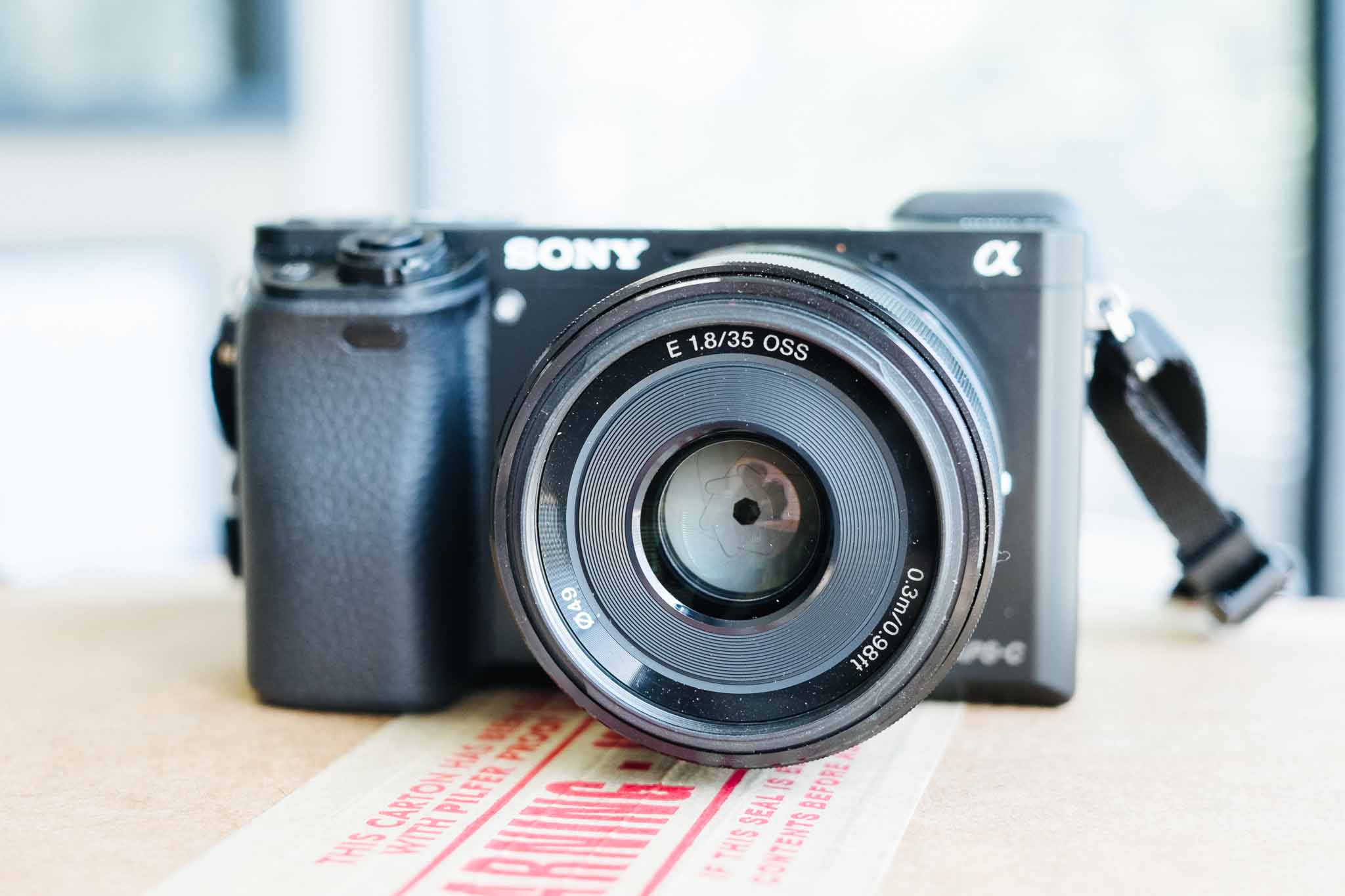
  • Two Days with the Sony A6000

    I had a couple quick days to play with the new Sony A6000, which is replacing the NEX lineup of APS-C sized Sony mirrorless cameras. I’ve used a few NEX cameras in the past and have really not been impressed, so I was a bit biased to not like this camera going into my testing.

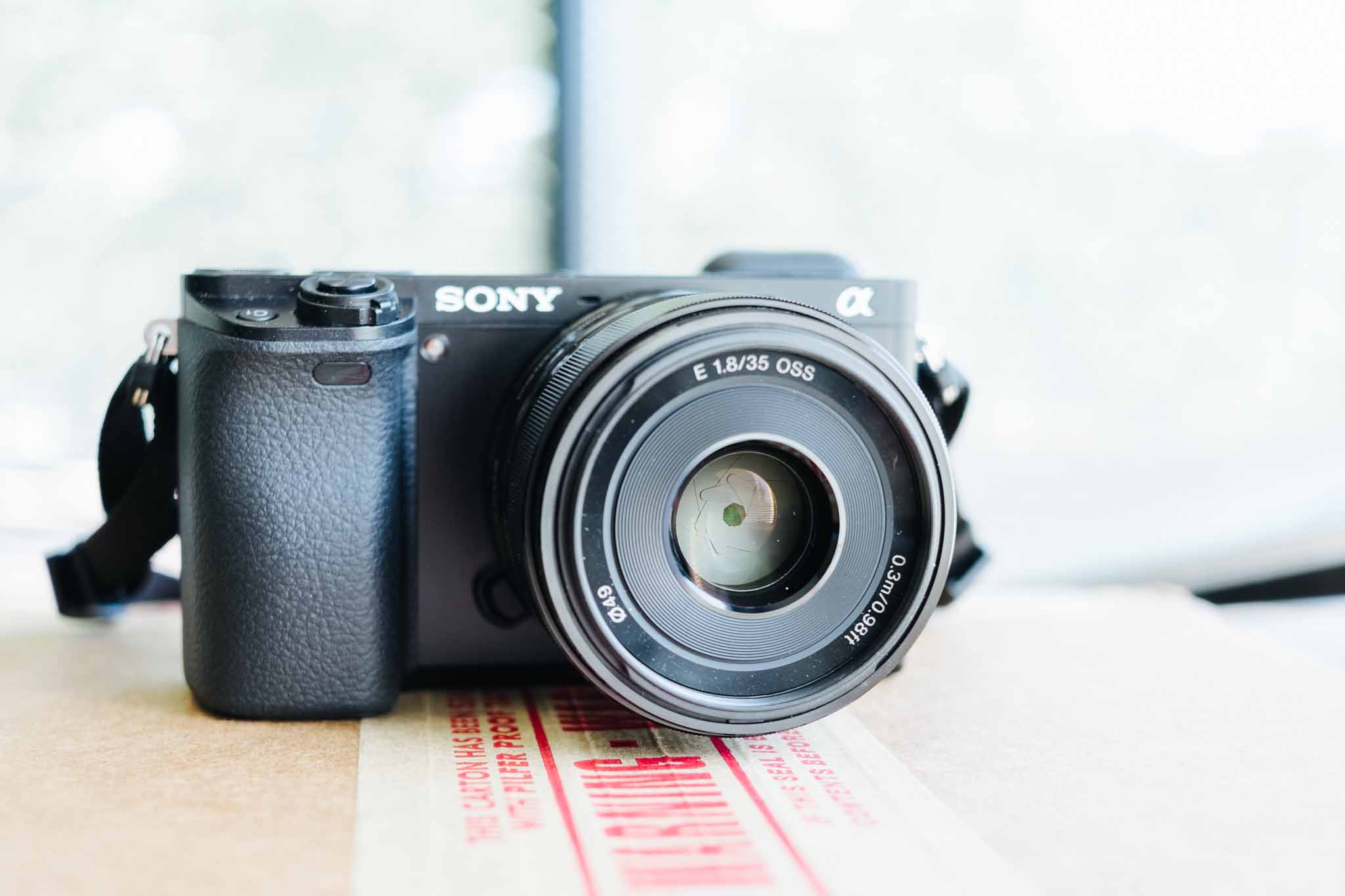
    For the duration of my testing I used the Sony 35 f/1.8 OSS lens (OSS is Sony’s version of image stabilization). What I found with the A6000 surprised me quite a bit, it’s actually quite an excellent camera.

    Handling

    Handling, or how a camera feels in your hand, can make or break a camera experience — this is also highly subjective, as everyones hands are different.

    To my hand the A6000 feels very comfortable with the large grip making the camera easy to hold with one hand, while never feeling like you might drop it.

    With the exception of the shutter button, all the buttons on the camera feel good. Not excellent, but good. The thing to remember is that this is a plastic camera body, with plastic buttons — everything feels like plastic. Nice plastic, but still plastic.

    That’s about where my compliments on the handling end.

    The shutter button is too easily pressed, and there were many times when I intended to half-press the shutter to lock focus, and instead snapped a photo. With longer use, this probably becomes less of an issue, but the feel between half-press to exposing the image is so subtle that I have a feeling I would always end up with a few accidental photos. This is the first time I have ever felt this way about a shutter release.

    The two main dials, one for the mode setting, and the other to adjust controls are backwards. With the mode being in a very convenient spot for your thumb, and the dial where you would actually adjust something like EV, Aperture, or Shutter, being in a very awkward spot for my thumb. Essentially requiring me to hold the camera slightly less securely to use it. This drove me nuts as I felt like I was doing thumb contortions to get at the dial.

    But that’s not the worst handling issue — the dedicated movie recording button is. I’ve been told that this button location used to be worse on the NEX lineup, and so it was moved out of the way. It is now in such an awkward spot that I would not recommend anyone press it while holding the camera with just one hand. Now, for recording movies it makes sense to hold the camera with two hands (for stability), but even so this is a dumb place for such a button.

    Beyond those comments I didn’t get to use the camera long enough to find any other handling issues I feel comfortable making an assessment on.

    Image Quality

    It is top notch, and a whopping 24.3 megapixels. I’m not the right person to ask for someone to dive into the quality, but that’s not what most people want to know. Instead let me answer what I feel are the most common questions:

    • Can this take lovely pictures? Yes. But I do find the pictures to be a soft, and in need of sharpening in post processing. I found this in just about every image I took.
    • How is the noise control? Not as good as Fujifilm, but not too shabby. I wouldn’t take it over 3200 if I wanted a clean image (after noise reduction), but 6400 is fine.
    • How are the colors? Neutral, that’s the best way I can describe them. This camera lacks personality in the image tone, and some people will love that, while others (like me) will feel it looks a bit generic.

    Overall then: images need sharpening and noise reduction above 1600 ISO, and the colors lack personality. That’s not too shabby, and lets not forget you get a very large image from this camera, in a very small package.

    Auto Focus

    The fastest and quietest I’ve used, hands down. Just about every camera I have used I have been able to hear the AF motor (even Canon USM), but I really can’t hear it on the Sony. Even with my ear next to the lens, I have a tough time hearing the motor. It’s a bit unreal — like somehow the camera magically focuses without doing anything at all.

    Add to that the fact that the AF is nearly instantaneous, and always spot on. Then add to that the fact that the tracking can actually track my kid — and wow, just wow.

    This is a truly impressive AF, and I drool over how good it is. I want this in every camera.

    All of this means: AF-C is a no brainer on this camera. After a couple hundred shots I set the camera to continuous autofocus with tracking, I mean why not? I don’t hear thew noise, the camera doesn’t hunt for focus, and it always hits it’s mark. It’s astounding.

    The only complaint I have is that the stock multi-AF point mode didn’t always find what I wanted the focus to be on, and for those times it was far faster to switch to manual focus than to change modes and select the focus point. Now, that is only the case in still life photography, once you introduce people the camera tracks the people exceedingly well.

    This is a people camera first and foremost.

    Miscellaneous

    • Shutter Sound: this is actually a pretty loud camera. So even though the autofocus is silent, the shutter is really loud and higher in pitch. It’s not annoying, but no where near stealth. Everyone in the room will probably hear it. It sounds to me a bit how Hollywood makes ‘silencers’ and pistol sound.
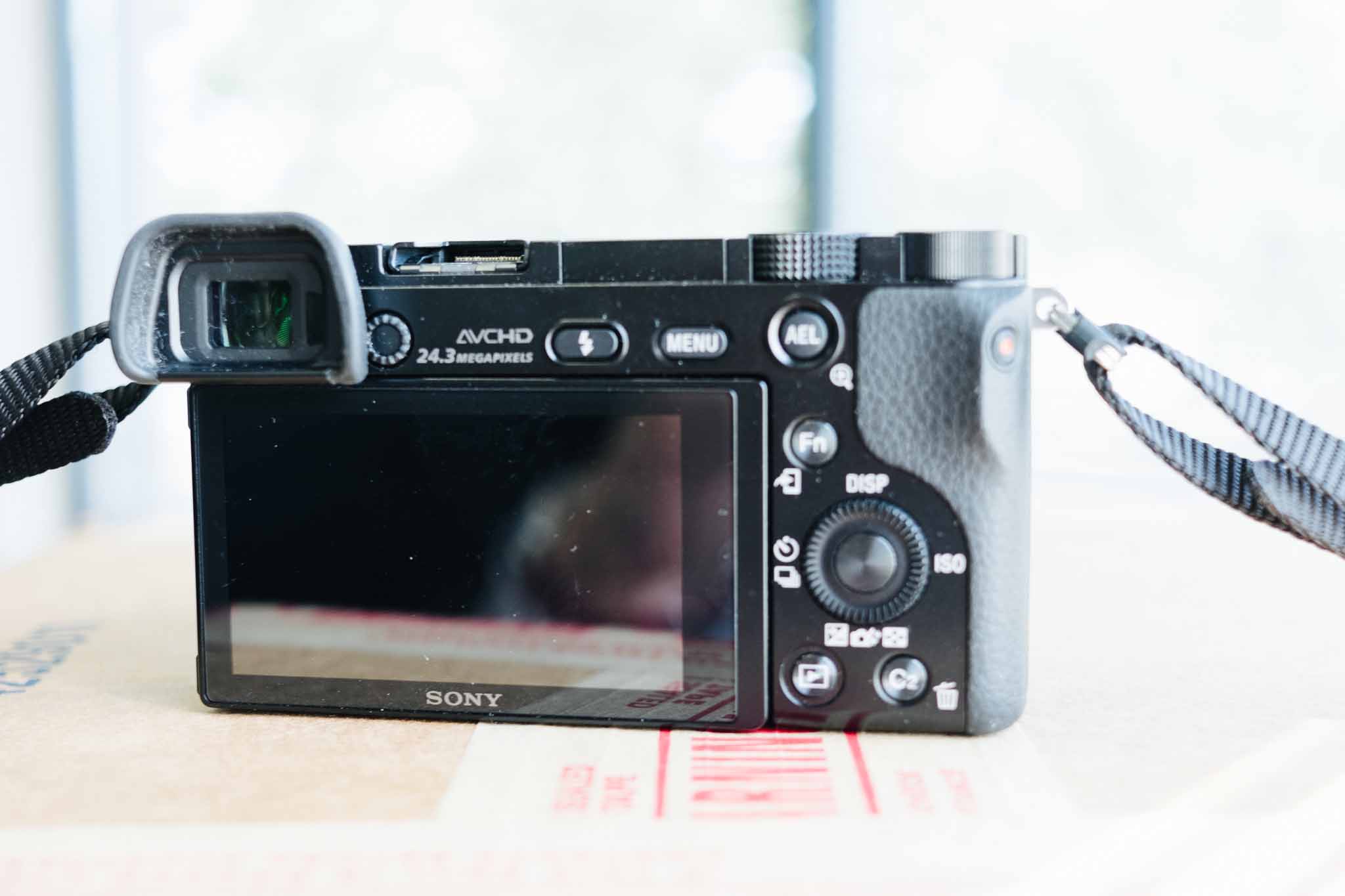
    • There is shit all over camera. One of the worst things about the camera is the excessive labeling and writing. Do I really need the megapixel count etched on the camera? No. Just look at this mess. Way too much going on.
    • The SD card slot, is the worst SD card slot in the history of SD card slots. Look at an SD card, see that indent for your finger nail? That helps get SD cards out of slots, and it is quite nice. That indent, on the A6000, goes up against the battery door, so that one must try hard to pinch the edges of the SD card to remove it. No joke, I had to use two index fingers to get my card out as it does not pop up high enough, nor offer access to the finger nail indent. I hate this so much that it is almost a deal breaker right there.
    • Eye cup: it’s huge. Like really huge. Probably great for bright light, but really kills the ability to compactly stow the camera. It can be removed, but then the glare is terrible on the EVF. For how small the camera is, the eye cup is comically large.
    • Manual Focus isn’t great, it’s not bad, but I had trouble with it unlike I have had with other cameras. This just is not a camera meant to manual focus, and why would you with how great the autofocus is.

    Overall

    This is a camera that is very easy to use and a camera that you can trust. ((WiFi could not be tested because this reviewer was running a beta of iOS.)) What I mean is that you can set this camera to P mode, and hand it to anyone and trust that the camera will do a pretty epic job of making sure you get a decent photo — especially if that photo is of people.

    In other words, close to the opposite of a Fujifilm camera as you can get.

    Because of that, I found myself getting a little frustrated with the camera at times. I felt like I had little control over the exposure even in Aperture Priority mode (my preferred mode of shooting). That has nothing to do with a flaw in the camera, as much as it has to do with a flaw in the photographer. The camera never let me make a mistake, and so I never really felt like the images were ones I was making — as much as images the camera was making.

    So who then is this camera for? Well I can think of two people:

    1. Someone who wants really good images, without having to ‘learn photography’. And I truly do not mean that as a back handed compliment to the A6000 — it’s actually kind of impressive if you think about it. I tried to find something where the camera would screw up, but I couldn’t.
    2. Anyone with kids who want images that are in focus of their kids. Seriously, if you want a small camera that can track sports, and active kids — this is the camera to buy. No joke, I wish I could have one of these just for the times when I know the kids are going to be active (waking hours). This is a beast of a camera for focus tracking.

    Those two categories, unsurprisingly, encompass a large swath of people. Where a person is likely not to enjoy this camera is if they like a bit more manual control. Everything is done with odd buttons and very few dials on this camera. This is a tough camera not to like, and surprisingly (to me) I really do like it.

    This is a people camera and, luckily for Sony, people tend to mostly take pictures of other people. I won’t replace my Fuji for this, but this is a very tempting and very good camera. Perhaps the best people/family/kids camera I have ever used.

    Buy It

    Buy it at Amazon.

    Or buy it from B&H Photo.

    Photos

  • iOS 8 Extensions

    Federico Viticci dives into iOS 8 extensions:

    With less annoyances, faster access to information, and better communication between the apps we use every day, iOS is growing up. Apple put the ball in the developers’ court, and now they have to figure out how they can improve the ways we use our devices every day with more flexible, powerful apps.

    These are going to be very cool. Can’t wait.

  • Leadership and Work

    Michael Lopp:

    The work isn’t hard because of the things you know; it’s hard because of the unknowable. This piece is not an argument for more leaders, it’s a request to appreciate that the unknowable arrives – every single day.

  • Our Favorite Cameras

    Interesting poll results over on The Online Photographer. I was surprised to see the Olympus OM-D E-M5 come in at number 2 overall — though it is a very good camera (even still).