Author: Ben Brooks

  • W3 Total Failure

    When I first started with WordPress, I knew one thing to be true: I needed caching. A WordPress site without caching is a site waiting to go down.

    Even with a fast, powerful server you’re better off caching WordPress, which as anyone who has tried will tell you, is a black-art. Not a black-art in the “bullshit SEO” sense, but in the sense that few people know how to do it effectively.

    Initially I chose WP-Supercache because it’s easy to install and get started. Over the years I have tried just about every plugin in WordPress.org’s database and even some outside CDN options. For most of this site’s life I have used a well known caching plugin called W3 Total Cache. It has, by far, the most daunting array of options but in all of my testing it was about a half–second faster than any other option out there. A *half–second*, folks.

    That half–second was worth all the hassle of configuring a complex plugin because on the web speed really matters. W3 Total Cache has always done its job, even passing the toughest test: a day where this site logged over 50,000 uniques in the span of 18 hours, on a relatively cheap hosting plan.

    I’ve moved this website to four different hosts over the course of its life ((For those not on App.net, I just moved to a Mac mini at macminicolo.net.)) and taken the same WordPress configuration with me. In all that time I’ve only had one bad experience with W3TC (when an update was corrupt and took my site down) and other than that I have been perfectly happy.

    Recently I began hosting on the Mac mini. Right away I was seeing problems with the caching plugin, but after some sorting out everything started working. Then I made a change to the footer and nothing on the site updated. I did everything I could think of and still nothing.

    It occurred to me that the cache wasn’t working correctly. I disabled the plugin, but the site was still being cached. Huh?

    I tried deleting the plugin and all of its far-reaching tentacles. And then the site went down.

    I tried searching for solutions and, while I wasn’t alone, I couldn’t find a single thing that worked. I enlisted the help of an [elite WordPress guru][1] and even he was stymied.

    And then he figured it out. We restarted the server, waited, and then the damned beast was banished. ((It looks like APC was storing something it shouldn’t have, whatever the reason a disabled plugin was still running.))

    I have since switched back to WP-Supercache and couldn’t be happier — and given the amount of complaints I have seen about W3TC and users not being able to remove it, I simply cannot recommend that anyone use W3 Total Cache at this time.

    [1]: https://twitter.com/jchristopher
  • ‘Please Don’t Buy an SLR if You’ll Only Use the Kit Lens’

    [Marco Arment on SLRs][1]:

    > A decent consumer SLR body, usually $600–900, is a big investment for most people. But if you can’t also afford to buy at least one good lens with it, you’ll get better photos by going with a less expensive kit, such as a high-end point-and-shoot or an entry-level mirrorless setup.

    I’ll second Marco here, with the caveat that you really can take a great photo with any lens or camera. **BUT** the overall quality when you try to use that photo later on is where you will really see the trade off and likely find frustration.

    I’ve written about my [Panasonic GX1][2] and the excellent [20mm f/1.7][3] pancake lens. It is a camera setup I use all the time — I love it.

    But I also have a [Canon 5D][4] (the mk I, not the [mk II][5] or [mk III][6] — maybe if I had ads, or if you click on the links and buy things — that works too) and with the 5D here’s the lenses that I have:

    – [Canon 50mm f/1.4][7]
    – [Canon 17-40mm f/4][8]
    – [Canon 80-200mm f/2.8][9] (This is seriously an old-school lens)
    – [Canon 100mm f/2][10]

    I used to have the Canon [24-70 f/2.8][11] (affectionately called “The Brick” because it weighs about a ton), but I never used it for anything because the focal range for the weight added was not a good trade off. It is, however, one of the sharpest, and brightest lenses I have used.

    The two most used lenses in my setup for my Canon is the 50mm and the 17-40. I use the 50mm for any type of “normal” shooting and the 17-40 for a wide-angle for my day job in real estate.

    Prime lenses (those with fixed focal lengths) are amazingly more sharp and less distorted than zooms. If you can, you should own at least one in the 28-50mm range (28 on a APS-C sensor, 50 on full frame — adjust to taste).

    Here’s where I will differ with Marco, the 40mm he recommends is excellent, but there is also another really cheap lens, the [50mm 1.8][12]. The build quality is poor, but the lens is sharp and pretty fast. It’s a good entry step, Amazon has it listed at $110, but you can get it cheaper: [refurbished for $90][13], or you can find them from people who have stepped up for cheaper on Craigslist sometimes for as low as $65.

    *Tip: If you need to test the lens when you go to buy a used one (and you should), [back focusing will be a really good test][14] and easy to do on site.*

    For me the 50mm 1.4 is really all I need for personal photography and the 17-40 is all I need for work. There’s a lot of great lenses for a lot of money out there, but many are not needed. Your best bet is to get one good lens and see what you are lacking from there — also remember that buying a good lens will transfer from body to body with you. That 80-200mm lens I listed above is handed down from my Grandfather, it’s probably from the early 90s and still works fine.

    [1]: http://www.marco.org/2013/05/07/your-kit-lens-sucks
    [2]: https://brooksreview.net/2012/03/gx1/
    [3]: http://www.amazon.com/exec/obidos/ASIN/B002IKLJVE/ref=nosim&tag=brooksreview-20
    [4]: http://www.amazon.com/exec/obidos/ASIN/B0007Y791C/ref=nosim&tag=brooksreview-20
    [5]: http://www.amazon.com/exec/obidos/ASIN/B001G5ZTLS/ref=nosim&tag=brooksreview-20
    [6]: http://www.amazon.com/exec/obidos/ASIN/B007FGYZFI/ref=nosim&tag=brooksreview-20
    [7]: http://www.amazon.com/exec/obidos/ASIN/B00009XVCZ/ref=nosim&tag=brooksreview-20
    [8]: http://www.amazon.com/exec/obidos/ASIN/B00009R6WO/ref=nosim&tag=brooksreview-20
    [9]: http://photo.net/equipment/canon/80-200L
    [10]: http://www.amazon.com/exec/obidos/ASIN/B00009USVW/ref=nosim&tag=brooksreview-20
    [11]: http://www.amazon.com/exec/obidos/ASIN/B0076BNK30/ref=nosim&tag=brooksreview-20
    [12]: http://www.amazon.com/exec/obidos/ASIN/B00007E7JU/ref=nosim&tag=brooksreview-20
    [13]: http://www.adorama.com/CA5018AFUR.html
    [14]: http://cameralightlens.com/newsblog/?p=264

  • The Deciders

    [This is a fantastic article from Jeffrey Rosen at The New Republic][1]. The article details one of the toughest problems with running a service — a service which allows users to upload content — the problem is: when, and what, content to take down.

    The implications of being too aggressive are huge for the general openness of the internet while the implications of doing nothing could also be disastrous — and these are take down decisions being made by kids in the U.S. who are trying to follow a rule book handed to them. This is the one area where I won’t criticize Twitter, Facebook, or Google — they are doing a pretty good job dealing with a very difficult problem. They make mistakes, but by all accounts it seems that two things are true:

    1. They are learning from mistakes.
    2. They are not jumping to action before thinking through all the consequences.

    So kudos to them for that, and here’s hoping we can keep this control in the hands of the users and not the “free” governments of the world.

    [1]: http://www.newrepublic.com/article/113045/free-speech-internet-silicon-valley-making-rules%23

  • Limitless Surveillance

    [Glenn Greenwald reporting][1]:

    > Let’s repeat that last part: “no digital communication is secure”, by which he means not that any communication is susceptible to government interception as it happens (although that is true), but far beyond that: all digital communications – meaning telephone calls, emails, online chats and the like – are automatically recorded and stored and accessible to the government after the fact. To describe that is to define what a ubiquitous, limitless Surveillance State is.

    A better way to think about how bullshit this is, is to think about it this way: how would you feel if you found out the government (any government) opened all postal mail, copied it, filed the copies, resealed the envelope, and sent it along the way. If you think that is overstepping, well, there is *no* difference between intercepting postal mail and intercepting email or other digital communications.

    [1]: http://m.guardiannews.com/commentisfree/2013/may/04/telephone-calls-recorded-fbi-boston

  • Calendaring on the Mac

    For a long time I have argued for a smarter calendar. Jason Snell, [in an article for Macworld][1], outlines some great features that seem rather obvious, yet are missing from most apps.

    > And yet it all feels a bit pedestrian, like I’m really just using a computerized, networked version of a paper calendar. What’s missing are features that could turn my calendar into something more like a personal assistant.

    I agree with Jason and it got me thinking about [a post I wrote about the problems with calendar apps][2]. Let’s reconsider what a really great Mac calendaring app would be like.

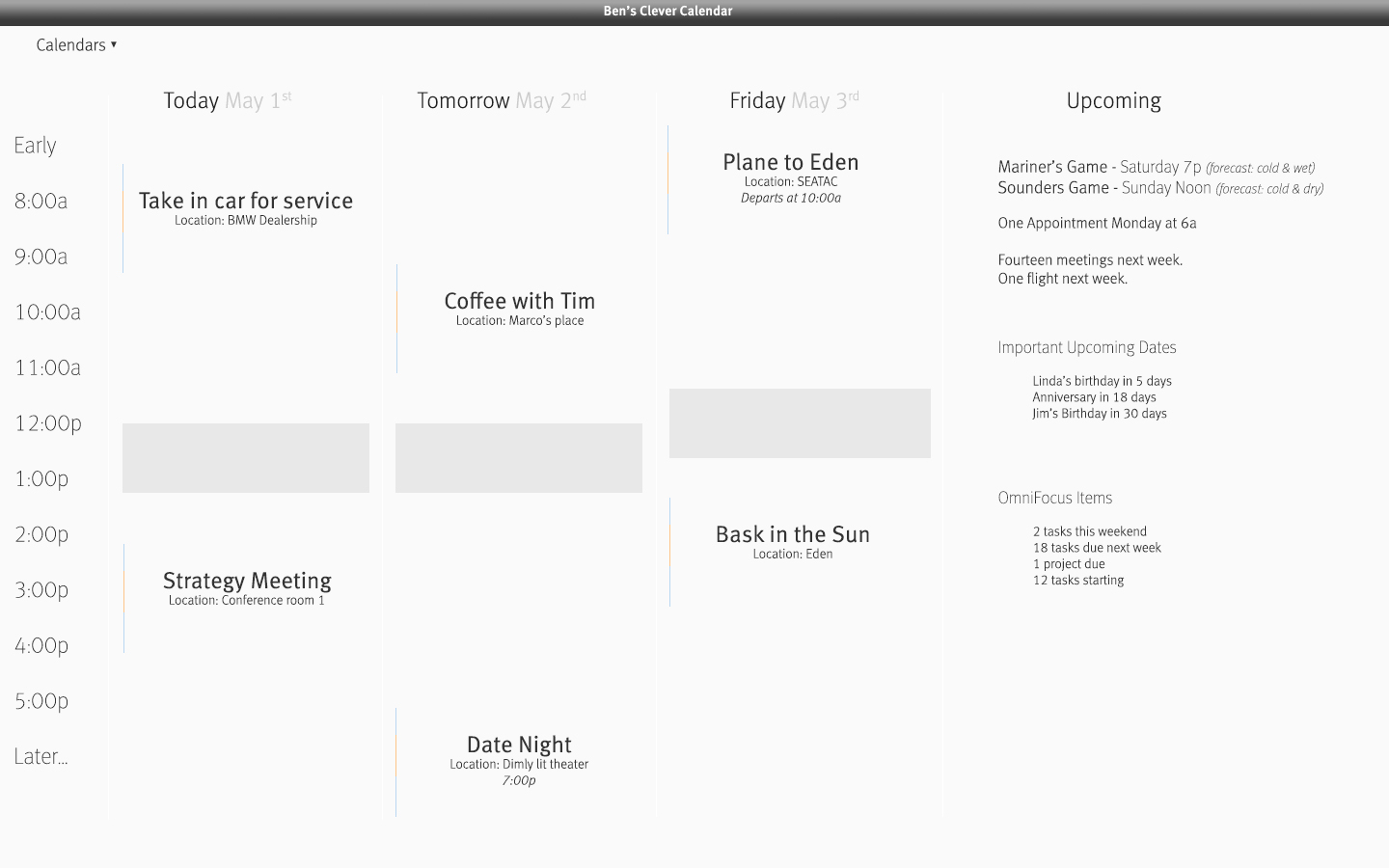
    To the right is what I have come up with.

    My calendar mock up.

    Looks aside, I want to take a look at the data, how it is presented and why I made these design decisions.

    ## The Main View

    There is only one view. No month view. No day view. You see today, tomorrow, and the following day, including an overview of a user-defined future time period.

    I have always found a view of an entire week overwhelming. My forward planning capacity is about three days. Beyond three days everything is too far out to think about in detail right now. It’s good to have future events planned, but not good for your mind to stress about things so far in the future. Thus, three days.

    The upcoming section shows events that fall outside of the current view in a snapshot-like way. There will be a preview of the weekend, as seen with the first two lines, and a heads-up about how next week starts (or how the next working day begins, if Friday isn’t the last day in the viewport). Then a more distant forecast, excluding specifics of each event, showing only a high-level overview of how fucked next week is.

    My ideal calendar would pull out important things that may need pre-planning — as I have shown with the ‘flight’ notice in this area. Flights are something you want to know about more than a few days ahead, so it’s important to show them here.

    Next come upcoming important dates, which is where birthdays and anniversaries are shown. Why should birthdays be an all day event at the top of my calendar?

    Lastly, a pane to show upcoming task information from OmniFocus — again this is to give an idea of how busy next week is. I prefer to see a high-level, generic view of next week’s events because typically I wonder: “Will next week be busy?” And not: “Do I have a meeting at 11AM with Bob on Wednesday?” This viewport better answers my question, than seeing all the details of the next week.

    ## Specific Touches

    You’ll notice that instead of showing twelve hours, I just set the times from 8AM – 5PM. This would be a user definable range, which should be set for the times you actually want to allow people to schedule meetings with you — since I assume you use a calendar service that shows others when you’re busy.

    Before or after that period the app just shows “earlier” and “later” — times when you *can* have things scheduled, but really don’t want to. If you *choose* to schedule things outside of the core hours, they are more likely to have ambiguous timing — like date night. If an appointment is scheduled in the “early” or “later” block, the start time is shown in text.

    ### Events

    Each event shows the title, location, weather (if wanted), and start time (if needed — see above). The colored bar to the left of each event denotes the duration of the appointment in orange/red and the travel times to and from the appointment in slate/blue. Ideally the app sets those automatically by grabbing travel time info from a mapping site (from a location you specify, to the location specified in the appointment).

    Next you might notice the gray blocks around lunch time that prevent your lunch hour being snagged by a coworker wanting a meeting. These are not hard-coded blocks — instead you would set the default lunch time but can drag them around day-to-day to better fit your actual schedule.

    ## The Gist

    The more I think about why calendars suck, the more I realize they *really* suck at two things:

    1. Protecting my time for me.
    2. Summarizing my time.

    On the *rare* occasions when I *need* to see a month-view I can grab one of a million other calendar apps. What I need every day is an app that runs fullscreen, which I glance at for a grasp on the next couple days. This kind of calendar app keeps me from getting overwhelmed, but still informs me if a nightmarish number of OmniFocus tasks and too many meetings are on the horizon.

    Now *this* idea is closer to the killer calendar app.

    [1]: http://www.macworld.com/article/2036158/why-aren-t-digital-calendars-smarter-.html
    [2]: https://brooksreview.net/2010/09/sucky-calendars/

  • Gmail’s Design

    [A great post detailing the difference between simplifying for the sake of design instead of for the sake of usability][1]. There are some really great points made, especially about how many clicks it takes to perform rather basic actions.

    > It’s also stop putting away the things I’m currently using. I might like to have a clean desk but if I’m writing a letter, I don’t want to open my drawer every time I want to reach for a piece of paper, pen, pencil or eraser.

    This really hit home for me, because I ran into this very problem a few months back. I decided to keep my pen in the pen drawer at my office — a rather innocent decision which I made so that I always knew where my pen was (I frequently would “lose” my pen and spend 20 seconds looking for it).

    It felt good to make the change, but it turned out to be incredibly inconvenient. Even though I lose my pen sometimes, the benefit of having it out and ready far outweighs the “always knowing where it is” notion.

    The same carries over with buttons in user interfaces. I hate the Mac OS X inspector windows that I always have to click through to get that *one* action that really should be accessible from the toolbar. (I am looking at you Pages, and your damned hidden “object causes wrap” check box — I hate you.)

    [1]: http://www.taigeair.com/why-gmail-2013-sucks-terribad-user-experience.html

  • Quote of the Day: John Carey

    “We are information junkies, always wondering whats behind the next refresh.”
  • Quote of the Day: Paul Kafasis

    “In short, the league owners as a whole don’t want to set a precedent of paying for their own stadiums.”
  • Quietly Admitting

    [Fraser Speirs][1]:

    > The entire article follows the pattern of building up small issues (and non-issues) to be insurmountable obstacles, then quietly admitting that a solution actually exists.

    What site is he talking about? Out of context it could really be any major tech site these days…

    (For the record he was debunking an “anti-iPad in enterprises” article which, surprisingly, was not posted Cnet.)

    [1]: http://speirs.org/blog/2013/4/27/it-does-not-love-ipads-and-thats-a-good-sign.html

  • ‘Do US Cities Need More Surveillance Cameras?’

    [Dominic Holden][1] presents a look at what more security cameras would do, and wouldn’t do in our country. This entire debate reminds me of the decent (but not great) TV series: Person of Interest.

    The show surrounds a smart computer geek, who created a program that analyzes all available data on the U.S. population (from cameras, wiretaps, phone logs, emails, etc.) to determine a likely terrorist threat, but a subset of the program (which the show revolves around) sends the creator a SSN of someone in NYC about to commit a serious crime, or have one committed against them. (Then they try to help and yadda, yadda, yadda.)

    Needless to say there is a lot of a good and a lot of bad that come from security cameras in public areas, but I think the most telling statement of how hard it is to still catch someone is a passage Holden includes from the CTO of the CIA:

    > The value of any piece of information is only known when you can connect it with something else that arrives at a future point in time. Since you can’t connect dots you don’t have, it drives us into a mode of, **[we fundamentally try to collect everything and hang on to it forever][2]**.

    24/7 monitoring of security cameras of any type is largely ineffective, inefficient, and cost prohibitive (except, apparently, in Las Vegas), so the deterrent factor isn’t “immediate arrest” as much as it is: tracking down people later. But as the passage above points out, it’s not always an immediate later. First you have to know that something happened somewhere that needs review, then you have to try an identify a nameless face off a grainy, poorly lit, and far away, camera.

    I can tell you that in my day job we struggle with the decision, of whether or not to install security cameras, all the time. Do we install security cameras to curb graffiti, what about curbing, or catching, people breaking into cars? Nine times out of ten, the best decision (economically and practically) is to not install cameras at all.

    My argument against cameras is not a privacy argument, but instead the same argument I would use against dead bolts on your front door.

    Dead bolts and security cameras serve the same purpose: to keep the honest people honest. Anyone intent on crime will do so no matter what level of “security” you have in place. That’s not to say you shouldn’t have a dead bolt — I do — but that you need to have reasonable expectations about the level of security offered. A strong boot is still coming through your door — dead bolt or not.

    Also remember that in addition to catching people with security cameras, you have to worry about securing the security cameras. At one building I manage, with a large camera network, the first place broken into is always the security camera room.

    There is always a place the cameras don’t cover, and always a place to attack — cameras just shift those places around.

    [1]: http://slog.thestranger.com/slog/archives/2013/04/21/after-the-boston-bombings-do-american-cities-need-more-surveillance-cameras
    [2]: http://www.huffingtonpost.com/2013/03/20/cia-gus-hunt-big-data_n_2917842.html

  • Quote of the Day: George Saunders

    “Twitter is a deliberate abstention. Somehow I hate the idea of there always being, in the back of my mind, this little voice saying: ‘Oh, I should tweet about this.’”
  • Betaworks

    I knew nothing about the sale of Instapaper until well after the news was posted online. After reading the news I wasn’t sure what to make of the entire situation. My knee jerk reaction was to cancel my account and just use Pinboard.in instead. However I stopped to consider what, why, and who was taking over: Betaworks.

    I knew that I knew the name Betaworks, but I couldn’t place it. A quick check of their site reminded me: Digg.

    Digg is really relevant to talk about in order to understand my thoughts on the Instapaper sale. When Digg first came out, I fell in love with it. For me Digg was *the* way to see the greatest anything on the web, it’s where I found out about a lot of the sites that I read and love today. I was a huge fan of the corresponding podcast and just enjoyed the service in general.

    Then Digg went sideways and there was a lot easier and better ways to stay on top of the web. Digg died for me.

    When Digg was relaunched I gave it a try via the iPhone app. The Digg iPhone app is still an app that I use and check multiple times a day, I really like it.

    The design, the content, everything in Digg right now is really great. Betaworks, in this bloggers opinion, has done a fantastic job taking Digg back to its roots.

    ***

    Which brings me to Instapaper.

    I really love Instapaper, and I admire the hell out of the work Marco Arment has done to build and maintain the integrity of the service. But I worry about its future under Betaworks.

    I have no doubt that Betaworks can keep the usability of Instapaper in place, that the speed and reliability of service will only improve, but I worry about the soul of Instapaper. Specifically, that it is a service worth paying for in a segment that has immense competition from free providers, and that Betaworks will keep it a privacy conscious, paid service (well mostly paid).

    I know that Betaworks has to make the purchase pencil on the ledger, whether they paid $1, or the “reported” $100 Billion dollars. ((I know of no such reports, but if CNN can make shit up, so can I.)) I worry that the service will eventually have to change, but for now I think it is a win for the current Instapaper users — with a healthy caveat of keeping a close eye on any ToS changes that may or may not come.

  • ‘This is freedom’

    [Tom Rogan writing about why conspiracy theories are usually good][1]:

    > And yet… Tsarnaev is innocent until proven guilty. In this sense, his supporters are little more than amateur defense attorneys — odd and pathetic, perhaps, but harmless. And they’re actually helping uphold the American tradition of a presumption of innocence. This is freedom.

    The more we question things, Rogan argues, the more accepting we are of reality. It’s an interesting viewpoint and hard to disagree with.

    I’ll see if I can get my buddy to join my crazy meet up — he knows more conspiracy theories than anyone I have ever met and it’s entertaining as hell.

    [1]: http://theweek.com/article/index/243355/why-conspiracy-theories-are-good-for-america

  • The Ego-Boosting-Wow-WWDC-Sure-Sold-Out-Fast Meetup (Seattle)

    Just to see how many people would respond, I posted on App.net the other day that I wanted to hold a Seattle meet up during WWDC for those not attending the conference. Two people said yes, and for App.net that’s batting 1.000, so here we are.

    Here’s what I am planning (please email me to let me know if you want to attend so I can choose a properly sized venue):

    – **Date:** June 13th, 2013 at 7:00pm to whenever I get too tired to be there.
    – **Location:** An appropriately sized bar in downtown Seattle, or (reluctantly) in Capitol Hill. Bar must serve a decent selection of whiskey. [We’ll be meeting here](http://www.yelp.com/biz/radiator-whiskey-seattle).
    – **What:** A group of nerds drinking, and not being ashamed that they own more than 15 weather apps even though they live in a city with only two weather types (rain and clouds).
    – **Who:** So far I can guarantee you me, and two other people.

    That’s all. [Shoot me an email][1] if you can attend so I can get the venue sized right.

    [1]: mailto:ben@brooksreview.net

  • Stark Contrast

    [Jason Kottke on some of the first weblogs][1]:

    > Those weblogs were idiosyncratic, about a little bit of everything, and sent people away to keep them coming back — a stark contrast to the late-’90s portal strategy of “stickiness.”

    Also a stark contrast to most major blogs of today. Think: TechCrunch, *The Verge*, Huffington Post — they all have designed their websites, and link in ways, that show how much they loathe sending away even one click (unless it is to an advertiser that is). This type of thinking is just ridiculous and arcane — sadly it is also standard web practice.

    [1]: http://www.wired.com/magazine/2013/04/kottke/

  • Twitter Music

    [Jim Ray](http://jimray.tumblr.com/post/48626134951/twitters-music-app-is-beautiful-in-that):

    > Perhaps I’m just too far past what Twitter considers cool, but a stream littered with #NowPlaying refuse (or Vines or Foursqure check-ins, for that matter) is a sign that I need to spend some quality time with the unfollow button. Twitter has built an app that requires users to abuse their timelines and followers with machine tags without any meaningful way of tuning out that noise.

    That’s an astute observation of not only Twitter’s new music thing, but of Twitter itself. Hashtags served a great purpose in the early days when they were used sparingly, but in a world where every TV show has a little hashtag in the bottom corner — well it’s time to run.

    App.net, of course, is not immune to this either — there exists hashtags on App.net and I hate them equally there too.

    I personally always thought Twitter would move beyond hashtags by scanning the content of a tweet and categorizing it automatically. I think that would work well for sports, and other things that one can easily discern what is being yelled about. For now I just hold out hope someone builds that for ADN.

  • Sunstroke 1.4

    [Sunstroke gained a modest update today][1] to version 1.4. New in this update is a few little things, one neat one:

    > Added the ability to long press on the sync button to force Sunstroke to refresh the Fever server.

    That’s a really clever little update — I love how minor but powerful that touch is. There’s a bunch of bug fixes too, oh and it now supports iPad.

    Yeah iPad now has not just a native Fever° app, but the *best* native Fever° app. Sunstroke is $4.99, which is a bargain. So buy it now before I convince him a price increase is needed.

    (Side note: I still use Fever mostly on my iPhone, but that’s really more due to habit than anything else — because using Fever° on my iPad is a joy in Sunstroke.)

    [1]: https://goneeast.com/sunstroke/

  • Drafts 3: One Hell of a Notepad

    [Federico Viticci has a very detailed review][1] of what is new in Drafts 3.0. I haven’t used the app, but to call it a scratchpad any longer is really unfair. There is a tremendous amount of power in Drafts — one could spend months in the app configuring it.

    I have a lot of respect for the work that has gone into Drafts, but I just need the scratchpad, so [Scratch][2] it is for me. I’ve come to realize I am just not a person that wants to, or needs to, use apps on my iPhone to do all sorts of crazy other stuff. It makes it too complicated for me to think about and adds too much cruft and not enough just doing.

    I don’t do much work on my iPhone any more — that’s been off loaded to my iPad(s). So when I pull out my iPhone there is a specific thing I want to do:

    – Check App.net
    – Post to App.net
    – Check Email
    – Send an email
    – Add a task to OmniFocus
    – View tasks, or mark tasks off
    – And much more

    My point is: I know what I am doing when I grab my iPhone, so why not just use the actual app. If I use it often it’s already on my homescreen. This is why Launchpad, Drafts, Triage, and other apps really didn’t stick for me. That’s not to say those aren’t great apps, but they tend to add too much cruft for me to stick with them very long.

    [1]: http://www.macstories.net/reviews/drafts-3-review-better-ios-automation-and-workflows/
    [2]: http://gokarbon.com/scratch/

  • Horizon 2.0

    *Today* Horizon calendar ships a major update. Gone are two of the biggest drawbacks of the application: bad icon and no natural language input. The former was one of the biggest reasons I wouldn’t put the app on my Home screen and the latter is a nice little extra for me.

    The new icon took me a week to get used to, I didn’t like it at first, but now quite a while into using the app with the new icon I really do like the icon. Horizon is now my default, Home screen, calendar app. It’s a fantastic app and I really do enjoy using it.

    One thing that I like about the app which I didn’t mention when I first reviewed it: is in the list view, you simply cannot go back in time. You can only see today and everything forward from there. This is actually a great touch, something that I think more calendar apps should incorporate.

    We don’t need to accidentally get stuck in the past — man that happens to me *a lot*.

    Two annoyances about the app:

    1. The new natural language parser (while good) offers no feedback in [the way that Fantastical does][1]. I wish it did, but this is minor for me as I use Siri for new events the majority of the time.
    2. Launch speed. I know (from beta notes) that the developer has been working hard on speeding up the app launch, but it’s still a tick too long for me (though better than it was). For me this is the one thing that Horizon really needs to improve on to take the app to that next level.

    If you haven’t tried out Horizon because you have Agenda, or Fantastical, then I suggest that you do. In the same way that Agenda and Fantastical are different apps, so too is Horizon and [it’s a worthy purchase for calendar nerds][2].

    [1]: http://www.leancrew.com/all-this/2013/04/whats-really-great-about-fantastical/
    [2]: http://horizonapp.me

  • Status Board

    [Panic has released Status Board][1]:

    > Status Board takes your data and gives it meaning. Use the easy built-in widgets. Or massage your data for our Graph and Table widgets. It’s going to be awesome.

    Like every other nerd, when [Panic teased about Status Board back in 2010](https://www.panic.com/blog/2010/03/the-panic-status-board/) I really wanted to get my hands on it. I had absolutely nothing to use it for, but sometimes you just must have pretty things. Status Board, the iOS app is indeed very pretty.

    That first day though, I had nothing to put on it. Now, just a little while later, there are tons of panels that one can add — [Viticci has a collection of them here][2].

    The best of the lot is the work done on the [Mint integration][3].

    What’s more fascinating to me is the allowance for CSV files in the app. I tried this out and it works as expected. Ideally I would like more control over different aspects of the CSV display, but it is indeed a quick and pretty way to display data.

    I am not sure if I will ever find a place where Status Board becomes a real tool for me, but that’s certainly not going to stop me from trying — because it’s an app you *want* to use.

    [1]: http://panic.com/statusboard/
    [2]: https://pinboard.in/u:ticci/t:statusboard
    [3]: https://github.com/maximevalette/MintStatusBoardHelper