Category: Articles

  • The Redirect

    [Todd Bishop over at GeekWire scored an interview with the infamous, Nathan Myhrvold and it is a doozy of a post](http://www.geekwire.com/2012/feisty-nathan-myhrvold-defends-quest-global-good/). In the post Myhrvold has two central themes that he redirects every question Bishop asks to:

    1. No one else in technology is doing what Myhrvold deems to be “good”.
    2. Most all technology is just a pile of toys for what he calls the “rich-world”.

    The statements from Myhrvold range from ridiculous to downright insane babbling.

    Let’s take this answer from Myhrvold responding to a quasi-question about the naming of his new position, “VP for Global Good”:

    >You know, I was at a conference recently where someone said, “Well, do you feel good about what you’re doing?” I turned to this person who is an entrepreneur at a prominent social networking website, and I said, “OK, fine. You’re about people sending little messages to each other and having fun on a social network. How big is your malaria project?”

    First, he didn’t answer the question he was asked, typical of someone who knows others won’t like the answer. Second, let’s assume he is talking about Twitter — what Myhrvold is actually missing is just how much good Twitter is doing. Twitter gives a global voice to the oppressed in countries like, for example, Egypt. It *is* a powerful tool — just because it doesn’t cure malaria, doesn’t mean that there is no “good”, unless I guess your name is Nathan Myhrvold.

    Every answer Myhrvold gives is the same load of bullshit, so I will just quote one last response, in its entirety (you should read the entire interview):

    >Q:What about just being more transparent about your different dealings with patents and all the holding companies and actually making sure that if you have a patent, it’s being used for an actual product and not just squatting on something?

    First, this is a fantastic question — basically a nice way of asking: “why not stop being a patent troll?”. Love it. Myhrvold’s non-response:

    >(Laughs.) Well, it’s another question that is like, “When are you going to stop beating your wife, Todd? That’s what we all really want to know.” …

    No, he really said that. Is he implying we shouldn’t tell people to stop beating their wife? ((I get the reference, still an absurd answer.))

    >Many, many companies that are involved with patents have very good business reason to structure their things through a series of patent holding companies, including virtually any technology company you could name does things entirely analagous to what we do. 100 percent.

    Translation: “Everyone does it, mom said it’s ok.”

    >In terms of transparency, all patents are transparent. What you’re really supposed to do is see if you’re infringing anybody’s patent. So what somebody says, why don’t you tell me which patents you have, Nathan, so I can avoid them, you’re supposed to be avoiding all of them! You’re saying, Nathan, I’d like to be honest with you but cheat everybody else. What’s up with that?

    Actually, that wasn’t the question. The question wasn’t: “why not be transparent with *your* patents”, but rather: why hide behind 50 shell companies and not cop to the fact that you sue the shit out of others that even look at a patent you own. That’s the question.

    >The truth of the matter is that big technology companies use patents as a strategic tool. You see Microsoft and Apple and Samsung and Yahoo and Facebook, you name it, they are using patents as a strategic tool. And they use every trick in the book when it comes to doing that for themselves. But there’s a set of folks, including some of those same companies, that quite hypocritically don’t want other people collecting any money from them on patents. It’s this very funny thing, “My patents are holy and great, and all of the ways I structure and hide my patents, that’s wonderfulness. But Intellectual Ventures, we’re upset with them because they might actually make us pay for some of the inventions we’ve made billions of dollars on without paying. Gosh it sure is more fun to get ‘em for free!” …

    That’s a great redirect by Myhrvold. Basically instead of answering anything close to the question he dropped Apple’s name and made you think that what Intellectual Ventures does is basically the same as what Apple does. Which isn’t true. But, hey, he didn’t have to answer the question this way.

    The only honest answer was the one about Todd beating his wife — which is basically Myhrvold’s way of saying: fuck off. Well, that’s how I read it.
  • Finding a Good Flashlight App for the iPhone

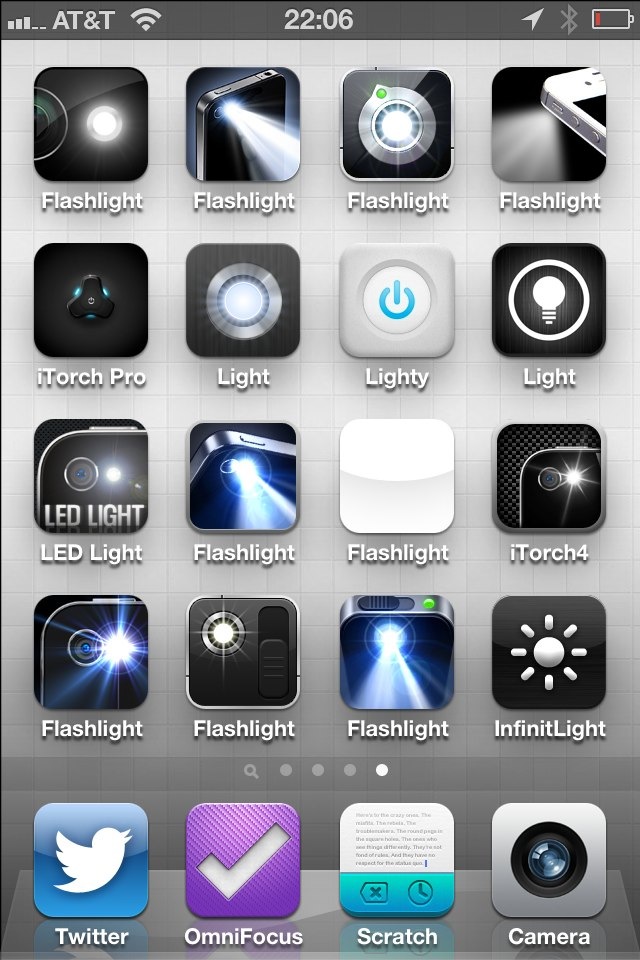
    Have you ever tried to find a good flashlight app in the App Store? You might as well close your eyes and download one at random, you will either get a slow app, or a hideous app. Take your pick.

    Actually, if we are honest, there really is only one aspect of a flashlight app that matters: speed.

    To that end I downloaded all of these:

    How I spend my weekends.

    I’d take the time to name them all, and link to every single one, but there’s one problem: all of them but one sucks. So instead I am just going to number them from the top corner to the bottom and tell you one thing about each: their speed.

    ### Side Note

    Why are all flashlight apps called: `flashlight something`. Twitter developers can come up with neat names, ditto weather devs, so what’s wrong withe flashlight developers? This is another reason it’s very difficult to link to each app.

    ### The Speed

    With a fresh reboot on my iPhone (running iOS 6b4) and no flashlight apps present in the multi-tasking tray, I launched each app and timed the speed until the LED light came on, to the best of my abilities.

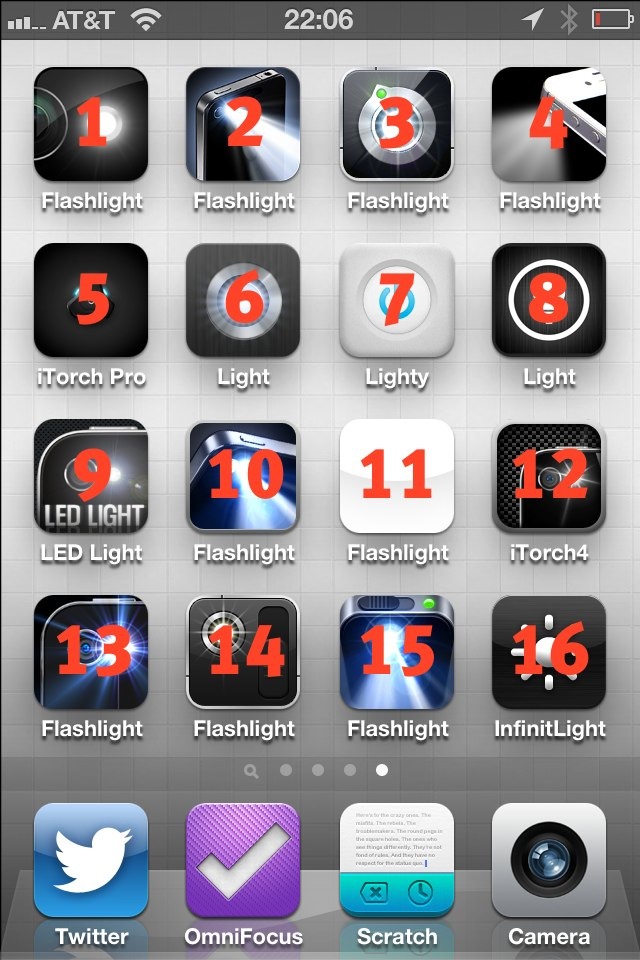
    Here’s the key:

    The number overlay corresponds with the list below of launch times.

    Here’s the results:

    1. 1.6s
    2. 3.3s
    3. 3s
    4. did not launch to an “on” LED
    5. 2.1s
    6. 1.6s
    7. 1.1s
    8. did not launch to an “on” LED
    9. 2.2s
    10. 2.4s
    11. 2.1s
    12. 1.8s
    13. 1.2s
    14. did not launch to an “on” LED
    15. 4s
    16. 2.4s

    The winner is #7, also known as, Lighty. It’s a paid app (bonus points) with a decent icon and decent UI. More than that it is just the fastest of the lot. There are probably about 4,324,322 other flashlight apps, but these were the only ones I tested.

    ### Launch Center Pro

    When I polled Twitter to see what flashlight apps they were using, I got a ton of people saying they use Launch Center Pro. I did too, but then Launch Center Pro moved off of my home screen making it a bit harder to use. My main issue with using Launch Center Pro is that it takes two taps to activate the light — I want one tap to activate the light so I can get to it as fast as I can.

    ### Lighty

    If you are a person that uses a flashlight app on your iPhone, I have to say: of the 16 flashlight apps I tested, [Lighty](http://itunes.apple.com/us/app/lighty-flashlight-for-iphone/id391503046?mt=8) is the best.

  • Jambox Speaker Shelf

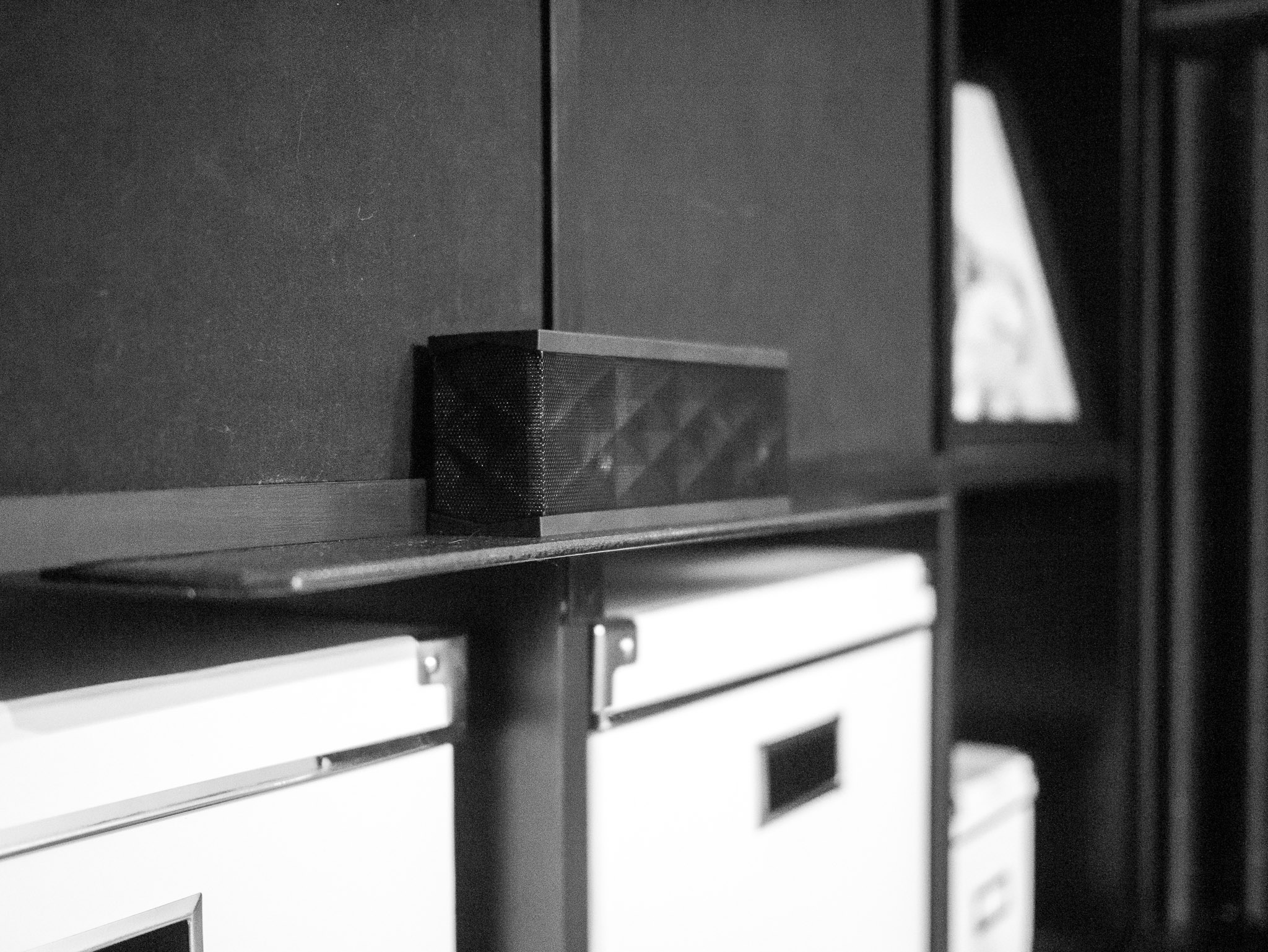
    I recently moved my desk so that instead of being against a wall, the back side of the desk is against a large [Ikea bookshelf](http://www.amazon.com/exec/obidos/ASIN/B0050PEC2W/ref=nosim&tag=brooksreview-20). Since I have had this particular desk I haven’t found a truly good spot for my [Jambox](http://www.amazon.com/exec/obidos/ASIN/B004E10KI8/ref=nosim&tag=brooksreview-20) — a spot the centers the device with my head so that I can get decent sound out of it.

    This, was bugging me.

    In looking at how my desk centered on the shelf and the height of the shelf unit, I thought it would be great to build a little shelf that the Jambox could sit on that stuck out from the Ikea shelf.

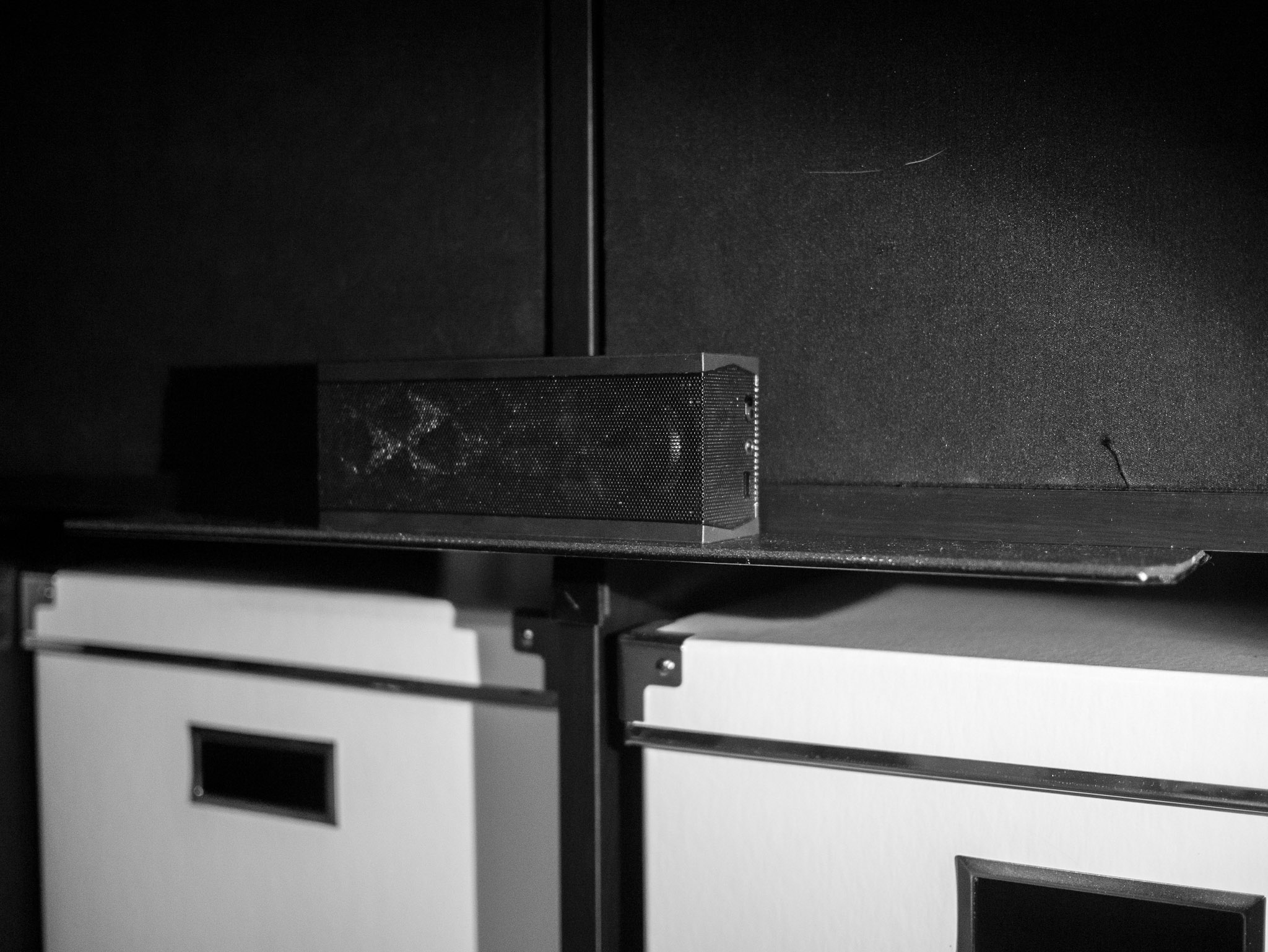
    So I did just that, and the end result is one of the thinnest and strongest shelves I have built — so I thought I would share.

    I basically notched a piece of steel, painted it, covered it with foam, and screwed it in place. That’s the simple explanation, but for those of you that don’t know what I just said I will go through step by step.

    Here’s what we want to end up with:


    To get there you need to buy, or have, the following supplies:

    – [Hacksaw](http://www.amazon.com/exec/obidos/ASIN/B00002X227/ref=nosim&tag=brooksreview-20), with [saw blades](http://www.amazon.com/exec/obidos/ASIN/B002KHNCQ0/ref=nosim&tag=brooksreview-20).
    – [Metal File](http://www.amazon.com/exec/obidos/ASIN/B001R1QCE4/ref=nosim&tag=brooksreview-20)
    – [Simpson Strong-Tie](http://www.amazon.com/exec/obidos/ASIN/B003YHEEDU/ref=nosim&tag=brooksreview-20) (this is the shelf)
    – Some sort of liner to put on top, I used something like [this](http://www.amazon.com/exec/obidos/ASIN/B002AS9NGC/ref=nosim&tag=brooksreview-20).
    – [Some black spray paint](http://www.amazon.com/exec/obidos/ASIN/B002BWOS6C/ref=nosim&tag=brooksreview-20).
    – Spray glue, [I used this](http://www.amazon.com/exec/obidos/ASIN/B0002BBV2S/ref=nosim&tag=brooksreview-20), but this [low strength stuff](http://www.amazon.com/exec/obidos/ASIN/B0000AZ735/ref=nosim&tag=brooksreview-20) should be fine.
    – Screws (sorry, no Amazon link for these)
    – A [screwdriver](http://www.amazon.com/exec/obidos/ASIN/B0015SBILG/ref=nosim&tag=brooksreview-20) or a [screw gun](http://www.amazon.com/exec/obidos/ASIN/B0046RE72K/ref=nosim&tag=brooksreview-20) of some sort.
    – [Some pliers](http://www.amazon.com/exec/obidos/ASIN/B00004SBCU/ref=nosim&tag=brooksreview-20).

    ### Step 1

    Now that you have all the goods, time to get started. Remember we want this:


    Since my shelf spans over the vertical divider on the shelving unit I had to notch the shelf (you can skip this, and buying a hacksaw and blades, if you don’t need to span over a vertical support). Just measure the width of the shelf you need to span so you know how wide your notch needs to be. Make two marks centered on the metal where your cuts need to be and how far down. Saw down about an inch, or enough to get the holes to be safely inside the edge of whatever material you will be screwing the shelf into.

    Once you have two cuts made, you just bend down the ‘tongue’ that you created with your pliers. This will also act as additional support, but mostly saves you all the trouble of having to cut off that flange in a clean manner.

    Now that this is done your metal cutting is over — short lived as it was.

    ### Step 2

    Now grab your file. The goal here is to file every rough edge, or corner, on the metal so that it is smooth. Focus on the parts that will be exposed — also if your cut was crooked or wavy, you can smooth it a bit with the file. Take long smooth strokes with the file pushing it away from you and not pulling it back (lift it off the surface). Pay attention to the corners that are beveled already.

    Once you are happy with how smooth the metal edges are, you can move on — but this is your only chance to smooth them.

    ### Step 3

    Now it’s time to paint. All you want to do is coat the entire piece of metal with the paint color of your choice.

    #### Some Tips

    1. Don’t try to coat everything on one pass. Slowly build the paint to avoid runs in the paint.
    2. Clean the surface thoroughly before painting.
    3. Don’t do this indoors.
    4. Let the paint fully cure overnight so that you can work with the shelf without getting finger prints embedded in the paint.
    5. Don’t be afraid to re-coat if you need to, read the side of the paint can for directions on how long to wait before re-coating.
    6. Spray past the ends of the metal for complete coverage.
    7. Be sure to paint the edges of the metal as they will show.

    ### Step 4

    Once the paint is dry, it is now time to affix the liner to the shelf. Roll out your liner on a workbench and put the top of the shelf down on the liner. Cut a rough shape out of the liner using a knife or scissors, leaving enough overhang on each side. (This makes the fine tuning step easier.)

    Once cut out, you will need to place the liner and the shelf on some cardboard. Place the liner face down and the shelf face up (the side you want to be up on the shelf, should be up).

    Now spray both the liner and the shelf with the spray glue you purchased — don’t go crazy, just one pass will do.

    **Make sure to get from edge to edge — that is most important.**

    Now spray glue is messy, but it is effective. Wait about 15 minutes or so and pick up the liner — carefully.

    You will now place it on the shelf, glue-side to glue-side. Be sure to leave overhang on each edge.

    #### Tip

    I tend to start from the center and smooth outward with spray glue to avoid all bubbles.

    ### Step 5

    Now that the liner is on the shelf, and you have given it 20 minutes or so to setup, we can trim the edges. I just took the shelf and placed it liner side down on a workbench I didn’t mind cutting into and took a box knife to trim the edges of the liner off. For the tongue I took and cut the notches in the liner and rolled it down onto the tongue so that it too was covered.

    ### Step 6

    Your shelf is done, now it is time to install it. If you laid out the shelf correctly there should be pre-drilled holes in the metal that you can feed the screw through. If not you can drill a couple of holes.

    Two screws should be good on either end to hold most items — I put four in for symmetry.


    You are done.


  • Galaxy Returns

    [Steven Musil has a list of reasons why people (at select Best Buy locations) are returning the Samsung Galaxy Tab 10.1](http://news.cnet.com/8301-13579_3-57487895-37/malfunction-not-ipad-played-greater-role-in-galaxy-returns/). Let’s break down the list, shall we, from most common to least common reasons (according to Musil):

    – Browser freezes
    – Lack of screen sensitivity
    – Poor WiFi
    – Screen lagging
    – Short battery life
    – Inability to sync with a PC
    – Honeycomb OS is difficult to use
    – Wanted an iPad 2 instead
    – Lack of support for Hulu, Netflix, Skype
    – Poor speed and performance

    Ten reasons, only one of which is: “this isn’t an iPad”. ((Anyone else find it odd that he specifies iPad 2, I wonder how many returned it for the new iPad, or a used iPad.))

    Same list, same order, just changing the names of each item to the underlying cause:

    – Bad software
    – Bad hardware
    – Bad hardware
    – Bad software
    – Bad hardware **and** software
    – Bad software
    – Bad software
    – Bad purchase decision
    – Bad software
    – Bad hardware **and** software

    So out of ten reasons to return the Samsung Galaxy Tab 10.1, seven reasons (70%) can be attributed to Android. Forty percent is hardware. I think that says a lot about why Android tablets have been failing: Android is the weak point.

    But that’s not all this tells us, because what is the baseline for these complaints. Is it that the tablets performs these tasks worse than their computers, or worse than another tablet? If another tablet, what tablet?

    I would argue no one buys a tablet expecting it to match PC speed, so I assume that these complaints are in comparison to *another* tablet — the only one of which that makes sense is the iPad because the iPad is the only one with wide enough advertising for first time tablet buyers to be able to form some sort of a baseline for how a tablet should work.

    What I am saying is that the majority of knocks against this tablet are software related and are probably in comparison to the iPad.

  • Trey’s Lightroom Presets

    [I saw this collection earlier and decided to buy it](http://www.stuckincustoms.com/lightroom-presets/). It was only `$19.97` for the entire collection of Lightroom presets (sort of like Filters for Lightroom). Editing photos takes an artistic eye and I always have applied a preset and then tweaked it to my style when I needed to make major adjustments. Trey Ratcliff’s presets are very good out of the box, needing little tweaking. Here are some examples using them with shots that otherwise looked below average:

    Original.
    Original.
    Original.
    Original.
    Original.

    Again, not spectacular shots on my part, but the filters turn these shots into useable images in my opinion. Not to mention that they give you fantastic starting points to build off of and to see what areas of the images you want to do what to. [Well worth the purchase](http://www.stuckincustoms.com/lightroom-presets/).

  • Apple Branded Search

    [MG Siegler speculating about Apple replacing Google as the default search engine with Bing](http://techcrunch.com/2012/08/06/two-down-one-to-go/):
    >Microsoft needs Apple to make Bing relevant. Apple needs Microsoft in order to stop paying Google billions. This is so obvious. I think we may see a Google-free iPhone sooner, rather than later.

    [I’ve already spoken about how I like Bing on my iOS devices](https://brooksreview.net/2012/08/bing-mobile/), but I think there is another option towards removing Google from iOS and Apple alike.

    [I mentioned that Yahoo! should buy DuckDuckGo](https://brooksreview.net/2012/07/yahoo-punching/), but what if the suitor was Apple?

    Think about this for a moment: what if Apple used a fraction of the cash they have on hand to buy two companies:

    1. DuckDuckGo
    2. Wolfram Alpha

    Then they turn those two search engines into one and the same search engine — powered by Apple — and only available to Apple customers. It’s now the default on iOS and Mac OS X — it would become instantly excellent and widely used.

    Apple would also have two options here:

    1. Give it away free as a thanks for being a customer — they can afford to.
    2. They could place one or two ads on the results using iAds, thus making up what they spent to buy the companies in a few years time.

    Think about this a little more: not only would this be a blow Google, but to Microsoft as well. This would give people a true reason to use iOS and the Mac, it would keep money out of competitors hands, and would be a game changer.

    I have no clue if this a business Apple wants to be in, but I would bet that at least one (DuckDuckGo) of these two companies would match up very nicely with Apple. ((Man, I hope this happens.))

    Alternatively I could see Apple convincing Bing to allow a fully Apple-branded results page and I could further see Microsoft being OK with that for a bit, but that prospect is far less exciting.

  • The New Digg

    Digg relaunched their site/service recently and while ([as I talked about on the podcast](http://5by5.tv/bb/72)) I don’t particularly care for the new site, there is one part of the site that I do like. But first a recap of what I don’t like:

    1. Facebook login only — lame.
    2. The design doesn’t do much in the way of telling me what is the most important, other than the one large item.
    3. I don’t understand what value the little “reaction comments” are supposed to add.
    4. The Most Popular section has graphs of popularity over time that do nothing to tell me if the story is something I should read or not. Why are people so obsessed with time and isn’t a mark of a lame post that it is no longer popular a day later — let alone an hour later?
    5. The Upcoming section is just boring.

    I mostly hate the new site for #1, but all the other items bug me. Digg, for me, had/has a lot to prove to show me that it still can be useful.

    So while Digg’s website may not be great — I am liking [their mobile app](http://itunes.apple.com/us/app/digg/id362872995?ls=1&mt=8). The Digg iOS app isn’t amazing or even revolutionary, but I find it very useful in how light, fast, and relevant it is.

    Digg tweeted that people should check out their app to stay in touch while out and about over the weekend. And all weekend long I was behind on Twitter and RSS, but it only took 20 seconds to stay up on Digg’s app — and every time I found something neat I wanted to read.

    That’s the Digg I remember liking back in the day. It was a welcomed surprise.

    Now because I can’t sign up (damned Facebook logins) I had to share each story via email to my Instapaper email address in order to add it for reading later — even so I am liking using the [Digg app](http://itunes.apple.com/us/app/digg/id362872995?ls=1&mt=8) to find neat stories when I only have half a minute or so to look.

  • Quick RSS Feed Note

    Yesterday I deleted access to the ‘articles only’ RSS feed, so if that’s not working for you that’s why. There were about 400 of you using it, sorry for the lack of notice.

    With the increased length of my linked listed posts and the subsequent decrease in post frequency I no longer find it necessary to offer an articles only feed. Also I believe now that it is equally important to read both post types.

    I deleted it yesterday and did not set a forward. The reason there was no forward set was simple: I feel that it is within my rights to remove things without your permission, but not within them to add things to your RSS reader without your permission. Redirecting, forwarding, or changing the RSS feed instead of deleting it would have added things to your feed and I wasn’t ok with doing that.

    This is the main and only (non-member) RSS feed now: http://feeds.feedburner.com/TheBrooksReview

  • Extending the Life of my G4 Mac mini

    I purchased my Mac mini the day that Apple announced it — I mean the very first Mac mini Apple made — and I spent every last dollar I had on it at the time. I have used that Mac mini everyday since I purchased it and it’s only on its second hard drive. Suffice to say, I have gotten my value out of the machine.

    For the last five years or so, the Mac mini has spent its little life attached to my TV as a media center. It downloads and stores all the video files ((I don’t know the legality of downloading TV shows from the web if you pay for the cable subscription already, so that’s *not* what I am talking about. Either way, it’s not movies — honestly.)) I would like to play on my TV and plays them over a DVI connection. Up and until this year everything worked really well, I couldn’t playback 720p or higher quality files, but “normal TV grade HD” played back just fine.

    Then everyone made the switch to encode video files with h.264 and well, the Mac mini struggles to play those files back. I get random artifacts and massive amounts of dropped frames during fast moving scenes. This is something that has been driving my wife and me nuts.

    This all got me to thinking about how I could get back smoother playback without having to buy a new machine. Initially I thought Mountain Lion would be the answer, streaming the files from the mini and AirPlaying to the Apple TV, but having to move my retina MacBook Pro into the living room didn’t sound appealing.

    I wanted to stream from the mini to the Apple TV, but with none of the video streaming to AirPlay apps working on PowerPC chips, I thought I was SOL. Then I found [File Browser](http://itunes.apple.com/us/app/filebrowser-access-files-on/id364738545?mt=8), a $4.99 universal iOS app that allows you to browse network shared files, play them back on the device and/or stream them over AirPlay.

    So with that I can stream the videos on the Mac mini to my iOS device, from there I can AirPlay them to my TV via the Apple TV. Thus giving me smooth playback for $4.99.

    It’s not all roses though, the app is pretty ugly and the icon is blue.

    That said, it worked, worked well, and amazingly was damned easy to setup.

    And so the G4 Mac mini lives on.

  • The Polarizing ‘New’ Apple Ads

    As most saw over the weekend, [Apple released three new ads that focus on their ‘genius’ support team](http://www.apple.com/mac/videos/#tv-ads-laborday). The ads show helpless users of Macs, all wanting to do something, and needing help.

    There’s been a lot of debate, and over the weekend about these ads, but I never saw the ads, so I just knew about them from what I saw in Twitter and my RSS feed. The reaction was a bunch of less than happy Mac users:

    [John Gruber](http://daringfireball.net/linked/2012/07/28/genius):

    >These spots don’t appeal to me, personally. They’re not cool. But they’re not supposed to be cool, and they’re not targeted at existing Mac users.

    [Jean-Louis Gassée](https://twitter.com/gassee/statuses/229210920717541376):

    >Ouch! Cringe-inducing new Apple “Genius” ads for Mac. Put those back in the bottle. First celebrity Siri ads, now this?

    [Ken Segall](http://kensegall.com/2012/07/new-mac-ads-landing-with-a-serious-thud/):

    >In the effort to show that the Genius is the most helpful guy in the world, Apple has created customers who, shall we say, are on the dim side. In past ads, Apple has shown “ordinary people doing extraordinary things,” simply because Apple products are so easy to use. Now we have thick people who want to be better, but need a Genius to help. Not exactly flattering.

    Lastly, [Gruber’s comments](http://daringfireball.net/linked/2012/07/30/segall) on Segall’s post really made me go watch the ads:

    >The idea is these on-screen Mac users in need of help are supposed to make the viewer at home feel like, “Hey, I’m smarter than that guy.”

    Of the three ads, ‘Mayday’ is the only one I care for. I think ‘Labor Day’ is kind of funny, but doesn’t do much but show off the iPhoto products you can order. ‘Basically’ is, basically, a warning that you should go to the Apple Store to buy your Apple goods — because otherwise you don’t *actually* get a Mac.

    But I want to talk about ‘Mayday’ because I think it is a great ad — an ad that I can relate to first hand as a non-dumb-Mac user. Most of the ‘Mayday’ ad is just so-so, but it is the ending that I think is great, subtle, but great. At the end the flight attendant comes to get the Genius to help with a Keynote presentation — after the Genius just finished helping with an iMovie project — the Genius springs to action, but so does the Mac user he was just helping.

    Let that sink in for a moment.

    The guy that was so “helpless” before is filled with confidence and proclaims: “Let’s do this” — gets up with the Genius to go help *another* Mac user.

    So Apple just subtly told all would-be Mac users that:

    – If you come to the Apple store for help, we *will* help you;
    – You won’t need to come back for more help;
    – You can now help *others* with Mac problems.

    This is something I have seen time and time again, once you show a new Mac user how to do something — they find it so easy to do again, and now they tend to be more than willing to actively help *other* Mac users. It used to be a game — dodging being a Windows tech support friend — but with Macs I have found that most users are all too happy to help other users.

    To me, that *is* what this Apple ad is showing — and Apple is just giving new users an FYI that they can find Apple Geniuses in their stores.

    I don’t think the ads are bad at all, they just aren’t geared towards anyone reading this site.

    This ad tells new users that there is great help available, help that will teach you — not lecture you. That Mac users band together. Some say these ads aren’t great, but I think ‘Mayday’ is pretty great — it’s just telling a story we aren’t used to seeing Apple tell.

  • Reviewing S°lar, a Weather App

    It’s almost to the point now where I don’t expect any new weather apps to be worth even thinking about, but I am glad I gave [S°lar](http://thisissolar.com) a try after [Jon Mitchell](http://twitter.com/ablaze/status/228353678095024128) pointed it out to me on Twitter. Let’s get something clear first, it’s not an ideal weather app for me, but it is really interesting and worth talking a bit about — because it does weather a bit differently.

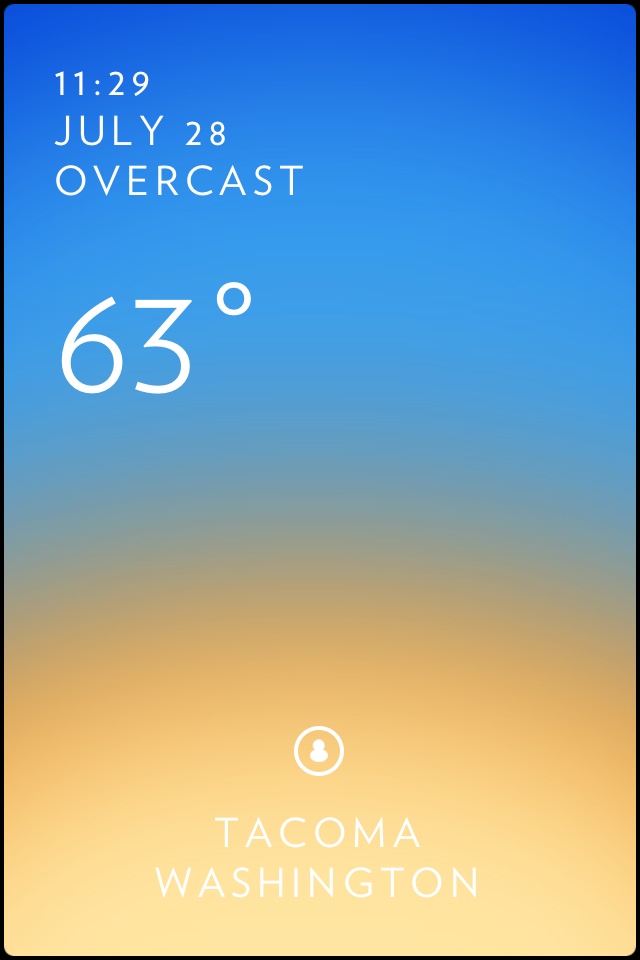
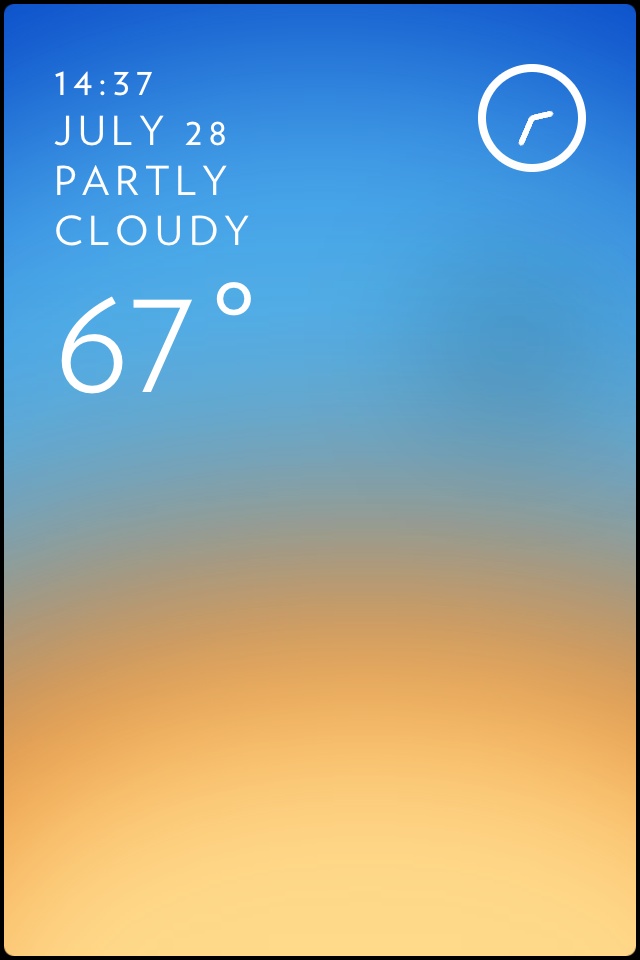
    The first thing that immediately struck me about S°lar is how much I love the way the weather data (just temp and conditions) is displayed:

    Default S°lar view.

    That’s a pretty minimal set of data, but it does two things really nicely:

    1. Shows the temp in an easy glance able manner.
    2. Shows a background that isn’t some silly image of the weather, or static thing — instead it gives your a hint of the temp and an indication of the weather (it drips from the top if raining, or shows colors to indicate clouds or blue sky — in this case it is warmish with a blue sky).

    S°lar isn’t like Dark Sky, but it’s better than most any other app for giving you an idea of the weather in a traditional manner.

    If that was all this app did, I would likely keep it around — but as it turned out this was only scratching the surface.

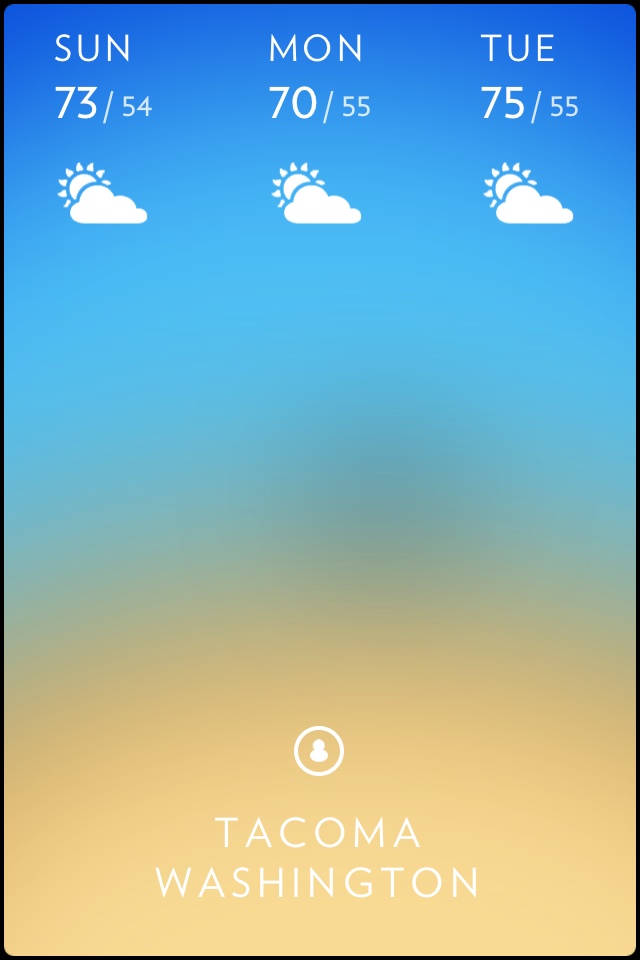
    Pull down, and you get the three day forecast:

    Drag down to get this forecast.

    Slide your finger from the bottom up, you can see the weather info change based on the hourly forecast — this is pretty neat:

    The hourly forecast, shown by sliding your finger from the bottom up.

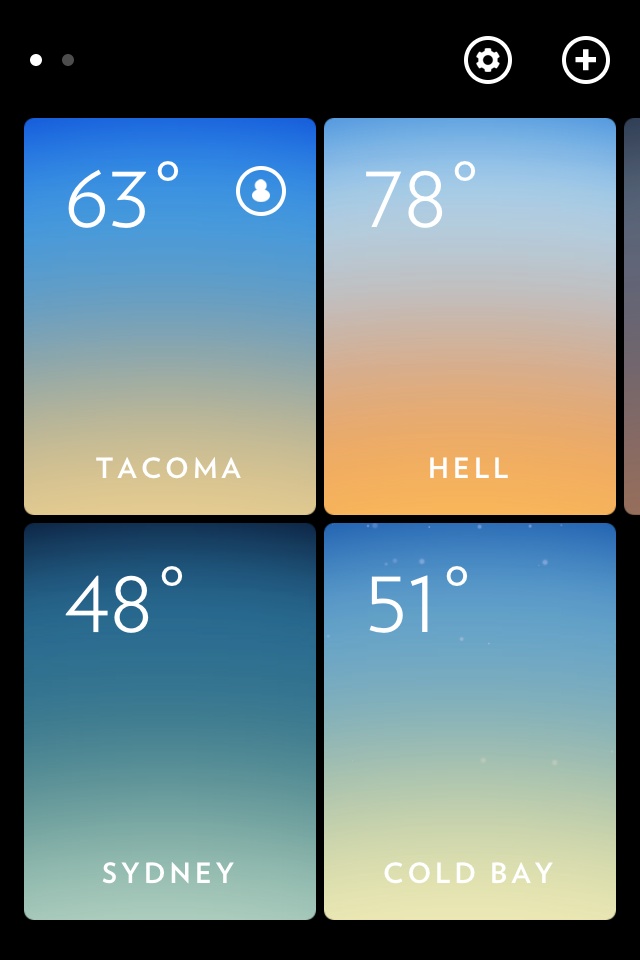
    Double tap to pull back and see all of your locations:

    All my locations.

    What I love about this is that the view is actually useful, and not just a switcher (you can swipe from side to side to change locations without pulling back to this view). Many weather apps make you select a location before they show you any data, so I love that this app gives you useful data before you even dive into a location. It just works “out of the box”.

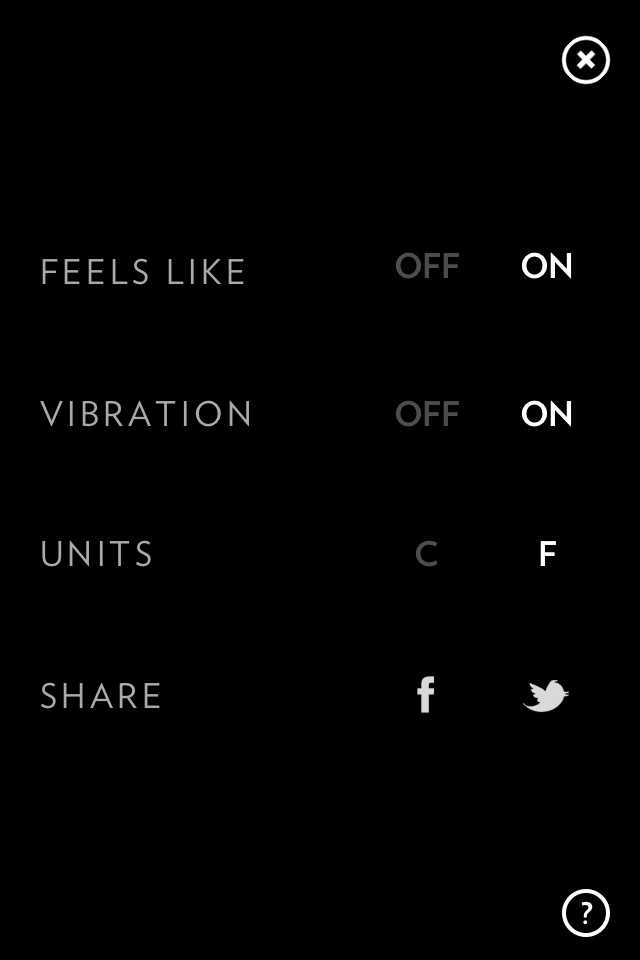
    The settings screen is equally simple and well designed:

    The settings screen.

    Ok so none of those screens are unique — because while beautiful, they certainly aren’t revolutionary.

    Here’s the reason that I like this app though: go back and look at those swipes and taps I mentioned — each one can be done with only your thumb and iPhone in one hand. That’s not something I can say for many apps.

    ### Why Ben, Why

    I really like this app, the UI and interface is really nice and really invisible — S°lar is the [Clear](http://www.realmacsoftware.com/clear/) of weather apps — and I really like Clear.

    Overall I don’t know how useful S°lar will be to me (I love Clear, but I don’t use it anymore), but I do think that S°lar is a very solid weather app, and a perfect convince-someone-they-want-an-iPhone-app.

    [Get it from the App Store for $0.99.](http://itunes.apple.com/us/app/solar-weather/id542875991?mt=8)

  • Following Up On: ‘The Mac App Store’s Future of Irrelevance’

    [Marco Arment follows up on his post](http://www.marco.org/2012/07/26/not-just-geeks) [from earlier](https://brooksreview.net/2012/07/mas-marco/) about the Mac App Store, clarifying ((I don’t think this is a direct response to my post.)) :
    >Geeks aren’t the only people who have the problems that these apps solve, and we’re not the only people who can figure out how to find, buy, and use these tools. Give the rest of the computer-owning world some credit.

    >This isn’t about a few geeks being inconvenienced. It’s about a very large number of Mac users, far beyond geeks, being discouraged from buying (or being unable to buy) the software they need from the Mac App Store, and why that’s not in Apple’s best long-term interests.

    Again, I disagree. Arment undoubtedly knows more about the intricacies of Apple’s App Store, but I simply don’t buy this argument. In my last post I misconstrued Arment’s post as him giving up on the Mac App Store, and I also pegged this as a “geek” problem. While I am wrong about those two issues, I still don’t believe there is a risk of the Mac App Store becoming a wasteland of any sort.

    Arment is right about non-geeks being able to easily find and purchase apps outside of the Mac App Store — it’s how software has traditionally been purchased, well once software started being sold as digital downloads — but here I really think Arment and I disagree is on his last sentence that I quoted above, again:

    >It’s about a very large number of Mac users, far beyond geeks, being discouraged from buying (or being unable to buy) the software they need from the Mac App Store, and why that’s not in Apple’s best long-term interests.

    I don’t disagree with the notion that there are problems with the Mac App Store, but how exactly are users being “discouraged from buying” apps in the Mac App Store? I am guessing that this comment is related to Arment’s earlier statement:

    >My argument was more nuanced: many previously-acceptable apps have been effectively kicked out of the App Store because they’re incompatible with the current implementation of sandboxing, and this hurts the *customers* of those apps enough that *they* will lose confidence in buying nontrivial software from the Store in the future.

    To clarify this in my own head, I do a bit of role playing. Let’s say there’s an app I love called iBanana. iBanana uses some hack-y stuff that Apple hates and that prevents it from being sandboxed, so they are forced out of the app store. But I bought iBanana in the app store, now I don’t get new updates and am forced to (likely) re-buy the app.

    This is likely the most discouragement that I will see from buying other apps in the app store (I am assuming no developer is ridiculous enough to petition customers to boycott the Mac App Store).

    I am guessing the thinking is that when I go to buy another app, I stop and remember the iBanana fiasco, go to the developers website and buy from there — thus leaving crappy apps in the store. That makes sense, but I have two issues with this thinking that — in my mind — make it a trivial issue.

    ### Not a Recurring Event

    The big problem is that Apple changed their mind about what was allowed in the app store, they forced out apps because they wanted/needed/whatever reason to implement sandboxing. Such a change is not likely to occur again, so while apps had to recently leave the store — it’s not *likely* to be a regular occurrence for Mac App Store customers.

    It sucks this time around and *current* Mac App Store customers might have a bad taste in their mouths, but all will be forgotten in time — assuming Apple doesn’t pull crap like this on a regular basis, or really, ever again.

    That is, I don’t expect us to be regularly talking about apps that have been “forced out” of the app store by rule changes.

    I do, however, agree that if Apple continues down such a path of constant rule changing and forcing out apps — that at that point geeks should begin petitioning users not to buy from the Mac App Store. But I don’t think that is where we are now. What we are seeing right now is the side effect of launching a platform before it should be, and moving that platform to where Apple wants it.

    ### Mac OS X Petitions You to Use the Mac App Store

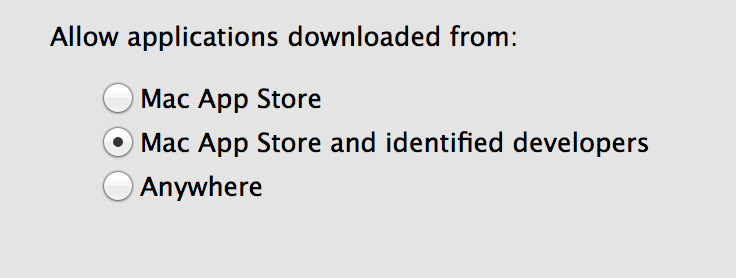
    System Preference panel for app warnings.

    With Mountain Lion, Apple set the OS to *warn* users if the app is *not* from a trusted developer or the Mac App Store. That’s the default setting, with users having to navigate to System Preferences to change this.   

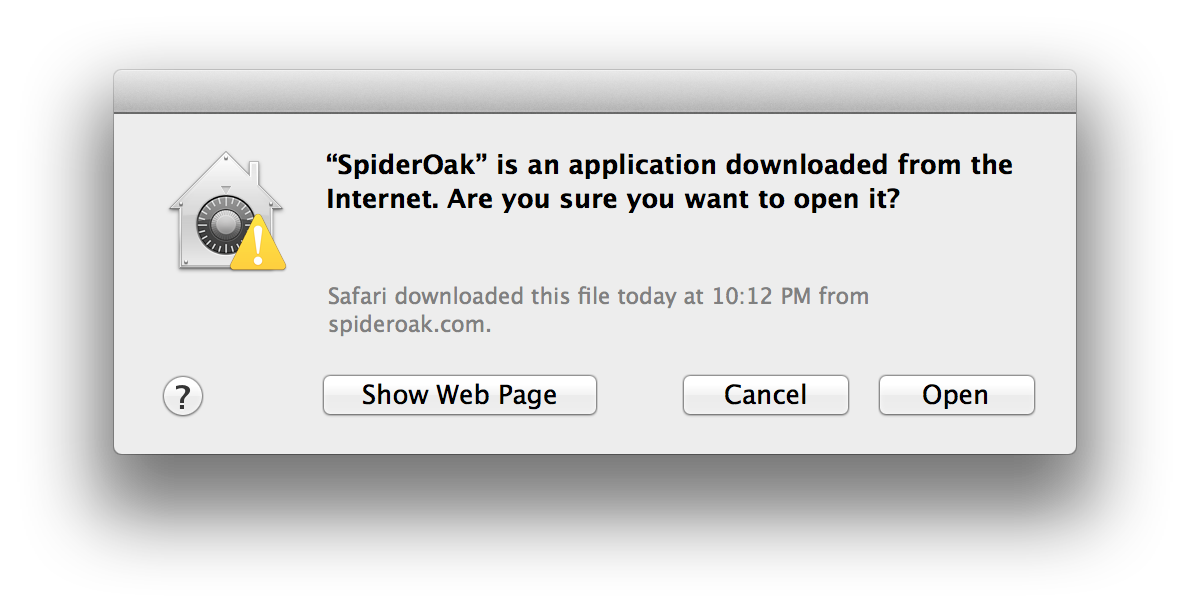
    So whenever a user opts out of the app store, downloads an app from an “unknown” developer they see this warning:

    The warning dialog for SpiderOak — a “untrusted” Mac app.

    That dialog is Apple’s way of telling all of its users — by default — that they should be wary about installing such apps, when most of the time they really don’t need to be wary. I can see why Apple did this, and it’s likely not primarily to promote the Mac App Store, but to combat malware and such.

    At the same time, it hurts developers who aren’t in the Mac App Store because now a user has to pause and think: “do I trust this person?” Ouch. Then again, installing software from the web has always been a bit like the wild west, so maybe one question won’t hurt. But I have to think that it does stop today’s youth in their tracks — you know those that don’t remember scanning their PC every hour and finding new viruses on it.

    ### Going Forward

    The reality is that Apple’s Mac App Store, as devised, (as a clone of the iOS App Store) in OS X is a rather big mess. However if I have to choose as to whether this dies the slow death of Ping, or is constantly pushed until it’s the default, well I think the latter is the likely case and I don’t see that as being a very big leap from where Apple currently is.

    Arment is right, it’s not *just* a “geek problem” as I inappropriately labeled it. It is an Apple problem, but it’s also a developer’s problem. Here’s the thing though, I don’t see Apple giving in on this and I certainly don’t see Mac developers “jumping ship” over this.

    That leaves developers with the issue of having to get customers to trust them enough to run their software, even though their OS is telling them to be wary.

    ### Post Script on ‘Casual Apps’

    [Neven Mrgan argues](http://mrgan.tumblr.com/post/28058883006/the-mac-app-stores-future):

    >And the Mac App Store, in its current incarnation, just isn’t built for us. It’s built for people looking for casual apps and games. (Sorry, there’s one more category: Apple’s own apps, which don’t have to play by Apple’s rules.)

    I don’t see that as being the case either, because if 1Password can find a way to stay in the store and Adobe can ship Lightroom to it I think it stands to reason that solid, powerful apps can and will always be a part of the Mac App Store.

  • ‘The Mac App Store’s Future of Irrelevance’

    [Marco Arment is done with the Mac App Store, and worries](http://www.marco.org/2012/07/26/mac-app-store-future):

    >The Mac App Store is in significant danger of becoming an irrelevant, low-traffic flea market where buyers rarely venture for serious purchases.

    His arguments are not new and he certainly is not alone, but I think he is wrong.

    Arment feels burned by the fact that he embraced the Mac App Store heavily, only to later see apps he purchased leave the Mac App Store — thus offering him no more updates — because of sandboxing rules (among other things). I don’t disagree that some of Apple’s rules are heavy handed and over reaching for geeky Mac users, but for the general Mac user, I think Apple has done a nice job creating a trusted place to buy Mac apps.

    Some of the best apps will never make it to the Mac App Store, apps like:

    – Keyboard Maestro
    – LaunchBar
    – TextExpander
    – Dropbox
    – Hazel

    If any of those do make it, they will likely be crippled. With the exception of Dropbox, every single app on that list is an app that I have tried to get my wife to use, and failed to do. Because she’s not a geek. And non-geeks tend not to be as effected by the apps leaving the Mac App Store as their geek counterparts are.

    It *is* a big deal that some apps are leaving, it’s important, but let’s not kid ourselves here — it’s pretty much only important to geeks.

    I’ve managed to survive on iOS without these geeky apps — where TextExpander exists, but isn’t as useful.

    Additionally, if you look at the “quality” of the top-grossing apps in the iOS app store, you can see that they aren’t *great* apps in the same way that those listed above are. They are inexpensive or free games with paid currency you have to buy to use in the game. Apple doesn’t seem to care, because 30% is 30% and users like those apps.

    As geeks we don’t want to see App Stores overrun with crap, but crap sells.

    As for the worry of ‘low-traffic’, well Apple addressed that yesterday — ensuring that the Mac App Store will forever have high traffic: they made the Mac App Store the only place to get your OS updates for OS X, putting a notice in the Notification Center when you need to check for updates. Every Mac user will have to go into the Mac App Store from time to time, and I am certain many will click over to see what apps are featured. I can’t think of a better way to assure an app store of continued traffic.

    As a geek, I’m right there with Marco, but I just don’t think it matters to Apple or non-geeks.

  • Mountain Lion

    Mac OS X, 10.8. The iterative update to Apple’s OS X, 10.7. I have been using the beta build of Mountain Lion for a long time now and I think that there are some really interesting things taking place in Mountain Lion.

    Some of those items:

    – iCal becomes ‘Calendar’.
    – Address Book becomes ‘Contacts’.
    – Save As makes a guest appearance.
    – Tweeting is a part of the OS.
    – Omnibar.

    The biggest change though: the completely useless Notification Center. So let’s talk about that.

    The Notification Center serves two purposes:

    1. To notify you as the user of events that occurred on your Mac, or reminders that you have set.
    2. To notify others of things you want them to know (via Tweeting and such).

    This is obviously an addition made in response to the overwhelming demand for a notification center on iOS, but the problem is that I find it completely unnecessary in OS X. The reason I find it unnecessary: there aren’t any notifications I get on my Mac that I would need to look at some point later in time, which is not the case on iOS.

    I can see upcoming events in the Notification Center, but Fantastical serves that role, and does a better job. I can see recent emails, but that’s only practical if I get a few emails — besides theres a numbered badge on the Mail icon (and I don’t use the inbox to count “new” messages).

    I can see Twitter mentions or DMs, the latter of which is actually nice — except that when I click it Safari opens Twitter.com, even though Twitter for Mac and Osfoora are there. That pretty much makes this irrelevant for me.

    Aside from that, there’s nothing in the notification center that is worth it. Now you just have another menubar icon (to the right of Spotlight) that you cannot remove.

    Hopefully third party developers will find a way to make this a useful feature, but I am just not seeing it at all.

    What is nice about notifications though, is that you no longer need Growl to have nice notifications roll down from the top of the screen. Just like in iOS, you can also control which apps can send notifications in System Preferences — this is actually useful.

    However this could have been added without a full notification center. Much like on iOS I spend a few moments every so often to clear out the Mac notification center — not once have I seen a notification that I had missed, or one that I was glad was ‘archived’ somewhere.

    The difference between Mac notifications and iPhone notifications is that Mac notifications are really only relevant when they happen if I am at my Mac. Mountain Lion doesn’t treat these notifications like that though, they are treated as just as important as the ones I get on my iPhone. That just seems off to me.

    ### Things to Not Complain About

    Now that my main complaint is out of the way, here is a quick rundown on my thoughts of various things in Mountain Lion, in no particular order.

    – I like that iCal is now just Calendar, but I wish that more than just a name change had occurred. Even so, the naming is better — so too with AddressBook becoming Contacts.
    – The omnibar in Safari is something that takes a couple of hours to get used to, but once you are used to it there is no going back. I really dig it.
    – In Finder, when you delete an item the next item in the view is then selected. Previously in 10.7, when you deleted an item in any view, no other items would be selected. This is an amazingly nice touch if, like me, you often use Quick Look to peruse the files sitting in a folder, while hitting `CMD+Delete ` to get rid of the ones you no longer want. Now you don’t have to find the spot you were in, you can just keep on going.
    – AirPlay — this was a *finally* feature for me and almost eliminates a need for a Mac mini connected to my TV. I haven’t made the full on switch yet, but it’s only a matter of time at this point until most video I play on my TV is streamed from my Mac and not the Mac mini attached to the TV.
    – `CMD+Shift+Opt+S`, welcome back Save As…
    – Share sheets: just like in iOS, you can now hit a button in Safari to share the page you are looking at. This is great for Tweeting links to things you are reading, but it seems far less useful on the Mac than on iOS. (Pro tip: `SHIFT+CMD+D` sends the tweet.)
    – Dashboard: amazingly Dashboard is still alive. I thought for sure it would quietly go to a nice farm where it can run free, but nope it’s still here. Good deal too, I use it a lot.
    – Dictation is going to be the hidden gem for many people. I use the piss out of it on iOS and I bet I will end up using it a fair bit on the Mac too. No, it’s not great if others can hear you, but the implementation is done well and the service just seems to work.
    – Inline download progress indicators in Finder, this is one of those: why didn’t we have this all along items. Very nice to not have to jump back to Safari to see how far along the file is.
    – Speaking of Finder, there’s one more: you can now Encrypt any disk from Finder. Go encrypt all your disks.

    Lastly, two items that I have yet to try but hope they work as advertised:

    – Power Nap: where your Mac can do stuff even when in sleep. (Think backups and email checking.) If this works I will be really happy about it.
    – Multiple Time Machine backup locations. I really hope this works, because it’s annoying to have your machine not backing up when you are at work, or home, so here’s hoping this just works.

    ### Buy It

    The update is $19.99 and I can’t see a reason to not update. Apps are going to quickly start to support 10.8 first and assume that a $20 update price isn’t too much for the majority of Mac users to pay. There’s far more good than bad in this update and if you are an iOS fan you are really going to like some of the changes — if you aren’t, then the changes are easy enough to ignore that they shouldn’t bug you much.

  • Raise Your Prices

    I have no first hand experience with this, but I think we can make some reasonable assumptions about the underlying problems.

    I think it best to start with [this post from David Barnard on the App Cubby blog](http://appcubby.com/blog/the-sparrow-problem/), the post was all over the web when he posted it and it makes all sorts of assumptions. I have been told by a couple of people now that Barnard’s guesses at Sparrow’s revenue were not accurate at all, [Barnard seems to be hearing the same thing](https://twitter.com/drbarnard/status/227799912459407360):

    >It does seem like I got the Mac App Store profit wrong and that the app was more profitable than I assumed

    That doesn’t actually matter much for the debate at hand, Sparrow is not representative of the app market. I think the main point that Barnard was trying to get across is best expressed in this line from [his post](http://appcubby.com/blog/the-sparrow-problem/):

    >The age of selling software to users at a fixed, one-time price is coming to an end. It’s just not sustainable at the absurdly low prices users have come to expect.

    That’s a sentence that really hits home for me and at the same time bugs the crap out of me.

    I go out of my way to *spend* money on apps, so I hate hearing that what I spent wasn’t enough to help fund the app’s development. But, I also think that isn’t a problem that I created, it’s a problem of the market place **and** the developers. As Barnard says, expectations of cheap software have been firmly planted in the consumer mind, but who set them?

    In Apple-land the expectation for inexpensive software has been set, by Apple itself first. The lowest price you can charge: $0.99. If Apple wanted to, they could have made that base higher.

    Then came a flood of developers who looked at that price and couldn’t imagine, themselves, paying more than a buck for an iPhone app. By the time it was clear that people are willing to pay for iPhone apps, and are willing to pay more than a buck, the expectation of $0.99 apps had already been set.

    I get that, we all do. It’s odd when an app is over $2.99.

    But while Apple may be responsible for the minimum price a developer can charge, the developer is the one responsible for choosing the price. This problem may look like it’s Apple’s fault, but developers chose $0.99, maybe not *you* but those before you did.

    I have seen a few people chime in arguing for recurring payments to solve this — like the monthly membership here — where it keeps revenue coming in. This, though, only makes sense for apps that are really portals to a service, such as:

    – Twitter
    – Facebook
    – Path
    – Instapaper
    – MLB At Bat
    – Day One

    What it doesn’t make sense for are apps that one could call a service, but more likely just assume are *only* an app, such as:

    – OmniFocus
    – Soulver
    – Mail
    – Agenda
    – Scratch

    These are all great apps, apps that deserve to make their creators a living, but they aren’t apps that even I would be willing to pay for every month. They are apps that I would be willing to shell out more than $9.99 for when I initially purchased them, but that’s about it. If that’s your app and you can’t make a living selling at that price point, then you have to think about whether the app is worth it or not.

    Over the past week I have told at least half a dozen people that they aren’t charging enough for their time, service, app, or product. It’s not just a problem in iOS or the Mac, but it’s a problem across the web. People seem more willing to compete on price, than on quality.

    So what bugs the crap out of me is that developers are whining about not making enough money, when they are the ones in charge of the pricing. If you need more money per customer to hack it, charge more. If people aren’t willing to pay that, well, unfortunately you have your answer.

    People will pay for good software, the Omnigroup proves this point, but you have to offer compelling and unique software in order to demand such prices. I am not saying that App Cubby thinks it is the consumers fault, but it sure sounds like that to me — and that bugs me. I don’t like when people charge too little to make a living and then complain about charging too little.

  • Photo Archiving and Remote Photo Libraries

    A few days back now a reader asked a question that I get surprisingly often: how do you store and manage all of your photos? I have been constrained to 256GB SSDs since 2010, so I know how to manage GBs of photos, without having to keep them on my hard drive.

    I figured it was about time to share how I do all this — since it seems to be a question that many are interested it. The answer is actually pretty simple, here’s how:

    1. Get a big ass, fast as you can, external HD.
    2. Choose the photo management app of your choice.
    3. Archive the photos onto that external by moving the library folder (or the equivalent for that app) to the drive.
    4. Create a new library named after the current year.
    5. Every year move that library to the external drive and create a new library.

    I have been doing this for a while now, well before the HD constraint, as a way to keep library sizes down and thus the app running smoother.

    So why by year? Two reasons: one to make the app run faster when you load the library (especially if the library needs to update because of a change in the app) and secondly to make it easier to find *that* image when you need to. I don’t bother sorting out old years, instead I just massed moved it all to one file (for me I started in 2007).

    So why bother with this, well I shoot in RAW wherever I can, here’s the break down of the library sizes that I have:

    – pre-2007 through 2007: 55.23GB
    – 2008: 41.65GB
    – 2009: 21.26 (no clue why the dip).
    – 2010: 40.56GB
    – 2011: 177.9GB
    – So far for 2012: 30GB

    That’s why I can’t keep these on one computer, and those are only the library sizes of my Aperture library, most of 2012 has been shot in Lightroom.

    *[As I mentioned in a earlier post](https://brooksreview.net/2012/07/amazon-goflex/), I am now using a Thunderbolt HDD for this storage and it is fantastically fast.*

    ### A Word About Photo Apps

    As you can see I used Aperture exclusively for a while, but I am only now still using it because it is retina ready, while Lightroom is not. I actually prefer Lightroom to Aperture for the better noise control alone.

    However Aperture does make it very easy to store photos this way. Lightroom makes it easy to export out a folder of images to another drive and still be able to view them in the current library — when that drive is attached. Of course this can lead to a lot of images in Lightroom, but both Aperture and Lightroom have advantages.

    All this to say: it doesn’t matter what program you use, just figure out a reasonable way to off load the data in an easy to find manner. I prefer Lightroom because of the noise control and better image adjustments, but I prefer the layout and workflow of Aperture much more. It’s a mixed bag.

    ### For Photo Heavy Years

    I can assure you that I did not keep that entire 175GB library on my laptop at once. For times when the library starts to get bloated part way through the year, I will off load projects/folders inside the library to an archive library. Thus allowing me to keep *most* of this year’s library on my machine, while keeping storage requirements down.

    This is a pain in the ass to manage at year end, so I usually just keep two libraries for that year in the archive — which always comes back to bite me when I am looking for an image later. I don’t recommend this kind of laziness.

    ### Backups

    My obligatory note: external HDDs fail and fail often. Make several redundant copies of your data.

    ### Finally

    My workflow is very simple and fairly common for this task. The main objectives are:

    1. Get the GBs off my SSD.
    2. Make recalling a photo as simple as knowing the year it was taken.

    With camera file sizes growing, this is likely to become an issue for more and more people — even if all you use is iPhoto.

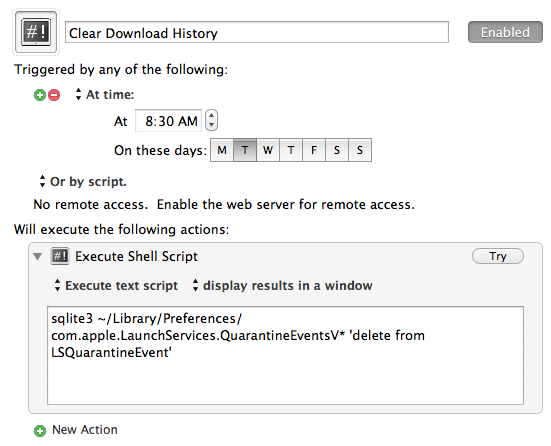
  • Automatically Clear the Full Log of Your Mac Download History

    [Last week I saw this post on the Mac OS X Hints site](http://hints.macworld.com/article.php?story=20120717025305161), and I was concerned. I had no clue that your Mac kept a full log of your download history. I know I am more paranoid than most, but hey, even Mac OS X Hints recommends clearing it out.

    It’s a quick terminal command, but I’ll never remember to do it.

    Instead I created this Keyboard Maestro macro to clear it for me:

    The simplest macro I have I ever created.

    Now it will always be cleaned out, without me ever having to think about it.

    [You can download it here](http://c276381.r81.cf1.rackcdn.com/Clear_Download_History.kmmacros.zip).

  • On Paid Apps Being Acquired, Apps Abandoned

    Today we saw [two](http://blog.acrylicapps.com/post/27635101056/our-next-project-facebook) [companies](http://www.theverge.com/2012/7/20/3172222/google-buys-sparrow-mail) get gobbled up, both selling well known and respected paid applications in the Mac space. Both seemingly do a good business. Both acquired for the talent of the employees, not the products they sell — as such the products for both will be gone soon enough.

    I wasn’t going to write about this, because neither was particularly interesting, but then a few tweets and emails later and I have been asked to defend a rather popular post of mine: “[Fragility of Free](https://brooksreview.net/2011/03/fragility-free/)”.

    In that post I argue that choosing to use free apps is a bad idea, because often free apps will die off because the developer can no longer support the apps. I state (sorry for quoting myself):

    >The fragility of free is a catchy term that describes what happens when the free money runs out. Or — perhaps more accurately — when the investors/founders/venture capitalists run out of cash, or patience, or both. Because at some point Twitter and all other companies have to make the move from ‘charity’ to ‘business’ — or, put another way, they have to make the move from spending tons of money to making slightly more money than they spend.

    My argument is that nothing can continue to be free forever. At some point you are going to pay for it, by viewing ads, exchanging money, or having to switch to something else because your free thing is gone — dead. Now we see a situation where a paid app is gone and dead — the very thing that I was arguing for — but the truth is a paid app is simply *more* secure than free, certainly not foolproof.

    I said:

    >This happens with free software and services, sometimes with paid services (but that is far less likely). Sometimes the funding for free just runs out — perhaps it was just someones hobby, a hobby that you depended on — doesn’t matter because it is gone now.

    Sparrow is gone now. Perhaps it lives on as part of Google, but Sparrow as we knew it yesterday is effectively dead.

    So how do you stop this from happening to another app that you depend on?

    [Marco Arment offers a suggestion](http://www.marco.org/2012/07/20/talent-acquisitions):

    >If you want to keep the software and services around that you enjoy, do what you can to make their businesses successful enough that it’s more attractive to keep running them than to be hired by a big tech company.

    I think the key part here is “more attractive”, it would be easy to say “more lucrative”, but inaccurate. I know far too many people who are willing to be paid less to do something that they enjoy more. Such is the case right here on this site, I took a pay cut to rid my site of ads — I did this willingly and (from a readers perspective) unnecessarily. It is simply more attractive for me to blog without ads, and more attractive for Marco (I assume) to work from home on his own schedule, on a product that he has passion for.

    Paid doesn’t solve everything, but free solves next to nothing.

  • The Nexus 7

    This is not my first time around the block with a seven inch tablet, I reviewed the original Samsung Galaxy Tab ([here](https://brooksreview.net/2010/11/tab-review/)), I review the Amazon Kindle Fire ([here](https://brooksreview.net/2011/11/kindle-fire-2/)), and now the Google/ASUS Nexus 7 (here ((No, like really *here* — listen you are reading the Nexus 7 review right now, let me get back to it.)) ). I really didn’t want to buy the Nexus 7, but the more I read about it, the more it sounded like this probably would be the best seven inch tablet made to date. It had been a while since I used Android, so off I went.

    I kind of knew what to expect from a seven inch tablet, but I was hoping for better hardware and smoother software. Both are things the Nexus 7 delivers on.

    ### The Short Version

    The long and short of it is that the Nexus 7 has impressive hardware, a solid OS, but ultimately doesn’t hold up to the iPad.

    Now, I ask that if you disagree with me, that you continue to read the rest of the post. But if all you wanted to know is if you should buy it: not yet.

    ### The Longer Version

    The Nexus 7 is a truly good device. Solid in every aspect. For me, where it falls flat, is in giving me a reason to use it. It’s more awkward to type on than my iPhone or iPad. It’s easier to hold in one hand than the iPad, but not easier than the iPhone.

    It awkwardly fits between my iPhone and iPad, and that’s not a good thing.

    Let me use a car metaphor for you (because you love it when I do that). Imagine you own three vans: a “normal” 7-8 seat minivan, a 10 passenger van, and a 15 passenger van. Odds are that the two most used vans are the smallest and the largest. The 10 passenger isn’t *that* much larger than the minivan and isn’t *that* much smaller than the 15 passenger van. And so the 10 passenger van only has a 1,000 miles on it after 10 years.

    The Nexus 7 *is* the 10 passenger van.

    And here’s the thing about the Nexus 7, there isn’t one thing that is so demonstrably wrong about it that I can point to it and say: “haha, iPad wins”. Because truthfully the iPad doesn’t win, but neither does the Nexus 7.

    I use tablets in two places: meetings and at home. For meetings the Nexus 7 has pretty much sucked every time for multiple reasons:

    – Can’t get the apps I am accustomed to.
    – The apps I do find are hideous.
    – It’s too small.

    But really none of that matters because I simply have cut most meetings out of my life, so I rarely have them anyway. The ones I do have, are often short and don’t warrant anything more than my iPhone.

    That brings us to the one place I use my tablet more than any other place: home.

    At home I use my iPad for the following:

    – Writing
    – Reading
    – Email
    – RSS
    – Web Browsing

    The Nexus 7 can do all of this, but in my use it can only do two things better than the iPad: reading in bed, and reading with one hand. For every other task the iPad is better, but only marginally so. Text/fonts/typefaces, all look better on the iPad screen. But it’s not just because the iPad screen is a “retina” display, the Nexus 7 and Android choose typefaces I dislike for reading and then render those choices poorly.

    There is no better example than Instapaper — which has the same fonts on both devices, shown in the same manner. Instapaper on the iPad just looks far more readable.

    So yes, the seven inch tablet is easier to carry around and works better in one hand, BUT…

    But my iPhone is *even* easier to carry around and works *even* better in one hand than the Nexus 7. Do you see what I am getting at here?

    It’s not that the Nexus 7 stacks up poorly to my iPad, it’s that the Nexus 7 stacks up poorly to my iPhone.

    The way I look at this is that I would choose a seven inch tablet over the iPad so that I could have a *more* portable tablet than the iPad. I completely understand why people would want this. So I carried the Nexus 7 with me everywhere I went. I had it tethered to my iPhone and ready to go. I paid for every equivalent app I had on my iPad — including the $10 MLB At Bat app. For the entire first two days I made an effort to do everything on the Nexus 7.

    After that I didn’t think about which device I used.

    Nine times out of ten, I reached for my iPhone over the Nexus 7. And for those times when I did, specifically, sit down to use a tablet: I grabbed the Nexus 7 and then felt like I was handicapping myself and then reached for the iPad.

    And yet [Shawn Blanc thinks this is the area that the Nexus 7 excels at](http://shawnblanc.net/2012/07/the-nexus-7/):

    > It seems silly to buy such a capable tablet for the sole purpose of easier couch surfing and extended reading, but to me that is the Nexus 7′s strongest suit.

    I wouldn’t fault anyone for owning a Nexus 7, but I will scratch my head at anyone buying one that already has an iPhone and iPad — because I can’t figure out a time when it is better to use than either.

  • Announcing Two Members Only Features

    I have crafted two small perks for members — these will always be members only.

    The first is something I am calling “Daily Linkage”. Unlike my normal linked list posts, this is just a list of links presented without any commentary. These are items that I read and think are important enough to share, but that I have nothing additional to add to with commentary that makes them worth a full linked list post. Pretty simple, members can [check it out here](https://brooksreview.net/category/linkage/).

    The second is called “The Weekly Review” and it’s a blatant rip-off of the [Evening Edition](http://evening-edition.com/), except it is posted every Friday and centers on technology news and the TSA — you thought I would forget about the TSA? Ha. I round up the week in tech and add a few comments and lots of links (hopefully). Members can [check this out here](https://brooksreview.net/category/weekly-review/).

    Both of these items are a way to share more time sensitive items with members, but I make no guarantee that they will stick around — for now both are just a running experiment. If the feedback is good, and I don’t get annoyed by doing this, then hopefully they will stick around.

    But by no means should either be the basis for your membership.