Category: Articles

  • ‘Americans’ Personal Data Shared With CIA, IRS, Others in Security Probe’

    [Marisa Taylor][1]:

    > Federal officials gathered the information from the customer records of two men who were under criminal investigation for purportedly teaching people how to pass lie detector tests. The officials then distributed a list of 4,904 people – along with many of their Social Security numbers, addresses and professions – to nearly 30 federal agencies, including the Internal Revenue Service, the CIA, the National Security Agency and the Food and Drug Administration.
    > Although the polygraph-beating techniques are unproven, authorities hoped to find government employees or applicants who might have tried to use them to lie during the tests required for security clearances. Officials with multiple agencies confirmed that they’d checked the names in their databases and planned to retain the list in case any of those named take polygraphs for federal jobs or criminal investigations.

    And:

    > “It’s very alarming and McCarthy-esque in its zeal. To put a person on a secret list because they bought the ‘wrong book’ or are associated with someone who did is overly paranoid.”

    Do you *still* think that all of this is ok because you “have nothing to hide”? Do you know what books you have bought over the last decade? What software? What YouTube videos you have watched?

    It’s ok if you don’t, the NSA knows — and from the sounds of it they are willing to share that information.

    [1]: http://www.mcclatchydc.com/2013/11/14/208438/americans-personal-data-shared.html

  • WiFi Off

    [Verne Kopytoff on new indoor tracking technology for marketers and retailers](http://www.technologyreview.com/news/520811/stores-sniff-out-smartphones-to-follow-shoppers/):

    > Forest City Enterprises uses Wi-Fi to monitor foot traffic in most of the nearly 20 shopping centers it owns or manages. It says the data helped it decide where to move an escalator that was interfering with an entrance. The company also measures how long visitors stay after a fashion show or concert. Stephanie Shriver-Engdahl, Forest City’s president of digital strategy, says the company wants to know, “Do they get one soda, hop in the car, and leave? Or are they staying longer?” In the future, foot-traffic data could be used to set lease prices, she says.

    Man I hate this stuff. I’m tempted to keep WiFi off on my iPhone until I need it, as LTE is fast enough 80% of the time.

    On the other hand, from the retailer perspective, this is going to be a big deal as they struggle to compete with Amazon and the suggestions it makes to customers.

  • A7 Speeds and Heat

    The iPad mini (retina) A7 appears to run slower than the iPad Air’s A7 does, this likely is a heat saving and power saving maneuver, [as Matthew Panzarino notes][1]:

    > The reduction may be due to thermal profiles which prevent the device from getting uncomfortably warm to the touch, a complaint with some previous models of iPad. Many iPad Air owners and reviewers have noted that the tablet does not have the same warming issues even with heavy use.

    Interestingly I hadn’t noticed that my iPad Air gets hot at all. With the iPad 3 there were many times it would be very warm, hot even. The iPad mini got warm, but never hot. The iPad Air, as best as my memory tells me, has yet to even feel noticeably warm. Even after gaming, Geekbenching — no warmth.

    That may be the most impressive upgrade to the iPad line thus far.

    #### Side Note

    Panzarino [links to this Geekbench result][2] that is assumed to be the new retina iPad mini, clocking it at 1390/2512 on Geekbench 3. That seems to be on par with the iPhone 5s and just slightly lower than the iPad Air. We will need a lot more data points before anything definitive can be shown here though.

    What’s more interesting to me is the speed jump from the original iPad mini which clocked in at: 261/495. That’s almost comical to think about in comparison to what the iPads are putting out today. Amazing, really.

    I cannot wait for new applications to come out that take advantage of all the CPU power in the newest round of iPads.

    [1]: http://techcrunch.com/2013/11/12/retina-ipad-minis-a7-runs-at-1-3ghz-same-as-iphone-5s-and-slightly-below-ipad-airs-1-4ghz/
    [2]: http://browser.primatelabs.com/geekbench3/201561

  • ‘Apple Maps: How Google Lost When Everyone Thought It Had Won’

    [Charles Arthur][1]:

    > That means that Google has gone from having at least 31m users on the iPhone in April 2012 – and perhaps as many as 35m in September 2012, based on a model using a sliding scale of maps ownership – to around 6.3m who are using it monthly on iOS 6 and above.

    That his concluding paragraph — the rest of the article says this (more or less) several times over. That’s a massive hit to Google. These numbers are survey numbers and not comprehensive, and therefore should not be taken as gospel — still they show a very disturbing trend for Google.

    Mapping is important, but it is important to Google and Apple in different ways. Google uses mapping as a direct source of income (sponsored listing, targeted ads, other creepy things), where Apple uses mapping as indirect income: mostly as a feature to their iOS platform, just another selling point for the device.

    So whereas Apple could survive if they killed their mapping client all together (because users could install alternatives), ((Yes, still a lot of people would complain, but even *you* would buy a new iPhone if it didn’t have a native maps app.)) Google would take a substantial revenue hit if they lost all mapping. It’s in that light that I highly doubt the explanation for why Apple switched from Google maps is any more convoluted than: we don’t want to make money for our competitor.

    [1]: http://www.theguardian.com/technology/2013/nov/11/apple-maps-google-iPhone-users

  • Scheming for Privacy and Security

    Have you ever clicked a phone number in Safari to get the phone app to call that store you were searching for? Maybe you’ve clicked a link to a YouTube video and it opened in the awful YouTube application instead of Safari. In iOS, this interaction between apps happens via URL schemes, which are available to Apple applications as well as third party applications. Everyone uses them without noticing they exist, just like file-type associations on PCs.

    ### URL Schemes
    Out of the box, iOS provides URL schemes for things like HTTP, email, text messaging, maps and telephone numbers. These URL schemes allow iOS to convert strings of text into actions, allowing time saving features like clicking a phone number in Safari to initiate a phone call.

    Third party applications use these schemes to enable workflows across apps. Each application can register its own custom handle and scheme. The scheme is how applications interpret the input. The handle is the prefix to URLs that will launch the app, registered with the system.

    A sample handle for a Great Application(TM):

    GreatApplication://

    [X-Callback-URL](http://x-callback-url.com/), a draft specification created by Greg Pierce of Agile Tortoise, has been created to allow two-way communications by applications. It allows sending an action to an application that will return a result back to the original application.

    When the URL is opened, iOS launches TargetApp and passes the URL as arguments (see implementation for details of handling incoming URLs). TargetApp will parse the URL, identify the action requested, and translate “Hello” to “Spanish” as passed in the parameters. The “translate” action and its parameters are all specific to TargetApp and should be documented by the developer. If TargetApp is successful in translating the word, it calls the URL in the x-callback parameter to return the result to SourceApp.

    ### Usage

    Applications such as Tweetbot use URL schemes both by providing a scheme to perform actions in Tweetbot and by configuring actions that use other applications, such as sending a photo to Camera+ for editing before tweeting.

    Most users have therefore used these URL schemes without knowing they exist, and advanced users take advantage of them to make iOS more powerful and friendly to workflows that would be otherwise unavailable.

    Some great examples of advanced workflows can be found in applications such as [Drafts](http://agiletortoise.com/drafts/), [Launch Center Pro](http://contrast.co/launch-center-pro/) and [Editorial](http://omz-software.com/editorial/).

    Launch Center Pro gives you a catalog of actions to pick and set shortcuts for. Using Launch Center Pro, you can quickly send a new task to OmniFocus, launch Camera+ in “Take a Picture” mode, append a string of text to a file in Byword and much, much more. Drafts works in a similar fashion, allowing you to create actions based on your text input.

    ### Issue

    URL Schemes are great. They are, however, a source of user input that should never be trusted as safe. To allow convenience without creating a security or privacy risk to the user, any application registering a custom scheme must keep in mind that input could be sent by an attacker.

    Safari for iOS, being a web browser, can be used to send actions to applications that implement URL schemes. The easiest way to test this is to find an application on your device supporting URL schemes, building an action in Launch Center Pro, and copying that URL in Safari. Here are a few samples you can try. You must have either WhatsApp or Felix installed for these examples to work.

    Launching WhatsApp will prompt you to pick a contact and show you a message ready to be sent with the word “Test”.

    **Warning: Clicking this on iOS will launch WhatsApp and prompt you for a contact to send “Test” to**

    [Try it.](whatsapp://send?text=Test)

    whatsapp://send?text=Test

    Launch Felix, which will show a precomposed message ready to be sent.
    **Warning: Clicking this on iOS will launch Felix with a message sheet with the text “Testing a few URL scheme things out…”**

    [Try it.](felix://compose/post?text=Testing%20a%20few%20URL%20scheme%20things%20out…)

    felix://compose/post?text=Testing%20a%20few%20URL%20scheme%20things%20out...

    Not only will Safari prompt you before launching the app, these two actions are built in a way where time is saved, but no action is actually performed automatically. You still have to send the message yourself.

    As applications implement actions, it’s easy for a developer to only think about the ease of use of an action and to be tempted to automate it as much as possible, especially if the goal is to use X-Callback-URL to send the user back to his original application.

    Compounding the issue is the fact that *Safari will launch these URLs automatically* if they are placed in an inline frame. This frame would perform the same action as the Felix example above, automatically.

    <iframe src="felix://compose/post?text=Testing%20a%20few%20URL%20scheme%20things%20out..." height="240" width="320"></iframe>

    In the case of well-built actions that require a user confirmation or that do not present a risk, this has little impact. But combined with a dangerous action, it makes automating an attack all that much easier.

    I sat down at the end of August and looked at the applications I had on my phone and found two examples of dangerous actions within a few minutes.

    ### Example 1 – Data destruction in Byword

    Byword allows a file to be overwritten through its URL scheme. The action is called “Replace File” and does exactly as it says: It replaces the file named ‘FilenameX’ with the new text you feed it. This string would overwrite ‘Important.txt’ with the string “haha”. For most users, recovering the data is impossible.

    byword://replace?location=icloud&path=&name=Important.txt&text=haha

    The only thing that mitigated the risk of this vulnerability being exploited is the fact that a file path and name is needed. However, with iCloud being flat, it is not so far fetched to imagine a person would have a file called ‘important.txt’ or ‘todo.txt’. In a targeted attack, someone could try to make an educated guess for a filename. If you sent me a file called ‘bigproject.txt’ and I know you are a Byword user it would be logical to assume you store that file in iCloud. Dictionary attacks could possibly be performed, though a good distribution method for the malicious pages would need to be obtained, as Safari will only launch the first URL targeting an application. By using social media, instant messaging or email, an attacker would distribute the URL to a page with an embedded inline frame designed to overwrite the file. The same method could target a whole population of users by performing a *watering hole* attack. Watering hole attacks consist of targeting a site known to be a frequent destination of your targets. If you were attacking Apple fans, any of the big Apple blogs vulnerable to a cross-site scripting attack would be an enticing target.

    [Metaclassy](http://metaclassy.com) responded quickly when I reported this issue and implemented a very good fix by prompting the user before overwriting a file.

    [More details on this vulnerability.](http://blog.binaryfactory.ca/2013/09/cve-2013-5725-byword-for-ios-data-destruction-vulnerability/)

    ### Example 2 – Leak a user’s identity in Tweetbot

    Tweetbot is my favorite Twitter client on iPhone, iPad and OS X. It supports multiple actions through its custom URL scheme, including following a user or marking a tweet as a favorite.

    This can be useful to add a link for users to follow you easily, but no prompt was presented to the user. This effectively means that you could get a Tweetbot user to follow you without them realizing. While this might seem minor, it is actually an important privacy risk. Imagine you are browsing a website, and an attacker either gives you a link to a malicious page or inserts the malicious inline frame in one of the pages. You barely have time to notice it and Tweetbot opens and follows someone. Once this has happened the person can now link you, or at least your Twitter account, to someone browsing that site or having received that email with a malicious link. As a lot of people, myself included, post enough details on social media to reveal our real identities, this could be used by attackers to reveal the true identity of anonymous users of a website, forum or email address. A political activist using an email account created only for this purpose could be revealed the moment he clicked on the malicious link.

    The same can be done by having you favorite a tweet. Remember that Twitter can send notifications for such events, so even if you quickly unfollowed or un-favorited, the damage has been done.

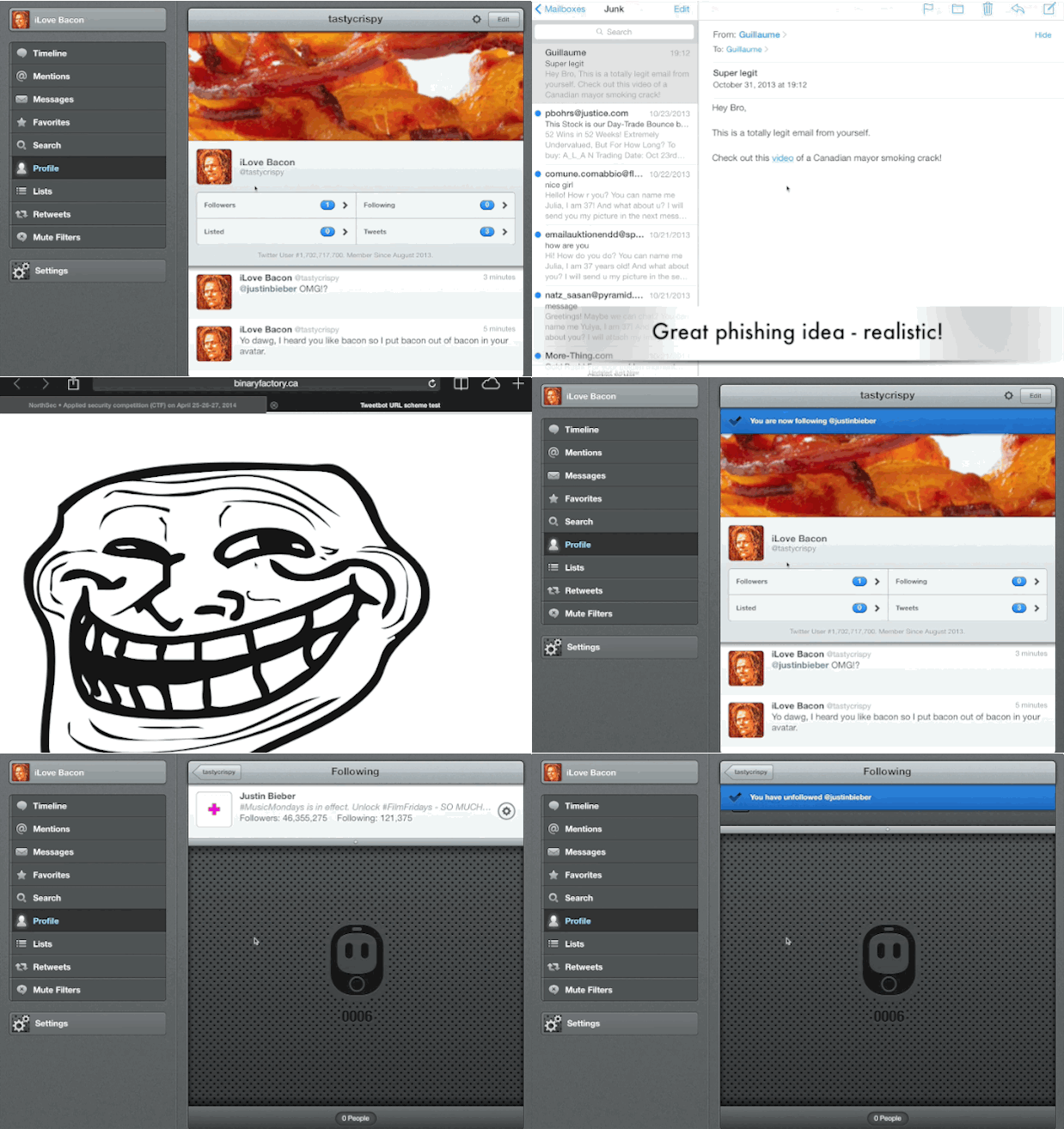
    In this image, you can see me receiving a phishing email. When I click the link, it opens Safari, which launches Tweetbot and has me following Justin Bieber.

    How embarassing is that?
    ![](https://f3a98a5aca88d28ed629-2f664c0697d743fb9a738111ab4002bd.ssl.cf1.rackcdn.com/URL-Tweetbot-iOS.gif)

    Tapbots has fixed this issue in Tweetbot V3 for iPhone, and fixes for the iPad and Mac version are coming. For the Mac, there’s a workaround which is to simply disassociate your browser from Tweetbot, as it is not using system-level handles like on iOS. If you’re on iPad, you can still try it out.

    **Warning: Clicking this on iOS or OS X could cause you to follow me**
    [Try it](tweetbot:///follow/gepeto42)

    [More details on this vulnerability.](http://blog.binaryfactory.ca/2013/11/cve-2013-5726-tweetbot-for-ios-and-mac-user-disclosureprivacy-issue/)

    ### Conclusion

    URL schemes will become more popular as developers try to get applications to communicate and enable great workflows. Some were expecting new official methods of app communication in iOS 7, which this has not materialized. Because of that, URL schemes are currently the only practical way for inter-app communications on iOS. As these schemes become more popular, it is important for developers to remember that input from URL schemes could be malicious. Developers should ensure that any action with the potential to damage data, threaten privacy or reveal confidential information should be confirmed by the user before being performed.

    If you want to play with URL schemes, I highly recommend using Contrast’s [support site](http://actions.contrast.co/) for Launch Center. Look at the applications you have and how they behave when you send them a potentially dangerous request for action. If you find something, notify the developer before disclosing the issue publicly.

    As more users attempt to centralize their computing lives, by replacing their laptops with iOS devices, it is only natural to want better interoperability between apps without interruption. Developers will have to add more support for URL schemes until better methods of inter-app communication are supported by Apple.

    I have a gut feeling that there must be some calendar applications that can set up unwanted alarms at 3am, without the user noticing. There must be text editors that silently overwrite data. Surely there are messaging apps that send messages without the user’s consent.

    Now we just have to find them.

    ***

    *This was a guest post from Guillaume Ross, an Information Security Consultant, whose writing can be found at [Binaryfactory.ca](http://blog.binaryfactory.ca). If you think you have an article to contribute, [get in touch](https://brooksreview.net/contribute/).*


  • RAW Image Editing on the iPad

    Since finding out that Filterstorm Neue can handle RAW images, I also found out that the photos app could too. I promptly went out to buy the Lightning SD card reader and imported half a dozen RAW images from my GX1 onto the iPad Air. Here’s a few things I found out that may be of use to you:


    – It works. You can view *and* manipulate the images in the built-in Photos app.
    – It’s really slow. I had a 64GB SDXC card with 204 RAW images on it and it took the iPad Air about 5 minutes to build previews for all apps so I could import them. From what I could tell you cannot leave the app during that time or the operation is paused.
    – There is also no indication that images are still loading, which is needed. iOS first loads dotted squares to show the amount of images, and then fills in with previews. While you can tell if there are still previews left to generate, you can’t tell if there are still more squares to load in — some kind of dialog would be great here.
    – Once you start importing images it works reasonably fast. It’s not lightning speed, but it is acceptable.
    – As I said, you can edit the photos natively, which is nice.

    Overall the experience was pretty solid, it’s not ground breaking by any means but it is nice to have RAW support so that I can download, edit, and post images from my iPad without worry.

    *(Images in this post edited only on the iPad, naturally. The first image was edited in the photos app, the second in Filterstorm Neue.)*

  • Subsidized by Google

    [John McDermott on a new NSA, wait no, Google “tool”](http://digiday.com/platforms/google-tracking/):

    > Google is beta-testing a program that uses smartphone location data to determine when consumers visit stores, according to agency executives briefed on the program by Google employees. Google then connects these store visits to Google searches conducted on smartphones in an attempt to prove that its mobile ads do, in fact, work.

    McDermott notes that this is mostly on Android devices since Google can have near continuous location reporting there, but it does happen on iOS too:

    > When an iPhone user stops using an app, it continues running “in the background.” The user might not realize it, but the app continues working, much in the same way tabs function on a Web browser.

    > Google’s namesake iOS app — commonly referred to as Google mobile search — continues collecting a user’s location information when it runs in the background.

    He also notes that all Google iOS apps have this “feature”, so be sure to turn off location services for Google apps.

    Obviously I hate this kind of thing, especially from Google as they have a strong financial motivation to sell off this information (which is exactly what they are doing with it), but it made me wonder about something else.

    How long before Android users get subsidized cell phone plans? Subsidized by Google, with the catch being that Google can push ads to you and turns on these location tracking features by default, no way to turn them off. The user gets low(er) cost cell phone plans in exchange for handing over tons more information to Google and seeing more ads. Seems like this would be a natural direction. I bet it will be hailed as a great humanitarian move from Google and Apple analysts will say Apple *must* offer similar plans or face sudden death.

  • ‘How the NSA Exposed the Media’s Biggest Bias’

    [David Sirota][1]:

    > To spotlight this bias, CJR looked at NSA-related reporting by America’s four largest newspapers. Aggregating all of the coverage, the journalism watchdog organization found that there has been a clear slant in favor of the government’s defense of mass spying.

    That’s to be expected as large press organizations try not to piss off governments to the point where they lose coveted spots in the press corps. However, I think the most damning part of Sirota’s piece is this:

    > Assessing the whole situation, the Federal Communications Commission recently concluded that there is a fundamental “power shift” happening in the media right now—one in which media organizations are “more reliant on news doled out by press release or official statement, which means that they report the news powerful institutions want us to know rather than what has been concealed.”

    To me that is far more egregious than not pissing off the government — that’s just lazy.

    [1]: http://motherboard.vice.com/blog/how-the-nsa-exposed-the-medias-biggest-bias

  • ‘How to Build an Audience in 743 Difficult Steps’

    Really [great post from Rian van der Merwe][1] about growing a blog audience:

    > This is a story about deciding to take a route that avoids most of these traditional content marketing methods. It’s a story of how a struggling blog with an insignificant number of readers has become not only a source of great joy and expression for me, but also a source of non-insignificant income. This is definitely not a story about how to get to 1 million page views a month. It’s a story about how to make your page views count.

    Getting traffic is pretty much a black art, tanking your traffic is easy though. ((Just add a paywall.)) I don’t agree with everything in this post (but the shoutout was all too kind), but what I do know is that people can tell when you don’t care. It simply isn’t interesting to read blog posts about topics the author doesn’t care about — if the author doesn’t care, why should you?

    I think that is where larger, multi-author, sites get into trouble — it becomes more about “freshness” and less about writing about topics the writers are interested in. Watch out for that.

    [1]: http://www.elezea.com/2013/11/how-to-build-an-audience/

  • Wherein I Post My ‘Highly’ Anticipated Thoughts on the iPad Air

    *White, 64GB, Verizon LTE* — that’s the iPad Air I picked up for myself on November 1st and I was expecting a lot from this device.

    For me the iPad Air is replacing two iPads, not just one. Both my mini and my aging iPad 3 are going on in life as hand-me-downs, as the Air becomes my only iPad. Since getting the iPad Air I have spent an inordinate amount of time working from it — I haven’t used my Mac at home since I got it.

    Typically that would have been purposeful, allowing me to boast about my rigorous testing here in this quasi-review I am writing. Typically you expect me to now say that I am posting/writing this from the Air, well, sorry I am writing this on my retina MacBook Pro because that’s just where I happen to be.

    But once I get home for the day, for the weekend, once I am home in general — I just can’t see a need for any other device than the iPad Air. Which just so happens to be a huge benefit. No, not because of battery life, space, weight, or any of the other bullshit that is all to easy to sling around about a new device.

    It’s a huge benefit to me personally because, with our family growing, and my wife’s business growing, we need to rearrange our house a bit. Currently my wife and I share an office space in what would normally be a formal living room — but I enclosed it into a lovely, if large, shared office. Now with kiddo number two on the way, we need the guest room as another kids room — but we still need a guest room. So my portion of the shared office is now becoming that guest room.

    It will mark the first time since high school that I don’t have a dedicated home office with a large desk and a comfy chair. I’ll be taking up residence in the kitchen, at a small built-in desk someone thought was clever to build in there (not me). Truthfully though, I don’t plan on using my laptop at home for much. It will do its nightly backups, and serve as a photo editor for RAW images (I don’t think the iPad can import those… yet). Other than that, if the past few days are any indication, there isn’t much other need for a laptop at home for me.

    The iPad mini always felt to cramped, and yes, non-retina was a bummer — but the biggest issue was size. It was fantastic to hold, and carry, but to use for *stuff* it just was OK. I actually think my iPhone did/does a better job at many tasks like writing. ((Just ask Patrick Rhone.))

    The iPad 3 I had was slow, but more than that it was just heavy. I loved the size of the display, but the weight would kill you. I didn’t want to carry it around the house at all because it just felt too heavy — too ridiculous — to be lugging around.

    All of that has been solved with the Air. Yeah, sure it is fast. Yes it is new and shiny.

    *But* more than all of that, the thinning of the bezel makes the screen pop more — makes it feel larger — and the thinning of the device (both weight and size) makes this iPad feel like a wonder to hold. It’s something that you still can’t believe works, and works well at that.

    For the first time since I got the original iPad I am presented with a device that I actively *want* to use for things — not just a device that I have if I need it. It reminds me of 2007 and 2010 all over again. It’s more than just a new and shiny toy, it’s about a device that works so perfectly well that you cannot help but find uses for it — all for the very sake of wanting to use it more.

    When you have something that is just a true joy to use — in every respect — you ended up contriving more and more situations for you to use that thing. That’s the iPad Air in a nutshell.

  • Shaming the U.S. One PDF at a Time

    [This report from Apple will be making the rounds][1]. In the report Apple discloses as much information as they say they can about government information requests. Overall, not much new is learned — except perhaps that given the customer database size Apple has, the requests are very few relatively speaking (Apple says between 2000-3000 accounts are effected, and many report that Apple holds 600 million credit cards in the iTunes system).

    The best part about the report, and the reason why I am linking to it, is the masterful job Apple does at shaming people/entities/corporations/governments in a public document without outrightly coming out to shame them.

    Take this obvious dig at Google for example:

    > Perhaps most important, our business does not depend on collecting personal data. We have no interest in amassing personal information about our customers. We protect personal conversations by providing end-to-end encryption over iMessage and FaceTime. We do not store location data, Maps searches, or Siri requests in any identifiable form.

    Yeah, *Larry Page*. Or this dig at Google again (later in the document):

    > Unlike many other companies dealing with requests for customer data from government agencies, Apple’s main business is not about collecting information.

    Now, in this report, it is not just Google, and companies like Google, that Apple is slinging some mud at — it’s also the United States government. While Apple outwardly disagrees with the limited reporting and the vague nature of requests, the biggest slam is in their first table.

    That table lists the account requests Apple received from every country which has sent one to Apple. Each country has a detailed and accurate numerical breakdown of the requests, accounts effected, and compliance numbers — conveniently Apple put these into a nice percentage to see what percentage Apple is rejecting.

    *Except* for the United States, where the data is laughably in a vague range, per the demand of the United States. (Increments of 1000.)

    Apple *could* have omitted other countries, not done the percentage thing, or made the data look generally less stupid from the United States, but they didn’t.

    Instead Apple left the data as is, reported the way Apple wants to report the actual numbers, so that the entire world can see how asinine the United States is being about allowing a company to report numbers. Numbers, not names of people, just numbers. What good does it do any terrorist if they know the number is 1, or 999?

    I just love this side of Apple.

    [1]: http://www.apple.com/pr/pdf/131105reportongovernmentinforequests2.pdf

  • Undershirts, Part Two: The Journey gets decidedly more expensive.

    A surprising number of readers contacted me to share their favorite undershirts, or to suggest others they thought I should try. Most of these shirts raised the price point considerably. This past month I tested four more shirts, which I wore and washed aggressively to test their durability. A prolonged test will likely reveal flaws that were not obvious in just a month.

    ## RibbedTee

    Mike Schwarz, the founder of RibbedTee, reached out to me after he read about my woes with his shirts last time. He felt that based on the date of my order (back in 2011) I had received shirts from a bad batch (something wrong with the fabric that caused too much shrinking). He offered to send me some to try, but he also gave me links to reviews of other shirts that I might like.

    Because of Mike’s “Macy’s Santa” attitude, I accepted four new [RibbedTee][1] shirts from him (two white, two gray) gratis.

    The difference in these shirts was obvious. The new shirts were much longer and felt more comfortable. I immediately threw them into my washing machine, set the water temperature to “sanitize” and turned on steam mode for good measure. After the wash I tossed the shirts into the dryer and set the heat to “anti-bacterial”. I didn’t notice any shrink, so I would expect these shirts to retain their shape over time.

    With the length of the shirts sorted out, fitting my body nicely, it was time to test for my last major complaint: armpit area comfort. This is still a point of contention for me with these shirts. The shirts are meant to hug your body closely, which they do in all areas *except* the armpit area. Perhaps this is a personal issue but I always *feel* like the sleeves are bunching into my armpits (they don’t actually bunch), which is simply uncomfortable. During a full day’s wear the issue becomes less noticeable until I start to sweat, at which point I’m reminded of the annoyance. I can wear them all day, but from time to time I do that thing where you tug at your undershirt and look like an idiot.

    I think a lot of people will find RibbedTee to be their ideal shirt. They hide well under a dress shirt, making them well suited for those wearing properly fitted dress shirts on a daily basis. They are reasonably priced but are not cheap.

    Personally, I’ll keep a couple on hand for formal occasions but not for everyday wear.

    ## Dockers

    Next up is the [Dockers v-neck tall][2]. Again (depending on Amazon) the shirts are roughly $10 each and come in packs of three. I ordered one pack of shirts.

    You should immediately notice that these shirts are made from a thicker material, especially given their low price. They fit comfortably, hugging your body slightly more than a standard t-shirt.

    Where these shirts fail for me is the v-neck. The neck opening is narrow, so while you don’t see the undershirt where your shirt collar gapes open, the v-neck collar has a tendency to work its way up the left or right side of your neck. Maybe I have mutant shoulders, but it took me a bit of effort to get this shirt situated well underneath my dress shirt.

    Once correctly positioned the shirt tends to stay in place very well. It’s thick enough to wear as a normal t-shirt if needed. ((Other than the issue of wearing a v-neck t-shirt.)) This is the most casual, t-shirt-like, undershirt that I tested.

    Overall this is a solid shirt. It holds up well and wears comfortably at a very low price. However, the neckline of the shirt doesn’t work well for me, which is a deal-breaker. I’d rather wear the RibbedTee shirt.

    ## Fruit of the Loom

    The [Fruit of the Loom v-neck tall][3] is another Amazon three-pack that costs about $13 for all *three* shirts. Naturally the quality is lower than the others tested. Even so, $13 for three shirts? I had to test these.

    They really aren’t as bad as I expected. The neckline is actually great, but the material is quasi-transparent. I would wear them as a t-shirt around the house, or working in the yard, but that’s about the limit. Whereas the Docker’s shirt could be worn to the store without embarrassment, that’s not the case for this shirt. ((Other than the fact that you are wearing a plain white v-neck as a shirt, which (again) by itself is embarrassing.))

    In fact, a couple weeks into testing I thought these would be the clear winner. Unfortunately they suffer the same fate as so many other cheap shirts: Poor shape retention. After just a few washes it became clear that this shirt will lose its shape over the course of a couple years.

    That fact alone prevents me from recommending this shirt at all. However I should note that in addition to the poor shape retention this shirt also doesn’t “hide well” under a thin dress shirt. In other words: it will be apparent where your undershirt is, which is a big problem for me.

    ## UnderFit

    Ben Brockland, founder of [UnderFit][4], also reached out to offer me one of his shirts to test. At $25 *each* I was happy to accept a review shirt. I told him my height and weight, then he picked the size and sent it to me. Normally I order large-tall, but since the shirts don’t come in tall sizes he sent an extra-large, which I’m glad of.

    Clearly extra-large is the correct size for me in this shirt, so keep that in mind when selecting your size. Also, this shirt is not specifically made for tall people, but the XL fit me fine with no length complaints at all.

    UnderFit’s biggest surprise was the texture of the fabric, which was so soft that I wanted to rub my face on it. That may sound odd, but it’s the best way to describe the feel of this shirt: You *will* want this next to your skin. ((Reviewing undershirts is not that exciting. I have to take my thrills where I find them.))

    The UnderFit fabric is just *so* damned soft. Not “fuzzy” soft but smooth like silk, without the crappy qualities that silk brings.

    If it wasn’t already obvious, my search for an undershirt stops here, with UnderFit. These shirts offer the best qualities of the RibbedTee and the best of a normal cotton t-shirt.

    UnderFit shirts are thin and hug the body while remaining loose enough to allow freedom of movement, unlike the RibbedTee. Like the RibbedTee, the UnderFit shirt disappears beneath your dress shirt. The neck line is excellent and the fabric is top-notch. I was worried after the first wash that shape retention may be a problem but that doesn’t seem to be the case at all — and this is easily the most washed and worn shirt of this test round.

    I only have one UnderFit shirt but I find my self doing more laundry so I can wear it more often.

    The only problem with the UnderFit shirt is the price. At $25 each I’m looking at $250 to get fully stocked with UnderFit shirts. For some people this will make sense — if I wore suits daily this is *the* shirt I would wear under them — but for others the price will be too high.

    ## Wrap Up

    Despite having a dozen more shirts suggested by readers I am stopping here. UnderFit is excellent and meets all my needs. RibbedTee is my runner-up for a pure undershirt. Dockers is my runner-up as an all around shirt, which also works well as an undershirt.

    [1]: http://ribbedtee.com/store/product/classic-fit-white-v-neck-undershirt/
    [2]: http://www.amazon.com/exec/obidos/ASIN/B007IRM1NM/ref=nosim&tag=brooksreview-20
    [3]: http://www.amazon.com/exec/obidos/ASIN/B00CEH0MSM/ref=nosim&tag=brooksreview-20
    [4]: http://www.underfitshirts.com

  • Arming the TSA, and Not With Knowledge

    [Brian Tumulty](http://www.usatoday.com/story/news/nation/2013/11/02/tsa-lax-shooting-armed-guards/3394601/):

    > The union representing airport screeners for the Transportation Security Administration says Friday’s fatal shooting of an agent at Los Angeles International Airport highlights the need for armed security officers at every airport checkpoint.

    Why stop there? Why not arm the ticketing agents, the bag handlers, and the custodian staff should definitely get AR-15s. The gate agents should get shotguns though, too close range for an AR. ((I very much feel for the family of the victim(s), but it’s this kind of reactionary thinking that makes the rest of the world laugh at us.))

  • Let’s make it 2.0 so we can charge for it again.

    [Chris Bowler on apps that charge for new versions](http://chrisbowler.com/journal/app-fatigue):

    > But as the consumer, I have to admit I grow tired of paying for the same app three or four times.

    I suspect this is a common refrain and I think there are more than a few issues compounding this:

    1. The iOS 7 update has certainly caused a lot of apps to charge for new versions and all together that gets expensive, but this is certainly not how a normal couple of months go for paid upgrades of apps.
    2. As Bowler notes, there is no reason to upgrade something that is working, but we often feel we *must*. Either because of a new design, new features, or what have you to an app that we use several times a day. It’s hard not to update something when you use it constantly and the upgrade is only a few dollars. That said, it adds up.
    3. There are some bad seed developers ruining the experience for others. Some that do barely anything to their app and then call it version 12 and charge for a new version. I’ve been seeing a lot of head scratchers lately, and that is also adding to customer frustrations.

    There’s nothing easy to point at as the cause, but there are a lot of little factors that are adding up right now. Ultimately, I think more subscription pricing is the future — allowing developers to set expectations that you have to pay me $X.99 per year/month to use this app. I’d personally love to see apps start charging $1.99-2.99 a year for an app with free upgrades. There’s no surprises in that for users and it gives developers a way to keep money coming in without having to resort to shady tactics.

  • More Reasons to Hate Comcast

    The Washington Post had a [nice investigative article about Comcast donating to opponents of Seattle’s incumbent mayor, Mike McGinn](http://www.washingtonpost.com/blogs/the-switch/wp/2013/10/31/comcast-is-donating-heavily-to-defeat-the-mayor-who-is-bringing-gigabit-fiber-to-seattle/). (McGinn is trying to get gigabit fiber in a way that hurts the Comcast monopoly in Seattle.) The Post just added to that with [an interview with McGinn](http://www.washingtonpost.com/blogs/the-switch/wp/2013/11/01/seattle-mayor-i-have-comcast-and-i-would-like-better-service/), which begins:

    > **First, I have a personal question. Who is your Internet provider and are happy with your service?**
    > My Internet is provided by Comcast, and I know my family would like better service. I will speak for my gamer son as well.

    And ends:

    > **Do you have any specific comment on Comcast’s contributions to various PACs during this race?**
    > I just think it speaks for itself.

    God, I hate Comcast.

  • Holy BIOS

    [Dan Goodin](http://arstechnica.com/security/2013/10/meet-badbios-the-mysterious-mac-and-pc-malware-that-jumps-airgaps/):

    > With the speakers and mic intact, Ruiu said, the isolated computer seemed to be using the high-frequency connection to maintain the integrity of the badBIOS infection as he worked to dismantle software components the malware relied on.

    > “The airgapped machine is acting like it’s connected to the Internet,” he said. “Most of the problems we were having is we were slightly disabling bits of the components of the system. It would not let us disable some things. Things kept getting fixed automatically as soon as we tried to break them. It was weird.”

    The best guess is that the first computer was infected from a USB device, but what’s nuts (if true, it’s not 100% yet) is that a computer with no wifi or Bluetooth, or ethernet can still communicate and send data through the mic and speakers. I mean. Wow. What a hack.

    Update: [Errata Security has more information](http://blog.erratasec.com/2013/10/badbios-features-explained.html#.UnQYebK9KK0) on the plausibility of this hack:

    > In other words, while I know of no talk at a hacking conference on “air gapped communication” via sound waves, it’s pretty darn easy, so expect to see one soon at a conference.

    > By the way, there are other ways to do air gapped communications using covert channels. For example, you might exploit blinking LEDs and using the built-in camera on the laptop. Or, you might be able to monitor the voltage on the power supply on one computer while turn on the power supply on/off on another. The overage laptop computer has a godaweful number of inputs/outputs that we don’t quite realize.

    Excuse me while I go buy more tin foil.

  • The Push

    Shawn Blanc, talking about which iPad would be best for him, [mentions a quandary that I often find myself in][1]:

    > There are, of course, advantages and disadvantages to iOS’s constraints just as there are advantages and disadvantages to the versatility of OS X. Each device and its operating system have their own ways of empowering creative work as well as hindering it.
    > It’s often easier for me to work from my MacBook Air and sometimes I flat out need to. But I want to and will continue to work from my iPad as often as possible.

    There is no doubt that if I have a desk to work at, and fast WiFi, it is almost always easier for me to work with my MacBook Pro. *For any task*. the MacBook Pro is fast, it has a bigger screen, a [better keyboard][2], and all of my Keyboard Maestro macros.

    But, I still very much want to work on my iPad as much as possible.

    Like Shawn, when I travel, I struggle with what I should take, laptop, iPad, or both. I have gone through a lot of work to make sure that I can do 90-95% of my work on my iOS devices with no problems, but that doesn’t mean I can do that work as fast as on my MacBook Pro.

    That’s frustrating as a nerd, and I didn’t realize why until now. It’s not the device speed, but instead it is a lot like HDMI, well before HDMI was standard. I’d get a TV or receiver with HDMI ports, but no devices that used HDMI — what I really wanted was to *use* the HDMI ports, not just have them. That’s what having an iPad feels like to me at time: a great tool that is missing parts to make it truly useful.

    [I think John Gruber explained this nerd want for change well][3]:

    > The way I see the iPad taking over the mass market from laptop PCs is subtly. I think it’s more about people hanging on to old laptops for legacy tasks, spending their money now on new iPads, and then using their old laptops less and less over time.

    I could easily get by without an iPad. It would be even easier to get by with an iPad 2. But with each new model of iPads my life gets a bit easier — not exponentially, but incrementally. Even so I don’t need an iPad, but I want one. I want to use it more.

    And as Gruber highlights it will be a slow takeover, but as a nerd I want it to be an immediate takeover and the pull between the two is painful for any nerd. But the platform isn’t ready yet, it gets closer everyday, but it’s not quite there yet.

    I suspect this is part of the pull that nerds are feeling, and part of the push that ‘normals’ are beginning to feel. The idea that the next thing is already here, but the rest of the world, in one way or another, has yet to catch up.

    I bought my MacBook Pro with the assumption that I wouldn’t upgrade it for three years. By then my iPad might be faster at computing tasks. By then the iPad may be *there*. By then I just may not need a laptop in the traditional sense of what people use laptops for.

    I can’t wait for then.

    [1]: http://shawnblanc.net/2013/10/airs/
    [2]: https://brooksreview.net/2013/10/code/
    [3]: http://daringfireball.net/linked/2013/10/30/bajarin-iPad-air

  • Fantastical 2 for iPhone

    While [Shawn Blanc thinks Fantastical 2 for iPhone is *the best*][1], I am more reserved. I think Fantastical 2 is tied with Horizon ((I have a business relationship with the developer of Horizon, but no business interests in Horizon itself.)) for a very close *second* place, as Apple’s built in calendar app stands atop the mountain.


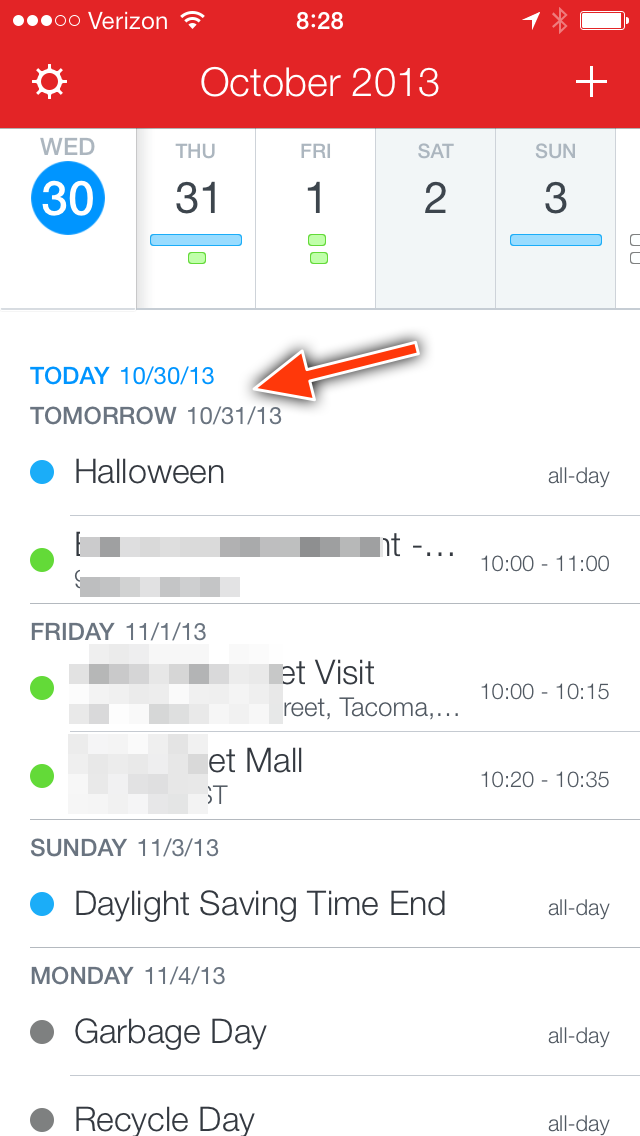
    First let me explain my two problems with Fantastical 2, as both can be seen with a screenshot.

    1. When there are no events for the day, that is not immediately evident if you are prone to taking a quick glance. Instead one could be forgiven for mistaking tomorrow as today. (see the red arrow) I did this dozens of times while testing the app.
    2. Why are all-day events given the same priority of time based events? That is, I think of all-day events more like reminders (hey garbage day idiot), than I do as appointments. I cannot be alone here. I would love to see all-day events de-emphasized a bit.

    Other than that, Fantastical is a superb app. However I like Apple’s offering better for two specific reasons:


    1. The live date in the icon without an icon badge is just killer. I know third-party developers cannot do this, but that doesn’t mean I don’t love it.
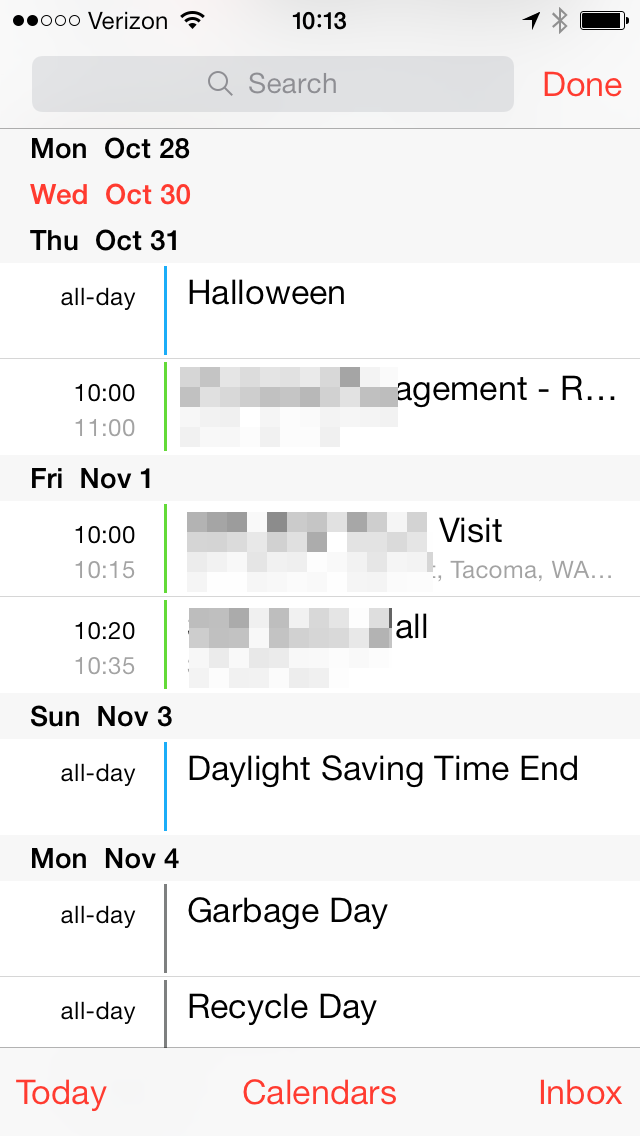
    2. The “search view” in Calendar is excellent for my needs. (But suffers from the same problem as Fantastical’s #1 issues listed above. While they both handle “all day” events similarly, I give an edge to Apple here as I find it easier to note it is all day. That’s a highly subjective call though.)

    I know a lot of people hate the new Calendar app, but I am not among them. For those that just hate it for some reason that I cannot comprehend, both Fantastical 2 and Horizon offer excellent alternatives. If pressed, I’d give a slight edge to Fantastical 2 over Horizon as I find it “fitting” better visually on iOS 7.

    [1]: http://shawnblanc.net/2013/10/review-fantastical-2-iPhone/

  • The Ultimate EDC Pocket Knife

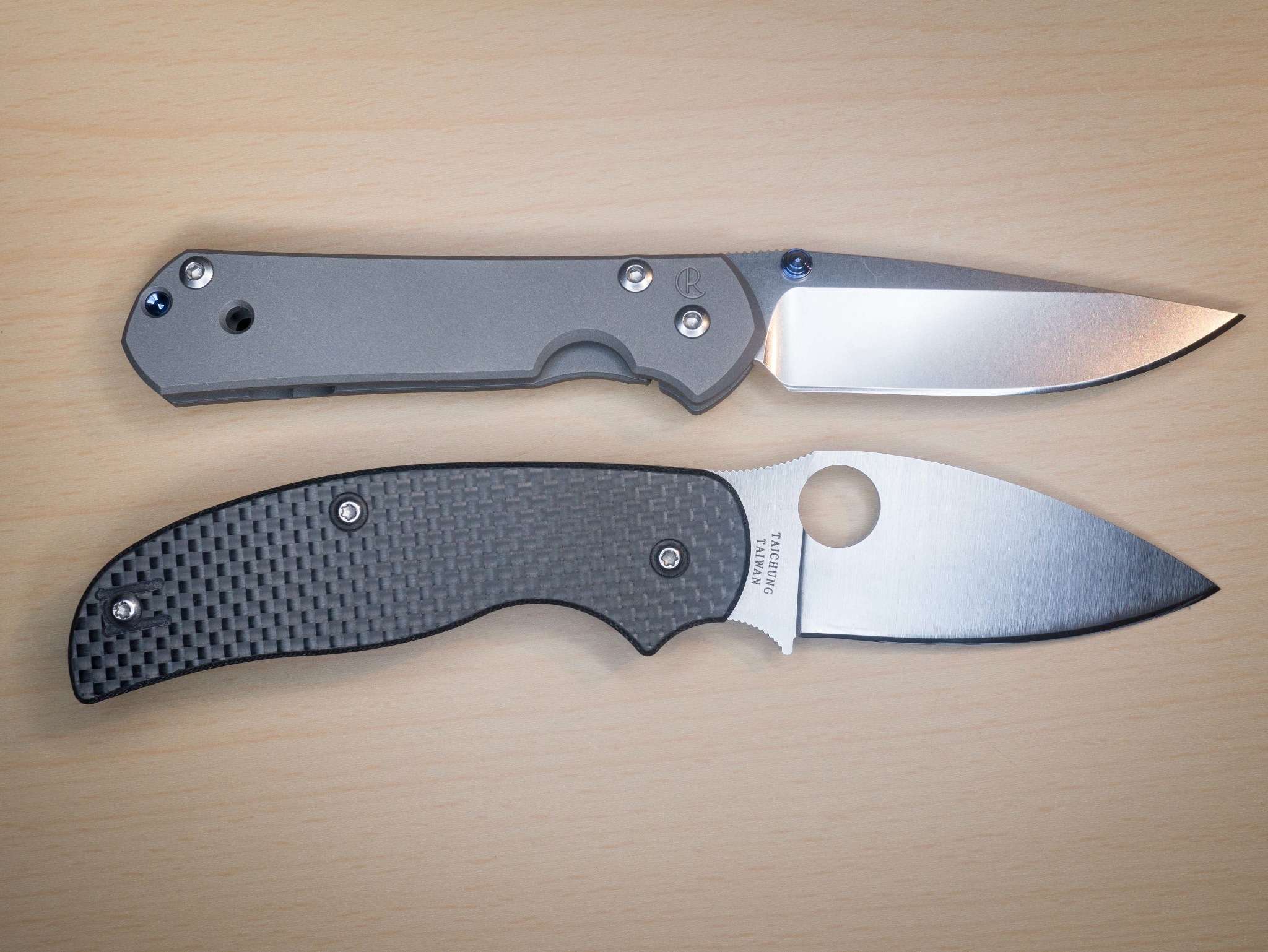
    After I found the Spyderco Sage series of knives I had pretty much stopped searching for a better everyday pocket knife. I was exceedingly happy, with the Sage I in particular. However, as things changed, I became annoyed by the physical width of the knife. Particularly when I wanted to keep it in my pocket, instead of clipped to the top, it was too wide to slide my hand past to get at other things in my pocket.

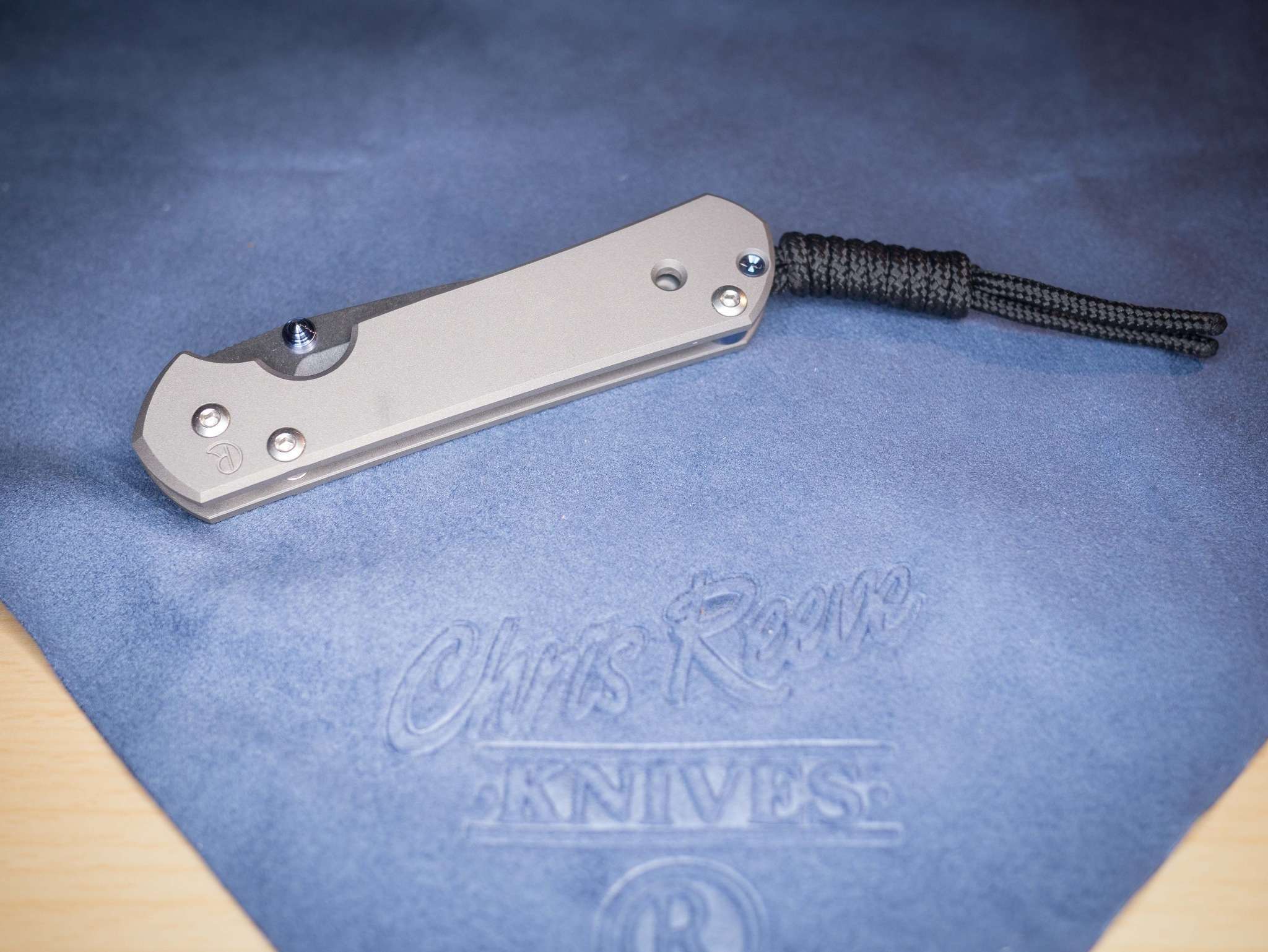
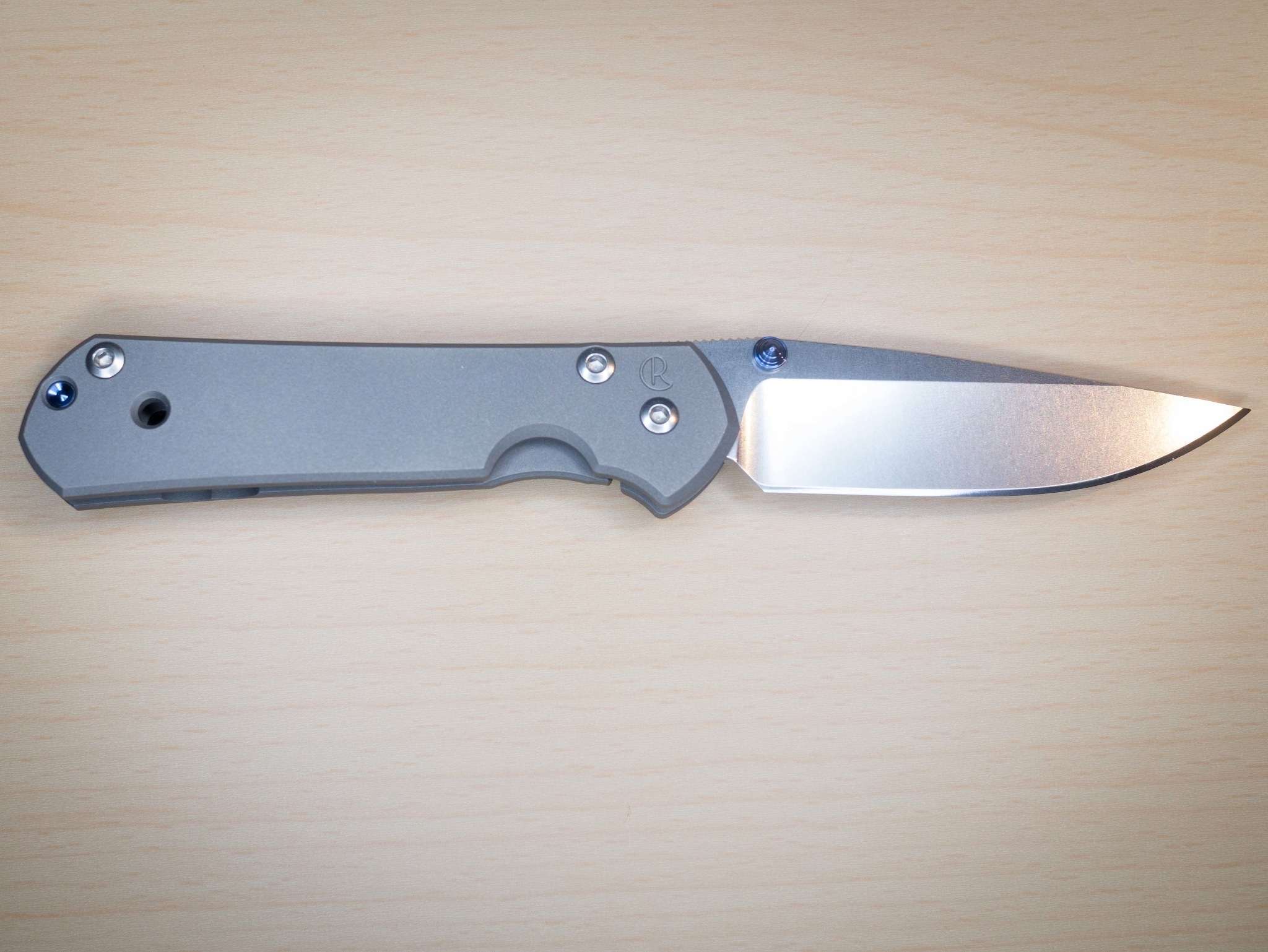
    There was only one other knife I wanted to try: the Chris Reeves Small Sebenza. I ordered the left-handed model (which means that the blade lock and opening nub are flipped to make the knife accommodate a left handed person) and put it through a few months of testing.


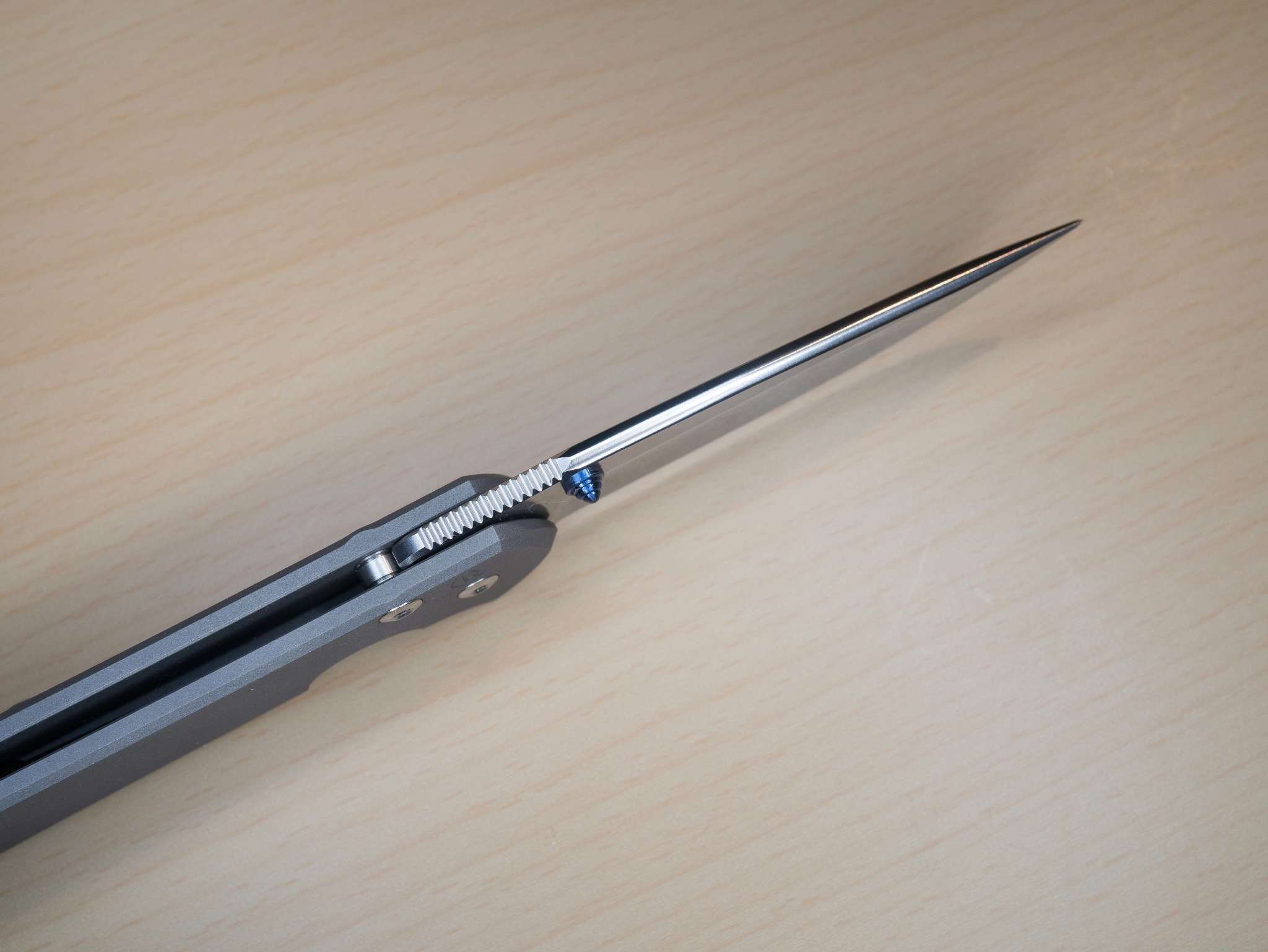
    Upon opening the knife I immediately noticed it’s build quality. The Spyderco knives are excellent but the Sebenza is an entirely different level of quality. The best evidence is the back of the knife blade: On almost every other knife I have tried the back is angular in some way. It’s not something you really want to touch if you can avoid it.


    But the back of the Sebenza is something I really want to touch — a disturbing amount. The back edge is rounded and polished. It feels smoother than the back of an iPhone. Even the jimping, which is cut-in to provide better grip for your thumb in wet conditions, feels smooth and civilized.

    In fact I think “civilized” is the most apt description for this knife. Every knife has a personality. Most SOG knives feel aggressive. The Spyderco Sage knives feel like trusted tools. The Sebenza just feels civilized.


    The opening and closing actions are smooth as silk. There’s no jitter, even when the knife contains a bunch of pocket lint. One downside: This knife is slower to open than the Spyderco, but that’s largely due to the width difference and thumb stud versus large cutout that Spyderco is known for. Where the Spyderco can provide easier grip and more leverage, the Sebenza has neither, but makes up for it in overall width savings.

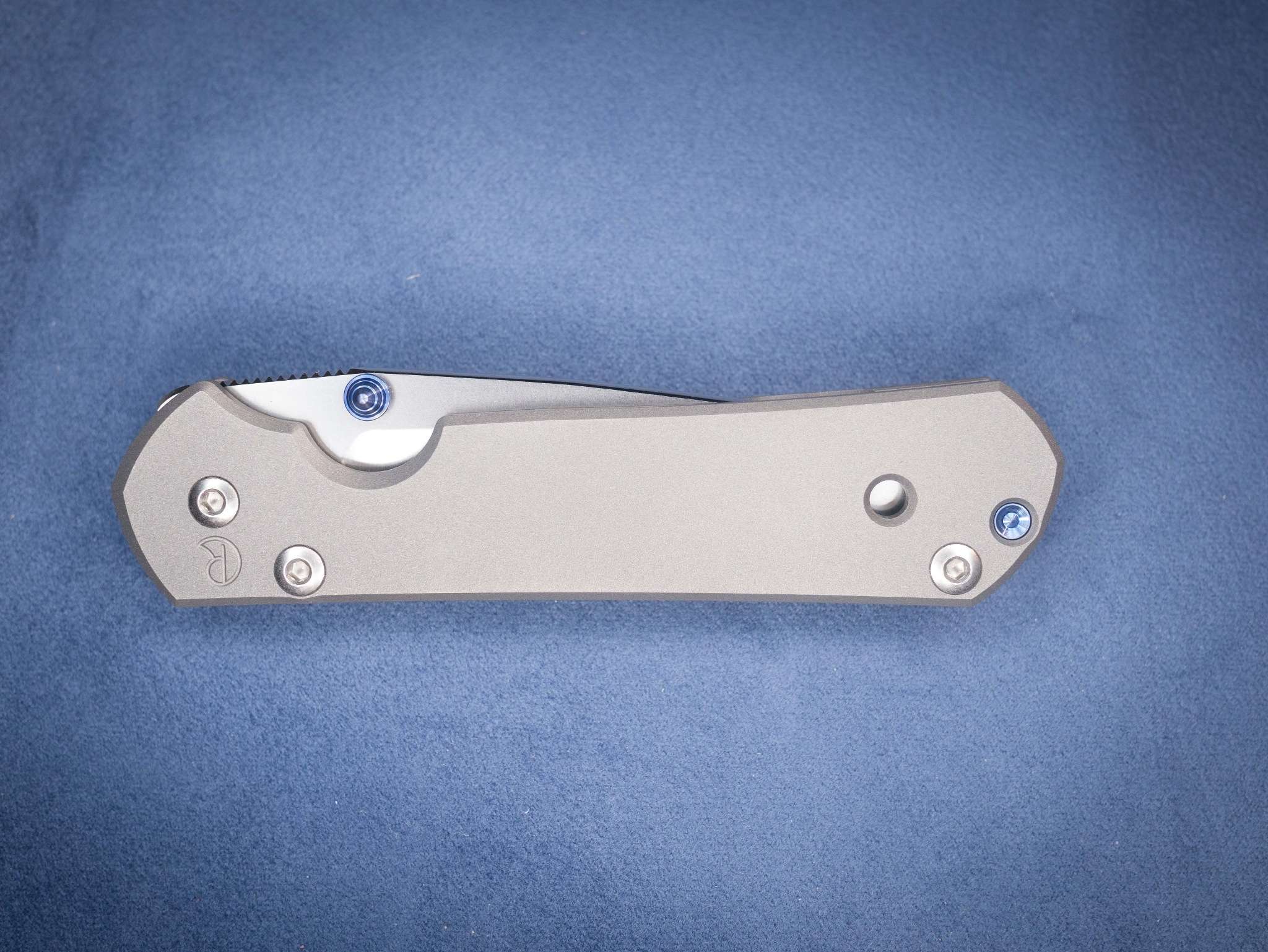
    Sage I bottom.

    The knife itself looks absolutely stunning. The blade material is topnotch S35V. ((Older models use S30V, new models use S35V.)) The frame is a nice titanium finish, which will show wear.

    Of all the knives I have tested this blade stands apart for two reasons:

    1. It is shockingly sharp. I don’t know if it’s due to shape, blade design or the upgraded S35V steel, but it always feels sharper than other knives — even just after sharpening. I went a full two months without sharpening and it still felt sharp.
    2. It collects a lot less “tape goop” than the Sage knives. (Tape goop is that crap that sticks to your knife when you cut open packing tape.)

    The Sebenza, unlike any other knife I have tested, is truly a fantastic knife to use, look at and handle. It’s also three times the price of the next best knife. Is it worth it?


    The Sebenza is absolutely worth every penny. However, as an everyday carry, it’s not that much better than the Spyderco Sage 1. If you prefer a smaller profile knife, then the Sebenza is the only other knife I would recommend. For me, the Sebenza is worth it, but it’s not a knife I would recommend to everyone. If you can comfortably pocket the Spyderco, that’s your knife. Replacement and guilt costs are lower with the Sage I. If you can’t pocket the Sage I, or you want the absolute best (price be damned), Chris Reeves Small Sebenza is the one.

    Buy Them:

  • iPad Air Reviews Are Out

    The iPad Air reviews are out, and they appear overwhelmingly positive. As for which you should buy, only [John Gruber tackled that question][1]. Here’s his wrap-up on how I suspect most readers here will be using the iPad (as a laptop companion):

    > For me, personally, with my primary uses of the iPad being reading web pages, Twitter, email, and books,2 the larger display of the Air doesn’t have as much appeal. I think I’m going to hold out and buy a new iPad Mini for myself. But it’s a damn close call.

    Impressive that it is that close of a call, leading me to believe it really is more of a personal call than a call that can be backed up with clear reasons why. Interestingly, Gruber notes that thumb-typing on the mini is very important to him:

    > But for me, as an iPad thumb-typist, the Mini makes it easier to type.

    He also notes that he doesn’t like thumb-typing on the Air, while [Jim Dalrymple on the other hand noted this about thumb typing on the Air][2]:

    > This smaller size is great. If you have decent sized hands you can type with two thumbs on the iPad in portrait, something I wasn’t really able to do with the last generation iPad without a lot of stretching. Clearly a full-size iPad is not something you will be thumb typing with all the time1, but it does give you an idea of how much smaller the iPad Air is.

    I still think iPad-thumb-typers are crazy, but it’s good to know the Air is making it possible for *some* people.

    [Over at AnandTech they have a great photo][3] (hit the link to see it) of the new angle that the smart cover holds the iPad at when in “movie viewing” mode. It looks like it will be a much better angle for typing with a bluetooth keyboard too.

    I will say the three-panel smart covers are crap compared to the four panel ones, but the omission of metal on the cover is, erm, *smart*. ((Apologies.))

    I stand by my [assessment that the Air is the way to go][4].

    [1]: http://daringfireball.net/2013/10/the_iPad_air
    [2]: http://www.loopinsight.com/2013/10/29/review-iPad-air/
    [3]: http://www.anandtech.com/show/7460/apple-iPad-air-review
    [4]: https://brooksreview.net/2013/10/air-always-the-air/