Top Posts

Leica Sofort 2June 13, 2024
Grand Seiko SBGX261February 23, 2023

Recent Articles

  • Love of Pen and Paper

    Chris Bowler on planning his week with pen and paper: Now, I realize this could all be done in OmniFocus. I could tinker with perspectives and get a view that is very similar. But I cherish the exercise and taking the time causes me to closely consider each task and whether it’s a good use…

    Chris Bowler on planning his week with pen and paper:

    Now, I realize this could all be done in OmniFocus. I could tinker with perspectives and get a view that is very similar. But I cherish the exercise and taking the time causes me to closely consider each task and whether it’s a good use of my time. Sometimes the slow way is the better way.

    This jives well with my post yesterday about needing something to physically write on. I’ll admit that writing on the iPad is far less satisfying than writing on paper — but it’s easier to deal with in the long-run for me. And so the iPad wins out.

    That said, another option is (as Chris pointed to) the Whitelines notebooks — which are just fantastic — they have a notebook series called ‘Whitelines Link‘ which uses a special iPhone app to snap a picture of the page. The page has details on it to get the skew and alignment just right. I have one and it works pretty well. (Super hard to find on Amazon though.)

  • Improving My Workflow: Desk

    Most of the year I spend reacting to things going on at work, news on the web, and opportunities as they present themselves. So while I used to be a big GTD nerd, of late I tend to just be a reactionary fool. About once a year I stop working, dump everything rattling in my…
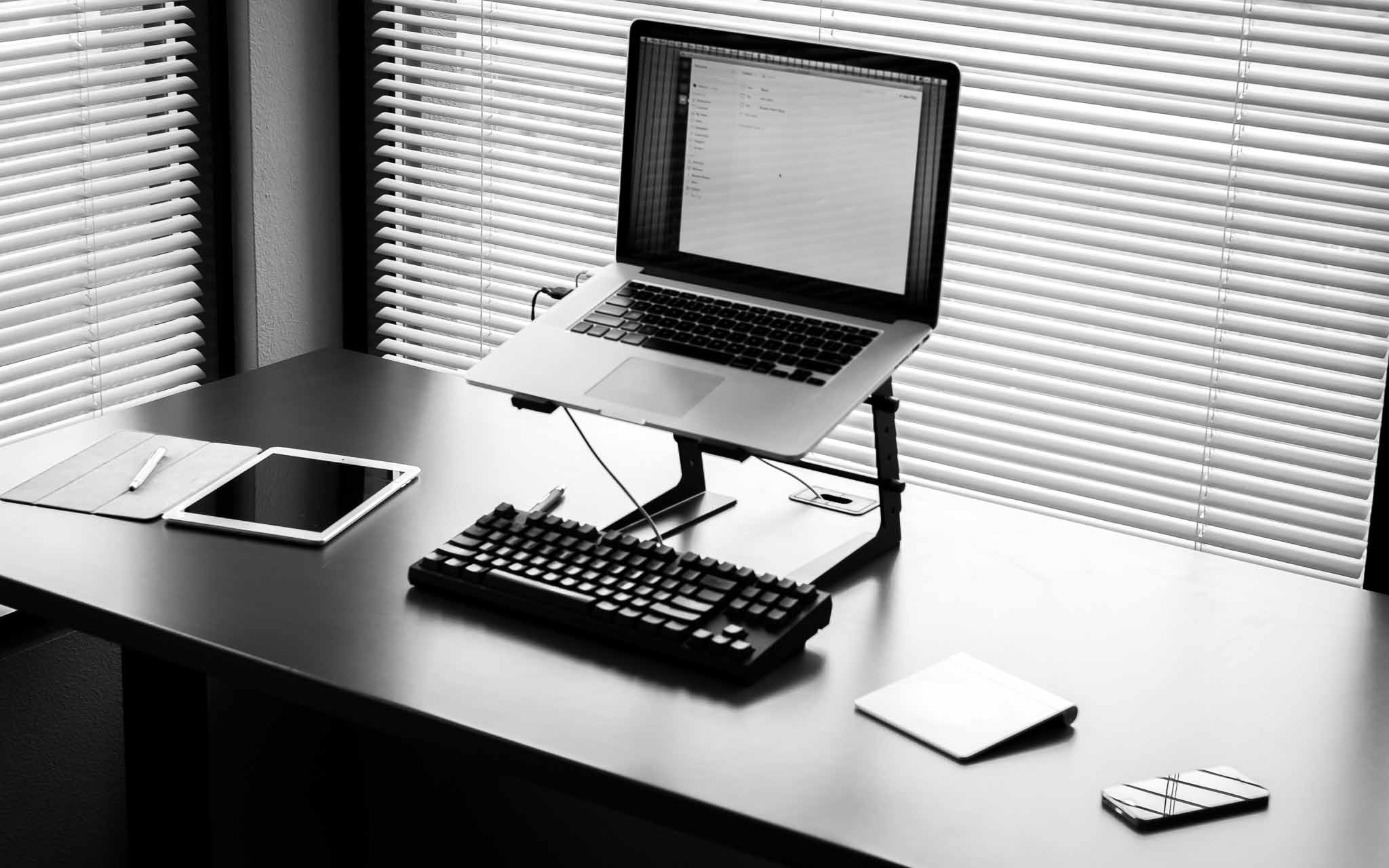
    Most of the year I spend reacting to things going on at work, news on the web, and opportunities as they present themselves. So while I used to be a big GTD nerd, of late I tend to just be a reactionary fool. About once a year I stop working, dump everything rattling in my brain on something, and then reevaluate it all.

    My goal is instead of forcing myself to work in a rigid way which may actually not work for me, I try to set habits once a year and let those habits slowly change throughout the year as I need. Then at some point I stop and reevaluate it all.

    It just so happens that this once a year period is right now for me.

    The first up for my changes in habits are in how I work at my desk, and on my desktop. As you can see in the picture I keep my desk very tidy, so here’s a quick rundown of what’s going on.

    Left Side

    On the left side of my desk I keep my camera, my iPad, my stylus, and a pen. I’m left handed so it only feels natural to keep those items on my left.

    iPad & Stylus

    When I get to work I layout my iPad and Bamboo Stylus as you see in the picture. I also open up the Notability app, with a “scratch” document open and ready (but the iPad off). I’ve long tried different ways of entering quick notes into my Mac (notes you might take while on a phone call), but in practice it doesn’t work to use a keyboard. Typing with one hand just is annoying.

    Pen and paper are fastest, but I can’t stand a pen and paper. Instead I use Notability as the paper, and the stylus as my pen.

    I keep one running file of notes in Notability, which archive once a month. This allows me to scribble phone numbers much easier than typing with one hand while on a phone call, like I would on paper, but with the added flexibility that a digital system offers.

    So far this works well.

    An additional note: I keep the smart cover as you see in the picture. This allows my left hand/wrist to anchor the iPad in position while I write — and keeps the iPad feeling much thinner (hand is held higher because of the cover and iPad is lower than if the cover was folded behind it) than if I were to fold the cover back behind the iPad. So while it looks a bit silly, it works much better this way and feels more comfortable.

    As for the stylus: a necessary evil. I like the Cosmonaut, but the rubber makes my hand smell funny so I don’t ever use it. The Bamboo stylus is small, looks nice, and writes well.

    So there you are, I guess I am an iPad stylus guy after all.

    Pen

    I’m currently using 1.0mm Uniball Jetstream pens with blue ink. Original documents are best signed in blue ink and that’s pretty much the only reason I have the pen: signing contracts and checks. I don’t care to hear about other pen choices, I literally just use it to sign things.

    Camera

    While my camera isn’t always on my desk, it usually is 60% of the time which is why I included it in the picture. There’s no reason for the camera to be on my desk, other than to serve as a reminder of what I would rather be doing.

    Center

    Central to my desk is my retina MacBook Pro, CODE Keyboard, trackpad, and DJ stand for my Mac. The stand is to get the computer high enough, the Mac always has Flow open and ready to go. That CODE keyboard, she’s a thing of beauty. (Also trackpad, because I don’t like the scratching sounds of a mouse sliding on my desk.)

    Right Side

    Off to the right I keep my iPhone. This reason is two fold: I tend to answer my phone with my right hand, and it is easiest to move when someone wants to come set papers down for me to review. That and the left side is really crowded as is.

    Boring

    On the face of it this is all rather boring to talk about, but the biggest revelation for me was using Notability. I’ve long used the app in meetings, but making a place for my iPad & stylus on my desk has really helped me keep working without trying to type one handed, remember things, or search for paper.

    For me adding in the iPad in this way wasn’t obvious, but felt natural once I did it. It takes a lot of space on the desk, but just works brilliantly. I’ve tried many other apps, but I like the way Notability works, and so it stuck.

    Most people like to keep a scratch piece of paper handy, and I truly do too, but I don’t like dealing with that paper afterwards. Using my iPad I get 85% of the way to that paper, with the added benefit of not having to deal with the paper after I am done with it.

    I also find leaving the cover open, feels like it is an open notepad awaiting my scribbles. And yes, sometimes I just use it to doodle while on the phone — but I typically switch to Paper for that.

  • BitTorrent Sync Support for Network Attached Storage

    Erik Pounds: BitTorrent Sync already offers the safest and most efficient way to sync data between devices. We’re now introducing our support of network-attached storage (NAS) devices to offer BitTorrent-built Sync apps in vendor storefronts; creating a simple path to access and transfer your data from the NAS to a desktop, mobile or other NAS…

    Erik Pounds:

    BitTorrent Sync already offers the safest and most efficient way to sync data between devices. We’re now introducing our support of network-attached storage (NAS) devices to offer BitTorrent-built Sync apps in vendor storefronts; creating a simple path to access and transfer your data from the NAS to a desktop, mobile or other NAS device, whenever and wherever you need it (and we mean all of your data, not some of it: without limits or storage fees).

    They are already partnered with Netgear. This looks like a great solution for people without a server or always-on computer to sync with. The entry-level NAS is only $166 with no drives on Amazon. I've been using BitTorrent Sync for quite a while and have been extremely happy with it.

  • Google Contact Lenses

    At first I was all like: my worst nightmare. And then I read this from Alyssa Bereznak: The technology could potentially allow Google to shrink its wearable face computer — known as Google Glass — into the size of a single contact lens. Rather than be controlled by voice, those wearing the contacts would command their device through, as…

    At first I was all like: my worst nightmare. And then I read this from Alyssa Bereznak:

    The technology could potentially allow Google to shrink its wearable face computer — known as Google Glass — into the size of a single contact lens. Rather than be controlled by voice, those wearing the contacts would command their device through, as Patent Bolt analyzes it, “a sophisticated system” of “unique blinking patterns.” In other words, people wearing these contacts may look even weirder than people in Google Glass.

    Ever wonder what could make you more stupid than the figure eight iPhone compass calibration dance? I’d argue “unique blinking patterns” pretty much takes the cake.

  • How do these people have jobs?

    John Gruber on the latest idiocy: That’s the extent of Nocera’s argument that iPad-like new products from Apple “seem unlikely”: Yukari Kane’s having written so in her book. Really. Oh boy.

    John Gruber on the latest idiocy:

    That’s the extent of Nocera’s argument that iPad-like new products from Apple “seem unlikely”: Yukari Kane’s having written so in her book. Really.

    Oh boy.

  • Berkeley Drafting Table

    Thomas Brand has a nice find of a cheap “adjustable” height desk.

    Thomas Brand has a nice find of a cheap “adjustable” height desk.

  • Screens 3 for Mac

    A great update to Screens 3 for Mac. I’ve been testing it out over the last week and it really is much better than built in screen sharing.

    A great update to Screens 3 for Mac. I’ve been testing it out over the last week and it really is much better than built in screen sharing.

  • GoGo Wireless Adds Surveillance Capabilities for Government

    Bruce Schneier on this despicable act: It [GoGo] has voluntarily decided to violate your privacy and turn your data over to the government. Fuck them.

    Bruce Schneier on this despicable act:

    It [GoGo] has voluntarily decided to violate your privacy and turn your data over to the government.

    Fuck them.

  • Standing Desks: How to Get Going

    Mikael Cho recently moved to a standing desk, but found the experience short lived. Cho: After two weeks, I was able to stand for about four hours a day, but I still needed to take multiple breaks. This was fine with me because I often need breaks throughout the day to refresh and maintain a…

    Mikael Cho recently moved to a standing desk, but found the experience short lived. Cho:

    After two weeks, I was able to stand for about four hours a day, but I still needed to take multiple breaks. This was fine with me because I often need breaks throughout the day to refresh and maintain a good flow.
    And:
    If a standing desk works for you that’s great. But if it doesn’t, don’t force it — especially if it negatively impacts your work. Standing while working might not be for you. It wasn’t for me. And that’s okay. Standing for long periods of time isn’t much better than sitting anyway.

    Cho gets really in-depth into the standing desk ideology, and what he has done in hopes of making his sitting desk situation better. Even though I don’t agree with Cho, this is an article that I think everyone who works at a desk should read.

    That said, it is my opinion that he went about standing to work all wrong. At the beginning of 2011 I started standing full-time. I wrote my reasoning in that linked post, but you all know why already: standing is healthier.

    But standing hurts right? Cho was driven nuts, my buddy Shawn Blanc couldn’t bear to stand all day (Shawn corrected me) much preferred to sit while writing, than he did standing. It’s a pain in the foot to stand all day. But only for a little while.

    Like anything in life you have to ease into standing to work, and then even after that it will take a while to build up the strength to stand all day — trust me. It is three years later and I still stand to work, but even at that I get tired.

    My journey to standing all day looked like this:

    • Day One: stood for two hours, and didn’t get much work done. Finally sat down and just wanted to cry.
    • Day Two: basically the same thing as day one for the next week.
    • Week Two: Things were better.
    • Month Two: I can now stand for about 6 hours a day, but more importantly I have finally broken the urge to sit down when I need to concentrate on something.
    • Month Four: I stand all day, and can work effectively now while I stand. I still go home with sore feet and legs.
    • Month Eight: The soreness is mostly gone and I can stand fine.
    • Year Two: I can’t focus as well when I sit, and my legs/feet rarely feel sore. I’ve also ditched the anti-fatigue matt.
    • Year Three: It feels weird, and too loungey, to sit and work.

    In other words, it takes more than a year to fully adapt the standing habit. Think about how much you hated sitting a desks when you were a kid to work, but then you got used to it — now you are trying to undo all of that training.

    The biggest issues you will face when trying to move to a standing desk are:

    • Sore feet, knees, legs, and lower back. This is common, and is due to you not being used to working those muscles all day like this.
    • Trouble focusing on detailed tasks while standing. You just aren’t used to standing and so standing itself is taking some of your concentration.
    • People won’t get why you are doing it and will constantly remind you how comfortable sitting is.
    • Your chair is right there — calling to you.

    Standing all day isn’t easy, but I firmly believe that it is a lifestyle choice that will pay off in spades long-term. So, here are my top tips for getting started with a standing desk:

    • Wait at least six months before you build/buy any sort of a permanent standing desk. There are tons of ways to build a makeshift standing desk for pennies. Just search around. After that you can get something nice, but I waited until just recently to buy and actual standing desk.
    • Wear comfortable shoes, like athletic shoes, for at least the first month. Even if you can’t wear those for you job, bring a pair to switch into while working. Don’t try to go bare foot.
    • Don’t be afraid to take your shoes on and off as you feel you need to do.
    • Anti-fatigue mats are nice, especially if the floor in your office isn’t carpet.
    • Your feet will swell, so be sure to wear shoes with laces so that you can loosen them.
    • Don’t try to stand for more than an hour for the first week.
    • Then, if I were to do it again, I would add 90 minutes to my standing time each week until I got to eight hours.
    • BUT, break up that time in halves. Stand when you first get to work, and right after lunch. Sit the rest of the time.
    • If you need to sit, sit. Don’t force standing, but also try to have enough discipline to hit your standing time goal each day.
    • Marvel at how much shorter “meetings at your desk” are now that others are forced to stand too.
    • Don’t eat while standing.

    Most important: give it time. Six months in, you should have a good sense if standing is going to work for you, but it won’t be until about a year in that you are fully comfortable with standing.

    These days I stand for about 85% of my working day and sit for the rest. If I am tired from the kids keeping me up, I just sit. There’s no reason to have my work suffer just so I can stand, but I still try very hard to stand as much as possible.

    Even an hour a day of standing is better than no standing. Keep that in mind and go easy.

    The biggest downside to standing is how much faster you wear our your shoes and socks. I go through socks like crazy now.

  • Quote of the Day: Bruce Schneier

    “Surveillance of power is one of the most important ways to ensure that power does not abuse its status. But, of course, power does not like to be watched.” — Bruce Schneier

    “Surveillance of power is one of the most important ways to ensure that power does not abuse its status. But, of course, power does not like to be watched.”
  • Password Trouble

    Scott Williams on the annoyance of changing passwords on sites: Don’t restrict password length. 1Password let’s me create a 50 character password, yet I’d say at least 40% of the sites I went to couldn’t handle a password that long. I hate it when a site restricts passwords/characters for passwords.

    Scott Williams on the annoyance of changing passwords on sites:

    Don’t restrict password length. 1Password let’s me create a 50 character password, yet I’d say at least 40% of the sites I went to couldn’t handle a password that long.

    I hate it when a site restricts passwords/characters for passwords.

  • Updates to Writer Pro

    I’ve been using Writer Pro a lot since it came out, but recently found myself back in Ulysses III (a topic for another post). Recently though Writer Pro got a very important update, this update adds the first ever ‘night mode’ theme to Writer Pro. It’s very well done, and very welcomed. I prefer to…

    I’ve been using Writer Pro a lot since it came out, but recently found myself back in Ulysses III (a topic for another post). Recently though Writer Pro got a very important update, this update adds the first ever ‘night mode’ theme to Writer Pro.

    It’s very well done, and very welcomed. I prefer to write fullscreen with a dark background, and so Ulysses always fit the bill there better. But this new night mode for Writer Pro has much better colors — it’s very well done.

    (Luckily Ulyesses allows you to edit the themes it uses, so this should be a no-brainer.)

    Either way, if you bought Writer Pro already you are really going to dig the new night mode.

  • Brightest Flashlight Gets No FTC Fine

    Jeff John Roberts: On paper, the order looks like stern stuff but, in practice, it’s hard to see how this amounts to real punishment. Even though Geidl did something deeply unethical, compromising the privacy of tens of millions of people, he will not pay a cent for his misdeeds. Bullshit. And: The FTC said earlier…

    Jeff John Roberts:

    On paper, the order looks like stern stuff but, in practice, it’s hard to see how this amounts to real punishment. Even though Geidl did something deeply unethical, compromising the privacy of tens of millions of people, he will not pay a cent for his misdeeds.

    Bullshit. And:

    The FTC said earlier that it didn’t seek financial restitution because the app was free. The agency’s justification is unsatisfying, however, because it doesn’t acknowledge that Geidl must have earned earned income by selling users’ geolocation. A better approach would have been to strip him of any profits he made through the app, and also name-and-shame the advertisers who bought the information from him.

    Agreed. I hate this shit where hands are barely even slapped for major privacy violations.

  • NSA and Heartbleed

    I like this denial, in that it is pretty solid and clear that the NSA did not know about Heartbleed and therefore did not exploit it. I tend to believe the statement too, for two reasons: It passes my smell test, as I do believe the NSA thinks it would be more of a threat…

    I like this denial, in that it is pretty solid and clear that the NSA did not know about Heartbleed and therefore did not exploit it. I tend to believe the statement too, for two reasons:

    1. It passes my smell test, as I do believe the NSA thinks it would be more of a threat than an asset to leave the security hole open.
    2. The statement doesn't leave room for weaseling out of legal repercussions for the agency. The winds are shifting and “national security” is no longer a statement that is reason enough alone.
  • xkcd: Heartbleed Explanation

    And now everyone gets it.

    And now everyone gets it.

  • Drop Condoleezza Rice or we will #dropdropbox

    I agree wholeheartedly: Choosing Condoleezza Rice for Dropbox’s Board is problematic on a number of deeper levels, and invites serious concerns about Drew Houston and the senior leadership at Dropbox’s commitment to freedom, openness, and ethics. When a company quite literally has access to all of your data, ethics become more than a fun thought…

    I agree wholeheartedly:

    Choosing Condoleezza Rice for Dropbox’s Board is problematic on a number of deeper levels, and invites serious concerns about Drew Houston and the senior leadership at Dropbox’s commitment to freedom, openness, and ethics. When a company quite literally has access to all of your data, ethics become more than a fun thought experiment.

  • Oso Washington Mudslide

    Great photos from Joshua Trujillo which document the devastation in Oso, Washington. Also a good use of Exposure.

    Great photos from Joshua Trujillo which document the devastation in Oso, Washington. Also a good use of Exposure.

  • Minimal ToDo

    Walter Somerville on Begin: It’s not a system that will appeal to everyone, but I have found it very helpful, if only to slow down and think through the day before I start working.

    Walter Somerville on Begin:

    It’s not a system that will appeal to everyone, but I have found it very helpful, if only to slow down and think through the day before I start working.