Top Posts

Leica Sofort 2June 13, 2024
Grand Seiko SBGX261February 23, 2023

Recent Articles

  • State of the App Store: Weather Apps

    I love to nerd out on weather apps and weather data in general. I have always been fascinated by weather forecasts and I have always relied on them for planning events and my wardrobe. Yet there is still no good weather apps out there. The best weather app on iOS is Apple’s own weather app,…

    I love to nerd out on weather apps and weather data in general. I have always been fascinated by weather forecasts and I have always relied on them for planning events and my wardrobe. Yet there is still no good weather apps out there.

    The best weather app on iOS is Apple’s own weather app, but it’s only available on the iPhone for some damned reason. It used to be among the bottom tier of weather apps, but the addition of the current location and hourly forecasting moved it to the top of the list. A very close second is [My-Cast](http://itunes.apple.com/us/app/my-cast-weather-radar/id348779486?mt=8), but it’s starting to get long in the tooth.

    So we have a useable — serviceable? — weather app on our iPhones, but what about our iPads? Sadly, we face a choice between bad and useless on the iPad.

    Just the other day I browsed the app store, looking only at paid weather apps for the iPad. There seems to only be two types of displays that developers are using.

    ### Display Type One: Weather Station

    The first display design are modeled around LCD weather “stations” that *used* to be popular among the Sharper Image crowd. This is the type of weather app that generally looks like this:
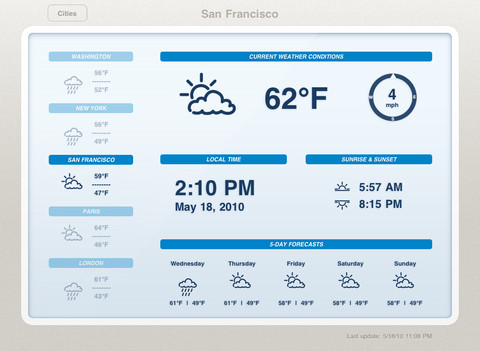
    It’s not bad, but I would argue it’s not even scratching the surface of possibilities given the device that is powering it. These types of apps are static, not interactive, and that’s bad.

    ### Display Type Two: Demo

    The second type of app is what I call a demo app — it’s an app that looks and works fantastic for giving a demo, or presentation, to someone — but when you get right down to it, it too sucks. The best example of this is [Weather HD](http://itunes.apple.com/us/app/weather-hd/id364193735?mt=8). It’s a beautiful large graphic that is clearly taking advantage of the iPad, just not in a way that helps someone wanting weather information.

    By and in large most of the “new” weather apps I see on the iPad app store take this approach:

    1. Show incredibly beautiful graphic of the current weather conditions.
    2. Relegate all other (more important) weather information to a smaller section of the screen.

    I cannot be clear enough: I hate these apps.

    In my mind, they are completely useless.

    ### Both Display Types are Useless

    Thinking about it a bit more I actually think it is fair to say that both display arrangements are fairly useless, because both assume the same thing: that the user is going to leave their iPad on, and with that app up in the foreground.

    That’s the only way these apps become useful: if you are dedicating your iPad to the display of these apps. ((To be fair, weather apps are not alone in this category.)) The problem with that is that weather data is begging to become interactive.

    Radar maps look like they are from the 90s, and yet they could be so much more. [Take a look at the wind map across the U.S. to see just how amazing weather data can be if we try](http://hint.fm/wind/). You may think that wind map isn’t useful, but I actually learned quite a bit by looking at it and the way the wind was moving throughout my corner of the country, but just imagine what we can do with precipitation and temperatures…

    ### Is There Anything Good?

    Short answer: no. Longer answer: [Seasonality Go](http://getseasonality.com/go/) is about the most interesting of the iPad weather apps ([still](https://brooksreview.net/2011/04/seasonality/)), but it’s not very nice looking. Where it lacks in design, it somewhat makes up for it by making graphs and layouts interactive. Additionally the Radar map actually works — and does so quickly. It’s not good, but it’s the only thing I found worth keeping on my iPad.

    ### Moving Forward

    As I said above, it seems to me that developers of weather apps for iOS have reached an impasse, where they can’t move outside of the box of current weather display methods. The last thing the app store needs is another Weather app that shows a giant sun radiating heat with the temperature data shoved in the corner.

    What iOS needs, the iPad specifically, is a weather app that asks what a user truly wants and needs — because I really doubt there are many people that want to buy a $500 device to leave it in a stand showing your fantastic radiating sun all day long.

    UPDATE: Some confusion over what I am trying to say here. First that weather apps suck right now. Second that the weather data needs to be more interactive. If you are wondering what a “perfect” weather app for me would look like, I can’t tell you. I think that, right now, developers are just trying to show weather states and temperatures, instead of asking what a user wants to learn from weather info, and that goes beyond: “do I need an umbrella?”

  • [SPONSOR] One More Thing – iOS Conference

    Interested in the design, development and business of iOS apps? At One More Thing, our goal is to get developers confident, psyched, and ready to move from dreaming of making apps to just doing it. Learn from awesome developers & designers such as: – Loren Brichter (Tweetie/ex-Twitter) – Neven Mrgan (Panic) – Karl von Randow…

    Interested in the design, development and business of iOS apps? At One More Thing, our goal is to get developers confident, psyched, and ready to move from dreaming of making apps to just doing it. Learn from awesome developers & designers such as:

    – Loren Brichter (Tweetie/ex-Twitter)
    – Neven Mrgan (Panic)
    – Karl von Randow (Camera+)
    – Raphael Schaad (Flipboard)
    – Matt Rix (Trainyard)
    – Shaun Inman (Last Rocket)
    and many more…

    They’ll be in Melbourne, Australia on the 25th & 26th of May, 2012. Register before April 12th for discounted early-bird pricing. It’s a perfect excuse to visit Australia too!

  • iOS Text Editor Comparison

    A comprehensive and detailed list and comparison chart of just about every iOS text editor I have heard of, by Brett Terpstra.

    A comprehensive and detailed list and comparison chart of just about every iOS text editor I have heard of, by Brett Terpstra.

  • ‘The Benefits are Make-believe’

    A call to disband the TSA.

    A call to disband the TSA.

  • Judge Posner upholds largest part of Apples touchscreen heuristics 949 patent in Motorola case

    Florian Mueller: >Apple argues that “if it turns out the claims are too broadly written and run afoul of the prior art, that is an issue that may be resolved at trial or via summary judgment”, which is legally accurate, but the idea of interpreting gestures, which are inherently imprecise if made by a human…

    Florian Mueller:

    >Apple argues that “if it turns out the claims are too broadly written and run afoul of the prior art, that is an issue that may be resolved at trial or via summary judgment”, which is legally accurate, but the idea of interpreting gestures, which are inherently imprecise if made by a human being, by applying a certain degree of tolerance shouldn’t be patentable regardless of who was first to come up with it. That’s why I agreed with Motorola’s request to declare the patent invalid for indefiniteness. But Apple won in Chicago, Apple won at the ITC, and now Motorola and Samsung, and the Android ecosystem at large, face a serious threat. If Android devices can’t implement any of the gestures described above, they won’t be competitive.

    I’m with Mueller here, that this patent shouldn’t be allowed, but it seems that at this point it is legal and could really screw over Android. Basically forcing Android touchscreens to work like crap, or pay a stiff license fee to Apple.

  • ‘The Girls Around Me App Takes Creepy to a New Level’

    Nick Bilton on a new location based app: >“Girls Around Me uses Foursquare, the location-based mobile service, to determine your location. It then scans for girls in the area who have recently checked-in on the service. Once you identify a girl you’d like to talk to, one that inevitably has no idea you’re snooping on…

    Nick Bilton on a new location based app:
    >“Girls Around Me uses Foursquare, the location-based mobile service, to determine your location. It then scans for girls in the area who have recently checked-in on the service. Once you identify a girl you’d like to talk to, one that inevitably has no idea you’re snooping on her, you can connect to her through Facebook, see her full name, profile photos and send her a message.

    Yeah, I don’t see this app sticking around for much longer.

    UPDATE: Foursquare has cut off the api access to the app.

  • Readability: What We’re About

    I have a lot to say about this post, [all of which can be summed up by John Gruber in a comment he made earlier today](http://daringfireball.net/linked/2012/03/30/readability): >No word on when they’ll stop collecting (and keeping) money on behalf of unaffiliated publishers. Lastly, you have to love this dig from Ziade at people speaking out against…

    I have a lot to say about this post, [all of which can be summed up by John Gruber in a comment he made earlier today](http://daringfireball.net/linked/2012/03/30/readability):

    >No word on when they’ll stop collecting (and keeping) money on behalf of unaffiliated publishers.

    Lastly, you have to love this dig from Ziade at people speaking out against Readability (myself included, I assume):

    >So it’s no wonder that even smart, thoughtful writers can say surprisingly vitriolic things with uncharacteristic thoughtlessness when writing about an area as exciting as this one.

    Is it really that surprising that people got pissed when you started taking money on their behalf without permission?

  • Reset to Default

    A while back I posted a link about productivity by [Tony Schwartz from the Harvard Business Review that was titled](http://blogs.hbr.org/schwartz/2012/03/the-magic-of-doing-one-thing-a.html): “The Magic of Doing One Thing at a Time”. In my link I quoted this bit: >The biggest cost — assuming you don’t crash — is to your productivity. In part, that’s a simple consequence…

    A while back I posted a link about productivity by [Tony Schwartz from the Harvard Business Review that was titled](http://blogs.hbr.org/schwartz/2012/03/the-magic-of-doing-one-thing-a.html): “The Magic of Doing One Thing at a Time”.

    In my link I quoted this bit:

    >The biggest cost — assuming you don’t crash — is to your productivity. In part, that’s a simple consequence of splitting your attention, so that you’re partially engaged in multiple activities but rarely fully engaged in any one. In part, it’s because when you switch away from a primary task to do something else, you’re increasing the time it takes to finish that task by an average of 25 per cent.

    Nothing Schwartz was saying was particularly new to me, but I liked the reminder, so I posted about it.

    I spent the rest of the weekend working on projects around my house. I was dead focused on the task at hand. I didn’t stop to check email or Twitter — or anything — I just kept working, completing one thing at a time. ((I recommend that you do not multi-task while using power tools.))

    After I finished up I sat down at my computer and looked at the screen.

    Twitter was running, Mail was running, ditto Messages, Yojimbo, OmniFocus, Notational Velocity, Safari, Dashboard, and on and on.

    I thought back to what Schwartz wrote and realized that when I am working on my Mac I am constantly jumping between these apps — I am increasing my time it takes to do any one thing because I allow myself to engage too many things at once.

    This — I assume — is why many people find the iPad to be such a refreshing writing tool: it forces focus. I know this and I have said this before.

    This time I wanted to bring that forced focus to my Mac. Somehow. Fullscreen apps took me a step towards that, but the three finger swipe became too convenient to procrastinate with.

    I needed a solution, well truthfully a band-aid. Because the solution is discipline, and that is a far reach from the fix I implemented. My fix, though is the solution to the long term need of more discipline when I work.

    So I asked myself to define the activities that I used my computer for, and then to break down what apps I need to have open to best do these activities. I came up with four activities (but I am adding more as the need arises):

    1. Casual computing. In this mode I am not doing anything that is important so distractions are welcomed interruptions — a way to spur other thoughts.
    2. Default. This is the state I always want to “enter” my computer with. It is the pure state, there are minimal distractions, but maximal apps to get to any immediate task right away.
    3. Writing. This is a pure mode where only the tools needed to write are running.
    4. Work. This is the “day job” mode, where like the writing mode only the tools needed are running.

    Ideally I wanted to be able to hit a keystroke and flip my computer from one mode to another — so that’s what I created with Keyboard Maestro.

    Pressing `SHIFT+CONTROL+OPTION+R` activates a Keyboard Maestro macro that presents me with the four modes, but instead of calling them “modes” I actually call them: resets. I chose ‘resets’ because that’s what I am doing. I am not shifting my mode from work to writing, I am resetting my computing environment from work to writing.

    All that Keyboard Maestro does is open and close the apps needed for each reset so that only the apps that I want open for each reset are open.

    ### Reset my Usage

    This can, of course, be done manually — hell you can even just ignore offending apps if you want — but I like this approach because it forces me to commit to doing something different. Practically speaking, I can’t just start writing a post if I am in the middle of an IM conversation — I must first have decided to either end the conversation and get to writing or to continue the conversation and delay the writing. Doing both cannot be an option any longer.

    More than just that, the drastic shift in what windows I see on my desktop — going from open windows to no opened windows — resets my mind. Effectively I am shoving everything off my desk and then saying: go.

    I am also changing my viewport by displaying a new background for each mode shift thus helping my brain to shift into the new work at hand.

    I know that I can do this without an elaborate Keyboard Maestro setup. I know that I don’t need to close these apps if I instead just ignore them. None of that knowledge changes the fact that I simply don’t ignore those apps when they are open. So truthfully I really do need to use these macros to achieve this level of concentration.

    [When I wrote about why I prefer Writer over Byword](https://brooksreview.net/2012/03/writing-2/) and how I see the two apps very differently I received a lot of feedback. The feedback seemed to be wild agreement, even if the person preferred another app, or criticism that I was simply too fiddly. Perhaps I have other issues — suggested some — if I can’t just sit down and write.

    Perhaps.

    Or perhaps I am not alone and that’s why tools like iA Writer exist.

    Either way, I do like this little trick.

    #### Setup Notes

    Here’s some screenshots of the four resets in Keyboard Maestro:

    – [Default](http://c276381.r81.cf1.rackcdn.com/Screen%20Shot%202012-03-30%20at%201.37.18%20PM.png)
    – [Writing](http://c276381.r81.cf1.rackcdn.com/Screen%20Shot%202012-03-30%20at%201.37.27%20PM.png)
    – [Work](http://c276381.r81.cf1.rackcdn.com/Screen%20Shot%202012-03-30%20at%201.37.22%20PM.png)
    – [Casual](http://c276381.r81.cf1.rackcdn.com/Screen%20Shot%202012-03-30%20at%201.37.13%20PM.png)

    [Here is how I am changing the desktop background (using Automator)](http://c276381.r81.cf1.rackcdn.com/Screen%20Shot%202012-03-30%20at%201.37.52%20PM.png).

  • Airport Security: Statements

    Bruce Schneier on TSA and airport security: >The humiliation, the dehumanisation and the privacy violations are also harms. That Mr Hawley dismisses these as mere “costs in convenience” demonstrates how out-of-touch the TSA is from the people it claims to be protecting. Additionally, there’s actual physical harm: the radiation from full-body scanners still not publicly…

    Bruce Schneier on TSA and airport security:
    >The humiliation, the dehumanisation and the privacy violations are also harms. That Mr Hawley dismisses these as mere “costs in convenience” demonstrates how out-of-touch the TSA is from the people it claims to be protecting. Additionally, there’s actual physical harm: the radiation from full-body scanners still not publicly tested for safety; and the mental harm suffered by both abuse survivors and children: the things screeners tell them as they touch their bodies are uncomfortably similar to what child molesters say.

    and:

    >The current TSA measures create an even greater harm: loss of liberty. Airports are effectively rights-free zones. Security officers have enormous power over you as a passenger. You have limited rights to refuse a search. Your possessions can be confiscated. You cannot make jokes, or wear clothing, that airport security does not approve of. You cannot travel anonymously. (Remember when we would mock Soviet-style “show me your papers” societies? That we’ve become inured to the very practice is a harm.) And if you’re on a certain secret list, you cannot fly, and you enter a Kafkaesque world where you cannot face your accuser, protest your innocence, clear your name, or even get confirmation from the government that someone, somewhere, has judged you guilty. These police powers would be illegal anywhere but in an airport, and we are all harmed—individually and collectively—by their existence.

  • Modahaus Tips

    A great post from Modahaus listing out tips for getting some really great shots from your iPhone using their gear.

    A great post from Modahaus listing out tips for getting some really great shots from your iPhone using their gear.

  • ‘Now Can We Start Talking About the Real Foxconn?’

    Tim Culpan: >The problem with Mike Daisey’s lies is that they’ve painted a picture of the Evil Empire, a place devoid of any happiness or humanity. A dark, Dickensian scene of horror and tears. They also make anyone who tries to tell a fuller, more balanced account look like an Apple or Foxconn apologist because…

    Tim Culpan:
    >The problem with Mike Daisey’s lies is that they’ve painted a picture of the Evil Empire, a place devoid of any happiness or humanity. A dark, Dickensian scene of horror and tears. They also make anyone who tries to tell a fuller, more balanced account look like an Apple or Foxconn apologist because your mind is already full of the “knowledge” of how bad it is there.

    Culpan also talks about how workers want more hours, not less — a story that [jives with a Reuters report](http://www.reuters.com/article/2012/03/30/apple-foxconn-workers-idUSL3E8EU4I820120330).

  • Modahaus Steady Stand

    [](http://c276381.r81.cf1.rackcdn.com/modahaus-2.jpg) A while back a rep for [Modahaus](http://www.modahaus.com) contacted me about a new photography stand they had come out with for the iPhone and small cameras. It looked pretty neat, so when they offered to send me one of my choosing to review, I took them up on it. International shipping being what it is,…
    [](http://c276381.r81.cf1.rackcdn.com/modahaus-2.jpg)

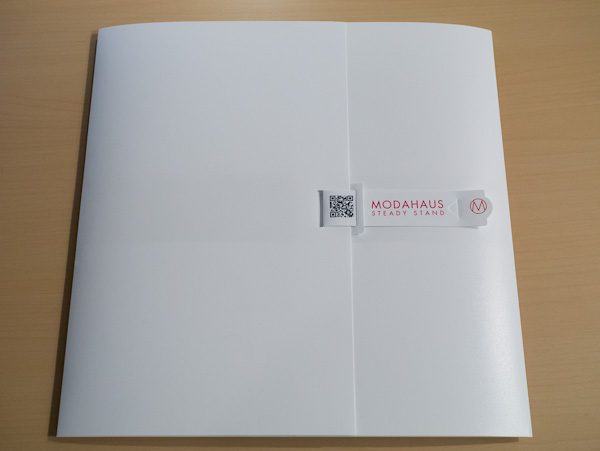
    A while back a rep for [Modahaus](http://www.modahaus.com) contacted me about a new photography stand they had come out with for the iPhone and small cameras. It looked pretty neat, so when they offered to send me one of my choosing to review, I took them up on it. International shipping being what it is, the stand arrived a few days ago.

    The [Steady Stand](http://www.modahaus.com/store/steady-stands/) is meant to take product photos from directly above the item. It’s pretty simple, or so I thought. I wasn’t sure what to expect, but I am actually really surprised with the results from this stand.

    Modahaus makes the stand in four different sizes. The different sizes not only fit different devices, but they also hold different sized objects inside the stand (the area where you take the picture of the object). [I opted for the SS200 which is the second largest stand, because I wanted to see if the stand would hold my GX1 (it does)](http://www.modahaus.com/store/steady-stand-200/).

    Here’s what the stand looks like when you get it:

    [](http://c276381.r81.cf1.rackcdn.com/modahaus-1.jpg)
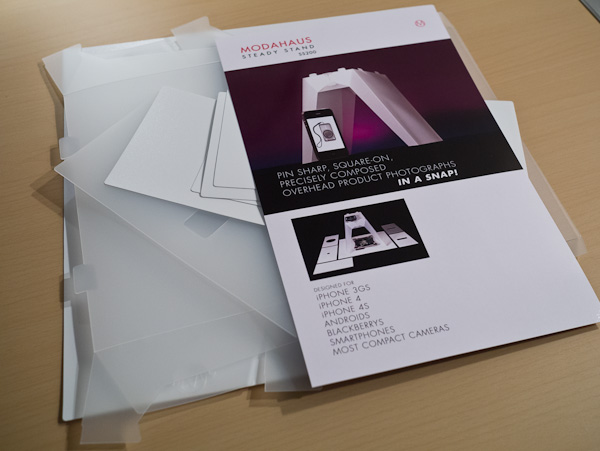
    I was really pumped to open it once I saw the packaging, but when I did — well — this is what I saw:

    [](http://c276381.r81.cf1.rackcdn.com/modahaus-3.jpg)
    There was a lot of little bits of plastic, I feared I was in for an Ikea level assembly operation. Pleasantly, that wasn’t the case. There is actually only one solid piece of plastic that makes up the stand, and the directions amount to:

    1. Re-crease the creased edges.
    2. Put four tabs in two slots.
    3. Done.

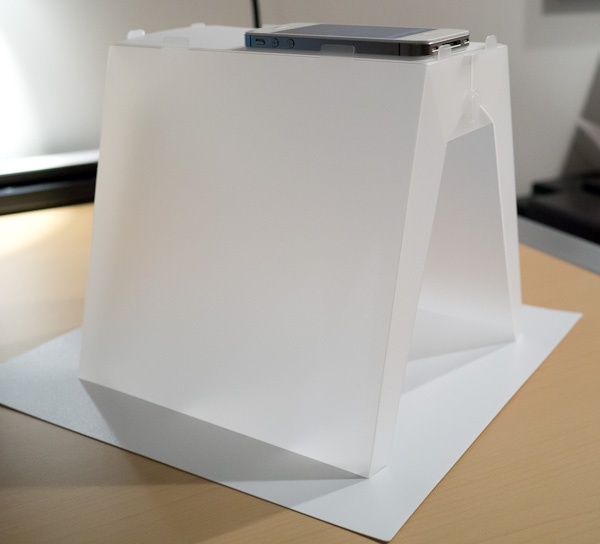
    It didn’t take long to figure out at all, and the end result is this:

    [](http://c276381.r81.cf1.rackcdn.com/modahaus-4.jpg)
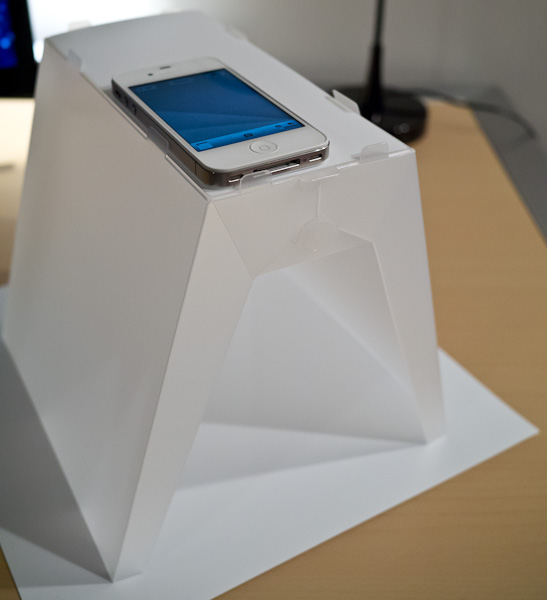
    That’s not a piece of paper on the bottom, it’s a piece of plastic that came with the stand. There are a few different inserts that rest on the top to adapt to different types of cameras — including the one shown for the iPhone. ((Side note: there is also a smaller piece of solid white plastic that can be rested on top of a coffee mug to provide an even more macro like level of focus, a nice touch.))

    [](http://c276381.r81.cf1.rackcdn.com/modahaus-5.jpg)
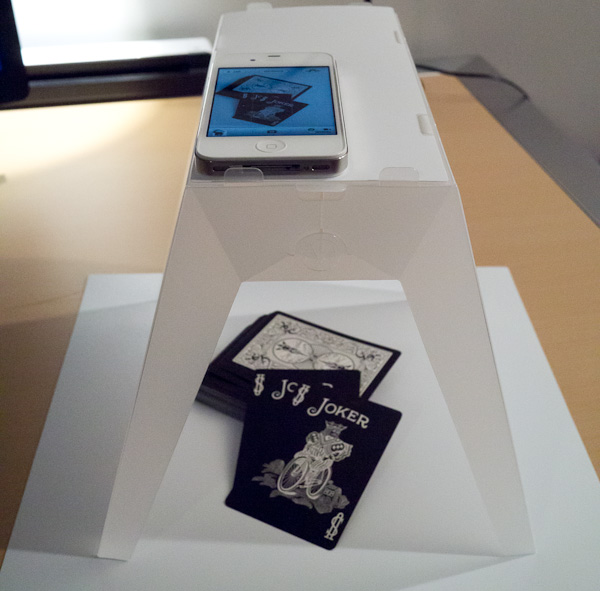
    There isn’t much else to say, because to be honest this stand works as advertised.

    [](http://c276381.r81.cf1.rackcdn.com/modahaus-6.jpg)

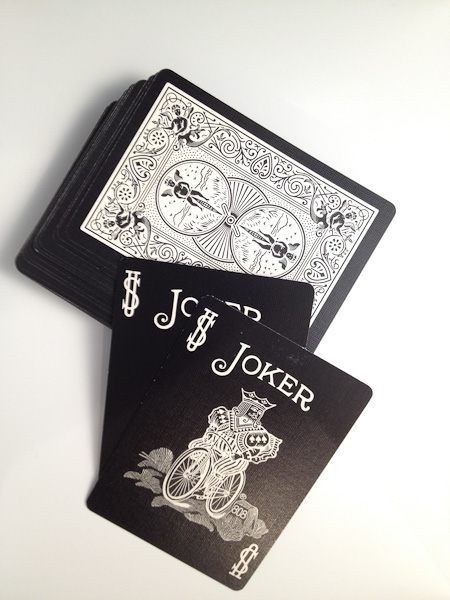
    Anyone who takes product photos knows that a good photo isn’t as easy as you think it is. So in the above arrangement I placed some playing cards in the stand and used my iPhone to shoot the photo. The only light in the room was the overhead light and my desk lamp pointing away from the stand. It was so dim in the room that to shoot the above photo of the stand I had to do it at ISO 3200 on my GX1. So it was dim, but here’s the photo as it was directly out of my iPhone:

    [](http://c276381.r81.cf1.rackcdn.com/modahaus-9.jpg)
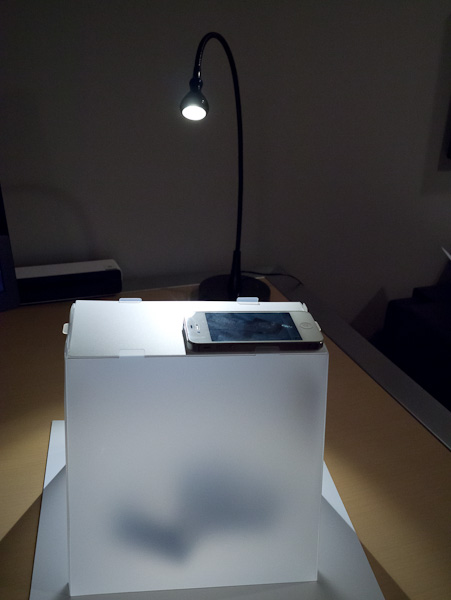
    The color balance could use a tweak, but overall not that bad. I wanted a better shot though, so I spent about 5 seconds redirecting the light from my desk lamp directly into just one side of the Steady Stand and turning the stand a bit, like so:

    [](http://c276381.r81.cf1.rackcdn.com/modahaus-7.jpg)
    That small, but significant change resulted in this:

    [](http://c276381.r81.cf1.rackcdn.com/modahaus-10.jpg)
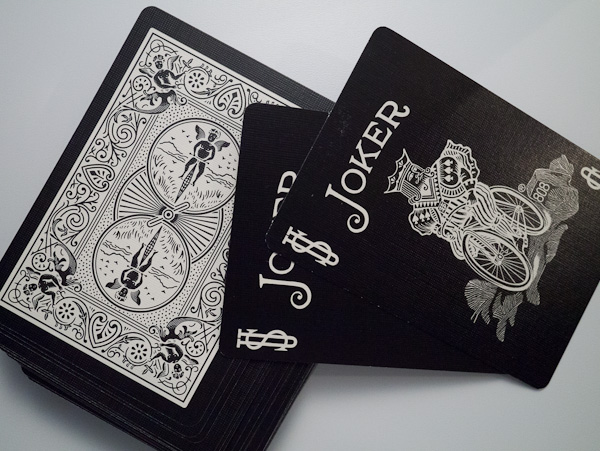
    Again that’s straight out of the iPhone. The light is a bit uneven in both the color balance and the levels. The color balance issue is the difference between my desk lamp and the overhead lights (both were on). Lastly the lighting balance issue is just from shining the light into one side in such a harsh manner.

    I have absolutely no doubts that you can create fantastic product shots with this stand with a minimal level of setup and time needed.

    Here’s the same exact setup, but using the GX1 as the camera instead:

    [](http://c276381.r81.cf1.rackcdn.com/modahaus-8.jpg)
    My guess is that in a brightly lit room, or one with sunlight pouring in, you could get some fantastically even images.

    I quite like this stand, and the best part for me: you can fold it back flat and stow it away. That’s a killer feature.

  • ‘Readability Tweaks Sharing Feature in Response to Copyright Theft Accusations’

    Chris Dary responds to the criticism from today and promises changes. ((For what it’s worth Dary seems to me to be on the up and up and was the only person at Readability to respond to my request to ‘opt-out’.)) Dary: >Until we are able to come up with something more graceful for both the…

    Chris Dary responds to the criticism from today and promises changes. ((For what it’s worth Dary seems to me to be on the up and up and was the only person at Readability to respond to my request to ‘opt-out’.)) Dary:

    >Until we are able to come up with something more graceful for both the user and the publisher, we’re now linking shared articles on devices directly to the publishers site.

    Nice.

  • ’10 Million Hits a Day With WordPress Using a $15 Server’

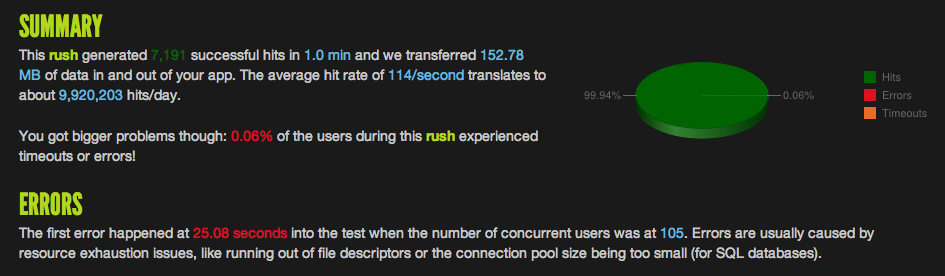
    Neat trick. He used [blitz.io](http://blitz.io/) to test this. Out of curiosity I ran a similar test using blitz.io on this site, without making a single change, just to see what happened. Here’s the result: Not too shabby, but I wanted to push it a little further — so I did. ((250 concurrent users in 30…

    Neat trick. He used [blitz.io](http://blitz.io/) to test this. Out of curiosity I ran a similar test using blitz.io on this site, without making a single change, just to see what happened. Here’s the result:

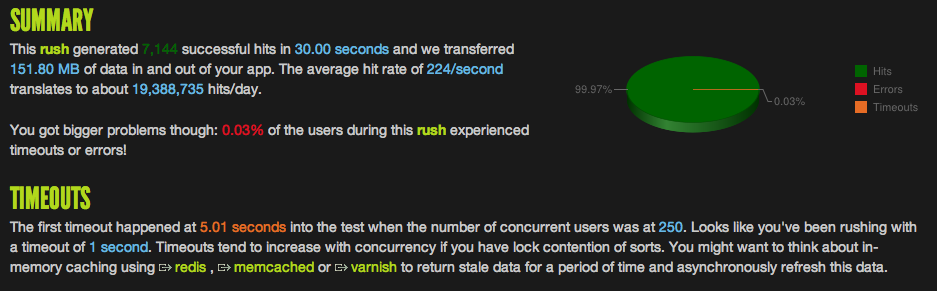
    Not too shabby, but I wanted to push it a little further — so I did. ((250 concurrent users in 30 seconds.)) Here’s what I got:

    That is roughly 19 million hits in a day. I monitored the CPU load during that test and it peaked at 80% and settled around 68%. No too shabby. ((I don’t know how “real” this testing system is, but it is pretty neat.))

  • Pageviews and Reading Later

    David Chartier writing about another issue he has with read later services — the fact that you can send a link to them without ever visiting the original site (as in Twitter apps): >Yes, it can be a pain in the ass to visit a page before saving it to read later if you’re on…

    David Chartier writing about another issue he has with read later services — the fact that you can send a link to them without ever visiting the original site (as in Twitter apps):
    >Yes, it can be a pain in the ass to visit a page before saving it to read later if you’re on a crappy 3G connection, or you’re simply in a rush and don’t have time. But it still means an article is getting sucked off a publisher’s site without anything of value exchanged in return.

    When Twitter overhauled its infamous Twitter for iOS app they changed it so you *had* to visit a site before sending it to Instapaper. It was the single most annoying thing to me, but perhaps they were just trying to be “noble” about this content scraping stuff.

    I don’t disagree with Chartier, but I also don’t think this is something that is likely to stop — ever.

  • Stealability

    Turns out that when you ‘share’ a link from Readability, the link that is shared links back to the readability optimized site — not to the original source article. This is both shady and completely at odds with the ‘goodwill’ nature of the web. (Read it Later and Instapaper share links that go back to…

    Turns out that when you ‘share’ a link from Readability, the link that is shared links back to the readability optimized site — not to the original source article. This is both shady and completely at odds with the ‘goodwill’ nature of the web. (Read it Later and Instapaper share links that go back to the source article.) Or as A.T. Faust III put it:

    >Still, intentional or not, Readability’s current setup is tantamount to content theft, and that’s a problem for everyone involved.

    [Here’s how you ‘opt-out’ of Readability’s madness](https://brooksreview.net/2012/03/opt-out/).

    [via J.D.]
  • The B&B Podcast #54: Distraction-Free Sweater

    Shawn and I talk about business models of apps like Instagram and services like Twitter. We also discuss our iPad usage and how it fits into our workflows. Be sure to check in on 5by5 to listen to us live on Thursdays, and if you are interested in sponsoring the show drop me a line.

    Shawn and I talk about business models of apps like Instagram and services like Twitter. We also discuss our iPad usage and how it fits into our workflows.

    Be sure to check in on 5by5 to listen to us live on Thursdays, and if you are interested in sponsoring the show drop me a line.

  • The End of RIM as We Know It

    Dan Frommer: >Not only is RIM in worse financial shape, but all bets are off for its recovery.

    Dan Frommer:
    >Not only is RIM in worse financial shape, but all bets are off for its recovery.

  • RootMetrics Carrier Coverage Map

    >How do cellular carriers really perform? Find out by entering your city, zip code or even your address in the search box below, or by selecting a city from the available list. Discover your carrier’s strength over your mobile footprint. Find out your carrier’s RootScore – an aggregate grade – and get an understanding of…

    >How do cellular carriers really perform? Find out by entering your city, zip code or even your address in the search box below, or by selecting a city from the available list. Discover your carrier’s strength over your mobile footprint. Find out your carrier’s RootScore – an aggregate grade – and get an understanding of your carrier’s voice and data strength. Then view all four carriers side-by-side. You may be surprised by the facts.

    Good to know.

  • OopsieFocus Script

    Still use this script from Shawn everyday. I love it so much I thought I would remind everyone of it.

    Still use this script from Shawn everyday. I love it so much I thought I would remind everyone of it.