Top Posts

Leica Sofort 2June 13, 2024
Grand Seiko SBGX261February 23, 2023

Recent Articles

  • Apple FileVault 2 Encryption Cracked by Forensic Software

    John E Dunn for Macworld on a new “forensic” piece of software that can crack into Apple’s FileVault 2 encrypted systems: >Put another way, the product cannot extract encryption keys on static data or before the keys have been summoned as part of the logging-in process. As long as the login is not automatic users…

    John E Dunn for Macworld on a new “forensic” piece of software that can crack into Apple’s FileVault 2 encrypted systems:
    >Put another way, the product cannot extract encryption keys on static data or before the keys have been summoned as part of the logging-in process. As long as the login is not automatic users should be safe.

    >In the case of FireVault, hackers also need to get to the memory contents through a working FireWire port so remote access is not possible.

    I am guessing that a locked screen will still count as “logged in”. So if traveling it might actually be a fantastic idea to actually turn your laptop off so that this software cannot be used to hack into it.

    One other interesting thing is that FireWire must be used. I am assuming you could use Thunderbolt to get a FireWire port, but what about on my 2010 MacBook Air that has only USB?

    **Update**: [Thomas Brand](http://eggfreckles.net/) chimed in to confirm my suspicions about Thunderbolt:

    and:

  • Reviewing PDFPen for iPad

    [PDFPen for iPad](http://www.smilesoftware.com/PDFpen/iOS/index.html) was released just before I hopped on a plane to head down to Macworld|iWorld in San Francisco. [I read a quick review of it](http://www.macstories.net/reviews/smiles-pdfpen-for-ipad-is-a-powerful-1-0-version/) and then purchased the app, closed down my iPad, and jumped on a plane. While airborne I got an email from my real estate agent saying that he…

    [PDFPen for iPad](http://www.smilesoftware.com/PDFpen/iOS/index.html) was released just before I hopped on a plane to head down to Macworld|iWorld in San Francisco. [I read a quick review of it](http://www.macstories.net/reviews/smiles-pdfpen-for-ipad-is-a-powerful-1-0-version/) and then purchased the app, closed down my iPad, and jumped on a plane.

    While airborne I got an email from my real estate agent saying that he needed some paperwork signed for the home my wife and I are purchasing. I used iMessage to tell my wife to sign the paperwork on her Mac and then send me the file. At this point I could have pulled out my MacBook Air and paid another Wi-Fi fee to connect it, but I had PDFPen on my iPad — why not give it a go?

    I did and it worked fantastically well.

    You might be thinking that there are hundreds of apps on the App Store that can do this same thing, and there likely are, but PDFPen has some really great things that made me love it.

    A few of those things are:

    – iCloud Sync
    – Stored Signatures
    – Email a “Printed” PDF

    ### iCloud

    If you have PDFPen on your Mac, then PDFPen for the iPad will sync the files between the two applications over iCloud. Unless you are a heavy PDF user this likely doesn’t seem to be all that life-changing of a feature, but it still is pretty great.

    The iCloud support in iOS and Mac applications has become a fantastic Dropbox like utility, but unlike Dropbox it is something that is built-in at the system level.

    You don’t have to think about it and that is key.

    So when I sent out 4-5 signed PDFs from PDFPen on my iPad and a few days later was sitting at my MacBook Air with a need to resend a couple of those documents — I didn’t need to go find my iPad. All I had to do was grab those PDFs in PDFPen and resend them. They were just there.

    It’s these really small moments that add up to a product that just fits in your life. More developers need to add iCloud syncing — it really is great — and I am glad PDFPen has it.

    ### Stored Signatures

    I didn’t know this when I was signing all those PDFs, but there is a fantastic feature of PDFPen that allows you to store your own signatures and other scribbles so that they can be added to any document with one tap. Here’s how you do that (from a Smile newsletter):
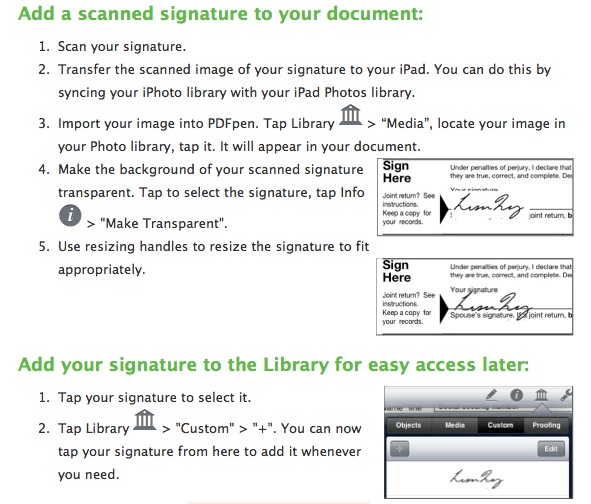
    I love that feature and have already added not just my signature, but my initials as well. It’s a nice little touch and I can imagine there being some really great uses for this (including storing company logos).

    ### Emailing a “Printed” PDF

    One of the most annoying problems that I run into on a weekly basis is filling out a PDF, sending it to a Windows user only to get an email back saying that the document isn’t filled out. I don’t know why this is a problem on Windows, but the layered approach that Preview seems to take on the Mac is not compatible in a universal manner.

    The solution has always been to fill out the PDF and then print the file to a PDF — thus flattening the document. The fine folks at Smile must have had this problem too because when sending out the PDF in PDFPen you can choose to send it as a flattened file (printed PDF) if you want.

    This *is* fantastic.

    ### Two Criticisms

    There are two things about this app that I don’t care for:

    1. The icon. I have never been a fan of the styling that Smile uses for its icons and PDFPen is no exception. I know that I pick on icons a lot, but a good icon is a good icon. A bad icon is one that I never want on my home screen — so if my home screen is your goal, you better make your icon good.
    2. Highlighting PDFs is a bit awkward. I could see this being pretty good with a Cosmonaut, but with my finger I felt like I never learned how to highlight before. If some sort of tracking could be built-in so that you can make relatively straight lines then we would really have something here. Until then, if your primary use case is highlighting, you might want to look elsewhere. ((Also, why are you highlighting so many PDFs?))

    ### One Step Closer ###

    Like I said before, I am not a PDF guru. However I am a real estate professional and PDFs are a norm in my business. There’s nothing missing from PDFPen for my needs, which takes me just one step closer to not needing my Mac at all.

    In fact, I didn’t even need my MacBook Air at Macworld until I recorded a podcast — a large part of not needing the Air was because of PDFPen for iPad.

  • Windows Phone 8 Preview

    Paul Thurrott: >Windows Phone 8, codenamed Apollo, will be based on the Windows 8 kernel and not on Windows CE as are current versions. This will not impact app compatibility: Microsoft expects to have over 100,000 Windows Phone 7.5-compatible apps available by the time WP8 launches, and they will all work fine on this new…

    Paul Thurrott:
    >Windows Phone 8, codenamed Apollo, will be based on the Windows 8 kernel and not on Windows CE as are current versions. This will not impact app compatibility: Microsoft expects to have over 100,000 Windows Phone 7.5-compatible apps available by the time WP8 launches, and they will all work fine on this new OS.

    That’s interesting and in reading his post it sounds more and more like Windows Phone 8 will be very similar to Windows 8. That is: it will be a sibling to Windows instead of a cousin to Windows.

    I am not sure if this will be good or bad, but if they can pull it off while maintaining app compatibility (even while adding more screen resolutions) it should be a win.

  • ‘Against the Wall’

    Marco Arment on Google’s position in social networking and thwarting competitive threats: >It’s easy not to “be evil” when you’re ahead. But when you’re backed into a corner and your usual strategies aren’t working, it’s easy to get frustrated, scared, and angry, and throw previously held morals and standards out the window. Be sure to…

    Marco Arment on Google’s position in social networking and thwarting competitive threats:
    >It’s easy not to “be evil” when you’re ahead. But when you’re backed into a corner and your usual strategies aren’t working, it’s easy to get frustrated, scared, and angry, and throw previously held morals and standards out the window.

    Be sure to also read his footnote, as it is a great summary of the interesting wording chosen for Google’s mantra.

  • Notifications

    Great video with music from the technology that surrounds us.

    Great video with music from the technology that surrounds us.

  • Tweet of the Day: Shawn Blanc

    “When they say “the iPad isn’t a PC” what they mean “there’s no way I would or could give up my PC and use an iPad instead.”” — Shawn Blanc (@shawnblanc) February 2, 2012

    “When they say “the iPad isn’t a PC” what they mean “there’s no way I would or could give up my PC and use an iPad instead.””
    — Shawn Blanc (@shawnblanc) February 2, 2012
  • ‘Tumblr Hires Writers to Cover Itself’

    Brian Stelter: >By creating in-house content, social Web sites can increase the amount of time that users spend on their sites, thereby increasing their value to advertisers. Sounds an awful lot like blogging about blogging. Which sounds boring as crap.

    Brian Stelter:

    >By creating in-house content, social Web sites can increase the amount of time that users spend on their sites, thereby increasing their value to advertisers.

    Sounds an awful lot like blogging about blogging. Which sounds boring as crap.

  • Filmic Pro

    Nice little app that gives you more fine grain control when recording video on your iPhone. The icon is hideous though. Best feature: exposure and focus locks that are independent of each other. *(Thanks to all on Twitter that recommended this app.)*

    Nice little app that gives you more fine grain control when recording video on your iPhone. The icon is hideous though.

    Best feature: exposure and focus locks that are independent of each other.

    *(Thanks to all on Twitter that recommended this app.)*

  • Ten One Design’s Magnus Stand

    I shot a quick video ((Sorry for the bad audio and heavy breathing I am a bit sick/congested from traveling.)) using my father’s [Ten One Design Magnus](http://www.tenonedesign.com/magnus.php) stand for the iPad 2. The point of which is to see if the [iPad tips over while being used](http://hypertext.net/2012/01/magnus) in the stand. Spoiler: it doesn’t. However the…

    I shot a quick video ((Sorry for the bad audio and heavy breathing I am a bit sick/congested from traveling.)) using my father’s [Ten One Design Magnus](http://www.tenonedesign.com/magnus.php) stand for the iPad 2. The point of which is to see if the [iPad tips over while being used](http://hypertext.net/2012/01/magnus) in the stand.

    Spoiler: it doesn’t.

    However the angle is so steep that the stand isn’t great on your desk.

  • Smart Alec Review: Part III

    Traveling and using the Smart Alec.

    In part one I talked about my day-to-day usage of the Tom Bihn Smart Alec and how it felt to switch from a messenger bag to a backpack. In part II I talked about using the Smart Alec as my only bag for a short weekend away. In the third and final installment I am going to talk about using the bag at Macworld and toting it around San Francisco and airports.

    First, some more follow-up:

    • In the last installment I reported that I had some trouble getting the second strap on my shoulder. The tip provided from Tom Bihn was to loosen the strap that I put on last as I take the bag off. ((They have told me that they are working on a video to demonstrate what they mean.)) This is a cumbersome tip, but it does work. When in San Francisco I didn’t run into this issue given that I wasn’t wearing layers of clothing. So this may not be an issue for people that aren’t constantly layering clothes.
    • The zippers on the bag continue to get easier and easier to close one handed — this is great news.

    I’ll keep this pretty short because I don’t have much to say, but did want to talk about two things: expandability and the airport.

    Conference Mode

    While at Macworld|iWorld I found the Smart Alec to be outstanding. It kept my hands free the entire time and at times carried quite the load of gear. The bag went from carrying just an iPad and battery chargers to carrying the goodies purchased at the Apple Company Store and a couple of jackets that Shawn and I carried with us.

    I still preferred to not carry the bag around if possible (I would feel this way about any bag), but it never once became uncomfortable to carry with me. The only hinderance I ran into was when on the expo floor due to how crowded it was in spots.

    Last I will note that while moving around SF with the pack on there were more than a few times when the back of the Smart Alec became very warm — it felt like my MacBook Air had woken up and was overheating in the bag. This is likely due to how tightly the pack sits against your back and the dense material, adding that extra layer to your body. It was never uncomfortable, but it was warm enough that I noticed when I took the backpack off.

    TSA, Flying, and Airports

    Had I not been carrying an additional shoulder strap type carry-on, the Smart Alec would have made for the best TSA line bag I have ever had. It was fast and easy to pull out my MacBook Air and to stuff away the various items in my pockets — all in secured areas of the bag. And I mean fast.

    However trying to add another shoulder strap in lock step with a backpack is cumbersome at best and downright painful most of the time. I hate wheeled luggage because you can’t carry as much in them and you are at risk for them not fitting in overhead bins, but that would be a better option than carrying my Patagonia MLC with me on this trip.

    The absolute best part of the bag is how the pockets open, because it’s very easy to stand the bag up on the ground and pull out my iPad from the main compartment. I don’t have to futz about with balancing the bag and trying to get my iPad out as I have had to with most shoulder bags. Set the backpack down, unzip, and pull the iPad out — all while the bag is standing upright on its own.

    I can do that one handed.

    Bottom Line

    This is the best bag I have ever owned. It excels when you need it to go from medium to huge. But it doesn’t do small and compact well.

    It is, however, lightweight.

    The best feature of this bag, and I imagine of most backpacks, is just how freeing it is to have both hands free and not having to worry about balance. I don’t feel a desire to go back to a single strap bag of any kind.

    The tradeoff is size.

    A small backpack looks stupid, so you have to put up with a larger sized bag, but you don’t really feel the extra weight of the bag. Having a backpack always makes it look like you are carrying more than people with fancy minimalist shoulder bags, but it doesn’t necessarily mean you actually are carrying more.

  • TSA Agent at D/FW Airport Suspected of Stealing iPads

    Jason Whitely: >The theft has shaken Mojra’s trust in the TSA. “You can grope me, but you touch my iPad and it’s on.”

    Jason Whitely:
    >The theft has shaken Mojra’s trust in the TSA.

    “You can grope me, but you touch my iPad and it’s on.”

  • Quote of the Day: Chuck Skoda

    “Traditional PCs require that you come to them on their terms, overcoming numerous physical and intellectual abstractions. The iPad was the first computer built to meet you on your terms.” — Chuck Skoda

    “Traditional PCs require that you come to them on their terms, overcoming numerous physical and intellectual abstractions. The iPad was the first computer built to meet you on your terms.”
  • ‘Information Does Not Want to Be Free’

    Andy Weissman commenting on the ‘information wants to be free’ mantra: >Information (content) does not want to be free. Instead, information just wants to be distributed friction-free. That’s a big difference, and also the massive opportunity that should be at the center right now. Worth a full read.

    Andy Weissman commenting on the ‘information wants to be free’ mantra:
    >Information (content) does not want to be free. Instead, information just wants to be distributed friction-free. That’s a big difference, and also the massive opportunity that should be at the center right now.

    Worth a full read.

  • The New Definition of Incompetence

    I feel like we should take this entire article about the TSA and use it as the definition for ‘incompetence’.

    I feel like we should take this entire article about the TSA and use it as the definition for ‘incompetence’.

  • ‘Gone Google? Got Concerns? We Have Alternatives’

    Frank X. Shaw has posted on the Microsoft blog a list of Microsoft alternatives to Google — in case you are concerned about Google’s motives. Two things: 1. It should strike you as awesome that Microsoft did this, because think back 10 years and try to imagine them being this snarky. I love this post.…

    Frank X. Shaw has posted on the Microsoft blog a list of Microsoft alternatives to Google — in case you are concerned about Google’s motives. Two things:

    1. It should strike you as awesome that Microsoft did this, because think back 10 years and try to imagine them being this snarky. I love this post. Not because it is helpful, just because Microsoft seems to be everything that Google didn’t want to be, but now somehow Microsoft is looking better than Google.
    2. Holy crap Hotmail has “hundreds of millions” of users.

    You may not want to switch from Google to Microsoft, but you have to hand it to Microsoft that this is a pretty great post. The people reading the Microsoft blog are likely the people willing to switch to Microsoft.

  • You Don’t Say?

    [Cameron Kaine, for *Seeking Alpha*, posted yesterday](http://seekingalpha.com/article/325282-amazon-determined-to-continue-its-assault-on-apple): >With many investors (including yours truly) ready to proclaim retail and technology giant Amazon (AMZN) as the No. 1 contender to Apple (AAPL), this makes its upcoming earnings announcement on Tuesday all the more interesting. and: >It was an instant success and was termed the “iPad killer” –…

    [Cameron Kaine, for *Seeking Alpha*, posted yesterday](http://seekingalpha.com/article/325282-amazon-determined-to-continue-its-assault-on-apple):

    >With many investors (including yours truly) ready to proclaim retail and technology giant Amazon (AMZN) as the No. 1 contender to Apple (AAPL), this makes its upcoming earnings announcement on Tuesday all the more interesting.

    and:

    >It was an instant success and was termed the “iPad killer” – much to the dismay of Apple investors.

    [Today, Stu Woo and John Letzing for the *Wall Street Journal* reports](http://online.wsj.com/article/SB10001424052970204740904577195371567545142.html):

    >The Seattle-based e-commerce giant on Tuesday reported fourth-quarter revenue of $17.43 billion, up 35% from a year earlier. But profit plunged 57% to $177 million as the company continued to spend on warehouses, technology and its Kindle electronic devices. Amazon’s operating expenses rose 38% in the quarter from a year earlier, exceeding its 35% revenue increase.

    Sounds like Amazon is really challenging Apple’s top spot…

  • Apple’s Greatness, and Its Shame

    Andrew Winston: >But would anybody in their right mind be disappointed with $16.5 billion in quarterly cash flow instead of $17.5 billion? Yes, Wall Street. But then again you did qualify that with “right mind”. This is an incredibly over simplified view of the problem — paying more for manufacturing doesn’t solve the core issue.…

    Andrew Winston:
    >But would anybody in their right mind be disappointed with $16.5 billion in quarterly cash flow instead of $17.5 billion?

    Yes, Wall Street. But then again you did qualify that with “right mind”.

    This is an incredibly over simplified view of the problem — paying more for manufacturing doesn’t solve the core issue. The core issue is that such poor labor standards are acceptable in China.

    Giving Foxconn more money just means that Foxconn makes more money.

    Apple could demand that it be passed along to the employees, but let’s be honest because that is going to require a lot of double checks.

    Back to the above quote — while $16.5 billion and $17.5 billion are still huge numbers, Wall Street tends to *not* reward declining numbers. So yeah, there would be disappointment — especially so if Wall Street were to find out that Cook just decided he would like to make *less* money.

  • Use Launch Center to Go Directly to Adding a New Task in OmniFocus

    Just as the title says, you can enter a URL scheme in App Cubby’s [Launch Center](http://appcubby.com/launch-center/) which takes you directly into OmniFocus’ Quick Entry screen. It’s dead simple [given this forum post](http://forums.omnigroup.com/showthread.php?t=23210&highlight=iPhone+quick+entry). ### Steps 1. In Launch Center tap `Add New Launch…` 2. Tap `Launch Website/App` 3. Enter a title of your choosing. 4. For…

    Just as the title says, you can enter a URL scheme in App Cubby’s [Launch Center](http://appcubby.com/launch-center/) which takes you directly into OmniFocus’ Quick Entry screen.

    It’s dead simple [given this forum post](http://forums.omnigroup.com/showthread.php?t=23210&highlight=iPhone+quick+entry).

    ### Steps

    1. In Launch Center tap `Add New Launch…`
    2. Tap `Launch Website/App`
    3. Enter a title of your choosing.
    4. For the URL field type: `omnifocus:///add`
    5. Tap done.

    Works like a charm. This has moved Launch Center to my home screen.

  • App Cubby’s Launch Center

    Not much tech news invaded Macworld, but Launch Center did manage to get talked about quite a bit. I had a chance to download and toy with it while I was down at Macworld and I think it is one of those apps like Keyboard Maestro: it can be really good if you put in…

    Not much tech news invaded Macworld, but Launch Center did manage to get talked about quite a bit. I had a chance to download and toy with it while I was down at Macworld and I think it is one of those apps like Keyboard Maestro: it can be really good if you put in the time.

    Right now I only have three actions in it: Call wife, Flashlight, and New Tweet. Those three actions though eliminated the need for one app (flashlight) and makes two other “common” actions very easy. Right now it is a page 2 app for me, but it may just usurp Instapaper for page 1. ((No offense Instapaper, I just don’t use you that much on my iPhone.))

  • ‘Culture of Arrogance’

    Paul Robert Lloyd on Facebook: >Over time, I found it became less valuable; a utility for procrastination. As the company sought rapid growth, the design moved away from encouraging users to create close personal networks, towards openly sharing every aspect of their lives, with everybody and often unknowingly. True, but this bit is pretty scathing:…

    Paul Robert Lloyd on Facebook:
    >Over time, I found it became less valuable; a utility for procrastination. As the company sought rapid growth, the design moved away from encouraging users to create close personal networks, towards openly sharing every aspect of their lives, with everybody and often unknowingly.

    True, but this bit is pretty scathing:

    >Much like producing advertising campaigns for cigarette companies, **working for Facebook has become an ethically questionable career move**.

    Ouch. Even given how much I hate Facebook — I can’t agree with that last quote. I do however think that Lloyd is right in saying that Facebook has become rather arrogant — so too has Google, Apple, Microsoft, and RIM.