Top Posts

Leica Sofort 2June 13, 2024
Grand Seiko SBGX261February 23, 2023

Recent Articles

  • Review: The All New Calvetica

    I think it is only fair to start off this review by saying that I have never met a calendar (digital or otherwise) that I thought was perfect. When the iPhone came out I used the built-in Calendar.app until Calvetica came out. Then, not seeing anything but a design difference (more or less), I switched…

    I think it is only fair to start off this review by saying that I have never met a calendar (digital or otherwise) that I thought was perfect. When the iPhone came out I used the built-in Calendar.app until Calvetica came out. Then, not seeing anything but a design difference (more or less), I switched to Calvetica.

    Between that point and the release of [Agenda](https://brooksreview.net/2011/06/agenda-review/) I switched back and forth between the built-in Calendar and [Calvetica](http://calvetica.com/). When Agenda came out, I quickly moved to it as my full time iOS calendar app — it was just simply better to use.

    I won’t rehash all of [my complaints about calendars](https://brooksreview.net/2010/09/sucky-calendars/), but leave it at one main issue: don’t show me stuff that is from the past — my past. This is one area in which Agenda excels, and all others haven’t fare so well.

    ### Mobile Calendar Usage

    I am not sure how most people use calendars on their phones, but I do know how I use mine and it breaks down into four routines:

    1. Wake up in the morning and check the calendar for today’s events.
    2. Input new events when I am not at my Mac throughout the day.
    3. Be alerted to upcoming events.
    4. Review the coming appointments for the next day before bed.

    There is an odd couple of days in each month where I am looking at my calendar far off into some distant future to plan an event that will likely change before it happens — but that is the exception, not the rule.

    ### How Does Calvetica 4 Fare?

    Calvetica still fails at hiding my past from me (well at least past events), but there are some very compelling things that make a good case for using Calvetica over Agenda.

    ### New Appointments

    Calvetica has reworked how you create a new event in a calendar — it may be the fastest way to add a new event on the iPhone, yet not as fast as natural language input with something like Fantastical on the Mac. ((One thing that I am unsure about though is if given the smaller keyboard on iPhones, whether natural language input would be any good on iOS.)) When you want to create a new event, Calvetica presents you with this screen:

    [](https://f3a98a5aca88d28ed629-2f664c0697d743fb9a738111ab4002bd.ssl.cf1.rackcdn.com/calvetica/new-event.jpg)
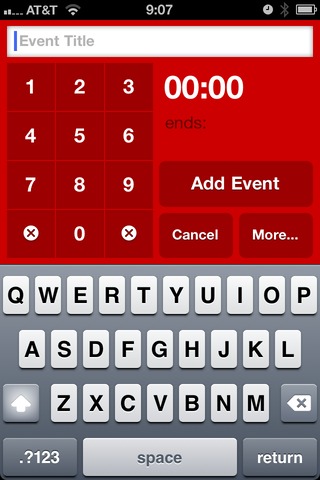
    That’s very nice, enter the title and tap out the time and you are done. You can however tap that more button and you are brought to this screen:

    [](https://f3a98a5aca88d28ed629-2f664c0697d743fb9a738111ab4002bd.ssl.cf1.rackcdn.com/calvetica/more.jpg)
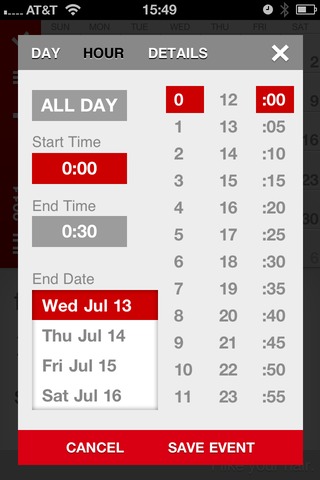
    This screen is still pretty quick and straight forward (note that you can set the default duration and alarm times, thus some people will be able to avoid these screens all together). What annoys me most about this is that you are taken immediately to an expanded time screen, most of which can be controlled on the previous screen — the details screen is what I really want to get to. It looks like so:

    [](https://f3a98a5aca88d28ed629-2f664c0697d743fb9a738111ab4002bd.ssl.cf1.rackcdn.com/calvetica/details.jpg)
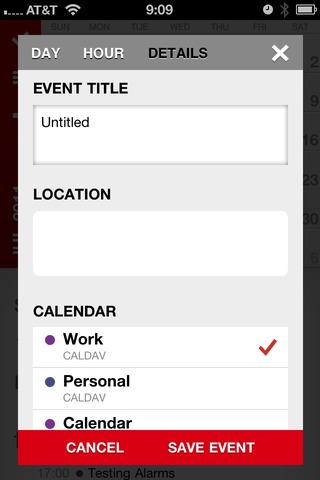
    There are two reasons I need this screen:

    1. I like to enter locations into my events.
    2. I don’t keep all my events on the same calendar. ((Though I am rethinking this, I mean does it really matter if it is a work event or personal event? I still have to attend both…))

    Overall and in my usage, the Calvetica interface is a touch faster to use than Calendar’s. If I could just get a faster way of adding in the location information I think it would be a pretty killer input method for me.

    ### Scheduling Appointments

    As I mentioned above there are rare occasions where I need to schedule a future event with someone — this means constantly scanning my calendar on different days to see what is open and what works with other people. This is quite possibly the most annoying thing to do, but I still need to do it.

    With the built in Calendar app this is best done by using the month view and tapping through the days to see what each day looks like. It’s not ideal, but it gets the job done. In Agenda I just used the never ending scrolling list of days to accomplish this — this works really well, right up and until the point that you need to jump to a specific day, at this point the system breaks down a bit.

    In Calvetica though you can view this:

    [](https://f3a98a5aca88d28ed629-2f664c0697d743fb9a738111ab4002bd.ssl.cf1.rackcdn.com/calvetica/week-view.jpg)
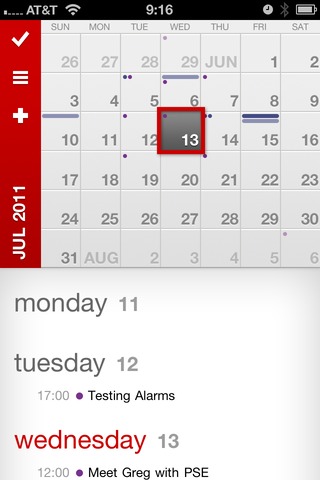
    With the full month shown and a scrolling view of the week selected — well you get a pretty good idea of what you have going on. A quick tap on the month name and you can jump to any date that you want very quickly. All of this makes for a pretty ideal way to schedule and plan with others. (The color coded dots and bars along the top of each day in the month calendar also give you a nice heads up of a potential problem/conflict.)

    ### Tasks

    One new addition in Calvetica 4 is the ability to schedule/manage/track tasks. I get the sense that this is a fairly basic offering. One nice thing is that there is a free cloud based backup for all your tasks, this makes the system a bit better — though syncing with a Mac app is still needed.

    If tasks liked this synced back to something on a Mac I could really see someone like my wife using this and liking it. Very straight forward with little confusion.

    There is also a nice UI change when you are viewing tasks versus events, very neat.

    ### Quick Reminders

    One of the neatest features is the new quick reminders, this almost takes the place of apps like Due for me. Touch and hold on the plus symbol and you are presented with the following screen:

    [](https://f3a98a5aca88d28ed629-2f664c0697d743fb9a738111ab4002bd.ssl.cf1.rackcdn.com/calvetica/quick-remind.jpg)
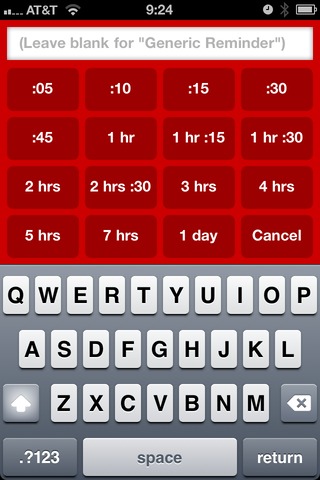
    These reminders will appear on your calendars as appointments, which is why I really love them for fast event creation. Sometimes when my day gets busy there are things I know I need to do before X time, but that I can forget. I used to create a task in OmniFocus for these items, but quick reminders in Calvetica is much faster and better.

    My most common reminder: go to bank, set due in 1 hour. I am forever forgetting to run to the bank. Quick reminders are great for this, love this feature.

    ### Day View

    There is no ‘day view’ in the sense that all you see is the days events, Calvetica will always keep a partial display of the month calendar. This is not bad, but it also brings about one other problem that I have with the day view as it is implemented: it feels like ‘old Calvetica’ and not this new Calvetica.

    I will admit though that this is the fastest way to delete appointments on my iPhone — man do I love deleting appointments.

    ### Agenda View

    Not to be confused with the Agenda app, agenda view is a fairly common calendar view that shows the appointments only. Using agenda view on Calvetica essentially turns the app into a better looking version of the built-in Calendar app’s month view. It works the same way.

    The one nice thing about Agenda view, is that unlike with week view you get to see the location of events — we should always ‘get’ to see this information if you ask me.

    ### Week View

    One of the best and prettiest features of the last version of Calvetica was the week views. In portrait orientation you get a lovely looking week view (which is still around), spin to landscape and you get a more traditional week layout.

    Gone is the landscape mode, which was a bummer for me until I realized that even — though I liked it — I never used it.

    The current week view with the mixed in month Calendar not only offers the best looking view for the app, but it is also the most useful for me when checking out my day. I can see if the day is empty at a glance and what is coming up and when. It’s clean and simple, best viewed with the month view partially hidden.

    ### Alerts

    Calvetica suffers the same fate as Agenda: system level alerts. When you have an alert go off before an event, the default Calendar is what you are taken to when you ‘slide to view’ the alert — this is both annoying and *not* Calvetica’s fault. Unless they wanted to run their own calendar databases, thus (as far as I understand) requiring you to re-input all your data.

    This is a problem and one that iOS 5 does not solve, but hopefully someone figures out and soon.

    ### Gesture Support

    An important part of using Calvetica is to make use of the gestures the app provides. The basics are swiping between calendar months, to the more advanced tap and hold to get additional features and pinch actions on the views to change the view type.

    One thing about Calvetica that should be apparent is that each of the view modes (Day, Agenda, Week) have their usefulness, tapping the small button to switch between them means that you are likely to never switch view modes, or be annoyed when you want to switch. With pinching gestures you can quickly switch between the modes — making Calvetica infinitely better.

    The app has a built in tutorial on gestures and I highly recommend you look through it before using the app.

    #### Hiding the Month Calendar

    One gesture is swiping up and down to show and hide the month calendar. Though the calendar doesn’t disappear (it shows the last two weeks, always), this is a very nice addition to the app. As much as I like this action, I have two major complaints about it:

    1. When slide the month up and out of the way, the last digit in the year is cut off, so right now it reads: JUL 201. That seems very un-Calvetica like and I would love to see it automatically change the wording to perhaps: JUL ’11. Same amount of characters, nothing cut off.
    2. Sorry, but why are you showing me the last two weeks in the calendar? Why *aren’t* you showing me the current week and next week — it’s doable and seems much more helpful. I like having the month calendar slid up and out of the way, but it would really be trick if it could still be helpful while it is tucked away — beyond just giving me more screen real estate.

    ### One More Complaint

    If you have multiple calendars syncing with the same name (say you test a lot of stuff and you have duplicate calendars in both iCloud and, oh, MobileMe) this is a very confusing app to figure out which ones should be shown.

    In fact the only app that handles this well is the built in app, since it shows what account each calendar is from. This is likely only an annoyance to people that keep multiple calendars, but it drove me crazy.

    ### Design

    When [I wrote about Agenda](https://brooksreview.net/2011/06/agenda-review/), I had this to say about Calvetica:

    >The problem with Calvetica is that I have always liked looking at Calvetica more than I have liked using it.

    I never meant that as a bad thing, it’s just a *thing*. When the guys at Mysterious Trousers asked if I would take a look at the beta of version 4, they seemed pretty confident that they addressed that issue. I couldn’t agree more, what’s more impressive is that they made me like using Calvetica — while also making the app *much* better looking.

    Overall Calvetica is better looking, however there is one screen that really bugs me:

    This details screen pop-up doesn’t sit right with me. Looks almost Android-ish. For instance: why are some of the fields rounded off on the corners, while others remain square? It’s a small nitpick, but I am not a huge fan of the design on this screen, mostly because I think these guys *can* do better.

    ### Spit and Polish

    There’s a few little things about Calvetica that are really nice little ‘extras’.

    – When in week view there is a little bit of footer text that says things like: “I like your hair.” It’s a touch of personality and makes me smile every time I see it.
    – You can change the color each calendar is displayed in. Yes, this *is* awesome.
    – You can rearrange the order things are shown in the ‘details’ screen so that what you use/want is at the top.
    – When in week view, the day’s date is show just to the right in a subtle gray — great touch that is both nice looking and very handy. This may seem trivial, but for some reason I really noticed how much I appreciated this.
    – The app still opens incredibly fast.

    ### Agenda v. Calvetica

    Honestly, I have a tough time deciding. The interfaces and logic behind each one is very different. If I had to choose I would say that Calvetica has a slight edge over Agenda right now for two reasons: design and event creation. As for the layout and display of your calendars, it’s Agenda all the way.

    Calvetica 4 is in the App Store now and is a free upgrade for existing users, [go check it out](http://calvetica.com/).

  • Rebooting the PC Industry: Tablets Force a Shift

    Jordan Robertson, an AP Writer: >Goldman Sachs calls tablets “one of the most disruptive forces in computing in nearly three decades.” It predicts that as many as 21 million people will buy tablets instead of laptops this year, jumping to 26.5 million next year. Tablets and iPads are very different beasts. In the above quote…

    Jordan Robertson, an AP Writer:
    >Goldman Sachs calls tablets “one of the most disruptive forces in computing in nearly three decades.” It predicts that as many as 21 million people will buy tablets instead of laptops this year, jumping to 26.5 million next year.

    Tablets and iPads are very different beasts. In the above quote it would be more appropriate to substitute ‘iPad’ where ever ‘tablet(s)’ is used. Remember that ‘tablets’ have been around for quite sometime — it is the iPad that is disrupting the market, not the generalized ‘tablet’. ((I freely admit this may not be the case long term, but is the case right now.))

  • Mac OS X Users: Clone Your Macs Before Installing Lion

    Craig Grannell: >I recommend before installing Lion that even if you’re using Time Machine you also create a working clone of your Mac. This is because while you can restore data from Time Machine, it’s faster and simpler to do so from a clone. He offers a couple of pieces of software — ignore all…

    Craig Grannell:
    >I recommend before installing Lion that even if you’re using Time Machine you also create a working clone of your Mac. This is because while you can restore data from Time Machine, it’s faster and simpler to do so from a clone.

    He offers a couple of pieces of software — ignore all but SuperDuper!. Small backup drives are pretty cheap, even at places like Best Buy and Fry’s. I picked up a 1TB LaCie drive from Best Buy that is USB 3 for like $80. Not a steal, but a good brand and worth the peace of mind.

    Oh, and if you want to upgrade to Lion when it comes out, then I suggest you get cloning tonight.

    *Ed. note: Many thanks to [Stephen M. Hackett](http://forkbombr.net/upgrading-to-lion/) for helping with my comma addiction. It is a real disease.*

  • Apple, China Mobile Talk Deal

    Tom Loftus: >The Wall Street Journal reports that Apple is getting closer to inking a deal with China Mobile, the country’s largest cellular operator with 600 million subscriber accounts. The U.S. has a *total* population of [311,799,978](http://www.census.gov/main/www/popclock.html) people.

    Tom Loftus:
    >The Wall Street Journal reports that Apple is getting closer to inking a deal with China Mobile, the country’s largest cellular operator with 600 million subscriber accounts.

    The U.S. has a *total* population of [311,799,978](http://www.census.gov/main/www/popclock.html) people.

  • Quote of the Day: Benny Lewis

    “Perhaps I’m wrong and praying or hoping that it will all work out, or generally being a nice person is what really “does the trick”, but why not actually get off your ass and do something tangible too while you’re at it.” — Benny Lewis

    “Perhaps I’m wrong and praying or hoping that it will all work out, or generally being a nice person is what really “does the trick”, but why not actually get off your ass and do something tangible too while you’re at it.”
  • WiFi/Bluetooth Interference

    My MacBook Air has this issue too, but I can’t use Dr. Drang’s solution because I constantly use a Bluetooth mouse and keyboard. I did try it out though and it solved my problem too. I hope it is a software issue that is fixed soon, ready: bug reporter.

    My MacBook Air has this issue too, but I can’t use Dr. Drang’s solution because I constantly use a Bluetooth mouse and keyboard. I did try it out though and it solved my problem too. I hope it is a software issue that is fixed soon, ready: bug reporter.

  • Reading on the iPad

    A great article by Shawn on the (still) miserable state of magazine apps on the iPad. I subscribe to a bunch of them, but my favorite app to read in is Instapaper — every time. It’s more than the design, it’s the function and the content. I know that what’s in Instapaper is something that…

    A great article by Shawn on the (still) miserable state of magazine apps on the iPad. I subscribe to a bunch of them, but my favorite app to read in is Instapaper — every time. It’s more than the design, it’s the function and the content.

    I know that what’s in Instapaper is something that I want to read — that I chose to read. I know that everything will look great and the same. I know that it will download stupidly fast over 3G and so I never worry about “updating” it before I leave.

    Print is dead, Instapaper is the new print. Shawn seems to want better magazine apps, I just want better integration with Instapaper, let the magazine layout become a novelty.

    Shawn:

    >And while I appreciate the customization and care surrounding each article found in *Wired* or *The New Yorker*, wouldn’t it be something if the magazine industry took a few cues from Instapaper and Reeder?

    Again I subscribe to a ton of magazines, I’d much prefer to just send a few of those magazine articles to Instapaper, because honesty there aren’t any publications left that I find worth reading from cover to cover. I’d argue a smart publisher might find a way to make Instapaper its iPad app. Admittedly, that probably would be too cutting edge for publishers.

  • Patina and Wear

    A Twitter follower sent me a link to this excellent post and does a better job describing what I meant about patina on your gadgets. Tom Armitage: >Wear is, of course, both a noun and a verb. It’s the verb that inevitably happens through use, and it’s the noun that the verb leaves behind. Patina…

    A Twitter follower sent me a link to this excellent post and does a better job describing what I meant about patina on your gadgets.

    Tom Armitage:

    >Wear is, of course, both a noun and a verb. It’s the verb that inevitably happens through use, and it’s the noun that the verb leaves behind. Patina is the history of a product written into its skin.

    [via Jonas K.]
  • Patina

    At the end of last week Marco Arment [posted a follow-up review on the Smart Cover](http://www.marco.org/2011/07/15/ipad-2-smart-cover-review) for the iPad 2. In it he states: >I can’t think of many situations in which a Smart Cover provides enough protection to be worth carrying and using for people who care about the aesthetic condition of their iPad.…

    At the end of last week Marco Arment [posted a follow-up review on the Smart Cover](http://www.marco.org/2011/07/15/ipad-2-smart-cover-review) for the iPad 2. In it he states:

    >I can’t think of many situations in which a Smart Cover provides enough protection to be worth carrying and using for people who care about the aesthetic condition of their iPad.

    He freely admits that here that he can’t let go of the fact that it is “only the back” of the device that likely will get banged up. I am quite the opposite of Marco when it comes to the Smart Cover — personally I think it is the best device cover you can get right now.

    Yes, it leaves [lines on the screen](https://brooksreview.net/2011/03/smart-covers/). Sure as Marco comments the leather doesn’t feel great. But, from a usability perspective I have never been happier with a case — this coming from someone who [prefers to *not* use a case on things](https://brooksreview.net/2011/05/iphone-case/).

    For me what makes the Smart Cover so good is three things:

    – Screen protection.
    – Easy on and off.
    – You don’t *have* to take it off.

    The auto-unlock is great, but not a deal breaker. With the original iPad I started by using a sleeve, then another sleeve, then the Apple iPad case. Each of those options sucked. The sleeves are nice, but highly inconvenient when you just want to pick up the iPad to look something up. I also found sleeves to be a pain in meetings and coffee shops — where do you store the sleeve when you are using the device? Your bag? Then you need to carry a bag.

    The Apple case for the original iPad solved my quick access problems, but added an ugly and awkward case to the device. The smart cover though easily pops off and folds into a small triangle that looks kinda neat sitting on a desk when not in use. I also could open and remove the smart cover quicker than I could pull my iPad out of a sleeve. I can even put the cover back on in about the same time as it takes to put the iPad back in a sleeve. ((This largely depending on the sleeve of course.))

    For me it comes down to how I use the iPad: I use it regularly and sporadically. Enough so that I find it incredibly annoying to take a sleeve on and off.

    #### Holding

    One complaint of Marco’s that I agree with is that there is not ideal way to hold the iPad with the Smart Cover on. In short spurts this has never bugged me, but when trying to hold the iPad for long periods of time — yeah the cover needs to come off. The beauty is that the Smart Cover is ridiculously easy to take off, so much so I find this hard to complain about.

    #### Protection

    One last thing that Marco mentioned:

    >And not having the back covered means that the iPad 2 can’t share a bag pocket with anything else without a risk of being scratched.

    I get what Marco means here, but my iPad and MacBook Air share the same pocket in my bag (padded laptop area) — everyday. I simply put the iPad 2 in with the smart cover resting between it and the MacBook Air and I have yet to see any problems on my MacBook Air’s top lid.

    Now, I likely wouldn’t be comfortable letting the iPad share a pocket with keys, but the same goes for anything of mine that is not fully protected — keys are a nightmare to carry.

    ### Patina

    The last bit that I really want to touch on is scratches on your device. I stopped using a case on my iPhone sometime around 2008, so all my iPhones have scratches on them. Every time I get a scratch on my iPhone, iPod, MacBook Air, or iPad I get upset.

    I don’t like my devices to get scratched up, I like my devices to always look brand new.

    But, and this is a big ‘but’, I do like the over all look — the patina — of a well used and scratched up device. When I hand over my old iPhone to my wife I look at it and know that I *used* it, I know that the device was *mine*.

    It’s an odd relationship to have: I like the end result of a well worn device that shows the life it has had, but I don’t like the minor nicks and scratches that it takes to get to that point.

    At the end of my original iPad’s tenure as my tablet it looked nearly perfect, save one scratch in the screen. It was always carried in a case that fully protected it. Right now, my iPad 2 (that has only been used with a Smart Cover), looks brand new. The back of the iPad has seen its share of woes (table grit, cats sliding it across a table, cats spilling a glass of water on it), but it doesn’t show any of those issues.

    I doubt this will be the case long term, but I will say, I have been very impressed with the durability of an iPad 2 + Smart Cover setup.

  • Fixing Soccer

    Paul Kafasis: >It seems like every time we start to care about soccer, it spits directly into our collective face, while handing us another devastating loss. One of his ways for fixing soccer: >Baseball doesn’t switch to a home run derby after the 12th inning. Basketball doesn’t switch to a game of H-O-R-S-E after the…

    Paul Kafasis:
    >It seems like every time we start to care about soccer, it spits directly into our collective face, while handing us another devastating loss.

    One of his ways for fixing soccer:

    >Baseball doesn’t switch to a home run derby after the 12th inning. Basketball doesn’t switch to a game of H-O-R-S-E after the second OT. So from now on, we’re not deciding which team is the best in the world through what are effectively coin flips.

    True that.

  • [SPONSOR] Palimpsest for iPad

    Palimpsest for iPad presents a personalized stream of long-form magazine articles. These articles come from the archives of top magazines, including The Atlantic, The New Yorker, and many others. Your votes on previous articles influence which articles are presented to you in the future. Palimpsest is like a radio-station of fascinating articles; with no index…

    Palimpsest for iPad presents a personalized stream of long-form magazine articles. These articles come from the archives of top magazines, including The Atlantic, The New Yorker, and many others. Your votes on previous articles influence which articles are presented to you in the future. Palimpsest is like a radio-station of fascinating articles; with no index and no way to jump ahead, it offers a layer of serendipity while letting you spend more time reading good articles and less time searching. If you love reading long articles on your iPad – get Palimpsest in the [App Store](http://itunes.apple.com/us/app/palimpsest/id432502081?mt=8#) today.

  • Google Chrome Speeds up Slow Computers

    This is just a link to the Google Chrome web browser, which I link to because of something that happened this weekend. My Mom has one of those fancy Dell Inspiron Mini notebooks and she was showing it to me asking if I could make it faster. The machine was unbearably slow which was partially…

    This is just a link to the Google Chrome web browser, which I link to because of something that happened this weekend. My Mom has one of those fancy Dell Inspiron Mini notebooks and she was showing it to me asking if I could make it faster. The machine was unbearably slow which was partially caused by a Windows update downloading in the background.

    The other part that was slow was loading the web in general — my iPhone 4 was beating it to webpages with my phone on AT&T’s 3G network. Suspecting that it was in part IE’s fault ((The remainder of the fault goes to Windows 7 Starter and, well, Dell.)) I installed Chrome — what a difference that made.

    If you are saddled with an under-powered computer you might take a look at Chrome, it sure sped up the machine that I was testing it on.

  • Marketcircle

    My thanks to Marketcircle for sponsoring the RSS feed this week, promoting their excellent Billings Pro software. I don’t know any reason why a Mac user needing to bill hourly, or just freelancing, wouldn’t use Billings Pro. This software is so cool that I almost wish I was a freelancer just so that I could…

    My thanks to Marketcircle for sponsoring the RSS feed this week, promoting their excellent Billings Pro software. I don’t know any reason why a Mac user needing to bill hourly, or just freelancing, wouldn’t use Billings Pro.

    This software is so cool that I almost wish I was a freelancer just so that I could use it. Not only is the software beautiful and robust, but Billings Pro is loaded with great extras like automatic backups.

    Killer software so be sure to check it out, there’s a free 30-day trial.

  • Mind Your MeTweets

    Apparently I am not the only one who is annoyed when people retweet positive things others say about them.

    Apparently I am not the only one who is annoyed when people retweet positive things others say about them.

  • Quote of the Day: Adam Lisagor

    “Worth noting: people who work at Apple think a Teva makes a suitable skateboarding shoe because they see the world just a little bit different from me and you.” — Adam Lisagor

    “Worth noting: people who work at Apple think a Teva makes a suitable skateboarding shoe because they see the world just a little bit different from me and you.”
  • Hotmail Bans Common Passwords

    Tom Warren: >Microsoft will also roll out a feature to prevent users from choosing a common password. Common passwords include password, 123456, ilovecats and gogiants. “This new feature will be rolling out soon, and will prevent you from choosing a very common password when you sign up for an account or when you change your…

    Tom Warren:
    >Microsoft will also roll out a feature to prevent users from choosing a common password. Common passwords include password, 123456, ilovecats and gogiants. “This new feature will be rolling out soon, and will prevent you from choosing a very common password when you sign up for an account or when you change your password,” says Craddock. Hotmail users who currently use a weak and common password may be prompted to change it in the future.

    Two things:

    1. This is a great move and every company should follow suit.
    2. ‘gogiants’ is really a common password?

  • Amazon’s Tablet Is No Threat to Apple, It’s a Huge Threat to Google

    MG Siegler: >Thanks to the “openness” of Android, Google has handed Amazon the keys to the Android kingdom. Amazon is going to launch a tablet that runs Android, but it will be fully Amazon’d. It will use Amazon’s Appstore, it will use Amazon movies, it will use Amazon books, it will use Amazon music, etc.…

    MG Siegler:
    >Thanks to the “openness” of Android, Google has handed Amazon the keys to the Android kingdom. Amazon is going to launch a tablet that runs Android, but it will be fully Amazon’d. It will use Amazon’s Appstore, it will use Amazon movies, it will use Amazon books, it will use Amazon music, etc. Google will have no control over this, even though it will be the seminal Android tablet. That would be terrifying for any brand.

    I have no doubt that this would be bad for Google and a partnership with Microsoft for Bing search to be default would make a lot of sense for both companies. What I think may also be a big threat to Google is this bit from Siegler:

    >Like $299 or less cheap. But can Amazon really make a 9-inch multi-touch screen color tablet for that cheap? Unless it’s an absolute piece of crap, that seems unlikely. There’s a reason why all other tablet manufacturers are having problems getting their tablets down to even the key $499 price point.

    That would worry me if I made Android tablets, because if Amazon comes in an undercuts other tablet price points two things could happen:

    1. Everyone loves it and now expects to get any other tablet at that price. Which, if Android tablet makers have a tough time getting to $499 — well this would be bad news.
    2. Everyone hates it because the hardware is junky, but because it is from Amazon a great many bought it. Now everyone starts to get a very bad taste in their mouth about Android tablet quality.

    It could also flop and not sell, thus none of this matters — being front and center on Amazon’s site though, I don’t see that as a likely outcome.

  • Is the Tablet Computer a New PC or Post-PC?

    Horace Dediu: >In Q2 2011 one million more Windows PCs were sold than in Q2 2010. In same time, 903k more OS X PCs and 5.5 million more iPads. I read this and the first thought that popped into my head: I wonder if Microsoft knows that they are an ‘underdog’ now? They are so…

    Horace Dediu:

    >In Q2 2011 one million more Windows PCs were sold than in Q2 2010. In same time, 903k more OS X PCs and 5.5 million more iPads.

    I read this and the first thought that popped into my head: I wonder if Microsoft knows that they are an ‘underdog’ now? They are so used to being *the* company, I wonder ((Whereby ‘wonder’ I mean assume.)) if part of the problem they are currently having is a result of still maintaining that mentality.

  • xScope on the Mac App Store

    I use this almost daily and it is now on the Mac App Store. A phenomenally useful app.

    I use this almost daily and it is now on the Mac App Store. A phenomenally useful app.

  • Spotify Has Landed in the U.S.

    I am not a big ‘streaming music’ kind of guy, but a reader (at least I assume) sent me an invite and I have to admit: I am liking it so far. Before you ask, no I don’t have any invites.

    I am not a big ‘streaming music’ kind of guy, but a reader (at least I assume) sent me an invite and I have to admit: I am liking it so far.

    Before you ask, no I don’t have any invites.