Top Posts

Leica Sofort 2June 13, 2024
Grand Seiko SBGX261February 23, 2023

Recent Articles

  • Don’t Mimic Real-World Interfaces

    There have always been those few apps that insist on looking like their physical, real world, equivalent. Calculator apps, date books, calendars, note taking apps, “stickies” — you know what I am talking about. Despite there being better options out there, better ways of displaying the data, designers stick with the known representation of the…

    There have always been those few apps that insist on looking like their physical, real world, equivalent. Calculator apps, date books, calendars, note taking apps, “stickies” — you know what I am talking about. Despite there being better options out there, better ways of displaying the data, designers stick with the known representation of the tool.

    Now, though, Apple is taking it too far.

    If you have seen any of the screenshots linked across the web about the new iCal interface you know what I am talking about. If you haven’t seen those, iCal is looking a lot like it does on the iPad right now in Lion’s developer preview. It’s ugly, and we should be way past this style by now.

    I have [proposed a better calendaring solution](https://brooksreview.net/2010/09/sucky-calendars/) and [Marco Arment has talked about what he would like to see](http://www.marco.org/480805355) as well. The problem right now is that we have the graphics processing power and the design acumen to make realistic looking interfaces, and designers think they should make them look realistic.

    Who wants that?

    In theory, and perhaps in movies, this is a great look — in fact from an eye candy perspective it looks amazing. The problem is that these apps that mimic a real world interface make for pretty terrible computing interfaces. Real interfaces, those printed on paper for calendars, or molded out of plastic for calculators are static — computing interfaces are dynamic. The difference is that to make a sheet of paper show 7 days worth of appointments means that you have to print all seven days. Once it is past the first day it would be impossible to dynamically shift the content so that it keeps the seven forward looking days view. On the computer though this is easily done, yet no one does it — why?

    I guess it is because that is not how paper calendars work, and that is just a silly convention to stick with.

    In the early days of computing modeling interfaces, such as a calculator, after an actual calculator was very user friendly because users had a base understanding of how to work a calculator already. This lowered the bar for the prerequisite knowledge to use early applications. Ditto apps like calendars, datebooks and address books.

    Now, I would guess that most “new” computer users actually don’t know that these things are mimicking their physical counterparts — well they know in the sense that it looks like a physical good, but I doubt they every think: “I used to have a calculator just like this one”.

    How many teenagers today are likely to have ever owned or used a DayRunner? Mimicking these interfaces is not about creating a more usable interface, or about giving the consumer what they know — it is about creating eye candy, while the usability and productivity of the app suffers. Eye candy can aid a design and the usability — as it did with the first computer applications — more often though is forces the app to look and behave in a manner that is not very helpful to the user.

    Ask any person who has used [Soulver](http://www.acqualia.com/soulver/) for Mac or iOS if they think Soulver was difficult to figure out — it is leaps and bounds better than any other calculator app, yet it doesn’t look like any other calculator app. It took me all of two minutes to figure out how to work the app and to realize just how much better it is. What Soulver did was not try to replicate the beloved HP 12c, instead they rethought what a calculator app was to be — and how it should be designed if it is only made for use on a computer, from day one.

    It is what calculators would have been if they were invented at the same time computers were, instead of what we have with most calculator apps.

    ### Little Bits of Paper ###

    Brent Simmons [calls it](http://inessential.com/2011/03/31/torn_paper_derangement_syndrome_tpds_) Torn Paper Derangement Syndrome (TPDS) and I most certainly have it:

    >If this rumored new UI for iCal is real and not just a mockup by a misanthropic Photoshop sadist, then I’m going to be distracted forever by the bits of torn paper under the toolbar.

    When I used paper notepads in school I would take an Exacto knife to remove those bits of paper weekly — can’t stand it. It is a sign of a flawed product — one that is designed to tear with ease and perfection at the top, but that never lives up to its expectation, much like checks (remember tearing those out). Why remind everyone of the imperfect days of yore by bring that bit of imperfection across. That is akin to Microsoft deciding that Excel should stop calculating *pi* after 3.14 — stupid and pointless given the tools at hand today.

    Nobody misses those bits of paper. Nobody wants iCal to look like their Franklin Covey — people want it to work like that, but not look like that. That is: people love the feel of pen and paper and scratching stuff off, but that feeling is not best replicated through showing static, arbitrary, bits of torn paper. People love how organized they became with these old school paper tools, yet instead of taking that organization to the next level with computing we just get the same thing we had in paper form (less the paper cuts and waste).

    The way to get people to love a calendar app is not to make it look like what they used 10 years ago, but to make it better than what they used 10 years ago. So far the only feature we have that consistently works is alarms that sound 15 minutes prior to meetings. Not even invites work on a regular, consistent basis across all devices.

    ### Feels Nice ###

    The best part about how these interfaces work is how they feel — can’t you feel the texture of the paper grain as you move your mouse pointer over it? Wait, all I feel is the glass desk below my mouse and subtle twinge of annoyance as I pass by the intended resting spot for my mouse pointer. We can’t feel the textures drawn on the screen.

    Real life interfaces are made to be pressed with the wide human finger, to be grasped in your hand and held in your briefcase. That’s why buttons can never be too small and why writing zones are large and the physical size is critically important. That’s also why a lot of these interfaces transfer nicely to touch based devices like the iPad or iPhone. That’s also why they suck so much on a ‘regular’ computer — a mouse pointer is tiny and doesn’t need huge click zones. Fonts are legible at small sizes and don’t need huge areas to fill. Screen sizes are anything but static and the interface needs to work well on all of them.

    There is a separation between the needs of the real world and the needs of the computer world. Making direct porting of interfaces a poor decision.

    ### Looks Great, Sucks to Use ###

    I can’t tell you how many apps there are that I could say the above about. Then there’s the small subset of apps that seem to really get how people actually want to, and do use, their apps — those are the apps that just leave you saying: wow.

    These are the apps we need and crave.

    It’s great that you spent 16 hours making that wood grain and stainless steel look exactly like the real thing — looks nice — but does your app work? Does your app make sense?

    Calvetica isn’t good because it works like a DayRunner — it’s good because it works well with my fat fingers tapping at a slick, backlit, glass screen. It works because when I turn in to landscape the information changes, it works because they thought about how people use the product (yet, they have not solved Marco’s complaint, nor most of mine.) The subtle texture of the Reeder background doesn’t make me love the app more, the navigation and presentation of only what is important makes me love the app. I don’t think OmniFocus on the iPad is better than it is on the Mac because it looks more like a paper check list — I know it is better because it shows me only what I really *need* to see at any given time.

    Some of the apps that are coming out for mixing boards and DJ scratching — they all look really cool, but they suck to use. You can’t physically turn a knob on the iPad screen — so why make knobs an essential part of your interface?

    Why haven’t people figured this out yet?
  • Quote of the Day: Mike Lazaridis

    “Please, you can’t use that word, it’s just not fair.” — Mike Lazaridis Man, that cracks me up.

    “Please, you can’t use that word, it’s just not fair.”

    Man, that cracks me up.

  • OmniFocus Solarized Themes

    I threw together the dark and light themes in OmniFocus, here’s what that looks like: ![Solarized Light for OmniFocus](https://f3a98a5aca88d28ed629-2f664c0697d743fb9a738111ab4002bd.ssl.cf1.rackcdn.com/of-light-solarized-tmb.png) ![Solarized Dark for OmniFocus](https://f3a98a5aca88d28ed629-2f664c0697d743fb9a738111ab4002bd.ssl.cf1.rackcdn.com/of-dark-solarized-tmb.png) I prefer the light and this is version 1.0 — if I make any changes or tweaks I will update this page. [Download Here](https://f3a98a5aca88d28ed629-2f664c0697d743fb9a738111ab4002bd.ssl.cf1.rackcdn.com/OF-Solarized%20Themes.zip) *(The font shown is DejaVu Sans, you can…

    I threw together the dark and light themes in OmniFocus, here’s what that looks like:

    ![Solarized Light for OmniFocus](https://f3a98a5aca88d28ed629-2f664c0697d743fb9a738111ab4002bd.ssl.cf1.rackcdn.com/of-light-solarized-tmb.png)
    ![Solarized Dark for OmniFocus](https://f3a98a5aca88d28ed629-2f664c0697d743fb9a738111ab4002bd.ssl.cf1.rackcdn.com/of-dark-solarized-tmb.png)

    I prefer the light and this is version 1.0 — if I make any changes or tweaks I will update this page.

    [Download Here](https://f3a98a5aca88d28ed629-2f664c0697d743fb9a738111ab4002bd.ssl.cf1.rackcdn.com/OF-Solarized%20Themes.zip)

    *(The font shown is DejaVu Sans, you can [get it here](http://dejavu-fonts.org/wiki/Main_Page).)*

    Updated versions:

    Version 1.0.1 — fixes colors for completed items.

  • Solarized

    I have always typed on a white background with dark gray text — it has a lot of contrast, but I just liked it. Justin linked to this and I check it out — what a fantastic color scheme (both light and dark) — I am using it now for everything and love it so…

    I have always typed on a white background with dark gray text — it has a lot of contrast, but I just liked it. Justin linked to this and I check it out — what a fantastic color scheme (both light and dark) — I am using it now for everything and love it so far. If you are looking for a nice color scheme to use for your text editors or terminal — give this a go.

    (Here’s the [TextMate theme](https://github.com/markstory/solarized).)

  • Developing for Android and All Those Screen Sizes

    Christopher Mims on developing for Android devices: >Developing for such a wide array of device screen sizes and aspect rations means that not only is it impossible to create pixel-perfect designs for Android interfaces, there isn’t even any guarantee that a given interface can be scaled to fit a particular screen. A nice read and…

    Christopher Mims on developing for Android devices:
    >Developing for such a wide array of device screen sizes and aspect rations means that not only is it impossible to create pixel-perfect designs for Android interfaces, there isn’t even any guarantee that a given interface can be scaled to fit a particular screen.

    A nice read and a follow-up to this [piece](http://android-gripes.tumblr.com/post/4547554787/why-do-apps-look-worse-on-android-than-iphone-a).

  • Final Cut Pro X

    The big story here isn’t that there is a new version of Final Cut Pro — it’s that the new version costs $299, not $999.

    The big story here isn’t that there is a new version of Final Cut Pro — it’s that the new version costs $299, not $999.

  • 15 Slides, Three Writers, Three Ways

    When I was down at SXSWi I almost missed this presentation from Jim Coudal, Michael Lopp, and John Gruber — they spoke early in the morning at a venue far away from my hotel — I am glad I didn’t miss it though. Turns out that this was the best presentation that I attended, they have…

    When I was down at SXSWi I almost missed this presentation from Jim Coudal, Michael Lopp, and John Gruber — they spoke early in the morning at a venue far away from my hotel — I am glad I didn’t miss it though. Turns out that this was the best presentation that I attended, they have great insight into how they write. If you have time to listen I recommend that you do (alas it is a Flash only audio player).

    [Updated: 4.13.11 at 7:02 AM]

    Gruber kindly posted a direct link to the MP3 so you aren’t stuck in Flash. Grab that here.

  • Acorn 3

    >Acorn can create layered screenshots of every window you have open on your computer. It’s magic. That’s a pretty amazing feature. With every update to Acorn I have less and less of a reason to have Photoshop installed — which is impressive for an app that is selling for $29.99 right now.

    >Acorn can create layered screenshots of every window you have open on your computer. It’s magic.

    That’s a pretty amazing feature. With every update to Acorn I have less and less of a reason to have Photoshop installed — which is impressive for an app that is selling for $29.99 right now.

  • Tablets for Giants

    Patrick Goss: >Lenovo is working on a 23-inch tablet, with William Cai telling TechRadar that the company believes a home tablet could be arriving this year. Wow. I’ll let [Craig Grannell](http://reverttosaved.com/2011/04/12/is-the-ipad-too-small-for-you-if-so-check-out-lenovos-23-incher/) comment on this one: >Someone at Lenovo presumably, then, was thinking about gaps in the tablet ecosystem and yelped “what if Godzilla wanted a…

    Patrick Goss:
    >Lenovo is working on a 23-inch tablet, with William Cai telling TechRadar that the company believes a home tablet could be arriving this year.

    Wow. I’ll let [Craig Grannell](http://reverttosaved.com/2011/04/12/is-the-ipad-too-small-for-you-if-so-check-out-lenovos-23-incher/) comment on this one:

    >Someone at Lenovo presumably, then, was thinking about gaps in the tablet ecosystem and yelped “what if Godzilla wanted a tablet?”, because that’s the only explanation that makes any sense.

  • Designing the iPhone Tab Bar

    Petter Silfver on the tab bar in iOS: >Since the screen width of an iPhone is 320 dots (1 dots = 1 or 2 pixels), Apple designed the standard tab bar to contain no more then five tabs to be able to maintain visible iconography and readable copy. Silfver brings up a ton of good…

    Petter Silfver on the tab bar in iOS:
    >Since the screen width of an iPhone is 320 dots (1 dots = 1 or 2 pixels), Apple designed the standard tab bar to contain no more then five tabs to be able to maintain visible iconography and readable copy.

    Silfver brings up a ton of good points relating to the tab bar — a great read for developers or people nerdy enough to be interested in tab bar design (me).

  • Welcome to the staticDimension

    There has been a lot of talk around the web lately about building ‘baked blogs’ — [Brent Simmons](http://inessential.com/2011/03/16/a_plea_for_baked_weblogs) (and he is not alone) is tired of not being able to read sites that John Gruber links to on [Daring Fireball](http://daringfireball.net/), because the sites tend to go down under heavy traffic influx. This is typically due…

    There has been a lot of talk around the web lately about building ‘baked blogs’ — [Brent Simmons](http://inessential.com/2011/03/16/a_plea_for_baked_weblogs) (and he is not alone) is tired of not being able to read sites that John Gruber links to on [Daring Fireball](http://daringfireball.net/), because the sites tend to go down under heavy traffic influx. This is typically due to one of two things: cheap, crappy, hosting; or not properly “baking” one’s blog. The former is easy to fix, but costs a bit more money. The latter is also easy to fix, but can be quite complicated, costing you time.

    Unfortunately most blogs that go down are WordPress blogs that aren’t being cached and thus, are dynamically being generated. The problem is that ‘baking’ a WordPress blog can be quite complicated and more than the average user wants to deal with (I will go into this more in a later post). In light of all this recent discussion I have been exploring all sorts of different blogging platforms — from Movable Type to things like Jekyll. I came across one true gem in all of this configuring, SSHing, and general time wasting — that gem goes by the excellent name: [staticDimension](http://subdimension.co.uk/pages/projects.html).

    How great is that name?

    This is a fully baked, static blogging platform. It is bare bones. It is free. And I think it just maybe perfect for new bloggers that are serious about the craft of writing on the web, and serious about not spending lots of money on hosting. Looking at the current blog software ecosystem I see two choices for bloggers that want to be able to provide ‘linked lists’ mixed with articles (like I do here, and [Shawn Blanc](http://shawnblanc.net/) does, and [Gruber](http://daringfireball.net/) and [Kottke](http://kottke.org/) probably started), the first choice is [Tumblr](http://www.tumblr.com), the second is [staticDimension](http://subdimension.co.uk/pages/projects.html). Sure, you can do this with WordPress and other platforms, but only if you are comfortable digging around some code — there is still no easy way to set this up on WordPress. Both Tumblr and staticDimension come with this feature built-in.

    We know enough about Tumblr already and it’s hosted, but free, platform, that has been seeing growing pains of late. This newcomer though, staticDimension, is also free and is dead simple to install on just about any web server. All you have to do is upload the files to the servers public directory and then change the username and passwords — you are now done. There are no plugins, no database configuration, no nothing. Upload, set preferences, done.

    Simple.

    What does it look like? Head on over to benb.me for a look at a blog running on staticDimension. (The site is running on the same server as TBR.) It is pretty simple and out of the box allows you to make three types of ‘posts’: pages, articles, linked posts. I think that is pretty much all that any new blogger is going to need to get going. All articles are written in Markdown and saved as plain text files on the server, making it easy to both backup and get your data back out of the platform if you decide to move to a more robust platform later on.

    The entire system is easy and simple.

    ### The Backend ###

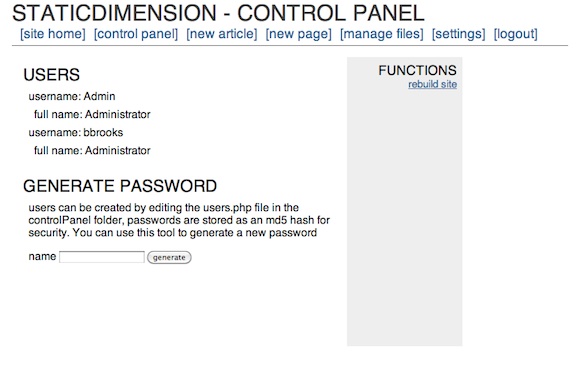
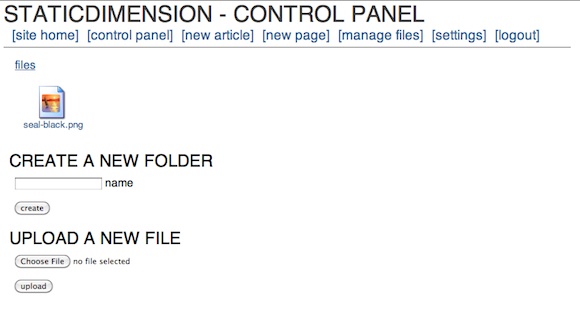
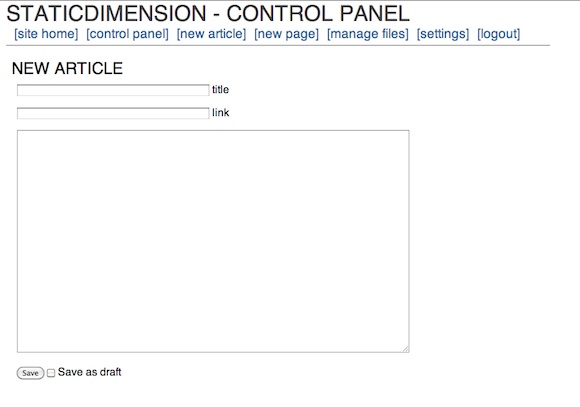
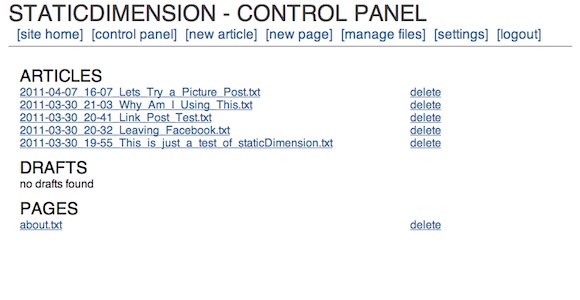
    It drives me nuts when you can’t see what the backend of a blog really looks like, so here is the control panel of staticDimension:

    [](https://f3a98a5aca88d28ed629-2f664c0697d743fb9a738111ab4002bd.ssl.cf1.rackcdn.com/sd-cp.png)
    [](https://f3a98a5aca88d28ed629-2f664c0697d743fb9a738111ab4002bd.ssl.cf1.rackcdn.com/sd-f.png)
    [](https://f3a98a5aca88d28ed629-2f664c0697d743fb9a738111ab4002bd.ssl.cf1.rackcdn.com/sd-art.png)
    [](https://f3a98a5aca88d28ed629-2f664c0697d743fb9a738111ab4002bd.ssl.cf1.rackcdn.com/sd-artlist.png)

    The whole thing is dead simple. My biggest complaint is that you can’t post from MarsEdit or TextMate (yet), but for a new blogger I doubt that matters as much as having an easy to setup system does. The backend is so fast and easy that it works fine on iOS — meaning you can write in your favorite program and copy and paste in the content with ease (not the case with WordPress). The options are far and few between, but the system has what you need — with one exception: auto-tweeting. It’s not the end of the world, but it does add a step that a service like Tumblr and WordPress don’t add.

    ### Design ###

    The stock template leaves a lot to be desired and truthfully this is the biggest downfall of the system at the moment. There really is no other templates that you can install. I took about 30 minutes and modified the four template files that are needed for the system to run (easy to do if you know HTML markup) and I also edited the CSS file to change the look and add in Typekit (again standard CSS if you know how to write that). After doing that I found that I like the way the site looks, love the site speed and am pretty darn happy with it.

    This is a flexible system for CSS writers, but I couldn’t find a way to edit the headline behavior on the site. For instance if I wanted to make the post headline of an article link through to the post page, I couldn’t find where that code lies. That’s a bit annoying, but again this is not for people who want full customization (not yet at least, it’s version 1.1 right now). I do think this is a good system if you know how to tweak a bit of CSS and you just want to get up and running. The stock theme is pretty, well, not attractive out of the box.

    ### Speed ###

    This is fast, granted I only have a few posts on the site, but it rebuilds instantly. You don’t even need to rebuild unless you edit one of the template files (not including the CSS, that changes when you upload the new version). Browsing speed is lightening fast, even with Typekit installed.

    ### Archives ###

    The archives are pretty basic and you have to drill down from year, to month, to day before you see a post. Then you see the post names as they appear in file names — a bit lame, but again not unusable. There are a few tricks to get the CSS working right past the main archives page, but emailing the developer will help you solve that problem.

    Archives are really not good by default in any blogging system. WordPress’ are unuseable (mine work because there is a lot of extra code being used) and Tumblr’s are silly unless you add a photo to every post you write. So while the archives are not great, this is something that is simply not great on any platform. I would love to see the archive system grab the title instead of the file name — that would remove at least one level of ugly.

    ### Annoyances ###

    I like the platform, but there are some things that need work:

    1. Your page name is what appears in the navigation, and in the page heading when you go to it. Leaving no real room for customization of wanting the nav to say one thing and the page title to say something else.
    2. As I mentioned before, no way to auto-tweet.
    3. No way to post from blogging clients like MarsEdit.
    4. Limited theme customization.
    5. No other themes available.
    6. Sidebar needs to be modified on each of the four template pages. To reflect the actual sidebar — there is no one sidebar template the system pulls from.
    7. No search, though adding in a Google site search box wouldn’t be hard.

    Again, this is a version 1.1 system and I am sure lots of changes are being worked on.

    ### Final Thoughts ###

    If you are just getting started with blogging and you want to run the web server yourself — give this a go first. I honestly think that you could run this off of a cheap $10/mo hosting plan and withstand a DF link — assuming you are not image heavy, or just don’t serve the images yourself (I don’t, S3 works great for that). The setup is stupidly simple. The backend is just what you need, nothing more. The files are stored as plain text so you can move them wherever, whenever.

    It’s just easy and it really is pretty nice. If you hate databases and SQL (who doesn’t) and you wanted to have linked list posting — this is a system you really need to check out. I say give it a try first because it really is that easy to set up and, frankly, if you are wanting to put your writing on the web you should be the one that owns the content.

    [Updated: 4.12.11 at 1:17 PM]

    One thing I didn’t mention is that the developer is incredibly nice and very responsive. I emailed with him a bit when I was playing with the platform and trying to work out some kinks. Since posting this review the platform was updated to version 1.2 and then to version 1.2.1 shortly after he read my thoughts. The biggest change is in the archives and how they display the post names — great work!

  • The Price of Free

    Eric F. Myers in the Google Reader support forums: >If you’ve come here from the”Something is Broken” forum thinking that this problem has been Answered, I’m sorry to say that it has not been. It’s been six months since I’ve posted this question and there’s still no answer from Google. The post in question still…

    Eric F. Myers in the Google Reader support forums:
    >If you’ve come here from the”Something is Broken” forum thinking that this problem has been Answered, I’m sorry to say that it has not been. It’s been six months since I’ve posted this question and there’s still no answer from Google. The post in question still has a star next to it.

    Another 283 people seem to echo his problem, that’s [what happens](https://brooksreview.net/2011/03/fragility-free/) when something is “free”.

    [h/t to reader King Yip]
  • Facebook Is Not as Truthful as Previously Thought — Shocking

    Kevin Sablan: >All tolled, the like buttons claimed that those pages were liked or recommended 4,622 times. In fact, they were liked or recommended only 1,790 times. Shocking, I’m sure. More information [here](http://almightylink.ksablan.com/statistics/facebook-button-count-is-wrong-use-realshare/). [via Hacker News]

    Kevin Sablan:
    >All tolled, the like buttons claimed that those pages were liked or recommended 4,622 times. In fact, they were liked or recommended only 1,790 times.

    Shocking, I’m sure. More information [here](http://almightylink.ksablan.com/statistics/facebook-button-count-is-wrong-use-realshare/).

  • Smartphones Killed the Video Star

    Cisco is shutting down Flip and canning its 550 employees — I feel bad for those employees and wish them the best. This was a company that made a great low-priced product, but the ever increasing quality of smartphone video cameras pretty much made it pointless to carry around a dedicated device. Next up: crappy…

    Cisco is shutting down Flip and canning its 550 employees — I feel bad for those employees and wish them the best. This was a company that made a great low-priced product, but the ever increasing quality of smartphone video cameras pretty much made it pointless to carry around a dedicated device. Next up: crappy point and shoot cameras.

  • Quote of the Day: Randy Murray

    “But thinking is working.” — Randy Murray

    “But thinking is working.”
  • Engadget on Android’s Fragmentation

    Vlad Savov: >Where the trouble arises is in the fact that not all Androids are born equal. The quality of user experience on Android fluctuates wildly from device to device, sometimes even within a single phone manufacturer’s product portfolio, resulting in a frustratingly inconsistent landscape for the willing consumer. This is a really good post…

    Vlad Savov:
    >Where the trouble arises is in the fact that not all Androids are born equal. The quality of user experience on Android fluctuates wildly from device to device, sometimes even within a single phone manufacturer’s product portfolio, resulting in a frustratingly inconsistent landscape for the willing consumer.

    This is a really good post by Savov and he touches on a lot of really important points. The above quotes passage though is the heart of the problem for consumers — it’s like buying a GM car and having nothing but troubles with the car, you will be forever biased against GM cars.

    It’s not the Android is necessarily bad — its that, right now, buying an Android phone is a bit of a crapshoot for the general consumer.

  • Android From an iPhone Switchers View

    Mike Melanson: >I opened the Android Market, searched for Flickr and quickly clicked on the app named Flickr that had the Flickr icon. Great. Once the download completed, I tapped on the icon and suddenly a website opened up to a phishing warning. I tried to exit, but it just reopened. Again and again. No…

    Mike Melanson:
    >I opened the Android Market, searched for Flickr and quickly clicked on the app named Flickr that had the Flickr icon. Great. Once the download completed, I tapped on the icon and suddenly a website opened up to a phishing warning. I tried to exit, but it just reopened. Again and again. No matter what combination of buttons I tried, the phone re-entered this unusable state of trying to reload this prohibited website and randomly rebooting.
    >Not in a year and a half has my iPhone done anything similar.
    >Now, I’m not saying this makes the thing unusable. I rebooted the phone, deleted the app and went on with my day, but I can only imagine a less confident mobile user going through this experience

    *Sounds fun.* I mean you need to reboot your phone and forceable remove the app before you can use the phone — yeah that’s the pillar of **not** being unusable. ((Lots of sarcasm here folks.))

  • Quote of the Day: Jeffrey Zeldman

    “I am your fan. Just not on Facebook.” — Jeffrey Zeldman

    “I am your fan. Just not on Facebook.”
  • Review: Notesy

    If you are a regular listener of [The B&B Podcast](http://thebbpodcast.com/) that Shawn and I co-host than you probably already know that I think pretty highly of [Notesy](http://notesy-app.com/) — a [Dropbox](http://db.tt/MrqICTQ) (that’s a referral link, it helps us both) syncing note app for iOS. If you don’t listen to the show ((You should.)) then you may…

    If you are a regular listener of [The B&B Podcast](http://thebbpodcast.com/) that Shawn and I co-host than you probably already know that I think pretty highly of [Notesy](http://notesy-app.com/) — a [Dropbox](http://db.tt/MrqICTQ) (that’s a referral link, it helps us both) syncing note app for iOS. If you don’t listen to the show ((You should.)) then you may be surprised to hear that I like Notesy so much that it has replaced [Simplenote](http://simplenoteapp.com/) on my iPhone home screen — and it replaced Simplenote after only 4 hours of usage.

    ### Syncing OTA ###

    The most noticeable difference between Simplenote and Notesy is that the former syncs using the excellent Simplenote sync engine and the latter syncs using the still very good Dropbox. You would think that there would be little to no difference with that, in fact, nobody should care about this. I thought the same thing, then I found out that there is quite a difference here.

    Surprisingly, Dropbox is slower than the Simplenote sync engine. ((I use [Notational Velocity](http://notational.net/) syncing to Simplenote with the Simplenote engine and store the plain text files in Dropbox. Now this works well so long as your Mac is always on and syncing. If that is not the case, then you run into the potential for sync conflicts if I changed the same note in Notesy and Simplenote without Notational open and running. Buyer beware.))

    It is not slower to the point where you are slowed down by the syncing of Dropbox, but it is slow enough that you notice the syncing — whereas with Simplenote I never really noticed it syncing. I don’t think this has anything to do with the app itself, I think it is just a difference in the speed and the way that the two engines sync.

    Where all of this matters is when you switch to the iOS device needing to get at your notes that you just added to the folder using, say, [Notational Velocity]([Notational Velocity](http://notational.net/)). When I was syncing Notational Velocity with Simplenote the notes just seemed to be in Simplenote on my iPhone moments after opening it. Using the Dropbox setup on Notational Velocity and Notesy the notes seem to pop in noticeably slower. ((Upon further investigation this could also be a result, in part, to the animation used when new notes come in.)) For the most part this doesn’t matter — truly we are talking about fractions of seconds here — but I thought it worth pointing out.

    What is important about this is the Dropbox is very good and Notesy integrates very will with it — so much so that if you never got on the Simplenote bandwagon this is likely to feel magical to you.

    ### Looks ###

    I am just about as picky as they come with the design and looks of any app. When I first opened up Notesy I wasn’t too impressed with the look of it. I opened up the settings and found that there is a plethora of options for customizing the looks of the app, and after about 20-30 seconds of playing around I can say that I now have an app that looks better than any other note app I have used on iOS.

    By default Notesy comes with a ‘textured’ theme set that has a very subtle canvas texture behind the text. I really like this texture on the notes themselves (you can set the backgrounds separately), but I am not a fan of it on the main notes list. The main notes list with the plain theme set, no lines of the note shown ((Except on the iPad where I show two lines.)) and timestamps turned off looks pretty good. My only complaint about the notes list view is that there are little green check marks on the right edge to show when the note has been synced — that’s nice to see, but I would much rather not see that, or just see a subtle looking check mark — I assume that the app has done its job and synced the note. ((I have heard that I may be getting my wish soon on this.))

    When you get into the individual note view, is when you get to the part of the app that I adore. With the subtle textured note background and ‘Thonburi’ set as the font at 17pt — well you just have heaven. Thonburi is incredibly legible on the iPhone/iPad screens — much more so than Helvetica ((I am a Helvetica fan, but it is not great in every instance and small type is hard to read with Helvetica.)) . I set the fixed width font to ‘DejaVu Sans Mono’, but more on this in a bit. Overall I think this a great looking interface.

    As with most apps that provide a ‘textured’ background I also find it a bit off putting when you scroll the note and the background remains static. It would feel a lot better if the texture moved with the text, but this may be a limitation of iOS itself.

    ### The Icon & Name ###

    I am, [admittedly](https://brooksreview.net/2011/03/app-naming/), very picky about app names and their icons, Notesy passes the test in my book. The name is simple and short, easy to say and descriptive. I know what this app is about just by reading the name.

    The icon though, man do I love it. It is not blue. Also, the icon is not blue. A simple looking ‘n’ with a nice light gray background that has ruled lines like a sheet of stainless steel notebook paper. It is subtle and elegant — an icon that I truly love. I think it maybe the best icon on my iPhone/iPad home screen — edging out Reeder and Gowalla.

    ### The Interface ###

    There isn’t much innovation to be done in the iOS note taking app arena, but there are a couple of nice things that the developer did with Notesy and a couple of really confusing things too.

    #### The Confusion ####

    I don’t get why there is a keyboard button when just tapping the screen pops up the keyboard. It almost seems like this was done to have six icons across the bottom. I really just don’t get why you need this — then again I am sure it is a sigh of relief for others.

    [Updated: 4.11.11 at 10:52 AM]
    The developer emailed me to say that this button actually is used as an append text button. That way if you have a long note you can tap this keyboard button and begin adding text to the bottom of the note, rather than scrolling down to the bottom and tapping on the screen. That is a nice touch, sorry for not realizing that — I don’t keep many long notes.

    Then we get to the ‘send this’ button, the button that typically allows you to email things — but in Notesy will also allow you to do things like: rename the note, duplicate the note, change the note to fixed width mode, email it, or print it. I get the last two options, those make sense, but the first three seem like they are in the wrong place. Again, I just don’t quite get it.

    I feel like those note action buttons need to be placed in their own menu item, but with the amount of icons along the bottom there really isn’t room. This isn’t something that is a deal breaker, but it does take a bit of getting used to. It is also likely that the average user may never know that these features exist because they never hit the button that they are accustomed to seeing as an ’email’ button. Having said that, the confusion about what the rectangular box with arrow popping out button really means. Safari uses it in very off ways, much like how Notesy uses it.

    #### The Nice Touches ####

    One of the coolest features of this app is that you can change notes (on a note by note basis) to a variable width font or a fixed width font. Essentially allowing you to flip the notes between the two sizes and fonts that you chose in the options. If I want a smaller note font I can change to fixed width and the size and font changes (because I set it to be a smaller font size) — not everyone will use this feature, but it is a great option for those that need it.

    What I would really like is that the background was able to switch when you changed the font style — then I could get fixed width on a white background, and variable width on the lovely textured one. Hopefully this comes in future updates, but there is a downside to this: too many style options leads to too much fiddling. Perhaps Notesy is saving me a bunch of time by omitting this option.

    I also noticed that setting a note to fixed width on my iPad did not sync that across to my iPhone — not sure if this is possible, but it would be neat if it did. Right now it is just a minor annoyance since most of my notes stay in the standard variable width font view.

    Unlike some other apps that argue over showing you no length, reading time, or word count Notesy hides this off on a dialog that you must invoke. There it shows you the basic word count information along with the creation time, modified time and current path. That’s the kind of information that you rarely need, but when you need it you want to be able to easily get at it — a very nice touch to keep it out of sight until needed.

    You can also select the folder you want Notesy to sync with — something that many other apps don’t allow. This is great because I can keep all my apps in sync and easily switch between them — I don’t feel stuck. I despise apps that don’t allow you to set the Dropbox folder that you sync with, it just feels silly to limit a user to a Dropbox folder named after your app.

    ### The Complaints ###

    I have two major complaints about this app:

    1. When you create a new note it asks for the note title — instead of just grabbing the first line of the note. I really dislike this practice because for notes that you have made in Notational Velocity that don’t have a ‘real’ title line it puts part of the first sentence in the ‘title’ view and the rest in the note body — making it very hard to read. I would love to be able to turn off this ‘feature’.
    2. The app looks identical to its iPhone counterpart on the iPad — while this can be advantageous for some apps, it makes this app not feel ‘right’. The list in landscape view is simply too wide and the app would really benefit from having a list to the left and a note preview to the right — just like how Simplenote chose to implement it. Truthfully anything to make that list a bit smaller, or to better use the space, would be welcomed.

    ### Two Thumbs Up ###

    No app is perfect ((Which is unfortunate.)) but the negatives of Notesy are far outweighed by its positives — so much so that I think it is a better solution than Simplenote. It is only $2.99 and for that you get both the iPhone and iPad versions — I’d easily pay $4.99 for this app. Give it a try.

  • Array Cameras

    David Zax: >A company called Pelican Imaging recently announced it had developed the first prototype “array camera” for mobile devices. Instead of using one lens, Pelican uses an array of multiple lenses; it combines all the data from these multiple viewpoints and then builds a single high-quality image. The benefit is a thinner footprint (many…

    David Zax:
    >A company called Pelican Imaging recently announced it had developed the first prototype “array camera” for mobile devices. Instead of using one lens, Pelican uses an array of multiple lenses; it combines all the data from these multiple viewpoints and then builds a single high-quality image.

    The benefit is a thinner footprint (many speculate the iPod touch gets crappy camera’s because a better one can’t be fit in the device). The down side? I have no clue, but I would guess it will be a while before they match the quality and ‘feel’ of a regular image sensor.