I had the honor to be a guest on the excellent Bro Show with Myke and Terry. We talked about a bunch of different things, including: the unicorn iPhone, iPhone location tracking, Apple v. Samsung, and Twitter buying Tweetdeck.
Top Posts
G-SHOCK DW-H5600 After 7 MonthsJuly 31, 2025
The Hype: Yoshida & Co’s Porter BagsAugust 26, 2025
GSHOCK GBD200December 14, 2021
Recent Articles
-
The Bro Show Episode 54
I had the honor to be a guest on the excellent Bro Show with Myke and Terry. We talked about a bunch of different things, including: the unicorn iPhone, iPhone location tracking, Apple v. Samsung, and Twitter buying Tweetdeck.
-
More on the iPhone Location Hubbub
Watts Martin: >What’s grating about this reporting is, as usual, the emphasis being placed on the fact that it’s an Apple product. The headlines are all variants of “Apple is recording your every move!” In fact, there’s no indication that Apple has any way to access this data at all—the only way to get it…
Watts Martin:
>What’s grating about this reporting is, as usual, the emphasis being placed on the fact that it’s an Apple product. The headlines are all variants of “Apple is recording your every move!” In fact, there’s no indication that Apple has any way to access this data at all—the only way to get it is to have access to your iPhone or to your iPhone backups, and to know whose iPhone the file belongs to.You really have nothing to complain about if you regularly check-in on social services or geo-locate your tweets. That said, I loved Martin’s last quip where he links to this [service](https://events.ccc.de/congress/2010/Fahrplan/events/4151.en.html) for Android:
>We introduce a new forensic technique that allows to collect users’ past locations on most current Android phones, within a few seconds. It becomes possible to tell where the user was at a given time, or where a phone call took place over the last few hours or days.
Now that is troublesome.
-
Steven Sasson — Sitting in the Pixel Chair
A nice quick video interviewing the inventor of the digital camera.
A nice quick video interviewing the inventor of the digital camera.
-
Quote of the Day: Susan Sontag
“Real art has the capacity to make us nervous.” — Susan Sontag
“Real art has the capacity to make us nervous.”— Susan Sontag -
Bullet Point
Growing up there was really only one bullet point on computers that I cared about: clock speed. I knew that the faster the CPU, the faster the computer. This drove my buying decisions (rather, my guidance of my parents buying decisions) for many years — this also lead the buying decisions of many consumers during…
Growing up there was really only one bullet point on computers that I cared about: clock speed. I knew that the faster the CPU, the faster the computer. This drove my buying decisions (rather, my guidance of my parents buying decisions) for many years — this also lead the buying decisions of many consumers during this time as well. CPU speed was the horsepower benchmark for the computer industry. Yet, as true car fans know, horsepower is only one component of a fast car, but it is — none-the-less — an important factor.
In college I learned about the magic of 512mb of RAM and as the clock speed boom slowed (as did my income), RAM became my go to benchmark — if the CPU was decent I knew that juicing the RAM would lead to a nice performance pay-off. I laughed at anything with less than 512mb of RAM — what a joke to use any less RAM. Of course RAM is more like a good car suspension — like horsepower it is important — but not the determining factor of the race, it’s what helps you get that horsepower down to the road. It also just so happens that both suspension changes and RAM changes are a bit cheaper than adding more horsepower. ((This, as I am sure I will get emails about, is an over generalization. I am simply saying that adding performance shocks, lowering springs, strut braces and the like can be bought at different times for less money each time — whereas most upgrades that truly boost HP cost a great deal all at once.))
Later in college, and post-college, it came down to software. I switched to a Mac with less RAM, a slower CPU and yet the computer still felt faster. The only explanation had to be the software I was running — Mac OS X now instead of Windows 2000 — all the hardware was the same, if not slower. ((I am omitting the obvious difference between PowerPCs and Intel, because in the end I think the PowerPC architecture was actually slower at that time. As somewhat evidence by the tremendous speed boost when Apple moved to Intel.)) If we stick to the car metaphor I think the software aspect of computers best represents the driver. Where a good driver can make a slow car faster, just as good software can make slow hardware faster ((More of a *feel* faster than actually making the hardware faster. That it is, the software is fully utilizing the hardware.)) . We inherently know that Michael Schumacher can drive our car faster than we ever could ((Most of us, that is.)) .
A year or more ago I discovered SSDs and just how much faster they can make your machine. It is, still, the biggest performance boost you can do to your computer. If I had to be forced to put a car analogy on SSDs I would have to say that it is akin to switching from an automatic gearbox to a sequential-manual gearbox used in F-1 cars, it helps in all instances of racing.
With Intel busily trying to obscure the true speed of their chips, GPUs satisfactory for all but the power users, SSDs starting to become main-stream ((Thanks MacBook Airs.)), most computers coming with plenty of RAM from the factory, and most software reaching excellent optimization levels (certainly on the Mac side of things) — what now is the benchmark upon which a nerd can fixate?
I give you: **Battery life**.
If you go to buy a new phone, laptop, tablet, or gadget today, I would guess you are pretty concerned with how long that battery will last and less so about CPU speeds, and RAM sizes. The really interesting thing about battery life is just how dependent it is on every single factor I talked about above. To get good battery life you need optimized hardware and optimized software (a large battery cell helps as well). Everything that we have cared about in the past has now lead us to the point where we can care about the one thing that is more annoying than memory swapping and slow boot times: carrying power cords.
### Why This Matters ###
Battery life matters because we need to be able to use our computing devices when and where we want — tablets with a 2-hour battery life makes doing so, very challenging. Battery life matters because we don’t want to be the guy in the meeting unravelling the extension cord and power brick. Battery life matters because if your cellphone dies, you are — effectively — cut off. Battery life matters because both airplanes and coffee shops have too limited a supply of power outlets.
Battery life is the new benchmark — it’s the first thing that I look at on any new piece of hardware. We can now, finally, make the reasonable assumption that both the hardware and software is fast enough on most devices — so now what matters is portability — with battery life being the bullet point at the top of the list, set in **bold**.
When I read reviews and I see that a MacBook Air competitor struggles to get 6 hours of battery life, I chuckle and dismiss the product. Crazy right? I bet you do the same — when you heard that the HTC 4G phone only gets 4.5 hours of battery life — I bet you thought: “no way I want that”.
Rightfully so.
The real change that has happened is that all software is pretty decent at this point (Yes, even Windows 7), all hardware is pretty equal ((For the average user, they don’t notice the small speed difference — unless you are thinking netbooks, those still suck.)) and most all machines come with enough RAM to do most all but the more serious work. That really only leaves design and battery life to compete on — well pricing too I suppose.
Having the battery life I do on my MacBook Air makes me feel like I got a two-year old F-1 race car with the fuel efficiency of a Prius — in other words: awesome.
In fact, we are so intrenched in our feelings that batteries are just not good enough, that more than 50% of my Twitter followers charge their phone nightly, regardless as to whether they need to recharge. ((I started only charging every other day, unless I have less than 50% battery life left when I go to bed.)) I don’t think this is really representative of the actual device’s battery performance ((Except for Android, as respondents often said multiple times a day.)) instead I think is has to do with something that Liam over at Remacable [touched on](http://remacable.com/2011/04/07/old-habits-and-living-in-the-future/):
>When my iPad tells me it has 40% battery remaining, I get anxious. I start wondering where the charger is. If I’m watching video, I wonder whether I should turn off the wifi radio. If I’m reading, I consider turning down the screen brightness. I can’t help myself. This is, after all, decades of learned behavior.
We have been so used to crappy battery life for so many years, that now we freak out when a battery that lasts for 10 hours shows only 40% remaining (meaning 4 hours battery life left). He’s not alone, last night my iPhone 4 was at 10% battery life and I only had another 20 minutes before I went to bed — yet the prospect of the battery reaching single digits before then was very unnerving.
This is why, when I look at the mobile computing space (Laptops, Tablets, Smartphones), it is hard to see anything but Apple as the clear winner. People are going to realize that with Apple they only need to charge their devices, at most, while they sleep (for the most part, perhaps not quite yet for some iPhone users). Thus far it is hard to make that case with most any other mobile computing device on the market — certainly not at the price points of the iPad, iPhone, MacBook Air and in their corresponding size. ((Extended battery packs are a joke and they are a reason not to buy a device — if the manufacturer sells an “extended” battery, walk away.))
Apple isn’t doing anything magical with battery life — they just make it a priority, and it needs to be top priority. No one really cares about how much RAM your phone has, or how many megapixels the camera shoots — what people care about is if, when they go to use the device, it works like they want and need it to. They care that they don’t have a depleting battery and have to start shutting off “features”.
I think the new plateau, the new bullet point, is becoming battery life. Notebook manufacturers, tablet manufacturers and phone manufacturers want to build and sell devices that have a battery that will last all day with continuous use. I want that too.
I think we all do.
-
iPhone Tracker
Apparently your iPhone and iPad stores a hidden, unencrypted, file on the device and backs it up to your Mac — in this file is location data on where you have been. This is both surprising and not that surprising all at the same time, some clever guys did this: >This open-source application maps the…
Apparently your iPhone and iPad stores a hidden, unencrypted, file on the device and backs it up to your Mac — in this file is location data on where you have been. This is both surprising and not that surprising all at the same time, some clever guys did this:
>This open-source application maps the information that your iPhone is recording about your movements. It doesn’t record anything itself, it only displays files that are already hidden on your computer.[via The Guardian] -
Tweetbot versus Twitter app (HIP Method)
This is a fantastic way to look at Tweetbot versus the Twitter app, Kaishin L.Reda explains: >To see if Tweetbot lives up to the hype, I tried to pit it against the official client using a GOMS-inspired, oversimplified human information processing model (HIP) on a set of frequent as well as less frequent tasks we…
This is a fantastic way to look at Tweetbot versus the Twitter app, Kaishin L.Reda explains:
>To see if Tweetbot lives up to the hype, I tried to pit it against the official client using a GOMS-inspired, oversimplified human information processing model (HIP) on a set of frequent as well as less frequent tasks we perform on Twitter.
Which basically means that a time value was assigned to every action (less typing time) and then each app was put through its paces. So for instance how quickly can one reply to a tweet in each app. This is a very neat method and the results are basically a wash.
The *more* interesting conclusion that was drawn is that it would seem Tweetbot is better when used as a Tweet reader, rather than that of a conversation tool. Meaning: you read tweets more frequently then you actually send tweets.
[via Federico Viticci] -
OmniFocus Love
Stephen M. Hackett: >Am I using OmniFocus to its full potential? Probably not. But in another, very real way, I am, since I’m getting things done with better results than ever before.
Stephen M. Hackett:
>Am I using OmniFocus to its full potential? Probably not. But in another, very real way, I am, since I’m getting things done with better results than ever before. -
“Customization for Customization’s Sake”
Justin Williams on fully customized UIs: >The second item on improving usability, however, is a must. Never customize the interface of your application just for the sake of customization. Do it because you truly believe it offers a better experience over the standard iOS way for all of your users. That’s a great take and…
Justin Williams on fully customized UIs:
>The second item on improving usability, however, is a must. Never customize the interface of your application just for the sake of customization. Do it because you truly believe it offers a better experience over the standard iOS way for all of your users.That’s a great take and Justin makes some very well reasoned arguments — arguments that are hard to argue with.
-
Dropbox and Security
Miguel de Icaza: >This announcement means that Dropbox never had any mechanism to prevent employees from accessing your files, and it means that Dropbox never had the crypto smarts to ensure the privacy of your files and never had the smarts to only decrypt the files for you. It turns out, they keep their keys…
Miguel de Icaza:
>This announcement means that Dropbox never had any mechanism to prevent employees from accessing your files, and it means that Dropbox never had the crypto smarts to ensure the privacy of your files and never had the smarts to only decrypt the files for you. It turns out, they keep their keys on their servers, and anyone with clearance at Dropbox or anyone that manages to hack into their servers would be able to get access to your files.That is very concerning for me — I keep just about everything in Dropbox these days. I may have to think about storing more sensitive stuff inside encrypted DMGs on Dropbox.
-
Full Rundown of Apple’s Lawsuit Against Samsung
Nilay Patel breaks down the case and makes it a damned interesting read.
Nilay Patel breaks down the case and makes it a damned interesting read.
-
A Feature
It would — perhaps — be egotistical to assume that above was about, or directed at, me. Perhaps, but I am going to assume that this is at least directed at me in some small way and I want to address two things about this statement. First: Yes, UI and UX can be a differentiating…
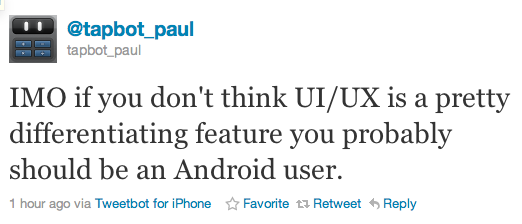
It would — perhaps — be egotistical to assume that above was about, or directed at, me. Perhaps, but I am going to assume that this is at least directed at me in some small way and I want to address two things about this statement.
First: Yes, UI and UX can be a differentiating feature. It just so happens that I believe that not to be the case in Tweetbot — you may not agree and that is fine. For UI or UX to be differentiating in the way that @tapbot_paul is speaking, is to mean that you are adding value through UI and UX ((This is my assumption of what he means.)) and I don’t think Tweetbot adds any value through that.
Second: Perhaps most importantly it feels like the maker of an app — that I gave an honest and well thought out opinion about — is now telling me to get off their lawn because that opinion (seemingly) doesn’t suit them. I criticized Obama the other day too when talking with co-workers, should I then leave the U.S.? It feels like he doesn’t think I should be an iOS user because I don’t love what Tapbots have done.
-
Businessweek for iPad
I have to admit that I have been a long time fan and reader of Businessweek ((I refuse to add that Bloomberg bit, I didn’t add McGraw-Hill when they owned the publication.)) . When I saw that they had an iPad app out, well, I shuddered to think what it would be like. There are…
I have to admit that I have been a long time fan and reader of Businessweek ((I refuse to add that Bloomberg bit, I didn’t add McGraw-Hill when they owned the publication.)) . When I saw that they had an iPad app out, well, I shuddered to think what it would be like. There are just no good apps where a publisher takes a popular periodical and ports it to the iPad — they are either overpriced, or just don’t have some of the more obvious features (like selecting text). Imagine my surprise then when I downloaded this app and found out that it really is not *that* bad.
This is no great app, this is not the model that all other publishers should follow on the iPad. What it is, is a very good app and one that lays good framework for apps to build off of. More importantly it is probably the best magazine app on the iPad right now.
The key it would seem is to not think about how you would port a magazine to the iPad, but how you would view the same type of content on the iPad. It is an important difference and one that I think Businessweek at least thought about, though this approach feels more like a hybrid — porting and re-thinking. There are some good bits and some head scratchers.
### The Text ###
One thing that immediately caught my attention about this app is the text is not an image. So often you get PDF images of actual magazine pages, with this app you get real text. Real text that you can select, and copy and paste elsewhere. One of those things that you would think would be an obvious addition to such an app, so it is nice to see that it as actually available in the app.
Even better, you can increase and decrease the size of the text — again seems novel, but not standard issue in many of these apps. Nice to see that in there for people who actually want to read and use the app.
### Download & Price ###
Like most magazine apps the app is actually free to download — once you get in the app you will have to cough up some money before you get any content. Where Businessweek differs for everyone though is on the pricing model: just $2.99 a month for weekly editions of the publication (I actually believe you get 54 issues in a full year). That’s a killer price, but not better than a paper subscription — for an iOS magazine it is a steal. It is $4 an issue for back issues, which isn’t great, but given the news nature of the articles there will hardly be a time when you want back issues. Unless you want to read about potential out-dated and often very wrong opinions. ((I saw often wrong because it is more likely that people can’t predict the future, then it is that people can see the future.))
The downloads are also significantly faster than most apps — I hear they weigh in around 100 MB — not great, but not the 500-600mb that Wired has. This is going to be a major concern for apps like this as users are not likely to want to try and download this over their 3G connections. Therefore I probably wouldn’t be able to use this app on an airplane unless I thought about downloading the current issue in advance. In all likelyhood these magazines could shave a lot of space off if they streamed the videos instead of embedded them. This would be a negative when you are on WiFi, but I would guess that most users would be fine with that as it would allow for smaller downloads.
### Navigation ###
The navigation isn’t at first obvious and at times it is hard to know if you skipped over an article. If you start by swiping right to left to advance the view, you feel as though you are thumbing through the articles. Once you get out of the “opening remarks” section though you stop moving between articles and start jumping through sections. This I still find rather confusing and often forget that I need to click and article to enter into that viewport.
What is neat though is that the navigation isn’t linear. You can skip to different sections which are conveniently listed along the top as tabs. Once in a section you can view the articles, and skip between them. Of course you can also just move through the entire issue page by page if you want (works best in portrait view), but as I said above you need to make an extra click at the start of each new section. Again the navigation isn’t always obvious, but they added nice arrows everywhere to help direct you around the app — these arrows are both obvious to see and not distracting, rather well done.
One thing that I really do like is that the app shows you how many pages an article is and what page you are on — the app also shows how many articles are in a section and which article you are on (1/9 or 3/5 articles). Things like that show that the developers looked at how people like to read things, and showing these status updates is very nice when you are trying to figure out if you actually have time to read an article.
### Readability ###
The body copy isn’t set in Helvetica, which means that overall the text is pretty readable ((I find small Helvetica print on the iPad to be less that desirable from a readability standpoint.)) . It isn’t perfect, there isn’t a font that has been designed for iPad use — but it does a great job at keeping the text from being cluttered and unreadable.
One thing that I wish the app did is change the column width when you increase and decrease the font size. The column widths are very comfortable on the smallest font size — go any larger and things start to look a bit comical. On the largest font size the average line (in landscape) holds between 5-6 words. If you need larger text you would be better suited to the portrait reading orientation as it looks better in the single column view.
A note about using the app in portrait: articles are no longer paginated and instead scroll.
To my eye the line-height could be a bit larger, but it is not uncomfortable to read. I do like the mix of Helvetica and (what seems to be) Georgia, it is nice to see the two classics paired with each other. It is also nice that they are both reserved for special roles (where Helvetica seems to be more informational and navigational and Georgia is set where you need to stop and read things).
### Social Crap ###
You can share snippets and stories by email, Twitter, or Facebook — nothing special here, but again very nice to see these options in the app from day one. Having said that, the Twitter integration has yet to work for me.
My biggest complaint here is the layout of the email text. You send an email and it looks like this by default:
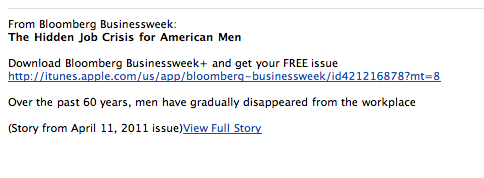
The problem here is that the biggest and most obvious link will cause you to download the app, instead of taking you to the story being shared. The small link almost forgotten at the bottom will pop the story open in the browser. What if I have the app installed on my iPad already, and I open the email on the iPad — you mean to tell me I can’t just open that link in the app, instead I have to read it in Safari? That’s kind of lame.
Luckily you can edit this text and help delete the irrelevant crap they add in — still that should be the default, putting that obligation on the user. Is the goal to get more readers, or more downloads of your app in iTunes?
### Missing ###
One thing that still kills me is that app supports swiping gestures, but not pinch-to-zoom gestures. I would love to be able to zoom in and out of text with multi-touch instead of having to select from three different font sizes. This is a minor annoyance, but I find it silly that it is not in there given the multi-touch nature of the iPad itself.
### Overall ###
Overall I really do like this app — in part I think that has to do with my long term readership of the publication. It is also just a great little app to sit down with and peruse through. All the content is available on the web, so it’s not that special, but there are some nice things about the app. Not the least of which is a nice forward thinking pricing model. Here’s hoping they start a trend of periodicals for $2.99 a month on the iPad.
-
Quote of the Day: Chuck Skoda
“It seems like a significant amount of mindshare keeps solving the same problems over and over again.” — Chuck Skoda
“It seems like a significant amount of mindshare keeps solving the same problems over and over again.” -
I Swear I Just Saw This
Amber Nettles Eric Fadden (sorry for the wrong attribution): > But developers must not lose sight of functionality. A Ferrari that lacks an engine is, for all intents and purposes, useless. The same goes for applications. I had no knowledge of this post when I used the analogy in my post. Please do not associate…
Amber NettlesEric Fadden (sorry for the wrong attribution):
> But developers must not lose sight of functionality. A Ferrari that lacks an engine is, for all intents and purposes, useless. The same goes for applications.I had no knowledge of this post when I used the analogy in my post. Please do not associate me with this drivel.
>Running it the first time was like finally going to that new restaurant you’ve been wanting to try only to realize that the food is no better than what you’d make in your own kitchen.
She must either be a) a great chef, or b) going to some pretty crappy restaurants. If b), try Urbanspoon.
[via Sean Sperte] -
It’s Not the Size of Your Chip…
Ian King and Ari Levy reporting on a new chip from Tilera that puts 100 cores on one small chip: >Simply increasing the speed at which a processor handles instructions from software has its limits. That approach generates a lot of heat and requires expensive cooling systems. “Turning up the clock frequency has given us…
Ian King and Ari Levy reporting on a new chip from Tilera that puts 100 cores on one small chip:
>Simply increasing the speed at which a processor handles instructions from software has its limits. That approach generates a lot of heat and requires expensive cooling systems. “Turning up the clock frequency has given us a great couple of decades, but it’s run out of juice,” says Tahernia, who joined the San Jose company in 2007 after a career at Motorola and Xilinx (XLNX). “For the first time, the semi industry is in the way of progress.”
>Tilera is creating grids of relatively simple processors on a piece of silicon. They can handle huge numbers of Web requests simultaneously without needing to run so fast that they overheat. The company is targeting the cloud computing market, where the ability to cram thousands of processors has become as important as the high-level data crunching and calculations needed to run, say, an Oracle (ORCL) database. -
UI, UX — Style
Sean Sperte takes exception to my views on Tweetbot: > The problem I now have with Ben’s perspective is that he’s confusing UI style for UX style. For instance he’s quick to dismiss some of Tweetbot’s features (like swipe to view conversations or list-as-timeline) as “a wrapper”, but I think those are true features –…
Sean Sperte takes exception to my views on Tweetbot:
> The problem I now have with Ben’s perspective is that he’s confusing UI style for UX style. For instance he’s quick to dismiss some of Tweetbot’s features (like swipe to view conversations or list-as-timeline) as “a wrapper”, but I think those are true features – original functionality, unique to the app.I almost wrote the entire article Sperte is referencing without mentioning Tweetbot, because honestly I didn’t want to have to defend my lack of love for Tweetbot — in the end the article was better with a concrete running example, so I left Tweetbot in. I stand by what I say, but I want to address a couple of points that Sperte and others have brought up.
>But a Kia? Come on, that’s just mean-spirited.
Not my intention at all, it’s just that Kia is as generic of a car as you can get here in the U.S. and Ferrari is just about as unique as you can get. Saying that the style of a Ferrari is unique to a Ferrari is simply not true — [Pininfarina](http://www.pininfarina.com/index.html) does much of the body work, as does air forces around the car. What I am saying is that the official Twitter client is the Kia and Tweetbot is the Pininfarina wrapper around the Kia to make it look better.
#### The Gestures ####
The fact of the matter isn’t that pull to refresh is unique, or anything else about the official Twitter app. In fact the official Twitter app, right now, is about as bland as you can get. You can call gestures a unique feature if you invent using gestures — the iPhone did that for smartphones, Tweetbot didn’t. Tweetbot just came up for more things to remember — essentially taking Twitter for the iPhone and adding movements previously only seen in Rubik’s Cubes.
*Jog this way, swipe here, tap fifteen times there and viola.*
Gestures in the case of Tweetbot aren’t adding anything to the all important UX — in fact I would think they are detracting from it by straying so far from conventional iOS norms. Most apps recognize one swipe per table view item (the Tweet itself in this case), Tweetbots breaks that convention and recognizes two: both left to right and right to left. That’s not bad, or good — it is unique — but there is no way you can call that a feature when other apps achieve the same end result with less moves.
The best argument I have seen to the Tweetbot having no unique features stance that I take is that you can grab related tweets. For the life of me I don’t know how, or if, you can do that in the official Twitter app. That may be a unique feature, but I would guess that other Twitter apps implement this as well — it’s not something that Tapbots invented.
Sean’s right that I didn’t make a clear distinction between UI styling and UX style — but I don’t think those two things are as important to users as designers think they are. The thing that is most important is how well, and the enjoyment derived, from interacting with the app and my willingness to want to keep using the app.
Right now, for me, Tweetbot is only being kept on my phone so that I can easily see when it gets updated.
-
AppSuration and Unique Traits
#### App Saturation and the Lack of Unique Features #### On [episode #8 of the B&B Podcast](http://thebbpodcast.com/2011/04/episode-8/) Shawn Blanc and I discussed the hottest new Twitter client: [Tweetbot](http://tapbots.com/software/tweetbot/). While I have yet to decide if I like Tweetbot any more, or less, than I like the official Twitter app — I did note two annoying…
#### App Saturation and the Lack of Unique Features ####
On [episode #8 of the B&B Podcast](http://thebbpodcast.com/2011/04/episode-8/) Shawn Blanc and I discussed the hottest new Twitter client: [Tweetbot](http://tapbots.com/software/tweetbot/). While I have yet to decide if I like Tweetbot any more, or less, than I like the official Twitter app — I did note two annoying things:
1. The app doesn’t have the “one” single feature that is unique to it.
2. The app feels like a nice wrapper of eye candy applied over the existing apps out there (mainly the official Twitter app).This though is a very common problem that I see over and over in the App Store and I think it comes from the amount of saturation that app categories like RSS feed readers, note taking apps, and Twitter apps are experiencing. It’s not a factor of bad development — it’s [groupthink](http://en.wikipedia.org/wiki/Groupthink), or perhaps more accurately lack of innovation.
### Being Unique ###
I don’t want to pick on Tweetbot, but it is one of the best examples of what I am referring to, it enters a very well populated landscape — Twitter apps for iPhones. What is fascinating is that if you really boil an app like Tweetbot down, there is no innovative feature — there is not a single feature that you can point to and say: “yeah you only get that on Tweetbot”. Yes there are uniques gestures, and taps, but those are all performing the same basic actions as other Twitter apps.
It is not that Tweetbot is the same as every other app, its just that Tweetbot is like a new Honda Civic — it’s new, but it’s not really *new*. Still a great car, but hard to say if it really is any better than the last model.
You could also argue that the ability to set a list in place of your timeline is just such a unique feature, but I would argue that it is just a different way of showing the lists (instead of making me drill through a menu like the official app does, I can view these lists on the main screen — even though you still view them relatively the same once you find the lists). The two examples I gave in the podcast of good, unique, features was for [Twitterrific](http://iconfactory.com/software/twitterrific) and [Echofon](http://www.echofon.com/).
The former has a unified timeline where you see mentions and DMs all in the timeline with your ‘normal’ tweets. That is something that (as far as I know) is only done in Twitterrific and while I don’t care for that feature, it is compelling to many users — it is a reason to buy the app — a way to differentiate itself from other Twitter apps.
Echofon has a similar feature (one that it alone does not have) which is to sync the place of your timeline across all other Echofon apps that you are using (iOS and Mac). That’s a fantastic feature and one that has made me wish that the rest of the app was better so that I could use it. That’s a feature that is incredible compelling compared to the rest of the Twitter apps out there, it is more unique than it is common.
Too often though — as I believe the case may be with Tweetbot — we get a new app in a crowded category that offers no unique feature, thus they just serve as more clutter. They may still be good and still look better than other apps, perhaps even they are cheaper, but if they weren’t in the store it wouldn’t be a huge loss, because they aren’t offering features that can’t be found in other apps.
This type of problem is seriously apparent in the note taking app market where every app seems to sync with Dropbox and there is really very little difference between the apps out there. Writer for Information Architects differentiates itself with a crazy 3-line-only view and a custom designed, iPad optimized, font. Notesy gives the user the ability to switch between fixed width and variable width fonts. The built in Notes app gives you the ability to sync with iTunes…
Why release an app if you aren’t going to *add* to the existing offerings something that will be truly useful to ,at least, a select few users?
### A Wrapper ###
The last complaint I lodged against Tweetbot was that it just seemed like an incredibly beautiful wrapper that was put over the official Twitter app. That is, everything is too similar in layout and functionality ((Again, excluding those fancy gestures and tap controls.)) that it just seems like you are using the same old app with a lovely new theme applied.
This all sounds rather horrible, like I am accusing people of swiping someone else’s work — that’s not what I am saying. It’s no different than if someone built another WordPress theme with the text down the left and a small menu on the right, but different colors and fonts — they aren’t copying the theme I use, they just employed a similar layout without a slightly different wrapper.
The more likely cause is that they chose a similar layout because they liked the way it worked and the user familiarity with that layout. Nothing wrong with that — except that I have to again ask where they are adding value that didn’t already exist?
We all like to theme things, but is such a theme really needed in a crowded marketplace?
Is a Kia automatically better if it is made to look like a Ferrari? Perhaps to a few people who want a slow Ferrari, but to most I would guess they wouldn’t care all that much — most are buying a Kia for reasons other than looks. ((Over generalization perhaps, but they have killer warrantees with very low prices. I would think that this is the main reason people buy Kia’s, and not performance or looks.)) Especially if the one that looked like a Ferrari is a more expensive option.
### The Question ###
Is your app a Ferrari, or does it just *look* like one?
If you found yourself reading this wondering what compelling features a Twitter app could add, or that a note taking app could add — then you are asking the right questions. The questions that need to be asked before a developer starts coding a new app. This isn’t saying that Tweetbot is bad, or that it isn’t worth the $2 — all I am saying is that time and time again it seems I am testing the same app with an improved color scheme.
-
Save Drive Space, Banish Old Email
Mr. Blanc pointed out this tip that saved him 25GB of space, I got back about 5GB — be sure to check it out. [via Shawn Blanc]
Mr. Blanc pointed out this tip that saved him 25GB of space, I got back about 5GB — be sure to check it out.
[via Shawn Blanc]