Month: October 2011

  • Miscellaneous Thoughts on the New iPhone 4S

    *(For the record I purchased a White 64GB AT&T-locked iPhone 4S.)*

    ### Speed

    For starters the phone is much faster than the iPhone 4. We knew this though, so that’s not saying much. Practically speaking though the 4S renders most app splash screens to only showing for a brief moment. Apps just open considerably faster and while you may think that is “nice, but not worth the price of admission” well you are wrong — it’s actually *really* nice.

    The entire interface feels more fluid and that’s saying a lot given how nicely the iPhone 4 performed. I notice the speed difference the most in two areas: loading complex websites and while multi-tasking between apps. The latter of which (if you do it often) makes this a smart upgrade.

    ### I Can Hear You Now

    At my office, with my iPhone 4 sitting flat on the desk 12 inches from my keyboard, it used to get me 0-2 bars on AT&T’s network. ((A combination of the building materials, and where I am in the building makes for a crap signal.)) The 4S, though, gets much better reception to the order of 3 solid bars in the same location.

    More importantly than the static signal, is the signal that I get when I hold my phone. It wasn’t uncommon with all versions of the iPhone prior to the 4S that I would drop a call while talking because I covered the antenna a bit too much (the 3G was the worst). I haven’t dropped a single call with the 4S since I got it, and that’s down from about 1 a day.

    There’s another huge difference though: the speaker for the ringer and speaker phone is much louder. I never had an issue with the ringer volume, but the speaker phone always sounded too quiet for me. While the speaker phone is still not as loud as I would like ((Admittedly I don’t have the best hearing.)) it is a vast improvement over where it was on the iPhone 4. It actually feels like a speaker phone now — maybe that’s not a good thing.

    ### Good Vibrations

    I can’t quite explain how the vibrating alerts are different on the iPhone 4S — but they are. Here’s what I have noticed:

    – The vibration seems smoother and not as violent. Thus my phone doesn’t seem to rattle much and wiggle around when it vibrates while sitting flat on my desk.
    – The quality seems better. Meaning I can feel the vibrating alert much better when the phone is in my pocket. Again, no clue why that is, as it doesn’t feel like a stronger, more forceful, vibration.

    My best guess is that Apple spent sometime engineering the vibration in the iPhone, the same way they engineered the “breathing” of the LED sleep indicators. We already know that the motor is different for the iPhone 4S and I would guess that Apple had a hand in designing how that motor works.

    ### Tactile Response

    I can’t tell if this is because the phone is brand new or not, but the metal band feels gripper and the glass feels smoother to me. Perhaps the olephobic coating on the glass is just fresh and thus feels smoother and the metal hasn’t had a chance to wear down yet, but I really don’t think that is the case. It feels different.

    The feeling isn’t worse or better, it’s just different.

    ### White

    I went with the white model, even though I think the white iPads are the lesser of the two colors. I always wanted the white iPhone 4, but since they weren’t out on day one I couldn’t get one.

    I have many reasons why I went with the white model:

    – Easier differentiation from my wife’s phone.
    – To make the phone look “new” and “different”.
    – To be different.
    – The iPod was white.

    At the end of the day though, I just wanted white.

    I am glad I went with the white model because I actually like it quite a bit more than I do the black. Here’s a few reasons why:

    – Easy to find in the dark.
    – Doesn’t show finger smudges as much.
    – Looks more iPod-like.

    The white model is quality looking and well made — even the dock connector port has white innards as opposed to black and impressive bit of “attention to detail” from Apple. There are only two things I don’t like about the white model:

    1. Visibility of the forward facing camera.
    2. Visibility of the light sensor.

    Seeing those two black blotches on the front of the phone ruins the lines of the device a bit. Overall though I really like the white model.

    ### Camera

    I was pumped to try out the camera in the 4S and am happy to report that it is just as good as I hoped. It’s fast, sharp, and has low noise — what more can you ask for from a phone?

    If the iPhone 4 camera was good enough that you *could* leave your point and shoot at home. Then the iPhone 4S camera is good enough that you *should* leave your point and shoot at home.

    One thing that I always preferred a dedicated camera for was for fast snap shots. Most cameras you can turn on and snap a photo without looking, if you need to, and that was never the case with the iPhone 4. Now, with the speed of the 4S, and the volume-shutter-button on iOS 5 the speed difference between a dedicated camera and the 4S is very close. Close enough that it doesn’t matter any more.

    The iPhone 4S is truly a great point and shoot camera that does full 1080p video. Win.
  • The Success of Newsstand on iOS

    Future UK CEO Mark Wood as reported by The AOP:
    >Future had sold more digital editions in the past four days through Apple’s Newsstand than in a normal month.

    For power users the Newsstand seems stupid and annoying, I suspect though that for many non-power users it is more of a “finally” type system. It makes searching for, downloading, paying for periodicals very easy — makes sense that it is a hit for publishers.

  • Quote of the Day: MG Siegler

    “When you “open” your device and/or software, shit always finds a way in.”
  • Deciding to Read

    Merlin Mann on Instapaper:
    >Twenty-some years after a college career sucking down over 1,000 pages a week, I am finally returning to reading a lot more. Because, I am deciding to read a lot more. Instapaper means there’s no excuse for not reading a lot more. Period.

    I have, throughout my life, been a terrible reader. I am slow and not motivated. Up an until I found Instapaper I didn’t read much — now I have trouble keeping Instapaper full. Without Instapaper, there’s a pretty good chance I would not have started this site because I likely wouldn’t follow technology the same way that I currently do.

    So, as Merlin says, thank you Marco.

  • Shadoe Huard on iMessage

    Shadoe Huard responding to [this post](https://brooksreview.net/2011/10/drang-imessage/) by me:
    >If you think iMessage is only a handy bonus, you’re missing the larger picture.

    He says that iMessage will be a “game changer” — it could be, but not in it’s current form. Currently it is just going to be a nice bonus for being an iOS users. What *would* make it a “game changer” is if one of the following happens:

    1. It is integrated into Mac OS X.
    2. It is opened up so that other platforms can use it (Android mainly).

    No matter how popular iOS is, it won’t every be on 100% of devices, thus it becomes hard for iMessage to be a wild success in the same way that Text messaging is. If, and only if, iMessage becomes universal, that’s when it will really matter.

  • Amazon Rewrites the Rules of Book Publishing

    David Streitfeld reporting on comments from Russell Grandinetti (an Amazon exec):
    >He pointed out, though, that the landscape was in some ways changing for the first time since Gutenberg invented the modern book nearly 600 years ago. “The only really necessary people in the publishing process now are the writer and reader,” he said. “Everyone who stands between those two has both risk and opportunity.”

    That includes Amazon. This entire move by Amazon not only makes sense, but sounds like a win-win for both writers and readers.

  • The Problem With ‘Free’ Apps

    Craig Grannell talking about the conundrums that face ‘magazine’ type apps in the App Store:

    >But that’s the problem with ‘free’: anyone can review, because anyone can download an app, without making any investment whatsoever. Typically, when people have paid money for something, they are more considered. And in making an app something other than free, you filter out the idiots.

    For what it’s worth the Tap! magazine app is actually quite good and has great content, but he brings up a great point: so long as reviewers can review something just by installing it, we will have these problems. So should reviewers be required to have first used the app for X period of time? Or wait until X days after they purchased it? What then of new apps that are yearning for reviews to spur downloads?

    If I was a magazine publisher, I’d charge for the app itself.

  • Expanding Siri

    Steven Sande on somethings he really wants Siri to do for him:

    >Finally, what about being able to do something like ask Siri to get a bunch of articles about a particular subject and put them into your Instapaper account? You say “Get me ten articles about terraforming Mars” and Siri grabs ten of the most popular web pages about the subject for you.

    That’d be really neat actually. I think these types of articles really show just how fast people are taking to Siri — notice that he never said he wanted Siri to “actually work” because it already does.

    This morning was the first time Siri was consistently running at full speed for me. On my drive in, using my Bluetooth headset cruising at fast speeds and listening to the radio it did the following:

    – Texted my brother-in-law “happy birthday”.
    – Set a reminder to go off when I got to my office.
    – Checked the weather where my office is.
    – Checked Apple’s stock price.

    It was all trivial stuff, but I was grinning from ear to ear. Siri just worked perfectly and completed all these tasks with my eyes staying glued to the road — amazing.

  • [SPONSOR] CleverKite Cloud

    We all know the best upgrade for any computer is a shiny new SSD — the speed boost is beyond amazing. Now, imagine that performance advantage in the cloud.

    [CleverKite](http://www.cleverkite.com/) is the first mainstream cloud hosting platform to be powered exclusively by blazing fast SSD technology. And that’s why CleverKite Cloud outperforms competitors like Amazon EC2 by a magnitude of 40-50x in disk performance.

    The Brooks Review readers get 10% off their first invoice with the promotion code `TBR`.

  • An Instapaper 4.0 Review with Some Insight from Marco Arment

    Instapaper has now gone [version 4](http://itunes.apple.com/us/app/instapaper/id288545208?mt=8) and Marco Arment has been kind enough to let me test out this new version. I can say that this new version is, without a doubt, fantastic.

    Arment is fond of saying that Instapaper has the most generous update policy (every update has been free) and I would argue that the only software company more generous is Apple with iOS. But, why — why wouldn’t Arment charge for these fantastic updates? Let’s let him explain:

    >There’s no good way to charge for updates in the App Store. Maybe Apple will add this functionality in the future, but they don’t seem to care so far. Maybe they’ll add it when they want upgrade pricing for the next version of Aperture or Final Cut Studio.

    >But I’m not sure I’d charge regardless. I get a lot of goodwill from my customers by continually improving the product that they bought months or years ago, and that goodwill helps spread the word and drive new sales. I know I charge a “premium” compared to many other apps, but I want people to feel like Instapaper is a ridiculously good deal.

    In my book Instapaper is certainly a “ridiculously good deal” and that may sum up Instapaper 4 perfectly.

    ### New Icon

    Marco changed his now iconic icon for Instapaper and I risk being a hypocrite in saying this, but I *love* the new Instapaper icon.

    I say I risk being a hypocrite because I have previously criticized apps that use page curls in their bottom corners, but with the overall design of Instapaper’s new icon — I think it works very well and truly doesn’t feel like a gimmick. What’s important about this new icon is that it represents what’s new about Instapaper.

    The icon looks like a newspaper in the background, thanks to the large headlines and grid layout, but surprise… that’s actually how the new Instapaper looks — at least on the iPad.

    ### The iPad Grid

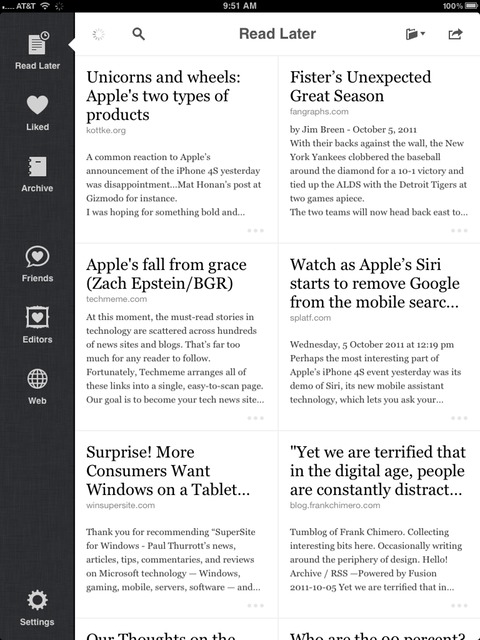
    Instapaper for the iPad has gone all grid on the home screen. Gone is the big list that looks like a blown up iPhone interface. It’s grid time, and then some.

    [](https://f3a98a5aca88d28ed629-2f664c0697d743fb9a738111ab4002bd.ssl.cf1.rackcdn.com/ip-grid.jpg)
    The grid not only looks beautiful, but is a more functional layout on the iPad. There is also a clever bit that tries to figure out who the author of the article is and print that below the headline, something which I find helpful when I see that a *certain* tech blog made it in my queue.

    Among those nice touches is the still frame previews that the app will now grab for supported video sites — something infinitely helpful when you are trying to remember what the video is about.

    I don’t save a ton of videos to Instapaper, but when I do, I need help in remembering what the video is about (beyond the headline) and these little still frames are perfect for this.

    I also love the expanded text view that you get with the grid — something I find invaluable when you save links from Twitter (because the headlines get messed up).

    Overall the Grid makes the statement that Instapaper on the iPad is more than just a larger version of Instapaper for the iPhone.

    ### Social

    A while back Instapaper added a social element to the app that allowed you to ‘follow’ users to see their liked items. It was a very neat feature, but the implementation on iOS was never done in a way that I found useful.

    In version 4, this changes.

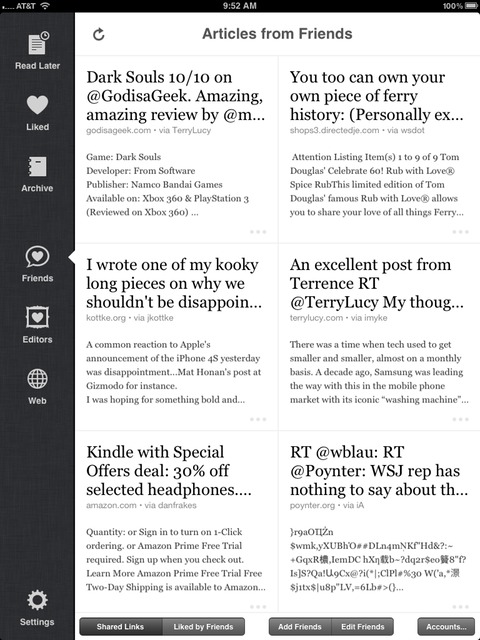
    There is now a friends tab along the left edge that when selected will pull up a ‘shared links’ view. This view shows all the links that are being shared on a social network of your choice (Twitter, Facebook).

    [](https://f3a98a5aca88d28ed629-2f664c0697d743fb9a738111ab4002bd.ssl.cf1.rackcdn.com/ip-friends.jpg)
    You get the same grid view of the main screen, but this time you get to see all the links that are currently being shared. There is an option to switch to the ‘Liked by Friends’ view which gives you a portal into what the people you follow on Instapaper are ‘liking’. This is by far one of the best ways to discover new, great, reads.

    I save this section of Instapaper for my dessert course, I love diving into it after I go through all the posts I added — just to peep on what other people I respect are reading. This is the digital equivalent of peeking into someone’s personal library. ((Even more so than seeing their Kindle library, because I am guessing this will give you a better insight into their interests.))

    These features alone would be killer and really ups the sometimes challenging aspect on your iPad/iPhone of getting good content into Instapaper.

    You almost don’t need to leave Instapaper anymore with these nice little additions.

    [](https://f3a98a5aca88d28ed629-2f664c0697d743fb9a738111ab4002bd.ssl.cf1.rackcdn.com/ip-editor.jpg)
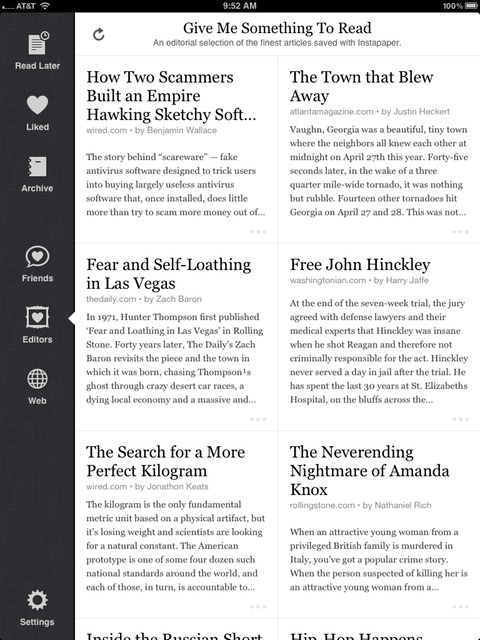
    Additionally the revamped ‘Editors’ tab pulls in the current articles on the Instapaper “Give me Something To Read” curation of articles. A very nice touch for loading up on long-form reads before you hit the plane — also getting a better variety of articles that you may not otherwise discover.

    Instapaper is the best cross-country-flight entertainment I have.

    ### Smaller Changes

    There are a few smaller changes that, when added up, make the app massively better.

    #### Footnotes Baby

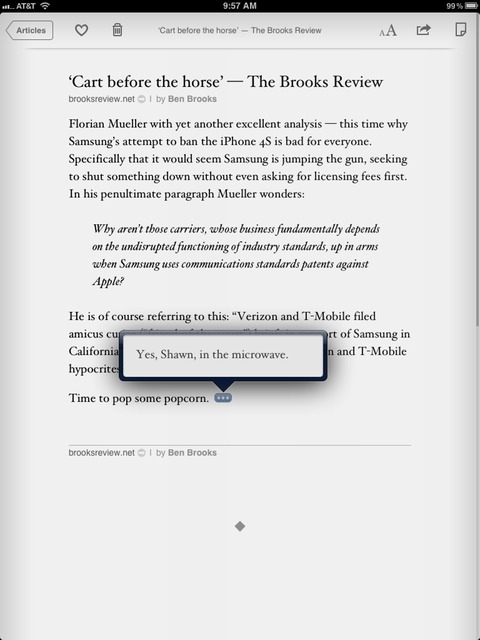
    Instapaper 4 adds support for copious Footnoters ((Like me.)) where the app will show a glyph with an `…` in it anytime a footnote appears. Tapping the icon results in a nice pop-up that shows the footnote.

    [](https://f3a98a5aca88d28ed629-2f664c0697d743fb9a738111ab4002bd.ssl.cf1.rackcdn.com/ip-footnote.jpg)
    This is perhaps the biggest change to the overall reading experience that version 4 introduces. Inline footnotes help keep you moving in the app instead of scrolling around to find the referenced footnote. It’s a great addition that was done seamlessly to the reading experience.

    #### Wikipedia Support

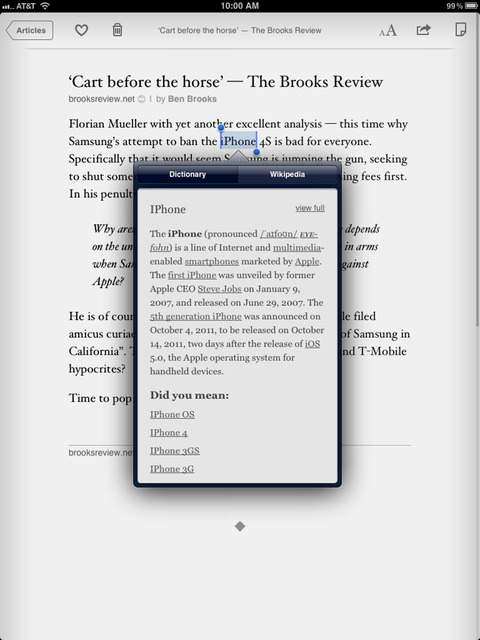
    It’s not often that I come across words that I need a definition of, but it is often that I come across things that I want to know more about — as in more reference information. For people like me, Instapaper has added a Wikipedia option to its dictionary.

    [](https://f3a98a5aca88d28ed629-2f664c0697d743fb9a738111ab4002bd.ssl.cf1.rackcdn.com/ip-wiki.jpg)

    Now if you highlight some words and ask the app to define them you will get a popup that has an option to view the Wikipedia information on the selected text.

    This is a very cool option.

    I find in-app Wikipedia information especially useful for finding out more information about companies while I am reading the article, or information on particular people that I don’t know much about.

    Come to think of it, this should actually be listed as a major feature.

    ### Search

    You might notice that the search bar at the top of your queue has disappeared ((On the iPhone.)) , replaced now by a dedicated search section of the app. The reason being: this new search function doesn’t just search the articles on your device — it searches the full text of every article you have saved to Instapaper, including those in your archive.

    It’s incredibly helpful, if like me, you often start telling someone about an article you read — only for them to ask that you send them the link. Instapaper saves me from having to spend hours on Google looking for the article because now I can just search the things that I have read all inside the place I read all my articles: Instapaper.

    The search is very fast (given the thousands of articles that it has to search for me) even over 3G.

    Most importantly search adds another revenue stream for Instapaper as it is only available via in-app purchase for the bargain price of $2.99 every three months. If you are already an Instapaper subscriber on the site then you will be granted access to this feature without needing to do the in-app-purchase.

    Either way, it’s the same deal and it really is a deal.

    ### Raising the Bar

    I am a huge Instapaper fanboy, and I don’t think I am incorrect in saying that with version 4.0 Marco Arment has significantly raised the bar in the ‘read later’ marketplace.

    The app is faster, better looking, more comprehensive, and helps you get more content to read. This is a free upgrade, but I would have gladly paid for it.

    ### Miscellany

    I had a chance to ask Arment about a few other Instapaper items, here’s that very short Q&A:

    TBR: You didn’t add feature X to Instapaper 4, why not? When’s it coming?

    MA: *There’s still lots of features I want to add, but I need to ship sometime.*

    TBR: It seems like the iPad version received more attention this time around than the iPhone version, is the eye deceiving?

    MA: *That’s correct. The iPad version had more room for improvement. Before 4.0, Instapaper on iPad felt like a scaled-up iPhone app. With 4.0, I’ve made the iPad app the premier way to use Instapaper, giving it an all-new navigation interface. Even in development, my priorities shifted: I’m now optimizing all new features for the iPad first and then figuring out how to port them to the iPhone.*

    TBR: What new feature are you most proud of?

    MA: *The iPad grid screen, by far. It was a lot of work, but completely worth every minute. I absolutely love using it.*

    Same here, the grid is killer.

    [Go get Instapaper 4](http://itunes.apple.com/us/app/instapaper/id288545208?mt=8) right now — you won’t regret it.

  • How RIM Compensates Fortune 500 Companies

    RIM via press release:
    >Research In Motion (RIM) (NASDAQ: RIMM; TSX: RIM) announced today that a selection of premium apps worth a total value of more than US $100 will be offered free of charge to subscribers as an expression of appreciation for their patience during the recent service disruptions.

    I can only imagine how excited all those stodgy BlackBerry users are at the idea they can get SIMS 3 and Bubble Bash 2 for free — *finally*.

  • iPhone 4S First Weekend Sales Top Four Million

    Apple through press release:
    > Apple® today announced it has sold over four million of its new iPhone® 4S, just three days after its launch on October 14. In addition, more than 25 million customers are already using iOS 5, the world’s most advanced mobile operating system, in the first five days of its release, and more than 20 million customers have signed up for iCloud®, a breakthrough set of free cloud services that automatically and wirelessly store your content in iCloud and push it to all your devices.

    Wow.

  • Dr. Drang on iMessage

    Dr. Drang:

    >If iMessage offered significant extra features, I might see some value in it. Allowing a conversation to jump between an iPhone and an iPad, is a nice feature, but since I don’t have an iPad, it means nothing to me.

    I have to disagree with him on iMessage, because I think it is actually a very interesting feature. Texting is much bigger among the younger crowd and guess what, it is expensive — so are iPhones. An iPod touch, or an old iPhone with iMessage becomes a great, inexpensive, option for the younger crowd. Sure it would need wifi, but that’s not overly hard anymore.

    And why turn it off, it’s not like there is anything detrimental to keeping iMessage turned on.

    Overall iMessage isn’t a feature that is going to change the world, but if you family and friends are all iPhone users (increasingly more likely), it’s a very nice tool to have.

  • A Profile of Jeff Bezos

    Richard L. Brandt profiling Amazon CEO Jeff Bezos:

    >He wanted a decentralized, even disorganized company where independent ideas would prevail over groupthink. He instituted, as a company-wide rule, the concept of the “two-pizza team”—that is, any team should be small enough that it could be fed with two pizzas.

    Overall a pretty interesting look at the man behind Amazon.

  • Location-Based Reminders Are the Best Thing Ever

    Dave Caolo on how great location based reminders are:
    >If you had asked me to describe what I want in a perfect reminder app, I’d list simple task creation, dependability, multi-device sync and so on. That’s exactly what Guy describes: I listed my desires in terms of what I’m already using. I never would have said, “Place a geofence around a given location and prompt me to act upon arriving at leaving that spot,” but it turns out that’s precisely what the perfect reminder app should do

    This works really well with OmniFocus — I only wish they could also make OmniFocus work with Siri.

  • AT&T iPhone 4S Activation Woes

    Like many other AT&T customers, I am having great trouble getting my new iPhone 4S activated. It is stuck on the screen that reads:

    >Could Not Activate iPhone
    >Your activation is still pending. You will receive an email notification once your activation is complete.
    >We’re sorry. There was a problem connecting to the server. Please try again later.

    ### Here’s what I know from the horses mouth (AT&T) ###

    I was able to get through to AT&T customer care and the first representative could not get the phone activated even though the system showed it was activated. Now it is important to note that he was operating without any iPhone 4S and (likely) iOS 5 manuals. After ~15 minutes of trying he sent me on to a technical support person.

    The technical support lady could not get the phone working either and was not familiar with the error message. She called down to their specialized Apple staff and reported back to me: “The servers are really busy I am told, and your phone *will* activate in an hour.”

    I clarified that she was saying that it would for sure be active in an hour, and again she said “yes”. She said to just leave it as it is and wait. We hung up, but I arranged for her to call back in an hour to see if it worked. Its been about 25 minutes and still no activation.

    Check back as I will update this post with information as I get it.

    *(Side note: I am hearing Apple expected to sell 5 times as many AT&T models as other carriers. This problem also seems to have arisen once the West Coast of the U.S. started getting their phones. AT&T was also very helpful and nice — I still just want the phone working.)*

    **UPDATED** (on Oct 14, 2011): AT&T just called me back and the phone was still not activated even though they say everything looks fine on their end. The call was disconnected while I was on hold with them and they have yet to call back. This seems like a load issue on their network and best to just wait it out if you can.

    **UPDATED** (on Oct 14, 2011): AT&T was no help, but my internet went down (Comcast blows) and so I tried activating over 3G — that worked. And [I am not alone](http://www.ipatrix.com/3812/att-woes/).

  • Grandview

    A big thanks to this weeks sponsor: Grandview. I think what I [first wrote](https://brooksreview.net/2011/05/grandview/) about Grandview still rings true:

    >It’s not something that will make you focus better, or write better — it is a very unique app that is loads of fun to use. I have been testing the app for quite sometime now and have to say that I really do enjoy it — not for every writing moment — there are times though when it feels like the right tool for the job.

    It’s a clever little app and I really enjoy using it. Go get your copy and see for yourself, you can snag it in the [Mac App Store here](http://itunes.apple.com/us/app/grandview/id432436025?mt=12).

  • Phoenix Jones Stops Assault

    Camera guy to 911: “There’s a huge group of people fighting, pepper spray, super heroes…”

    God, I love Seattle.

  • Idiots Pay More

    The Technology Review on the valuation of Facebook:
    >More likely, however, is that the value of Facebook and other social media companies is being driven by the kind of group think that has characterised so many bubbles in the past. In these, it doesn’t matter to a trader what Facebook is really worth as long as he or she thinks some other idiot will pay more.

    Good article that breaks down why Facebook is likely overvalued.